traction control CHEVROLET CORVETTE 2013 6.G User Guide
[x] Cancel search | Manufacturer: CHEVROLET, Model Year: 2013, Model line: CORVETTE, Model: CHEVROLET CORVETTE 2013 6.GPages: 414, PDF Size: 6.97 MB
Page 150 of 414
Black plate (46,1)Chevrolet Corvette Owner Manual - 2013 - crc2 - 11/8/12
5-46 Instruments and Controls
stops limiting wheel spin. See
Traction Control System (TCS) on
page 9‑34for more information.
TRACTION SYSTEM AND
ACTIVE HANDLING –OFF
This message displays, the
instrument panel cluster light turns
on, and a sound will be heard when
the Traction Control System (TCS)
and Active Handling System are
turned off by pressing the Active
Handling System button on the
center console for five seconds. The
Antilock Brake System (ABS)
remains on with the TCS and Active
Handling System off. Adjust your
driving accordingly. See Traction
Control System (TCS) on page 9‑34
and Active Handling System on
page 9‑35 for more information.
To acknowledge this message,
press the RESET button.
TRACTION SYSTEM AND
ACTIVE HANDLING –ON
If the Traction Control System (TCS)
and Active Handling System are off,
this message displays briefly, the
instrument panel cluster light turns
off, and a sound will be heard when
the TCS and Active Handling
System are turned on by briefly
pressing the Active Handling
System button on the center
console. See Traction Control
System (TCS) on page 9‑34 and
Active Handling System on
page 9‑35 for more information.
TRACTION SYSTEM –OFF
This message displays and stays
on, a sound will be heard, when the
TCS is turned off by pressing the
Active Handling System button on
the center console. See Traction
Control System (TCS) on page 9‑34
for more information.
To acknowledge the message, press
the RESET button.
TRACTION SYSTEM –ON
This message displays and a sound
will be heard when the Traction
Control System (TCS) is turned on
by pressing the Active Handling
System button on the center
console. This message
automatically clears from the DIC
display on its own. See Traction
Control System (TCS) on page 9‑34
for more information.
Safety Belt Messages
BUCKLE PASSENGER
This message reminds you to
buckle the passenger's safety belt.
This message displays and a sound
will be heard when the ignition is on,
the driver's safety belt is buckled,
the passenger's safety belt is
unbuckled with the passenger
airbag enabled, and the vehicle is in
motion. You should have the
passenger buckle their safety belt.
Page 195 of 414
Black plate (17,1)Chevrolet Corvette Owner Manual - 2013 - crc2 - 11/8/12
Infotainment System 7-17
Auxiliary Devices
Using the Auxiliary Input Jack
The vehicle may have an auxiliary
input jack on the right side of the
faceplate or in the center console.
This is not an audio output; do not
plug the headphone set into the
front auxiliary input jack. An external
audio device can be connected to
the auxiliary input jack for use as
another source for audio listening.
Drivers are encouraged to set up
any auxiliary device while the
vehicle is in P (Park). SeeDefensive
Driving on page 9‑3.
Connect a 3.5 mm (1/8 in) cable to
the radio’s front auxiliary input jack
to use a portable audio player. The
radio displays AUX INPUT DEVICE
when a device is connected and
begins playing audio from that
device. Top Knob (Power/Volume):
Turn
to increase or decrease the volume
of the portable player. Additional
volume adjustments can be made
from the portable device.
BAND: Press to listen to the radio
while a portable audio device is
playing. The portable audio device
continues playing.
CD/AUX (CD/Auxiliary): Press to
play a CD while a portable audio
device is playing. Press again and
the system begins playing audio
from the connected portable audio
player. If a portable audio player is
connected, AUX INPUT DEVICE
displays. If a portable audio player
is not connected, AUX INPUT
DEVICE does not display.
Phone
Bluetooth
For vehicles equipped with
Bluetooth capability, the system can
interact with many cell phones,
allowing:
.Placement and receipt of calls in
a hands-free mode.
.Sharing of the cell phone’s
address book or contact list with
the vehicle.
To minimize driver distraction,
before driving, and with the vehicle
parked:
.Become familiar with the
features of the cell phone.
Organize the phone book and
contact lists clearly and delete
duplicate or rarely used entries.
If possible, program speed dial
or other shortcuts.
.Review the controls and
operation of the infotainment
system.
Page 213 of 414
Black plate (1,1)Chevrolet Corvette Owner Manual - 2013 - crc2 - 11/8/12
Driving and Operating 9-1
Driving and
Operating
Driving Information
Distracted Driving . . . . . . . . . . . . . 9-2
Defensive Driving . . . . . . . . . . . . . 9-3
Drunk Driving . . . . . . . . . . . . . . . . . 9-3
Control of a Vehicle . . . . . . . . . . . 9-3
Braking . . . . . . . . . . . . . . . . . . . . . . . 9-3
Steering . . . . . . . . . . . . . . . . . . . . . . . 9-4
Off-Road Recovery . . . . . . . . . . . . 9-5
Loss of Control . . . . . . . . . . . . . . . . 9-5
Racing or Other CompetitiveDriving . . . . . . . . . . . . . . . . . . . . . . . 9-6
Driving on Wet Roads . . . . . . . . . 9-8
Highway Hypnosis . . . . . . . . . . . . 9-9
Hill and Mountain Roads . . . . . . 9-9
Winter Driving . . . . . . . . . . . . . . . 9-10
If the Vehicle Is Stuck . . . . . . . . 9-12
Vehicle Load Limits . . . . . . . . . . 9-12
Starting and Operating
New Vehicle Break-In . . . . . . . . 9-17
Front Air Dam . . . . . . . . . . . . . . . 9-17
Ignition Positions . . . . . . . . . . . . 9-18
Starting the Engine . . . . . . . . . . 9-20 Retained Accessory
Power (RAP) . . . . . . . . . . . . . . . 9-21
Shifting Into Park (Automatic Transmission) . . . . . . . . . . . . . . 9-22
Shifting out of Park . . . . . . . . . . 9-23
Parking (Manual
Transmission) . . . . . . . . . . . . . . 9-23
Parking over Things That Burn . . . . . . . . . . . . . . . . . . 9-23
Engine Exhaust
Engine Exhaust . . . . . . . . . . . . . . 9-24
Running the Vehicle WhileParked . . . . . . . . . . . . . . . . . . . . . 9-24
Automatic Transmission
Automatic Transmission . . . . . 9-25
Manual Mode . . . . . . . . . . . . . . . . 9-26
Manual Transmission
Manual Transmission . . . . . . . . 9-29
Brakes
Antilock BrakeSystem (ABS) . . . . . . . . . . . . . . 9-32
Parking Brake . . . . . . . . . . . . . . . 9-33
Brake Assist . . . . . . . . . . . . . . . . . 9-33
Ride Control Systems
Traction Control System (TCS) . . . . . . . . . . . . . . 9-34
Active Handling System . . . . . 9-35
Competitive Driving Mode . . . 9-36
Limited-Slip Rear Axle . . . . . . . 9-40
Selective Ride Control . . . . . . . 9-40
Cruise Control
Cruise Control . . . . . . . . . . . . . . . 9-42
Fuel
Fuel . . . . . . . . . . . . . . . . . . . . . . . . . 9-45
Recommended Fuel . . . . . . . . . 9-45
Gasoline Specifications . . . . . . 9-46
California Fuel Requirements . . . . . . . . . . . . . . 9-46
Fuels in Foreign Countries . . . 9-46
Fuel Additives . . . . . . . . . . . . . . . 9-46
Filling the Tank . . . . . . . . . . . . . . 9-47
Filling a Portable Fuel Container . . . . . . . . . . . . . . . . . . . 9-49
Towing
General TowingInformation . . . . . . . . . . . . . . . . . 9-50
Conversions and Add-Ons
Add-On ElectricalEquipment . . . . . . . . . . . . . . . . . 9-50
Page 214 of 414
Black plate (2,1)Chevrolet Corvette Owner Manual - 2013 - crc2 - 11/8/12
9-2 Driving and Operating
Driving Information
Distracted Driving
Distraction comes in many forms
and can take your focus from the
task of driving. Exercise good
judgment and do not let other
activities divert your attention away
from the road. Many local
governments have enacted laws
regarding driver distraction. Become
familiar with the local laws in
your area.
To avoid distracted driving, always
keep your eyes on the road, hands
on the wheel, and mind on the drive.
.Do not use a phone in
demanding driving situations.
Use a hands-free method to
place or receive necessary
phone calls.
.Watch the road. Do not read,
take notes, or look up
information on phones or other
electronic devices.
.Designate a front seat
passenger to handle potential
distractions.
.Become familiar with vehicle
features before driving, such as
programming favorite radio
stations and adjusting climate
control and seat settings.
Program all trip information into
any navigation device prior to
driving.
.Wait until the vehicle is parked
to retrieve items that have fallen
to the floor.
.Stop or park the vehicle to tend
to children.
.Keep pets in an appropriate
carrier or restraint.
.Avoid stressful conversations
while driving, whether with a
passenger or on a cell phone.
{WARNING
Taking your eyes off the road too
long or too often could cause a
crash resulting in injury or death.
Focus your attention on driving.
Refer to the infotainment section for
more information on using that
system, including pairing and using
a cell phone.
If equipped, refer to the navigation
manual for information on that
system, including pairing and using
a cell phone.
Page 217 of 414
Black plate (5,1)Chevrolet Corvette Owner Manual - 2013 - crc2 - 11/8/12
Driving and Operating 9-5
Off-Road Recovery
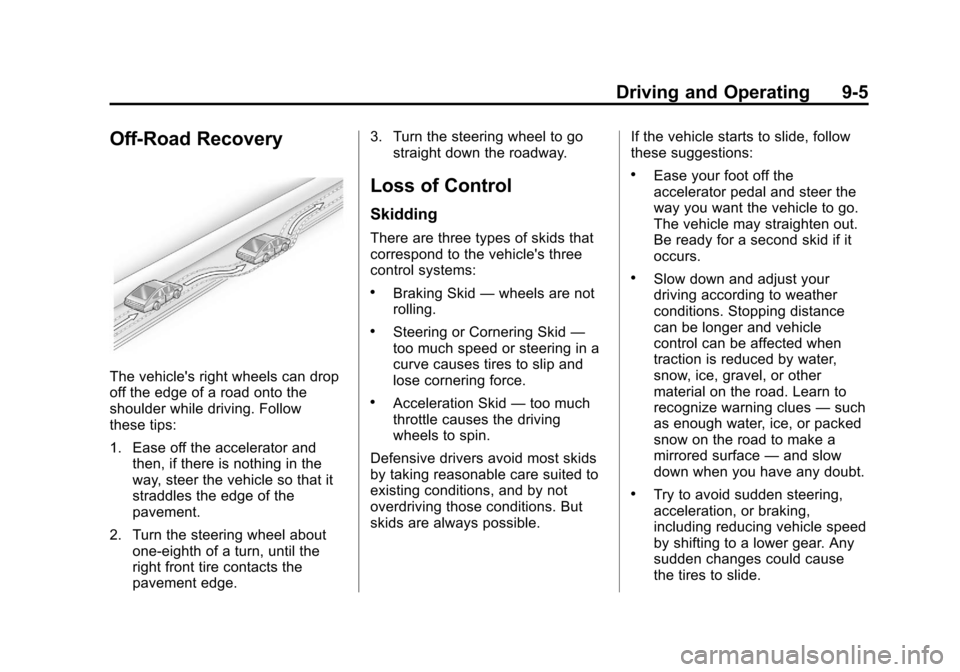
The vehicle's right wheels can drop
off the edge of a road onto the
shoulder while driving. Follow
these tips:
1. Ease off the accelerator andthen, if there is nothing in the
way, steer the vehicle so that it
straddles the edge of the
pavement.
2. Turn the steering wheel about one-eighth of a turn, until the
right front tire contacts the
pavement edge. 3. Turn the steering wheel to go
straight down the roadway.
Loss of Control
Skidding
There are three types of skids that
correspond to the vehicle's three
control systems:
.Braking Skid —wheels are not
rolling.
.Steering or Cornering Skid —
too much speed or steering in a
curve causes tires to slip and
lose cornering force.
.Acceleration Skid —too much
throttle causes the driving
wheels to spin.
Defensive drivers avoid most skids
by taking reasonable care suited to
existing conditions, and by not
overdriving those conditions. But
skids are always possible. If the vehicle starts to slide, follow
these suggestions:
.Ease your foot off the
accelerator pedal and steer the
way you want the vehicle to go.
The vehicle may straighten out.
Be ready for a second skid if it
occurs.
.Slow down and adjust your
driving according to weather
conditions. Stopping distance
can be longer and vehicle
control can be affected when
traction is reduced by water,
snow, ice, gravel, or other
material on the road. Learn to
recognize warning clues
—such
as enough water, ice, or packed
snow on the road to make a
mirrored surface —and slow
down when you have any doubt.
.Try to avoid sudden steering,
acceleration, or braking,
including reducing vehicle speed
by shifting to a lower gear. Any
sudden changes could cause
the tires to slide.
Page 219 of 414
Black plate (7,1)Chevrolet Corvette Owner Manual - 2013 - crc2 - 11/8/12
Driving and Operating 9-7
services can be found in the service
manual. SeeService Publications
Ordering Information on page 13‑16.
If the vehicle is used for racing or
other competitive driving, the rear
axle fluid temperatures may be
higher than would occur in normal
driving. We recommend that the
rear axle fluid be drained and
refilled with new fluid after every
24 hours of racing or competitive
driving. See Recommended Fluids
and Lubricants on page 11‑12 for
what fluid to use.
Z06 with Z07 and ZR1
Performance Package Brake
Burnish Procedure
Notice: These procedures are
specific to the Z06 and ZR1
Performance Package with
ceramic brake rotors. These
procedures should not be run on
other Corvette models as damage
may result. Notice:
The new vehicle break‐in
period should be completed
before performing the brake
burnish procedure or damage
may occur to the powertrain/
engine. See New Vehicle Break-In
on page 9‑17.
When performed as instructed,
these procedures will not damage
the brakes. During the burnishing
procedure, the brake pads will
smoke and produce an odor. The
braking force and pedal travel may
increase. After the procedure is
complete, the brake pads may
appear white at the rotor contact.
Street High Performance Brake
Burnishing Procedure
Run this procedure in a safe
manner and in compliance with all
local and state ordinances/laws
regarding motor vehicle operation.
Run this procedure only on dry
pavement. 1. From a stop, accelerate as
rapidly as possible without
activating traction control to a
speed of 97 kph (60 mph).
2. Use enough pedal force to completely stop the vehicle in
four to five seconds. If ABS
activates, braking is too hard.
3. Repeat Steps 1 and 2, five times. This should take
about 10 minutes.
4. After completing the 50 stops, cool the brakes by driving for
8 km (5 mi) at 97 kph (60 mph).
As with all high performance brake
systems, some amount of brake
squeal is normal.
Racing/Track Brake Burnish
Procedure
To prepare the ZR1 and Z06 with
Z07 Performance Package brake
system for track events and racing,
the Street High Performance Brake
Burnish as described previously
should be completed.
Page 220 of 414
Black plate (8,1)Chevrolet Corvette Owner Manual - 2013 - crc2 - 11/8/12
9-8 Driving and Operating
In addition to completing the Street
High Performance Brake Burnishing
Procedure, the following procedure
needs to be completed to make the
ZR1 and Z06 with Z07 Performance
Package brake system ready for
track events and racing.
This procedure should only be run
on a track and only on dry
pavement.
Notice:Brake pedal fade will
occur during this track burnish
procedure and can cause brake
pedal travel and force to increase.
This could extend stopping
distance until the brakes are fully
burnished.
1. Drive a normal first lap and not too aggressive.
2. Laps 2 and 3 should be gradually driven faster and more
aggressive, while allowing for
reduced brake output and
increased stopping distance due
to brake fade. 3. Lap 4 as near to full speed, while
allowing for reduced brake
output and increased stopping
distance due to brake fade.
4. Laps 5 and 6 should be cool down laps
5. Lap 7 should be normal driving or an easy out lap.
Driving on Wet Roads
Rain and wet roads can reduce
vehicle traction and affect your
ability to stop and accelerate.
Always drive slower in these types
of driving conditions and avoid
driving through large puddles and
deep‐standing or flowing water.
{WARNING
Wet brakes can cause crashes.
They might not work as well in a
quick stop and could cause
pulling to one side. You could
lose control of the vehicle.
After driving through a large
puddle of water or a car/vehicle
wash, lightly apply the brake
pedal until the brakes work
normally.
Flowing or rushing water creates
strong forces. Driving through
flowing water could cause the
vehicle to be carried away. If this
happens, you and other vehicle
occupants could drown. Do not
ignore police warnings and be
very cautious about trying to drive
through flowing water.
Page 222 of 414
Black plate (10,1)Chevrolet Corvette Owner Manual - 2013 - crc2 - 11/8/12
9-10 Driving and Operating
{WARNING
Coasting downhill in N (Neutral)
or with the ignition off is
dangerous. The brakes will have
to do all the work of slowing down
and they could get so hot that
they would not work well. You
would then have poor braking or
even none going down a hill.
Steering may also be affected
when ignition is off. You could
crash. Always have the engine
running and the vehicle in gear
when going downhill.
.Stay in your own lane. Do not
swing wide or cut across the
center of the road. Drive at
speeds that let you stay in your
own lane.
.Be alert on top of hills;
something could be in your lane
(stalled car, accident).
.Pay attention to special road
signs (falling rocks area, winding
roads, long grades, passing or
no-passing zones) and take
appropriate action.
Winter Driving
Driving on Snow or Ice
Drive carefully when there is snow
or ice between the tires and the
road, creating less traction or grip.
Wet ice can occur at about 0°C (32°
F) when freezing rain begins to fall,
resulting in even less traction. Avoid
driving on wet ice or in freezing rain
until roads can be treated with salt
or sand.
Drive with caution, whatever the
condition. Accelerate gently so
traction is not lost. Accelerating too
quickly causes the wheels to spin
and makes the surface under the
tires slick, so there is even less
traction.Try not to break the fragile traction.
If you accelerate too fast, the drive
wheels will spin and polish the
surface under the tires even more.
The Antilock Brake System (ABS)
improves vehicle stability during
hard stops on slippery roads, but
apply the brakes sooner than when
on dry pavement. See
Antilock
Brake System (ABS) on page 9‑32.
Allow greater following distance on
any slippery road and watch for
slippery spots. Icy patches can
occur on otherwise clear roads in
shaded areas. The surface of a
curve or an overpass can remain icy
when the surrounding roads are
clear. Avoid sudden steering
maneuvers and braking while
on ice.
Turn off cruise control on slippery
surfaces.
Page 224 of 414
Black plate (12,1)Chevrolet Corvette Owner Manual - 2013 - crc2 - 11/8/12
9-12 Driving and Operating
If it takes some time for help to
arrive, now and then when you run
the engine, push the accelerator
pedal slightly so the engine runs
faster than the idle speed. This
keeps the battery charged to restart
the vehicle and to signal for help
with the headlamps. Do this as little
as possible to save fuel.
If the Vehicle Is Stuck
Slowly and cautiously spin the
wheels to free the vehicle when
stuck in sand, mud, ice, or snow.
If stuck too severely for the traction
system to free the vehicle, turn the
traction system off and use the
rocking method. SeeTraction
Control System (TCS) on
page 9‑34.
{WARNING
If the vehicle's tires spin at high
speed, they can explode, and you
or others could be injured. The
vehicle can overheat, causing an
engine compartment fire or other
damage. Spin the wheels as little
as possible and avoid going
above 56 km/h (35 mph).
Rocking the Vehicle to Get
it Out
Turn the steering wheel left and
right to clear the area around the
front wheels. Turn off any traction
system. Shift back and forth
between R (Reverse) and a low
forward gear, spinning the wheels
as little as possible. To prevent
transmission wear, wait until the
wheels stop spinning before shifting
gears. Release the accelerator
pedal while shifting, and press
lightly on the accelerator pedal
when the transmission is in gear. Slowly spinning the wheels in the
forward and reverse directions
causes a rocking motion that could
free the vehicle. If that does not get
the vehicle out after a few tries, it
might need to be towed out. If the
vehicle does need to be towed out,
see
Towing the Vehicle on
page 10‑79.
Vehicle Load Limits
It is very important to know how
much weight your vehicle can
carry. This weight is called the
vehicle capacity weight and
includes the weight of all
occupants, cargo and all
nonfactory-installed options.
Two labels on your vehicle show
how much weight it may
properly carry, the Tire and
Loading Information label and
the Certification label.
Page 239 of 414
Black plate (27,1)Chevrolet Corvette Owner Manual - 2013 - crc2 - 11/8/12
Driving and Operating 9-27
When accelerating the vehicle from
a stop in snowy and icy conditions,
you may want to shift to 2 (Second)
or 3 (Third) gear. A higher gear
allows you to gain more traction on
slippery surfaces. If traction control
is active, upshifts are delayed to
increase your control of the vehicle.
SeeTraction Control System (TCS)
on page 9‑34 Traction Control
System (TCS).
The Manual Paddle Shift system
can be deactivated by moving the
shift lever from S (Sport Mode) back
to D (Drive), or by holding either
up-shift paddle for more than
one second.
The driver may choose to briefly
activate the Manual Paddle Shift
system while in D (Drive). Tapping
either the upshift or downshift
controls will place the transmission
in Manual Paddle Shift mode. The
driver may then exit Manual Paddle
Shift mode by holding either upshift
control for more than one second.
The system will return to automatic
shifting after 10 seconds of cruising at a steady speed and no manual
shifts, or when the vehicle comes to
a stop.
While the Manual Paddle Shift gear
selection system is active, the
transmission will automatically
downshift through the gears as the
vehicle slows. The transmission will
select 2 (Second) gear as the
vehicle stops. From a stop, the
vehicle will start from and hold
2 (Second) gear unless the driver
manually paddle shifts into a
different gear or selects D (Drive).
The driver can select 1 (First) gear
for maximum acceleration from
a stop.
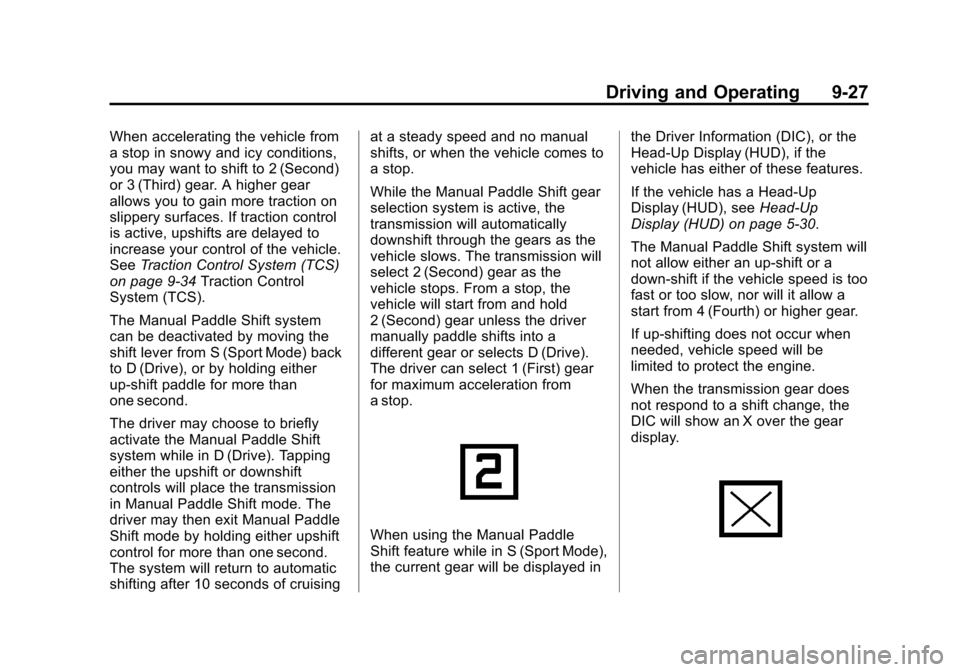
When using the Manual Paddle
Shift feature while in S (Sport Mode),
the current gear will be displayed in
the Driver Information (DIC), or the
Head-Up Display (HUD), if the
vehicle has either of these features.
If the vehicle has a Head-Up
Display (HUD), see
Head-Up
Display (HUD) on page 5‑30.
The Manual Paddle Shift system will
not allow either an up-shift or a
down-shift if the vehicle speed is too
fast or too slow, nor will it allow a
start from 4 (Fourth) or higher gear.
If up-shifting does not occur when
needed, vehicle speed will be
limited to protect the engine.
When the transmission gear does
not respond to a shift change, the
DIC will show an X over the gear
display.