lock CHEVROLET CORVETTE 2013 6.G Owner's Manual
[x] Cancel search | Manufacturer: CHEVROLET, Model Year: 2013, Model line: CORVETTE, Model: CHEVROLET CORVETTE 2013 6.GPages: 414, PDF Size: 6.97 MB
Page 49 of 414
Black plate (19,1)Chevrolet Corvette Owner Manual - 2013 - crc2 - 11/8/12
Keys, Doors, and Windows 2-19
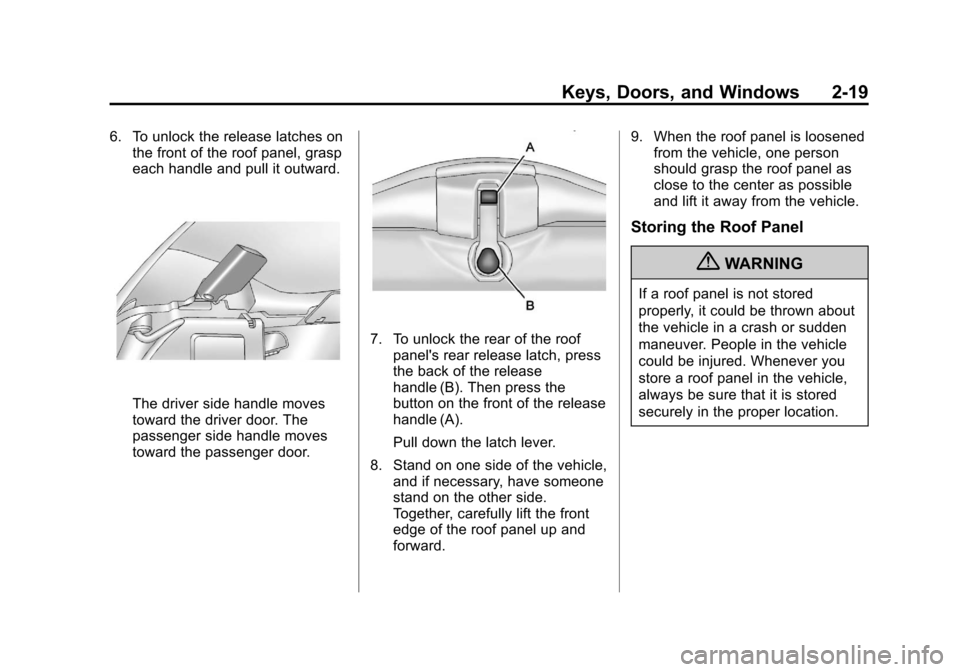
6. To unlock the release latches onthe front of the roof panel, grasp
each handle and pull it outward.
The driver side handle moves
toward the driver door. The
passenger side handle moves
toward the passenger door.
7. To unlock the rear of the roof
panel's rear release latch, press
the back of the release
handle (B). Then press the
button on the front of the release
handle (A).
Pull down the latch lever.
8. Stand on one side of the vehicle, and if necessary, have someone
stand on the other side.
Together, carefully lift the front
edge of the roof panel up and
forward. 9. When the roof panel is loosened
from the vehicle, one person
should grasp the roof panel as
close to the center as possible
and lift it away from the vehicle.
Storing the Roof Panel
{WARNING
If a roof panel is not stored
properly, it could be thrown about
the vehicle in a crash or sudden
maneuver. People in the vehicle
could be injured. Whenever you
store a roof panel in the vehicle,
always be sure that it is stored
securely in the proper location.
Page 53 of 414
Black plate (23,1)Chevrolet Corvette Owner Manual - 2013 - crc2 - 11/8/12
Keys, Doors, and Windows 2-23
P (Park) or a manual transmission
in Neutral before raising or
lowering the convertible top.
Lowering the Manual
Convertible Top
1. Park on a level surface. Shift anautomatic transmission into
P (Park) and set the parking
brake. Shift a manual
transmission into Neutral and set
the parking brake.
2. Make sure the ignition is off.
3. Make sure the trunk is closed.
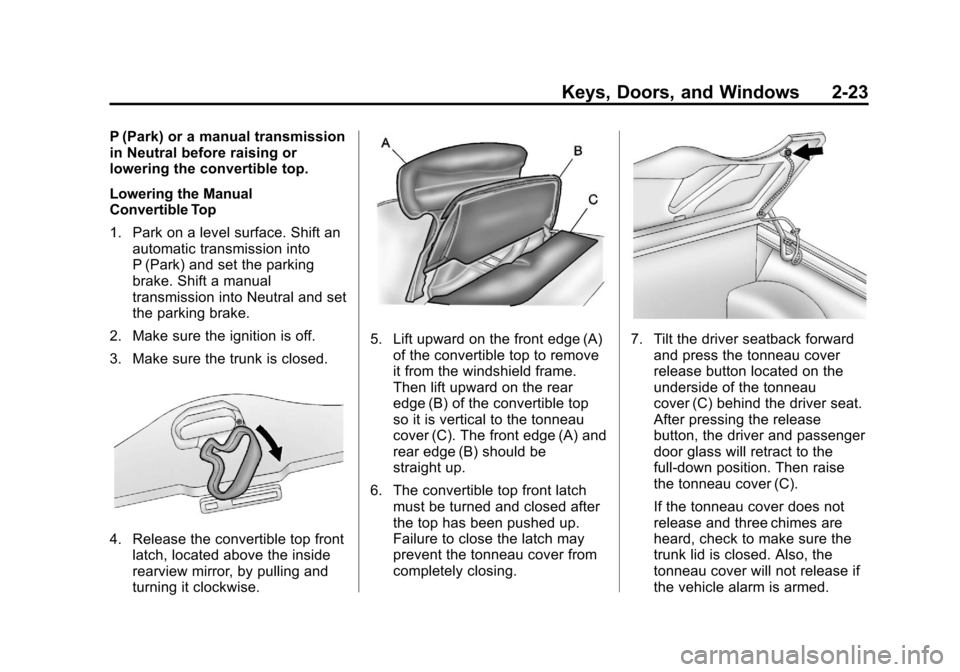
4. Release the convertible top front latch, located above the inside
rearview mirror, by pulling and
turning it clockwise.
5. Lift upward on the front edge (A)of the convertible top to remove
it from the windshield frame.
Then lift upward on the rear
edge (B) of the convertible top
so it is vertical to the tonneau
cover (C). The front edge (A) and
rear edge (B) should be
straight up.
6. The convertible top front latch must be turned and closed after
the top has been pushed up.
Failure to close the latch may
prevent the tonneau cover from
completely closing.7. Tilt the driver seatback forwardand press the tonneau cover
release button located on the
underside of the tonneau
cover (C) behind the driver seat.
After pressing the release
button, the driver and passenger
door glass will retract to the
full-down position. Then raise
the tonneau cover (C).
If the tonneau cover does not
release and three chimes are
heard, check to make sure the
trunk lid is closed. Also, the
tonneau cover will not release if
the vehicle alarm is armed.
Page 56 of 414
Black plate (26,1)Chevrolet Corvette Owner Manual - 2013 - crc2 - 11/8/12
2-26 Keys, Doors, and Windows
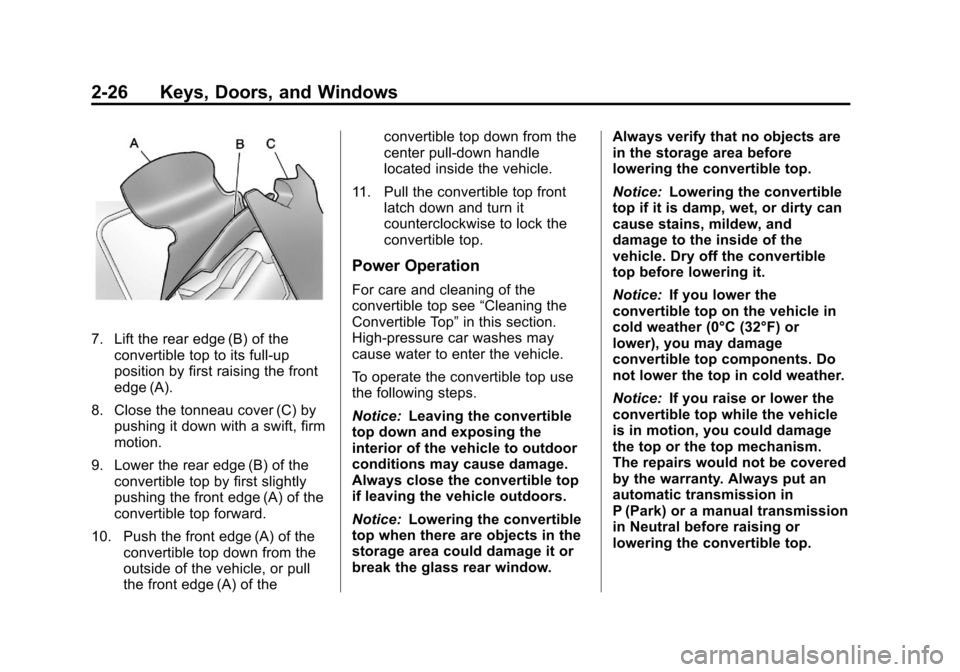
7. Lift the rear edge (B) of theconvertible top to its full-up
position by first raising the front
edge (A).
8. Close the tonneau cover (C) by pushing it down with a swift, firm
motion.
9. Lower the rear edge (B) of the convertible top by first slightly
pushing the front edge (A) of the
convertible top forward.
10. Push the front edge (A) of the convertible top down from the
outside of the vehicle, or pull
the front edge (A) of the convertible top down from the
center pull-down handle
located inside the vehicle.
11. Pull the convertible top front latch down and turn it
counterclockwise to lock the
convertible top.
Power Operation
For care and cleaning of the
convertible top see “Cleaning the
Convertible Top” in this section.
High-pressure car washes may
cause water to enter the vehicle.
To operate the convertible top use
the following steps.
Notice: Leaving the convertible
top down and exposing the
interior of the vehicle to outdoor
conditions may cause damage.
Always close the convertible top
if leaving the vehicle outdoors.
Notice: Lowering the convertible
top when there are objects in the
storage area could damage it or
break the glass rear window. Always verify that no objects are
in the storage area before
lowering the convertible top.
Notice:
Lowering the convertible
top if it is damp, wet, or dirty can
cause stains, mildew, and
damage to the inside of the
vehicle. Dry off the convertible
top before lowering it.
Notice: If you lower the
convertible top on the vehicle in
cold weather (0°C (32°F) or
lower), you may damage
convertible top components. Do
not lower the top in cold weather.
Notice: If you raise or lower the
convertible top while the vehicle
is in motion, you could damage
the top or the top mechanism.
The repairs would not be covered
by the warranty. Always put an
automatic transmission in
P (Park) or a manual transmission
in Neutral before raising or
lowering the convertible top.
Page 57 of 414
Black plate (27,1)Chevrolet Corvette Owner Manual - 2013 - crc2 - 11/8/12
Keys, Doors, and Windows 2-27
Lowering the Power
Convertible Top
1. Park on a level surface. Start theengine. Shift an automatic
transmission into P (Park) and
set the parking brake. Shift a
manual transmission into Neutral
and set the parking brake.
2. Make sure the trunk is closed, the rear trunk partition in the rear
storage area is in the fastened
upright position, and no objects
are forward of the divider. See
“Rear Trunk Partition” inRear
Storage on page 4‑1.
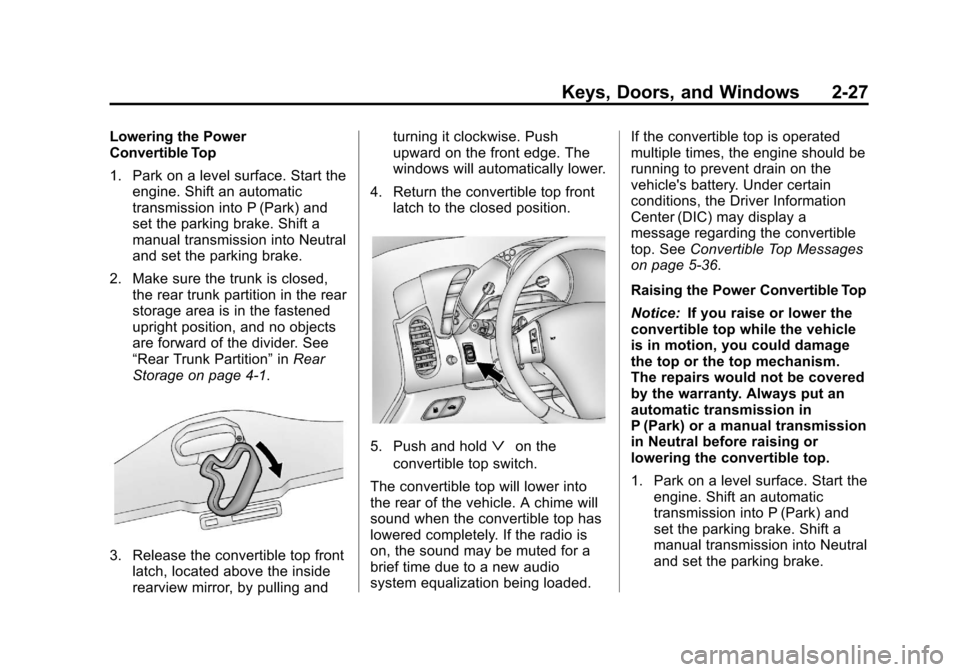
3. Release the convertible top front latch, located above the inside
rearview mirror, by pulling and turning it clockwise. Push
upward on the front edge. The
windows will automatically lower.
4. Return the convertible top front latch to the closed position.
5. Push and holdªon the
convertible top switch.
The convertible top will lower into
the rear of the vehicle. A chime will
sound when the convertible top has
lowered completely. If the radio is
on, the sound may be muted for a
brief time due to a new audio
system equalization being loaded. If the convertible top is operated
multiple times, the engine should be
running to prevent drain on the
vehicle's battery. Under certain
conditions, the Driver Information
Center (DIC) may display a
message regarding the convertible
top. See
Convertible Top Messages
on page 5‑36.
Raising the Power Convertible Top
Notice: If you raise or lower the
convertible top while the vehicle
is in motion, you could damage
the top or the top mechanism.
The repairs would not be covered
by the warranty. Always put an
automatic transmission in
P (Park) or a manual transmission
in Neutral before raising or
lowering the convertible top.
1. Park on a level surface. Start the engine. Shift an automatic
transmission into P (Park) and
set the parking brake. Shift a
manual transmission into Neutral
and set the parking brake.
Page 58 of 414
Black plate (28,1)Chevrolet Corvette Owner Manual - 2013 - crc2 - 11/8/12
2-28 Keys, Doors, and Windows
2. Make sure the trunk lid is closed,the rear trunk partition in the rear
storage area is in the fastened
upright position, and no objects
are forward of the divider. See
“Rear Trunk Partition” inRear
Storage on page 4‑1.
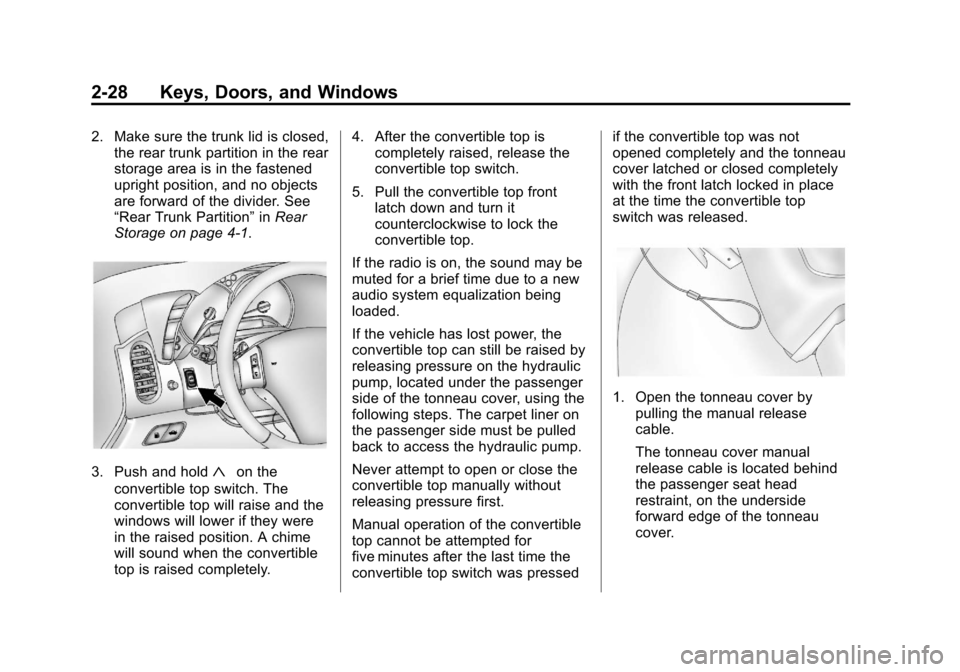
3. Push and hold«on the
convertible top switch. The
convertible top will raise and the
windows will lower if they were
in the raised position. A chime
will sound when the convertible
top is raised completely. 4. After the convertible top is
completely raised, release the
convertible top switch.
5. Pull the convertible top front latch down and turn it
counterclockwise to lock the
convertible top.
If the radio is on, the sound may be
muted for a brief time due to a new
audio system equalization being
loaded.
If the vehicle has lost power, the
convertible top can still be raised by
releasing pressure on the hydraulic
pump, located under the passenger
side of the tonneau cover, using the
following steps. The carpet liner on
the passenger side must be pulled
back to access the hydraulic pump.
Never attempt to open or close the
convertible top manually without
releasing pressure first.
Manual operation of the convertible
top cannot be attempted for
five minutes after the last time the
convertible top switch was pressed if the convertible top was not
opened completely and the tonneau
cover latched or closed completely
with the front latch locked in place
at the time the convertible top
switch was released.
1. Open the tonneau cover by
pulling the manual release
cable.
The tonneau cover manual
release cable is located behind
the passenger seat head
restraint, on the underside
forward edge of the tonneau
cover.
Page 59 of 414
Black plate (29,1)Chevrolet Corvette Owner Manual - 2013 - crc2 - 11/8/12
Keys, Doors, and Windows 2-29
Be careful when opening the
tonneau cover by hand. If the
tonneau cover is opened quickly,
damage can occur to the hinging
mechanism, which can prevent
proper operation of the
convertible top.
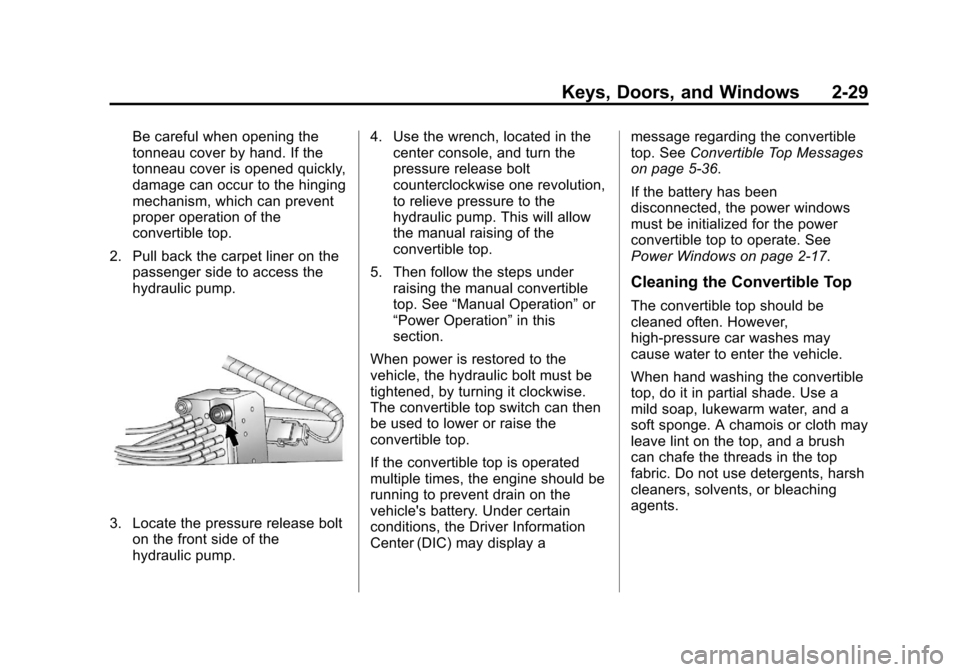
2. Pull back the carpet liner on the passenger side to access the
hydraulic pump.
3. Locate the pressure release bolton the front side of the
hydraulic pump. 4. Use the wrench, located in the
center console, and turn the
pressure release bolt
counterclockwise one revolution,
to relieve pressure to the
hydraulic pump. This will allow
the manual raising of the
convertible top.
5. Then follow the steps under raising the manual convertible
top. See “Manual Operation” or
“Power Operation” in this
section.
When power is restored to the
vehicle, the hydraulic bolt must be
tightened, by turning it clockwise.
The convertible top switch can then
be used to lower or raise the
convertible top.
If the convertible top is operated
multiple times, the engine should be
running to prevent drain on the
vehicle's battery. Under certain
conditions, the Driver Information
Center (DIC) may display a message regarding the convertible
top. See
Convertible Top Messages
on page 5‑36.
If the battery has been
disconnected, the power windows
must be initialized for the power
convertible top to operate. See
Power Windows on page 2‑17.
Cleaning the Convertible Top
The convertible top should be
cleaned often. However,
high-pressure car washes may
cause water to enter the vehicle.
When hand washing the convertible
top, do it in partial shade. Use a
mild soap, lukewarm water, and a
soft sponge. A chamois or cloth may
leave lint on the top, and a brush
can chafe the threads in the top
fabric. Do not use detergents, harsh
cleaners, solvents, or bleaching
agents.
Page 63 of 414
Black plate (3,1)Chevrolet Corvette Owner Manual - 2013 - crc2 - 11/8/12
Seats and Restraints 3-3
Lumbar Adjustment
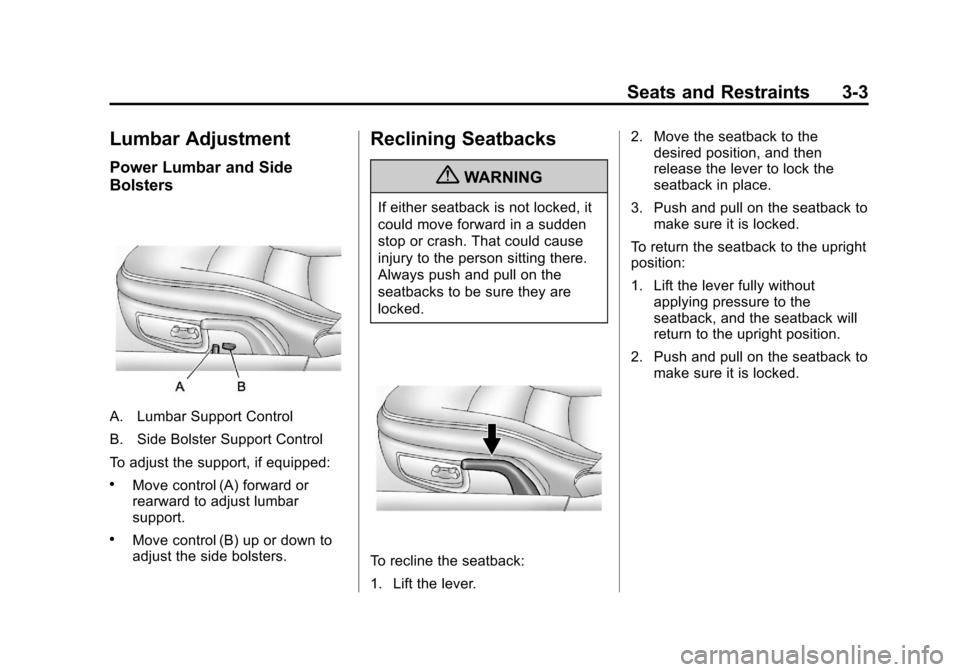
Power Lumbar and Side
Bolsters
A. Lumbar Support Control
B. Side Bolster Support Control
To adjust the support, if equipped:
.Move control (A) forward or
rearward to adjust lumbar
support.
.Move control (B) up or down to
adjust the side bolsters.
Reclining Seatbacks
{WARNING
If either seatback is not locked, it
could move forward in a sudden
stop or crash. That could cause
injury to the person sitting there.
Always push and pull on the
seatbacks to be sure they are
locked.
To recline the seatback:
1. Lift the lever.2. Move the seatback to the
desired position, and then
release the lever to lock the
seatback in place.
3. Push and pull on the seatback to make sure it is locked.
To return the seatback to the upright
position:
1. Lift the lever fully without applying pressure to the
seatback, and the seatback will
return to the upright position.
2. Push and pull on the seatback to make sure it is locked.
Page 65 of 414
Black plate (5,1)Chevrolet Corvette Owner Manual - 2013 - crc2 - 11/8/12
Seats and Restraints 3-5
Storing Memory Positions
To save into memory:
1. Adjust the driver seat, bothoutside mirrors, and the
telescopic steering column (if
equipped).
2. Press and hold “1”until
two beeps sound.
3. Repeat for a second driver position using “2.”
To recall a memory position:
.On vehicles with an automatic
transmission, press and release
“1” or“2.”
If the vehicle is in P (Park), a
single beep sounds and the
memory position is recalled after
a brief delay.
If the vehicle is not in P (Park),
three beeps sound and the
memory position is not recalled.
.On vehicles with a manual
transmission, when the vehicle
is on, the parking brake must be
set to recall a memory position.
Press and release “1”or“2.”
A single beep sounds and the
memory position is recalled after
a brief delay.
If the vehicle is on and the
parking brake is not set,
three beeps sound and the
memory position is not recalled.
Memory Remote Recall (Automatic
Transmission)
This feature can recall the driver
seat, outside mirrors, and telescopic
steering column (if equipped) to
stored positions when entering the
vehicle.
To activate, enter the vehicle and
start the engine. The driver seat,
outside mirrors, and telescopic
steering column will move to the
memory position associated with the
transmitter used to unlock the
vehicle. This feature is turned on or off using
the vehicle personalization menu.
See
Vehicle Personalization on
page 5‑51.
To stop recall movement, press one
of the power seat controls, power
mirror or memory buttons, or the
telescopic steering column switch.
If something has blocked the driver
seat while recalling a memory
position, the recall may stop.
Remove the obstruction; then press
and hold the appropriate manual
control for the memory item that is
not recalling for two seconds. Try
recalling the memory position again
by pressing the appropriate memory
button. If the memory position is still
not recalling, see your dealer for
service.
Easy Exit Driver Seat
This feature can move the seat
rearward and the telescopic steering
column (if equipped) out of the way
to allow extra room to exit the
vehicle.
Page 66 of 414
Black plate (6,1)Chevrolet Corvette Owner Manual - 2013 - crc2 - 11/8/12
3-6 Seats and Restraints
B(Easy Exit Driver Seat):Press
to save and recall the easy exit seat
position.
To save into memory:
1. Recall the desired driving position by pressing “1.”
2. Adjust the seat and the telescopic steering column to the
desired exit position.
3. Press and hold
Buntil
two beeps sound.
4. Repeat for a second driver position using “2.”
To recall, press and release
B.
The vehicle must be in P (Park) for
an automatic transmission or the
parking brake must be set for a
manual transmission. A single beep
sounds. The seat and telescopic
steering column will move to the
position previously stored for the
identified driver. If this feature is programmed on in
the vehicle personalization menu,
automatic recall occurs when one of
the following conditions is met:
.The vehicle is turned off, in
Retained Accessory
Power (RAP) or accessory
mode, and the driver door is
opened.
.The vehicle is turned off, or in
RAP, and the unlock button on
the RKE transmitter is pressed.
If something has blocked the driver
seat while recalling the exit position,
the recall may stop. Remove the
obstruction; then press and hold the
power seat control rearward for
two seconds. Try recalling the exit
position again. If the exit position is
still not recalling, see your dealer for
service.
See Vehicle Personalization on
page 5‑51.
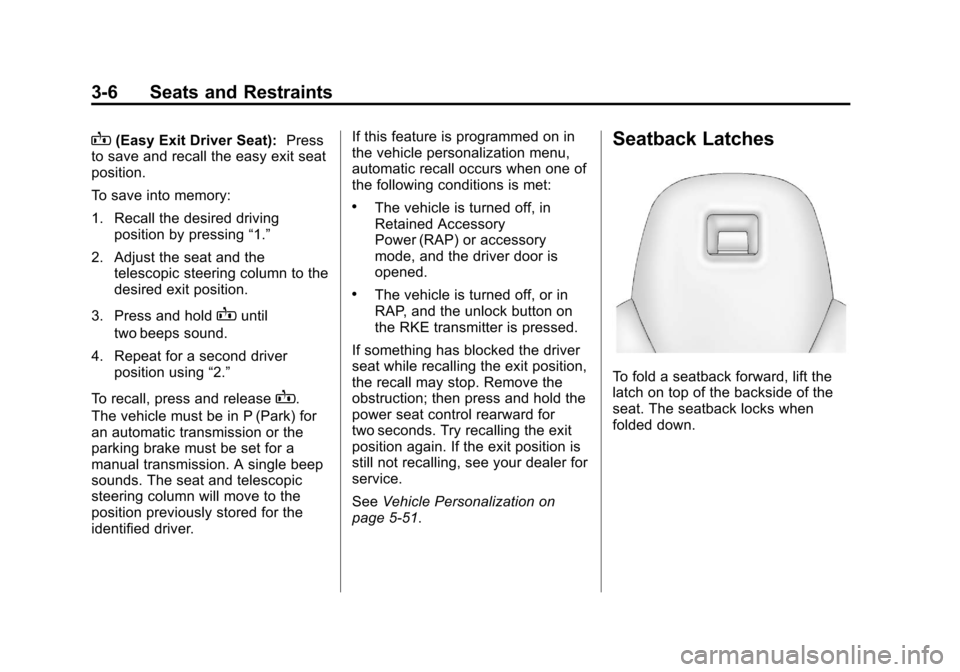
Seatback Latches
To fold a seatback forward, lift the
latch on top of the backside of the
seat. The seatback locks when
folded down.
Page 67 of 414
Black plate (7,1)Chevrolet Corvette Owner Manual - 2013 - crc2 - 11/8/12
Seats and Restraints 3-7
{WARNING
If either seatback is not locked, it
could move forward in a sudden
stop or crash. That could cause
injury to the person sitting there.
Always push and pull on the
seatbacks to be sure they are
locked.
To return a seatback to the sitting
position, lift up on the latch, raise
the seatback, and push the
seatback rearward. Push and pull
on the seatback to make sure it is
locked in place.
Heated Front Seats
{WARNING
If you cannot feel temperature
change or pain to the skin, the
seat heater may cause burns. To
reduce the risk of burns, people
with such a condition should use
care when using the seat heater,
especially for long periods of
time. Do not place anything on
the seat that insulates against
heat, such as a blanket, cushion,
cover, or similar item. This may
cause the seat heater to
overheat. An overheated seat
heater may cause a burn or may
damage the seat.
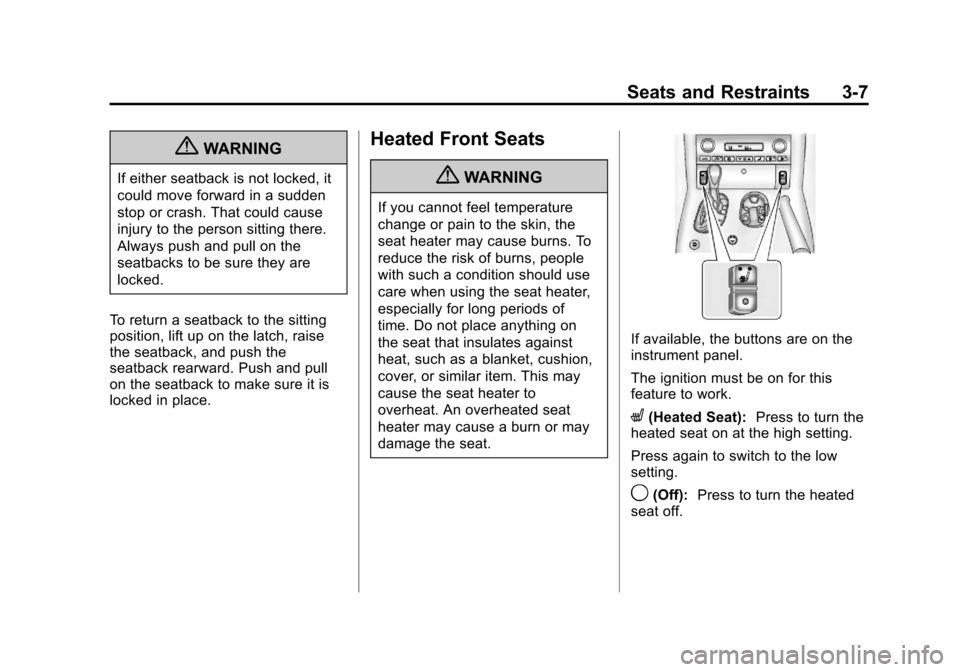
If available, the buttons are on the
instrument panel.
The ignition must be on for this
feature to work.
L(Heated Seat): Press to turn the
heated seat on at the high setting.
Press again to switch to the low
setting.
9(Off): Press to turn the heated
seat off.