lock CHEVROLET CORVETTE 2013 6.G Workshop Manual
[x] Cancel search | Manufacturer: CHEVROLET, Model Year: 2013, Model line: CORVETTE, Model: CHEVROLET CORVETTE 2013 6.GPages: 414, PDF Size: 6.97 MB
Page 159 of 414
Black plate (55,1)Chevrolet Corvette Owner Manual - 2013 - crc2 - 11/8/12
Instruments and Controls 5-55
If you choose ON, the parking
lamps, the high-beam headlamps,
and the back-up lamps will come on
for 20 seconds during low light
periods when all of the following
occur:
.You press the unlock button on
the RKE transmitter.
.Both of the doors are closed.
.The vehicle is off or in RAP.
The lamps remain on for 20 seconds
or until a door is opened, the lock
button on the RKE transmitter is
pressed, or the vehicle is no longer
off or in RAP.
See Remote Keyless Entry (RKE)
System on page 2‑2 for more
information.
When the mode you want is
selected, press the OPTION button
to set your choice and advance to
the next personal option.
Twilight Delay: This option allows
you to set the amount of time you
want the parking lamps and
high-beam headlamps to remain on after you exit the vehicle. This will
occur when the vehicle is off or in
RAP and the headlamps are on due
to the automatic headlamp system.
The parking lamps and high-beam
headlamps will remain on until the
driver selected time expires, the
exterior lamp control is activated,
or the vehicle is no longer off or
in RAP.
Press the OPTION button until
TWILIGHT DELAY appears on the
display, then press the RESET
button to scroll through the following
modes:
.OFF
.15 S
.30 S (default)
.90 S
If you choose OFF, this option will
turn off.
If you choose 15 S, the twilight
delay time will be set to 15 seconds.
If you choose 30 S, the twilight
delay time will be set to 30 seconds. If you choose 90 S, the twilight
delay time will be set to 90 seconds.
When the mode you want is
selected, press the OPTION button
to set your choice and advance to
the next personal option.
Flash at Unlock:
This option
activates the front and rear turn
signals for two short flashes when
the unlock or hatch/trunk button on
the RKE transmitter is pressed. This
will only occur when the vehicle
is off.
Press the OPTION button until
FLASH AT UNLOCK appears on the
display, then press the RESET
button to scroll through the following
modes:.YES (default)
.NO
If you choose YES, the front and
rear turn signals will flash twice
when you press the unlock button or
the hatch/trunk button on the RKE
transmitter.
Page 160 of 414
Black plate (56,1)Chevrolet Corvette Owner Manual - 2013 - crc2 - 11/8/12
5-56 Instruments and Controls
If you choose NO, this option will
turn off.
When the mode you want is
selected, press the OPTION button
to set your choice and advance to
the next personal option.
Flash at Lock:This option
activates the front and rear turn
signals for one long flash when the
lock button on the RKE transmitter
is pressed. This will only occur
when the vehicle is off. If the lock
button on the RKE transmitter is
pressed again within five seconds,
the horn will sound regardless of
which setting you have selected.
Press the OPTION button until
FLASH AT LOCK appears on the
display, then press the RESET
button to scroll through the following
modes:
.YES (default)
.NO If you choose YES, the front and
rear turn signals will flash once
when you press the lock button on
the RKE transmitter.
If you choose NO, this option will
turn off.
When the mode you want is
selected, press the OPTION button
to set your choice and advance to
the next personal option.
FOB Reminder:
This option
sounds the horn three times when
the driver door is closed and there is
a RKE transmitter inside the interior
of the vehicle. This will only occur
when the vehicle is off.
Press the OPTION button until FOB
REMINDER appears on the display,
then press the RESET button to
scroll through the following modes:
.YES
.NO (default) If you choose YES, the horn will
sound three times when a RKE
transmitter is inside of the vehicle
while the ignition is turned off and
the driver door is closed.
If you choose NO, this option will
turn off.
When the mode you want is
selected, press the OPTION button
to set your choice and advance to
the next personal option.
Passive Door Locking:
This
option allows you to select whether
the doors automatically lock during
normal vehicle exit. When the
ignition is turned off and all doors
become closed, the vehicle will
determine how many RKE
transmitters remain in the vehicle
interior. If at least one RKE
transmitter has been removed from
the interior of the vehicle, the doors
will lock after a short delay.
For example, if there are two RKE
transmitters in the vehicle and one
is removed, the other will be locked
in. The RKE transmitter locked in
Page 161 of 414
Black plate (57,1)Chevrolet Corvette Owner Manual - 2013 - crc2 - 11/8/12
Instruments and Controls 5-57
the vehicle can still be used to start
the vehicle or unlock the doors,
if needed. A person approaching the
outside of the locked vehicle without
an authorized RKE transmitter,
however, will not be able to open
the door, even with a transmitter in
the vehicle.
You may temporarily disable the
passive door locking feature by
pressing the door unlock switch for
three seconds on an open door.
Passive door locking will then
remain disabled until a door lock
switch is pressed or until the power
mode transitions from the off
power mode.
Press the OPTION button until
PASSIVE DOOR LOCKING appears
on the display, then press the
RESET button to scroll through the
following modes:
.OFF (default)
.SILENT
.HORNIf you choose OFF, this option will
turn off.
If you choose SILENT, the doors will
automatically lock a short time after
you remove a RKE transmitter from
the interior of the vehicle and close
both doors.
If you choose HORN, the doors will
automatically lock and the horn will
sound a short time after you remove
a RKE transmitter from the interior
of the vehicle and close both doors.
If you are parking in a quiet area
and do not want the horn to sound
when the doors lock, press the lock
button on the RKE transmitter
immediately after removing it from
the interior and closing the doors.
This will lock the doors and cancel
the passive locking for this ignition
cycle.
When the mode you want is
selected, press the OPTION button
to set your choice and advance to
the next personal option.
Passive Door Unlock:
This option
allows you to select which doors will
automatically unlock when you
approach and open the driver door
with the RKE transmitter. See Door
Locks on page 2‑7 for more
information.
Press the OPTION button until
PASSIVE DOOR UNLOCK appears
on the display, then press the
RESET button to scroll through the
following modes:
.DRIVER
.BOTH (default)
If you choose DRIVER, only the
driver door will automatically unlock
when you approach and open the
driver door with the RKE transmitter.
If you choose BOTH, both doors will
automatically unlock when you
approach and open the driver door
with the RKE transmitter.
Page 162 of 414
Black plate (58,1)Chevrolet Corvette Owner Manual - 2013 - crc2 - 11/8/12
5-58 Instruments and Controls
Auto Unlock:This option allows
you to select whether the driver
door, both doors, or neither door
automatically unlocks when the shift
lever is moved into P (Park) for
automatic transmission vehicles or
when the ignition is turned off or is
in RAP for manual transmission
vehicles.
Press the OPTION button until
AUTO UNLOCK appears on the
display, then press the RESET
button to scroll through the following
modes:
.OFF
.DRIVER
.BOTH (default)
If you choose OFF, this option will
turn off.
If you choose DRIVER, on
automatic transmission vehicles, the
driver door will automatically unlock
when the shift lever is moved into
P (Park). On manual transmission vehicles, the driver door will
automatically unlock when the
ignition is turned off or is in RAP.
If you choose BOTH, on automatic
transmission vehicles, both doors
will automatically unlock when the
shift lever is moved into P (Park).
On manual transmission vehicles,
both doors will automatically unlock
when the ignition is turned off or is
in RAP.
When the mode you want is
selected, press the OPTION button
to set your choice and advance to
the next personal option.
Language:
This option allows you
to select the language the DIC, the
Head-Up Display (HUD), if your
vehicle has this feature, and the
radio uses to display messages.
Each language mode will be
displayed in its own language. For
example, English will be displayed
as ENGLISH, Spanish as
ESPANOL, etc. If your vehicle has
the navigation system, you will not
have the Japanese language mode. Press the OPTION button until
LANGUAGE appears on the display,
then press the RESET button to
scroll through the following modes:
.ENGLISH (default)
.DEUTSCH (German)
.FRANCAIS (French)
.ITALIANO (Italian)
.ESPANOL (Spanish)
.JAPANESE
If you choose a language that you
do not understand, press the
OPTION and RESET buttons for
five seconds. The DIC will begin
displaying all of the various
languages one by one for as long
as the buttons are pressed. When
the desired language is displayed,
release the buttons and the DIC will
set to this language.
When the mode you want is
selected, press the OPTION button
to set your choice and advance to
the next personal option.
Page 176 of 414
Black plate (6,1)Chevrolet Corvette Owner Manual - 2013 - crc2 - 11/8/12
6-6 Lighting
Interior Lighting
Instrument Panel
Illumination Control
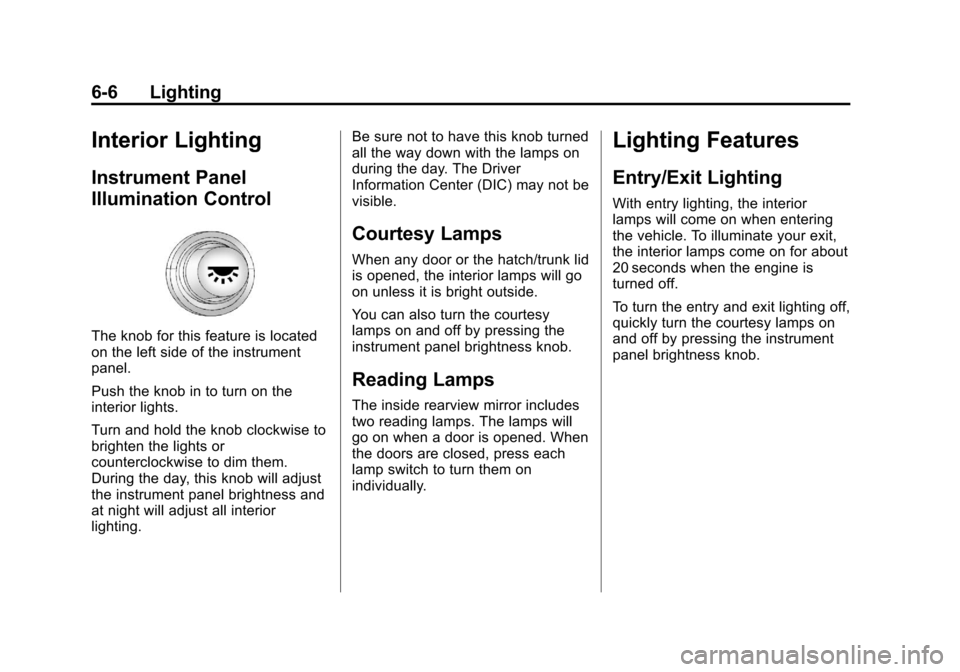
The knob for this feature is located
on the left side of the instrument
panel.
Push the knob in to turn on the
interior lights.
Turn and hold the knob clockwise to
brighten the lights or
counterclockwise to dim them.
During the day, this knob will adjust
the instrument panel brightness and
at night will adjust all interior
lighting.Be sure not to have this knob turned
all the way down with the lamps on
during the day. The Driver
Information Center (DIC) may not be
visible.
Courtesy Lamps
When any door or the hatch/trunk lid
is opened, the interior lamps will go
on unless it is bright outside.
You can also turn the courtesy
lamps on and off by pressing the
instrument panel brightness knob.
Reading Lamps
The inside rearview mirror includes
two reading lamps. The lamps will
go on when a door is opened. When
the doors are closed, press each
lamp switch to turn them on
individually.
Lighting Features
Entry/Exit Lighting
With entry lighting, the interior
lamps will come on when entering
the vehicle. To illuminate your exit,
the interior lamps come on for about
20 seconds when the engine is
turned off.
To turn the entry and exit lighting off,
quickly turn the courtesy lamps on
and off by pressing the instrument
panel brightness knob.
Page 180 of 414
Black plate (2,1)Chevrolet Corvette Owner Manual - 2013 - crc2 - 11/8/12
7-2 Infotainment System
Theft-Deterrent Feature
TheftLock®is designed to
discourage theft of the vehicle's
radio by learning a portion of the
Vehicle Identification Number (VIN).
The radio does not operate and
LOCKED displays if the radio is
stolen or moved to a different
vehicle.
When the when the ignition is in the
off position, a blinking red light on
the upper left side of the radio
indicates that TheftLock is armed.
Overview
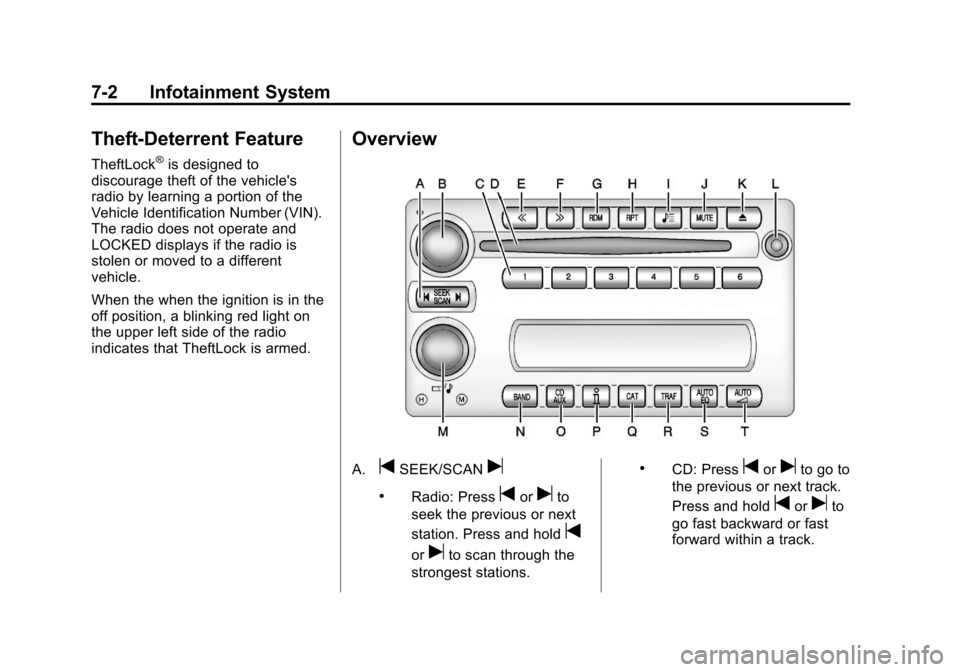
A.tSEEK/SCANu
.Radio: Presstoruto
seek the previous or next
station. Press and hold
t
oruto scan through the
strongest stations.
.CD: Presstoruto go to
the previous or next track.
Press and hold
toruto
go fast backward or fast
forward within a track.
Page 184 of 414
Black plate (6,1)Chevrolet Corvette Owner Manual - 2013 - crc2 - 11/8/12
7-6 Infotainment System
For vehicles with the Bose sound
system:
Vehicles with the Bose sound
system include Bose AudioPilot
®
noise compensation technology.
AudioPilot continuously adjusts the
audio system equalization to
compensate for background noise.
This feature is most effective at
lower radio volume settings where
background noise can affect how
well the audio is heard. At higher
volume settings, there may be little
or no adjustments by AudioPilot. For
additional information on AudioPilot,
visit bose.com/audiopilot.
To use AudioPilot:
1. Set the volume at the desiredlevel.
2. Press AUTO
nuntil AUTO
VOLUME ON displays.
3. Press AUTO
nuntil AUTO
VOLUME OFF displays to turn
off AudioPilot.
Radio Messages
CAL ERR (Calibration Error):
Displays if the radio is no longer
configured properly for the vehicle.
The vehicle must be returned to
your dealer for service.
LOC (Locked): Displays when the
TheftLock system has locked up.
The vehicle must be returned to
your dealer for service.
If any error occurs repeatedly or
cannot be corrected, contact your
dealer.
Radio
AM-FM Radio
Radio Data System (RDS)
RDS features are available for use
only on FM stations that broadcast
RDS information. The station name
or call letters display while the radio
is tuned to an RDS station.
This system relies upon receiving
specific information from these
stations and works only when the
information is available. In rare
cases, a radio station can broadcast
incorrect information that causes the
radio features to work improperly.
If this happens, contact the radio
station.
With RDS, the radio can:
.Seek to stations broadcasting
the selected type of
programming.
.Receive announcements
concerning local and national
emergencies.
Page 188 of 414
Black plate (10,1)Chevrolet Corvette Owner Manual - 2013 - crc2 - 11/8/12
7-10 Infotainment System
Up to 30 stations (six FM1, six FM2,
and six AM, six XM1 and six XM2),
and equalization settings for each
station can be programmed on the
six numbered pushbuttons.
To set presets:
1. Tune to a channel.
2. Press AUTO EQ to select theequalization.
3. Press and hold one of the six numbered pushbuttons until the
radio beeps once.
4. Repeat the steps for each pushbutton.
SiriusXM Radio Messages
XL (Explicit Language
Channels): These channels, or any
others, can be blocked by calling
1-800-929-2100 in the U.S. and
1-877-438-9677 in Canada.
Updating: The encryption code in
the receiver is being updated, and
no action is required. This process
should take no longer than
30 seconds. No Signal:
The system is
functioning correctly, but the vehicle
is in a location that is blocking the
XM signal. When the vehicle is
moved into an open area, the signal
should return.
Loading XM: The audio system is
acquiring and processing audio and
text data. No action is needed. This
message should disappear shortly.
CH Off Air: This channel is not
currently in service. Tune in to
another channel.
CH Unauth: This channel is
blocked or cannot be received with
your SiriusXM Subscription
package.
CH Unavail: This previously
assigned channel is no longer
assigned. Tune to another station.
If this station was one of the
presets, choose another station for
that preset button. No Info:
No artist, song title,
category, or text information is
available at this time on this
channel. The system is working
properly.
No Subscription Please Renew:
SiriusXM subscription needs to be
reactivated. Contact SiriusXM at
www.siriusxm.com or call
1-800-929-2100 in the U.S. and
www.xmradio.ca or call
1-877-438-9677 in Canada.
Not Found: There are no channels
available for the selected category.
The system is working properly.
XM Locked: The SiriusXM receiver
in the vehicle may have previously
been in another vehicle. For security
purposes, SiriusXM receivers
cannot be swapped between
vehicles. If this message is received
after having the vehicle serviced,
check with your dealer.
Page 207 of 414

Black plate (3,1)Chevrolet Corvette Owner Manual - 2013 - crc2 - 11/8/12
Climate Controls 8-3
passenger's climate control system
is off, the driver's temperature knob
will control the temperature for the
entire vehicle.
x 9 w(Fan):Press to increase
or decrease the fan speed. The fan
speed setting will appear in the
display.
Pressing the arrows will delete
AUTO from the digital display. The
fan graphics with the fan speed bars
will be shown. The AUTO button
must be pressed to return to the
automatic fan control.
If the airflow seems low when the
fan speed is at the highest setting,
the passenger compartment air filter
may need to be replaced. For more
information, see Passenger
Compartment Air Filter on page 8‑6.
N(Air Delivery Mode Control):
Press this button to manually lock in
the current air delivery setting and
to stop the automatic mode control.
Pressing
Ndeletes AUTO from the
digital display and the mode
graphics will be shown. To change the setting, press
Nagain. The
AUTO button must be pressed to
return to the automatic mode
selection.
To change the current mode, select
one of the following:
H(Vent): Air is directed to the
instrument panel outlets, with some
air directed to the floor outlets.
%(Bi-Level): Air is divided
between the instrument panel and
floor outlets.
6(Floor): Air is directed to the
floor outlets, with some air directed
to the windshield and side window
defogger outlets.
-(Floor/Defog): This mode clears
the windows of fog or moisture. Air
is directed to the windshield and the
floor outlets, with a small amount to
the side window outlets. In this
mode, the system automatically
turns off the recirculation and runs
the air conditioning compressor
unless the outside temperature is at or below freezing. The recirculation
mode cannot be selected while in
the defog mode.
1(Defrost):
This mode clears the
windows of fog or frost more quickly.
Air is directed to the windshield, with
a small amount directed to the side
window outlets. The indicator light
comes on and the digital display will
show the defrost mode symbol and
fan speed when the front defrost
mode is being used. In this mode,
the system automatically turns off
the recirculation and runs the air
conditioning compressor, unless the
outside temperature is at or below
freezing. Recirculation cannot be
selected while in the defrost mode.
Pressing
1again will return the
system to the last operating mode.
For severe ice conditions, turn the
driver's temperature knob to 32°C
(90°F) while in defrost mode.
Do not drive the vehicle until all the
windows are clear.
Page 209 of 414
Black plate (5,1)Chevrolet Corvette Owner Manual - 2013 - crc2 - 11/8/12
Climate Controls 8-5
cover the solar sensor located on
the top of the instrument panel near
the windshield or the system will not
work properly.
There is also a sensor located
behind the front bumper. This
sensor reads the outside air
temperature and helps to maintain
the temperature inside the vehicle.
Any cover on the front of the vehicle
could give a false reading in the
temperature.
If the outside temperature goes up,
the displayed temperature will not
change until:
.The vehicle's speed is above
19 km/h (12 mph) for
five minutes.
.The vehicle's speed is above
52 km/h (32 mph) for two and
one‐half minutes.
These delays prevent false
readings. If the temperature goes
down, the outside temperature will
be shown when you start the
vehicle. If it has been turned off for less than three hours, the
temperature will be recalled from the
previous vehicle operation.
There is also an inside temperature
sensor located to the left of the
ignition switch. The automatic
climate control system uses this
sensor to receive information, so if
you block or cover it, the system will
not function properly.
Rear Window Defogger
The rear window defogger uses a
warming grid to remove fog or frost
from the rear window.
The rear window defogger only
works when the engine is running.
=(Rear Window Defogger):
Press to turn the rear window
defogger on or off. Be sure to clear
as much snow from the rear window
as possible. An indicator light
comes on to show that the rear
window defogger is on.
The rear window defogger turns off
about 10 minutes after the button is
pressed when traveling less than 48 km/h (30 mph). If turned on
again, the defogger only runs for
about five minutes before turning
off. The defogger can also be turned
off by turning off the engine.
The vehicle has heated outside
rearview mirrors. The mirrors will
heat to help clear fog or frost from
the surface of the mirrors when the
rear window defogger button is
pressed.
For vehicles with a power
convertible top, the rear window
defogger and heated mirrors are
automatically disabled when the
power convertible top is moving
or down.
Notice:
Do not use anything
sharp on the inside of the rear
window. If you do, you could cut
or damage the warming grid, and
the repairs would not be covered
by the vehicle warranty. Do not
attach a temporary vehicle
license, tape, a decal, or anything
similar to the defogger grid.