seats CHEVROLET CORVETTE 2013 6.G Workshop Manual
[x] Cancel search | Manufacturer: CHEVROLET, Model Year: 2013, Model line: CORVETTE, Model: CHEVROLET CORVETTE 2013 6.GPages: 414, PDF Size: 6.97 MB
Page 100 of 414
Black plate (40,1)Chevrolet Corvette Owner Manual - 2013 - crc2 - 11/8/12
3-40 Seats and Restraints
7. If the child restraint has a toptether, follow the child restraint
manufacturer's instructions
regarding the use of the top
tether. See Lower Anchors and
Tethers for Children (LATCH
System) (Z06 and ZR1 Models
Only) on page 3‑33 orLower
Anchors and Tethers for
Children (LATCH System)
(Coupe and Convertible Models
Only) on page 3‑33 for more
information.
8. Before placing a child in the child restraint, make sure it is
securely held in place. To check,
grasp the child restraint at the
safety belt path and attempt to
move it side‐to‐side and back‐
and‐forth. When the child
restraint is properly installed,
there should be no more than
2.5 cm (1 in) of movement. If the airbag or airbags are off, the
off indicator in the passenger airbag
status indicator will come on and
stay on when the vehicle is started.
If a child restraint has been installed
and the on indicator is lit, see
“If the
On Indicator is Lit for a Child
Restraint” underPassenger Sensing
System on page 3‑20 for more
information.
To remove the child restraint,
unbuckle the vehicle safety belt and
let it return to the stowed position.
If the top tether is attached to a top
tether anchor, disconnect it.
Page 107 of 414
Black plate (3,1)Chevrolet Corvette Owner Manual - 2013 - crc2 - 11/8/12
Instruments and Controls 5-3
The telescopic steering column
position can be stored with your
memory settings. SeeMemory
Seats on page 3‑4.
Steering Wheel Controls
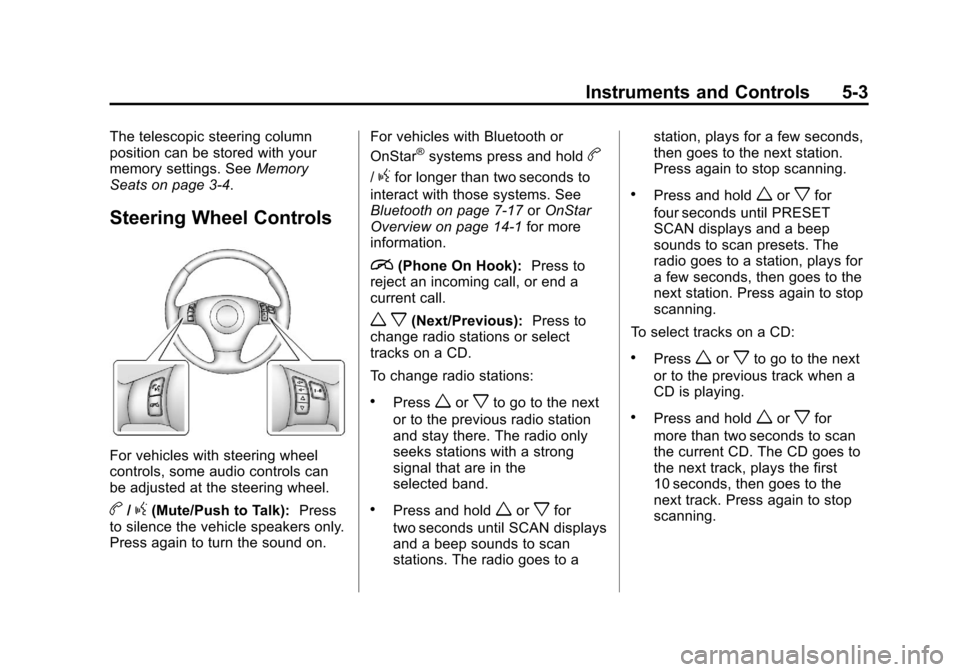
For vehicles with steering wheel
controls, some audio controls can
be adjusted at the steering wheel.
b/g(Mute/Push to Talk): Press
to silence the vehicle speakers only.
Press again to turn the sound on. For vehicles with Bluetooth or
OnStar
®systems press and holdb
/gfor longer than two seconds to
interact with those systems. See
Bluetooth on page 7‑17 orOnStar
Overview on page 14‑1 for more
information.
i(Phone On Hook): Press to
reject an incoming call, or end a
current call.
w x(Next/Previous): Press to
change radio stations or select
tracks on a CD.
To change radio stations:
.Pressworxto go to the next
or to the previous radio station
and stay there. The radio only
seeks stations with a strong
signal that are in the
selected band.
.Press and holdworxfor
two seconds until SCAN displays
and a beep sounds to scan
stations. The radio goes to a station, plays for a few seconds,
then goes to the next station.
Press again to stop scanning.
.Press and holdworxfor
four seconds until PRESET
SCAN displays and a beep
sounds to scan presets. The
radio goes to a station, plays for
a few seconds, then goes to the
next station. Press again to stop
scanning.
To select tracks on a CD:
.Pressworxto go to the next
or to the previous track when a
CD is playing.
.Press and holdworxfor
more than two seconds to scan
the current CD. The CD goes to
the next track, plays the first
10 seconds, then goes to the
next track. Press again to stop
scanning.
Page 130 of 414
Black plate (26,1)Chevrolet Corvette Owner Manual - 2013 - crc2 - 11/8/12
5-26 Instruments and Controls
2(Gauges):Press this button to
display gauge information like oil
pressure and temperature, coolant
temperature, automatic transmission
fluid temperature, if equipped,
battery voltage, and front/rear tire
pressures.
TRIP: Press this button to display
your total and trip distance driven,
the elapsed time function, your
average speed, and the engine
oil life.
OPTION: Press this button to
choose personal options that are
available on your vehicle,
depending on the options your
vehicle is equipped with, such as
door locks, easy entry seats, and
language.
RESET: Press this button, used
along with the other buttons, to
reset system functions, select
personal options, and turn off or
acknowledge messages on the DIC.Fuel Button
The fuel button displays average
fuel economy and instantaneous
fuel economy, calculated for your
specific driving conditions, and
range information.
Average Fuel Economy: The
average fuel economy is viewed as
a long-term approximation of your
overall driving conditions. You
should reset the average fuel
economy display every time you
refuel. If you press the RESET
button in this mode while you are
driving, the system will reset this
display and begin figuring fuel
economy from that point in time.
Press the fuel button to display
average fuel economy, such as:
.AVERAGE FUEL ECONOMY
11.7 L/100 km or
.AVERAGE FUEL ECONOMY
20.1 MPG Instantaneous Fuel Economy:
Instantaneous fuel economy reflects
only the fuel economy that the
vehicle has right now and will
change frequently as driving
conditions change. Unlike average
fuel economy, this menu item
cannot be reset.
Press the fuel button again to
display instantaneous fuel economy,
such as:
.INSTANT FUEL ECONOMY
11.7 L/100 km or
.INSTANT FUEL ECONOMY
20.1 MPG
Fuel Range: The range calculates
the remaining distance you can
drive without refueling. It is based
on fuel economy and the fuel
remaining in the tank.
Press the fuel button again to
display the range, such as:
.RANGE 48 km or
.RANGE 30 MI
Page 155 of 414
Black plate (51,1)Chevrolet Corvette Owner Manual - 2013 - crc2 - 11/8/12
Instruments and Controls 5-51
UPSHIFT NOW
SeeManual Transmission on
page 9‑29.
Vehicle Reminder
Messages
ACCESSORY MODE ON
This message displays when the
vehicle is in accessory mode.
ICE POSSIBLE
This message displays when the
outside air temperature is cold
enough to create icy road
conditions. Adjust your driving
accordingly.
OPTIONS UNAVAILABLE
This message displays for a few
seconds if a RKE transmitter that is
not labeled 1 or 2 is used and you
try to personalize the features on
the vehicle by pressing the OPTION
button. The personalization system
will not recognize the transmitter
and the DIC will not display the current driver number or the menus
used to set personalizations. The
personalization features will then be
set to the default states. See
Vehicle Personalization on
page 5‑51
for more information.
SET PARK BRAKE FOR SEAT
RECALL
If the vehicle has a manual
transmission, this message displays
if you try to recall the memory
positions when the ignition is on and
the parking brake is not set. If the
vehicle is on, you must set the
parking brake in order for the
memory positions to recall. See
Memory Seats on page 3‑4 for more
information.
Washer Fluid Messages
CHECK WASHER FLUID
See Washer Fluid on page 10‑32.
Vehicle
Personalization
Many features on your vehicle can
be personalized. This means that
the operation of these features can
be set to operate differently
depending on who is driving the
vehicle. See “Personal Options”
later in this section for the features
that you can personalize.
The personalization settings for
other features are automatically
updated and saved as the driver
adjusts them. These include the
following settings and presets:
.The radio presets, tone, volume,
fade, balance, equalization (EQ)
settings, and source (radio
or CD).
.The last climate control setting.
.The Head-Up Display (HUD)
position and dimming level,
if your vehicle has this feature.
Page 156 of 414
Black plate (52,1)Chevrolet Corvette Owner Manual - 2013 - crc2 - 11/8/12
5-52 Instruments and Controls
.The instrument panel cluster
dimming level and last selected
DIC display.
Separate personalization settings
are saved for two different drivers.
One of the Remote Keyless Entry
(RKE) transmitters is assigned to
driver 1. The other is assigned to
driver 2. The backs of the RKE
transmitters are labelled 1 or 2 to
correspond to each driver.
The current driver's preferences are
recalled when one of the following
occurs:
.The lock or unlock button on the
RKE transmitter, labelled 1 or 2,
is pressed.
.The appropriate memory
button, 1 or 2, located on the
driver door is pressed. See
Memory Seats on page 3‑4 for
more information.
.A valid RKE transmitter is
detected upon opening the
driver door. If more than one valid RKE
transmitter is detected upon opening
the driver door, the driver
preferences for the lowest driver
number will be recalled.
If an RKE transmitter that is not
labelled 1 or 2 is used, the
personalization system will not
recognize the transmitter. The Driver
Information Center (DIC) will not
display a current driver number and
the features that are normally
programmed through the DIC will be
set to the default states. Also, if the
OPTION button is pressed, the DIC
does not display the menus used to
set personalizations, but instead
displays OPTIONS UNAVAILABLE
for a few seconds.
Entering the Personal
Options Menu
To enter the personal options menu,
use the following steps:
1. If you have an automatic
transmission vehicle, turn the
vehicle on with the shift lever in
P (Park).
If you have a manual
transmission vehicle, turn the
vehicle on with the parking
brake set.
To avoid excessive drain on the
battery, it is recommended that
the headlamps are turned off.
2. Press the OPTION button and you will enter the PERSONAL
OPTIONS menu.
Page 210 of 414
Black plate (6,1)Chevrolet Corvette Owner Manual - 2013 - crc2 - 11/8/12
8-6 Climate Controls
Air Vents
Use the tab located on the air
outlets to change the direction of the
airflow.
Operation Tips
.Clear away any ice, snow,
or leaves from the air inlets at
the base of the windshield that
may block the flow of air into the
vehicle.
.Use of non-GM approved hood
deflectors may adversely affect
the performance of the system.
.Keep the area around the base
of the instrument panel console
and air path under the seats
clear of objects to help circulate
the air inside of the vehicle more
effectively.
Maintenance
Passenger Compartment
Air Filter
The passenger compartment air
filter removes certain particles from
the air including pollen and dust
particles. Reductions in airflow,
which may occur more often in
dusty areas, indicate that the filter
may need to be replaced. See
Maintenance Schedule on
page 11‑3.
Notice:Driving without a
passenger compartment air filter
in place can cause water and
small particles, like paper and
leaves, to be pulled into your
climate control system which may
cause damage to it. Make sure
you always replace the old filter
with a new one. The passenger compartment air
filter is located on the passenger
side of the engine compartment
near the battery. See
Engine
Compartment Overview on
page 10‑8.
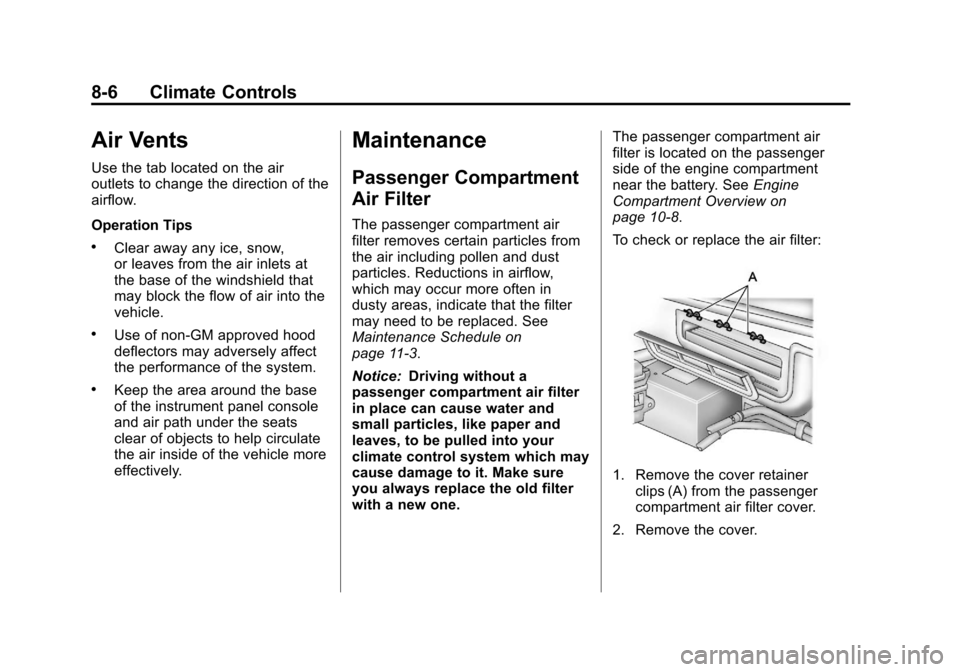
To check or replace the air filter:
1. Remove the cover retainer clips (A) from the passenger
compartment air filter cover.
2. Remove the cover.
Page 228 of 414
Black plate (16,1)Chevrolet Corvette Owner Manual - 2013 - crc2 - 11/8/12
9-16 Driving and Operating
GVWR for your vehicle, or the
Gross Axle Weight
Rating (GAWR) for either the
front or rear axle.
Do not load your vehicle with
more weight than it was
designed to carry. See“Steps
for Determining Correct Load
Limit” earlier in this section.
{WARNING
Do not load the vehicle any
heavier than the Gross
Vehicle Weight Rating
(GVWR), or either the
maximum front or rear Gross
Axle Weight Rating (GAWR).
This can cause systems to
break and change the way the
vehicle handles. This could
cause loss of control and a
crash. Overloading can also
shorten the life of the vehicle. Notice:
Overloading the
vehicle may cause damage.
Repairs would not be covered
by the vehicle warranty. Do
not overload the vehicle.
If you put things inside your
vehicle —like suitcases, tools,
packages or anything
else —they will go as fast as
the vehicle goes. If you have to
stop or turn quickly, or if there is
a crash, they will keep going.
{WARNING
Things you put inside your
vehicle can strike and injure
people in a sudden stop or
turn, or in a crash.
.Put things in the rear area
of your vehicle. Try to
spread the weight evenly.
(Continued)
WARNING (Continued)
.Never stack heavier
things, like suitcases,
inside the vehicle so that
some of them are above
the tops of the seats.
.Do not leave an
unsecured child restraint
in your vehicle.
.When you carry something
inside the vehicle, secure
it whenever you can.
Page 313 of 414
Black plate (51,1)Chevrolet Corvette Owner Manual - 2013 - crc2 - 11/8/12
Vehicle Care 10-51
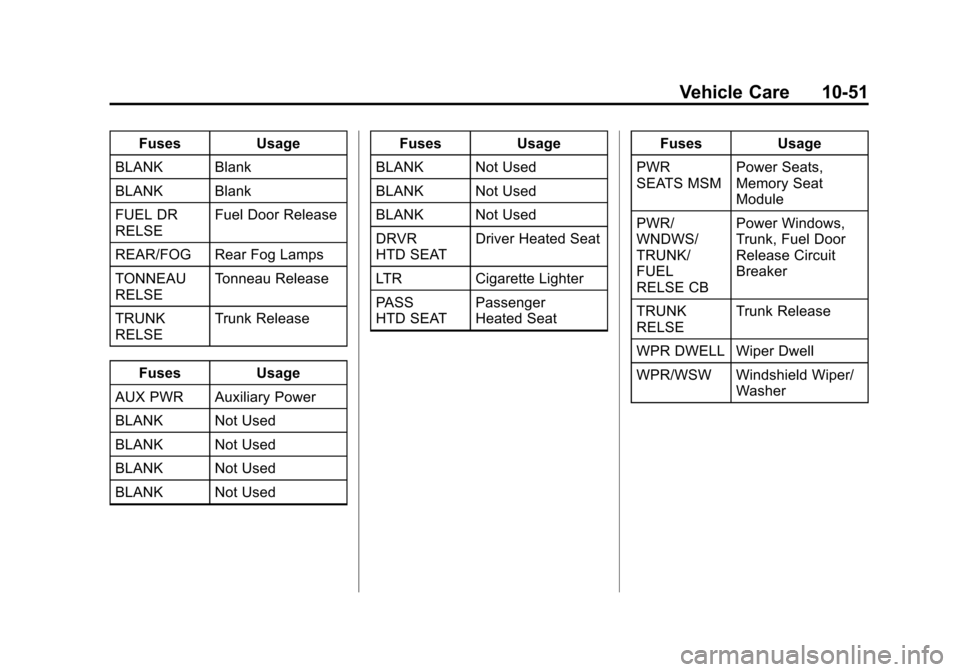
FusesUsage
BLANK Blank
BLANK Blank
FUEL DR
RELSE Fuel Door Release
REAR/FOG Rear Fog Lamps
TONNEAU
RELSE Tonneau Release
TRUNK
RELSE Trunk Release
Fuses Usage
AUX PWR Auxiliary Power
BLANK Not Used
BLANK Not Used
BLANK Not Used
BLANK Not Used Fuses
Usage
BLANK Not Used
BLANK Not Used
BLANK Not Used
DRVR
HTD SEAT Driver Heated Seat
LTR Cigarette Lighter
PASS
HTD SEAT Passenger
Heated Seat Fuses
Usage
PWR
SEATS MSM Power Seats,
Memory Seat
Module
PWR/
WNDWS/
TRUNK/
FUEL
RELSE CB Power Windows,
Trunk, Fuel Door
Release Circuit
Breaker
TRUNK
RELSE Trunk Release
WPR DWELL Wiper Dwell
WPR/WSW Windshield Wiper/ Washer
Page 320 of 414

Black plate (58,1)Chevrolet Corvette Owner Manual - 2013 - crc2 - 11/8/12
10-58 Vehicle Care
Accessory Weight:The
combined weight of optional
accessories. Some examples of
optional accessories are
automatic transmission, power
steering, power brakes, power
windows, power seats, and air
conditioning.
Aspect Ratio
:The relationship
of a tire's height to its width.
Belt
:A rubber coated layer of
cords between the plies and the
tread. Cords may be made from
steel or other reinforcing
materials.
Bead
:The tire bead contains
steel wires wrapped by steel
cords that hold the tire onto
the rim.
Bias Ply Tire
:A pneumatic tire
in which the plies are laid at
alternate angles less than
90 degrees to the centerline of
the tread. Cold Tire Pressure
:The
amount of air pressure in a tire,
measured in kPa (kilopascal)
or psi (pounds per square inch)
before a tire has built up heat
from driving. See Tire Pressure
on page 10‑60.
Curb Weight
:The weight of a
motor vehicle with standard and
optional equipment including the
maximum capacity of fuel, oil,
and coolant, but without
passengers and cargo.
DOT Markings
:A code molded
into the sidewall of a tire
signifying that the tire is in
compliance with the U.S.
Department of Transportation
(DOT) Motor Vehicle Safety
Standards. The DOT code
includes the Tire Identification
Number (TIN), an alphanumeric
designator which can also identify the tire manufacturer,
production plant, brand, and
date of production.
GVWR
:Gross Vehicle Weight
Rating. See Vehicle Load Limits
on page 9‑12.
GAWR FRT
:Gross Axle Weight
Rating for the front axle. See
Vehicle Load Limits on
page 9‑12.
GAWR RR
:Gross Axle Weight
Rating for the rear axle. See
Vehicle Load Limits on
page 9‑12.
Intended Outboard Sidewall
:
The side of an asymmetrical tire,
that must always face outward
when mounted on a vehicle.
Kilopascal (kPa)
:The metric
unit for air pressure.
Light Truck (LT-Metric) Tire
:A
tire used on light duty trucks and
some multipurpose passenger
vehicles.
Page 403 of 414

Black plate (1,1)Chevrolet Corvette Owner Manual - 2013 - crc2 - 11/8/12
INDEX i-1
A
Accessories andModifications . . . . . . . . . . . . . . . . . 10-3
Accessory Power . . . . . . . . . . . . . . 9-21
Active Handling System . . . . . . . 9-35 Light . . . . . . . . . . . . . . . . . . . . . . . . . . 5-23
Add-On Electrical
Equipment . . . . . . . . . . . . . . . . . . . 9-50
Additional Information OnStar
®. . . . . . . . . . . . . . . . . . . . . . 14-5
Adjustments
Lumbar, Front Seats . . . . . . . . . . . 3-3
Air Cleaner/Filter, Engine . . . . . 10-21
Air Dam, Front . . . . . . . . . . . . . . . . . 9-17
Air Filter, Passenger Compartment . . . . . . . . . . . . . . . . . 8-6
Air Vents . . . . . . . . . . . . . . . . . . . . . . . 8-6
Airbag System Check . . . . . . . . . . . . . . . . . . . . . . . . 3-25
How Does an AirbagRestrain? . . . . . . . . . . . . . . . . . . . 3-18
Passenger Sensing System . . . . . . . . . . . . . . . . . . . . . . 3-20 Airbag System (cont'd)
What Makes an Airbag
Inflate? . . . . . . . . . . . . . . . . . . . . . . 3-18
What Will You See after an
Airbag Inflates? . . . . . . . . . . . . . 3-19
When Should an Airbag Inflate? . . . . . . . . . . . . . . . . . . . . . . 3-17
Where Are the Airbags? . . . . . . 3-16
Airbags
Adding Equipment to theVehicle . . . . . . . . . . . . . . . . . . . . . . 3-25
Passenger Status Indicator . . . 5-17
Readiness Light . . . . . . . . . . . . . . 5-16
Servicing Airbag-Equipped Vehicles . . . . . . . . . . . . . . . . . . . . . 3-24
System Check . . . . . . . . . . . . . . . . 3-14
Alarm Vehicle Security . . . . . . . . . . . . . . 2-12
AM-FM Radio . . . . . . . . . . . . . . . . . . . 7-6
Antenna Satellite Radio . . . . . . . . . . . . . . . . 7-12
Antilock Brake System (ABS) . . . . . . . . . . . . . . . . 9-32
Warning Light . . . . . . . . . . . . . . . . . 5-21 Appearance Care
Exterior . . . . . . . . . . . . . . . . . . . . . 10-79
Interior . . . . . . . . . . . . . . . . . . . . . . 10-83
Ashtrays . . . . . . . . . . . . . . . . . . . . . . . . 5-7
Assistance Program, Roadside . . . . . . . . . . . . . . 13-7, 13-10
Audio Players . . . . . . . . . . . . . . . . . 7-12
CD . . . . . . . . . . . . . . . . . . . . . . . . . . . 7-12
Audio System Diversity Antenna System . . . . 7-12
Radio Reception . . . . . . . . . . . . . . 7-11
Theft-Deterrent Feature . . . . . . . . 7-2
Automatic Dimming Mirrors . . . . . . . . . . . . . . 2-15
Door Locks . . . . . . . . . . . . . . . . . . . . 2-9
Transmission . . . . . . . . . . . . . . . . . 9-25
Transmission Fluid . . . . . . . . . 10-20
Automatic Transmission Manual Mode . . . . . . . . . . . . . . . . . 9-26
Shift Lock ControlFunction Check . . . . . . . . . . . 10-39
Auxiliary Devices . . . . . . . . . . . . . . . . . . . . . . . 7-17
Axle, Rear . . . . . . . . . . . . . . . . . . . . 10-38