engine CHEVROLET CORVETTE 2014 7.G User Guide
[x] Cancel search | Manufacturer: CHEVROLET, Model Year: 2014, Model line: CORVETTE, Model: CHEVROLET CORVETTE 2014 7.GPages: 376, PDF Size: 4.94 MB
Page 36 of 376
Black plate (8,1)Chevrolet Corvette Owner Manual (GMNA-Localizing-U.S./Canada/Mexico-
6007198) - 2014 - CRC - 2/5/14
2-8 Keys, Doors, and Windows
{Caution
When replacing the battery, do
not touch any of the circuitry on
the transmitter. Static from your
body could damage the
transmitter.
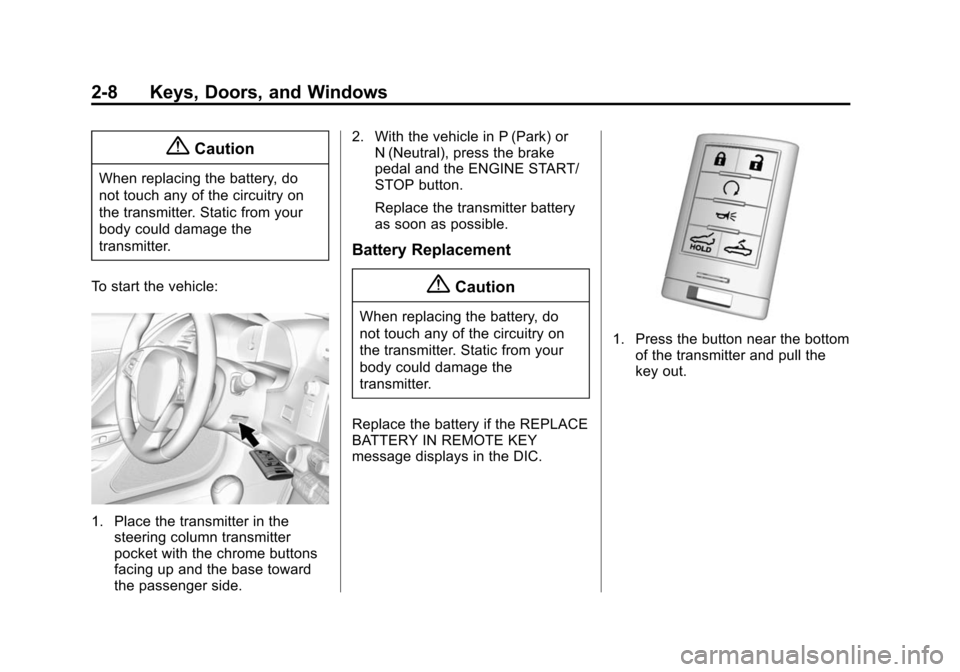
To start the vehicle:
1. Place the transmitter in the steering column transmitter
pocket with the chrome buttons
facing up and the base toward
the passenger side. 2. With the vehicle in P (Park) or
N (Neutral), press the brake
pedal and the ENGINE START/
STOP button.
Replace the transmitter battery
as soon as possible.
Battery Replacement
{Caution
When replacing the battery, do
not touch any of the circuitry on
the transmitter. Static from your
body could damage the
transmitter.
Replace the battery if the REPLACE
BATTERY IN REMOTE KEY
message displays in the DIC.
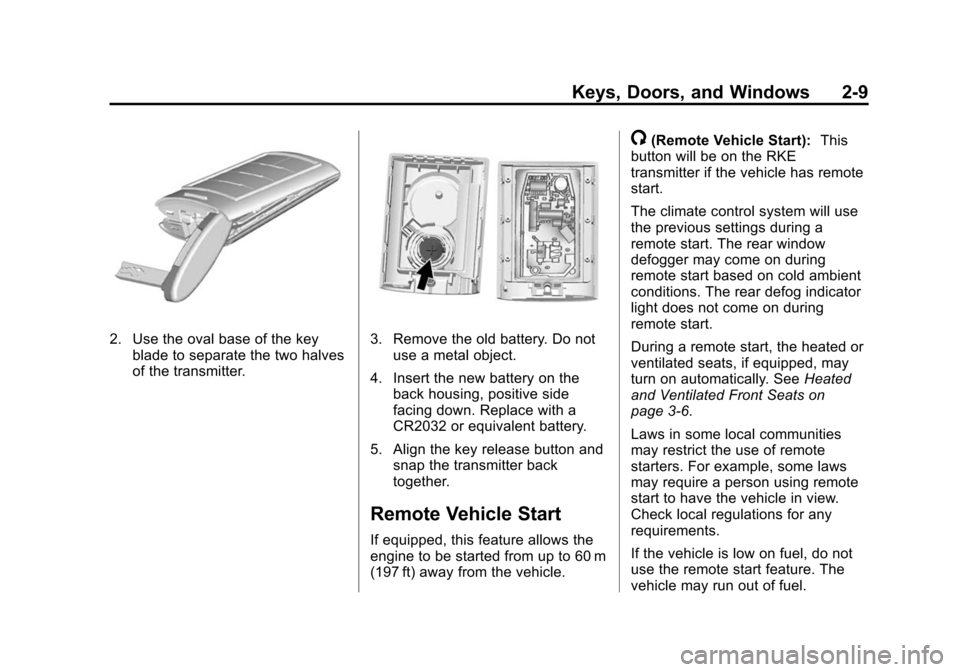
1. Press the button near the bottom of the transmitter and pull the
key out.
Page 37 of 376
Black plate (9,1)Chevrolet Corvette Owner Manual (GMNA-Localizing-U.S./Canada/Mexico-
6007198) - 2014 - CRC - 2/5/14
Keys, Doors, and Windows 2-9
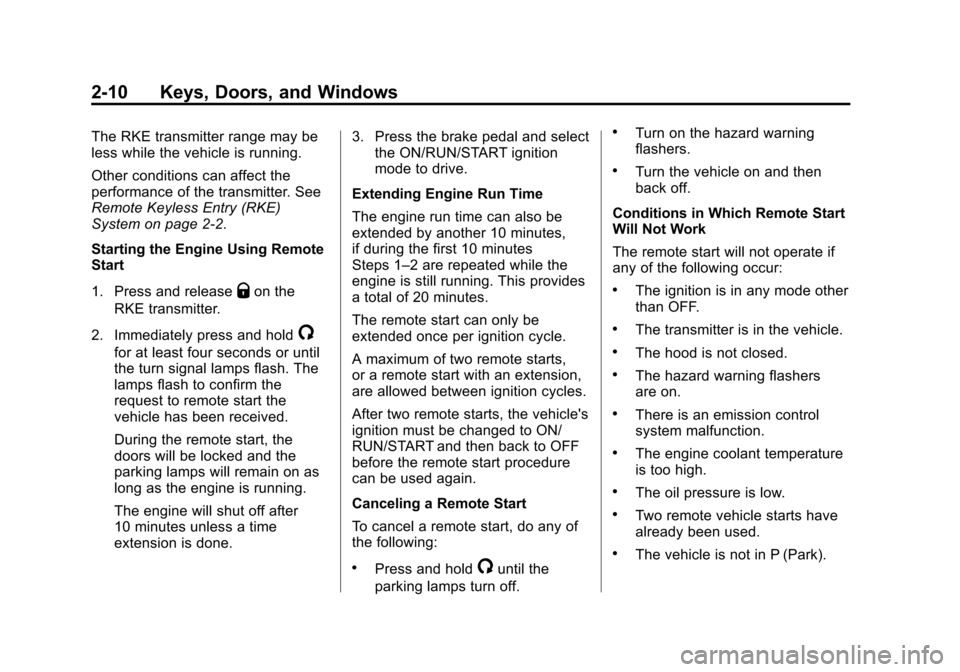
2. Use the oval base of the keyblade to separate the two halves
of the transmitter.3. Remove the old battery. Do notuse a metal object.
4. Insert the new battery on the back housing, positive side
facing down. Replace with a
CR2032 or equivalent battery.
5. Align the key release button and snap the transmitter back
together.
Remote Vehicle Start
If equipped, this feature allows the
engine to be started from up to 60 m
(197 ft) away from the vehicle.
/(Remote Vehicle Start): This
button will be on the RKE
transmitter if the vehicle has remote
start.
The climate control system will use
the previous settings during a
remote start. The rear window
defogger may come on during
remote start based on cold ambient
conditions. The rear defog indicator
light does not come on during
remote start.
During a remote start, the heated or
ventilated seats, if equipped, may
turn on automatically. See Heated
and Ventilated Front Seats on
page 3-6.
Laws in some local communities
may restrict the use of remote
starters. For example, some laws
may require a person using remote
start to have the vehicle in view.
Check local regulations for any
requirements.
If the vehicle is low on fuel, do not
use the remote start feature. The
vehicle may run out of fuel.
Page 38 of 376
Black plate (10,1)Chevrolet Corvette Owner Manual (GMNA-Localizing-U.S./Canada/Mexico-
6007198) - 2014 - CRC - 2/5/14
2-10 Keys, Doors, and Windows
The RKE transmitter range may be
less while the vehicle is running.
Other conditions can affect the
performance of the transmitter. See
Remote Keyless Entry (RKE)
System on page 2-2.
Starting the Engine Using Remote
Start
1. Press and release
Qon the
RKE transmitter.
2. Immediately press and hold
/
for at least four seconds or until
the turn signal lamps flash. The
lamps flash to confirm the
request to remote start the
vehicle has been received.
During the remote start, the
doors will be locked and the
parking lamps will remain on as
long as the engine is running.
The engine will shut off after
10 minutes unless a time
extension is done. 3. Press the brake pedal and select
the ON/RUN/START ignition
mode to drive.
Extending Engine Run Time
The engine run time can also be
extended by another 10 minutes,
if during the first 10 minutes
Steps 1–2 are repeated while the
engine is still running. This provides
a total of 20 minutes.
The remote start can only be
extended once per ignition cycle.
A maximum of two remote starts,
or a remote start with an extension,
are allowed between ignition cycles.
After two remote starts, the vehicle's
ignition must be changed to ON/
RUN/START and then back to OFF
before the remote start procedure
can be used again.
Canceling a Remote Start
To cancel a remote start, do any of
the following:
.Press and hold/until the
parking lamps turn off.
.Turn on the hazard warning
flashers.
.Turn the vehicle on and then
back off.
Conditions in Which Remote Start
Will Not Work
The remote start will not operate if
any of the following occur:
.The ignition is in any mode other
than OFF.
.The transmitter is in the vehicle.
.The hood is not closed.
.The hazard warning flashers
are on.
.There is an emission control
system malfunction.
.The engine coolant temperature
is too high.
.The oil pressure is low.
.Two remote vehicle starts have
already been used.
.The vehicle is not in P (Park).
Page 42 of 376
Black plate (14,1)Chevrolet Corvette Owner Manual (GMNA-Localizing-U.S./Canada/Mexico-
6007198) - 2014 - CRC - 2/5/14
2-14 Keys, Doors, and Windows
Use the power door unlock switch to
unlock the door when the vehicle is
not in P (Park). When the door is
closed again, the doors will lock
either when your foot is removed
from the brake or the vehicle speed
becomes faster than
13 km/h (8 mph).
Automatic Door Unlock
The vehicle is programmed so that
when the shift lever is moved into
P (Park) for automatic transmission
vehicles or when the ignition is
turned off or is in Retained
Accessory Power (RAP) for manual
transmission vehicles, both doors
will unlock.
With the vehicle stopped and the
engine running, door unlocking can
be programmed through the Driver
Information Center (DIC). This
allows the driver to choose various
unlock settings. For programming
information, seeVehicle
Personalization on page 5-43.
Lockout Protection
If the vehicle is in ACC/
ACCESSORY or ON/RUN/START,
and the power door lock switch is
pressed with the driver door open,
the doors will lock and only the
driver door will unlock.
If the vehicle is off and Unlocked
Door Anti-Lockout is turned on, the
driver door is open, and door
locking is requested using a door
lock switch or the RKE transmitter,
both doors will lock and only the
driver door will unlock. The
Unlocked Door Anti-Lockout feature
can be turned on or off using the
vehicle personalization menus.
See Vehicle Personalization on
page 5-43.
Lockout protection can be manually
overridden with the driver door open
by pressing and holding
Qon the
power door lock switch.
Doors
Hatch (Trunk)
{Warning
Exhaust gases can enter the
vehicle if it is driven with the
liftgate, hatch/trunk open, or with
any objects that pass through the
seal between the body and the
hatch/trunk or liftgate. Engine
exhaust contains carbon
monoxide (CO) which cannot be
seen or smelled. It can cause
unconsciousness and even death.
If the vehicle must be driven with
the liftgate or hatch/trunk open:
.Close all of the windows.
.Fully open the air outlets on
or under the instrument
panel.
(Continued)
Page 43 of 376
Black plate (15,1)Chevrolet Corvette Owner Manual (GMNA-Localizing-U.S./Canada/Mexico-
6007198) - 2014 - CRC - 2/5/14
Keys, Doors, and Windows 2-15
Warning (Continued)
.Adjust the climate control
system to a setting that
brings in only outside air and
set the fan speed to the
highest setting. See“Climate
Control Systems” in the
Index.
.If the vehicle is equipped with
a power liftgate, disable the
power liftgate function.
For more information about
carbon monoxide, see Engine
Exhaust on page 9-25.
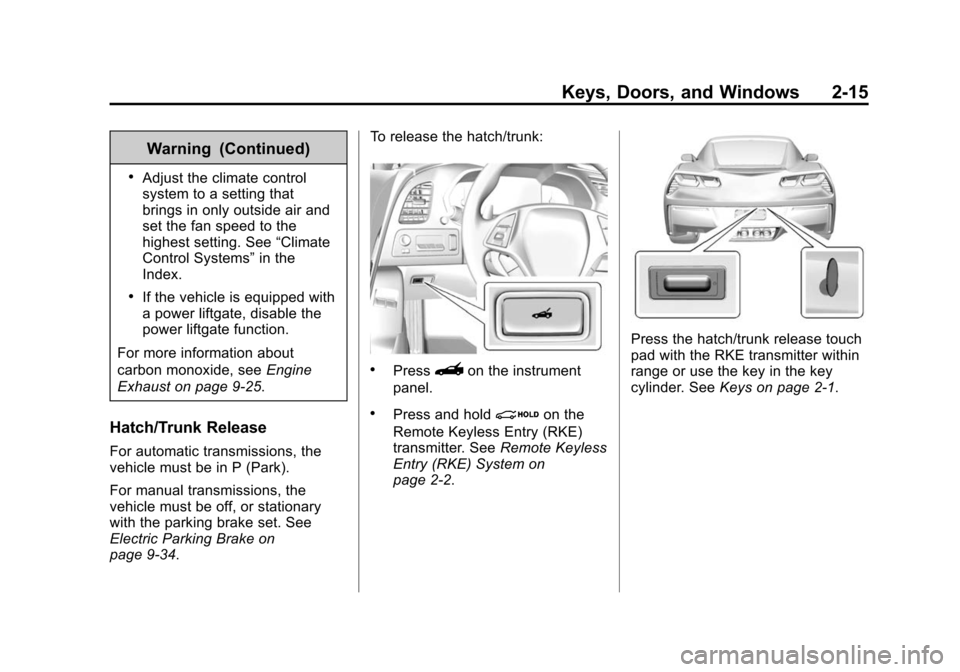
Hatch/Trunk Release
For automatic transmissions, the
vehicle must be in P (Park).
For manual transmissions, the
vehicle must be off, or stationary
with the parking brake set. See
Electric Parking Brake on
page 9-34. To release the hatch/trunk:
.Press}on the instrument
panel.
.Press and holdion the
Remote Keyless Entry (RKE)
transmitter. See Remote Keyless
Entry (RKE) System on
page 2-2.
Press the hatch/trunk release touch
pad with the RKE transmitter within
range or use the key in the key
cylinder. See Keys on page 2-1.
Page 47 of 376
Black plate (19,1)Chevrolet Corvette Owner Manual (GMNA-Localizing-U.S./Canada/Mexico-
6007198) - 2014 - CRC - 2/5/14
Keys, Doors, and Windows 2-19
With the vehicle turned off, pressd
on the right side of the hatch
release button. The indicator light
will come on momentarily, indicating
that these sensors have been
disabled for the next alarm system
arming cycle.
Immobilizer
SeeRadio Frequency Statement on
page 13-15.
Immobilizer Operation
The vehicle has a passive
theft-deterrent system.
The security light comes on in the
instrument cluster if there is a
problem with arming or disarming the theft-deterrent system. This light
also comes on briefly when the
engine is started.
The system is automatically armed
when the ignition is turned off.
The immobilization system is
disarmed when the ignition is placed
in ACC/ACCESSORY or ON/RUN/
START and a valid transmitter is
found in the vehicle.
You do not have to manually arm or
disarm the system.
The system has one or more RKE
transmitters that are matched to an
immobilizer control unit in the
vehicle. Only a correctly matched
RKE transmitter starts the vehicle.
The vehicle may not start if the RKE
transmitter is damaged.
If the engine does not start and the
security light comes on, there may
be a problem with the immobilizer
system. Press the ENGINE START/
STOP button again.
If the vehicle does not start and the
RKE transmitter appears to be
undamaged, try another RKE
transmitter. Or, place the transmitter
in the transmitter pocket. See
“NO
REMOTE DETECTED” underKey
and Lock Messages on page 5-36.
Check the fuse. See Fuses on
page 10-36. If the engine still does
not start with the other transmitter,
the vehicle needs service. If the
engine does start, the first
transmitter may be faulty. See your
dealer or have a new RKE
transmitter programmed to the
vehicle.
The immobilizer system can learn
new or replacement RKE
transmitters. Up to eight RKE
transmitters can be programmed for
the vehicle. To program additional
transmitters, see “Programming
Transmitters to the Vehicle” under
Remote Keyless Entry (RKE)
System Operation on page 2-3.
Do not leave the key or device that
disarms or deactivates the
theft-deterrent system in the vehicle.
Page 51 of 376
Black plate (23,1)Chevrolet Corvette Owner Manual (GMNA-Localizing-U.S./Canada/Mexico-
6007198) - 2014 - CRC - 2/5/14
Keys, Doors, and Windows 2-23
Express Window Operation
This feature allows the window to
automatically open or close fully.
.To activate express-down, press
the switch fully to the second
detent and release.
.To activate express-up, pull the
switch fully to the second detent
and release.
.To stop window movement,
press or pull the switch briefly.
Obstacle Detection
This feature is active during
express-up movements in ON/RUN/
START, or when the engine is off
and RAP is active. Obstacle
detection also works with RAP when
the switch is held up.
If the window encounters an object
during closing, it will stop and open
to a predetermined distance.Conditions such as severe cold or
ice may cause the window to
auto-reverse. The window will return
to normal operation once the
condition or object is removed.
If conditions prevent a window from
closing and the window continues to
auto-reverse, it is possible to close
the window while in ON/RUN by
holding the window switch in the
first or second detent until the
window is closed.
Window Operation with
Convertible Top
Windows automatically lower fully
when the convertible top is lowered
or raised. See
Convertible Top on
page 2-28. To raise the windows,
pull the switch to the second detent
and release.
Window Indexing
Indexing automatically lowers the
window a small amount when the
door is opened. When the door is
closed, the window will raise to its
full up position. If either window does not index properly, it could be
due to loss of power. Before
returning to the dealer for service,
perform the window indexing reset
procedure.
Window Indexing and
Express-Up Reset
Window indexing may be required if
the vehicle battery has been
recharged or disconnected, or is not
working. Express-up and the
convertible top will not function until
the windows are reset. After battery
power is restored, a message
displays in the Driver Information
Center. See
Driver Information
Center (DIC) on page 5-24.
Once power is restored:
1. Close the doors.
2. Start the vehicle.
3. Hold the window switch up to the
fully closed position.
Page 56 of 376
Black plate (28,1)Chevrolet Corvette Owner Manual (GMNA-Localizing-U.S./Canada/Mexico-
6007198) - 2014 - CRC - 2/5/14
2-28 Keys, Doors, and Windows
Convertible Top
If equipped with a convertible top,
review the following before
operating:
{Warning
While opening or closing the
convertible top, people can be
injured by the moving parts of the
tonneau cover or convertible top.
Maintain visual contact with the
top while it is being operated.
{Caution
Follow these guidelines when
operating the convertible top or
damage can occur:
.Remove all items from the
roof, trunk lid, or tonneau
cover before operating.(Continued)
Caution (Continued)
.Remove all objects from the
trunk that may contact the
convertible top when it is
operated.
.Do not leave the vehicle with
the convertible top open.
.Do not exceed 50 km/h
(31 mph) until the top has
completely closed or opened.
.Do not open or close the top
while driving in high wind
conditions.
.Do not operate the
convertible top multiple times
in a short period of time
without starting the engine to
avoid draining the vehicle
battery.(Continued)
Caution (Continued)
.Do not open or store the
convertible top when it is dirty
or wet. This could result in
stains, mildew, or other
damage.
.Only store the vehicle with
the top fully closed.
Opening the Convertible Top —
Instrument Panel Switch
1. Remove all objects from the top
of the tonneau cover and
forward of the partition. Place
the partition in the rear storage
area in the upright position.
Fasten both sides of the partition
to the posts just below the
tonneau cover. See Rear
Storage on page 4-2.
2. Close the trunk.
3. Start the vehicle or place it in ACC/ACCESSORY.
Page 82 of 376
Black plate (20,1)Chevrolet Corvette Owner Manual (GMNA-Localizing-U.S./Canada/Mexico-
6007198) - 2014 - CRC - 2/5/14
3-20 Seats and Restraints
The vehicle has a feature that may
automatically unlock the doors, turn
the interior lamps on, turn on the
hazard warning flashers, and shut
off the fuel system after the airbags
inflate. You can lock the doors, turn
the interior lamps off, and turn the
hazard warning flashers off by using
the controls for those features.
{Warning
A crash severe enough to inflate
the airbags may have also
damaged important functions in
the vehicle, such as the fuel
system, brake and steering
systems, etc. Even if the vehicle
appears to be drivable after a
moderate crash, there may be
concealed damage that could
make it difficult to safely operate
the vehicle.
Use caution if you should attempt
to restart the engine after a crash
has occurred.In many crashes severe enough to
inflate the airbag, windshields are
broken by vehicle deformation.
Additional windshield breakage may
also occur from the front outboard
passenger airbag.
.Airbags are designed to inflate
only once. After an airbag
inflates, you will need some new
parts for the airbag system.
If you do not get them, the
airbag system will not be there
to help protect you in another
crash. A new system will include
airbag modules and possibly
other parts. The service manual
for the vehicle covers the need
to replace other parts.
.The vehicle has a crash sensing
and diagnostic module which
records information after a
crash. See
Vehicle Data
Recording and Privacy on
page 13-13 andEvent Data
Recorders on page 13-13.
.Let only qualified technicians
work on the airbag system.
Improper service can mean that
the airbag system will not work
properly. See your dealer for
service.
Passenger Sensing
System
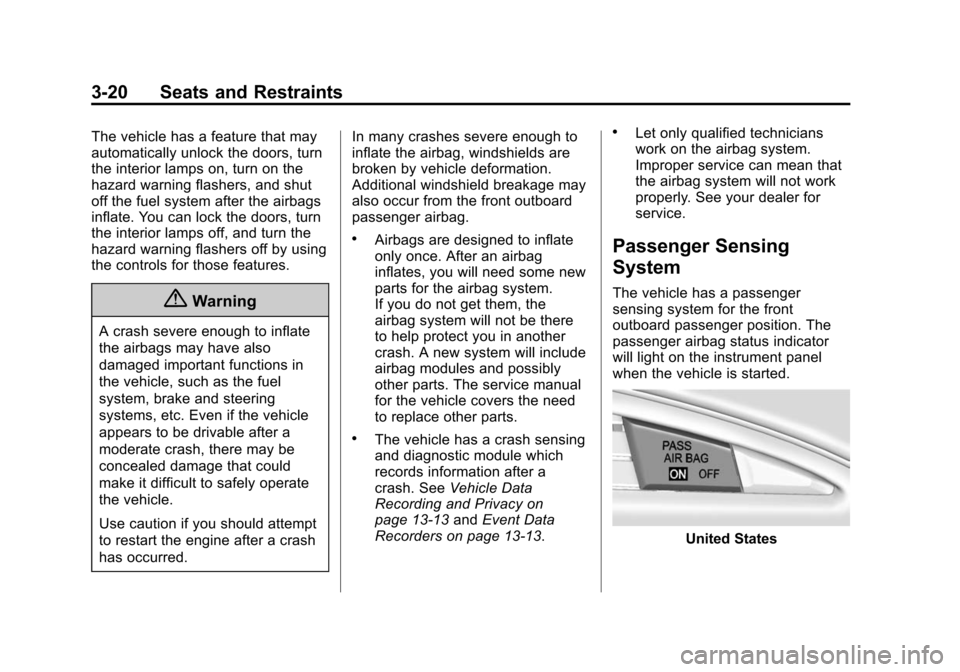
The vehicle has a passenger
sensing system for the front
outboard passenger position. The
passenger airbag status indicator
will light on the instrument panel
when the vehicle is started.
United States
Page 105 of 376
Black plate (1,1)Chevrolet Corvette Owner Manual (GMNA-Localizing-U.S./Canada/Mexico-
6007198) - 2014 - CRC - 2/5/14
Instruments and Controls 5-1
Instruments and
Controls
Controls
Steering Wheel Adjustment . . . 5-2
Steering Wheel Controls . . . . . . 5-2
Horn . . . . . . . . . . . . . . . . . . . . . . . . . . 5-2
Windshield Wiper/Washer . . . . . 5-2
Compass . . . . . . . . . . . . . . . . . . . . . 5-4
Clock . . . . . . . . . . . . . . . . . . . . . . . . . 5-4
Power Outlets . . . . . . . . . . . . . . . . . 5-4
Warning Lights, Gauges, and
Indicators
Warning Lights, Gauges, andIndicators . . . . . . . . . . . . . . . . . . . . 5-6
Instrument Cluster . . . . . . . . . . . . 5-7
Speedometer . . . . . . . . . . . . . . . . 5-11
Odometer . . . . . . . . . . . . . . . . . . . . 5-11
Trip Odometer . . . . . . . . . . . . . . . 5-11
Tachometer . . . . . . . . . . . . . . . . . . 5-11
Fuel Gauge . . . . . . . . . . . . . . . . . . 5-12
Engine Coolant Temperature Gauge . . . . . . . . . . . . . . . . . . . . . . 5-12
Safety Belt Reminders . . . . . . . 5-13
Airbag Readiness Light . . . . . . 5-13 Passenger Airbag Status
Indicator . . . . . . . . . . . . . . . . . . . . 5-14
Charging System Light . . . . . . 5-15
Malfunction Indicator Lamp . . . . . . . . . . . . . 5-15
Brake System Warning Light . . . . . . . . . . . . . . . . . . . . . . . 5-18
Electric Parking Brake Light . . . . . . . . . . . . . . . . . . . . . . . 5-18
Service Electric Parking Brake Light . . . . . . . . . . . . . . . . . . . . . . . 5-19
Antilock Brake System (ABS) Warning Light . . . . . . . . . . . . . . 5-19
Traction Off Light . . . . . . . . . . . . 5-20
StabiliTrak
®OFF Light . . . . . . . 5-20
Traction Control System (TCS)/StabiliTrak
®Light . . . . 5-20
Engine Coolant Temperature Warning Light . . . . . . . . . . . . . . 5-21
Tire Pressure Light . . . . . . . . . . 5-21
Engine Oil Pressure Light . . . . 5-22
Low Fuel Warning Light . . . . . . 5-22
Security Light . . . . . . . . . . . . . . . . 5-23
High-Beam On Light . . . . . . . . . 5-23
Lamps On Reminder . . . . . . . . . 5-23
Cruise Control Light . . . . . . . . . 5-23
Door Ajar Light . . . . . . . . . . . . . . 5-24
Information Displays
Driver Information Center (DIC) . . . . . . . . . . . . . . . 5-24
Head-Up Display (HUD) . . . . . 5-26
Vehicle Messages
Vehicle Messages . . . . . . . . . . . 5-31
Battery Voltage and Charging Messages . . . . . . . . . . . . . . . . . . 5-31
Brake System Messages . . . . 5-32
Compass Messages . . . . . . . . . 5-32
Convertible Top Messages . . . 5-32
Cruise Control Messages . . . . 5-34
Door Ajar Messages . . . . . . . . . 5-34
Engine Cooling System Messages . . . . . . . . . . . . . . . . . . 5-34
Engine Oil Messages . . . . . . . . 5-35
Engine Power Messages . . . . 5-35
Fuel System Messages . . . . . . 5-35
Key and Lock Messages . . . . . 5-36
Lamp Messages . . . . . . . . . . . . . 5-36
Ride Control System Messages . . . . . . . . . . . . . . . . . . 5-36
Airbag System Messages . . . . 5-40
Security Messages . . . . . . . . . . 5-40
Service Vehicle Messages . . . 5-40
Starting the Vehicle Messages . . . . . . . . . . . . . . . . . . 5-40
Tire Messages . . . . . . . . . . . . . . . 5-41