instrument cluster CHEVROLET CORVETTE 2014 7.G User Guide
[x] Cancel search | Manufacturer: CHEVROLET, Model Year: 2014, Model line: CORVETTE, Model: CHEVROLET CORVETTE 2014 7.GPages: 376, PDF Size: 4.94 MB
Page 115 of 376
Black plate (11,1)Chevrolet Corvette Owner Manual (GMNA-Localizing-U.S./Canada/Mexico-
6007198) - 2014 - CRC - 2/5/14
Instruments and Controls 5-11
Display Theme:Presspto enter
the Display Theme menu. Select
from Link to Drive Mode, Track,
Sport, or Tour for the cluster theme.
Speed Warning: The Speed
Warning display allows the driver to
set a speed that they do not want to
exceed. To set the Speed Warning,
press
pwhen Speed Warning is
displayed. Enable the speed
warning and then use
worxto
adjust the value. Press SEL to set
the speed. Once the speed is set,
this feature can be turned off by
pressing SEL while viewing this
page. If the selected speed limit is
exceeded, a pop-up warning is
displayed with a chime.
Pocket Gauges: Press
pwhile
Pocket Gauges is displayed to enter
the menu and select gauges that
can be displayed for the Sport
theme on the left or right of the
display area. Choose from Oil
Pressure Gauge, Oil Temperature Gauge, Battery Voltage,
Transmission Fluid Temperature
Gauge, or a blank gauge.
Software Info:
Press
pwhile
Software Info is highlighted to
display open source software
information.
Speedometer
The speedometer shows the
vehicle's speed in either kilometers
per hour (km/h) or miles per
hour (mph).
Odometer
The odometer shows how far the
vehicle has been driven, in either
kilometers or miles.
This vehicle has a tamper-resistant
odometer. If the vehicle needs a
new cluster installed, the new
odometer is set to the mileage of
the old odometer. If this is not
possible, it is set at zero and a label
is put on the driver door to show the
old mileage reading.
Trip Odometer
The trip odometer can show how far
the vehicle has been driven since
the trip odometer was last reset.
The trip odometer is accessed and
reset through the Driver Information
Center (DIC). See Driver
Information Center (DIC) on
page 5-24.
Tachometer
The tachometer displays the engine
speed in revolutions per
minute (rpm).
Page 117 of 376
Black plate (13,1)Chevrolet Corvette Owner Manual (GMNA-Localizing-U.S./Canada/Mexico-
6007198) - 2014 - CRC - 2/5/14
Instruments and Controls 5-13
soon as possible. SeeEngine
Overheating on page 10-25 for more
information.
Safety Belt Reminders
Driver Safety Belt Reminder
Light
There is a driver safety belt
reminder light on the instrument
panel cluster.
When the vehicle is started this light
flashes and a chime may come on
to remind the driver to fasten their
safety belt. Then the light stays on
solid until the belt is buckled. This
cycle may continue several times if
the driver remains or becomes
unbuckled while the vehicle is
moving. If the driver safety belt is buckled,
neither the light nor chime
comes on.
Passenger Safety Belt
Reminder Light
There is a passenger safety belt
reminder light on the instrument
panel cluster.
When the vehicle is started this light
flashes and a chime may come on
to remind passengers to fasten their
safety belt. Then the light stays on
solid until the belt is buckled. This
cycle continues several times if the
passenger remains or becomes
unbuckled while the vehicle is
moving.
If the passenger safety belt is
buckled, neither the chime nor the
light comes on.The front passenger safety belt
warning light and chime may turn on
if an object is put on the seat such
as a briefcase, handbag, grocery
bag, laptop or other electronic
device. To turn off the warning light
and/or chime, remove the object
from the seat or buckle the
safety belt.
Airbag Readiness Light
This light shows if there is an
electrical problem with the airbag
system. The system check includes
the airbag sensor(s), passenger
sensing system, the pretensioners,
the airbag modules, the wiring, and
the crash sensing and diagnostic
module. For more information on the
airbag system, see
Airbag System
on page 3-15.
Page 128 of 376
Black plate (24,1)Chevrolet Corvette Owner Manual (GMNA-Localizing-U.S./Canada/Mexico-
6007198) - 2014 - CRC - 2/5/14
5-24 Instruments and Controls
Door Ajar Light
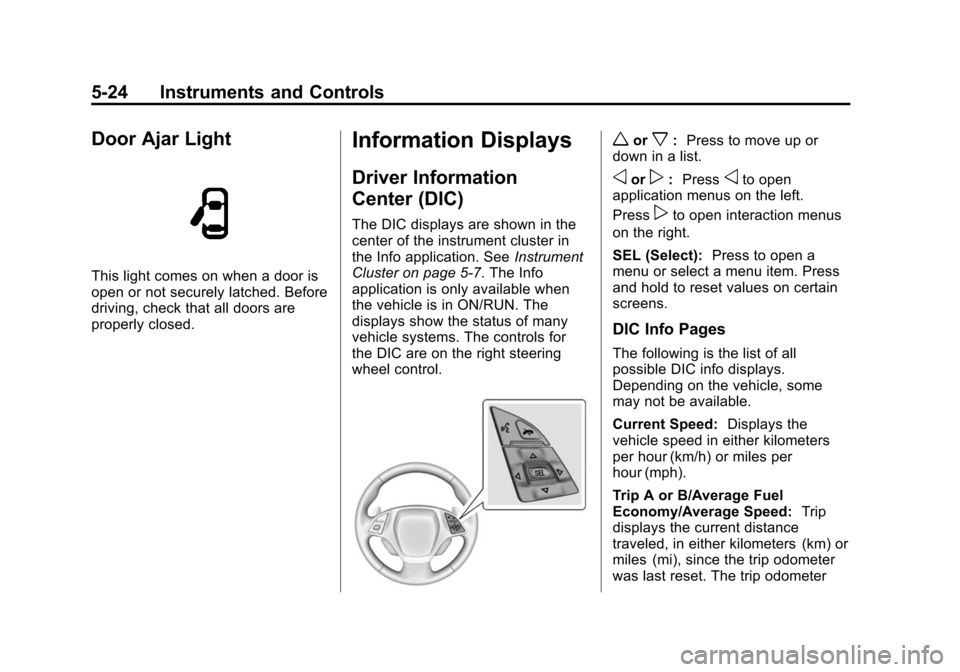
This light comes on when a door is
open or not securely latched. Before
driving, check that all doors are
properly closed.
Information Displays
Driver Information
Center (DIC)
The DIC displays are shown in the
center of the instrument cluster in
the Info application. SeeInstrument
Cluster on page 5-7. The Info
application is only available when
the vehicle is in ON/RUN. The
displays show the status of many
vehicle systems. The controls for
the DIC are on the right steering
wheel control.
worx: Press to move up or
down in a list.
oorp: Pressoto open
application menus on the left.
Press
pto open interaction menus
on the right.
SEL (Select): Press to open a
menu or select a menu item. Press
and hold to reset values on certain
screens.
DIC Info Pages
The following is the list of all
possible DIC info displays.
Depending on the vehicle, some
may not be available.
Current Speed: Displays the
vehicle speed in either kilometers
per hour (km/h) or miles per
hour (mph).
Trip A or B/Average Fuel
Economy/Average Speed: Trip
displays the current distance
traveled, in either kilometers (km) or
miles (mi), since the trip odometer
was last reset. The trip odometer
Page 131 of 376
Black plate (27,1)Chevrolet Corvette Owner Manual (GMNA-Localizing-U.S./Canada/Mexico-
6007198) - 2014 - CRC - 2/5/14
Instruments and Controls 5-27
{Caution
If you try to use the HUD image
as a parking aid, you may
misjudge the distance and
damage your vehicle. Do not use
the HUD image as a parking aid.
The HUD information can be
displayed in various languages. The
speedometer reading and other
numerical values can be displayed
in either English or metric units.
The language selection is changed
through the radio and the units of
measurement is changed through
the instrument cluster. See Vehicle
Personalization on page 5-43 and
“Settings” underInstrument Cluster
on page 5-7.
The HUD may display different
alerts and information for vehicles
equipped with these features:
.Speedometer
.Tachometer
.Manual Transmission Gear (If
Equipped)
.Manual Paddle Shift Gear
Indicator (If Equipped)
These displays on the HUD are
for use when using the manual
paddle shift controls to shift the
transmission. See “Manual
Paddle Shift” inAutomatic
Transmission on page 9-26.
.Shift Light
This light is used for
performance driving to indicate
that the vehicle's best
performance level has been
reached to shift the transmission
into the next higher gear. An
arrow pointing up will light up on
the display just prior to reaching
the engine fuel cut-off mode.
.G-Force Gauge
.Audio Information
.Upcoming Maneuver from
OnBoard Navigation
.Upcoming Maneuver from
OnStar
.Incoming Call
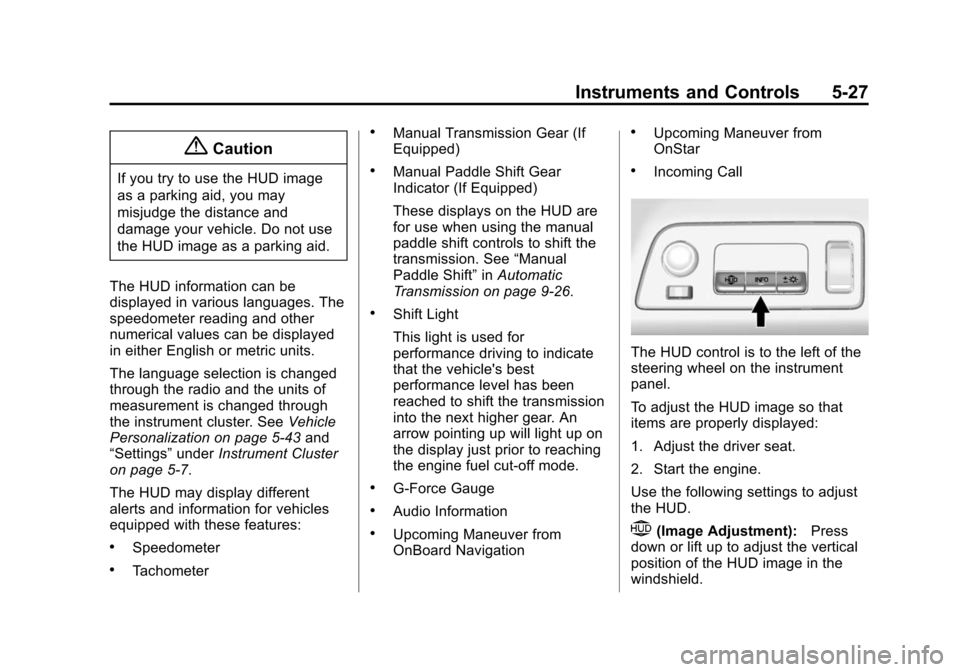
The HUD control is to the left of the
steering wheel on the instrument
panel.
To adjust the HUD image so that
items are properly displayed:
1. Adjust the driver seat.
2. Start the engine.
Use the following settings to adjust
the HUD.
$(Image Adjustment): Press
down or lift up to adjust the vertical
position of the HUD image in the
windshield.
Page 133 of 376
Black plate (29,1)Chevrolet Corvette Owner Manual (GMNA-Localizing-U.S./Canada/Mexico-
6007198) - 2014 - CRC - 2/5/14
Instruments and Controls 5-29
Metric
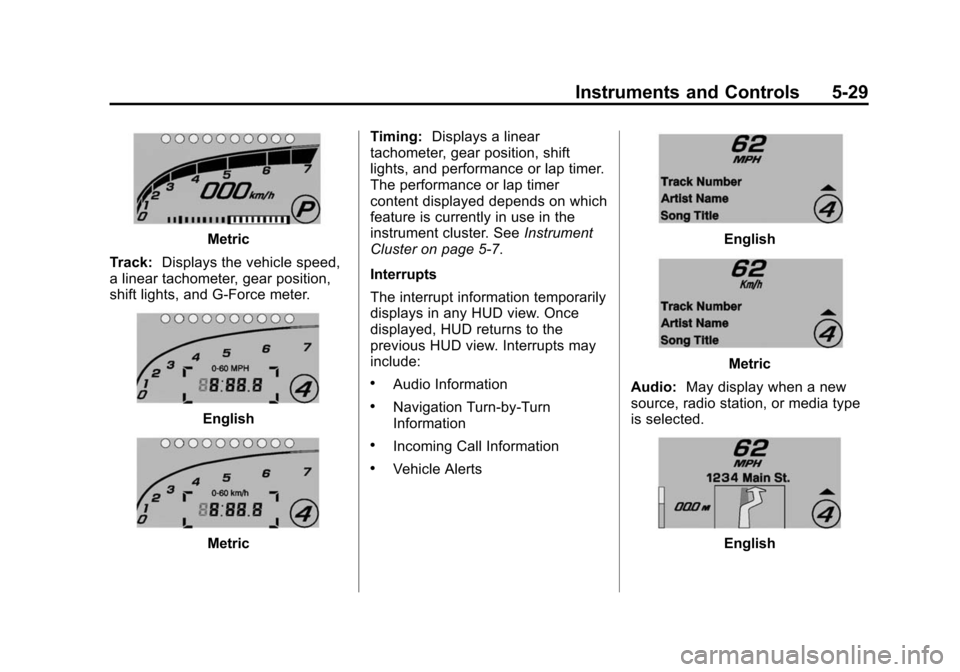
Track: Displays the vehicle speed,
a linear tachometer, gear position,
shift lights, and G-Force meter.
English
Metric Timing:
Displays a linear
tachometer, gear position, shift
lights, and performance or lap timer.
The performance or lap timer
content displayed depends on which
feature is currently in use in the
instrument cluster. See Instrument
Cluster on page 5-7.
Interrupts
The interrupt information temporarily
displays in any HUD view. Once
displayed, HUD returns to the
previous HUD view. Interrupts may
include:
.Audio Information
.Navigation Turn-by-Turn
Information
.Incoming Call Information
.Vehicle Alerts
English
Metric
Audio: May display when a new
source, radio station, or media type
is selected.
English
Page 134 of 376
Black plate (30,1)Chevrolet Corvette Owner Manual (GMNA-Localizing-U.S./Canada/Mexico-
6007198) - 2014 - CRC - 2/5/14
5-30 Instruments and Controls
Metric
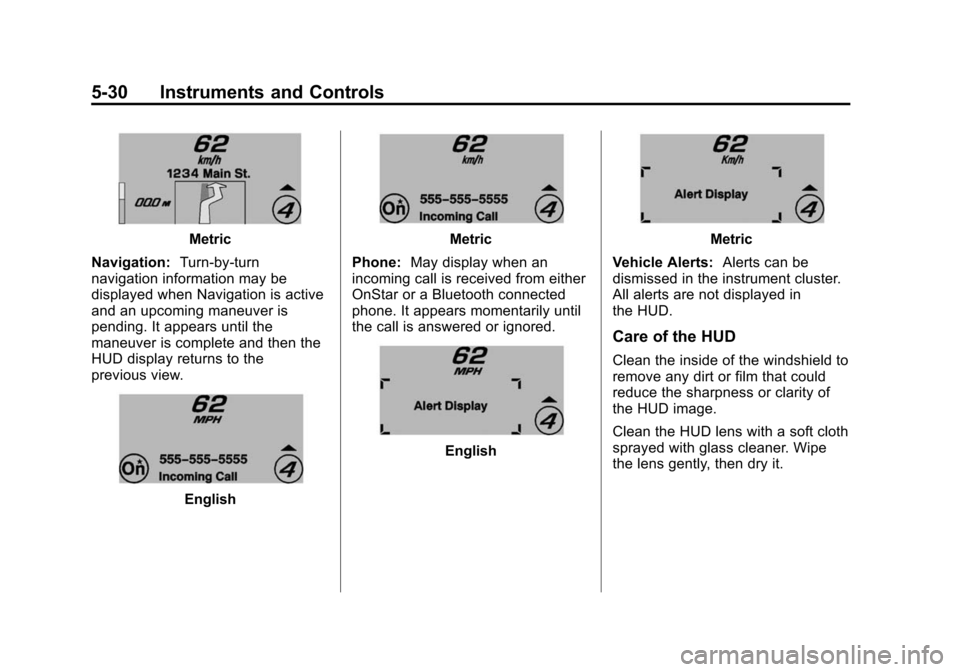
Navigation: Turn-by-turn
navigation information may be
displayed when Navigation is active
and an upcoming maneuver is
pending. It appears until the
maneuver is complete and then the
HUD display returns to the
previous view.
English
Metric
Phone: May display when an
incoming call is received from either
OnStar or a Bluetooth connected
phone. It appears momentarily until
the call is answered or ignored.
English
Metric
Vehicle Alerts: Alerts can be
dismissed in the instrument cluster.
All alerts are not displayed in
the HUD.
Care of the HUD
Clean the inside of the windshield to
remove any dirt or film that could
reduce the sharpness or clarity of
the HUD image.
Clean the HUD lens with a soft cloth
sprayed with glass cleaner. Wipe
the lens gently, then dry it.
Page 140 of 376
Black plate (36,1)Chevrolet Corvette Owner Manual (GMNA-Localizing-U.S./Canada/Mexico-
6007198) - 2014 - CRC - 2/5/14
5-36 Instruments and Controls
Key and Lock Messages
NO REMOTE DETECTED
This message displays when the
transmitter battery may be weak.
See“Starting the Vehicle with a Low
Transmitter Battery” underRemote
Keyless Entry (RKE) System
Operation on page 2-3.
NO REMOTE KEY WAS
DETECTED PLACE KEY IN
TRANSMITTER POCKET THEN
START YOUR VEHICLE
This message displays when trying
to start the vehicle if an RKE
transmitter is not detected. The
transmitter battery may be weak.
See “Starting the Vehicle with a Low
Transmitter Battery” underRemote
Keyless Entry (RKE) System
Operation on page 2-3.
NO REMOTE PRESS BRAKE
TO RESTART
This message displays if the RKE
transmitter is no longer detected in
the vehicle. Press the brake pedal
to restart the vehicle.
NUMBER OF KEYS
PROGRAMMED
This message displays when
programming new keys to the
vehicle.
REMOTE LEFT IN VEHICLE
This message displays when
leaving the vehicle with the RKE
transmitter still inside.
REPLACE BATTERY IN
REMOTE KEY
This message displays when the
battery in the RKE transmitter needs
to be replaced.
Lamp Messages
AUTOMATIC LIGHT CONTROL
ON/OFF
This message is displayed when the
automatic light control has been
turned on or off. See Automatic
Headlamp System on page 6-3.
TURN SIGNAL ON
This message is displayed if the
turn signal has been left on. Turn off
the turn signal.
Ride Control System
Messages
COMPETITIVE DRIVING MODE
This message displays and a sound
will be heard when the Competitive
Driving mode is selected. The
instrument cluster light will be on
when the Competitive Driving mode
is selected. Launch Control is
available when this mode is
selected. The Traction Control
System (TCS) will not be operating
Page 141 of 376
Black plate (37,1)Chevrolet Corvette Owner Manual (GMNA-Localizing-U.S./Canada/Mexico-
6007198) - 2014 - CRC - 2/5/14
Instruments and Controls 5-37
while in the Competitive Driving
mode. Adjust your driving
accordingly. SeeCompetitive
Driving Mode on page 9-42,
including the “Launch Control”
information.
MAXIMUM SPEED 129 km/h
(80 MPH)
This message displays when a
malfunction is present in the
Selective Ride Control system. The
vehicle speed will be limited to a
value determined by the vehicle
when the shock absorber system
has failed and the shocks are in
their full soft mode. Have the vehicle
serviced by your dealer as soon as
possible.
To acknowledge the message, press
the SEL button. The message
reappears every 10 minutes until
this condition changes.
PERF TRAC 1 –WET ACTIVE
HANDLING ON
This message displays and a sound
will be heard when this Performance
Traction Management mode is
selected. The instrument cluster
light will also be on when this mode
is selected. Launch Control is
available when this mode is
selected. In this mode the Traction
Control and StabiliTrak system are
available but intended for use on
wet race track conditions. Adjust
your driving accordingly. This
system is available only on models
with FE4 –Z51 Performance
Package and Magnetic Selective
Ride Control. See “Performance
Traction Management” and“Launch
Control” underCompetitive Driving
Mode on page 9-42 for more
information about the use of
this mode.
PERF TRAC 2 –DRY ACTIVE
HANDLING ON
This message displays and a sound
will be heard when this Performance
Traction Management mode is
selected. The instrument cluster
light will also be on when this mode
is selected. Launch Control is
available when this mode is
selected. In this mode the Traction
Control and StabiliTrak system are
available but intended for use on dry
race track conditions. Adjust your
driving accordingly. This system is
available only on models with FE4.
See “Performance Traction
Management” and“Launch Control”
under Competitive Driving Mode on
page 9-42 for more information
about the use of this mode.
Page 142 of 376
Black plate (38,1)Chevrolet Corvette Owner Manual (GMNA-Localizing-U.S./Canada/Mexico-
6007198) - 2014 - CRC - 2/5/14
5-38 Instruments and Controls
PERF TRAC 3–SPORT
ACTIVE HANDLING ON
This message displays and a sound
will be heard when this Performance
Traction Management mode is
selected. The instrument cluster
light will also be on when this mode
is selected. Launch Control is
available when this mode is
selected. In this mode the Traction
Control and StabiliTrak system are
available but intended for use on dry
race track conditions. Adjust your
driving accordingly. This system is
available only on models with FE4.
See “Performance Traction
Management” and“Launch Control”
under Competitive Driving Mode on
page 9-42 for more information
about the use of this mode.
PERF TRAC 4 –SPORT
ACTIVE HANDLING OFF
This message displays and a sound
will be heard when this Performance
Traction Management mode is
selected. The instrument cluster
light will also be on when this mode
is selected. Launch Control is
available when this mode is
selected. In this mode the Traction
Control is available but intended for
use on dry race track conditions.
The StabiliTrak system is disabled
when this mode is selected. This
mode will require more driver skill
than modes 1–3. Adjust your driving
accordingly. This system is available
only on models with FE4. See
“Performance Traction
Management” and“Launch Control”
under Competitive Driving Mode on
page 9-42 for more information
about the use of this mode.
PERF TRAC 5 –RACE ACTIVE
HANDLING OFF
This message displays and a sound
will be heard when this Performance
Traction Management mode is
selected. The instrument cluster
light will also be on when this mode
is selected. Launch Control is
available when this mode is
selected. In this mode the Traction
Control is available but intended for
use on dry race track conditions.
The StabiliTrak system is disabled
when this mode is selected. This
mode will require more driver skill
than modes 1–4. Adjust your driving
accordingly. This system is available
only on models with FE4. See
“Performance Traction
Management” and“Launch Control”
under Competitive Driving Mode on
page 9-42 for more information
about the use of this mode.
Page 143 of 376
Black plate (39,1)Chevrolet Corvette Owner Manual (GMNA-Localizing-U.S./Canada/Mexico-
6007198) - 2014 - CRC - 2/5/14
Instruments and Controls 5-39
REAR AXLE OFF
If this message is displayed, the
Electronic Limited-Slip Rear (if
equipped) is not operational. Drive
with caution. Avoid high speeds,
aggressive driving, and sharp
cornering. The system could be
overheated. Allow the system to
cool. If this message remains on,
see your dealer for service. The
vehicle is safe to drive, however,
continue to drive with caution.
When this message is displayed,
the vehicle’s handling capabilities
will be reduced during severe
maneuvers. StabiliTrak will be
affected. See Traction Control/
Electronic Stability Control on
page 9-36.
SERVICE STABILITRAK
This message displays if there is a
problem with the StabiliTrak system
and the vehicle needs service. The
StabiliTrak system light on the
instrument cluster also turns on and
a sound will be heard. See your
dealer. When this message is
displayed, the system is not
working. Adjust your driving
accordingly. See Traction Control/
Electronic Stability Control on
page 9-36.
SERVICE TRACTION SYSTEM
If this message displays when you
are driving, there is a problem with
the Traction Control System (TCS)
and the vehicle needs service. See
your dealer. When this message is
displayed, the system will not limit
wheel spin. Adjust your driving
accordingly.
The traction control system (TCS)
light on the instrument cluster will
also turn on and a sound will be
heard. When this message is displayed,
the computer controlled systems will
not assist the driver in controlling
the vehicle. Have the system
repaired by your dealer as soon as
possible. Adjust your driving
accordingly. See
Traction Control/
Electronic Stability Control on
page 9-36.
To acknowledge the message, press
the SEL button.
SHOCKS INOPERATIVE
This message displays when a
malfunction is present in the
Selective Ride Control system,
which is causing the shocks to be in
their full soft mode. This is a
warning to the driver that the vehicle
handling may be affected. Have the
vehicle serviced by your dealer as
soon as possible.
To acknowledge the message, press
the SEL button. The message
reappears every 10 minutes until
this condition changes.