remove seats CHEVROLET CORVETTE 2014 7.G Owners Manual
[x] Cancel search | Manufacturer: CHEVROLET, Model Year: 2014, Model line: CORVETTE, Model: CHEVROLET CORVETTE 2014 7.GPages: 376, PDF Size: 4.94 MB
Page 10 of 376
Black plate (4,1)Chevrolet Corvette Owner Manual (GMNA-Localizing-U.S./Canada/Mexico-
6007198) - 2014 - CRC - 2/5/14
1-4 In Brief
25.Electric Parking Brake on
page 9-34.
26. Dual Automatic Climate Control
System on page 8-1.
27. Passenger Temperature Controls. See Dual Automatic
Climate Control System on
page 8-1.
Passenger Heated and
Ventilated Seat Controls (If
Equipped). See Heated and
Ventilated Front Seats on
page 3-6.Initial Drive
Information
This section provides a brief
overview about some of the
important features that may or may
not be on your specific vehicle.
For more detailed information, refer
to each of the features which can be
found later in this owner manual.
Remote Keyless Entry
(RKE) System
The Keyless Access system allows
for vehicle entry when the
transmitter is within range. See
Remote Keyless Entry (RKE)
System Operation on page 2-3.
The RKE transmitter is used to lock
and unlock the doors may work up
to 60 m (197 ft) away from the
vehicle.
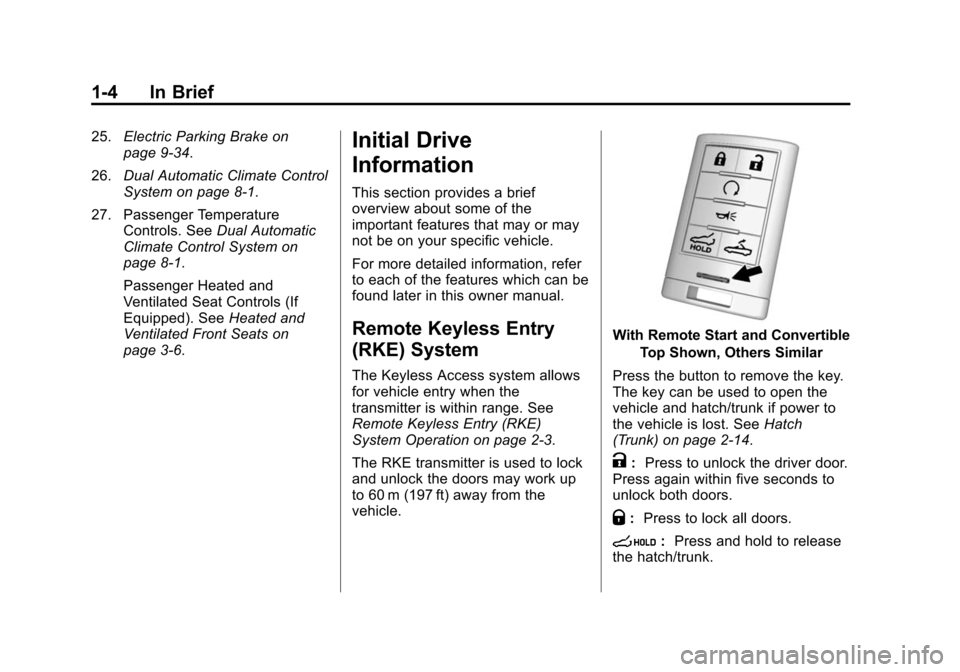
With Remote Start and Convertible
Top Shown, Others Similar
Press the button to remove the key.
The key can be used to open the
vehicle and hatch/trunk if power to
the vehicle is lost. See Hatch
(Trunk) on page 2-14.
K: Press to unlock the driver door.
Press again within five seconds to
unlock both doors.
Q: Press to lock all doors.
s:Press and hold to release
the hatch/trunk.
Page 37 of 376
Black plate (9,1)Chevrolet Corvette Owner Manual (GMNA-Localizing-U.S./Canada/Mexico-
6007198) - 2014 - CRC - 2/5/14
Keys, Doors, and Windows 2-9
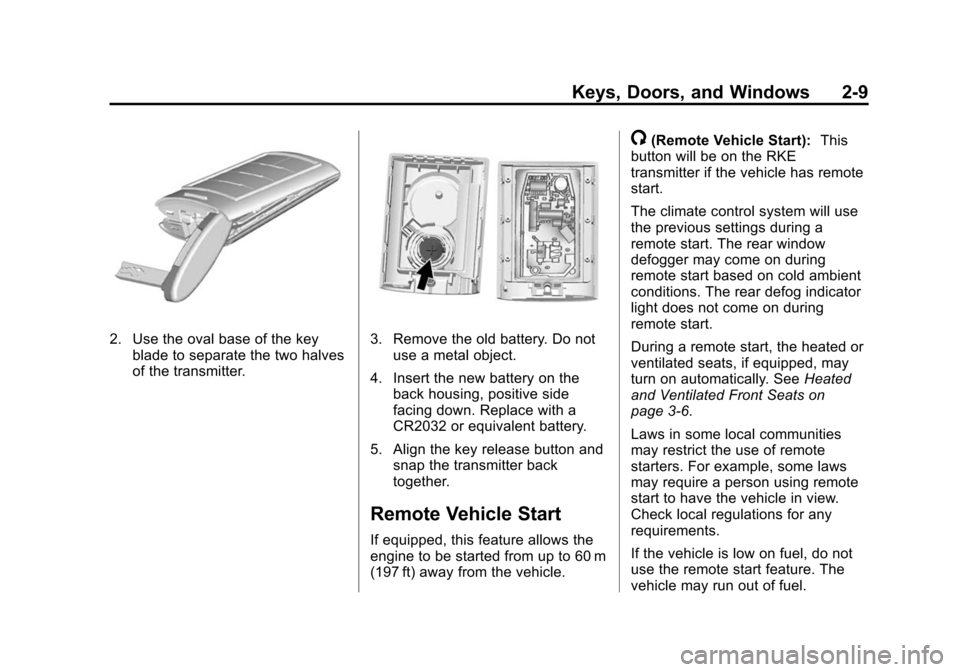
2. Use the oval base of the keyblade to separate the two halves
of the transmitter.3. Remove the old battery. Do notuse a metal object.
4. Insert the new battery on the back housing, positive side
facing down. Replace with a
CR2032 or equivalent battery.
5. Align the key release button and snap the transmitter back
together.
Remote Vehicle Start
If equipped, this feature allows the
engine to be started from up to 60 m
(197 ft) away from the vehicle.
/(Remote Vehicle Start): This
button will be on the RKE
transmitter if the vehicle has remote
start.
The climate control system will use
the previous settings during a
remote start. The rear window
defogger may come on during
remote start based on cold ambient
conditions. The rear defog indicator
light does not come on during
remote start.
During a remote start, the heated or
ventilated seats, if equipped, may
turn on automatically. See Heated
and Ventilated Front Seats on
page 3-6.
Laws in some local communities
may restrict the use of remote
starters. For example, some laws
may require a person using remote
start to have the vehicle in view.
Check local regulations for any
requirements.
If the vehicle is low on fuel, do not
use the remote start feature. The
vehicle may run out of fuel.
Page 64 of 376
Black plate (2,1)Chevrolet Corvette Owner Manual (GMNA-Localizing-U.S./Canada/Mexico-
6007198) - 2014 - CRC - 2/5/14
3-2 Seats and Restraints
Head Restraints
The vehicle's front seats have head
restraints in the outboard seating
positions that cannot be adjusted.
The front seat outboard head
restraints are not designed to be
removed.
Front Seats
Power Seat Adjustment
{Warning
You can lose control of the
vehicle if you try to adjust a driver
seat while the vehicle is moving.
Adjust the driver seat only when
the vehicle is not moving.
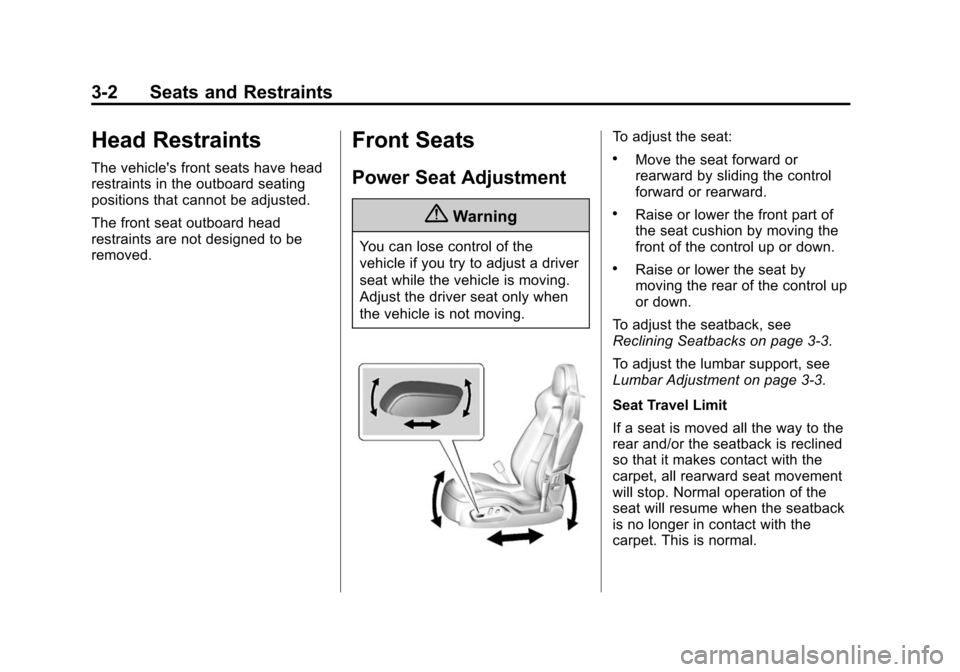
To adjust the seat:
.Move the seat forward or
rearward by sliding the control
forward or rearward.
.Raise or lower the front part of
the seat cushion by moving the
front of the control up or down.
.Raise or lower the seat by
moving the rear of the control up
or down.
To adjust the seatback, see
Reclining Seatbacks on page 3-3.
To adjust the lumbar support, see
Lumbar Adjustment on page 3-3.
Seat Travel Limit
If a seat is moved all the way to the
rear and/or the seatback is reclined
so that it makes contact with the
carpet, all rearward seat movement
will stop. Normal operation of the
seat will resume when the seatback
is no longer in contact with the
carpet. This is normal.
Page 66 of 376
Black plate (4,1)Chevrolet Corvette Owner Manual (GMNA-Localizing-U.S./Canada/Mexico-
6007198) - 2014 - CRC - 2/5/14
3-4 Seats and Restraints
Memory Seats
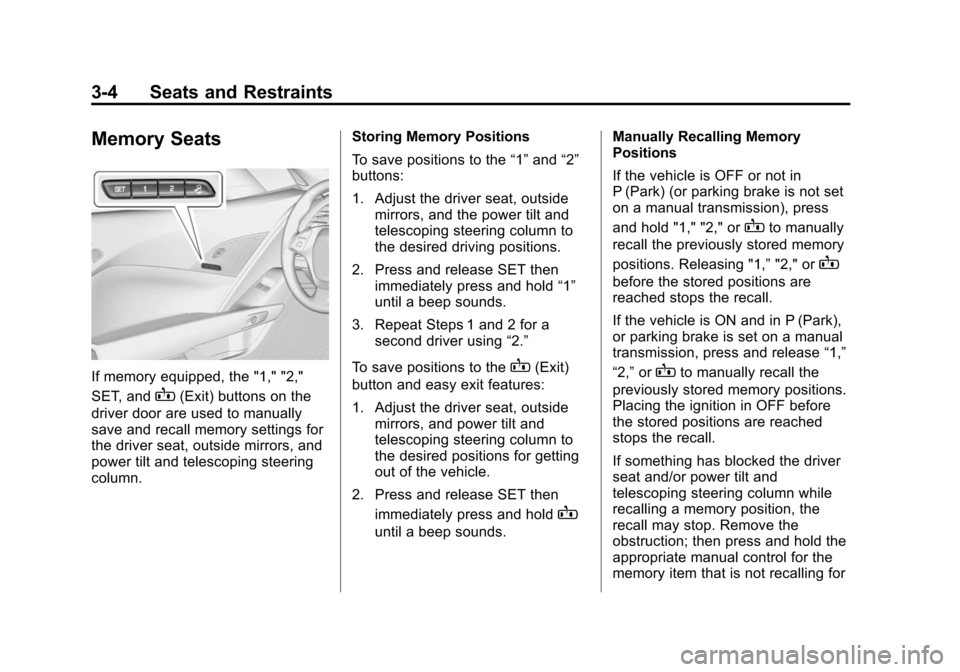
If memory equipped, the "1," "2,"
SET, and
B(Exit) buttons on the
driver door are used to manually
save and recall memory settings for
the driver seat, outside mirrors, and
power tilt and telescoping steering
column. Storing Memory Positions
To save positions to the
“1”and “2”
buttons:
1. Adjust the driver seat, outside mirrors, and the power tilt and
telescoping steering column to
the desired driving positions.
2. Press and release SET then immediately press and hold “1”
until a beep sounds.
3. Repeat Steps 1 and 2 for a second driver using “2.”
To save positions to the
B(Exit)
button and easy exit features:
1. Adjust the driver seat, outside mirrors, and power tilt and
telescoping steering column to
the desired positions for getting
out of the vehicle.
2. Press and release SET then immediately press and hold
B
until a beep sounds. Manually Recalling Memory
Positions
If the vehicle is OFF or not in
P (Park) (or parking brake is not set
on a manual transmission), press
and hold "1," "2," or
Bto manually
recall the previously stored memory
positions. Releasing "1,” "2," or
B
before the stored positions are
reached stops the recall.
If the vehicle is ON and in P (Park),
or parking brake is set on a manual
transmission, press and release “1,”
“2,” or
Bto manually recall the
previously stored memory positions.
Placing the ignition in OFF before
the stored positions are reached
stops the recall.
If something has blocked the driver
seat and/or power tilt and
telescoping steering column while
recalling a memory position, the
recall may stop. Remove the
obstruction; then press and hold the
appropriate manual control for the
memory item that is not recalling for
Page 67 of 376
Black plate (5,1)Chevrolet Corvette Owner Manual (GMNA-Localizing-U.S./Canada/Mexico-
6007198) - 2014 - CRC - 2/5/14
Seats and Restraints 3-5
two seconds. Try recalling the
memory position again by pressing
the appropriate memory button.
If the memory position is still not
recalling, see your dealer for
service.
Automatically Recalling Memory
Positions (Auto Memory Recall)
The Auto (Automatic) Memory
Recall feature automatically recalls
the current driver’s previously stored
“1” or“2” position when entering the
vehicle.
Depending upon the Auto Memory
Recall feature enabled in the vehicle
personalization menu, memory “1”
or “2” positions are recalled as
follows:
To activate the recall when the
ignition is off, and On - Driver Door
Open is selected in the vehicle
personalization menu:
.PressKon the RKE transmitter
and open the door.
.Press the lock/unlock button on
the outside driver door handle
and open the driver door. The
RKE transmitter must be present
for the recall to activate.
.If the driver door is already
open, press
Kon the RKE
transmitter to activate the recall.
To activate the recall at ignition ON,
the transmission must be in P (Park)
(or the parking brake set for a
manual transmission) and On - At
Ignition On selected in the vehicle
personalization menu:
.Place the ignition in ON/RUN/
START.
See Vehicle Personalization on
page 5-43.
To stop recall movement, press one
of the memory, power mirror,
or power seat controls, or press the
power tilt and telescoping steering
column control. If On - At Ignition
On is selected in the vehicle
personalization menu, placing the
ignition in OFF stops the recall. If something has blocked the driver
seat and/or power tilt and
telescoping steering column while
recalling a memory position, the
recall may stop. Remove the
obstruction; then press and hold the
appropriate manual control for the
memory item that is not recalling for
two seconds. Try recalling the
memory position again by opening
the driver door and pressing
Kon
the RKE transmitter. If the memory
position is still not recalling, see
your dealer for service.
Easy Exit Recall
If programmed on in the vehicle
personalization menu, the easy exit
feature automatically moves the
driver seat, power tilt and
telescoping steering column, and
outside mirrors on some vehicles to
the memory positions previously
saved to the
B(Exit) button. See
“Storing Memory Positions” listed
previously. See also Vehicle
Personalization on page 5-43.
Page 68 of 376
Black plate (6,1)Chevrolet Corvette Owner Manual (GMNA-Localizing-U.S./Canada/Mexico-
6007198) - 2014 - CRC - 2/5/14
3-6 Seats and Restraints
Easy exit recall automatically
activates when one of the following
occurs:
.The vehicle is turned off and the
driver door is opened within a
short time.
.The vehicle is turned off with the
driver door open.
If something has blocked the driver
seat and/or power tilt and
telescoping steering column while
recalling the exit position, the recall
may stop. Remove the obstruction;
then press and hold the appropriate
manual control for the exit feature
not recalling for two seconds. Try
recalling the exit position again.
If the exit position is still not
recalling, see your dealer for
service.
Seatback Latches
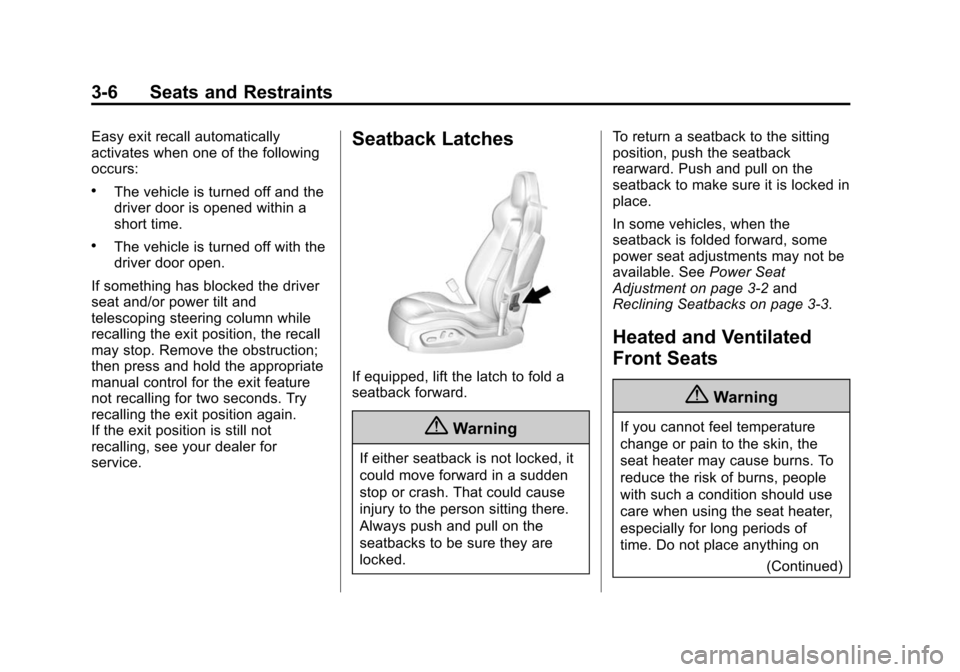
If equipped, lift the latch to fold a
seatback forward.
{Warning
If either seatback is not locked, it
could move forward in a sudden
stop or crash. That could cause
injury to the person sitting there.
Always push and pull on the
seatbacks to be sure they are
locked. To return a seatback to the sitting
position, push the seatback
rearward. Push and pull on the
seatback to make sure it is locked in
place.
In some vehicles, when the
seatback is folded forward, some
power seat adjustments may not be
available. See
Power Seat
Adjustment on page 3-2 and
Reclining Seatbacks on page 3-3.
Heated and Ventilated
Front Seats
{Warning
If you cannot feel temperature
change or pain to the skin, the
seat heater may cause burns. To
reduce the risk of burns, people
with such a condition should use
care when using the seat heater,
especially for long periods of
time. Do not place anything on
(Continued)
Page 84 of 376
Black plate (22,1)Chevrolet Corvette Owner Manual (GMNA-Localizing-U.S./Canada/Mexico-
6007198) - 2014 - CRC - 2/5/14
3-22 Seats and Restraints
Warning (Continued)
back as it will go. It is better to
secure the child restraint in a
rear seat.
The passenger sensing system is
designed to turn off the front
outboard passenger frontal airbag if:
.The front outboard passenger
seat is unoccupied.
.The system determines an infant
is present in a child restraint.
.A front outboard passenger
takes his/her weight off of the
seat for a period of time.
.There is a critical problem with
the airbag system or the
passenger sensing system.
When the passenger sensing
system has turned off the front
outboard passenger frontal airbag,
the off indicator will light and stay lit as a reminder that the airbag is off.
See
Passenger Airbag Status
Indicator on page 5-14.
The passenger sensing system is
designed to turn on the front
outboard passenger frontal airbag
anytime the system senses that a
person of adult size is sitting
properly in the front outboard
passenger seat.
When the passenger sensing
system has allowed the airbag to be
enabled, the on indicator will light
and stay lit as a reminder that the
airbag is active.
For some children, including
children in child restraints, and for
very small adults, the passenger
sensing system may or may not turn
off the front outboard passenger
frontal airbag, depending upon the
person's seating posture and body
build. Everyone in the vehicle who
has outgrown child restraints should
wear a safety belt
properly —whether or not there is
an airbag for that person.
{Warning
If the airbag readiness light ever
comes on and stays on, it means
that something may be wrong
with the airbag system. To help
avoid injury to yourself or others,
have the vehicle serviced right
away. See Airbag Readiness
Light on page 5-13 for more
information, including important
safety information.
If the On Indicator Is Lit for a
Child Restraint
The passenger sensing system is
designed to turn off the front
outboard passenger frontal airbag if
the system determines that an infant
is present in a child restraint. If a
child restraint has been installed
and the on indicator is lit:
1. Turn the vehicle off.
2. Remove the child restraint from the vehicle.
Page 85 of 376
Black plate (23,1)Chevrolet Corvette Owner Manual (GMNA-Localizing-U.S./Canada/Mexico-
6007198) - 2014 - CRC - 2/5/14
Seats and Restraints 3-23
3. Remove any additional itemsfrom the seat such as blankets,
cushions, seat covers, seat
heaters, or seat massagers.
4. Reinstall the child restraint following the directions provided
by the child restraint
manufacturer and refer to
Securing Child Restraints on
page 3-34. Even if the child
restraint is equipped with a
safety belt lock-off, make sure
the safety belt retractor is locked
by pulling the shoulder belt all
the way out of the retractor
before tightening the safety belt.
When the retractor lock is set,
the belt can be tightened but not
pulled out of the retractor. 5. If, after reinstalling the child
restraint and restarting the
vehicle, the on indicator is still lit,
turn the vehicle off. Then slightly
recline the vehicle seatback and
adjust the seat cushion,
if adjustable, to make sure that
the vehicle seatback is not
pushing the child restraint into
the seat cushion.
6. Restart the vehicle.
The passenger sensing system may
or may not turn off the airbag for a
child in a child restraint depending
upon the child’s size. It is better to
secure the child restraint in a
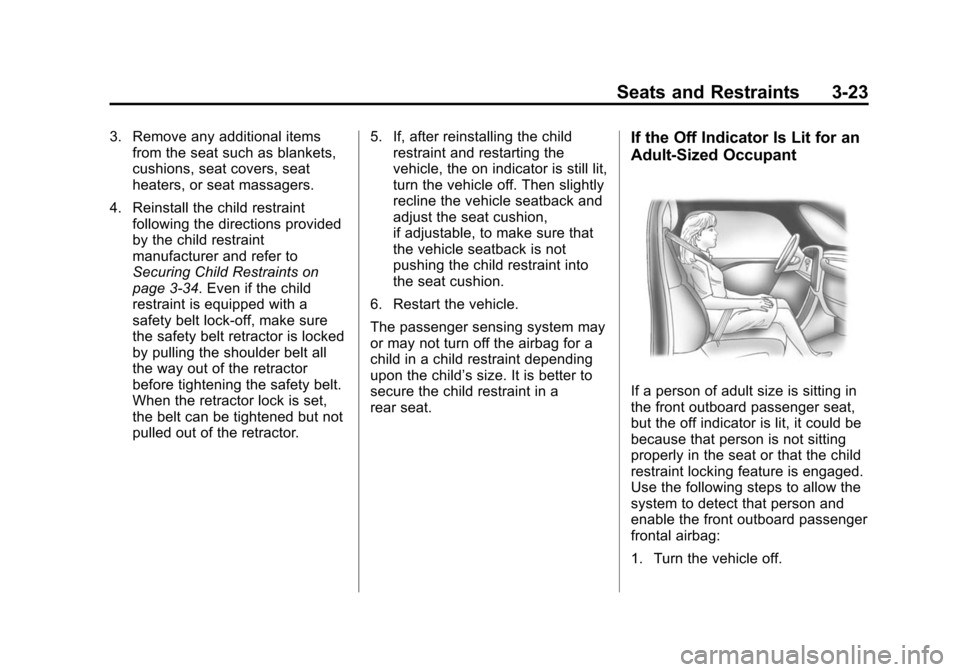
rear seat.If the Off Indicator Is Lit for an
Adult-Sized Occupant
If a person of adult size is sitting in
the front outboard passenger seat,
but the off indicator is lit, it could be
because that person is not sitting
properly in the seat or that the child
restraint locking feature is engaged.
Use the following steps to allow the
system to detect that person and
enable the front outboard passenger
frontal airbag:
1. Turn the vehicle off.
Page 86 of 376
Black plate (24,1)Chevrolet Corvette Owner Manual (GMNA-Localizing-U.S./Canada/Mexico-
6007198) - 2014 - CRC - 2/5/14
3-24 Seats and Restraints
2. Remove any additional materialfrom the seat, such as blankets,
cushions, seat covers, seat
heaters, or seat massagers.
3. Place the seatback in the fully upright position.
4. Have the person sit upright in the seat, centered on the seat
cushion, with legs comfortably
extended.
5. If the shoulder portion of the belt is pulled out all the way, the
child restraint locking feature will
be engaged. This may
unintentionally cause the
passenger sensing system to
turn the airbag off for some
adult-sized occupants. If this
happens, unbuckle the belt, let
the belt go back all the way, and
then buckle the belt again
without pulling the belt out all
the way.
6. Restart the vehicle and have the person remain in this position for
two to three minutes after the on
indicator is lit.{Warning
If the front outboard passenger
airbag is turned off for an
adult-sized occupant, the airbag
will not be able to inflate and help
protect that person in a crash,
resulting in an increased risk of
serious injury or even death. An
adult-sized occupant should not
ride in the front outboard
passenger seat, if the passenger
airbag off indicator is lit.
Additional Factors Affecting
System Operation
Safety belts help keep the
passenger in position on the seat
during vehicle maneuvers and
braking, which helps the passenger
sensing system maintain the
passenger airbag status. See
“Safety Belts” and“Child Restraints”
in the Index for additional
information about the importance of
proper restraint use. A thick layer of additional material,
such as a blanket or cushion,
or aftermarket equipment such as
seat covers, seat heaters, and seat
massagers can affect how well the
passenger sensing system
operates. We recommend that you
not use seat covers or other
aftermarket equipment except when
approved by GM for your specific
vehicle. See
Adding Equipment to
the Airbag-Equipped Vehicle on
page 3-25 for more information
about modifications that can affect
how the system operates.
The on indicator may be lit if an
object, such as a briefcase,
handbag, grocery bag, laptop,
or other electronic device, is put on
an unoccupied seat. If this is not
desired, remove the object from
the seat.
Page 97 of 376
Black plate (35,1)Chevrolet Corvette Owner Manual (GMNA-Localizing-U.S./Canada/Mexico-
6007198) - 2014 - CRC - 2/5/14
Seats and Restraints 3-35
Warning (Continued)
Secure rear-facing child restraints
in a rear seat, even if the airbag
is off. If you secure a
forward-facing child restraint in
the front seat, always move the
front passenger seat as far back
as it will go. It is better to secure
the child restraint in a rear seat.
SeePassenger Sensing System
on page 3-20 for additional
information.
Rear-facing child restraints should
not be installed in the vehicle, even
if the airbag is off.
Do not secure a child seat in a
position without a top tether anchor
if a national or local law requires
that the top tether be anchored, or if
the instructions that come with the
child restraint say that the top strap
must be anchored. In Canada, the law requires that
forward-facing child restraints have
a top tether, and that the tether be
attached.
You will be using the lap-shoulder
belt to secure the child restraint in
this position. Follow the instructions
that came with the child restraint.
1. Move the seat as far back as it
will go before securing the
forward-facing child restraint.
When the passenger sensing
system has turned off the front
outboard passenger frontal
airbag, the off indicator on the
passenger airbag status
indicator should light and stay lit
when you start the vehicle. See
Passenger Airbag Status
Indicator on page 5-14.
2. Put the child restraint on the seat.
Remove the safety belt from the
guide by sliding the webbing
through the opening on the guide. Do not secure the child
restraint with the safety belt
routed through the guide.
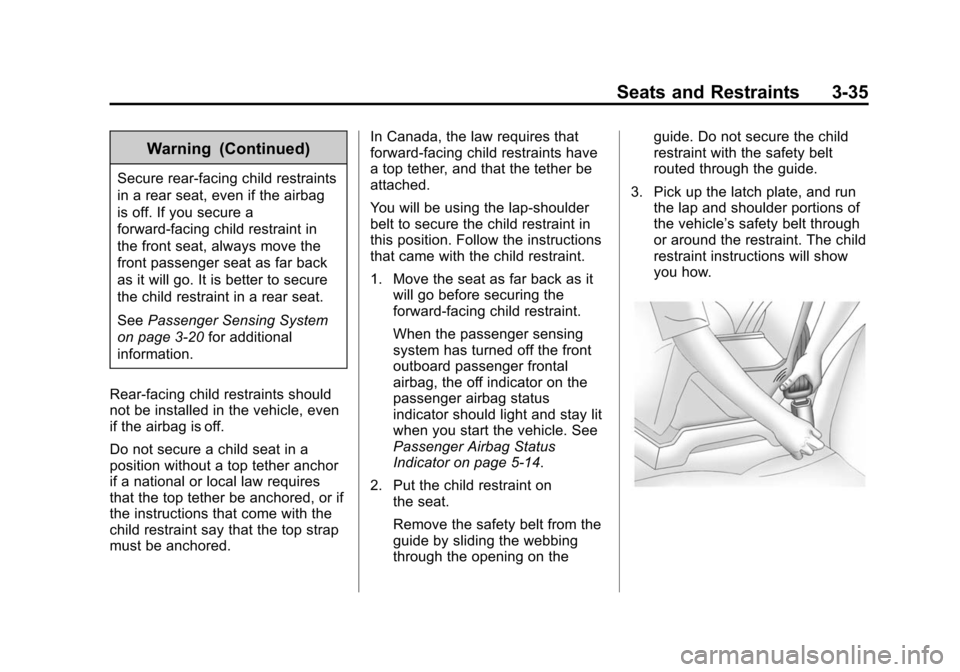
3. Pick up the latch plate, and run the lap and shoulder portions of
the vehicle’ s safety belt through
or around the restraint. The child
restraint instructions will show
you how.