lock CHEVROLET CORVETTE 2015 7.G User Guide
[x] Cancel search | Manufacturer: CHEVROLET, Model Year: 2015, Model line: CORVETTE, Model: CHEVROLET CORVETTE 2015 7.GPages: 393, PDF Size: 5.4 MB
Page 33 of 393
Black plate (4,1)Chevrolet Corvette Owner Manual (GMNA-Localizing-U.S./Canada/Mexico-
7576293) - 2015 - crc - 10/31/14
2-4 Keys, Doors, and Windows
positions may be recalled when
unlocking the vehicle and when the
door is open.
See“Remote Lock, Unlock, Start”
under Vehicle Personalization on
page 5-45 andMemory Seats on
page 3-4.
Pressing
Kwill disarm the
theft-deterrent system. See Vehicle
Alarm System on page 2-16.
When the doors are unlocked, the
fuel door is also unlocked.
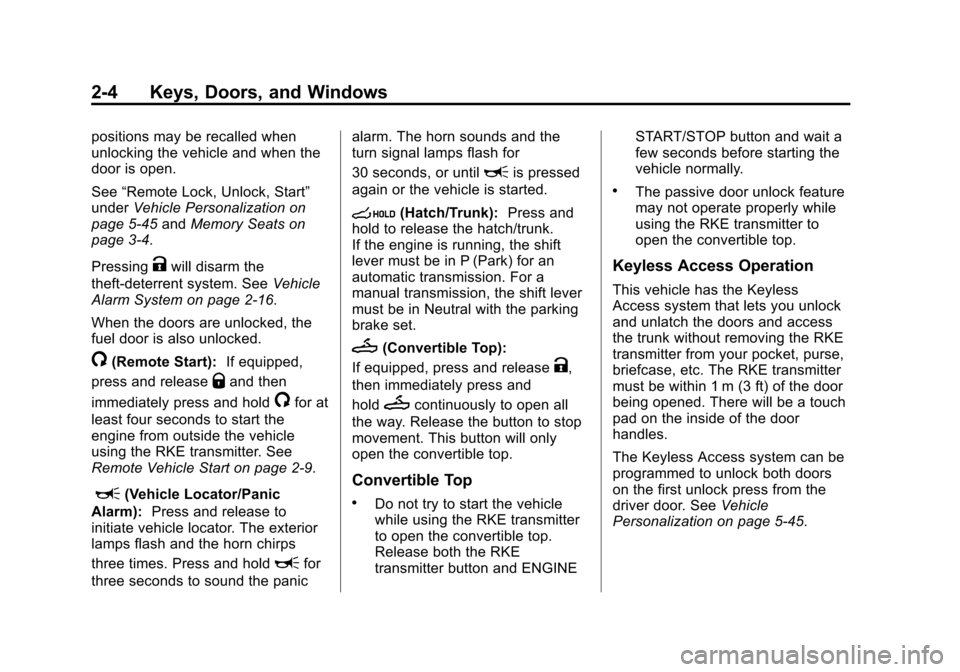
/(Remote Start): If equipped,
press and release
Qand then
immediately press and hold
/for at
least four seconds to start the
engine from outside the vehicle
using the RKE transmitter. See
Remote Vehicle Start on page 2-9.
L(Vehicle Locator/Panic
Alarm): Press and release to
initiate vehicle locator. The exterior
lamps flash and the horn chirps
three times. Press and hold
Lfor
three seconds to sound the panic alarm. The horn sounds and the
turn signal lamps flash for
30 seconds, or until
Lis pressed
again or the vehicle is started.
s(Hatch/Trunk): Press and
hold to release the hatch/trunk.
If the engine is running, the shift
lever must be in P (Park) for an
automatic transmission. For a
manual transmission, the shift lever
must be in Neutral with the parking
brake set.
M(Convertible Top):
If equipped, press and release
K,
then immediately press and
hold
Mcontinuously to open all
the way. Release the button to stop
movement. This button will only
open the convertible top.
Convertible Top
.Do not try to start the vehicle
while using the RKE transmitter
to open the convertible top.
Release both the RKE
transmitter button and ENGINE START/STOP button and wait a
few seconds before starting the
vehicle normally.
.The passive door unlock feature
may not operate properly while
using the RKE transmitter to
open the convertible top.
Keyless Access Operation
This vehicle has the Keyless
Access system that lets you unlock
and unlatch the doors and access
the trunk without removing the RKE
transmitter from your pocket, purse,
briefcase, etc. The RKE transmitter
must be within 1 m (3 ft) of the door
being opened. There will be a touch
pad on the inside of the door
handles.
The Keyless Access system can be
programmed to unlock both doors
on the first unlock press from the
driver door. See
Vehicle
Personalization on page 5-45.
Page 34 of 393
Black plate (5,1)Chevrolet Corvette Owner Manual (GMNA-Localizing-U.S./Canada/Mexico-
7576293) - 2015 - crc - 10/31/14
Keys, Doors, and Windows 2-5
Keyless Unlocking
Press the door handle sensor to
unlock and open the doors if the
RKE transmitter is within range. See
Door Locks on page 2-11and
“Passive Door Unlock” under
Vehicle Personalization on
page 5-45.
Passive Locking
Keyless Access will lock several
seconds after all doors are closed if
the vehicle is off and at least one
transmitter has been removed or
none remain in the vehicle.
The fuel door will also lock at
this time.
If other electronic devices interfere
with the RKE transmitter signal, the
vehicle may not detect the RKE
transmitter inside the vehicle.
If passive locking is enabled, the
doors may lock with the RKE
transmitter inside the vehicle. Do
not leave the RKE transmitter in an
unattended vehicle. To customize whether the doors
automatically lock when exiting the
vehicle, see
“Passive Door Lock”
under Vehicle Personalization on
page 5-45.
Temporary Disable Passive
Locking Feature
Temporarily disable the passive
locking by pressing and holding
K
on the interior door switch with a
door open for at least four seconds,
or until three chimes are heard.
Passive locking will then remain
disabled until
Qon the interior door
is pressed, or until the vehicle is
turned on.
To customize the doors to
automatically lock when exiting the
vehicle, see “Remote Lock, Unlock,
Start” under Vehicle Personalization
on page 5-45.
Remote Left in Vehicle Alert
When the vehicle is turned off and a
remote is left in the vehicle, the horn
will chirp three times after both
doors are closed. To turn on or off see
“Remote Left in Vehicle Alert”
under Vehicle Personalization on
page 5-45.
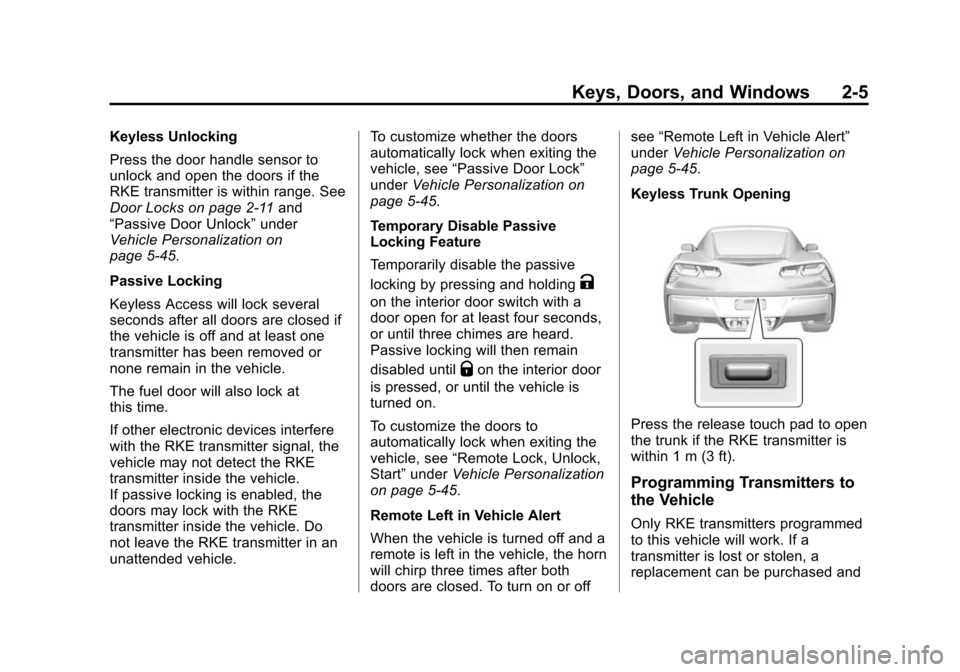
Keyless Trunk Opening
Press the release touch pad to open
the trunk if the RKE transmitter is
within 1 m (3 ft).
Programming Transmitters to
the Vehicle
Only RKE transmitters programmed
to this vehicle will work. If a
transmitter is lost or stolen, a
replacement can be purchased and
Page 36 of 393
Black plate (7,1)Chevrolet Corvette Owner Manual (GMNA-Localizing-U.S./Canada/Mexico-
7576293) - 2015 - crc - 10/31/14
Keys, Doors, and Windows 2-7
2. Remove the key from thetransmitter and insert the vehicle
key into the key cylinder above
the license plate.
3. Open the hatch/trunk.
4. Turn the key five times within 10 seconds.
The DIC message displays
REMOTE LEARN PENDING
PLEASE WAIT.
5. Return key base back into the RKE transmitter.
6. Wait for 10 minutes until the DIC displays PRESS ENGINE
START BUTTON TO LEARN,
then press the ENGINE START/
STOP button.
The DIC reads REMOTE
LEARN PENDING,
PLEASE WAIT.
7. Repeat Step 6 two additional times. After the third time all
previously known transmitters
will no longer work with the
vehicle. Remaining transmitters
can be relearned during the next steps. The DIC display should
now show READY FOR
REMOTE #1.
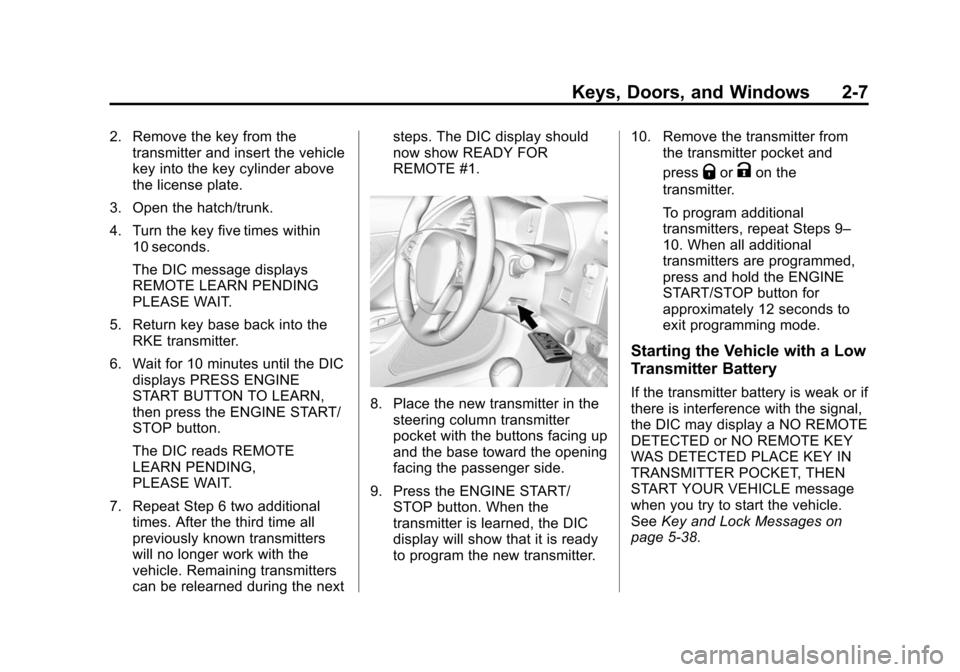
8. Place the new transmitter in the
steering column transmitter
pocket with the buttons facing up
and the base toward the opening
facing the passenger side.
9. Press the ENGINE START/ STOP button. When the
transmitter is learned, the DIC
display will show that it is ready
to program the new transmitter. 10. Remove the transmitter from
the transmitter pocket and
press
QorKon the
transmitter.
To program additional
transmitters, repeat Steps 9–
10. When all additional
transmitters are programmed,
press and hold the ENGINE
START/STOP button for
approximately 12 seconds to
exit programming mode.
Starting the Vehicle with a Low
Transmitter Battery
If the transmitter battery is weak or if
there is interference with the signal,
the DIC may display a NO REMOTE
DETECTED or NO REMOTE KEY
WAS DETECTED PLACE KEY IN
TRANSMITTER POCKET, THEN
START YOUR VEHICLE message
when you try to start the vehicle.
See Key and Lock Messages on
page 5-38.
Page 39 of 393
Black plate (10,1)Chevrolet Corvette Owner Manual (GMNA-Localizing-U.S./Canada/Mexico-
7576293) - 2015 - crc - 10/31/14
2-10 Keys, Doors, and Windows
The RKE transmitter range may be
less while the vehicle is running.
Other conditions can affect the
performance of the transmitter. See
Remote Keyless Entry (RKE)
System on page 2-2.
Starting the Engine Using Remote
Start
1. Press and release
Qon the
RKE transmitter.
2. Immediately press and hold
/
for at least four seconds or until
the turn signal lamps flash. The
lamps flash to confirm the
request to remote start the
vehicle has been received.
During the remote start, the
doors will be locked and the
parking lamps will remain on as
long as the engine is running.
The engine will shut off after
10 minutes unless a time
extension is done. 3. To drive, have the RKE
transmitter in the vehicle, press
the brake pedal, and then start
the vehicle.
Extending Engine Run Time
The engine run time can also be
extended by another 10 minutes,
if during the first 10 minutes
Steps 1–2 are repeated while the
engine is still running. An extension
can be requested, 30 seconds after
starting. This provides a total of
20 minutes.
The remote start can only be
extended once per ignition cycle.
A maximum of two remote starts,
or a remote start with an extension,
are allowed between ignition cycles.
After two remote starts, the vehicle's
ignition must be changed to ON/
RUN/START and then back to OFF
before the remote start procedure
can be used again. Canceling a Remote Start
To cancel a remote start, do any of
the following:
.Press and hold/until the
parking lamps turn off.
.Turn on the hazard warning
flashers.
.Turn the vehicle on and then
back off.
Conditions in Which Remote Start
Will Not Work
The remote start will not operate if
any of the following occur:
.The ignition is in any mode other
than OFF.
.The transmitter is in the vehicle.
.The hood is not closed.
.The hazard warning flashers
are on.
.There is an emission control
system malfunction.
.The engine coolant temperature
is too high.
Page 40 of 393
Black plate (11,1)Chevrolet Corvette Owner Manual (GMNA-Localizing-U.S./Canada/Mexico-
7576293) - 2015 - crc - 10/31/14
Keys, Doors, and Windows 2-11
.The oil pressure is low.
.Two remote vehicle starts have
already been used.
.The vehicle is not in P (Park).
Door Locks
{Warning
Unlocked doors can be
dangerous.
.Passengers—especially
children —can easily open
the doors and fall out of a
moving vehicle. When a door
is locked it will not open. You
increase the chance of being
thrown out of the vehicle in a
crash if the doors are not
locked. So, wear safety belts
properly and lock the doors
whenever you drive.
.Young children who get into
unlocked vehicles may be
unable to get out. A child can
(Continued)
Warning (Continued)
be overcome by extreme heat
and can suffer permanent
injuries or even death from
heat stroke. Always lock your
vehicle whenever you
leave it.
.Outsiders can easily enter
through an unlocked door
when you slow down or stop
your vehicle. Locking your
doors can help prevent this
from happening.
To lock or unlock from the outside,
press
QorKon the Remote
Keyless Entry (RKE) transmitter.
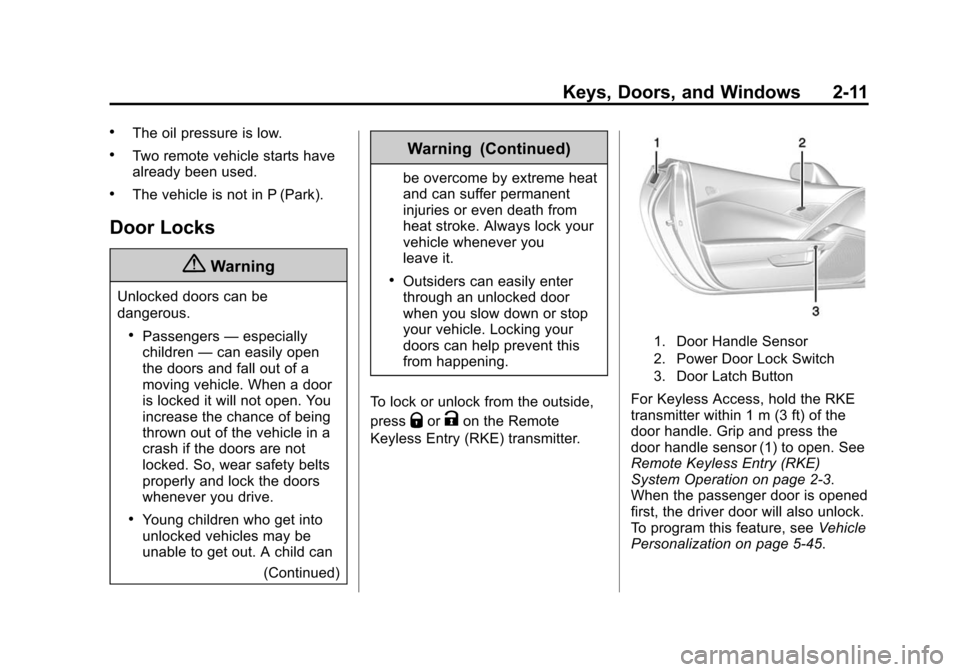
1. Door Handle Sensor
2. Power Door Lock Switch
3. Door Latch Button
For Keyless Access, hold the RKE
transmitter within 1 m (3 ft) of the
door handle. Grip and press the
door handle sensor (1) to open. See
Remote Keyless Entry (RKE)
System Operation on page 2-3.
When the passenger door is opened
first, the driver door will also unlock.
To program this feature, see Vehicle
Personalization on page 5-45.
Page 41 of 393
Black plate (12,1)Chevrolet Corvette Owner Manual (GMNA-Localizing-U.S./Canada/Mexico-
7576293) - 2015 - crc - 10/31/14
2-12 Keys, Doors, and Windows
To lock or unlock from the inside,
use the power door lock switch (2).
SeePower Door Locks on
page 2-13.
To open a door from the inside,
press the door latch button (3).
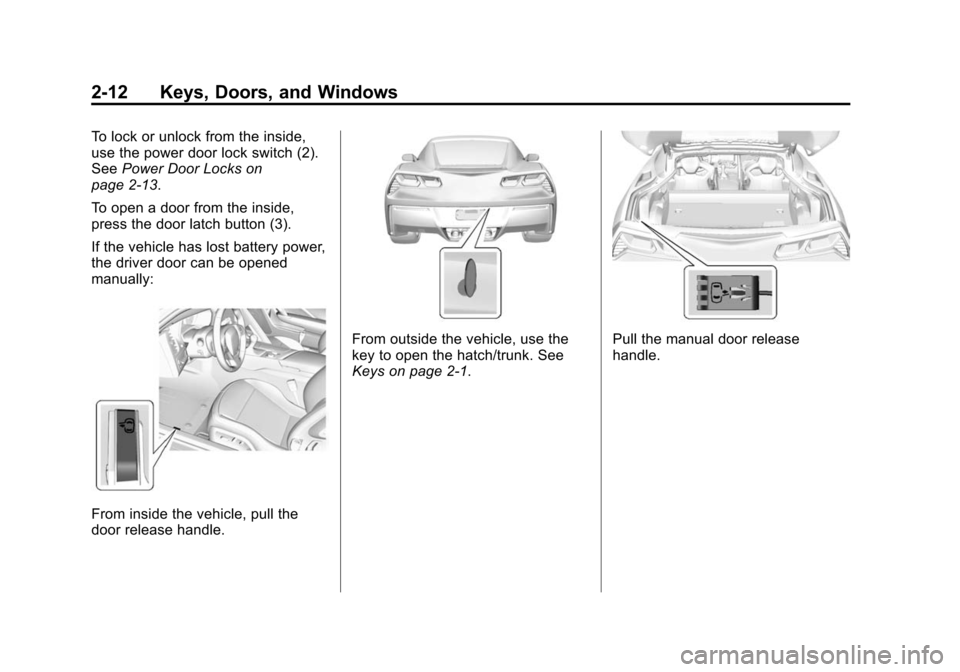
If the vehicle has lost battery power,
the driver door can be opened
manually:
From inside the vehicle, pull the
door release handle.
From outside the vehicle, use the
key to open the hatch/trunk. See
Keys on page 2-1.Pull the manual door release
handle.
Page 42 of 393
Black plate (13,1)Chevrolet Corvette Owner Manual (GMNA-Localizing-U.S./Canada/Mexico-
7576293) - 2015 - crc - 10/31/14
Keys, Doors, and Windows 2-13
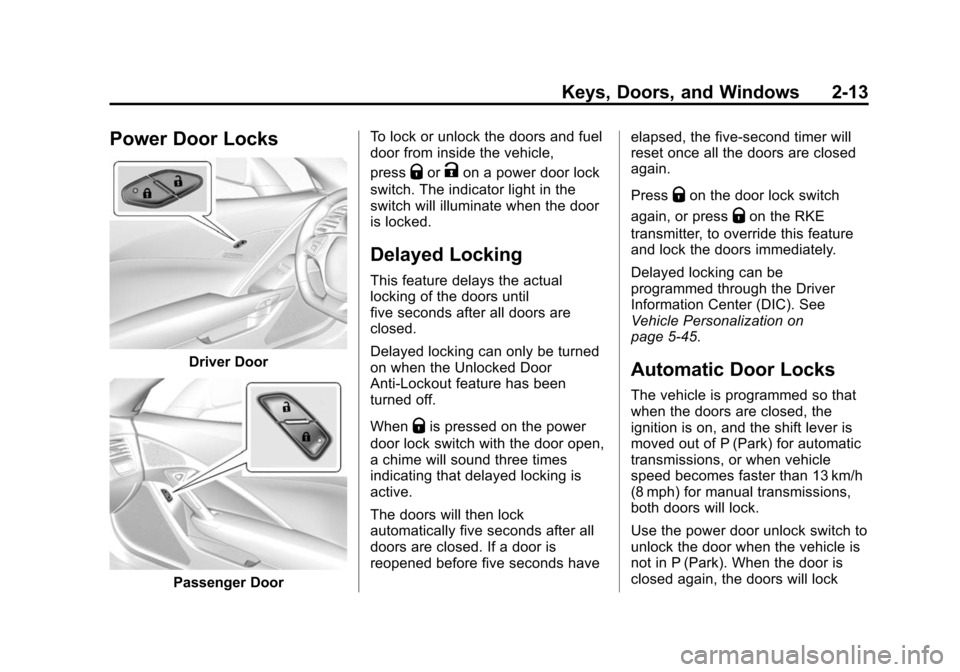
Power Door Locks
Driver Door
Passenger DoorTo lock or unlock the doors and fuel
door from inside the vehicle,
press
QorKon a power door lock
switch. The indicator light in the
switch will illuminate when the door
is locked.
Delayed Locking
This feature delays the actual
locking of the doors until
five seconds after all doors are
closed.
Delayed locking can only be turned
on when the Unlocked Door
Anti-Lockout feature has been
turned off.
When
Qis pressed on the power
door lock switch with the door open,
a chime will sound three times
indicating that delayed locking is
active.
The doors will then lock
automatically five seconds after all
doors are closed. If a door is
reopened before five seconds have elapsed, the five-second timer will
reset once all the doors are closed
again.
Press
Qon the door lock switch
again, or press
Qon the RKE
transmitter, to override this feature
and lock the doors immediately.
Delayed locking can be
programmed through the Driver
Information Center (DIC). See
Vehicle Personalization on
page 5-45.
Automatic Door Locks
The vehicle is programmed so that
when the doors are closed, the
ignition is on, and the shift lever is
moved out of P (Park) for automatic
transmissions, or when vehicle
speed becomes faster than 13 km/h
(8 mph) for manual transmissions,
both doors will lock.
Use the power door unlock switch to
unlock the door when the vehicle is
not in P (Park). When the door is
closed again, the doors will lock
Page 43 of 393
Black plate (14,1)Chevrolet Corvette Owner Manual (GMNA-Localizing-U.S./Canada/Mexico-
7576293) - 2015 - crc - 10/31/14
2-14 Keys, Doors, and Windows
either when your foot is removed
from the brake or the vehicle speed
becomes faster than
13 km/h (8 mph).
Automatic Door Unlock
The vehicle is programmed so that
when the shift lever is moved into
P (Park) for automatic transmission
vehicles or when the ignition is
turned off or is in Retained
Accessory Power (RAP) for manual
transmission vehicles, both doors
will unlock.
With the vehicle stopped and the
engine running, door unlocking can
be programmed through the Driver
Information Center (DIC). This
allows the driver to choose various
unlock settings. For programming
information, seeVehicle
Personalization on page 5-45.
Lockout Protection
If the vehicle is in ACC/
ACCESSORY or ON/RUN/START,
and the power door lock switch is
pressed with the driver door open,
the doors will lock and only the
driver door will unlock.
If the vehicle is off and Unlocked
Door Anti-Lockout is turned on, the
driver door is open, and door
locking is requested using a door
lock switch or the RKE transmitter,
both doors will lock and only the
driver door will unlock. The
Unlocked Door Anti-Lockout feature
can be turned on or off using the
vehicle personalization menus.
See Vehicle Personalization on
page 5-45.
Lockout protection can be manually
overridden with the driver door open
by pressing and holding
Qon the
power door lock switch.
Doors
Hatch (Trunk)
{Warning
Exhaust gases can enter the
vehicle if it is driven with the
liftgate, hatch/trunk open, or with
any objects that pass through the
seal between the body and the
hatch/trunk or liftgate. Engine
exhaust contains carbon
monoxide (CO) which cannot be
seen or smelled. It can cause
unconsciousness and even death.
If the vehicle must be driven with
the liftgate or hatch/trunk open:
.Close all of the windows.
.Fully open the air outlets on
or under the instrument
panel.
(Continued)
Page 46 of 393
Black plate (17,1)Chevrolet Corvette Owner Manual (GMNA-Localizing-U.S./Canada/Mexico-
7576293) - 2015 - crc - 10/31/14
Keys, Doors, and Windows 2-17
On Solid:Vehicle is secured
during the delay to arm the system.
Fast Flash: Vehicle is unsecured.
A door, the hood, or the hatch/trunk
is open.
Slow Flash: Alarm system is
armed.
Arming the Alarm System
1. Turn off the vehicle.
2. Lock the vehicle in one of three ways:
.Use the RKE transmitter.
.Use the Keyless Access
system.
.With a door open, pressQ
on the interior of the door.
3. After 30 seconds the alarm system will arm, and the
indicator light will begin to slowly
flash indicating the alarm system
is operating. Pressing
Qon the
RKE transmitter a second time will bypass the 30-second delay
and immediately arm the alarm
system.
The vehicle alarm system will not
arm if the doors are locked with
the key.
If the driver door is opened without
first unlocking with the RKE
transmitter, the horn will chirp and
the lights will flash to indicate
pre-alarm. If the vehicle is not
started, or the door is not unlocked
by pressing
Kon the RKE
transmitter during the 10-second
pre-alarm, the alarm will be
activated.
The alarm will also be activated if
the passenger door, the hatch/trunk,
or the hood is opened without first
disarming the system. When the
alarm is activated, the turn signals
flash and the horn sounds for about
30 seconds. The alarm system will
then re-arm to monitor for the next
unauthorized event.
Disarming the Alarm System
To disarm the alarm system or turn
off the alarm if it has been activated,
do one of the following:
.PressKon the RKE transmitter.
.Unlock the vehicle using the
Keyless Access system.
.Start the vehicle.
To avoid setting off the alarm by
accident:
.Lock the vehicle after all
occupants have left the vehicle
and both doors are closed.
.Always unlock a door with the
RKE transmitter or use the
Keyless Access system.
Unlocking the driver door with the
key will not disarm the system or
turn off the alarm.
Page 47 of 393
Black plate (18,1)Chevrolet Corvette Owner Manual (GMNA-Localizing-U.S./Canada/Mexico-
7576293) - 2015 - crc - 10/31/14
2-18 Keys, Doors, and Windows
How to Detect a Tamper
Condition
IfKis pressed on the transmitter
and the horn chirps and the lights
flash three times, a previous alarm
occurred while the system was
armed.
If the alarm has been activated, a
message will appear on the DIC.
See Security Messages on
page 5-42.
Inclination Sensor and
Intrusion Sensor
In addition to the standard
theft-deterrent system features, this
system may also have an inclination
sensor and intrusion sensor.
The inclination sensor can set off
the alarm if it senses movement of
the vehicle, such as a change in
vehicle orientation.
The intrusion sensor monitors the
vehicle interior, and can activate the
alarm if it senses unauthorized entry
into the vehicle’s interior. Do not allow passengers or pets to remain
in the vehicle when the intrusion
sensor is activated.
Before arming the theft-deterrent
system and activating the intrusion
sensor:
.Make sure both doors and
windows are completely closed.
.Secure any loose items such as
sunshades.
.Make sure there are no
obstructions blocking the
sensors.
Intrusion and Inclination
Sensors Disable Switch
It is recommended that the intrusion
and inclination sensors be
deactivated if pets are left in the
vehicle or the vehicle is being
transported.
With the vehicle turned off, press
d
to the right of the hatch/trunk
release button. The indicator light
will come on momentarily, indicating
that these sensors have been
disabled until the next time the
alarm system is armed.
Immobilizer
See
Radio Frequency Statement on
page 13-12.
Immobilizer Operation
The vehicle has a passive
theft-deterrent system.
The security light comes on in the
instrument cluster if there is a
problem with arming or disarming
the theft-deterrent system. This light
also comes on briefly when the
engine is started.
The system is automatically armed
when the ignition is turned off.