ignition CHEVROLET CORVETTE 2016 7.G User Guide
[x] Cancel search | Manufacturer: CHEVROLET, Model Year: 2016, Model line: CORVETTE, Model: CHEVROLET CORVETTE 2016 7.GPages: 351, PDF Size: 6.02 MB
Page 45 of 351
Chevrolet Corvette Owner Manual (GMNA-Localizing-U.S./Canada/Mexico-
9085364) - 2016 - crc - 9/15/15
44 Keys, Doors, and Windows
Windows
{Warning
Never leave a child, a helpless
adult, or a pet alone in a vehicle,
especially with the windows
closed in warm or hot weather.
They can be overcome by the
extreme heat and suffer
permanent injuries or even death
from heat stroke.
Power Windows
{Warning
Leaving children in a vehicle with
the Remote Keyless Entry (RKE)
transmitter is dangerous for many
reasons; children or others could
be badly injured or even killed.
They could operate the power
windows or other controls or even
make the vehicle move. The
windows will function with the
RKE transmitter in the vehicle
and they could be seriously
injured or killed if caught in the
path of a closing window. Do not
leave the RKE transmitter in a
vehicle with children.
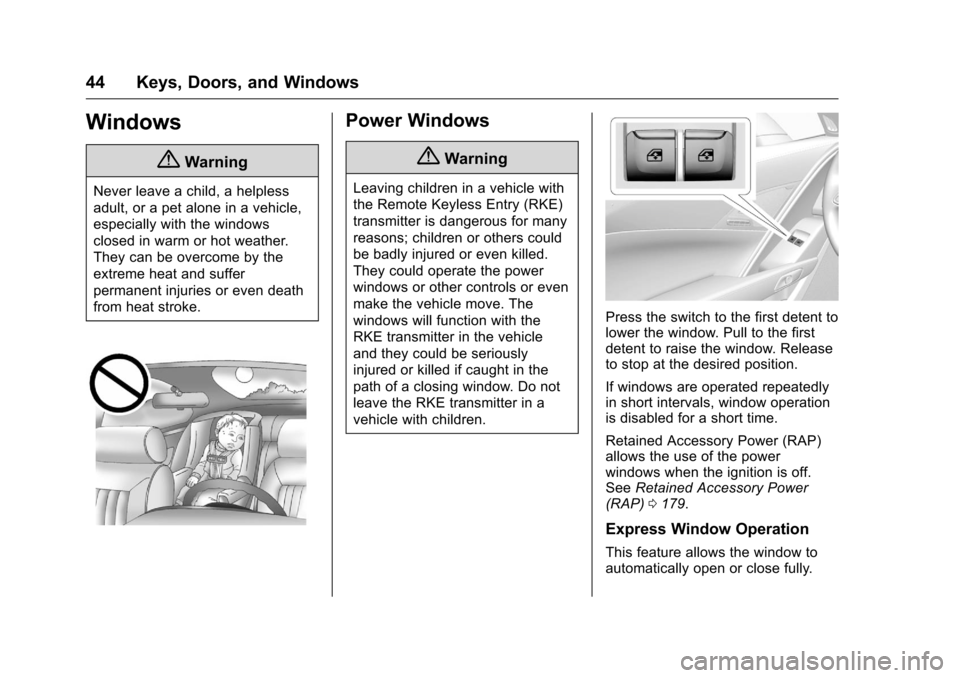
Press the switch to the first detent to
lower the window. Pull to the first
detent to raise the window. Release
to stop at the desired position.
If windows are operated repeatedly
in short intervals, window operation
is disabled for a short time.
Retained Accessory Power (RAP)
allows the use of the power
windows when the ignition is off.
SeeRetained Accessory Power
(RAP) 0179.
Express Window Operation
This feature allows the window to
automatically open or close fully.
Page 47 of 351
Chevrolet Corvette Owner Manual (GMNA-Localizing-U.S./Canada/Mexico-
9085364) - 2016 - crc - 9/15/15
46 Keys, Doors, and Windows
Roof
Roof Panel
If equipped with a removable roof
panel, use the following procedures
to remove or install it.
Caution
If a roof panel is dropped or
rested on its edges, the roof
panel, paint, and/or
weatherstripping may be
damaged. Always place the roof
panel in the stowage receivers
after removing it from the vehicle.
Removing the Roof Panel
{Warning
Do not remove a roof panel while
the vehicle is moving. The panel
could fall into the vehicle and
strike an occupant and cause you
to lose control. It could also fly off(Continued)
Warning (Continued)
and strike another vehicle.
Remove the roof panel only when
the vehicle is parked.
It may be necessary to have help
removing the roof panel.
To remove: 1. Shift an automatic transmission into P (Park) or a manual
transmission into 1 (First) or
R (Reverse).
2. Turn the ignition off and set the parking brake.
3. Lower both sun visors.
4. Open the rear hatch/trunk and remove any items that may
interfere with proper storage of
the roof panel.
5. Lower the windows. There are two release handles
on the front and one release
handle on the rear of the roof
panel.
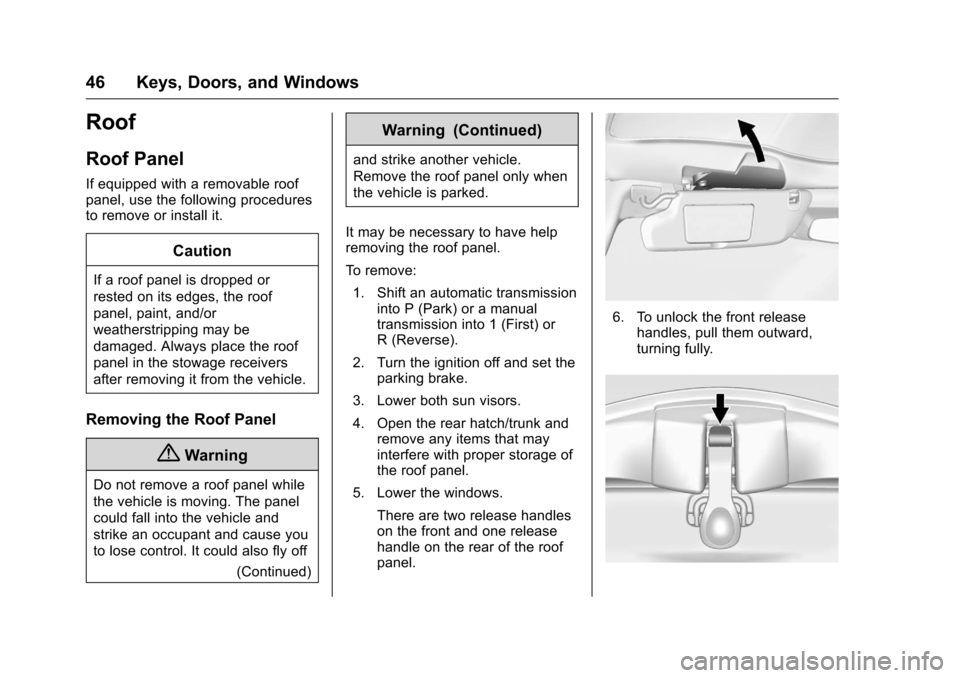
6. To unlock the front releasehandles, pull them outward,
turning fully.
Page 49 of 351

Chevrolet Corvette Owner Manual (GMNA-Localizing-U.S./Canada/Mexico-
9085364) - 2016 - crc - 9/15/15
48 Keys, Doors, and Windows
Installing the Roof Panel
{Warning
An improperly attached roof panel
may fall into or fly off the vehicle.
You or others could be injured.
After installing the roof panel,
always check that it is firmly
attached by pushing up on the
underside of the panel. Check
now and then to be sure the roof
panel is firmly in place.
Caution
Installing the roof with the release
handles in the closed position
could cause damage to the
interior trim. Always move
handles to the open position
when installing the roof.
It is easier if two people install the
roof panel. 1. Shift an automatic transmission
into P (Park). Shift a manual
transmission into 1 (First) or
R (Reverse).
2. Turn the ignition off and set the parking brake.
3. To remove the roof panel, pull up on the rear edge and
remove it from the
storage area.
4. Carefully place the roof panel over the top of the vehicle.
5. Position the rear edge of theroof panel next to the
weatherstrip on the back of the
roof opening. Then align and fit the pins at the rear of the roof
panel inside the openings in
the rear overhead weatherstrip.
Gently lower the front edge of
the roof panel to the front of the
roof opening.
6. Check that the weatherstripping on each side
of the roof panel is under the
panel.
7. Make sure the front release handles are in the full open
position.
8. Push the roof firmly downward to engage the pins.
9. Turn the front release handles inward so that they fully latch
to the closed position. It is
critical that the handles fully
latch.
Page 53 of 351
Chevrolet Corvette Owner Manual (GMNA-Localizing-U.S./Canada/Mexico-
9085364) - 2016 - crc - 9/15/15
52 Keys, Doors, and Windows
Troubleshooting
Check the following if the
convertible top switch
Mis not
operating:
. The ignition should be in ACC/
ACCESSORY or ON/RUN/
START, or Retained Accessory
Power (RAP) should be active.
. The trunk lid should be closed
and the trunk partition in place.
A DIC message will display.
. If the ONLY MANUAL
OPERATION OF TOP
POSSIBLE message is
displayed on the DIC, see
“Manual Movement of Top” later
in this section.
. At cooler outside temperatures,
the convertible top may not
open. It is possible to close the
top down to temperatures of
about −20 °C (−4 °F). A DIC
message will display if the top
will not open due to low
temperature. If necessary, move
the vehicle to a heated indoor
area to operate the top. .
If the top has recently been
cycled repeatedly or left in an
intermediate state, it will be
temporarily disabled. A DIC
message displays. Normal
operation will be restored within
10 minutes after the system has
cooled.
. If the vehicle battery is low, the
power top operation may be
disabled. Try to start the vehicle.
A DIC message displays.
. If the battery has recently been
reconnected or if the vehicle has
been jump started, the top may
not operate until the power
windows have been indexed.
Complete the power window
indexing procedure. See Power
Windows 044.
See Convertible Top
Messages 0121.
Other features may be affected
while operating the convertible top:
. The trunk can only be opened
with the key until the convertible
top is completely opened or
closed. .
Do not try to start the vehicle
while opening the top with the
RKE transmitter. A DIC message
may display. Release both
buttons and wait a few seconds
before starting the vehicle
normally.
. The passive door unlock feature
may not operate properly while
using the RKE transmitter to
open the convertible top.
. The windows cannot close while
the top is moving.
. When driving with the top not
fully secured, chimes can be
heard above 80 km/h (50 mph).
If the vehicle battery has been
disconnected and reconnected, the
fuses were pulled or replaced, or a
jump start was performed, the TOP
NOT SECURE message may
display. Press and hold
Mto
open/close the top until this
message is cleared.
See Convertible Top
Messages 0121.
Page 54 of 351
Chevrolet Corvette Owner Manual (GMNA-Localizing-U.S./Canada/Mexico-
9085364) - 2016 - crc - 9/15/15
Keys, Doors, and Windows 53
Partial Top Cycling
If the convertible top operation is
stopped before completion, the top
will temporarily hold its position.
If the ignition is in ACC/
ACCESSORY or ON/RUN/START,
the top will be held for up to
five minutes. If the vehicle is moving
or off, the amount of time will vary
from a few seconds to about a
minute.
Beeps and DIC messages will be
displayed before the top will move.
When this occurs, immediately finish
the convertible top operation by
pressing the button again until it
completes.
If the top cannot be secured, keep
clear of the top components. In
some conditions the top may move
quickly.
Do not drive with the convertible top
in an unsecured position. The top
components may move
unexpectedly. In some cases the
top may not be able to be power
operated. If this occurs, follow the
DIC messages displayed.If the tonneau cover is not secured
and latched, and the vehicle is
moving above 10 km/h (6 mph), the
tonneau cover may automatically
move to a stable position.
See
Convertible Top
Messages 0121.
Manual Movement of Top
If the DIC displays the ONLY
MANUAL OPERATION OF TOP
POSSIBLE message:
1. Press
Mto either open or
close the top. Press the switch
in the opposite direction if one
does not work.
2. If the top moves, continue pressing the switch in that
direction for at least
five seconds. The top should
then work normally.
If the top does not respond in either
direction, use the following
procedure to manually adjust the
convertible top and tonneau cover if
they are retracted but not latched.
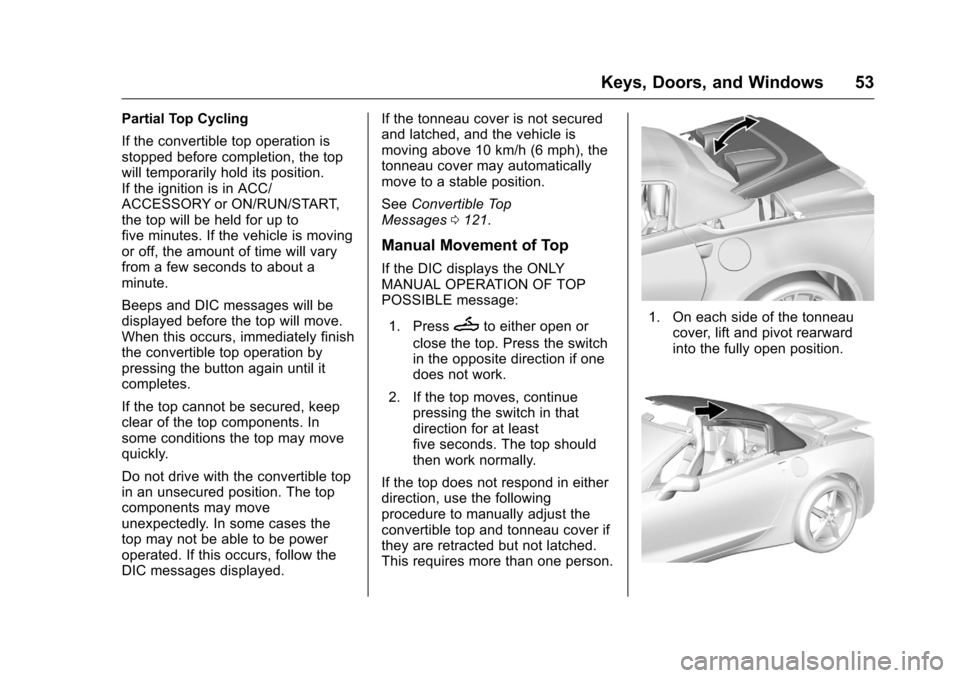
This requires more than one person.1. On each side of the tonneau cover, lift and pivot rearward
into the fully open position.
Page 58 of 351
Chevrolet Corvette Owner Manual (GMNA-Localizing-U.S./Canada/Mexico-
9085364) - 2016 - crc - 9/15/15
Seats and Restraints 57
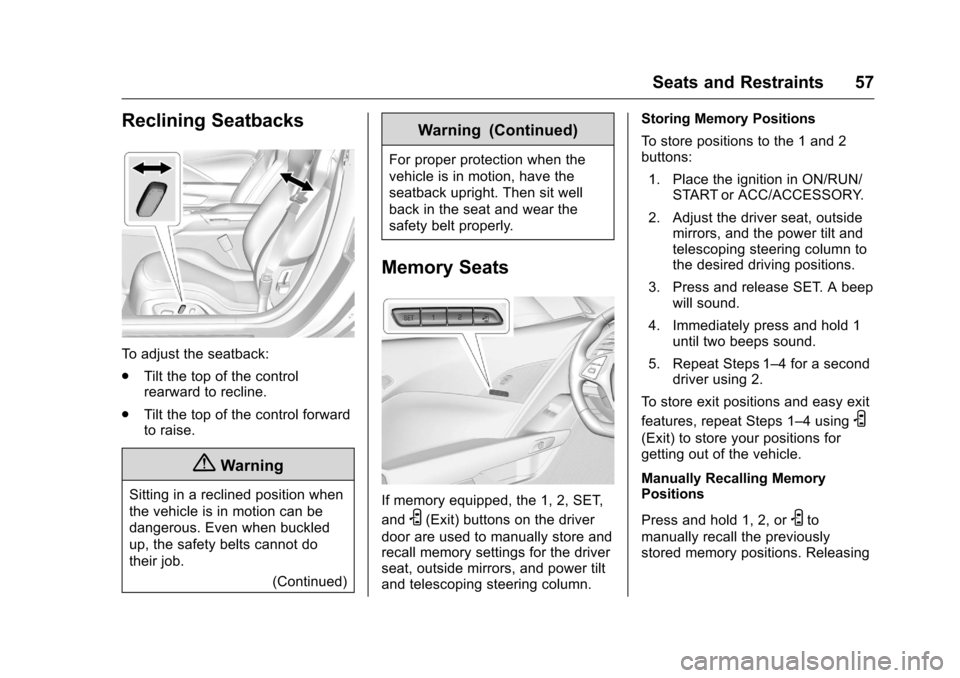
Reclining Seatbacks
To adjust the seatback:
.Tilt the top of the control
rearward to recline.
. Tilt the top of the control forward
to raise.
{Warning
Sitting in a reclined position when
the vehicle is in motion can be
dangerous. Even when buckled
up, the safety belts cannot do
their job.
(Continued)
Warning (Continued)
For proper protection when the
vehicle is in motion, have the
seatback upright. Then sit well
back in the seat and wear the
safety belt properly.
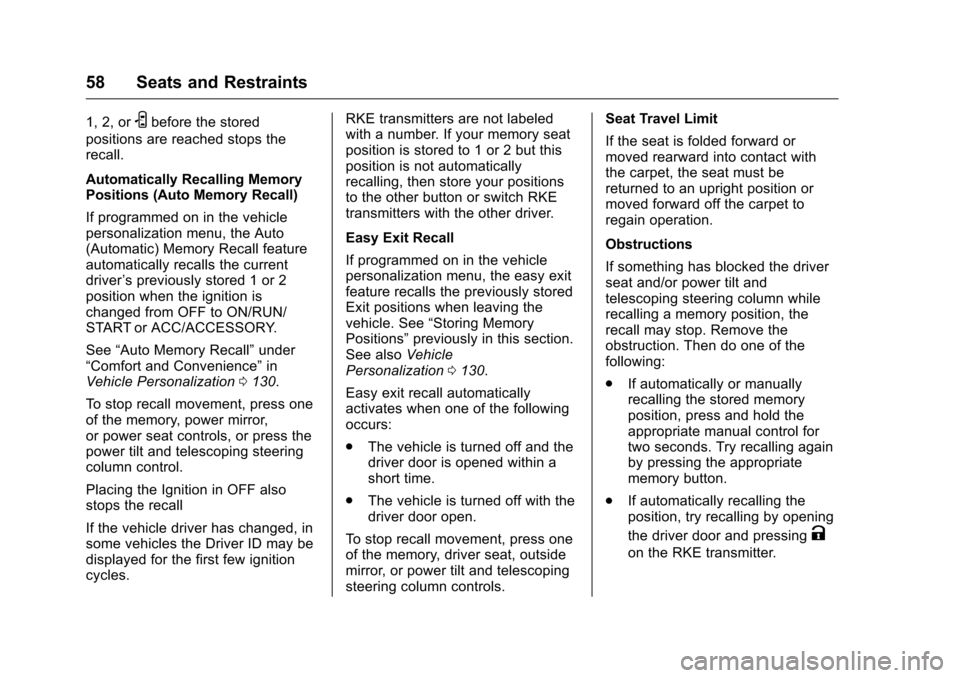
Memory Seats
If memory equipped, the 1, 2, SET,
and
S(Exit) buttons on the driver
door are used to manually store and
recall memory settings for the driver
seat, outside mirrors, and power tilt
and telescoping steering column. Storing Memory Positions
To store positions to the 1 and 2
buttons:
1. Place the ignition in ON/RUN/ START or ACC/ACCESSORY.
2. Adjust the driver seat, outside mirrors, and the power tilt and
telescoping steering column to
the desired driving positions.
3. Press and release SET. A beep will sound.
4. Immediately press and hold 1 until two beeps sound.
5. Repeat Steps 1–4 for a second driver using 2.
To store exit positions and easy exit
features, repeat Steps 1–4 using
S
(Exit) to store your positions for
getting out of the vehicle.
Manually Recalling Memory
Positions
Press and hold 1, 2, or
Sto
manually recall the previously
stored memory positions. Releasing
Page 59 of 351
Chevrolet Corvette Owner Manual (GMNA-Localizing-U.S./Canada/Mexico-
9085364) - 2016 - crc - 9/15/15
58 Seats and Restraints
1, 2, orSbefore the stored
positions are reached stops the
recall.
Automatically Recalling Memory
Positions (Auto Memory Recall)
If programmed on in the vehicle
personalization menu, the Auto
(Automatic) Memory Recall feature
automatically recalls the current
driver ’s previously stored 1 or 2
position when the ignition is
changed from OFF to ON/RUN/
START or ACC/ACCESSORY.
See “Auto Memory Recall” under
“Comfort and Convenience” in
Vehicle Personalization 0130.
To stop recall movement, press one
of the memory, power mirror,
or power seat controls, or press the
power tilt and telescoping steering
column control.
Placing the Ignition in OFF also
stops the recall
If the vehicle driver has changed, in
some vehicles the Driver ID may be
displayed for the first few ignition
cycles. RKE transmitters are not labeled
with a number. If your memory seat
position is stored to 1 or 2 but this
position is not automatically
recalling, then store your positions
to the other button or switch RKE
transmitters with the other driver.
Easy Exit Recall
If programmed on in the vehicle
personalization menu, the easy exit
feature recalls the previously stored
Exit positions when leaving the
vehicle. See
“Storing Memory
Positions” previously in this section.
See also Vehicle
Personalization 0130.
Easy exit recall automatically
activates when one of the following
occurs:
. The vehicle is turned off and the
driver door is opened within a
short time.
. The vehicle is turned off with the
driver door open.
To stop recall movement, press one
of the memory, driver seat, outside
mirror, or power tilt and telescoping
steering column controls. Seat Travel Limit
If the seat is folded forward or
moved rearward into contact with
the carpet, the seat must be
returned to an upright position or
moved forward off the carpet to
regain operation.
Obstructions
If something has blocked the driver
seat and/or power tilt and
telescoping steering column while
recalling a memory position, the
recall may stop. Remove the
obstruction. Then do one of the
following:
.
If automatically or manually
recalling the stored memory
position, press and hold the
appropriate manual control for
two seconds. Try recalling again
by pressing the appropriate
memory button.
. If automatically recalling the
position, try recalling by opening
the driver door and pressing
K
on the RKE transmitter.
Page 61 of 351
Chevrolet Corvette Owner Manual (GMNA-Localizing-U.S./Canada/Mexico-
9085364) - 2016 - crc - 9/15/15
60 Seats and Restraints
Driver and Redundant PassengerControls
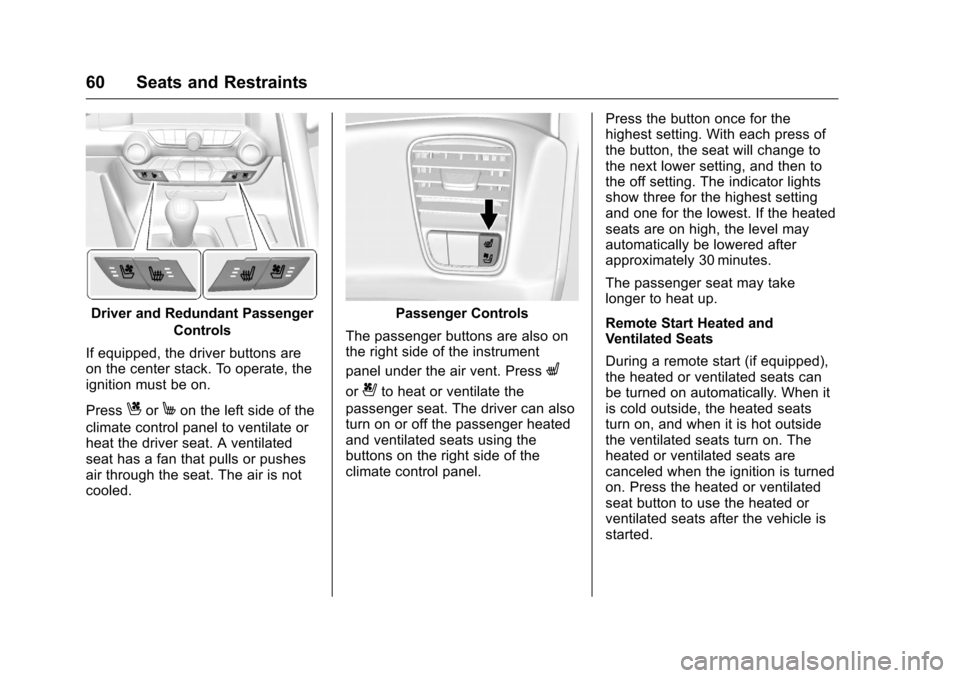
If equipped, the driver buttons are
on the center stack. To operate, the
ignition must be on.
Press
CorMon the left side of the
climate control panel to ventilate or
heat the driver seat. A ventilated
seat has a fan that pulls or pushes
air through the seat. The air is not
cooled.
Passenger Controls
The passenger buttons are also on
the right side of the instrument
panel under the air vent. Press
L
or{to heat or ventilate the
passenger seat. The driver can also
turn on or off the passenger heated
and ventilated seats using the
buttons on the right side of the
climate control panel. Press the button once for the
highest setting. With each press of
the button, the seat will change to
the next lower setting, and then to
the off setting. The indicator lights
show three for the highest setting
and one for the lowest. If the heated
seats are on high, the level may
automatically be lowered after
approximately 30 minutes.
The passenger seat may take
longer to heat up.
Remote Start Heated and
Ventilated Seats
During a remote start (if equipped),
the heated or ventilated seats can
be turned on automatically. When it
is cold outside, the heated seats
turn on, and when it is hot outside
the ventilated seats turn on. The
heated or ventilated seats are
canceled when the ignition is turned
on. Press the heated or ventilated
seat button to use the heated or
ventilated seats after the vehicle is
started.
Page 93 of 351
Chevrolet Corvette Owner Manual (GMNA-Localizing-U.S./Canada/Mexico-
9085364) - 2016 - crc - 9/15/15
92 Instruments and Controls
Vehicle ReminderMessages . . . . . . . . . . . . . . . . . . . 129
Vehicle Speed Messages . . . . . 130
Washer Fluid Messages . . . . . . 130
Window Messages . . . . . . . . . . . 130
Vehicle Personalization
Vehicle Personalization . . . . . . . 130
Universal Remote System
Universal Remote System . . . . 137
Universal Remote System Programming . . . . . . . . . . . . . . . 137
Universal Remote System Operation . . . . . . . . . . . . . . . . . . . 139
Controls
Steering Wheel
Adjustment
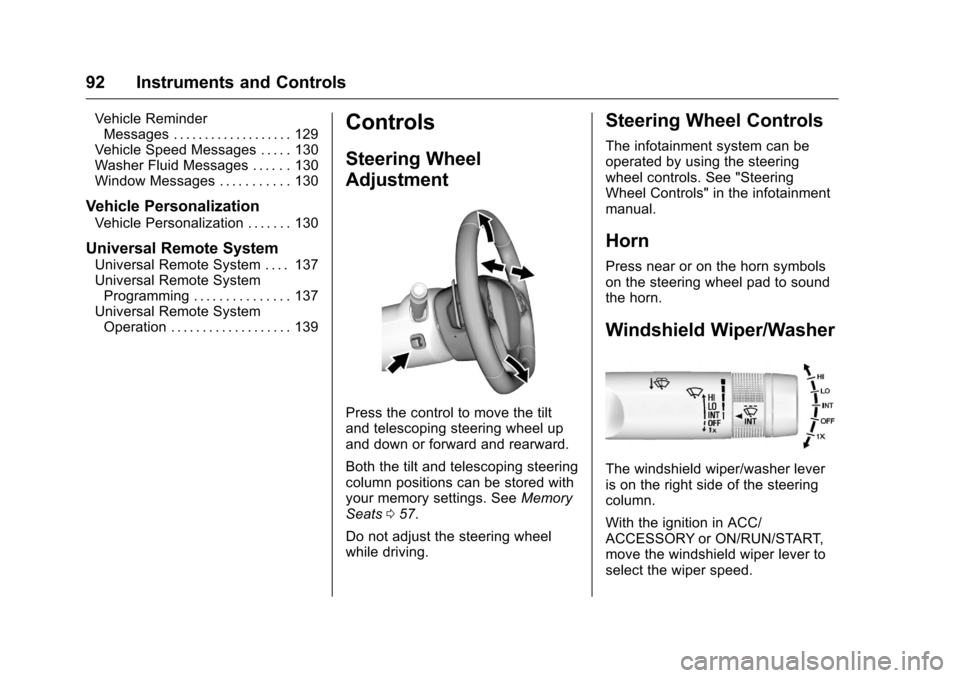
Press the control to move the tilt
and telescoping steering wheel up
and down or forward and rearward.
Both the tilt and telescoping steering
column positions can be stored with
your memory settings. See Memory
Seats 057.
Do not adjust the steering wheel
while driving.
Steering Wheel Controls
The infotainment system can be
operated by using the steering
wheel controls. See "Steering
Wheel Controls" in the infotainment
manual.
Horn
Press near or on the horn symbols
on the steering wheel pad to sound
the horn.
Windshield Wiper/Washer
The windshield wiper/washer lever
is on the right side of the steering
column.
With the ignition in ACC/
ACCESSORY or ON/RUN/START,
move the windshield wiper lever to
select the wiper speed.
Page 94 of 351
Chevrolet Corvette Owner Manual (GMNA-Localizing-U.S./Canada/Mexico-
9085364) - 2016 - crc - 9/15/15
Instruments and Controls 93
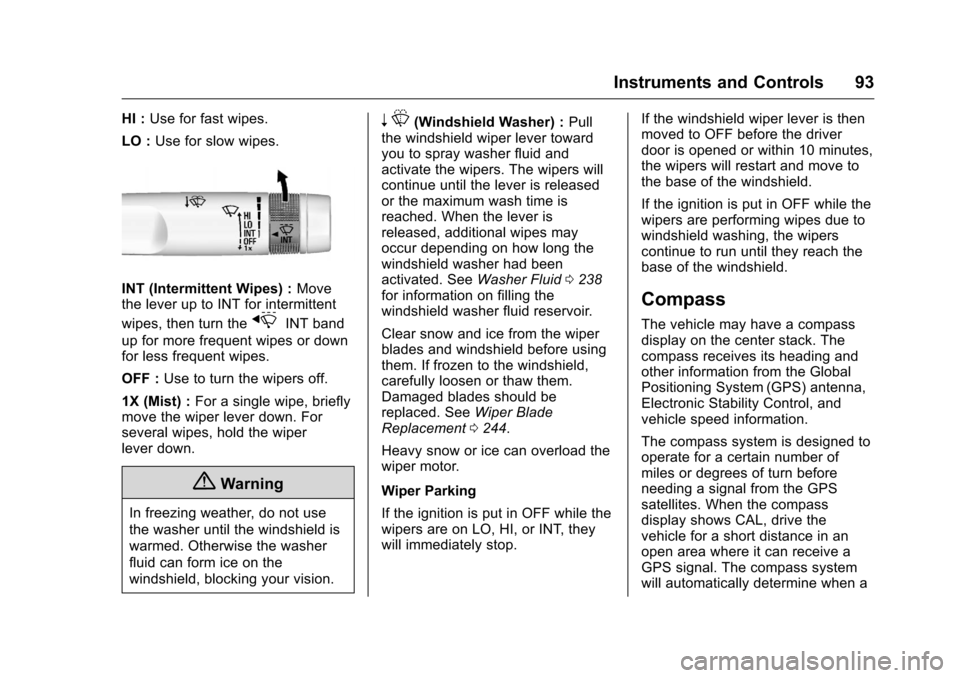
HI :Use for fast wipes.
LO : Use for slow wipes.
INT (Intermittent Wipes) : Move
the lever up to INT for intermittent
wipes, then turn the
xINT band
up for more frequent wipes or down
for less frequent wipes.
OFF : Use to turn the wipers off.
1X (Mist) : For a single wipe, briefly
move the wiper lever down. For
several wipes, hold the wiper
lever down.
{Warning
In freezing weather, do not use
the washer until the windshield is
warmed. Otherwise the washer
fluid can form ice on the
windshield, blocking your vision.
n L(Windshield Washer) : Pull
the windshield wiper lever toward
you to spray washer fluid and
activate the wipers. The wipers will
continue until the lever is released
or the maximum wash time is
reached. When the lever is
released, additional wipes may
occur depending on how long the
windshield washer had been
activated. See Washer Fluid0238
for information on filling the
windshield washer fluid reservoir.
Clear snow and ice from the wiper
blades and windshield before using
them. If frozen to the windshield,
carefully loosen or thaw them.
Damaged blades should be
replaced. See Wiper Blade
Replacement 0244.
Heavy snow or ice can overload the
wiper motor.
Wiper Parking
If the ignition is put in OFF while the
wipers are on LO, HI, or INT, they
will immediately stop. If the windshield wiper lever is then
moved to OFF before the driver
door is opened or within 10 minutes,
the wipers will restart and move to
the base of the windshield.
If the ignition is put in OFF while the
wipers are performing wipes due to
windshield washing, the wipers
continue to run until they reach the
base of the windshield.
Compass
The vehicle may have a compass
display on the center stack. The
compass receives its heading and
other information from the Global
Positioning System (GPS) antenna,
Electronic Stability Control, and
vehicle speed information.
The compass system is designed to
operate for a certain number of
miles or degrees of turn before
needing a signal from the GPS
satellites. When the compass
display shows CAL, drive the
vehicle for a short distance in an
open area where it can receive a
GPS signal. The compass system
will automatically determine when a