ignition CHEVROLET CORVETTE 2016 7.G Workshop Manual
[x] Cancel search | Manufacturer: CHEVROLET, Model Year: 2016, Model line: CORVETTE, Model: CHEVROLET CORVETTE 2016 7.GPages: 351, PDF Size: 6.02 MB
Page 286 of 351
Chevrolet Corvette Owner Manual (GMNA-Localizing-U.S./Canada/Mexico-
9085364) - 2016 - crc - 9/15/15
Vehicle Care 285
The battery is under a battery cover
in the hatch/trunk area on the
passenger side under the carpet.
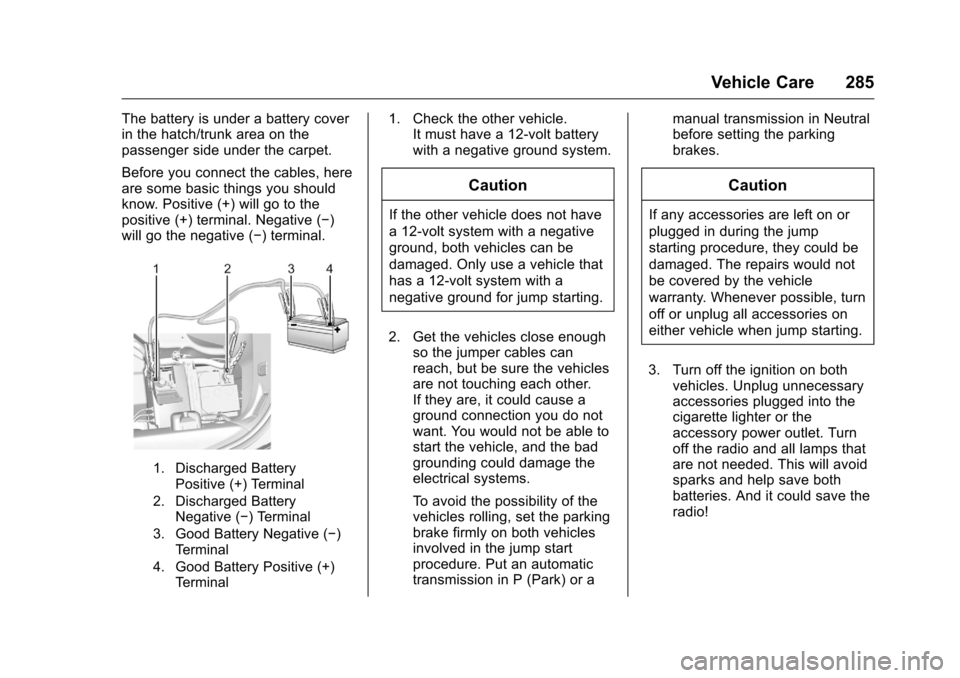
Before you connect the cables, here
are some basic things you should
know. Positive (+) will go to the
positive (+) terminal. Negative (−)
will go the negative (−) terminal.
1. Discharged BatteryPositive (+) Terminal
2. Discharged Battery Negative (−) Terminal
3. Good Battery Negative (−) Terminal
4. Good Battery Positive (+) Terminal
1. Check the other vehicle. It must have a 12-volt battery
with a negative ground system.
Caution
If the other vehicle does not have
a 12-volt system with a negative
ground, both vehicles can be
damaged. Only use a vehicle that
has a 12-volt system with a
negative ground for jump starting.
2. Get the vehicles close enough so the jumper cables can
reach, but be sure the vehicles
are not touching each other.
If they are, it could cause a
ground connection you do not
want. You would not be able to
start the vehicle, and the bad
grounding could damage the
electrical systems.
To avoid the possibility of the
vehicles rolling, set the parking
brake firmly on both vehicles
involved in the jump start
procedure. Put an automatic
transmission in P (Park) or a manual transmission in Neutral
before setting the parking
brakes.
Caution
If any accessories are left on or
plugged in during the jump
starting procedure, they could be
damaged. The repairs would not
be covered by the vehicle
warranty. Whenever possible, turn
off or unplug all accessories on
either vehicle when jump starting.
3. Turn off the ignition on both vehicles. Unplug unnecessary
accessories plugged into the
cigarette lighter or the
accessory power outlet. Turn
off the radio and all lamps that
are not needed. This will avoid
sparks and help save both
batteries. And it could save the
radio!
Page 332 of 351
Chevrolet Corvette Owner Manual (GMNA-Localizing-U.S./Canada/Mexico-
9085364) - 2016 - crc - 9/15/15
OnStar 331
OnStar Services
Emergency
Emergency Services require an
active, OnStar subscription plan
(excludes Basic Plan). With
Automatic Crash Response, built-in
sensors can automatically alert a
specially trained OnStar Advisor
who is immediately connected in to
the vehicle to help.
Press
Ufor a priority connection to
an OnStar Advisor who can contact
emergency service providers, direct
them to your exact location, and
relay important information.
With OnStar Crisis Assist, specially
trained Advisors are available
24 hours a day, 7 days a week, to
provide a central point of contact,
assistance, and information during a
crisis.
With Roadside Assistance, Advisors
can locate a nearby service provider
to help with a flat tire, a battery
jump, or an empty gas tank.
Security
If equipped, OnStar provides these
services:
. With Stolen Vehicle Assistance,
OnStar Advisors can use GPS to
pinpoint the vehicle and help
authorities quickly recover it.
. With Remote Ignition Block,
if equipped, OnStar can block
the engine from being restarted.
. With Stolen Vehicle Slowdown,
if equipped, OnStar can work
with law enforcement to
gradually slow the vehicle down.
Navigation
OnStar navigation requires a
specific OnStar subscription plan.
Press
|to receive Turn-by-Turn
directions or have them sent to the
vehicle navigation screen,
if equipped.
Turn-by-Turn Navigation
1. Press|to connect to an
Advisor.
2. Request directions to be downloaded to the vehicle.
3. Follow the voice-guided commands.
Using Voice Commands
During a Planned Route
Cancel Route
1. Press
Q. System responds:
“OnStar ready,” then a tone.
2. Say “Cancel route.” System
responds: “Do you want to
cancel directions?”
3. Say “Yes.”System responds:
“OK, request completed, thank
you, goodbye.”
Route Preview
1. Press
Q. System responds:
“OnStar ready,” then a tone.
2. Say “Route preview.” System
responds with the next three
maneuvers.
Page 336 of 351
Chevrolet Corvette Owner Manual (GMNA-Localizing-U.S./Canada/Mexico-
9085364) - 2016 - crc - 9/15/15
OnStar 335
.Press|to speak with an
Advisor.
OnStar services cannot work unless
the vehicle is in a place where
OnStar has an agreement with a
wireless service provider for service
in that area. The wireless service
provider must also have coverage,
network capacity, reception, and
technology compatible with OnStar
services. Service involving location
information about the vehicle cannot
work unless GPS signals are
available, unobstructed, and
compatible with the OnStar
hardware. OnStar services may not
work if the OnStar equipment is not
properly installed or it has not been
properly maintained. If equipment or
software is added, connected,
or modified, OnStar services may
not work. Other problems beyond
the control of OnStar —such as
hills, tall buildings, tunnels, weather,
electrical system design and
architecture of the vehicle, damage
to the vehicle in a crash, or wireless
phone network congestion or
jamming —may prevent service. See
Radio Frequency
Statement 0325.
Services for People with
Disabilities
Advisors provide services to help
Subscribers with physical disabilities
and medical conditions.
Press
|to help:
. Locate a gas station with an
attendant to pump gas.
. Find a hotel, restaurant, etc.,
that meets accessibility needs.
. Provide directions to the closest
hospital or pharmacy in urgent
situations.
TTY Users
OnStar has the ability to
communicate to deaf,
hard-of-hearing, or speech-impaired
customers while in the vehicle. The
available dealer-installed TTY
system can provide in-vehicle
access to all OnStar services,
except Virtual Advisor and OnStar
Turn-by-Turn Navigation.
OnStar Personal Identification
Number (PIN)
A PIN is needed to access some
OnStar services. The PIN will need
to be changed the first time when
speaking with an Advisor. To
change the OnStar PIN, contact an
OnStar Advisor by pressing
|or
calling 1-888-4ONSTAR.
Warranty
OnStar equipment may be
warranted as part of the vehicle
warranty.
Languages
The vehicle can be programmed to
respond in multiple languages.
Press
|and ask for an Advisor.
Advisors are available in English,
Spanish, and French. Available
languages may vary by country.
Potential Issues
OnStar cannot perform Remote
Door Unlock or Stolen Vehicle
Assistance after the vehicle has
been off continuously for five days
without an ignition cycle. If the
Page 345 of 351
Chevrolet Corvette Owner Manual (GMNA-Localizing-U.S./Canada/Mexico-
9085364) - 2016 - crc - 9/15/15
344 Index
Gauges (cont'd)Speedometer . . . . . . . . . . . . . . . . . 101
Tachometer . . . . . . . . . . . . . . . . . . . 101
Trip Odometer . . . . . . . . . . . . . . . . 101
Warning Lights and
Indicators . . . . . . . . . . . . . . . . . . . . . 95
Gear Shifting Light . . . . . . . . . . . . . . 109
General Information Service and Maintenance . . . . . 297
Towing . . . . . . . . . . . . . . . . . . . . . . . . 210
Vehicle Care . . . . . . . . . . . . . . . . . . 213
Glove Box . . . . . . . . . . . . . . . . . . . . . . . 87
GM Mobility Reimbursement Program . . . . . . . . . . . . . . . . . . . . . . . 318
H
Hatch . . . . . . . . . . . . . . . . . . . . . . . . . . . . 37
Hazard Warning Flashers . . . . . . . 143
Head Restraints . . . . . . . . . . . . . . . . . 55
Head-up Display . . . . . . . . . . . . . . . . 115
Headlamps
Aiming . . . . . . . . . . . . . . . . . . . . . . . . 245
Automatic . . . . . . . . . . . . . . . . . . . . . 142
Bulb Replacement . . . . . . . . . . . . 245
Daytime RunningLamps (DRL) . . . . . . . . . . . . . . . . 141
Flash-to-Pass . . . . . . . . . . . . . . . . . 141
High Intensity Discharge (HID) Lighting . . . . . . . . . . . . . . . 245 Headlamps (cont'd)
High-Beam On Light . . . . . . . . . . .112
High/Low Beam Changer . . . . . 141
Lamps On Reminder . . . . . . . . . .113
Heated and Ventilated Front Seats . . . . . . . . . . . . . . . . . . . . . . . . . . 59
Heated Mirrors . . . . . . . . . . . . . . . . . . . 42
High-Beam On Light . . . . . . . . . . . . 112
High-Speed Operation . . . . . . . . . . 264
Hill and Mountain Roads . . . . . . . . 168
Hill Start Assist (HSA) . . . . . . . . . . 192
Hood . . . . . . . . . . . . . . . . . . . . . . . . . . . 217
Horn . . . . . . . . . . . . . . . . . . . . . . . . . . . . . 92
How to Wear Safety Belts Properly . . . . . . . . . . . . . . . . . . . . . . . . 62
Hydraulic Clutch . . . . . . . . . . . . . . . . 230
I
Ignition Positions . . . . . . . . . . . . . . . 175
Immobilizer . . . . . . . . . . . . . . . . . . . . . . 40
Infants and Young Children, Restraints . . . . . . . . . . . . . . . . . . . . . . 79
Infotainment . . . . . . . . . . . . . . . . . . . . 146
Infotainment System . . . . . . . . . . . . 328
Instrument Cluster . . . . . . . . . . . . . . . 96
Instrument Panel Storage Area . . . . . . . . . . . . . . . . . . . 87
Interior Rearview Mirrors . . . . . . . . . 43
Introduction . . . . . . . . . . . . . . . . . . . . . . . 2
J
Jump Starting - North
America . . . . . . . . . . . . . . . . . . . . . . . 284
K
Key and Lock Messages . . . . . . . . 124
Keyless EntryRemote (RKE) System . . . . . . . . . 26
Keys . . . . . . . . . . . . . . . . . . . . . . . . . . . . . 24
L
Labeling, Tire Sidewall . . . . . . . . . . 258
Lamps Courtesy . . . . . . . . . . . . . . . . . . . . . . 144
Daytime Running (DRL) . . . . . . 141
Exterior Controls . . . . . . . . . . . . . . 140
Exterior Lamps OffReminder . . . . . . . . . . . . . . . . . . . 140
Exterior Lighting Battery Saver . . . . . . . . . . . . . . . . . . . . . . . 145
License Plate . . . . . . . . . . . . . . . . . 246
Malfunction Indicator . . . . . . . . . 106
Messages . . . . . . . . . . . . . . . . . . . . 125
On Reminder . . . . . . . . . . . . . . . . . .113
Reading . . . . . . . . . . . . . . . . . . . . . . 144
Lap-Shoulder Belt . . . . . . . . . . . . . . . 63
LATCH, Lower Anchors and Tethers for Children . . . . . . . . . . . . 83
Latches, Seatback . . . . . . . . . . . . . . . 59