climate control CHEVROLET CORVETTE 2017 7.G User Guide
[x] Cancel search | Manufacturer: CHEVROLET, Model Year: 2017, Model line: CORVETTE, Model: CHEVROLET CORVETTE 2017 7.GPages: 360, PDF Size: 6.3 MB
Page 155 of 360
Chevrolet Corvette Owner Manual (GMNA-Localizing-U.S./Canada/Mexico-
9956103) - 2017 - crc - 4/28/16
154 Climate Controls
Climate Controls
Climate Control Systems
Dual Automatic ClimateControl System . . . . . . . . . . . . . 154
Air Vents
Air Vents . . . . . . . . . . . . . . . . . . . . . 158
Maintenance
Passenger Compartment AirFilter . . . . . . . . . . . . . . . . . . . . . . . . 158
Service . . . . . . . . . . . . . . . . . . . . . . . 159
Climate Control Systems
Dual Automatic Climate Control System
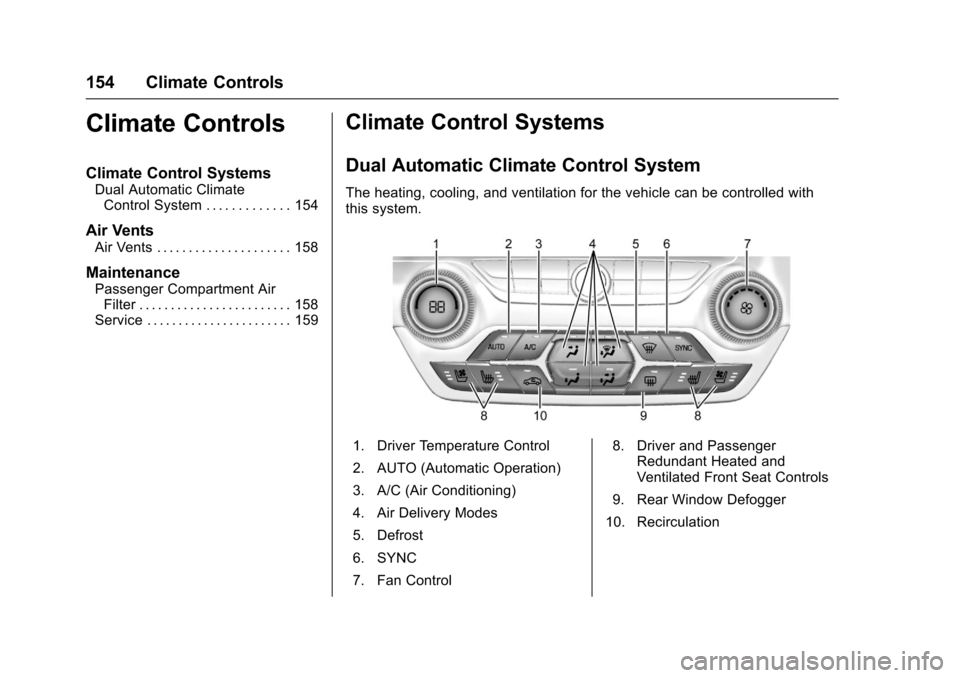
The heating, cooling, and ventilation for the vehicle can be controlled with
this system.
1. Driver Temperature Control
2. AUTO (Automatic Operation)
3. A/C (Air Conditioning)
4. Air Delivery Modes
5. Defrost
6. SYNC
7. Fan Control 8. Driver and Passenger
Redundant Heated and
Ventilated Front Seat Controls
9. Rear Window Defogger
10. Recirculation
Page 156 of 360
Chevrolet Corvette Owner Manual (GMNA-Localizing-U.S./Canada/Mexico-
9956103) - 2017 - crc - 4/28/16
Climate Controls 155
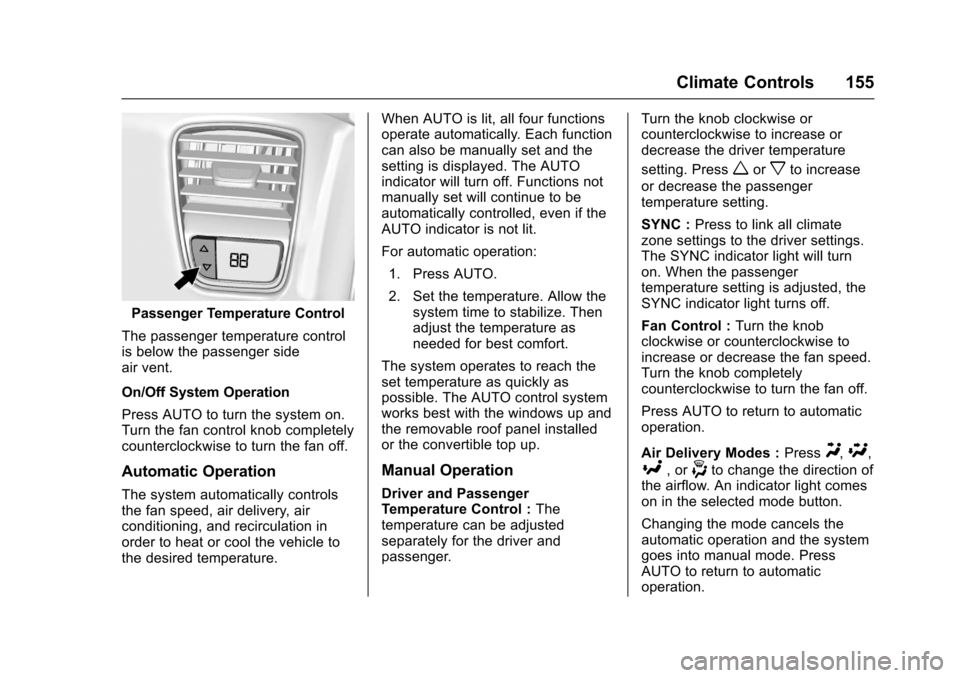
Passenger Temperature Control
The passenger temperature control
is below the passenger side
air vent.
On/Off System Operation
Press AUTO to turn the system on.
Turn the fan control knob completely
counterclockwise to turn the fan off.
Automatic Operation
The system automatically controls
the fan speed, air delivery, air
conditioning, and recirculation in
order to heat or cool the vehicle to
the desired temperature. When AUTO is lit, all four functions
operate automatically. Each function
can also be manually set and the
setting is displayed. The AUTO
indicator will turn off. Functions not
manually set will continue to be
automatically controlled, even if the
AUTO indicator is not lit.
For automatic operation:
1. Press AUTO.
2. Set the temperature. Allow the system time to stabilize. Then
adjust the temperature as
needed for best comfort.
The system operates to reach the
set temperature as quickly as
possible. The AUTO control system
works best with the windows up and
the removable roof panel installed
or the convertible top up.
Manual Operation
Driver and Passenger
Temperature Control : The
temperature can be adjusted
separately for the driver and
passenger. Turn the knob clockwise or
counterclockwise to increase or
decrease the driver temperature
setting. Press
worxto increase
or decrease the passenger
temperature setting.
SYNC : Press to link all climate
zone settings to the driver settings.
The SYNC indicator light will turn
on. When the passenger
temperature setting is adjusted, the
SYNC indicator light turns off.
Fan Control : Turn the knob
clockwise or counterclockwise to
increase or decrease the fan speed.
Turn the knob completely
counterclockwise to turn the fan off.
Press AUTO to return to automatic
operation.
Air Delivery Modes : Press
Y,\,
[, or-to change the direction of
the airflow. An indicator light comes
on in the selected mode button.
Changing the mode cancels the
automatic operation and the system
goes into manual mode. Press
AUTO to return to automatic
operation.
Page 157 of 360
Chevrolet Corvette Owner Manual (GMNA-Localizing-U.S./Canada/Mexico-
9956103) - 2017 - crc - 4/28/16
156 Climate Controls
Y:Air is directed to the instrument
panel outlets.
[: Air is directed to the floor
outlets.
\: Air is directed to the instrument
panel outlets and the floor outlets.
-: Air is directed to the windshield
and floor outlets to clear the
windows of fog or moisture. The
recirculation mode cannot be
selected while in the defog mode.
0: Press to clear the windshield
of fog or frost more quickly. Air is
directed to the windshield and side
window outlets. The recirculation
mode cannot be selected while in
defrost mode.
For best results, clear all snow and
ice from the windshield before
defrosting.
Do not drive the vehicle until all the
windows are clear.
A/C : Press to turn the air
conditioning on or off. If the fan is
turned off, the air conditioner will not
run and the indicator light may
turn off. Press AUTO to return to automatic
operation and the air conditioner
runs as needed. When the indicator
light is on, the air conditioner runs
automatically to cool the air inside
the vehicle or to dry the air as
needed to defog the windshield
faster.
Depending on the engine speed, the
air conditioning compressor may
shut off and turn on again and a
slight change in A/C cooling and
engine performance may be
noticed. This is normal. The system
is designed to make adjustments to
help with fuel economy while still
maintaining the selected
temperature.
If the A/C is turned off, automatic
operation is canceled.
/:
Press to turn on
recirculation. An indicator light
comes on. Air is recirculated to
quickly cool the inside of the vehicle
or reduce the entry of outside air
and odors. Recirculation mode is
not available in defrost or
defog mode.
Rear Window Defogger
=: Press to turn the rear window
defogger on or off. An indicator light
on the button comes on to show that
the rear window defogger is on.
The defogger only works when the
ignition is in ON/RUN/START. The
defogger turns off if the ignition is in
the ACC/ACCESSORY or LOCK/
OFF position.
The rear window defogger can be
set to automatic operation. See
“Climate and Air Quality” under
Vehicle Personalization 0132.
When auto rear defog is selected,
the rear window defogger turns on
automatically when the interior
temperature is cold and the outside
temperature is about 4 °C (40 °F)
and below. The auto rear defogger
turns off automatically after about
10 minutes.
The heated outside rearview mirrors
turn on with the rear window
defogger and help to clear fog or
frost from the surface of the mirror.
See Heated Mirrors 043.
Page 158 of 360
Chevrolet Corvette Owner Manual (GMNA-Localizing-U.S./Canada/Mexico-
9956103) - 2017 - crc - 4/28/16
Climate Controls 157
If equipped with a power convertible
top, the rear window defogger and
heated mirrors are automatically
disabled when the power convertible
top is moving or down.
Caution
Using a razor blade or sharp
object on the inside rear window
can damage the antenna or
defogger. Repairs would not be
covered by the vehicle warranty.
Do not stick anything to the rear
window.
z/{:If equipped. press to heat
or ventilate the seat. See Heated
and Ventilated Front Seats 061.
Remote Start Climate Control
Operation (If Equipped) : If remote
start is used to start the vehicle, the
climate control system will come on.
The system uses the driver ’s
previous settings to heat or cool the
inside of the vehicle. The rear
window defogger or heated outside
rearview mirrors, if equipped, may
come on based on cold ambient conditions. The rear defog indicator
light may not come on during a
remote start. The heated or
ventilated seats may turn on if it is
cold or hot outside. See
Remote
Vehicle Start 033 and Heated and
Ventilated Front Seats 061,
if equipped.
Sensors
The interior cabin air temperature
and solar sensor on top of the
instrument panel near the
windshield monitors the solar heat
and measures the initial interior
cabin temperature.
The climate control system uses the
sensor information to adjust the
temperature, fan speed,
recirculation, and air delivery mode
for best comfort.
The humidity and windshield
temperature sensor is on the
windshield glass inside surface near
the rearview mirror. The automatic
climate control system uses this
sensor to receive information to
determine the need for defogging. If any of these sensors are blocked
or covered, the automatic climate
control system may not work
properly.
There is also a sensor behind the
front bumper. This sensor reads the
outside air temperature and helps to
maintain the temperature inside the
vehicle. Any cover on the front of
the vehicle could give a false
reading in the temperature.
Page 159 of 360
Chevrolet Corvette Owner Manual (GMNA-Localizing-U.S./Canada/Mexico-
9956103) - 2017 - crc - 4/28/16
158 Climate Controls
Air Vents
Use the tab on the air outlets to
change the direction of the airflow.
Operation Tips
.Clear away any ice, snow,
or leaves from the air inlets at
the base of the windshield that
may block the flow of air into the
vehicle.
. Use of non-GM approved hood
deflectors may adversely affect
the performance of the system.
. Keep the area around the base
of the instrument panel console
and air path under the seats
clear of objects to help circulate
the air inside of the vehicle more
effectively.
Maintenance
Passenger Compartment
Air Filter
The passenger compartment air
filter reduces dust, pollen, and other
airborne irritants from outside air
that is pulled into the vehicle.
Reductions in airflow, which may
occur more often in dusty areas,
indicate that the filter may need to
be replaced. See Maintenance
Schedule 0307.
Caution
Driving without a passenger
compartment air filter in place can
cause water and small particles,
like paper and leaves, to be
pulled into your climate control
system which may cause damage
to it. Make sure you always
replace the old filter with a
new one. The passenger compartment air
filter is on the passenger side of the
engine compartment near the
coolant surge tank. See
Engine
Compartment Overview 0225.
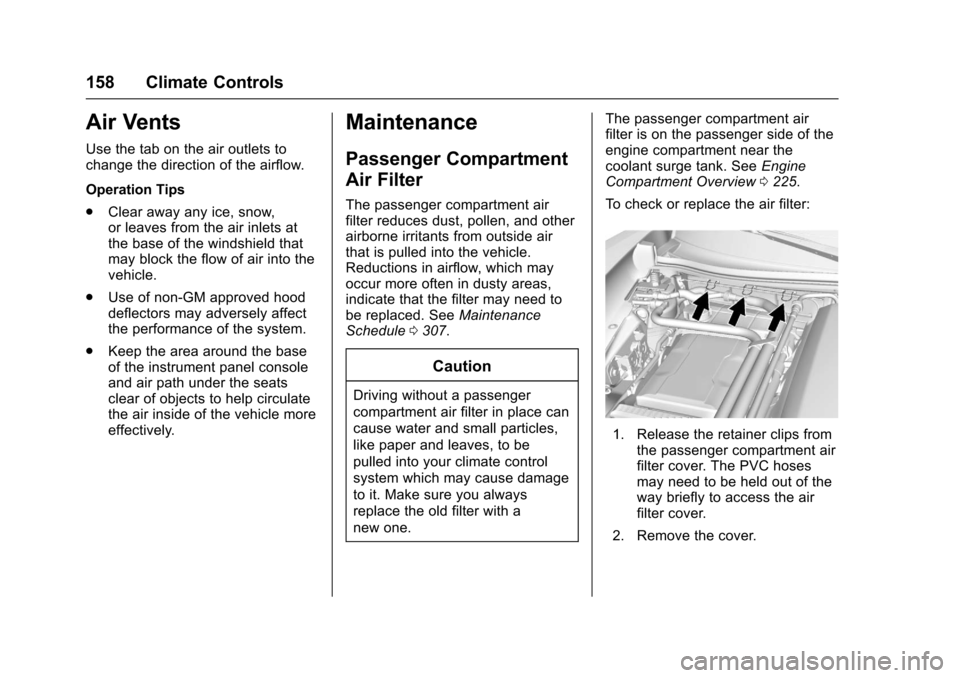
To check or replace the air filter:
1. Release the retainer clips from the passenger compartment air
filter cover. The PVC hoses
may need to be held out of the
way briefly to access the air
filter cover.
2. Remove the cover.
Page 160 of 360
Chevrolet Corvette Owner Manual (GMNA-Localizing-U.S./Canada/Mexico-
9956103) - 2017 - crc - 4/28/16
Climate Controls 159
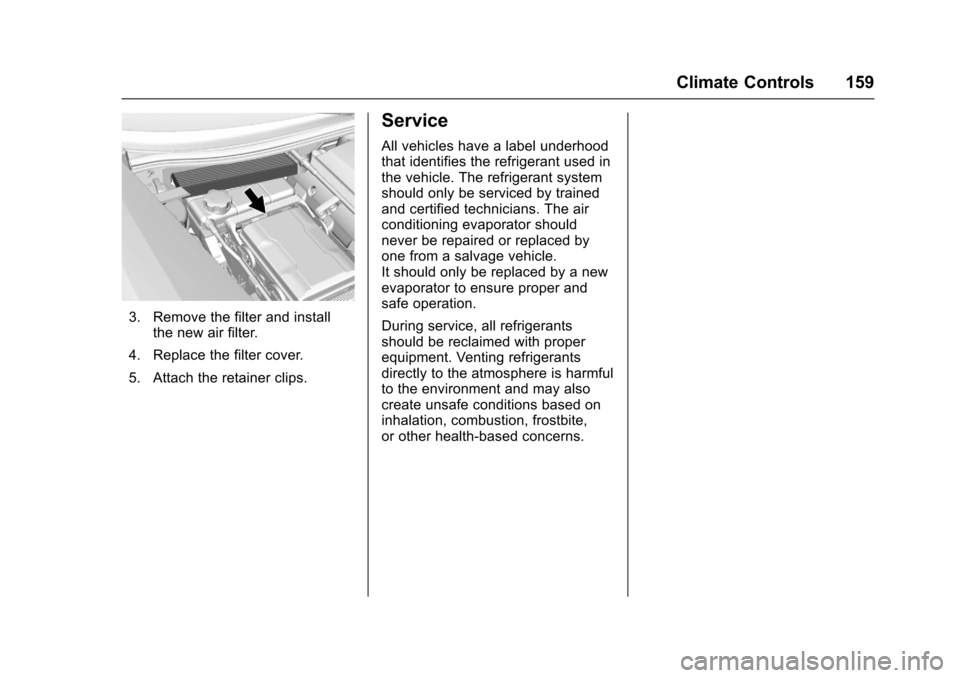
3. Remove the filter and installthe new air filter.
4. Replace the filter cover.
5. Attach the retainer clips.
Service
All vehicles have a label underhood
that identifies the refrigerant used in
the vehicle. The refrigerant system
should only be serviced by trained
and certified technicians. The air
conditioning evaporator should
never be repaired or replaced by
one from a salvage vehicle.
It should only be replaced by a new
evaporator to ensure proper and
safe operation.
During service, all refrigerants
should be reclaimed with proper
equipment. Venting refrigerants
directly to the atmosphere is harmful
to the environment and may also
create unsafe conditions based on
inhalation, combustion, frostbite,
or other health-based concerns.
Page 162 of 360
Chevrolet Corvette Owner Manual (GMNA-Localizing-U.S./Canada/Mexico-
9956103) - 2017 - crc - 4/28/16
Driving and Operating 161
Conversions and Add-Ons
Add-On ElectricalEquipment . . . . . . . . . . . . . . . . . . 217Driving Information
Distracted Driving
Distraction comes in many forms
and can take your focus from the
task of driving. Exercise good
judgment and do not let other
activities divert your attention away
from the road. Many local
governments have enacted laws
regarding driver distraction. Become
familiar with the local laws in
your area.
To avoid distracted driving, keep
your eyes on the road, keep your
hands on the steering wheel, and
focus your attention on driving.
. Do not use a phone in
demanding driving situations.
Use a hands-free method to
place or receive necessary
phone calls.
. Watch the road. Do not read,
take notes, or look up
information on phones or other
electronic devices. .
Designate a front seat
passenger to handle potential
distractions.
. Become familiar with vehicle
features before driving, such as
programming favorite radio
stations and adjusting climate
control and seat settings.
Program all trip information into
any navigation device prior to
driving.
. Wait until the vehicle is parked
to retrieve items that have fallen
to the floor.
. Stop or park the vehicle to tend
to children.
. Keep pets in an appropriate
carrier or restraint.
. Avoid stressful conversations
while driving, whether with a
passenger or on a cell phone.
{Warning
Taking your eyes off the road too
long or too often could cause a
crash resulting in injury or death.
Focus your attention on driving.
Page 177 of 360
Chevrolet Corvette Owner Manual (GMNA-Localizing-U.S./Canada/Mexico-
9956103) - 2017 - crc - 4/28/16
176 Driving and Operating
Winter Driving
Driving on Snow or Ice
Snow or ice between the tires and
the road creates less traction or
grip, so drive carefully. Wet ice can
occur at about 0 °C (32 °F) when
freezing rain begins to fall. Avoid
driving on wet ice or in freezing rain
until roads can be treated.
For Slippery Road Driving:
.Accelerate gently. Accelerating
too quickly causes the wheels to
spin and makes the surface
under the tires slick.
. Turn on Traction Control. See
Traction Control/Electronic
Stability Control 0199.
. The Antilock Brake System
(ABS) improves vehicle stability
during hard stops, but the
brakes should be applied sooner
than when on dry pavement.
See Antilock Brake System
(ABS) 0196.
. Allow greater following distance
and watch for slippery spots. Icy
patches can occur on otherwise clear roads in shaded areas.
The surface of a curve or an
overpass can remain icy when
the surrounding roads are clear.
Avoid sudden steering
maneuvers and braking while
on ice.
. Turn off cruise control.
Blizzard Conditions
Stop the vehicle in a safe place and
signal for help. Stay with the vehicle
unless there is help nearby.
If possible, use Roadside
Assistance. See Roadside
Assistance Program 0328. To get
help and keep everyone in the
vehicle safe:
. Turn on the hazard warning
flashers.
. Tie a red cloth to an outside
mirror.
{Warning
Snow can trap engine exhaust
under the vehicle. This may
cause exhaust gases to get
inside. Engine exhaust contains
carbon monoxide (CO), which
cannot be seen or smelled. It can
cause unconsciousness and even
death.
If the vehicle is stuck in snow:
. Clear snow from the base of
the vehicle, especially any
blocking the exhaust pipe.
. Open a window about 5 cm
(2 in) on the vehicle side
that is away from the wind,
to bring in fresh air.
. Fully open the air outlets on
or under the instrument
panel.
. Adjust the climate control
system to circulate the air
inside the vehicle and set
(Continued)
Page 178 of 360
Chevrolet Corvette Owner Manual (GMNA-Localizing-U.S./Canada/Mexico-
9956103) - 2017 - crc - 4/28/16
Driving and Operating 177
Warning (Continued)
the fan speed to the highest
setting. See“Climate
Control Systems.”
For more information about CO,
see Engine Exhaust 0188.
To save fuel, run the engine for
short periods to warm the vehicle
and then shut the engine off and
partially close the window. Moving
about to keep warm also helps.
If it takes time for help to arrive,
when running the engine, push the
accelerator pedal slightly so the
engine runs faster than the idle
speed. This keeps the battery
charged to restart the vehicle and to
signal for help with the headlamps.
Do this as little as possible, to
save fuel.
If the Vehicle Is Stuck
Slowly and cautiously spin the
wheels to free the vehicle when
stuck in sand, mud, ice, or snow. If stuck too severely for the traction
system to free the vehicle, turn the
traction system off and use the
rocking method. See
Traction
Control/Electronic Stability
Control 0199.
{Warning
If the vehicle's tires spin at high
speed, they can explode, and you
or others could be injured. The
vehicle can overheat, causing an
engine compartment fire or other
damage. Spin the wheels as little
as possible and avoid going
above 56 km/h (35 mph).
Rocking the Vehicle to Get
it Out
Turn the steering wheel left and
right to clear the area around the
front wheels. Turn off any traction
system. Shift back and forth
between R (Reverse) and a low
forward gear, spinning the wheels
as little as possible. To prevent
transmission wear, wait until the
wheels stop spinning before shifting gears. Release the accelerator
pedal while shifting, and press
lightly on the accelerator pedal
when the transmission is in gear.
Slowly spinning the wheels in the
forward and reverse directions
causes a rocking motion that could
free the vehicle. If that does not get
the vehicle out after a few tries, it
might need to be towed out. If the
vehicle does need to be towed out,
see
Towing the Vehicle 0295.
Vehicle Load Limits
It is very important to know how
much weight the vehicle can
carry. This weight is called the
vehicle capacity weight and
includes the weight of all
occupants, cargo, and all
nonfactory-installed options.
Two labels on the vehicle may
show how much weight it may
properly carry: the Tire and
Loading Information label and
the Certification label.
Page 266 of 360
Chevrolet Corvette Owner Manual (GMNA-Localizing-U.S./Canada/Mexico-
9956103) - 2017 - crc - 4/28/16
Vehicle Care 265
Caution (Continued)
when possible, avoid contact with
curbs, potholes, and other road
hazards.
Competition Oriented
Tires
This vehicle may come with P285/
30ZR19 and P335/25ZR20 Michelin
PS CUP2 competition oriented tires
that are DOT approved for street
use. Competition oriented tires use
a special tread pattern and
compound that provide more grip
than normal road tires. The
minimum tread depth will be
reached earlier than typical tires,
resulting in reduced tire life. This
special tread pattern and compound
will have decreased performance in
cold climates, heavy rain, and
standing water. It is recommended
that winter tires be installed on the
vehicle when driving at
temperatures below approximately10 °C (50 °F) or on ice or snow
covered roads. See
Winter
Tires 0263.
{Warning
Driving on wet roads, in heavy
rain, or through standing water
with competition oriented tires
may cause hydroplaning and loss
of control. Use extreme caution
and drive slowly on wet roads.
{Warning
Driving with competition oriented
tires on snow, ice, or cold road
surfaces can cause loss of control
or an accident. Competition
oriented tires are summer season
tires and are not intended to be
driven on snow, ice, or road
surfaces below 10 °C (50 °F). Do
not drive a vehicle with
competition oriented tires in these
conditions.
Caution
Competition oriented tires have
rubber compounds that lose
flexibility and may develop
surface cracks in the tread area
at temperatures below −7 °C
(20 °F). Always store competition
oriented tires indoors and at
temperatures above −7 °C (20 °F)
when not in use. If the tires have
been subjected to −7 °C (20 °F) or
less, let them warm up in a
heated space to at least 10 °C
(50 °F) for 24 hours or more
before being installed or driving a
vehicle on which they are
installed. Do not apply heat or
blow heated air directly on the
tires. Always inspect tires before
use. See Tire Inspection 0275.
Summer Tires
High Performance Summer Tires
This vehicle may come with high
performance summer tires. These
tires have a special tread and