climate control CHEVROLET CORVETTE 2017 7.G Owners Manual
[x] Cancel search | Manufacturer: CHEVROLET, Model Year: 2017, Model line: CORVETTE, Model: CHEVROLET CORVETTE 2017 7.GPages: 360, PDF Size: 6.3 MB
Page 2 of 360

Chevrolet Corvette Owner Manual (GMNA-Localizing-U.S./Canada/Mexico-
9956103) - 2017 - crc - 4/28/16
ContentsIntroduction . . . . . . . . . . . . . . . . . . . . . . 2
In Brief . . . . . . . . . . . . . . . . . . . . . . . . . . . 5
Keys, Doors, and Windows . . . . . 25
Seats and Restraints . . . . . . . . . . . 56
Storage . . . . . . . . . . . . . . . . . . . . . . . . . 89
Instruments and Controls . . . . . . . 93
Lighting . . . . . . . . . . . . . . . . . . . . . . . 142
Infotainment System . . . . . . . . . . 148
Climate Controls . . . . . . . . . . . . . . 154
Driving and Operating . . . . . . . . . 160
Vehicle Care . . . . . . . . . . . . . . . . . . 219
Service and Maintenance . . . . . 306
Technical Data . . . . . . . . . . . . . . . . 320
Customer Information . . . . . . . . . 324
Reporting Safety Defects . . . . . . 335
OnStar . . . . . . . . . . . . . . . . . . . . . . . . 338
Index . . . . . . . . . . . . . . . . . . . . 349
Page 6 of 360
Chevrolet Corvette Owner Manual (GMNA-Localizing-U.S./Canada/Mexico-
9956103) - 2017 - crc - 4/28/16
In Brief 5
In Brief
Instrument Panel
Instrument Panel . . . . . . . . . . . . . . . . 6
Initial Drive Information
Initial Drive Information . . . . . . . . . . 8
Remote Keyless Entry (RKE)System . . . . . . . . . . . . . . . . . . . . . . . . 8
Remote Vehicle Start . . . . . . . . . . . 8
Door Locks . . . . . . . . . . . . . . . . . . . . . 9
Trunk Release . . . . . . . . . . . . . . . . . 10
Windows . . . . . . . . . . . . . . . . . . . . . . . 11
Seat Adjustment . . . . . . . . . . . . . . . 11
Memory Features . . . . . . . . . . . . . . 12
Heated and Ventilated Seats . . . 13
Safety Belts . . . . . . . . . . . . . . . . . . . . 13
Passenger Sensing System . . . 14
Mirror Adjustment . . . . . . . . . . . . . . 14
Steering Wheel Adjustment . . . . 15
Interior Lighting . . . . . . . . . . . . . . . . 15
Exterior Lighting . . . . . . . . . . . . . . . 16
Windshield Wiper/Washer . . . . . . 16
Climate Controls . . . . . . . . . . . . . . . 17
Transmission . . . . . . . . . . . . . . . . . . 18
Vehicle Features
Infotainment System . . . . . . . . . . . 19
Steering Wheel Controls . . . . . . . 19
Cruise Control . . . . . . . . . . . . . . . . . 19 Driver Information
Center (DIC) . . . . . . . . . . . . . . . . . 19
Curb View Camera . . . . . . . . . . . . 20
Rear Vision Camera (RVC) . . . . 20
Power Outlets . . . . . . . . . . . . . . . . . 20
Universal Remote System . . . . . 20
Roof Panel . . . . . . . . . . . . . . . . . . . . 21
Convertible . . . . . . . . . . . . . . . . . . . . 21
Performance and Maintenance
Traction Control/Electronic Stability Control . . . . . . . . . . . . . . 21
Tire Pressure Monitor . . . . . . . . . . 21
Performance Vehicle Features . . . . . . . . . . . . . . . . . . . . . 22
Fuel (LT1 6.2L V8 Engine) . . . . . 22
Fuel (LT4 6.2L Supercharged V8 Engine) . . . . . . . . . . . . . . . . . . . 23
E85 or FlexFuel . . . . . . . . . . . . . . . . 23
Engine Oil Life System . . . . . . . . 23
Car Wash Guidelines . . . . . . . . . . 23
Driving for Better Fuel Economy . . . . . . . . . . . . . . . . . . . . . 24
Roadside Assistance Program . . . . . . . . . . . . . . . . . . . . . . 24
Page 8 of 360

Chevrolet Corvette Owner Manual (GMNA-Localizing-U.S./Canada/Mexico-
9956103) - 2017 - crc - 4/28/16
In Brief 7
1.Air Vents 0158.
2. Turn Signal Lever. See Turn
and Lane-Change
Signals 0145.
Exterior Lamp Controls 0142.
3. Manual Shift Paddles (If Equipped). See Manual
Mode 0191.
Active Rev Match Paddles (If
Equipped). See Active Rev
Match 0195.
4. Instrument Cluster 098.
5. Windshield Wiper/Washer 094.
6. Instrument Panel Storage Button. See Instrument Panel
Storage 089.
7. Passenger Airbag Status Indicator. See Passenger
Sensing System 073.
8. Light Sensor. See Automatic
Headlamp System 0144.
9. Hazard Warning
Flashers 0145.
10. Infotainment 0148. 11. Passenger Temperature
Control. See Dual Automatic
Climate Control System 0154.
Passenger Heated and
Ventilated Seat Controls (If
Equipped). See Heated and
Ventilated Front Seats 061.
12. Driver and Redundant Passenger Heated and
Ventilated Seat Controls (If
Equipped). See Heated and
Ventilated Front Seats 061.
13. Dual Automatic Climate Control
System 0154.
14. Electric Parking Brake 0197.
15. MODE SELECT Knob. See Competitive Driving
Mode 0205.
16. Shift Lever (Manual Shown). SeeAutomatic Transmission
0 189 orManual
Transmission 0194.
17. Keyless Ignition. See Ignition
Positions 0182.
18. Bluetooth Controls. See “Steering Wheel Controls” in
the infotainment manual. Voice Recognition Controls.
See
“Steering Wheel Controls”
in the infotainment manual.
Driver Information Center (DIC)
Controls. See Driver
Information Center (DIC) 0115.
19. Steering Wheel Controls 094.
20. Horn 094.
21. Steering Wheel Adjustment
094 (Out of View).
22. Cruise Control 0209.
23. Hood Release (Out of View). SeeHood 0224.
24. Data Link Connector (DLC) (Out of View). See Malfunction
Indicator Lamp (Check Engine
Light) 0108.
25. Hatch/Trunk Release Button. SeeHatch (Trunk) 038.
Intrusion and Inclination
Sensors Disable Switch. See
Vehicle Alarm System 040.
26. Head-Up Display Controls (If Equipped). See Head-Up
Display (HUD) 0117.
27. Power Mirrors 043.
Page 14 of 360
Chevrolet Corvette Owner Manual (GMNA-Localizing-U.S./Canada/Mexico-
9956103) - 2017 - crc - 4/28/16
In Brief 13
When Easy Exit Options is enabled
in the personalization menu, the
seats will move to the previously
stored exit position when the vehicle
is turned off and driver door is
opened within a short time.
SeeMemory Seats 058 and
Vehicle Personalization 0132.
Heated and Ventilated
Seats
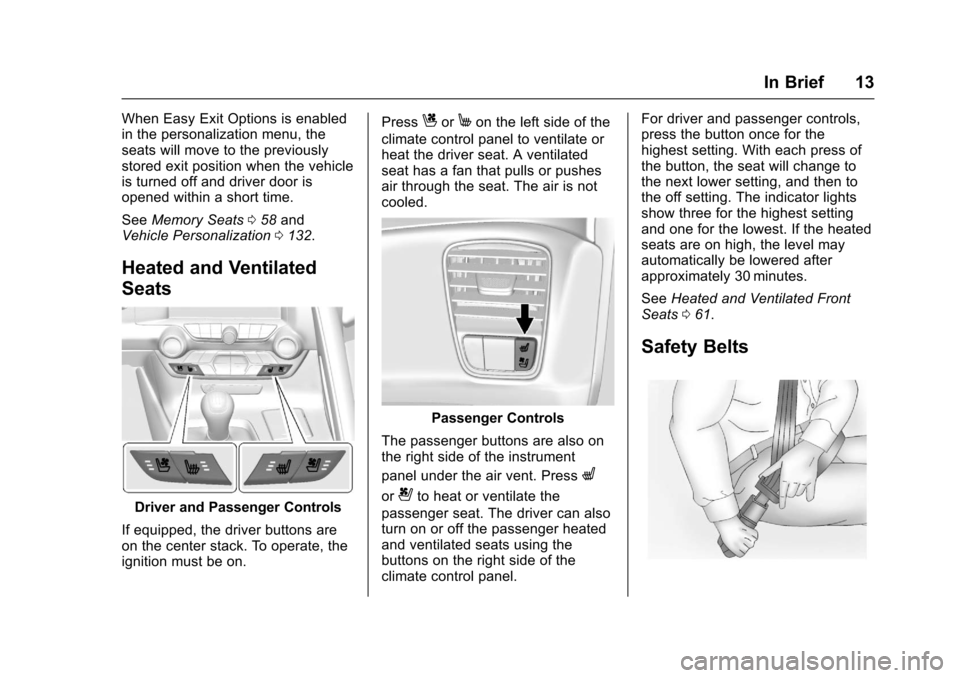
Driver and Passenger Controls
If equipped, the driver buttons are
on the center stack. To operate, the
ignition must be on. Press
CorMon the left side of the
climate control panel to ventilate or
heat the driver seat. A ventilated
seat has a fan that pulls or pushes
air through the seat. The air is not
cooled.
Passenger Controls
The passenger buttons are also on
the right side of the instrument
panel under the air vent. Press
L
or{to heat or ventilate the
passenger seat. The driver can also
turn on or off the passenger heated
and ventilated seats using the
buttons on the right side of the
climate control panel. For driver and passenger controls,
press the button once for the
highest setting. With each press of
the button, the seat will change to
the next lower setting, and then to
the off setting. The indicator lights
show three for the highest setting
and one for the lowest. If the heated
seats are on high, the level may
automatically be lowered after
approximately 30 minutes.
See
Heated and Ventilated Front
Seats 061.
Safety Belts
Page 18 of 360
Chevrolet Corvette Owner Manual (GMNA-Localizing-U.S./Canada/Mexico-
9956103) - 2017 - crc - 4/28/16
In Brief 17
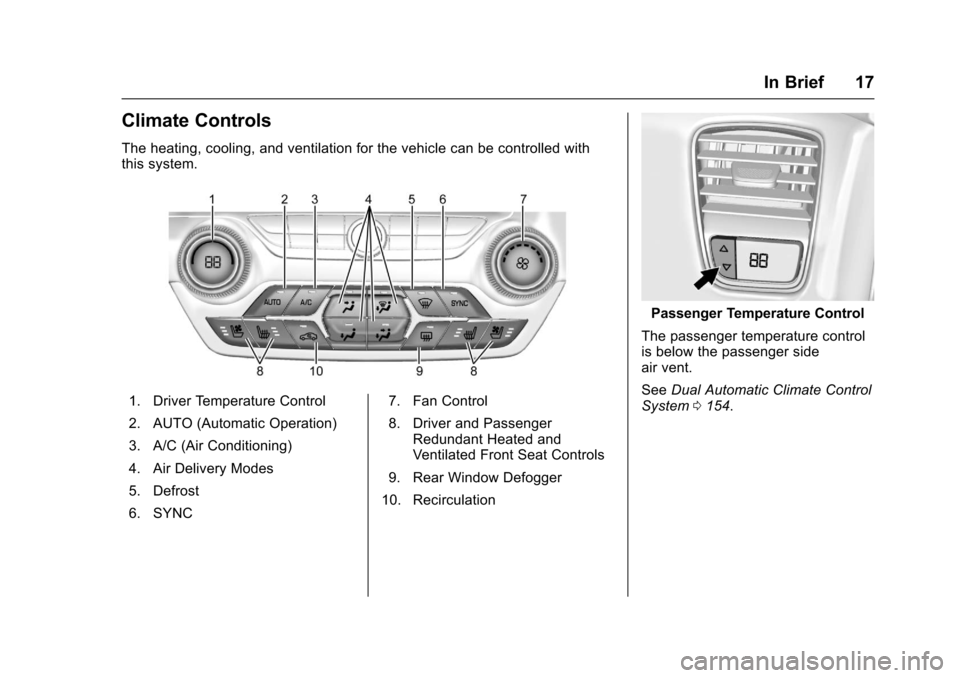
Climate Controls
The heating, cooling, and ventilation for the vehicle can be controlled with
this system.
1. Driver Temperature Control
2. AUTO (Automatic Operation)
3. A/C (Air Conditioning)
4. Air Delivery Modes
5. Defrost
6. SYNC7. Fan Control
8. Driver and Passenger
Redundant Heated and
Ventilated Front Seat Controls
9. Rear Window Defogger
10. Recirculation
Passenger Temperature Control
The passenger temperature control
is below the passenger side
air vent.
See Dual Automatic Climate Control
System 0154.
Page 34 of 360
Chevrolet Corvette Owner Manual (GMNA-Localizing-U.S./Canada/Mexico-
9956103) - 2017 - crc - 4/28/16
Keys, Doors, and Windows 33
Remote Vehicle Start
If equipped, this feature allows the
engine to be started from outside
the vehicle.
/:This button will be on the RKE
transmitter if the vehicle has remote
start.
The climate control system will use
the previous settings during a
remote start. The rear window
defogger may come on during
remote start based on cold ambient
conditions. The rear defog indicator
light does not come on during
remote start.
During a remote start, the heated or
ventilated seats, if equipped, may
turn on automatically. See Heated
and Ventilated Front Seats 061.
Laws in some local communities
may restrict the use of remote
starters. For example, some laws
may require a person using remote
start to have the vehicle in view.
Check local regulations for any
requirements. If the vehicle is low on fuel, do not
use the remote start feature. The
vehicle may run out of fuel.
The RKE transmitter range may be
less while the vehicle is running.
Other conditions can affect the
performance of the transmitter. See
Remote Keyless Entry (RKE)
System
026.
Starting the Engine Using Remote
Start
1. Press and release
Qon the
RKE transmitter.
2. Immediately press and hold
/
for at least four seconds or until
the turn signal lamps flash. The
lamps flash to confirm the
request to remote start the
vehicle has been received.
During the remote start, the
doors will be locked and the
parking lamps will remain on as
long as the engine is running.
The engine will shut off after
10 minutes unless a time
extension is done. 3. To drive, have the RKE
transmitter in the vehicle, press
the brake pedal, and then start
the vehicle.
Extending Engine Run Time
The engine run time can also be
extended by another 10 minutes,
if during the first 10 minutes
Steps 1–2 are repeated while the
engine is still running. An extension
can be requested, 30 seconds after
starting. This provides a total of
20 minutes.
The remote start can only be
extended once per ignition cycle.
A maximum of two remote starts,
or a remote start with an extension,
are allowed between ignition cycles.
After two remote starts, the vehicle's
ignition must be changed to ON/
RUN/START and then back to OFF
before the remote start procedure
can be used again.
Page 39 of 360
Chevrolet Corvette Owner Manual (GMNA-Localizing-U.S./Canada/Mexico-
9956103) - 2017 - crc - 4/28/16
38 Keys, Doors, and Windows
Doors
Hatch (Trunk)
{Warning
Exhaust gases can enter the
vehicle if it is driven with the
liftgate, hatch/trunk open, or with
any objects that pass through the
seal between the body and the
hatch/trunk or liftgate. Engine
exhaust contains carbon
monoxide (CO) which cannot be
seen or smelled. It can cause
unconsciousness and even death.
If the vehicle must be driven with
the liftgate or hatch/trunk open:. Close all of the windows.
. Fully open the air outlets on
or under the instrument
panel.
. Adjust the climate control
system to a setting that
brings in only outside air
and set the fan speed to the
(Continued)
Warning (Continued)
highest setting. See
“Climate Control Systems”
in the Index.
. If the vehicle is equipped
with a power liftgate, disable
the power liftgate function.
For more information about
carbon monoxide, see Engine
Exhaust 0188.
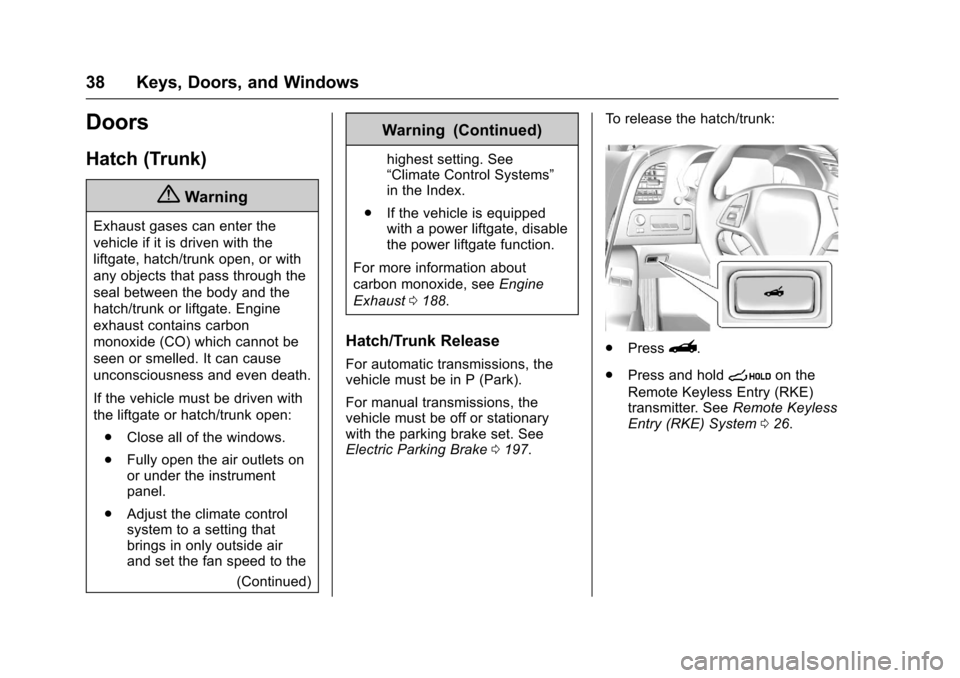
Hatch/Trunk Release
For automatic transmissions, the
vehicle must be in P (Park).
For manual transmissions, the
vehicle must be off or stationary
with the parking brake set. See
Electric Parking Brake 0197. To release the hatch/trunk:
.
Press}.
. Press and hold
son the
Remote Keyless Entry (RKE)
transmitter. See Remote Keyless
Entry (RKE) System 026.
Page 44 of 360
Chevrolet Corvette Owner Manual (GMNA-Localizing-U.S./Canada/Mexico-
9956103) - 2017 - crc - 4/28/16
Keys, Doors, and Windows 43
Exterior Mirrors
Convex Mirrors
{Warning
A convex mirror can make things,
like other vehicles, look farther
away than they really are. If you
cut too sharply into the right lane,
you could hit a vehicle on the
right. Check the inside mirror or
glance over your shoulder before
changing lanes.
The passenger side mirror is convex
shaped. A convex mirror's surface is
curved so more can be seen from
the driver seat.
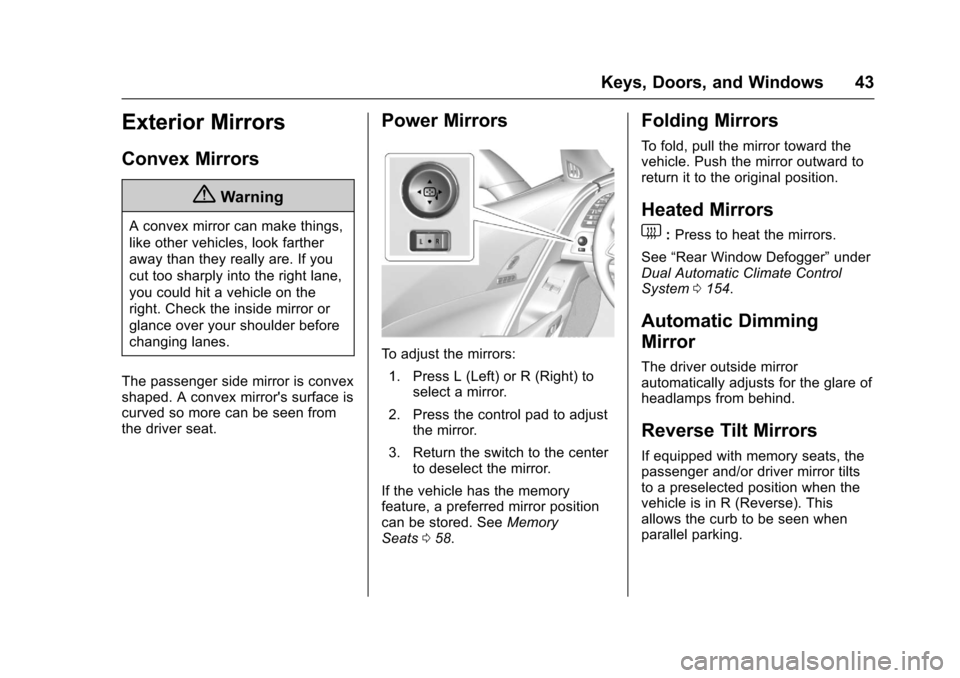
Power Mirrors
To adjust the mirrors: 1. Press L (Left) or R (Right) to select a mirror.
2. Press the control pad to adjust the mirror.
3. Return the switch to the center to deselect the mirror.
If the vehicle has the memory
feature, a preferred mirror position
can be stored. See Memory
Seats 058.
Folding Mirrors
To fold, pull the mirror toward the
vehicle. Push the mirror outward to
return it to the original position.
Heated Mirrors
1
:Press to heat the mirrors.
See “Rear Window Defogger” under
Dual Automatic Climate Control
System 0154.
Automatic Dimming
Mirror
The driver outside mirror
automatically adjusts for the glare of
headlamps from behind.
Reverse Tilt Mirrors
If equipped with memory seats, the
passenger and/or driver mirror tilts
to a preselected position when the
vehicle is in R (Reverse). This
allows the curb to be seen when
parallel parking.
Page 62 of 360
Chevrolet Corvette Owner Manual (GMNA-Localizing-U.S./Canada/Mexico-
9956103) - 2017 - crc - 4/28/16
Seats and Restraints 61
available. SeePower Seat
Adjustment 057 and Reclining
Seatbacks 058.
Heated and Ventilated
Front Seats
{Warning
If you cannot feel temperature
change or pain to the skin, the
seat heater may cause burns. To
reduce the risk of burns, people
with such a condition should use
care when using the seat heater,
especially for long periods of
time. Do not place anything on
the seat that insulates against
heat, such as a blanket, cushion,
cover, or similar item. This may
cause the seat heater to
overheat. An overheated seat
heater may cause a burn or may
damage the seat.
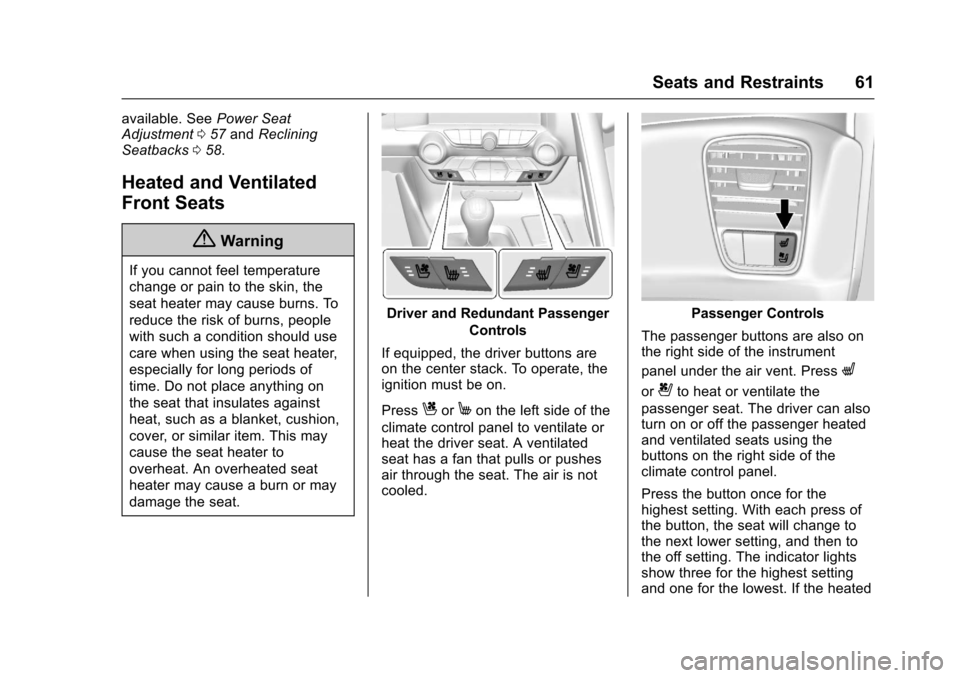
Driver and Redundant Passenger
Controls
If equipped, the driver buttons are
on the center stack. To operate, the
ignition must be on.
Press
CorMon the left side of the
climate control panel to ventilate or
heat the driver seat. A ventilated
seat has a fan that pulls or pushes
air through the seat. The air is not
cooled.
Passenger Controls
The passenger buttons are also on
the right side of the instrument
panel under the air vent. Press
L
or{to heat or ventilate the
passenger seat. The driver can also
turn on or off the passenger heated
and ventilated seats using the
buttons on the right side of the
climate control panel.
Press the button once for the
highest setting. With each press of
the button, the seat will change to
the next lower setting, and then to
the off setting. The indicator lights
show three for the highest setting
and one for the lowest. If the heated
Page 135 of 360
Chevrolet Corvette Owner Manual (GMNA-Localizing-U.S./Canada/Mexico-
9956103) - 2017 - crc - 4/28/16
134 Instruments and Controls
Manage Favorites
This allows favorites to be edited.
See“Manage Favorites” in
“Settings” under“Radio” in the
infotainment manual.
Number of Favorites Shown
Press to set the number of favorites
to display.
Select the desired number or select
Auto and the infotainment system
will automatically adjust the number
of favorites shown.
Audible Touch Feedback
This allows Audible Touch
Feedback to be turned on or off.
Select Off or On.
Bose Audio Pilot
This feature adjusts the volume
based on the noise in the vehicle.
See “Bose AudioPilot Noise
Compensation Technology” under
“Infotainment System Settings” in
the infotainment manual.
Select Off or On. Maximum Start Up Volume
This feature sets the maximum
startup volume. If the vehicle is
started and the volume is greater
than this level, the volume is
adjusted to this level.
To set the maximum startup volume,
press + or
−to increase or
decrease.
Vehicle
Select and the following may
display:
. Climate and Air Quality
. Comfort and Convenience
. Lighting
. Power Door Locks
. Remote Lock, Unlock, Start
Climate and Air Quality
Select and the following may
display:
. Auto Fan Max Speed
. Auto Defog
. Auto Rear Defog Auto Fan Max Speed
This feature will set the maximum
auto fan speed.
Select Low, Medium, or High.
Auto Defog
When set to On, the front defog will
automatically react to temperature
and humidity conditions that may
cause fogging.
Select Off or On.
Auto Rear Defog
If equipped, this feature will
automatically turn on the rear defog.
Select Off or On.
Comfort and Convenience
Select and the following may
display:
.
Auto Memory Recall
. Easy Exit Options
. Chime Volume
. Reverse Tilt Mirror