check CHEVROLET CORVETTE 2017 7.G Owners Manual
[x] Cancel search | Manufacturer: CHEVROLET, Model Year: 2017, Model line: CORVETTE, Model: CHEVROLET CORVETTE 2017 7.GPages: 360, PDF Size: 6.3 MB
Page 8 of 360

Chevrolet Corvette Owner Manual (GMNA-Localizing-U.S./Canada/Mexico-
9956103) - 2017 - crc - 4/28/16
In Brief 7
1.Air Vents 0158.
2. Turn Signal Lever. See Turn
and Lane-Change
Signals 0145.
Exterior Lamp Controls 0142.
3. Manual Shift Paddles (If Equipped). See Manual
Mode 0191.
Active Rev Match Paddles (If
Equipped). See Active Rev
Match 0195.
4. Instrument Cluster 098.
5. Windshield Wiper/Washer 094.
6. Instrument Panel Storage Button. See Instrument Panel
Storage 089.
7. Passenger Airbag Status Indicator. See Passenger
Sensing System 073.
8. Light Sensor. See Automatic
Headlamp System 0144.
9. Hazard Warning
Flashers 0145.
10. Infotainment 0148. 11. Passenger Temperature
Control. See Dual Automatic
Climate Control System 0154.
Passenger Heated and
Ventilated Seat Controls (If
Equipped). See Heated and
Ventilated Front Seats 061.
12. Driver and Redundant Passenger Heated and
Ventilated Seat Controls (If
Equipped). See Heated and
Ventilated Front Seats 061.
13. Dual Automatic Climate Control
System 0154.
14. Electric Parking Brake 0197.
15. MODE SELECT Knob. See Competitive Driving
Mode 0205.
16. Shift Lever (Manual Shown). SeeAutomatic Transmission
0 189 orManual
Transmission 0194.
17. Keyless Ignition. See Ignition
Positions 0182.
18. Bluetooth Controls. See “Steering Wheel Controls” in
the infotainment manual. Voice Recognition Controls.
See
“Steering Wheel Controls”
in the infotainment manual.
Driver Information Center (DIC)
Controls. See Driver
Information Center (DIC) 0115.
19. Steering Wheel Controls 094.
20. Horn 094.
21. Steering Wheel Adjustment
094 (Out of View).
22. Cruise Control 0209.
23. Hood Release (Out of View). SeeHood 0224.
24. Data Link Connector (DLC) (Out of View). See Malfunction
Indicator Lamp (Check Engine
Light) 0108.
25. Hatch/Trunk Release Button. SeeHatch (Trunk) 038.
Intrusion and Inclination
Sensors Disable Switch. See
Vehicle Alarm System 040.
26. Head-Up Display Controls (If Equipped). See Head-Up
Display (HUD) 0117.
27. Power Mirrors 043.
Page 23 of 360
Chevrolet Corvette Owner Manual (GMNA-Localizing-U.S./Canada/Mexico-
9956103) - 2017 - crc - 4/28/16
22 In Brief
the tires to the recommended
pressure shown on the Tire and
Loading Information label. See
Vehicle Load Limits0177. The
warning light will remain on until the
tire pressure is corrected.
The low tire pressure warning light
may come on in cool weather when
the vehicle is first started, and then
turn off as the vehicle is driven. This
may be an early indicator that the
tire pressures are getting low and
the tires need to be inflated to the
proper pressure.
The TPMS does not replace normal
monthly tire maintenance. Maintain
the correct tire pressures.
See Tire Pressure Monitor
System 0273.
Performance Vehicle
Features
Checking Engine Oil
Your vehicle may have a high
performance dry sump lubrication
system. This system operates differently than a standard engine
lubrication system. See
Engine
Oil 0230.
Check the oil level only after the
engine has been thoroughly warmed
up and then check between five and
10 minutes of shutoff. This ensures
that the oil level reading obtained
will be accurate.
Brake Noise
Under certain weather or operating
conditions, occasional brake squeal
may be heard with the vehicle's
performance braking system. This
brake system is designed for
superior fade resistance and
consistent operation using high
performance brake pads. Brake
squeal is normal and does not affect
system performance.
Tire Chatter/Hop
When driving at slow speeds and in
very tight turns, the vehicle may
have tire chatter/hop. This condition
is normal and the vehicle does not
require service. Road Imperfections/Crown Effects
The vehicle's precise steering and
handling make it very responsive to
road surface feedback. A slight pull
may be felt in the steering
depending on the crown of the road
and/or other road surface variations
such as troughs or ruts. This is
normal and the vehicle does not
require service.
Fuel (LT1 6.2L V8 Engine)
Premium Recommended Fuel
Use premium 93 octane unleaded
gasoline in your vehicle. Unleaded
gasoline with an octane rating as
low as 87 may be used, but it will
reduce performance and fuel
economy. See
Fuel0213.
Page 27 of 360
Chevrolet Corvette Owner Manual (GMNA-Localizing-U.S./Canada/Mexico-
9956103) - 2017 - crc - 4/28/16
26 Keys, Doors, and Windows
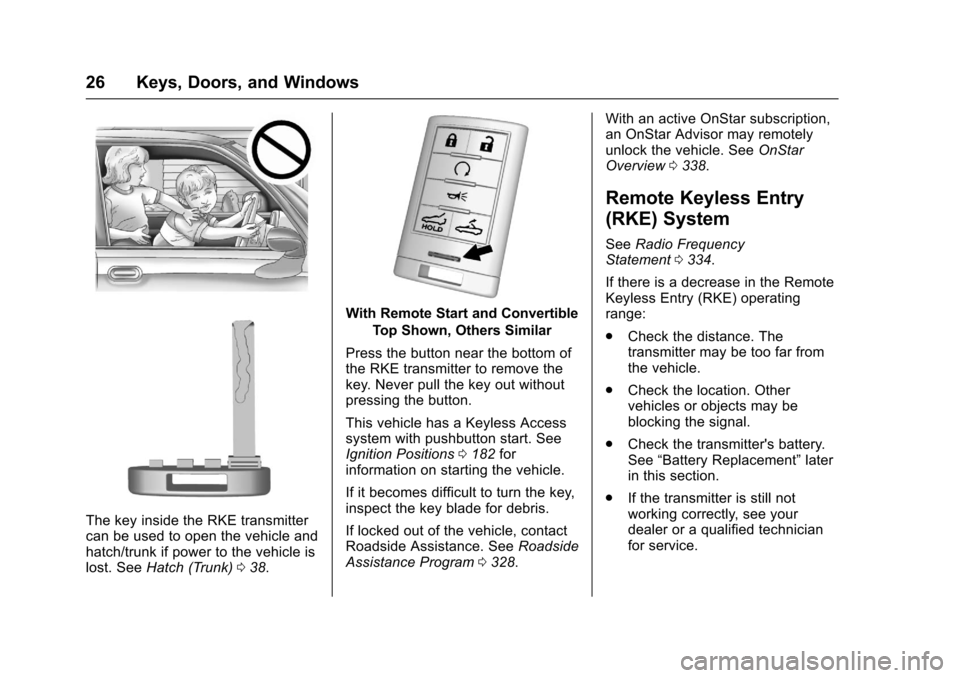
The key inside the RKE transmitter
can be used to open the vehicle and
hatch/trunk if power to the vehicle is
lost. SeeHatch (Trunk) 038.
With Remote Start and Convertible
Top Shown, Others Similar
Press the button near the bottom of
the RKE transmitter to remove the
key. Never pull the key out without
pressing the button.
This vehicle has a Keyless Access
system with pushbutton start. See
Ignition Positions 0182 for
information on starting the vehicle.
If it becomes difficult to turn the key,
inspect the key blade for debris.
If locked out of the vehicle, contact
Roadside Assistance. See Roadside
Assistance Program 0328. With an active OnStar subscription,
an OnStar Advisor may remotely
unlock the vehicle. See
OnStar
Overview 0338.
Remote Keyless Entry
(RKE) System
See Radio Frequency
Statement 0334.
If there is a decrease in the Remote
Keyless Entry (RKE) operating
range:
. Check the distance. The
transmitter may be too far from
the vehicle.
. Check the location. Other
vehicles or objects may be
blocking the signal.
. Check the transmitter's battery.
See “Battery Replacement” later
in this section.
. If the transmitter is still not
working correctly, see your
dealer or a qualified technician
for service.
Page 34 of 360
Chevrolet Corvette Owner Manual (GMNA-Localizing-U.S./Canada/Mexico-
9956103) - 2017 - crc - 4/28/16
Keys, Doors, and Windows 33
Remote Vehicle Start
If equipped, this feature allows the
engine to be started from outside
the vehicle.
/:This button will be on the RKE
transmitter if the vehicle has remote
start.
The climate control system will use
the previous settings during a
remote start. The rear window
defogger may come on during
remote start based on cold ambient
conditions. The rear defog indicator
light does not come on during
remote start.
During a remote start, the heated or
ventilated seats, if equipped, may
turn on automatically. See Heated
and Ventilated Front Seats 061.
Laws in some local communities
may restrict the use of remote
starters. For example, some laws
may require a person using remote
start to have the vehicle in view.
Check local regulations for any
requirements. If the vehicle is low on fuel, do not
use the remote start feature. The
vehicle may run out of fuel.
The RKE transmitter range may be
less while the vehicle is running.
Other conditions can affect the
performance of the transmitter. See
Remote Keyless Entry (RKE)
System
026.
Starting the Engine Using Remote
Start
1. Press and release
Qon the
RKE transmitter.
2. Immediately press and hold
/
for at least four seconds or until
the turn signal lamps flash. The
lamps flash to confirm the
request to remote start the
vehicle has been received.
During the remote start, the
doors will be locked and the
parking lamps will remain on as
long as the engine is running.
The engine will shut off after
10 minutes unless a time
extension is done. 3. To drive, have the RKE
transmitter in the vehicle, press
the brake pedal, and then start
the vehicle.
Extending Engine Run Time
The engine run time can also be
extended by another 10 minutes,
if during the first 10 minutes
Steps 1–2 are repeated while the
engine is still running. An extension
can be requested, 30 seconds after
starting. This provides a total of
20 minutes.
The remote start can only be
extended once per ignition cycle.
A maximum of two remote starts,
or a remote start with an extension,
are allowed between ignition cycles.
After two remote starts, the vehicle's
ignition must be changed to ON/
RUN/START and then back to OFF
before the remote start procedure
can be used again.
Page 38 of 360
Chevrolet Corvette Owner Manual (GMNA-Localizing-U.S./Canada/Mexico-
9956103) - 2017 - crc - 4/28/16
Keys, Doors, and Windows 37
PressQon the door lock switch
again, or press
Qon the RKE
transmitter, to override this feature
and lock the doors immediately.
Delayed locking can be
programmed through the Driver
Information Center (DIC). See
Vehicle Personalization 0132.
Automatic Door Locks
The doors will lock automatically
when all doors are closed, the
ignition is on, and the shift lever is
moved out of P (Park) for automatic
transmissions, or when vehicle
speed becomes faster than 13 km/h
(8 mph) for manual transmissions.
If a vehicle door is unlocked and
then opened and closed, the doors
will lock either when your foot is
removed from the brake or the
vehicle speed becomes faster than
13 km/h (8 mph).
To unlock the doors:
.
Press
Kon a power door lock
switch. .
For an automatic transmission,
shift into P (Park).
. For a manual transmission, turn
the vehicle off when parked.
Automatic door locking cannot be
disabled. Automatic door unlocking
can be programmed. See Vehicle
Personalization 0132.
Lockout Protection
If the vehicle is in ACC/
ACCESSORY or ON/RUN/START
and the power door lock switch is
pressed with the driver door open,
all the doors will lock and only the
driver door will unlock.
If the vehicle is off and locking is
requested while a door is open,
when all doors are closed the
vehicle will check for RKE
transmitters inside. If an RKE
transmitter is detected and the
number of RKE transmitters inside
has not reduced, the driver door will
unlock and the horn will chirp three
times. Lockout Protection can be manually
overridden with the driver door open
by pressing and holding
Qon the
power door lock switch.
Unlocked Door Anti-Lockout
If Unlocked Door Anti-Lockout is
turned on and the vehicle is off, the
driver door is open, and locking is
requested, all the doors will lock and
only the driver door will unlock. The
Unlocked Door Anti-Lockout feature
can be turned on or off using the
vehicle personalization menus. See
Vehicle Personalization 0132.
Page 43 of 360
Chevrolet Corvette Owner Manual (GMNA-Localizing-U.S./Canada/Mexico-
9956103) - 2017 - crc - 4/28/16
42 Keys, Doors, and Windows
The security light comes on in the
instrument cluster if there is a
problem with arming or disarming
the theft-deterrent system. This light
also comes on briefly when the
engine is started.
The system is automatically armed
when the ignition is turned off.
The immobilization system is
disarmed when the ignition is placed
in ACC/ACCESSORY or ON/RUN/
START and a valid transmitter is
found in the vehicle.
You do not have to manually arm or
disarm the system.
The system has one or more RKE
transmitters that are matched to an
immobilizer control unit in the
vehicle. Only a correctly matched
RKE transmitter starts the vehicle.
The vehicle may not start if the RKE
transmitter is damaged.If the engine does not start and the
security light comes on, there may
be a problem with the immobilizer
system. Press the ENGINE START/
STOP button again.
If the vehicle does not start and the
RKE transmitter appears to be
undamaged, try another RKE
transmitter. Or, place the transmitter
in the transmitter pocket. See
“NO
REMOTE DETECTED” underKey
and Lock Messages 0126. Check
the fuse. See Fuses0254. If the
engine still does not start with the
other transmitter, the vehicle needs
service. If the engine does start, the
first transmitter may be faulty. See
your dealer or have a new RKE
transmitter programmed to the
vehicle.
The immobilizer system can learn
new or replacement RKE
transmitters. Up to eight RKE
transmitters can be programmed for
the vehicle. To program additional
transmitters, see “Programming
Transmitters to the Vehicle” under
Remote Keyless Entry (RKE)
System Operation 027. Do not leave the key or device that
disarms or deactivates the
theft-deterrent system in the vehicle.
Page 44 of 360
Chevrolet Corvette Owner Manual (GMNA-Localizing-U.S./Canada/Mexico-
9956103) - 2017 - crc - 4/28/16
Keys, Doors, and Windows 43
Exterior Mirrors
Convex Mirrors
{Warning
A convex mirror can make things,
like other vehicles, look farther
away than they really are. If you
cut too sharply into the right lane,
you could hit a vehicle on the
right. Check the inside mirror or
glance over your shoulder before
changing lanes.
The passenger side mirror is convex
shaped. A convex mirror's surface is
curved so more can be seen from
the driver seat.
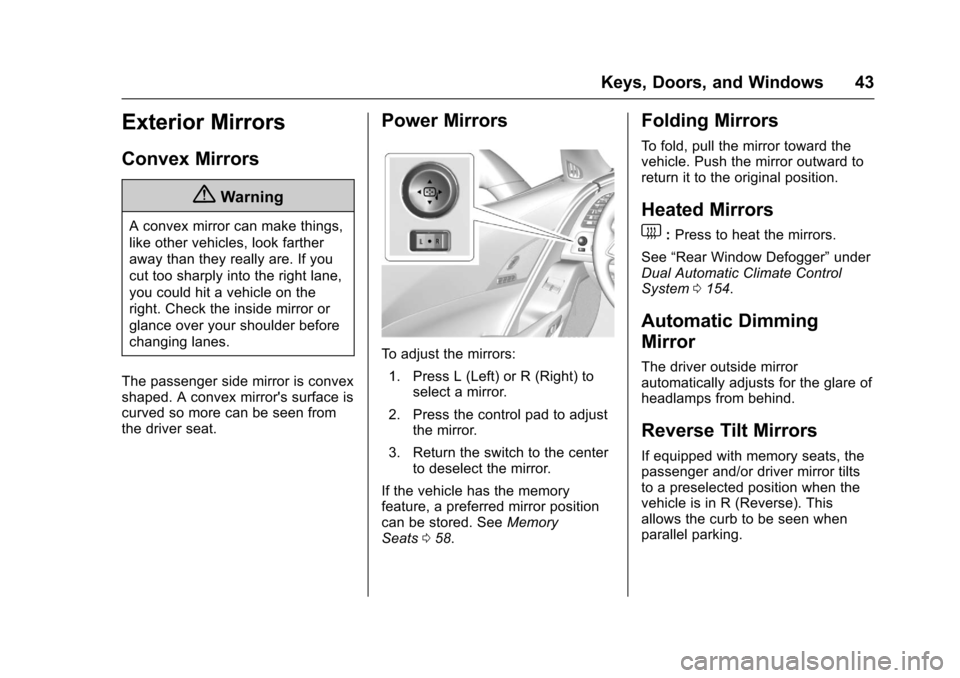
Power Mirrors
To adjust the mirrors: 1. Press L (Left) or R (Right) to select a mirror.
2. Press the control pad to adjust the mirror.
3. Return the switch to the center to deselect the mirror.
If the vehicle has the memory
feature, a preferred mirror position
can be stored. See Memory
Seats 058.
Folding Mirrors
To fold, pull the mirror toward the
vehicle. Push the mirror outward to
return it to the original position.
Heated Mirrors
1
:Press to heat the mirrors.
See “Rear Window Defogger” under
Dual Automatic Climate Control
System 0154.
Automatic Dimming
Mirror
The driver outside mirror
automatically adjusts for the glare of
headlamps from behind.
Reverse Tilt Mirrors
If equipped with memory seats, the
passenger and/or driver mirror tilts
to a preselected position when the
vehicle is in R (Reverse). This
allows the curb to be seen when
parallel parking.
Page 50 of 360
Chevrolet Corvette Owner Manual (GMNA-Localizing-U.S./Canada/Mexico-
9956103) - 2017 - crc - 4/28/16
Keys, Doors, and Windows 49
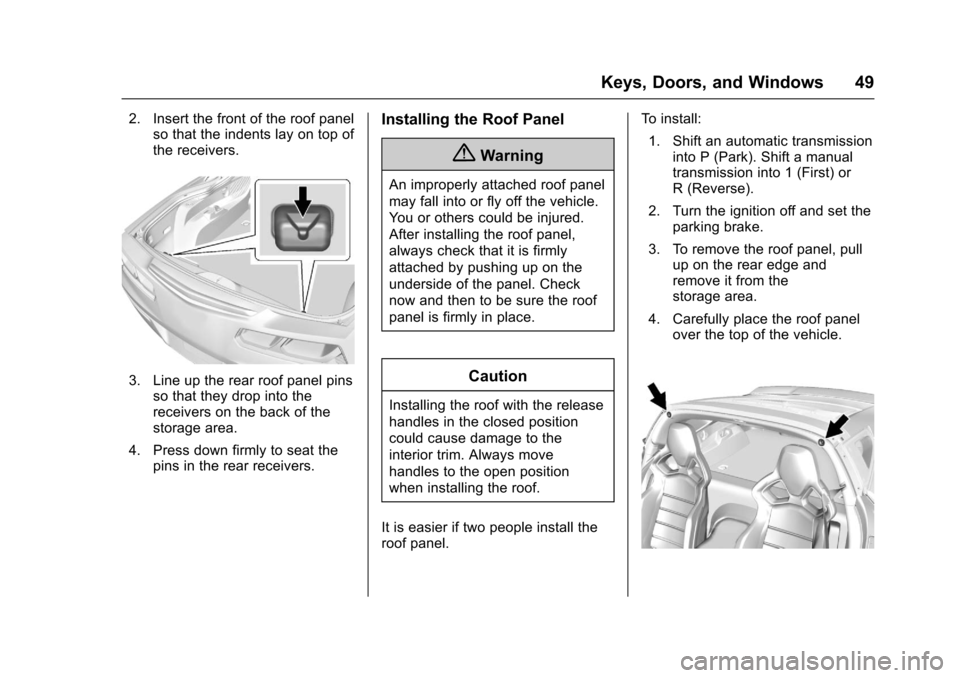
2. Insert the front of the roof panelso that the indents lay on top of
the receivers.
3. Line up the rear roof panel pins
so that they drop into the
receivers on the back of the
storage area.
4. Press down firmly to seat the pins in the rear receivers.
Installing the Roof Panel
{Warning
An improperly attached roof panel
may fall into or fly off the vehicle.
You or others could be injured.
After installing the roof panel,
always check that it is firmly
attached by pushing up on the
underside of the panel. Check
now and then to be sure the roof
panel is firmly in place.
Caution
Installing the roof with the release
handles in the closed position
could cause damage to the
interior trim. Always move
handles to the open position
when installing the roof.
It is easier if two people install the
roof panel. To install:
1. Shift an automatic transmission into P (Park). Shift a manual
transmission into 1 (First) or
R (Reverse).
2. Turn the ignition off and set the parking brake.
3. To remove the roof panel, pull up on the rear edge and
remove it from the
storage area.
4. Carefully place the roof panel over the top of the vehicle.
Page 51 of 360
Chevrolet Corvette Owner Manual (GMNA-Localizing-U.S./Canada/Mexico-
9956103) - 2017 - crc - 4/28/16
50 Keys, Doors, and Windows
5. Position the rear edge of theroof panel next to the
weatherstrip on the back of the
roof opening. Then align and fit
the pins at the rear of the roof
panel inside the openings in
the rear overhead weatherstrip.
Gently lower the front edge of
the roof panel to the front of the
roof opening.
6. Check that the weatherstripping on each side
of the roof panel is under the
panel.
7. Make sure the front release handles are in the full open
position.
8. Push the roof firmly downward to engage the pins.
9. Turn the front release handles inward so that they fully latch
to the closed position. It is
critical that the handles fully
latch.
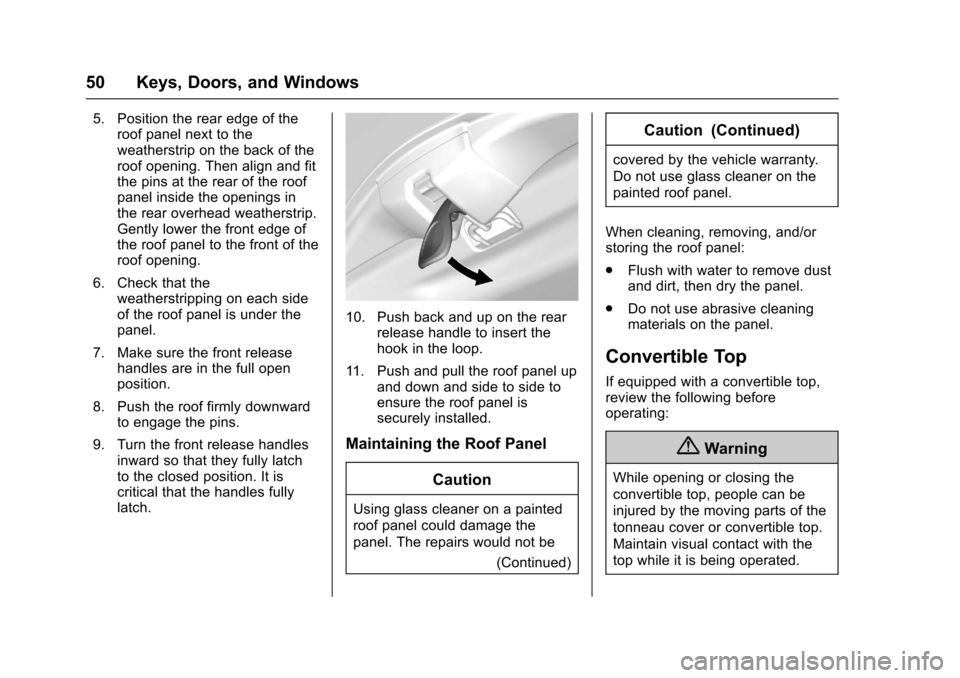
10. Push back and up on the rear release handle to insert the
hook in the loop.
11. Push and pull the roof panel up and down and side to side to
ensure the roof panel is
securely installed.
Maintaining the Roof Panel
Caution
Using glass cleaner on a painted
roof panel could damage the
panel. The repairs would not be (Continued)
Caution (Continued)
covered by the vehicle warranty.
Do not use glass cleaner on the
painted roof panel.
When cleaning, removing, and/or
storing the roof panel:
. Flush with water to remove dust
and dirt, then dry the panel.
. Do not use abrasive cleaning
materials on the panel.
Convertible Top
If equipped with a convertible top,
review the following before
operating:
{Warning
While opening or closing the
convertible top, people can be
injured by the moving parts of the
tonneau cover or convertible top.
Maintain visual contact with the
top while it is being operated.
Page 54 of 360
Chevrolet Corvette Owner Manual (GMNA-Localizing-U.S./Canada/Mexico-
9956103) - 2017 - crc - 4/28/16
Keys, Doors, and Windows 53
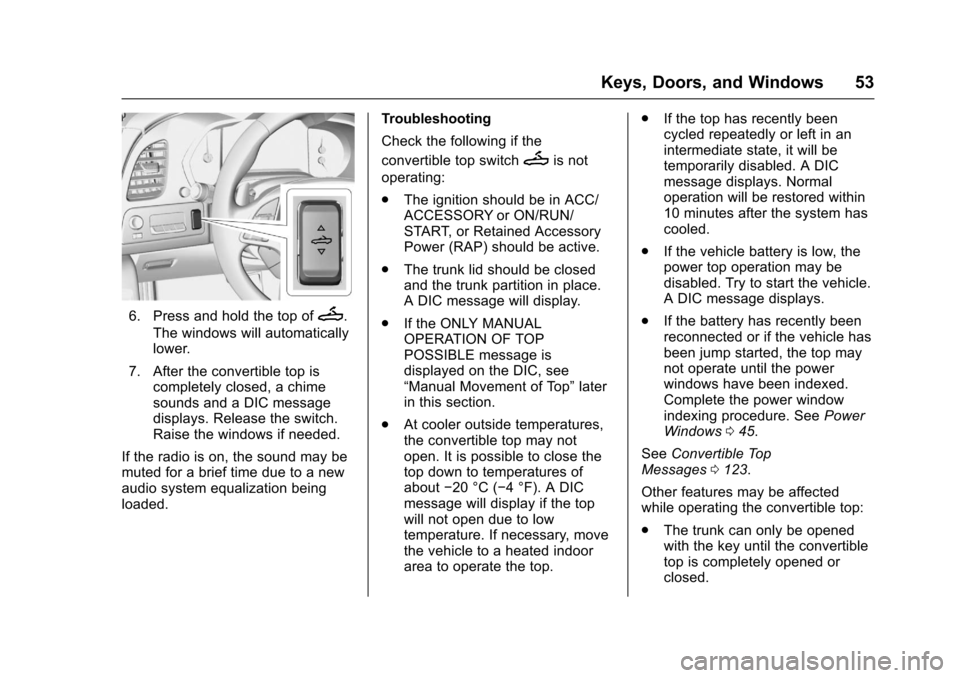
6. Press and hold the top ofM.
The windows will automatically
lower.
7. After the convertible top is completely closed, a chime
sounds and a DIC message
displays. Release the switch.
Raise the windows if needed.
If the radio is on, the sound may be
muted for a brief time due to a new
audio system equalization being
loaded. Troubleshooting
Check the following if the
convertible top switch
Mis not
operating:
. The ignition should be in ACC/
ACCESSORY or ON/RUN/
START, or Retained Accessory
Power (RAP) should be active.
. The trunk lid should be closed
and the trunk partition in place.
A DIC message will display.
. If the ONLY MANUAL
OPERATION OF TOP
POSSIBLE message is
displayed on the DIC, see
“Manual Movement of Top” later
in this section.
. At cooler outside temperatures,
the convertible top may not
open. It is possible to close the
top down to temperatures of
about −20 °C (−4 °F). A DIC
message will display if the top
will not open due to low
temperature. If necessary, move
the vehicle to a heated indoor
area to operate the top. .
If the top has recently been
cycled repeatedly or left in an
intermediate state, it will be
temporarily disabled. A DIC
message displays. Normal
operation will be restored within
10 minutes after the system has
cooled.
. If the vehicle battery is low, the
power top operation may be
disabled. Try to start the vehicle.
A DIC message displays.
. If the battery has recently been
reconnected or if the vehicle has
been jump started, the top may
not operate until the power
windows have been indexed.
Complete the power window
indexing procedure. See Power
Windows 045.
See Convertible Top
Messages 0123.
Other features may be affected
while operating the convertible top:
. The trunk can only be opened
with the key until the convertible
top is completely opened or
closed.