engine CHEVROLET CORVETTE 2018 User Guide
[x] Cancel search | Manufacturer: CHEVROLET, Model Year: 2018, Model line: CORVETTE, Model: CHEVROLET CORVETTE 2018Pages: 358, PDF Size: 5.46 MB
Page 34 of 358
Chevrolet Corvette Owner Manual (GMNA-Localizing-U.S./Canada/Mexico-
11374030) - 2018 - CRC - 11/8/17
Keys, Doors, and Windows 33
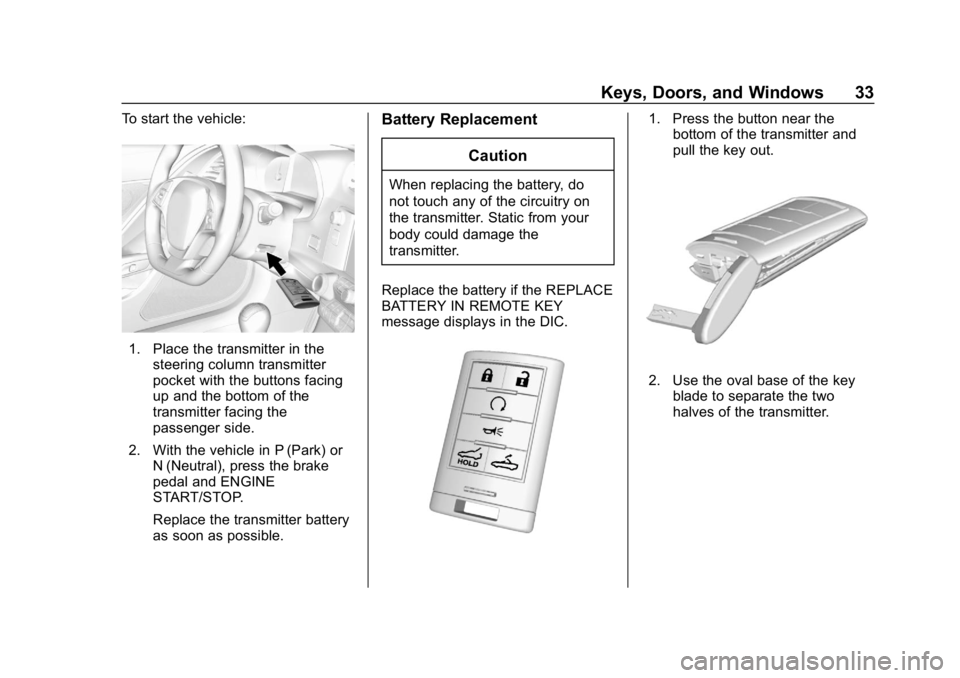
To start the vehicle:
1. Place the transmitter in thesteering column transmitter
pocket with the buttons facing
up and the bottom of the
transmitter facing the
passenger side.
2. With the vehicle in P (Park) or N (Neutral), press the brake
pedal and ENGINE
START/STOP.
Replace the transmitter battery
as soon as possible.
Battery Replacement
Caution
When replacing the battery, do
not touch any of the circuitry on
the transmitter. Static from your
body could damage the
transmitter.
Replace the battery if the REPLACE
BATTERY IN REMOTE KEY
message displays in the DIC.
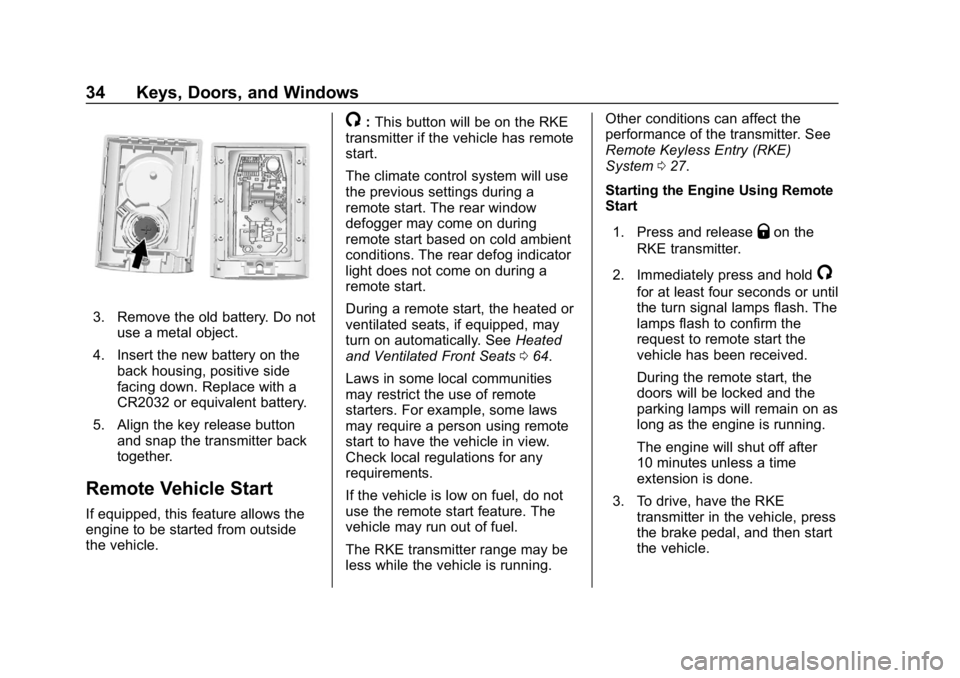
1. Press the button near the bottom of the transmitter and
pull the key out.
2. Use the oval base of the key
blade to separate the two
halves of the transmitter.
Page 35 of 358
Chevrolet Corvette Owner Manual (GMNA-Localizing-U.S./Canada/Mexico-
11374030) - 2018 - CRC - 11/8/17
34 Keys, Doors, and Windows
3. Remove the old battery. Do notuse a metal object.
4. Insert the new battery on the back housing, positive side
facing down. Replace with a
CR2032 or equivalent battery.
5. Align the key release button and snap the transmitter back
together.
Remote Vehicle Start
If equipped, this feature allows the
engine to be started from outside
the vehicle.
/:This button will be on the RKE
transmitter if the vehicle has remote
start.
The climate control system will use
the previous settings during a
remote start. The rear window
defogger may come on during
remote start based on cold ambient
conditions. The rear defog indicator
light does not come on during a
remote start.
During a remote start, the heated or
ventilated seats, if equipped, may
turn on automatically. See Heated
and Ventilated Front Seats 064.
Laws in some local communities
may restrict the use of remote
starters. For example, some laws
may require a person using remote
start to have the vehicle in view.
Check local regulations for any
requirements.
If the vehicle is low on fuel, do not
use the remote start feature. The
vehicle may run out of fuel.
The RKE transmitter range may be
less while the vehicle is running. Other conditions can affect the
performance of the transmitter. See
Remote Keyless Entry (RKE)
System
027.
Starting the Engine Using Remote
Start
1. Press and release
Qon the
RKE transmitter.
2. Immediately press and hold
/
for at least four seconds or until
the turn signal lamps flash. The
lamps flash to confirm the
request to remote start the
vehicle has been received.
During the remote start, the
doors will be locked and the
parking lamps will remain on as
long as the engine is running.
The engine will shut off after
10 minutes unless a time
extension is done.
3. To drive, have the RKE transmitter in the vehicle, press
the brake pedal, and then start
the vehicle.
Page 36 of 358
Chevrolet Corvette Owner Manual (GMNA-Localizing-U.S./Canada/Mexico-
11374030) - 2018 - CRC - 11/8/17
Keys, Doors, and Windows 35
Extending Engine Run Time
The engine run time can also be
extended by another 10 minutes,
if during the first 10 minutes
Steps 1 and 2 are repeated while
the engine is still running. An
extension can be requested
30 seconds after starting. This
provides a total of 20 minutes.
The remote start can only be
extended once per ignition cycle.
A maximum of two remote starts,
or a remote start with an extension,
are allowed between ignition cycles.
After two remote starts, or a remote
start with an extension, the ignition
must be turned on and then off
before the remote start procedure
can be used again.
Canceling a Remote Start
To cancel a remote start, do any of
the following:
.Press and hold
/until the
parking lamps turn off.
. Turn on the hazard warning
flashers. .
Turn the vehicle on and then off.
Conditions in Which Remote Start
Will Not Work
The remote start will not operate if
any of the following occur:
. The ignition is in any mode other
than off.
. The RKE transmitter is in the
vehicle.
. The hood is not closed.
. The hazard warning flashers
are on.
. There is an emission control
system malfunction.
. The engine coolant temperature
is too high.
. The oil pressure is low.
. Two remote vehicle starts, or a
remote start with an extension,
have already been used.
. The vehicle is not in P (Park).
Door Locks
{Warning
Unlocked doors can be
dangerous.
. Passengers, especially
children, can easily open
the doors and fall out of a
moving vehicle. The doors
can be unlocked and
opened while the vehicle is
moving. The chance of
being thrown out of the
vehicle in a crash is
increased if the doors are
not locked. So, all
passengers should wear
seat belts properly and the
doors should be locked
whenever the vehicle is
driven.
(Continued)
Page 40 of 358
Chevrolet Corvette Owner Manual (GMNA-Localizing-U.S./Canada/Mexico-
11374030) - 2018 - CRC - 11/8/17
Keys, Doors, and Windows 39
has not reduced, the driver door will
unlock and the horn will chirp three
times.
Lockout Protection can be manually
overridden with the driver door open
by pressing and holding
Qon the
power door lock switch.
Unlocked Door Anti-Lockout
If Unlocked Door Anti-Lockout is
turned on and the vehicle is off, the
driver door is open, and locking is
requested, all the doors will lock and
the driver door will remain open.
Press the button again to lock the
driver door. The Unlocked Door
Anti-Lockout feature can be turned
on or off. See Vehicle
Personalization 0126.
Doors
Hatch (Trunk)
{Warning
Exhaust gases can enter the
vehicle if it is driven with the
liftgate, hatch/trunk open, or with
any objects that pass through the
seal between the body and the
hatch/trunk or liftgate. Engine
exhaust contains carbon
monoxide (CO) which cannot be
seen or smelled. It can cause
unconsciousness and even death.
If the vehicle must be driven with
the liftgate or hatch/trunk open:
. Close all of the windows.
. Fully open the air outlets on
or under the instrument
panel.
(Continued)
Warning (Continued)
.Adjust the climate control
system to a setting that
brings in only outside air
and set the fan speed to the
highest setting. See
“Climate Control Systems”
in the Index.
. If the vehicle is equipped
with a power liftgate, disable
the power liftgate function.
For more information about
carbon monoxide, see Engine
Exhaust 0184.
Hatch/Trunk Release
For automatic transmissions, the
vehicle must be in P (Park).
For manual transmissions, the
vehicle must be off or stationary
with the parking brake set. See
Electric Parking Brake 0193.
Page 44 of 358
Chevrolet Corvette Owner Manual (GMNA-Localizing-U.S./Canada/Mexico-
11374030) - 2018 - CRC - 11/8/17
Keys, Doors, and Windows 43
Before arming the theft-deterrent
system and activating the intrusion
sensor:
.Make sure both doors and
windows are completely closed.
. Secure any loose items such as
sunshades.
. Make sure there are no
obstructions blocking the
sensors.
Intrusion and Inclination
Sensors Disable Switch
It is recommended that the intrusion
and inclination sensors be
deactivated if pets are left in the
vehicle or if the vehicle is being
transported.
With the vehicle turned off, press
d
to the right of the hatch/trunk
release button. The indicator light
will come on momentarily, indicating
that these sensors have been
disabled until the next time the
alarm system is armed.
Immobilizer
See Radio Frequency Statement
0 331.
Immobilizer Operation
The vehicle has a passive
theft-deterrent system.
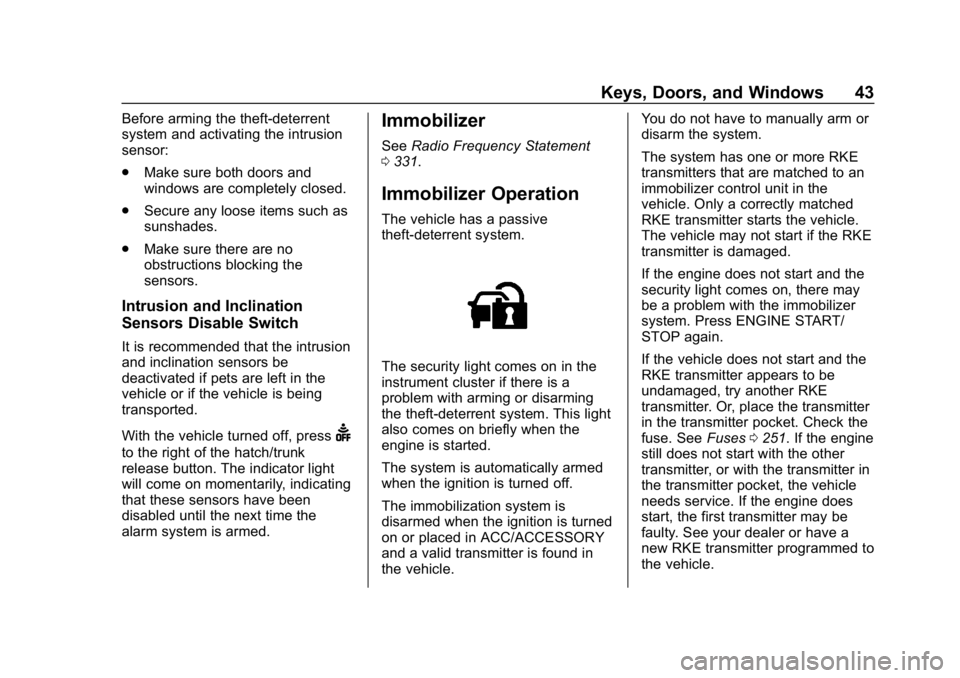
The security light comes on in the
instrument cluster if there is a
problem with arming or disarming
the theft-deterrent system. This light
also comes on briefly when the
engine is started.
The system is automatically armed
when the ignition is turned off.
The immobilization system is
disarmed when the ignition is turned
on or placed in ACC/ACCESSORY
and a valid transmitter is found in
the vehicle. You do not have to manually arm or
disarm the system.
The system has one or more RKE
transmitters that are matched to an
immobilizer control unit in the
vehicle. Only a correctly matched
RKE transmitter starts the vehicle.
The vehicle may not start if the RKE
transmitter is damaged.
If the engine does not start and the
security light comes on, there may
be a problem with the immobilizer
system. Press ENGINE START/
STOP again.
If the vehicle does not start and the
RKE transmitter appears to be
undamaged, try another RKE
transmitter. Or, place the transmitter
in the transmitter pocket. Check the
fuse. See
Fuses0251. If the engine
still does not start with the other
transmitter, or with the transmitter in
the transmitter pocket, the vehicle
needs service. If the engine does
start, the first transmitter may be
faulty. See your dealer or have a
new RKE transmitter programmed to
the vehicle.
Page 48 of 358

Chevrolet Corvette Owner Manual (GMNA-Localizing-U.S./Canada/Mexico-
11374030) - 2018 - CRC - 11/8/17
Keys, Doors, and Windows 47
Power windows work when the
vehicle is on or in ACC/
ACCESSORY, or when Retained
Accessory Power (RAP) is active.
SeeRetained Accessory Power
(RAP) 0182.
Using the window switch, press to
open or pull to close the window.
The windows may be temporarily
disabled if they are used repeatedly
within a short time.
Window Express Movement
All windows can be opened without
holding the window switch. Press
the switch down fully and quickly
release to express open the
window.
If equipped, pull the window switch
up fully and quickly release to
express close the window.
Briefly press or pull the window
switch in the same direction to stop
that window’s express movement.
Window Automatic Reversal
System
The express-close feature will
reverse window movement if it
comes in contact with an object.
Extreme cold or ice could cause the
window to auto-reverse. The
window will operate normally after
the object or condition is removed.
Automatic Reversal System
Override
{Warning
If automatic reversal system
override is active, the window will
not reverse automatically. You or
others could be injured and the
window could be damaged.
Before using automatic reversal
system override, make sure that
all people and obstructions are
clear of the window path.
When the engine is on, override the
automatic reversal system by pulling
and holding the window switch if
conditions prevent it from closing.
Programming the Power
Windows
Programming may be necessary if
the vehicle's battery has been
disconnected or discharged. If the
window will not express close,
program each express-close
window: 1. Close all doors.
2. Turn the ignition on or to ACC/ ACCESSORY.
3. Partially open the window to be programmed. Then close it and
continue to pull the switch
briefly after the window has
fully closed.
4. Open the window and continue to press the switch briefly after
the window has fully opened.
Window Operation with
Convertible Top
Windows automatically lower fully
when the convertible top is lowered
or raised. See Convertible Top 052.
Page 53 of 358
Chevrolet Corvette Owner Manual (GMNA-Localizing-U.S./Canada/Mexico-
11374030) - 2018 - CRC - 11/8/17
52 Keys, Doors, and Windows
Caution (Continued)
covered by the vehicle warranty.
Do not use glass cleaner on the
painted roof panel.
When cleaning, removing, and/or
storing the roof panel:
. Flush with water to remove dust
and dirt, then dry the panel.
. Do not use abrasive cleaning
materials on the panel.
Convertible Top
If equipped with a convertible top,
review the following before
operating:
{Warning
While opening or closing the
convertible top, people can be
injured by the moving parts of the
tonneau cover or convertible top.
Maintain visual contact with the
top while it is being operated.
Caution
Follow these guidelines when
operating the convertible top or
damage can occur:
. Remove all items from the
roof, trunk lid, or tonneau
cover before operating.
. Remove all objects from the
trunk that may contact the
convertible top when it is
operated.
. Do not leave the vehicle
with the convertible
top open.
. Do not exceed 50 km/h
(31 mph) until the top has
completely closed or
opened.
. Do not open or close the top
while driving in high wind
conditions.
. Do not operate the
convertible top multiple
times in a short period of
(Continued)
Caution (Continued)
time without starting the
engine to avoid draining the
vehicle battery.
. Do not open or store the
convertible top when it is
dirty or wet. This could
result in stains, mildew,
or other damage.
. Only store the vehicle with
the top fully closed.
Opening the Convertible Top —
Instrument Panel Switch
1. Remove all objects from the top of the tonneau cover and
forward of the partition. Place
the partition in the rear storage
area in the upright position.
Fasten both sides of the
partition to the posts just below
the tonneau cover. See Rear
Storage 093.
2. Close the trunk.
3. Start the vehicle or place it in ACC/ACCESSORY.
Page 77 of 358
Chevrolet Corvette Owner Manual (GMNA-Localizing-U.S./Canada/Mexico-
11374030) - 2018 - CRC - 11/8/17
76 Seats and Restraints
Airbags should never be regarded
as anything more than a supplement
to seat belts.
What Will You See after
an Airbag Inflates?
After the frontal and seat-mounted
side impact airbags inflate, they
quickly deflate, so quickly that some
people may not even realize the
airbags inflated. Some components
of the airbag module may be hot for
several minutes. For location of the
airbags, seeWhere Are the
Airbags? 073.
The parts of the airbag that come
into contact with you may be warm,
but not too hot to touch. There may
be some smoke and dust coming
from the vents in the deflated
airbags. Airbag inflation does not
prevent the driver from seeing out of
the windshield or being able to steer
the vehicle, nor does it prevent
people from leaving the vehicle.
{Warning
When an airbag inflates, there
may be dust in the air. This dust
could cause breathing problems
for people with a history of
asthma or other breathing trouble.
To avoid this, everyone in the
vehicle should get out as soon as
it is safe to do so. If you have
breathing problems but cannot
get out of the vehicle after an
airbag inflates, then get fresh air
by opening a window or a door.
If you experience breathing
problems following an airbag
deployment, you should seek
medical attention.
The vehicle has a feature that may
automatically unlock the doors, turn
on the interior lamps and hazard
warning flashers, and shut off the
fuel system after the airbags inflate.
The feature may also activate,
without airbag inflation, after an
event that exceeds a predetermined
threshold. After turning the ignition off and then on again, the fuel
system will return to normal
operation; the doors can be locked,
the interior lamps can be turned off,
and the hazard warning flashers can
be turned off using the controls for
those features. If any of these
systems are damaged in the crash
they may not operate as normal.
{Warning
A crash severe enough to inflate
the airbags may have also
damaged important functions in
the vehicle, such as the fuel
system, brake and steering
systems, etc. Even if the vehicle
appears to be drivable after a
moderate crash, there may be
concealed damage that could
make it difficult to safely operate
the vehicle.
Use caution if you should attempt
to restart the engine after a crash
has occurred.
Page 97 of 358
Chevrolet Corvette Owner Manual (GMNA-Localizing-U.S./Canada/Mexico-
11374030) - 2018 - CRC - 11/8/17
96 Instruments and Controls
Instruments and
Controls
Controls
Steering Wheel Adjustment . . . . 97
Steering Wheel Controls . . . . . . . 97
Horn . . . . . . . . . . . . . . . . . . . . . . . . . . . 97
Windshield Wiper/Washer . . . . . . 97
Compass . . . . . . . . . . . . . . . . . . . . . . 98
Clock . . . . . . . . . . . . . . . . . . . . . . . . . . 98
Power Outlets . . . . . . . . . . . . . . . . . 99
Warning Lights, Gauges, and
Indicators
Warning Lights, Gauges, andIndicators . . . . . . . . . . . . . . . . . . . 100
Instrument Cluster . . . . . . . . . . . . 101
Speedometer . . . . . . . . . . . . . . . . . 106
Odometer . . . . . . . . . . . . . . . . . . . . . 106
Trip Odometer . . . . . . . . . . . . . . . . 106
Tachometer . . . . . . . . . . . . . . . . . . . 106
Fuel Gauge . . . . . . . . . . . . . . . . . . . 106
Boost Gauge . . . . . . . . . . . . . . . . . 107
Engine Coolant Temperature Gauge . . . . . . . . . . . . . . . . . . . . . . 108
Seat Belt Reminders . . . . . . . . . 109
Airbag Readiness Light . . . . . . . 109 Passenger Airbag Status
Indicator . . . . . . . . . . . . . . . . . . . . . 110
Charging System Light . . . . . . . . 111
Malfunction Indicator Lamp . . . 111
Brake System Warning Light . . . . . . . . . . . . . . . . . . . . . . . . 113
Electric Parking Brake Light . . . . . . . . . . . . . . . . . . . . . . . . 113
Service Electric Parking Brake Light . . . . . . . . . . . . . . . . . . . . . . . . 114
Antilock Brake System (ABS) Warning Light . . . . . . . . . . . . . . . 114
Traction Off Light . . . . . . . . . . . . . 114
Traction Control System (TCS)/ Electronic Stability Control
Light . . . . . . . . . . . . . . . . . . . . . . . . 115
Electronic Stability Control (ESC) Off Light . . . . . . . . . . . . . . 115
Engine Coolant Temperature Warning Light . . . . . . . . . . . . . . . 115
Tire Pressure Light . . . . . . . . . . . 116
Engine Oil Pressure Light . . . . . 116
Low Fuel Warning Light . . . . . . . 117
Security Light . . . . . . . . . . . . . . . . . 117
High-Beam On Light . . . . . . . . . . 117
Lamps On Reminder . . . . . . . . . . 117
Cruise Control Light . . . . . . . . . . 118
Door Ajar Light . . . . . . . . . . . . . . . 118
Information Displays
Driver Information Center (DIC) . . . . . . . . . . . . . . . . 118
Head-Up Display (HUD) . . . . . . 121
Vehicle Messages
Vehicle Messages . . . . . . . . . . . . 125
Engine Power Messages . . . . . 125
Vehicle Speed Messages . . . . . 126
Vehicle Personalization
Vehicle Personalization . . . . . . . 126
Universal Remote System
Universal Remote System . . . . 133
Universal Remote System Programming . . . . . . . . . . . . . . . 133
Universal Remote System Operation . . . . . . . . . . . . . . . . . . . 135
Page 101 of 358
Chevrolet Corvette Owner Manual (GMNA-Localizing-U.S./Canada/Mexico-
11374030) - 2018 - CRC - 11/8/17
100 Instruments and Controls
Caution
Leaving electrical equipment
plugged in for an extended period
of time while the vehicle is off will
drain the battery. Always unplug
electrical equipment when not in
use and do not plug in equipment
that exceeds the maximum
20 amp rating.
Certain electrical accessories may
not be compatible with the
accessory power outlet and could
overload vehicle or adapter fuses.
If a problem is experienced, see
your dealer.
When adding electrical equipment,
be sure to follow the proper
installation instructions included with
the equipment. See Add-On
Electrical Equipment 0214. It is recommended that a qualified
technician or dealer be seen for the
proper installation of your
equipment.
Caution
Hanging heavy equipment from
the power outlet can cause
damage not covered by the
vehicle warranty. The power
outlets are designed for
accessory power plugs only, such
as cell phone charge cords.
Warning Lights,
Gauges, and
Indicators
Warning lights and gauges can
signal that something is wrong
before it becomes serious enough
to cause an expensive repair or
replacement. Paying attention to the
warning lights and gauges could
prevent injury.
Some warning lights come on briefly
when the engine is started to
indicate they are working. When
one of the warning lights comes on
and stays on while driving, or when
one of the gauges shows there may
be a problem, check the section that
explains what to do. Waiting to do
repairs can be costly and even
dangerous.