brake CHEVROLET CORVETTE 2019 Workshop Manual
[x] Cancel search | Manufacturer: CHEVROLET, Model Year: 2019, Model line: CORVETTE, Model: CHEVROLET CORVETTE 2019Pages: 367, PDF Size: 6.8 MB
Page 207 of 367
Chevrolet Corvette Owner Manual (GMNA-Localizing-U.S./Canada/Mexico-
12032182) - 2019 - crc - 5/8/18
206 Driving and Operating
ESC OFF lightgwill go out.
Launch Control (Track
Mode Only)
A Launch Control feature is
available, within Competitive Driving
Mode, on all vehicles to allow the
driver to achieve high levels of
vehicle acceleration in a straight
line. Launch Control is a form of
traction control that manages tire
spin while launching the vehicle.
This feature is intended for use
during closed course race events
where consistent zero to
60 and quarter mile times are
desirable.
Launch Control is only available
when the following criteria are met:
.Competitive Driving Mode is
selected or any of the
Performance Traction
Management modes are
selected. The TCS light comes
on the instrument cluster and the
appropriate DIC message
displays.
. The vehicle is not moving. .
The steering wheel is pointing
straight.
Manual Transmissions
. The clutch is pressed and the
vehicle is in 1 (First) gear.
. The accelerator pedal is rapidly
applied to wide open throttle.
The Launch Control feature will
initially limit engine speed as the
driver rapidly applies the accelerator
pedal to wide open throttle. Allow
the engine rpm to stabilize.
A smooth, quick release of the
clutch, while maintaining the fully
pressed accelerator pedal, will
manage wheel slip. Complete shifts
as described in Manual
Transmission 0192.
Automatic Transmissions
. The brake pedal must be firmly
pressed to the floor, equivalent
to a panic brake event.
. The accelerator pedal is rapidly
applied to wide open throttle. (If
the vehicle rolls due to wide
open throttle, release the
throttle, press the brake pedal more firmly, and re-apply the
accelerator to wide open
throttle.)
The Launch Control feature will
initially limit engine speed as the
driver rapidly applies the accelerator
pedal to wide open throttle. Allow
the engine rpm to stabilize.
A smooth, quick release of the
brake pedal, while maintaining the
fully pressed accelerator pedal, will
manage wheel slip.
After the vehicle is launched, the
system continues in Competitive
Driving Mode or Performance
Traction Management.
Competitive Driving Mode, PTM,
and Launch Control are systems
designed for a closed course race
track and not intended for use on
public roads. The systems are not
intended to compensate for lack of
driver experience or familiarity with
the race track.
Page 209 of 367
Chevrolet Corvette Owner Manual (GMNA-Localizing-U.S./Canada/Mexico-
12032182) - 2019 - crc - 5/8/18
208 Driving and Operating
If the Traction Control System (TCS)
begins to limit wheel spin while you
are using cruise control, the cruise
control automatically disengages.
SeeTraction Control/Electronic
Stability Control 0198. When road
conditions allow for using safely
again, cruise control can be turned
back on.
If the brakes are applied, cruise
control disengages.
Cruise control will disengage if
either TCS or StabiliTrak/ESC is
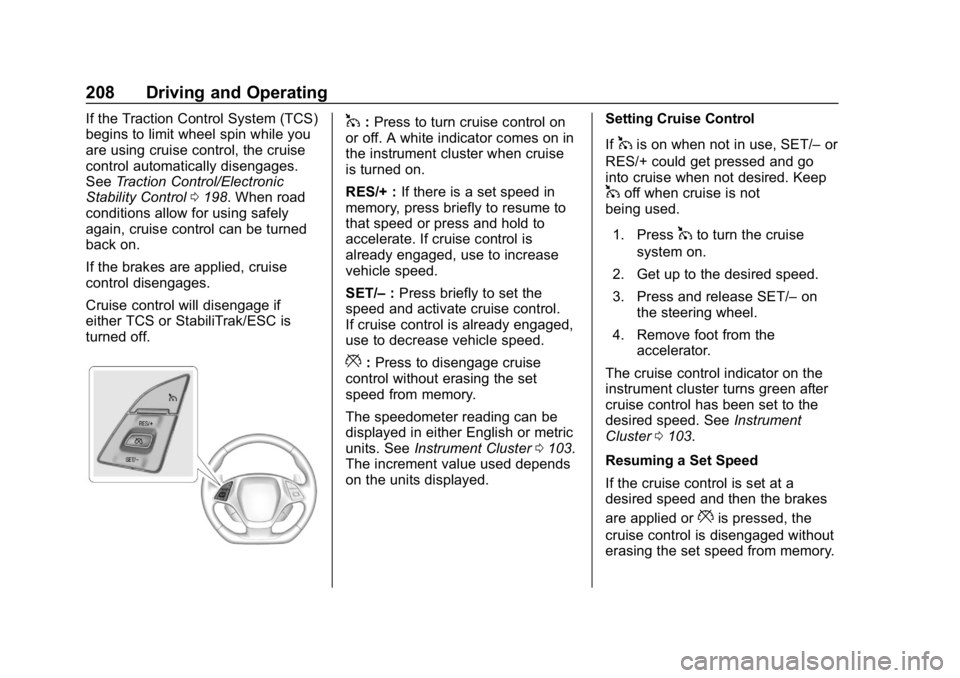
turned off.1: Press to turn cruise control on
or off. A white indicator comes on in
the instrument cluster when cruise
is turned on.
RES/+ : If there is a set speed in
memory, press briefly to resume to
that speed or press and hold to
accelerate. If cruise control is
already engaged, use to increase
vehicle speed.
SET/– :Press briefly to set the
speed and activate cruise control.
If cruise control is already engaged,
use to decrease vehicle speed.
*: Press to disengage cruise
control without erasing the set
speed from memory.
The speedometer reading can be
displayed in either English or metric
units. See Instrument Cluster 0103.
The increment value used depends
on the units displayed. Setting Cruise Control
If
1is on when not in use, SET/–
or
RES/+ could get pressed and go
into cruise when not desired. Keep
1off when cruise is not
being used.
1. Press
1to turn the cruise
system on.
2. Get up to the desired speed.
3. Press and release SET/– on
the steering wheel.
4. Remove foot from the accelerator.
The cruise control indicator on the
instrument cluster turns green after
cruise control has been set to the
desired speed. See Instrument
Cluster 0103.
Resuming a Set Speed
If the cruise control is set at a
desired speed and then the brakes
are applied or
*is pressed, the
cruise control is disengaged without
erasing the set speed from memory.
Page 210 of 367
Chevrolet Corvette Owner Manual (GMNA-Localizing-U.S./Canada/Mexico-
12032182) - 2019 - crc - 5/8/18
Driving and Operating 209
Once the vehicle reaches about
40 km/h (25 mph) or more, briefly
press RES/+. The vehicle returns to
the previous set speed.
Increasing Speed While Using
Cruise Control
Do one of the following:
.Press and hold RES/+ until the
desired speed is reached, then
release it.
. To increase vehicle speed in
small increments, briefly press
RES/+. For each press, the
vehicle goes about 1.6 km/h
(1 mph) faster.
Reducing Speed While Using
Cruise Control
Do one of the following:
. Press and hold SET/– until the
desired lower speed is reached,
then release it.
. To decrease the vehicle speed in
small increments, briefly press
SET/–. For each press, the
vehicle goes about 1.6 km/h
(1 mph) slower. Passing Another Vehicle While
Using Cruise Control
Use the accelerator pedal to
increase the vehicle speed. When
you take your foot off the pedal, the
vehicle will slow down to the
previously set cruise speed.
While pressing the accelerator pedal
or shortly following the release to
override cruise control, briefly
pressing SET/–
will result in cruise
set to the current vehicle speed.
Using Cruise Control on Hills
How well the cruise control works
on hills depends upon the vehicle
speed, load, and the steepness of
the hills. When going up steep hills,
you might have to step on the
accelerator pedal to maintain your
speed. When going downhill, you
might have to brake or shift to a
lower gear to keep your speed
down. If the brake pedal is applied,
cruise control will disengage. Cruise Control in Manual Paddle
Shift Gear Selection
When the vehicle is in M (Manual
Mode) and the manual paddle shift
controls are not being used, cruise
control operates in the same
manner as D (Drive).
When the vehicle is in M (Manual
Mode) and the manual paddle shift
controls are being used, cruise
control operates as follows:
.
If cruise control is active and a
gear is selected with the manual
paddle shift controls, the vehicle
speed is maintained in the driver
selected gear and will not
automatically upshift or
downshift the transmission while
the driver ’s gear selection is
active.
. If driving in hilly terrain, cruise
control may not be able to
maintain vehicle speed if an
upshift or downshift is not
selected by the driver. While
driving on hilly terrain and cruise
control is active with a manual
paddle shift gear selection, the
Page 211 of 367
Chevrolet Corvette Owner Manual (GMNA-Localizing-U.S./Canada/Mexico-
12032182) - 2019 - crc - 5/8/18
210 Driving and Operating
driver must select the proper
gear for the terrain or select D
(Drive) on the shift lever for full
automatic transmission
operation.
Ending Cruise Control
. Step lightly on the brake pedal.
. Press the clutch pedal for
several seconds or shift to
Neutral (manual transmissions).
. Shift the transmission to
N (Neutral) (automatic
transmissions).
. Press
*.
. To turn off cruise control,
press
1.
Erasing Speed Memory
The cruise control set speed is
erased from memory if
1is pressed
or if the ignition is turned off.
Driver Assistance
Systems
Assistance Systems for
Parking or Backing
If equipped, the Rear Vision Camera
(RVC) and Curb View Camera may
help the driver park or avoid objects.
Always check around the vehicle
when parking or backing.
Rear Vision Camera (RVC)
When the vehicle is shifted into
R (Reverse), the RVC displays an
image of the area behind the vehicle
in the infotainment display. The
previous screen displays when the
vehicle is shifted out of R (Reverse)
after a short delay. To return to the
previous screen sooner, press any
button on the infotainment system,
shift into P (Park), or reach a vehicle
speed of approximately 12
km/h (8 mph).
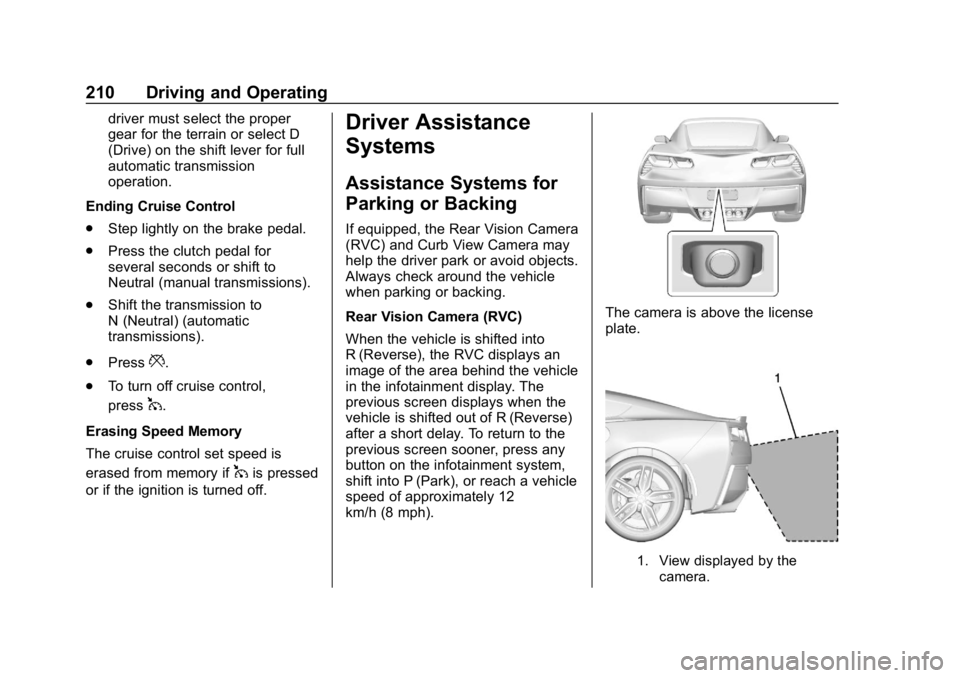
The camera is above the license
plate.
1. View displayed by the camera.
Page 219 of 367
Chevrolet Corvette Owner Manual (GMNA-Localizing-U.S./Canada/Mexico-
12032182) - 2019 - crc - 5/8/18
218 Vehicle Care
Vehicle Care
General Information
General Information . . . . . . . . . . 219
California Proposition65 Warning . . . . . . . . . . . . . . . . . 219
California Perchlorate Materials Requirements . . . . . 220
Accessories and Modifications . . . . . . . . . . . . . . . . 220
Lifting the Vehicle . . . . . . . . . . . . 220
Vehicle Checks
Doing Your Own Service Work . . . . . . . . . . . . . . . 223
Hood . . . . . . . . . . . . . . . . . . . . . . . . . 223
Engine Compartment Overview . . . . . . . . . . . . . . . . . . . . 225
Engine Oil . . . . . . . . . . . . . . . . . . . . 232
Engine Oil Life System . . . . . . . 237
Automatic Transmission Fluid . . . . . . . . . . . . . . . . . . . . . . . . 238
Manual Transmission Fluid . . . 239
Hydraulic Clutch . . . . . . . . . . . . . . 239
Engine Air Cleaner/Filter . . . . . . 239
Cooling System (Engine) . . . . . 242
Cooling System (Aero Panel) . . . . . . . . . . . . . . . . . . . . . . . 246 Cooling System (Intercooler on
LT4 and LT5 Engines) . . . . . . . 247
Engine Overheating . . . . . . . . . . 247
Washer Fluid . . . . . . . . . . . . . . . . . 248
Brakes . . . . . . . . . . . . . . . . . . . . . . . 249
Brake Fluid . . . . . . . . . . . . . . . . . . . 250
Battery - North America . . . . . . 251
Rear Axle . . . . . . . . . . . . . . . . . . . . 252
Starter Switch Check . . . . . . . . . 253
Park Brake and P (Park) Mechanism Check . . . . . . . . . . 254
Wiper Blade Replacement . . . . 254
Windshield Replacement . . . . . 255
Gas Strut(s) . . . . . . . . . . . . . . . . . . 255Headlamp Aiming
Headlamp Aiming . . . . . . . . . . . . 256
Bulb Replacement
Bulb Replacement . . . . . . . . . . . . 257
High Intensity Discharge (HID) Lighting . . . . . . . . . . . . . . . . . . . . . 257
LED Lighting . . . . . . . . . . . . . . . . . 257
License Plate Lamp . . . . . . . . . . 257
Electrical System
Electrical System Overload . . . 258
Fuses . . . . . . . . . . . . . . . . . . . . . . . . 258
Engine Compartment Fuse Block . . . . . . . . . . . . . . . . . . . . . . . . 259 Rear Compartment Fuse
Block . . . . . . . . . . . . . . . . . . . . . . . . 262
Wheels and Tires
Tires . . . . . . . . . . . . . . . . . . . . . . . . . . 265
Winter Tires . . . . . . . . . . . . . . . . . . 266
Run-Flat Tires . . . . . . . . . . . . . . . . 266
Low-Profile Tires . . . . . . . . . . . . . 267
Competition Oriented Tires . . . 268
Summer Tires . . . . . . . . . . . . . . . . 269
Tire Sidewall Labeling . . . . . . . . 269
Tire Designations . . . . . . . . . . . . . 270
Tire Terminology andDefinitions . . . . . . . . . . . . . . . . . . 271
Tire Pressure . . . . . . . . . . . . . . . . . 274
Tire Pressure for High-Speed Operation . . . . . . . . . . . . . . . . . . . 275
Tire Pressure Monitor System . . . . . . . . . . . . . . . . . . . . . . 275
Tire Pressure Monitor Operation . . . . . . . . . . . . . . . . . . . 276
Tire Inspection . . . . . . . . . . . . . . . . 278
Tire Rotation . . . . . . . . . . . . . . . . . 279
When It Is Time for New Tires . . . . . . . . . . . . . . . . . . . . . . . . 280
Buying New Tires . . . . . . . . . . . . . 280
Different Size Tires and Wheels . . . . . . . . . . . . . . . . . . . . . . 282
Uniform Tire Quality Grading . . . . . . . . . . . . . . . . . . . . . 282
Page 221 of 367
Chevrolet Corvette Owner Manual (GMNA-Localizing-U.S./Canada/Mexico-
12032182) - 2019 - crc - 5/8/18
220 Vehicle Care
California Perchlorate
Materials Requirements
Certain types of automotive
applications, such as airbag
initiators, seat belt pretensioners,
and lithium batteries contained in
Remote Keyless Entry transmitters,
may contain perchlorate materials.
Special handling may be necessary.
For additional information, see
www.dtsc.ca.gov/hazardouswaste/
perchlorate.
Accessories and
Modifications
Adding non-dealer accessories or
making modifications to the vehicle
can affect vehicle performance and
safety, including such things as
airbags, braking, stability, ride and
handling, emissions systems,
aerodynamics, durability, and
electronic systems like antilock
brakes, traction control, and stability
control. These accessories or
modifications could even cause
malfunction or damage not covered
by the vehicle warranty.Damage to suspension components
caused by modifying vehicle height
outside of factory settings will not be
covered by the vehicle warranty.
Damage to vehicle components
resulting from modifications or the
installation or use of non-GM
certified parts, including control
module or software modifications, is
not covered under the terms of the
vehicle warranty and may affect
remaining warranty coverage for
affected parts.
GM Accessories are designed to
complement and function with other
systems on the vehicle. See your
dealer to accessorize the vehicle
using genuine GM Accessories
installed by a dealer technician.
Also, see
Adding Equipment to the
Airbag-Equipped Vehicle 083.
Lifting the Vehicle
{Warning
Lifting a vehicle can cause an
injury. The vehicle can slip off the
jack and roll over you or other
people. You and they could be
badly injured. Find a level place
to lift your vehicle. To help
prevent the vehicle from moving:
1. Set the parking brake firmly.
2. Put an automatictransmission in P (Park) or a
manual transmission in
1 (First) or R (Reverse).
3. Turn off the engine.
To be even more certain the
vehicle will not move, put blocks
in front of and behind the wheels.
Page 227 of 367

Chevrolet Corvette Owner Manual (GMNA-Localizing-U.S./Canada/Mexico-
12032182) - 2019 - crc - 5/8/18
226 Vehicle Care
1.Passenger Compartment Air
Filter 0155 (Out of View).
2. Coolant Surge Tank and Pressure Cap.
See Cooling System (Engine)
0 242 orCooling System (Aero
Panel) 0246 orCooling
System (Intercooler on LT4 and
LT5 Engines) 0247.
3. Engine Compartment Fuse
Block 0259.
4. Engine Air Cleaner/Filter 0239.
5. Engine Cooling Fan (Out of View).
See Cooling System (Engine)
0 242 orCooling System (Aero
Panel) 0246 orCooling
System (Intercooler on LT4 and
LT5 Engines) 0247.
6. Engine Oil Fill Cap. See “When
to Add Engine Oil” under
Engine Oil 0232.
7. Engine Oil Dipstick. See “Checking Engine Oil” under
Engine Oil 0232.
8. Brake Fluid Reservoir. See Brake Fluid 0250. 9. Clutch Master Cylinder
Reservoir (If Equipped). See
Hydraulic Clutch 0239.
10. Windshield Washer Fluid Reservoir. See “Adding Washer
Fluid” under Washer Fluid
0 248.
Page 229 of 367

Chevrolet Corvette Owner Manual (GMNA-Localizing-U.S./Canada/Mexico-
12032182) - 2019 - crc - 5/8/18
228 Vehicle Care
1. Engine Oil Dipstick. See“Checking Engine Oil” under
Engine Oil 0232.
2. Dry Sump Engine Oil Tank Fill Cap. See “Changing Engine Oil
and Filter” Engine Oil 0232.
3. Passenger Compartment Air
Filter 0155 (Out of View).
4. Coolant Surge Tank and Pressure Cap.
See Cooling System (Engine)
0 242 orCooling System (Aero
Panel) 0246 orCooling
System (Intercooler on LT4 and
LT5 Engines) 0247.
5. Engine Compartment Fuse
Block 0259.
6. Engine Air Cleaner/Filter 0239.
7. Engine Cooling Fan (Out of View).
See Cooling System (Engine)
0 242 orCooling System (Aero
Panel) 0246 orCooling
System (Intercooler on LT4 and
LT5 Engines) 0247.
8. Brake Fluid Reservoir. See Brake Fluid 0250. 9. Clutch Master Cylinder
Reservoir (If Equipped). See
Hydraulic Clutch 0239.
10. Windshield Washer Fluid Reservoir. See “Adding Washer
Fluid” under Washer Fluid
0 248.
Page 231 of 367

Chevrolet Corvette Owner Manual (GMNA-Localizing-U.S./Canada/Mexico-
12032182) - 2019 - crc - 5/8/18
230 Vehicle Care
1. Engine Oil Dipstick. See“Checking Engine Oil” under
Engine Oil 0232.
2. Dry Sump Engine Oil Tank Fill Cap. See “Changing Engine Oil
and Filter” Engine Oil 0232.
3. Passenger Compartment Air
Filter 0155 (Out of View).
4. Coolant Surge Tank and Pressure Cap.
See Cooling System (Engine)
0 242 orCooling System (Aero
Panel) 0246 orCooling
System (Intercooler on LT4 and
LT5 Engines) 0247.
5. Engine Compartment Fuse
Block 0259.
6. Engine Air Cleaner/Filter 0239.
7. Engine Cooling Fan (Out of View).
See Cooling System (Engine)
0 242 orCooling System (Aero
Panel) 0246 orCooling
System (Intercooler on LT4 and
LT5 Engines) 0247.
8. Brake Fluid Reservoir. See Brake Fluid 0250. 9. Clutch Master Cylinder
Reservoir (If Equipped). See
Hydraulic Clutch 0239.
10. Windshield Washer Fluid Reservoir. See “Adding Washer
Fluid” under Washer Fluid
0 248.
Page 233 of 367
Chevrolet Corvette Owner Manual (GMNA-Localizing-U.S./Canada/Mexico-
12032182) - 2019 - crc - 5/8/18
232 Vehicle Care
1. Engine Oil Dipstick. See“Checking Engine Oil” under
Engine Oil 0232.
2. Dry Sump Engine Oil Tank Fill Cap. See “Changing Engine Oil
and Filter” Engine Oil 0232.
3. Passenger Compartment Air
Filter 0155 (Out of View).
4. Coolant Surge Tank and Pressure Cap.
See Cooling System (Engine)
0 242 orCooling System (Aero
Panel) 0246 orCooling
System (Intercooler on LT4 and
LT5 Engines) 0247.
5. Engine Compartment Fuse
Block 0259.
6. Engine Air Cleaner/Filter 0239.
7. Engine Cooling Fan (Out of View).
See Cooling System (Engine)
0 242 orCooling System (Aero
Panel) 0246 orCooling
System (Intercooler on LT4 and
LT5 Engines) 0247.
8. Brake Fluid Reservoir. See Brake Fluid 0250. 9. Clutch Master Cylinder
Reservoir (If Equipped). See
Hydraulic Clutch 0239.
10. Windshield Washer Fluid Reservoir. See “Adding Washer
Fluid” under Washer Fluid
0 248.
Engine Oil
To ensure proper engine
performance and long life, careful
attention must be paid to engine oil.
Following these simple, but
important steps will help protect
your investment:
.
Use engine oil approved to the
proper specification and of the
proper viscosity grade. See
“Selecting the Right Engine Oil”
in this section.
. Check the engine oil level
regularly and maintain the
proper oil level. See “Checking
Engine Oil” and“When to Add
Engine Oil” in this section.
. Change the engine oil at the
appropriate time. See Engine Oil
Life System 0237. .
Always dispose of engine oil
properly. See “What to Do with
Used Oil” in this section.
Checking Engine Oil (Except
ZR1, Z06, Grand Sport, and
Stingray with Z51)
If the ENGINE OIL LOW–ADD OIL
message displays on the Driver
Information Center (DIC), check the
engine oil level right away.
Check the engine oil level regularly,
every 650 km (400 mi), especially
prior to a long trip. The engine oil
dipstick handle is a loop. See
Engine Compartment Overview
0225 for the location.
{Warning
The engine oil dipstick handle
may be hot; it could burn you.
Use a towel or glove to touch the
dipstick handle.