change wheel CHEVROLET CORVETTE 2020 User Guide
[x] Cancel search | Manufacturer: CHEVROLET, Model Year: 2020, Model line: CORVETTE, Model: CHEVROLET CORVETTE 2020Pages: 336, PDF Size: 5.21 MB
Page 112 of 336
Chevrolet Corvette Owner Manual (GMNA-Localizing-U.S./Canada/Mexico-
12470550) - 2020 - CRC - 4/23/20
Instruments and Controls 111
The HUD information appears as an
image focused out toward the front
of the vehicle.
Caution
If you try to use the HUD image
as a parking aid, you may
misjudge the distance and
damage your vehicle. Do not use
the HUD image as a parking aid.
The HUD information can be
displayed in various languages. The
speedometer reading and other
numerical values can be displayed
in either English or metric units.
The language selection is changed
through the radio and the units of
measurement is changed through
the instrument cluster. See Vehicle
Personalization 0116 and “Settings”
under Instrument Cluster 094.
The HUD may display different
alerts and information for vehicles
equipped with these features:
. Speedometer
. Tachometer .
Manual Paddle Shift Gear
Indicator
These displays on the HUD are
for use when using the manual
paddle shift controls to shift the
transmission. See “Manual
Paddle Shift” inDual Clutch
Transmission 0171.
. G-Force Gauge
. Upcoming Maneuver from
On-Board Navigation
. Upcoming Maneuver from
OnStar
. Incoming Call
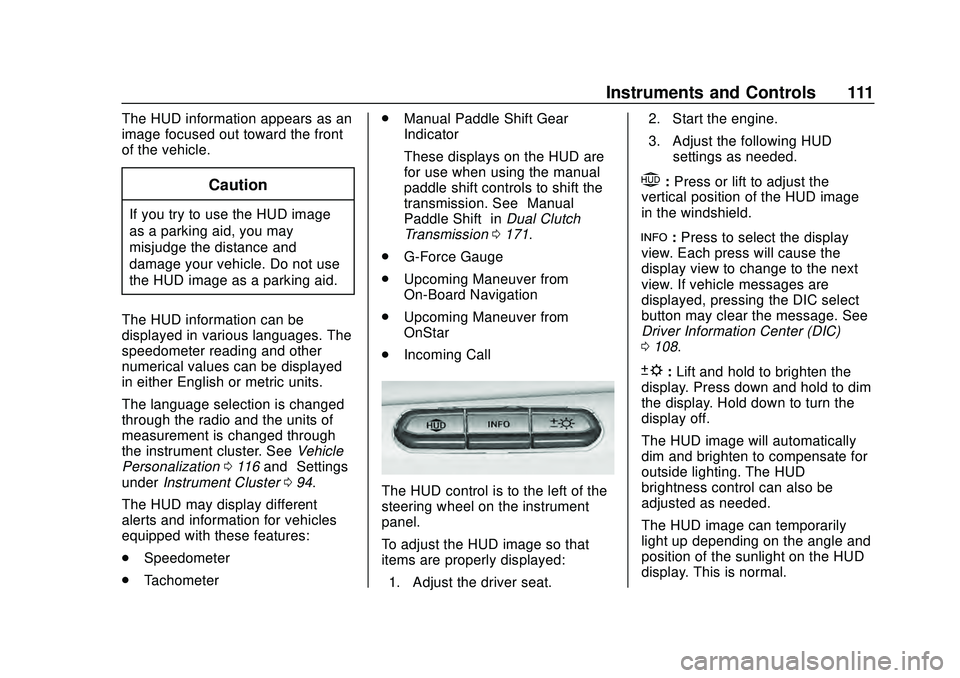
The HUD control is to the left of the
steering wheel on the instrument
panel.
To adjust the HUD image so that
items are properly displayed:
1. Adjust the driver seat. 2. Start the engine.
3. Adjust the following HUD
settings as needed.
$:Press or lift to adjust the
vertical position of the HUD image
in the windshield.
!: Press to select the display
view. Each press will cause the
display view to change to the next
view. If vehicle messages are
displayed, pressing the DIC select
button may clear the message. See
Driver Information Center (DIC)
0 108.
D:Lift and hold to brighten the
display. Press down and hold to dim
the display. Hold down to turn the
display off.
The HUD image will automatically
dim and brighten to compensate for
outside lighting. The HUD
brightness control can also be
adjusted as needed.
The HUD image can temporarily
light up depending on the angle and
position of the sunlight on the HUD
display. This is normal.
Page 121 of 336
Chevrolet Corvette Owner Manual (GMNA-Localizing-U.S./Canada/Mexico-
12470550) - 2020 - CRC - 4/23/20
120 Instruments and Controls
Remote Left in Vehicle Alert
This feature sounds an alert when
the remote key is left in the vehicle.
Touch Off or On.
Remote Removed from Vehicle
Alert
This feature beeps the horn 3 times
when exiting a running vehicle with
the remote key.
Touch Off or On.
Ride Height
Touch and the following may
display:
Location Based Auto Lift
This setting enables the Front Lift to
automatically raise or lower when
the vehicle is near GPS stored
locations. SeeFront Lift System
0 191.
Touch Off or On.
Seating Position
Touch and the following may
display:
. Seat Entry Memory
. Seat Exit Memory
Seat Entry Memory
This feature automatically recalls
the previously stored 1 or 2 button
positions when the ignition is
changed from off to on. See
Memory Seats 050.
Touch Off or On.
Seat Exit Memory
This feature automatically recalls
the previously stored exit button
positions when the ignition is
changed from on to off if the driver
door is open or opened. See
Memory Seats 050.
Touch Off or On.
Teen Driver
See “Teen Driver” under“Settings”
in the infotainment manual.
Valet Mode
This will lock the infotainment
system and steering wheel controls.
It may also limit access to vehicle
storage locations, if equipped.
To enable valet mode:
1. Enter a four-digit code on the keypad.
2. Touch Enter to go to the confirmation screen.
3. Re-enter the four-digit code.
Touch Lock or Unlock to lock or
unlock the system. Touch Back to
go back to the previous menu.
To configure the Performance Data
Recorder (PDR) to automatically
record in Valet mode, see “Settings”
in Performance Data Recorder
(PDR) 0132.
Page 151 of 336
Chevrolet Corvette Owner Manual (GMNA-Localizing-U.S./Canada/Mexico-
12470550) - 2020 - CRC - 4/23/20
150 Driving and Operating
1. Ease off the accelerator andthen, if there is nothing in the
way, steer the vehicle so that it
straddles the edge of the
pavement.
2. Turn the steering wheel about one-eighth of a turn, until the
right front tire contacts the
pavement edge.
3. Turn the steering wheel to go straight down the roadway.
Loss of Control
Skidding
There are three types of skids that
correspond to the vehicle's three
control systems:
.Braking Skid —wheels are not
rolling.
. Steering or Cornering Skid —
too much speed or steering in a
curve causes tires to slip and
lose cornering force.
. Acceleration Skid —too much
throttle causes the driving
wheels to spin. Defensive drivers avoid most skids
by taking reasonable care suited to
existing conditions, and by not
overdriving those conditions. But
skids are always possible.
If the vehicle starts to slide, follow
these suggestions:
.
Ease your foot off the
accelerator pedal and steer the
way you want the vehicle to go.
The vehicle may straighten out.
Be ready for a second skid if it
occurs.
. Slow down and adjust your
driving according to weather
conditions. Stopping distance
can be longer and vehicle
control can be affected when
traction is reduced by water,
snow, ice, gravel, or other
material on the road. Learn to
recognize warning clues —such
as enough water, ice, or packed
snow on the road to make a
mirrored surface —and slow
down when you have any doubt.
. Try to avoid sudden steering,
acceleration, or braking,
including reducing vehicle speed by shifting to a lower gear. Any
sudden changes could cause
the tires to slide.
Remember: Antilock brakes help
avoid only the braking skid.
Track Events and
Competitive Driving
(Z51 Only)
Vehicles without Z51 package
should not be used for track events
and competitive driving.
{Danger
High-performance features are
intended for use only on closed
tracks by experienced and
qualified drivers and should not
be used on public roads.
High-speed driving, aggressive
cornering, hard braking, and other
high-performance driving can be
dangerous. Improper driver inputs
for the conditions may result in (Continued)
Page 161 of 336
Chevrolet Corvette Owner Manual (GMNA-Localizing-U.S./Canada/Mexico-
12470550) - 2020 - CRC - 4/23/20
160 Driving and Operating
Rocking the Vehicle to Get
it Out
Turn the steering wheel left and
right to clear the area around the
front wheels. Turn off any traction
system. Shift back and forth
between R (Reverse) and a low
forward gear, spinning the wheels
as little as possible. To prevent
transmission wear, wait until the
wheels stop spinning before shifting
gears. Release the accelerator
pedal while shifting, and press
lightly on the accelerator pedal
when the transmission is in gear.
Slowly spinning the wheels in the
forward and reverse directions
causes a rocking motion that could
free the vehicle. If that does not get
the vehicle out after a few tries, it
may need to be towed out. If the
vehicle does need to be towed out,
seeTowing the Vehicle 0271.
Vehicle Load Limits
It is very important to know how
much weight the vehicle can
carry. This weight is called the
vehicle capacity weight and includes the weight of all
occupants, cargo, and all
nonfactory-installed options.
Two labels on the vehicle may
show how much weight it may
properly carry: the Tire and
Loading Information label and
the Certification label.
{Warning
Do not load the vehicle any
heavier than the Gross
Vehicle Weight Rating
(GVWR), or either the
maximum front or rear Gross
Axle Weight Rating (GAWR).
This can cause systems to
break and change the way the
vehicle handles. This could
cause loss of control and a
crash. Overloading can also
reduce stopping distance,
damage the tires, and shorten
the life of the vehicle.
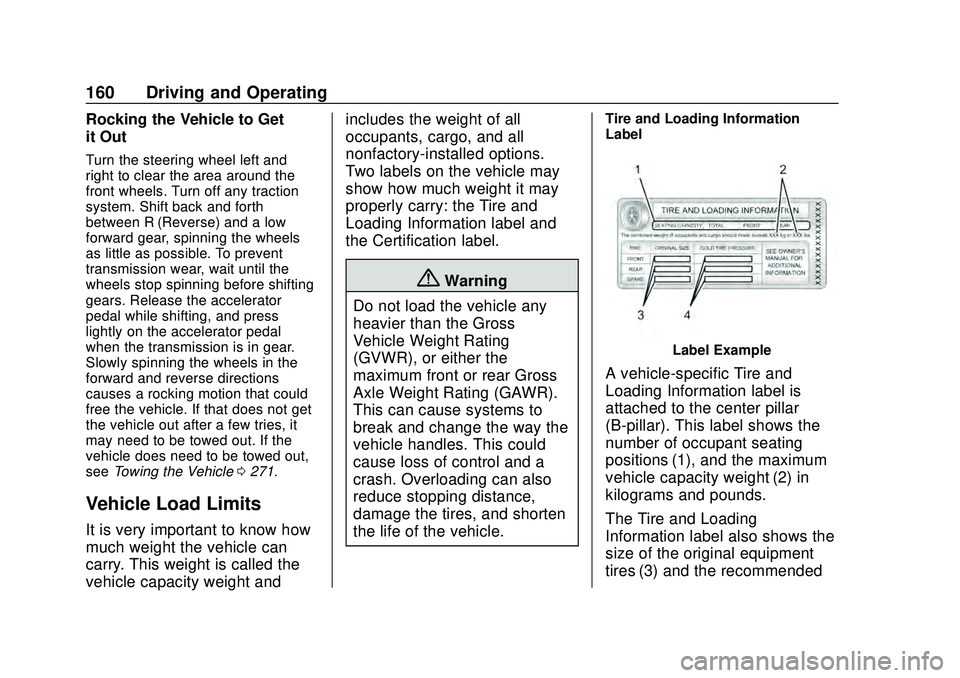
Tire and Loading Information
Label
Label Example
A vehicle-specific Tire and
Loading Information label is
attached to the center pillar
(B-pillar). This label shows the
number of occupant seating
positions (1), and the maximum
vehicle capacity weight (2) in
kilograms and pounds.
The Tire and Loading
Information label also shows the
size of the original equipment
tires (3) and the recommended
Page 191 of 336
Chevrolet Corvette Owner Manual (GMNA-Localizing-U.S./Canada/Mexico-
12470550) - 2020 - CRC - 4/23/20
190 Driving and Operating
‐Not upshifting when the
accelerator is released to
avoid unnecessary shifts if the
accelerator is re-applied
‐ Recognizing sporty driving and
anticipate upcoming corners
with the appropriate gear
selection entering and exiting
. Driver Modes
‐Driver influenced changes are
effective in all driving modes,
however the aggressiveness
of the transmission response
will increase between Tour,
Sport, and Track Modes
respectively.
Active Fuel Management (engine
cylinder shuts off)
. Normal with Dual Clutch
Transmission: The engine uses
8-cylinder mode when
accelerating, but changes to
4-cylinder mode when coasting.
Active Fuel Management is a preset
of Powertrain and cannot be
modified or changed independently. Engine Sound
Changes when the variable exhaust
valves open.
Steering (Assist Effort)
Adjusts from a lighter steering feel
to reduced assist for more
steering feel.
Magnetic Ride Control (if
equipped)
Adjusts the shock dampening
firmness based on driving
conditions to improve comfort and
performance.
Driver Mode Customization
The vehicle is equipped to modify
the following vehicle settings base
on vehicle content. Through the
center stack, under Vehicle
Settings, select Drive Mode to
customize and personalize My
Mode and/or Z-Mode.
Engine Sound:
Engine Sound adjusts the volume of
engine noise. Setting range from
quietest to loudest volume as you
move from Stealth through Track..
Stealth, Tour, Sport, Track
Steering:
This setting adjusts the effort
required to turn the steering wheel.
The steering wheel offers better
feedback but requires more effort as
you move from Tour to Track.
. Tour, Sport, Track
Suspension:
This setting adjusts the firmness of
the suspension in the vehicle.
Suspension adjust stiffness of the
shocks and / or springs. The ride is
more comfortable at lower settings
and is stiffer at higher settings for
better control.
. Tour, Sport, Track
Powertrain:
This setting adjusts the throttle
response, gear shifting and engine
performance. An increased throttle
response enhances the acceleration
feel as you move toward Track, but
with a comfort trade-off due to more
aggressive gear shifting.
. Normal, Tour, Sport, Track
Page 196 of 336
Chevrolet Corvette Owner Manual (GMNA-Localizing-U.S./Canada/Mexico-
12470550) - 2020 - CRC - 4/23/20
Driving and Operating 195
clutch. After the vehicle is launched,
the system continues in Competitive
Driving Mode or PTM.
Competitive Driving Mode, PTM,
and Launch Control are systems
designed for a closed course race
track and not intended for use on
public roads. The systems are not
intended to compensate for lack of
driver experience or familiarity with
the race track.
Caution
The new vehicle break-in period
should be completed before using
the launch control feature,
otherwise performance will be
limited and damage may occur to
the powertrain/engine. SeeNew
Vehicle Break-In 0163.
Limited-Slip Differential
(without Z51)
The mechanical limited-slip
differential can give more traction on
snow, mud, ice, sand, or gravel.
It works like a standard axle most of the time, but when traction is low,
this feature allows the drive wheel
with the most traction to move the
vehicle. See
Competitive Driving
Mode 0192 and
Maintenance Schedule 0286.
Limited-Slip Differential
(with Z51)
The Electronic Limited-Slip
Differential (eLSD) is a hydraulically
actuated clutch system inside the
transaxle. It can infinitely vary the
clutch engagement between 0 and
2250 N*m (1659 lb-ft) of breakaway
torque between the rear wheels.
When necessary it responds from
open to full engagement in fractions
of a second. Smaller clutch
adjustments happen even faster.
The eLSD:
.
Uses the vehicle sensors and
driver inputs to determine the
optimum amount of clutch
engagement for the conditions. .
Improves traction while
cornering by changing the
engagement to achieve a
balance between directional
control and acceleration.
. Provides optimal engagement
for high-speed control and
stability without affecting precise
steering and turn-in.
. Improves vehicle stability during
spirited driving and evasive
maneuvers. It is fully integrated
with the Active Handling and
Performance Traction
Management (PTM) systems (if
equipped).
There are unique calibrations based
on the Traction Control System
(TCS) setting. eLSD modes change
automatically when the traction
control button is pressed. No unique
input from the driver is required.
. Mode 1 is the standard mode
when the vehicle is started.
It provides a touring calibration
with an emphasis on vehicle
stability. Mode 1 is also used in
PTM Wet mode.
Page 197 of 336
Chevrolet Corvette Owner Manual (GMNA-Localizing-U.S./Canada/Mexico-
12470550) - 2020 - CRC - 4/23/20
196 Driving and Operating
.Mode 2 is engaged when both
TCS and StabiliTrak are turned
off. This calibration provides
more nimble corner turn-in, and
is biased for better traction out of
corners.
. Mode 3 is engaged when PTM is
engaged in Dry, Sport 1 & 2, and
Race modes. This is a nimble
calibration with similar
functionality as eLSD Mode 2,
however, it is integrated to work
with PTM.
. Mode 4 is engaged when TCS is
selected off, but StabiliTrak
remains on. Vehicle stability is
still the priority, while allowing for
optimized traction out of corners.Cruise Control
With cruise control, a speed of
about 40 km/h (25 mph) or more
can be maintained without keeping
your foot on the accelerator. Cruise
control does not work at speeds
below about 40 km/h (25 mph).
{Warning
Cruise control can be dangerous
where you cannot drive safely at
a steady speed. Do not use
cruise control on winding roads or
in heavy traffic.
Cruise control can be dangerous
on slippery roads. On such roads,
fast changes in tire traction can
cause excessive wheel slip, and
you could lose control. Do not use
cruise control on slippery roads.
If the Traction Control System (TCS)
begins to limit wheel spin while you
are using cruise control, the cruise
control automatically disengages.
See Traction Control/Electronic
Stability Control 0182. When road conditions allow for using safely
again, cruise control can be turned
back on.
If the brakes are applied, cruise
control disengages.
Cruise control will disengage if
either TCS or StabiliTrak/Electronic
Stability Control (ESC) is turned off.
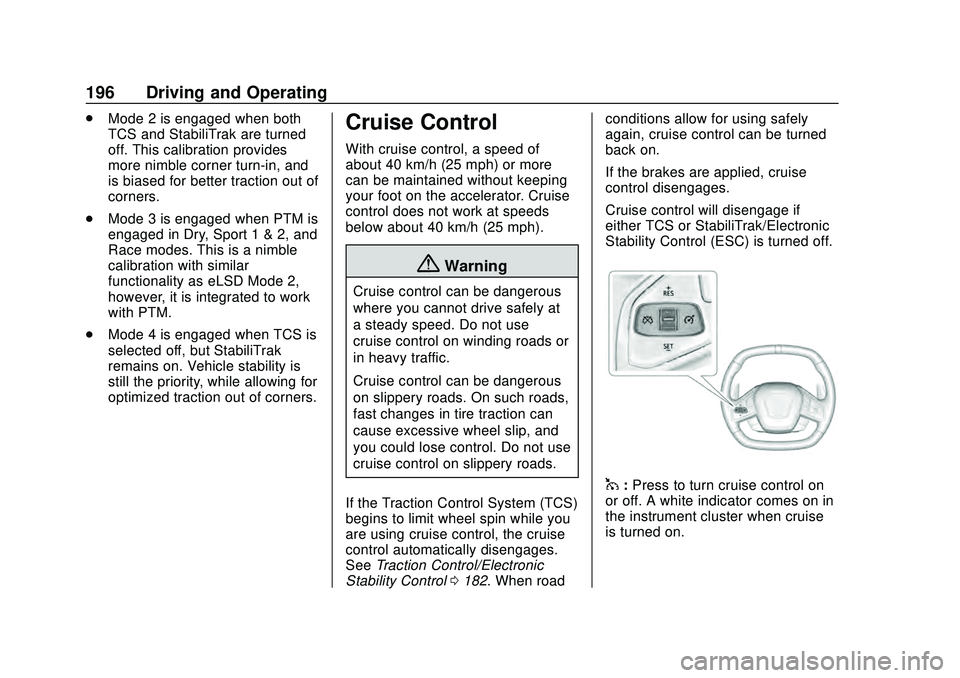
1:
Press to turn cruise control on
or off. A white indicator comes on in
the instrument cluster when cruise
is turned on.
Page 224 of 336
Chevrolet Corvette Owner Manual (GMNA-Localizing-U.S./Canada/Mexico-
12470550) - 2020 - CRC - 4/23/20
Vehicle Care 223
Caution
Use of the incorrect transmission
fluid may damage the vehicle,
and the damage may not be
covered by the vehicle warranty.
Always use the correct
transmission fluid. See
Recommended Fluids and
Lubricants0295.
Change the fluid and filter at the
proper intervals. See Maintenance
Schedule 0286. Be sure to use the
correct fluid. See Recommended
Fluids and Lubricants 0295.
Dual Clutch Transmission
Fluid Life System
When to Change the Dual
Clutch Transmission Fluid
This vehicle has a computer that
indicates when to change the
transmission fluid. This is based on
a combination of factors which
include temperature and miles
driven. Based on driving conditions, the mileage at which a fluid change
is indicated can vary considerably.
For the fluid life system to work
properly, the system must be reset
every time the fluid is changed.
When the system has calculated
that fluid life has been diminished, it
indicates that a fluid change is
necessary. A CHANGE
TRANSMISSION FLUID SOON
message comes on. Change the
fluid as soon as possible within the
next 1 000 km (600 mi). Failure to
change transmission fluid at
required intervals could lead to
suboptimal transmission
performance. Your dealer has
trained service technicians who will
change the fluid and reset the
system. If the system is ever reset
accidentally, the fluid must be
changed at 72 000 km (45,000 mi)
since the last fluid change.
How to Reset the Dual Clutch
Transmission Fluid Life
System
Reset the system whenever the
transmission fluid is replaced so that
the system can calculate the next
transmission fluid change.
To reset:
1. Place the vehicle in P (Park).
2. Select the Oil & Fluid Life page under the Maintenance DIC
menu. See Driver Information
Center (DIC) 0108.
3. Press the thumbwheel under the Oil & Fluid Life page to
move to the Reset/Disable
display area. Select Reset
Transmission Fluid with the
thumbwheel scroll then press
the thumbwheel. Then press
Yes to confirm the reset.
4. When the Transmission Fluid Life System is successfully
reset, 100% Transmission Fluid
Life will be displayed.
Page 225 of 336
Chevrolet Corvette Owner Manual (GMNA-Localizing-U.S./Canada/Mexico-
12470550) - 2020 - CRC - 4/23/20
224 Vehicle Care
Engine Air Filter Life
System
When to Change Engine Air
Filter
If equipped, this feature provides an
indication of when to change the
engine air filter. It is based on
driving conditions, which can cause
when to change to vary greatly. It is
possible an air filter change may not
be indicated for up to four years.
When the "Replace at Next Oil
Change" message displays, the
engine air filter should be replaced
at the time of the next engine oil
change. When the "Replace Engine
Air Filter Now" message displays,
the engine air filter should be
replaced as soon as possible. Reset
the engine air filter life system after
the engine air filter is replaced. See
your dealer for service and to reset
the system.
How to Reset Engine Air Filter
Life System
Reset the system whenever the
engine air filter is replaced so that
the system can calculate the next
engine air filter change.
To reset:1. Place the vehicle in P (Park).
2. Select Air Filter Life under the Maintenance DIC menu. See
Driver Information Center (DIC)
0108.
3. Press the thumbwheel under the Air Filter Life page to move
to the Reset/Disable area.
Select Reset Air Filter Life with
the thumbwheel scroll and then
press the thumbwheel. Then
press Yes to confirm the reset.
4. When the Engine Air Filter Life System is successfully reset,
100% Air Filter Life will be
displayed.
Engine Air Cleaner/Filter
See Engine Compartment Overview
0 215 for the location of the engine
air cleaner/filter.
Caution
If water is sprayed and enters the
engine air cleaner/filter intake and
housing, the engine could be
damaged. The repairs would not
be covered by the vehicle
warranty.
When to Inspect the Engine Air
Cleaner/Filter
For intervals on changing and
inspecting the engine air cleaner/
filter, see Maintenance Schedule
0 286.
How to Inspect/Replace the
Engine Air Cleaner/Filter
Do not start the engine or have the
engine running with the engine air
cleaner/filter housing open. Before
removing the engine air cleaner/
filter, make sure that the engine air
Page 248 of 336
Chevrolet Corvette Owner Manual (GMNA-Localizing-U.S./Canada/Mexico-
12470550) - 2020 - CRC - 4/23/20
Vehicle Care 247
Winter Tires
This vehicle was not originally
equipped with winter tires. Winter
tires are designed for increased
traction on snow and ice-covered
roads. Consider installing winter
tires on the vehicle if frequent
driving on ice or snow covered
roads is expected. See your dealer
for details regarding winter tire
availability and proper tire selection.
Also, seeBuying New Tires 0261.
With winter tires, there may be
decreased dry road traction,
increased road noise, and shorter
tread life. After changing to winter
tires, be alert for changes in vehicle
handling and braking.
If using winter tires:
. Use tires of the same brand and
tread type on all four wheel
positions.
. Use only radial ply tires of the
same size, load range, and
speed rating as the original
equipment tires. Winter tires with the same speed
rating as the original equipment tires
may not be available for H, V, W, Y,
and ZR speed rated tires. If winter
tires with a lower speed rating are
chosen, never exceed the tire's
maximum speed capability.
Run-Flat Tires
This vehicle, when new, had run-flat
tires. There is no spare tire, no tire
changing equipment, and no place
to store a tire in the vehicle.
The vehicle also has a Tire
Pressure Monitor System (TPMS)
that indicates a loss of tire pressure
in any of the tires.
{Warning
If the low tire warning light
displays on the instrument cluster,
the handling capabilities will be
reduced during severe
maneuvers. Driving too fast could
cause loss of control and you or
others could be injured. Do not
(Continued)
Warning (Continued)
drive over 80 km/h (50 mph) when
the low tire warning light is
displayed. Drive cautiously and
check the tire pressures as soon
as possible.
Run-flat tires can be driven on with
no air pressure. There is no need to
stop on the side of the road to
change the tire. Continue driving;
however, do not drive too far or too
fast. Driving on the tire may not be
possible if there is permanent
damage. To prevent permanent
damage, the tire can be driven with
no air pressure for up to 80 km
(50 mi) at speeds slower than
80 km/h (50 mph) when carrying a
load of driver plus one passenger.
When carrying a heavier load, total
distance driven without air should
be reduced. As soon as possible,
contact the nearest authorized GM
or run-flat servicing facility for
inspection and repair or
replacement.