engine CHEVROLET CORVETTE 2020 User Guide
[x] Cancel search | Manufacturer: CHEVROLET, Model Year: 2020, Model line: CORVETTE, Model: CHEVROLET CORVETTE 2020Pages: 336, PDF Size: 5.21 MB
Page 30 of 336
Chevrolet Corvette Owner Manual (GMNA-Localizing-U.S./Canada/Mexico-
12470550) - 2020 - CRC - 4/23/20
Keys, Doors, and Windows 29
If the engine does not start and the
security light comes on, there may
be a problem with the immobilizer
system. Try starting the vehicle
again.
If the vehicle does not start and the
remote key appears to be
undamaged, try another remote key.
Or, place the remote key in the
cupholder backup location. See
Remote Keyless Entry (RKE)
System Operation09. If the engine
still does not start with the other
remote key, or with the remote key
in the cupholder backup location,
the vehicle needs service. If the
engine does start, the first remote
key may be faulty. See your dealer
or have a new remote key
programmed to the vehicle. The immobilizer system can learn
new or replacement remote keys.
Up to eight remote keys can be
programmed for the vehicle. To
program additional remote keys, see
“Programming Remote Keys to the
Vehicle”
underRemote Keyless
Entry (RKE) System Operation 09.
Do not leave the remote key or
device that disarms or deactivates
the theft-deterrent system in the
vehicle.Exterior Mirrors
Convex Mirrors
{Warning
A convex mirror can make things,
like other vehicles, look farther
away than they really are. If you
cut too sharply into the right lane,
you could hit a vehicle on the
right. Check the inside mirror or
glance over your shoulder before
changing lanes.
The passenger side mirror is convex
shaped. A convex mirror's surface is
curved so more can be seen from
the driver seat.
Page 43 of 336
Chevrolet Corvette Owner Manual (GMNA-Localizing-U.S./Canada/Mexico-
12470550) - 2020 - CRC - 4/23/20
42 Keys, Doors, and Windows
{Warning
Components under the tonneau,
close to the engine, can get hot
from running the engine. To help
avoid the risk of burning
unprotected skin, never touch
these components until they have
cooled, and always use a glove or
towel to avoid direct skin contact.
{Warning
While opening or closing the
convertible top, people can be
injured by the moving parts of the
tonneau cover or convertible top.
Maintain visual contact with the
top while it is being operated.
Caution
Follow these guidelines when
operating the convertible top or
damage can occur:. Remove all items from the
roof, trunk lid, or tonneau
cover before operating.
. Remove all objects that may
contact the convertible top
when it is operated.
. Do not leave the vehicle
with the convertible
top open.
. Do not exceed 50 km/h
(31 mph) until the top has
completely closed or
opened.
. Do not open or close the top
while driving in high wind
conditions.
. Do not operate the
convertible top multiple
times in a short period of
(Continued)
Caution (Continued)
time without starting the
engine to avoid draining the
vehicle battery.
. Only store the vehicle with
the top fully closed.
Opening the Convertible Top —
Driver Door Switch
1. Ensure the roof and tonneau cover are clear of any objects.
2. The trunk must be closed.
3. Start the vehicle or place it in ACC/ACCESSORY.
4. When possible, operate the convertible top when the
vehicle is stopped. The top can
be operated while driving
below 50 km/h (31 mph) and
will stop if that speed is
exceeded. The top operation
will take approximately
17 seconds. Make sure the top
operation can be completed
before that speed is reached.
Page 46 of 336
Chevrolet Corvette Owner Manual (GMNA-Localizing-U.S./Canada/Mexico-
12470550) - 2020 - CRC - 4/23/20
Keys, Doors, and Windows 45
.When driving with the top not
fully secured, chimes can be
heard above 50 km/h (31 mph).
If the vehicle battery has been
disconnected and reconnected,
if the fuses were pulled or replaced,
or if a jump start was performed, a
message indicating the top is not
secure may display. Press and
release
Kand then quickly press
and hold
Mon the remote key,
or press and hold
Mon the driver
door switch to open the top, or pull
and hold
Mon the driver door
switch to close the top until this
message clears.
Partial Top Cycling
If the convertible top operation is
stopped before completion, the top
will temporarily hold its position.
Over time, the tonneau may drift to
a near closed position. Opening the Tonneau Cover
—
Engine Access
{Warning
When opening or closing the
tonneau cover, people can be
injured by the moving parts of the
tonneau cover. Maintain visual
contact with the tonneau cover
when it is in motion and keep
hands and objects away from the
moving parts.
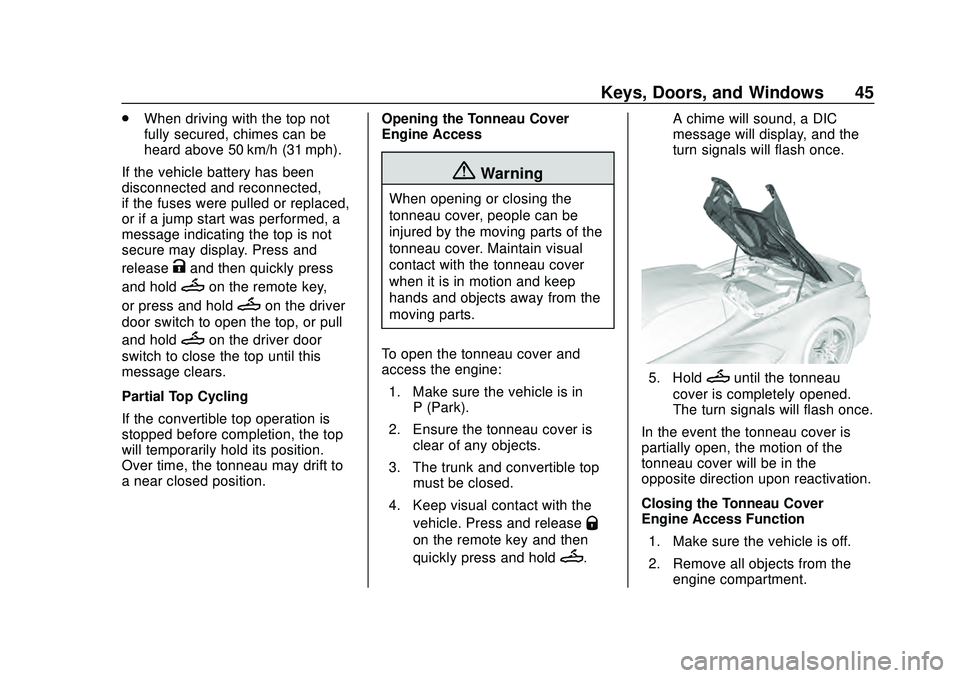
To open the tonneau cover and
access the engine: 1. Make sure the vehicle is in P (Park).
2. Ensure the tonneau cover is clear of any objects.
3. The trunk and convertible top must be closed.
4. Keep visual contact with the vehicle. Press and release
Q
on the remote key and then
quickly press and hold
M. A chime will sound, a DIC
message will display, and the
turn signals will flash once.
5. HoldMuntil the tonneau
cover is completely opened.
The turn signals will flash once.
In the event the tonneau cover is
partially open, the motion of the
tonneau cover will be in the
opposite direction upon reactivation.
Closing the Tonneau Cover —
Engine Access Function
1. Make sure the vehicle is off.
2. Remove all objects from the engine compartment.
Page 47 of 336
Chevrolet Corvette Owner Manual (GMNA-Localizing-U.S./Canada/Mexico-
12470550) - 2020 - CRC - 4/23/20
46 Keys, Doors, and Windows
3. The trunk and convertible topmust be closed.
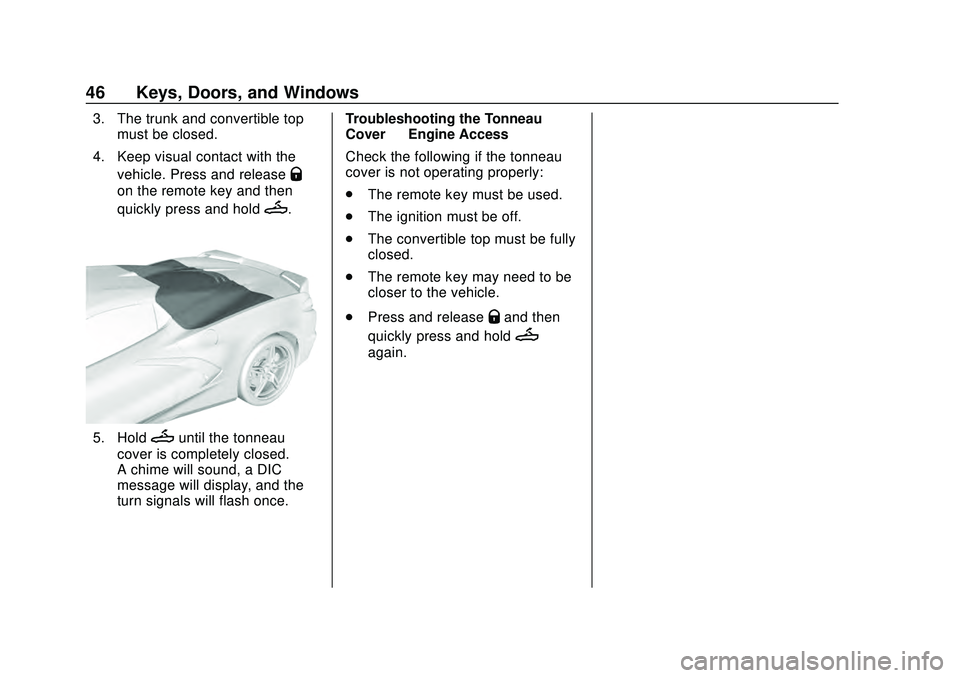
4. Keep visual contact with the vehicle. Press and release
Q
on the remote key and then
quickly press and hold
M.
5. HoldMuntil the tonneau
cover is completely closed.
A chime will sound, a DIC
message will display, and the
turn signals will flash once. Troubleshooting the Tonneau
Cover
—Engine Access
Check the following if the tonneau
cover is not operating properly:
. The remote key must be used.
. The ignition must be off.
. The convertible top must be fully
closed.
. The remote key may need to be
closer to the vehicle.
. Press and release
Qand then
quickly press and hold
M
again.
Page 54 of 336
Chevrolet Corvette Owner Manual (GMNA-Localizing-U.S./Canada/Mexico-
12470550) - 2020 - CRC - 4/23/20
Seats and Restraints 53
.Memory SET, 1, 2, orB
.Power mirror, with the driver or
passenger side mirror selected
. Power steering wheel,
if equipped
Seat Travel Limit
If the rearward or reclining seat or
seatback movement makes contact
with the carpet behind the seat, the
seat will automatically move forward
a small distance. If it remains in
contact, memory recall may not
complete. Move the seat and/or
seatback forward a small distance
away from the carpet behind the
seat and attempt the memory recall
again.
Obstructions
If something has blocked the driver
seat while recalling a memory
position, the recall may stop.
Remove the obstruction and try the
recall again. If the memory position
still does not recall, see your dealer.
Heated and Ventilated
Front Seats
{Warning
If temperature change or pain to
the skin cannot be felt, the seat
heater may cause burns. To
reduce the risk of burns, use care
when using the seat heater,
especially for long periods of
time. Do not place anything on
the seat that insulates against
heat, such as a blanket, cushion,
cover, or similar item. This may
cause the seat heater to
overheat. An overheated seat
heater may cause a burn or may
damage the seat.
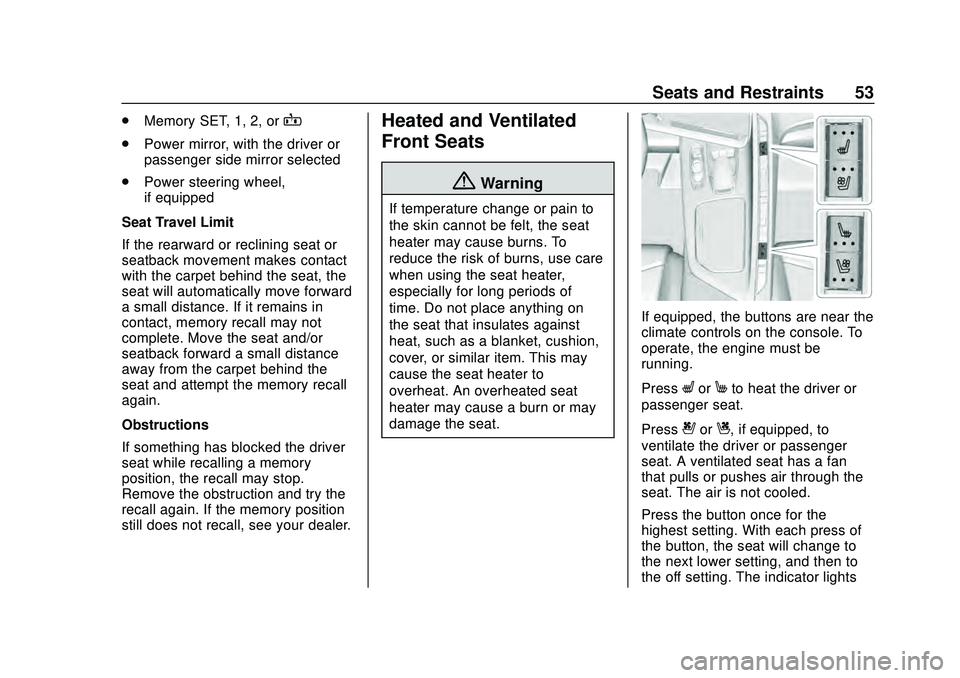
If equipped, the buttons are near the
climate controls on the console. To
operate, the engine must be
running.
Press
LorMto heat the driver or
passenger seat.
Press
{orC, if equipped, to
ventilate the driver or passenger
seat. A ventilated seat has a fan
that pulls or pushes air through the
seat. The air is not cooled.
Press the button once for the
highest setting. With each press of
the button, the seat will change to
the next lower setting, and then to
the off setting. The indicator lights
Page 55 of 336

Chevrolet Corvette Owner Manual (GMNA-Localizing-U.S./Canada/Mexico-
12470550) - 2020 - CRC - 4/23/20
54 Seats and Restraints
show three for the highest setting
and one for the lowest. If the heated
seats are on high, the level may
automatically be lowered after
approximately 30 minutes.
The passenger seat may take
longer to heat up.
Auto Heated and Ventilated Seats
If the vehicle is equipped with auto
heated or ventilated seats, and the
engine is running, this feature will
automatically activate the heated or
ventilated seats at the level required
by the vehicle's interior temperature.
The active high, medium, low, or off
heated or ventilated seat level will
be indicated by the manual heated
and ventilated seat buttons on the
console.
Use the manual heated and
ventilated seat buttons on the
console to turn auto heated or
ventilated seats off. If the passenger
seat is unoccupied, the auto heated
or ventilated seats feature will not
activate that seat. The auto heatedand ventilated seats feature can be
programmed to always be enabled
when the vehicle is on.
If equipped with a heated steering
wheel, the auto heated steering
wheel activation will follow the
heated seat auto activation and the
heated wheel indicator will follow
the state of the steering wheel heat.
Remote Start Heated and
Ventilated Seats
During a remote start (if equipped),
the heated or ventilated seats can
be turned on automatically. When it
is cold outside, the heated seats
turn on, and when it is hot outside
the ventilated seats turn on. The
heated and ventilated seat
indicators and heated steering
wheel indicator may come on during
this operation. The heated or
ventilated seats are canceled when
the ignition is turned on. Press the
heated or ventilated seat button to
use the heated or ventilated seats
after the vehicle is started.
The temperature performance of an
unoccupied seat may be reduced.
This is normal.
The heated or ventilated seats may
turn on during a remote start unless
they are disabled in the vehicle
personalization menu. See
Remote
Vehicle Start 015 and
Vehicle Personalization 0116.
Page 68 of 336
Chevrolet Corvette Owner Manual (GMNA-Localizing-U.S./Canada/Mexico-
12470550) - 2020 - CRC - 4/23/20
Seats and Restraints 67
{Warning
When an airbag inflates, there
may be dust in the air. This dust
could cause breathing problems
for people with a history of
asthma or other breathing trouble.
To avoid this, everyone in the
vehicle should get out as soon as
it is safe to do so. If you have
breathing problems but cannot
get out of the vehicle after an
airbag inflates, then get fresh air
by opening a window or a door.
If you experience breathing
problems following an airbag
deployment, you should seek
medical attention.
The vehicle has a feature that may
automatically unlock the doors, turn
on the interior lamps and hazard
warning flashers after the airbags
inflate. The feature may also
activate, without airbag inflation,
after an event that exceeds a
predetermined threshold. After turning the ignition off and then
on again, the fuel system will return
to normal operation; the doors can
be locked, the interior lamps can be
turned off, and the hazard warning
flashers can be turned off using the
controls for those features. If any of
these systems are damaged in the
crash they may not operate as
normal.
{Warning
A crash severe enough to inflate
the airbags may have also
damaged important functions in
the vehicle, such as the fuel
system, brake and steering
systems, etc. Even if the vehicle
appears to be drivable after a
moderate crash, there may be
concealed damage that could
make it difficult to safely operate
the vehicle.
Use caution if you should attempt
to restart the engine after a crash
has occurred.
In many crashes severe enough to
inflate the airbag, windshields are
broken by vehicle deformation.
Additional windshield breakage may
also occur from the front outboard
passenger airbag.
.
Airbags are designed to inflate
only once. After an airbag
inflates, you will need some new
parts for the airbag system.
If you do not get them, the
airbag system will not be there
to help protect you in another
crash. A new system will include
airbag modules and possibly
other parts. The service manual
for the vehicle covers the need
to replace other parts.
. The vehicle has a crash sensing
and diagnostic module which
records information after a
crash. See Vehicle Data
Recording and Privacy 0314
and
Event Data Recorders 0314.
. Let only qualified technicians
work on the airbag system.
Improper service can mean that
Page 87 of 336
Chevrolet Corvette Owner Manual (GMNA-Localizing-U.S./Canada/Mexico-
12470550) - 2020 - CRC - 4/23/20
86 Instruments and Controls
Instruments and
Controls
Controls
Steering Wheel Adjustment . . . . 87
Steering Wheel Controls . . . . . . . 87
Heated Steering Wheel . . . . . . . . 87
Horn . . . . . . . . . . . . . . . . . . . . . . . . . . . 87
Windshield Wiper/Washer . . . . . . 87
Compass . . . . . . . . . . . . . . . . . . . . . . 88
Clock . . . . . . . . . . . . . . . . . . . . . . . . . . 89
Power Outlets . . . . . . . . . . . . . . . . . 89
Wireless Charging . . . . . . . . . . . . . 90
Warning Lights, Gauges, and
Indicators
Warning Lights, Gauges, andIndicators . . . . . . . . . . . . . . . . . . . . 93
Instrument Cluster . . . . . . . . . . . . . 94
Speedometer . . . . . . . . . . . . . . . . . . 98
Odometer . . . . . . . . . . . . . . . . . . . . . . 98
Trip Odometer . . . . . . . . . . . . . . . . . 98
Tachometer . . . . . . . . . . . . . . . . . . . . 98
Fuel Gauge . . . . . . . . . . . . . . . . . . . . 98
Engine Coolant Temperature Gauge . . . . . . . . . . . . . . . . . . . . . . . . 99
Transmission Temperature Gauge . . . . . . . . . . . . . . . . . . . . . . . . 99 Seat Belt Reminders . . . . . . . . . . . 99
Airbag Readiness Light . . . . . . . 100
Passenger Airbag Status
Indicator . . . . . . . . . . . . . . . . . . . . 100
Charging System Light . . . . . . . 101
Malfunction Indicator Lamp
(Check Engine Light) . . . . . . . . 102
Front Lift System Light . . . . . . . 103
Brake System Warning Light . . . . . . . . . . . . . . . . . . . . . . . . 104
Electric Parking Brake Light . . . . . . . . . . . . . . . . . . . . . . . . 104
Service Electric Parking Brake Light . . . . . . . . . . . . . . . . . . . . . . . . 105
Antilock Brake System (ABS) Warning Light . . . . . . . . . . . . . . . 105
Traction Off Light . . . . . . . . . . . . . 105
Traction Control System (TCS)/ Electronic Stability Control
Light . . . . . . . . . . . . . . . . . . . . . . . . 106
Electronic Stability Control (ESC) Off Light . . . . . . . . . . . . . . 106
Tire Pressure Light . . . . . . . . . . . 106
Engine Oil Pressure Light . . . . 107
Security Light . . . . . . . . . . . . . . . . . 107
High-Beam On Light . . . . . . . . . . 107
Lamps On Reminder . . . . . . . . . 108
Cruise Control Light . . . . . . . . . . 108
Door Ajar Light . . . . . . . . . . . . . . . 108
Information Displays
Driver Information Center (DIC) . . . . . . . . . . . . . . . . 108
Head-Up Display (HUD) . . . . . . 110
Vehicle Messages
Vehicle Messages . . . . . . . . . . . . 114
Engine Power Messages . . . . . 115
Vehicle Speed Messages . . . . . 115
Vehicle Personalization
Vehicle Personalization . . . . . . . 116
Universal Remote System
Universal Remote System . . . . 121
Universal Remote System Programming . . . . . . . . . . . . . . . 121
Universal Remote System Operation . . . . . . . . . . . . . . . . . . . 123
Page 94 of 336

Chevrolet Corvette Owner Manual (GMNA-Localizing-U.S./Canada/Mexico-
12470550) - 2020 - CRC - 4/23/20
Instruments and Controls 93
Warning Lights,
Gauges, and
Indicators
Warning lights and gauges can
signal that something is wrong
before it becomes serious enough
to cause an expensive repair or
replacement. Paying attention to the
warning lights and gauges could
prevent injury.Some warning lights come on briefly
when the engine is started to
indicate they are working. When
one of the warning lights comes on
and stays on while driving, or when
one of the gauges shows there may
be a problem, check the section that
explains what to do. Waiting to do
repairs can be costly and even
dangerous.
Page 99 of 336
Chevrolet Corvette Owner Manual (GMNA-Localizing-U.S./Canada/Mexico-
12470550) - 2020 - CRC - 4/23/20
98 Instruments and Controls
Scroll to the desired features with
the thumbwheel, and press to toggle
them on or off.
Using the thumbwheel, except to
acknowledge an alert, will exit
Simplify mode.
The selected features will stay
hidden even after starting and
restarting the vehicle, unless
Simplify mode is manually canceled.
Speedometer
The speedometer shows the
vehicle's speed in either kilometers
per hour (km/h) or miles per
hour (mph).
Odometer
The odometer shows how far the
vehicle has been driven, in either
kilometers or miles.
Trip Odometer
The trip odometer shows how far
the vehicle has been driven since
the trip odometer was last reset.The trip odometer is accessed and
reset through the Driver Information
Center (DIC). See
Driver
Information Center (DIC) 0108.
Tachometer
The tachometer displays the engine
speed in revolutions per
minute (rpm).
Shift lights will not appear until the
engine is warm.
Caution
If the engine is operated with the
rpm’s in the warning area at the
high end of the tachometer, the
vehicle could be damaged, and
the damage would not be covered
by the vehicle warranty. Do not
operate the engine with the rpm’s
in the warning area.
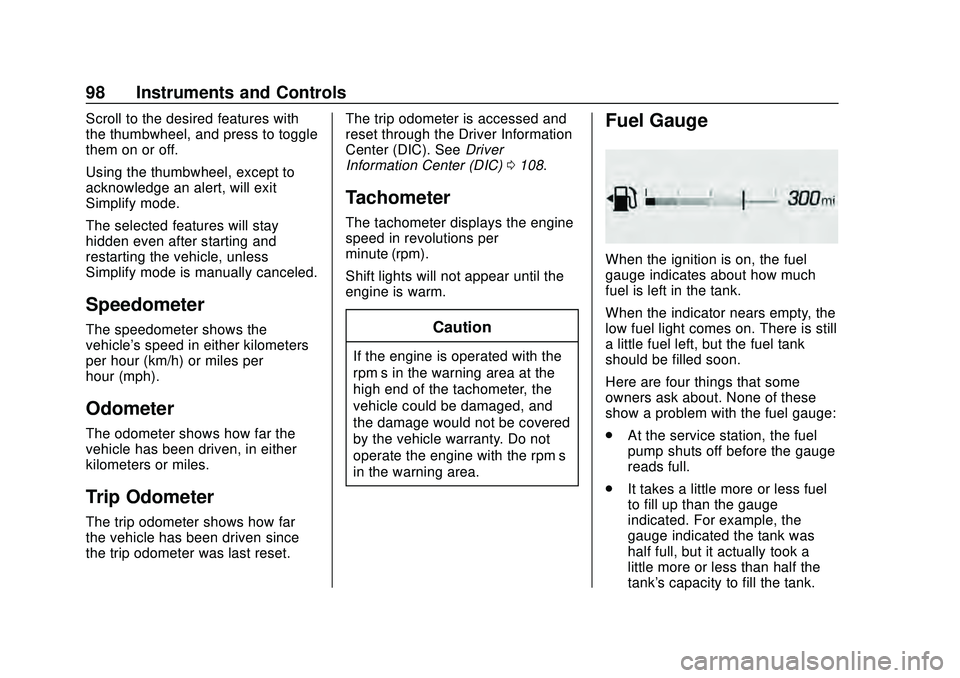
Fuel Gauge
When the ignition is on, the fuel
gauge indicates about how much
fuel is left in the tank.
When the indicator nears empty, the
low fuel light comes on. There is still
a little fuel left, but the fuel tank
should be filled soon.
Here are four things that some
owners ask about. None of these
show a problem with the fuel gauge:
.
At the service station, the fuel
pump shuts off before the gauge
reads full.
. It takes a little more or less fuel
to fill up than the gauge
indicated. For example, the
gauge indicated the tank was
half full, but it actually took a
little more or less than half the
tank's capacity to fill the tank.