keyless CHEVROLET CORVETTE 2020 User Guide
[x] Cancel search | Manufacturer: CHEVROLET, Model Year: 2020, Model line: CORVETTE, Model: CHEVROLET CORVETTE 2020Pages: 336, PDF Size: 5.21 MB
Page 28 of 336
Chevrolet Corvette Owner Manual (GMNA-Localizing-U.S./Canada/Mexico-
12470550) - 2020 - CRC - 4/23/20
Keys, Doors, and Windows 27
On Solid :Vehicle is secured
during the delay to arm the system.
Fast Flash : Vehicle is unsecured.
A door, the hood, or the hatch/trunk
is open.
Slow Flash : Alarm system is
armed.
Arming the Alarm System
1. Turn off the vehicle.
2. Lock the vehicle in one of three ways:
.Use the remote key.
. Use the Keyless Access
system.
. With a door open, press
Q
on the interior of the door.
3. After 30 seconds the alarm system will arm, and the
indicator light will begin to
slowly flash indicating the
alarm system is operating.
Pressing
Qon the remote key
a second time will bypass the
30-second delay and
immediately arm the alarm
system. The vehicle alarm system will not
arm if the doors are locked with the
mechanical key.
If the driver door is opened without
first unlocking with the remote key,
the horn will chirp and the lights will
flash to indicate pre-alarm. If the
vehicle is not started, or the door is
not unlocked by pressing
Kon the
remote key during the 10-second
pre-alarm, the alarm will be
activated.
The alarm will also be activated if
the passenger door, the hatch/trunk,
or the hood is opened without first
disarming the system. When the
alarm is activated, the turn signals
flash and the horn sounds for about
30 seconds. The alarm system will
then re-arm to monitor for the next
unauthorized event.
Disarming the Alarm System
To disarm the alarm system or turn
off the alarm if it has been activated,
do one of the following:
. Press
Kon the remote key. .
Unlock the vehicle using the
Keyless Access system.
. Start the vehicle.
To avoid setting off the alarm by
accident:
. Lock the vehicle after all
occupants have left the vehicle
and both doors are closed.
. Always unlock a door with the
remote key or use the Keyless
Access system.
Unlocking the driver door with the
key will not disarm the system or
turn off the alarm.
How to Detect a Tamper
Condition
IfKis pressed on the remote key
and the horn chirps and the lights
flash three times, a previous alarm
occurred while the system was
armed.
If the alarm has been activated, a
message will appear on the DIC.
Page 30 of 336
Chevrolet Corvette Owner Manual (GMNA-Localizing-U.S./Canada/Mexico-
12470550) - 2020 - CRC - 4/23/20
Keys, Doors, and Windows 29
If the engine does not start and the
security light comes on, there may
be a problem with the immobilizer
system. Try starting the vehicle
again.
If the vehicle does not start and the
remote key appears to be
undamaged, try another remote key.
Or, place the remote key in the
cupholder backup location. See
Remote Keyless Entry (RKE)
System Operation09. If the engine
still does not start with the other
remote key, or with the remote key
in the cupholder backup location,
the vehicle needs service. If the
engine does start, the first remote
key may be faulty. See your dealer
or have a new remote key
programmed to the vehicle. The immobilizer system can learn
new or replacement remote keys.
Up to eight remote keys can be
programmed for the vehicle. To
program additional remote keys, see
“Programming Remote Keys to the
Vehicle”
underRemote Keyless
Entry (RKE) System Operation 09.
Do not leave the remote key or
device that disarms or deactivates
the theft-deterrent system in the
vehicle.Exterior Mirrors
Convex Mirrors
{Warning
A convex mirror can make things,
like other vehicles, look farther
away than they really are. If you
cut too sharply into the right lane,
you could hit a vehicle on the
right. Check the inside mirror or
glance over your shoulder before
changing lanes.
The passenger side mirror is convex
shaped. A convex mirror's surface is
curved so more can be seen from
the driver seat.
Page 32 of 336
Chevrolet Corvette Owner Manual (GMNA-Localizing-U.S./Canada/Mexico-
12470550) - 2020 - CRC - 4/23/20
Keys, Doors, and Windows 31
Resetting the Power Folding
Mirrors
Reset the power folding mirrors if:
.The mirrors are accidentally
obstructed while folding.
. They are accidentally manually
folded/unfolded.
. The mirrors do not stay in the
unfolded position.
. The mirrors vibrate at normal
driving speeds.
Fold and unfold the mirrors one time
using the mirror controls to reset
them to their normal position.
A noise may be heard during the
resetting of the power folding
mirrors. This sound is normal after a
manual folding operation.
Remote Mirror Folding
If equipped with power folding
mirrors, remote mirror folding is on,
and the mirrors have been folded
with the power folding mirror switch,
they may not be automatically unfolded. See
“Remote Mirror
Folding” underVehicle
Personalization 0116 to turn on.
If equipped with power folding
mirrors and the mirrors have not
been folded with the power folding
mirror switch and the vehicle is in
P (Park), they may be automatically
folded/unfolded as follows: 1. If doors are locked by pressing
Hon the remote key, the
mirrors may fold. If doors are
unlocked by pressing
Ion the
remote key, the mirrors may
unfold. See Remote Keyless
Entry (RKE) System Operation
0 9.
2. If doors are unlocked by pressing the driver door handle
touchpad, the mirrors may
unfold. See “Keyless
Unlocking/Locking from the
Driver Door” inRemote
Keyless Entry (RKE) System
Operation 09.
3. If passive locking is enabled and doors are locked by that
feature, the mirrors may fold. See
“Passive Locking” in
Remote Keyless Entry (RKE)
System Operation 09.
Heated Mirrors
1:Press to heat the mirrors.
See “Rear Window Defogger” under
Dual Automatic Climate Control
System 0139.
Automatic Dimming
Mirror
If equipped, the driver side mirror
automatically adjusts for the glare of
headlamps from behind.
Reverse Tilt Mirrors
If equipped with reverse tilt mirrors
and memory seats, the passenger
and/or driver mirror tilts to a
preselected position when the
vehicle is in R (Reverse). This
allows the curb to be seen when
parallel parking.
The mirror(s) may move from their
tilted position when:
Page 44 of 336
Chevrolet Corvette Owner Manual (GMNA-Localizing-U.S./Canada/Mexico-
12470550) - 2020 - CRC - 4/23/20
Keys, Doors, and Windows 43
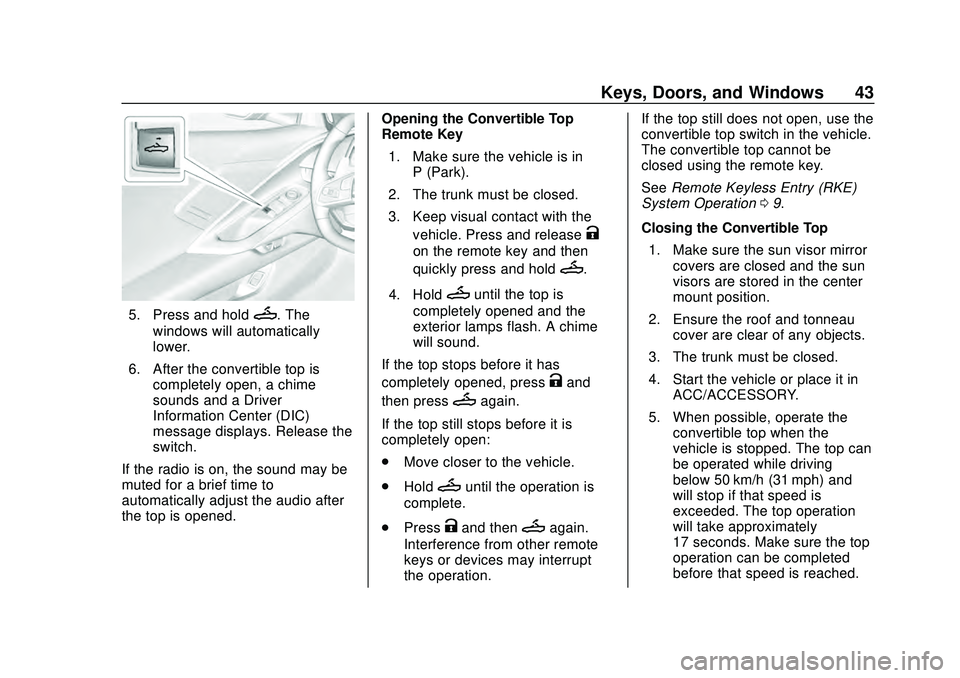
5. Press and holdM. The
windows will automatically
lower.
6. After the convertible top is completely open, a chime
sounds and a Driver
Information Center (DIC)
message displays. Release the
switch.
If the radio is on, the sound may be
muted for a brief time to
automatically adjust the audio after
the top is opened. Opening the Convertible Top
—
Remote Key
1. Make sure the vehicle is in P (Park).
2. The trunk must be closed.
3. Keep visual contact with the vehicle. Press and release
K
on the remote key and then
quickly press and hold
M.
4. Hold
Muntil the top is
completely opened and the
exterior lamps flash. A chime
will sound.
If the top stops before it has
completely opened, press
Kand
then press
Magain.
If the top still stops before it is
completely open:
. Move closer to the vehicle.
. Hold
Muntil the operation is
complete.
. Press
Kand thenMagain.
Interference from other remote
keys or devices may interrupt
the operation. If the top still does not open, use the
convertible top switch in the vehicle.
The convertible top cannot be
closed using the remote key.
See
Remote Keyless Entry (RKE)
System Operation 09.
Closing the Convertible Top 1. Make sure the sun visor mirror covers are closed and the sun
visors are stored in the center
mount position.
2. Ensure the roof and tonneau cover are clear of any objects.
3. The trunk must be closed.
4. Start the vehicle or place it in ACC/ACCESSORY.
5. When possible, operate the convertible top when the
vehicle is stopped. The top can
be operated while driving
below 50 km/h (31 mph) and
will stop if that speed is
exceeded. The top operation
will take approximately
17 seconds. Make sure the top
operation can be completed
before that speed is reached.
Page 51 of 336
Chevrolet Corvette Owner Manual (GMNA-Localizing-U.S./Canada/Mexico-
12470550) - 2020 - CRC - 4/23/20
50 Seats and Restraints
{Warning
Sitting in a reclined position when
the vehicle is in motion can be
dangerous. Even when buckled
up, the seat belts cannot do
their job.
For proper protection when the
vehicle is in motion, have the
seatback upright. Then sit well
back in the seat and wear the
seat belt properly.
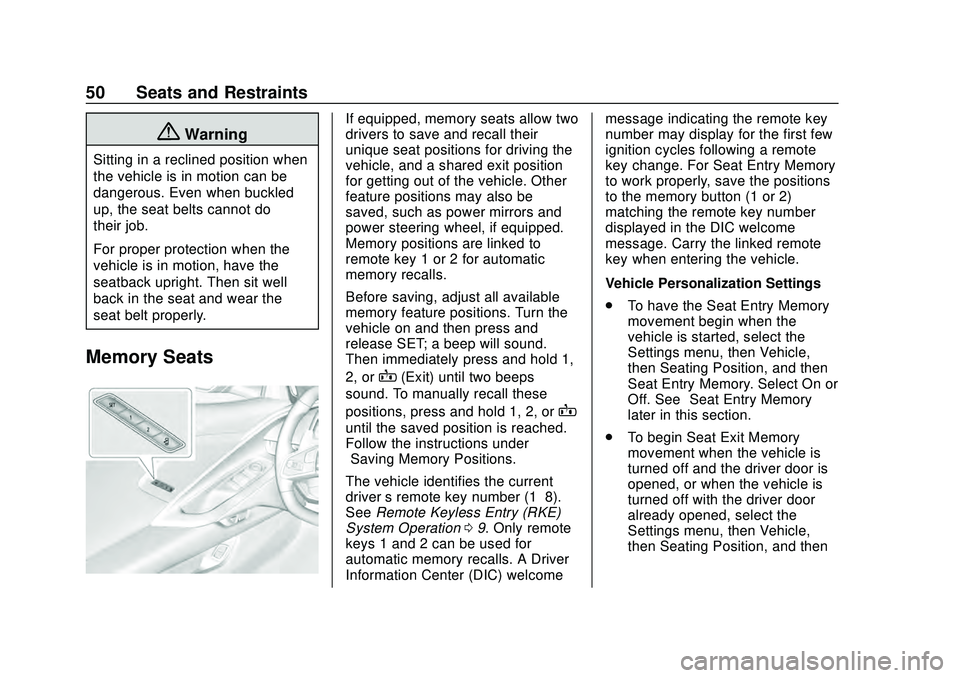
Memory Seats
If equipped, memory seats allow two
drivers to save and recall their
unique seat positions for driving the
vehicle, and a shared exit position
for getting out of the vehicle. Other
feature positions may also be
saved, such as power mirrors and
power steering wheel, if equipped.
Memory positions are linked to
remote key 1 or 2 for automatic
memory recalls.
Before saving, adjust all available
memory feature positions. Turn the
vehicle on and then press and
release SET; a beep will sound.
Then immediately press and hold 1,
2, or
B(Exit) until two beeps
sound. To manually recall these
positions, press and hold 1, 2, or
B
until the saved position is reached.
Follow the instructions under
“Saving Memory Positions.”
The vehicle identifies the current
driver ’s remote key number (1–8).
See Remote Keyless Entry (RKE)
System Operation 09. Only remote
keys 1 and 2 can be used for
automatic memory recalls. A Driver
Information Center (DIC) welcome message indicating the remote key
number may display for the first few
ignition cycles following a remote
key change. For Seat Entry Memory
to work properly, save the positions
to the memory button (1 or 2)
matching the remote key number
displayed in the DIC welcome
message. Carry the linked remote
key when entering the vehicle.
Vehicle Personalization Settings
.
To have the Seat Entry Memory
movement begin when the
vehicle is started, select the
Settings menu, then Vehicle,
then Seating Position, and then
Seat Entry Memory. Select On or
Off. See “Seat Entry Memory”
later in this section.
. To begin Seat Exit Memory
movement when the vehicle is
turned off and the driver door is
opened, or when the vehicle is
turned off with the driver door
already opened, select the
Settings menu, then Vehicle,
then Seating Position, and then
Page 53 of 336

Chevrolet Corvette Owner Manual (GMNA-Localizing-U.S./Canada/Mexico-
12470550) - 2020 - CRC - 4/23/20
52 Seats and Restraints
Manual Memory recall movement for
1, 2 or
Bbuttons may be initiated
and will complete to the saved
memory position if the vehicle is
shifted in or out of P (Park).
Seat Entry Memory, Driver
Seat Only
The vehicle identifies the number of
the current driver ’s remote key (1–
8). See Remote Keyless Entry
(RKE) System Operation 09. If the
remote key is 1 or 2, and Seat Entry
Memory is enabled in vehicle
personalization, the positions saved
to the same memory button number
1 or 2 are automatically recalled
when the vehicle is turned on.
Remote keys 3–8 will not provide
automatic memory recalls.
To turn Seat Entry Memory on or off,
see “Vehicle Personalization
Settings” previously in this section
and Vehicle Personalization 0116.
The vehicle must be in P (Park) to
start Seat Entry Memory. Seat Entry
Memory recall will complete if the vehicle is shifted out of P (Park)
prior to reaching the saved memory
position.
To stop Seat Entry Memory recall
movement, turn the vehicle off or
press any of the following controls:
.
Power seat
. Memory SET, 1, 2, or
B
.Power mirror, with the driver or
passenger side mirror selected
. Power steering wheel,
if equipped
If the saved memory seat position
does not automatically recall or
recalls to the wrong positions, the
driver ’s remote key number (1 or 2)
may not match the memory button
number that positions were saved
to. Try storing the position to the
other memory button or try the other
remote key.
If the seat or seatback movement
rearward or recline makes contact
with the carpet behind the seat, the
seat will automatically adjust
forward a small distance. If it
remains in contact, memory recalls may not complete. Move the seat
and/or seatback forward a small
distance away from the carpet
behind the seat and try the memory
recall again.
Seat Exit Memory, Driver
Seat Only
Seat Exit Memory is not linked to a
remote key. The position saved toBis used for all drivers. To turn
Seat Exit Memory on or off, see
"Vehicle Personalization Settings"
previously in this section and
Vehicle Personalization 0116.
If turned on, the position saved to
Bis automatically recalled when
one of the following occurs:
. The vehicle is turned off and the
driver door is opened within a
short time.
. The vehicle is turned off with the
driver door open.
To stop Seat Exit Memory
movement, press any of the
following memory controls:
. Power seat
Page 120 of 336
Chevrolet Corvette Owner Manual (GMNA-Localizing-U.S./Canada/Mexico-
12470550) - 2020 - CRC - 4/23/20
Instruments and Controls 119
.Remote Start Auto Cool Seats
. Remote Start Auto Heat Seats
. Remote Window Operation
. Passive Door Unlock
. Passive Door Lock
. Remote Left in Vehicle Alert
. Remote Removed from Vehicle
Alert
Remote Unlock Light Feedback
This setting flashes the exterior
lamps when the vehicle is unlocked
with the remote key.
Touch Off or Flash Lights.
Remote Lock Feedback
This setting specifies how the
vehicle responds when the vehicle
is locked with the remote key.
Touch Off, Lights and Horn, Lights
Only, or Horn Only.
Remote Door Unlock
This setting specifies whether all
doors, or just the driver door, unlock
when pressing
Kon the remote key. Touch All Doors or Driver Door.
Remote Start Auto Cool Seats
This setting automatically turns on
the ventilated seats when using the
remote start function on warm days.
See
Heated and Ventilated Front
Seats 053 and
Remote Vehicle Start 015.
Touch Off or On.
Remote Start Auto Heat Seats
This setting automatically turns on
the heated seats when using the
remote start function on cold days.
See Heated and Ventilated Front
Seats 053 and
Remote Vehicle Start 015.
If equipped with Auto Heated
Steering Wheel, this feature will turn
on when the Remote Start Auto
Heat Seats turn on.
Touch Off or On. Remote Window Operation
When enabled, this feature allows
the windows to be opened remotely
when pressing and holding
Kon the
remote key. See Remote Keyless
Entry (RKE) System Operation 09.
Touch Off or On.
Passive Door Unlock
This setting specifies which doors
unlock when using the button on the
driver door handle to unlock the
vehicle.
Touch Off, All Doors, or Driver
Door Only.
Passive Door Lock
This setting specifies if the vehicle
will automatically lock, or lock and
provide an alert after all the doors
are closed, and you walk away from
the vehicle with the remote key. See
Remote Keyless Entry (RKE)
System Operation 09.
Touch Off, On with Horn
Chirp, or On.
Page 130 of 336
Chevrolet Corvette Owner Manual (GMNA-Localizing-U.S./Canada/Mexico-
12470550) - 2020 - CRC - 4/23/20
Lighting 129
Interior Lighting
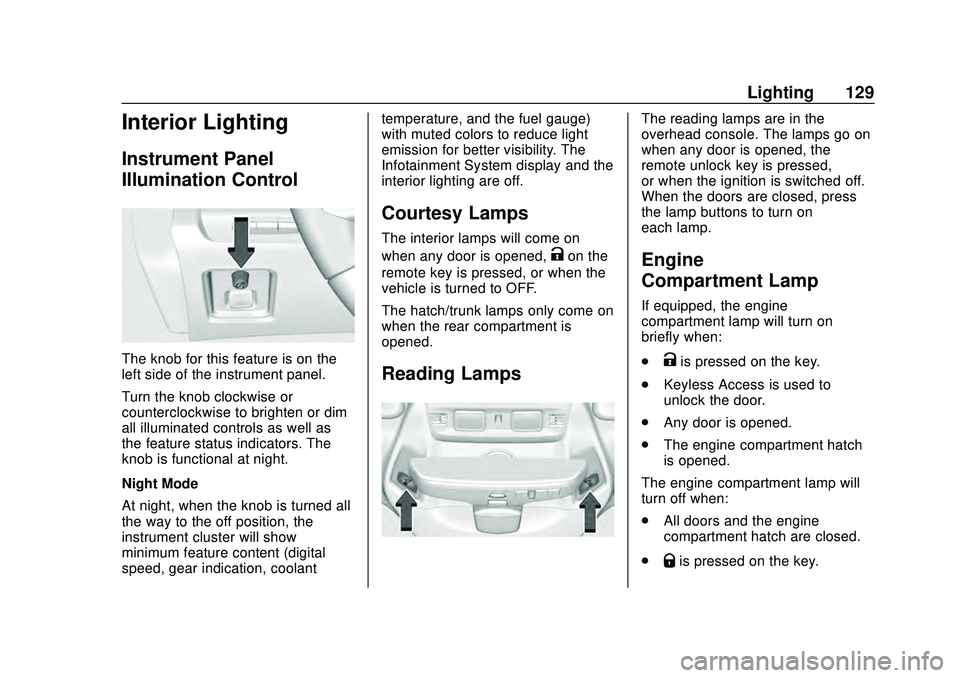
Instrument Panel
Illumination Control
The knob for this feature is on the
left side of the instrument panel.
Turn the knob clockwise or
counterclockwise to brighten or dim
all illuminated controls as well as
the feature status indicators. The
knob is functional at night.
Night Mode
At night, when the knob is turned all
the way to the off position, the
instrument cluster will show
minimum feature content (digital
speed, gear indication, coolanttemperature, and the fuel gauge)
with muted colors to reduce light
emission for better visibility. The
Infotainment System display and the
interior lighting are off.
Courtesy Lamps
The interior lamps will come on
when any door is opened,
Kon the
remote key is pressed, or when the
vehicle is turned to OFF.
The hatch/trunk lamps only come on
when the rear compartment is
opened.
Reading Lamps
The reading lamps are in the
overhead console. The lamps go on
when any door is opened, the
remote unlock key is pressed,
or when the ignition is switched off.
When the doors are closed, press
the lamp buttons to turn on
each lamp.
Engine
Compartment Lamp
If equipped, the engine
compartment lamp will turn on
briefly when:
.
Kis pressed on the key.
. Keyless Access is used to
unlock the door.
. Any door is opened.
. The engine compartment hatch
is opened.
The engine compartment lamp will
turn off when:
. All doors and the engine
compartment hatch are closed.
.
Qis pressed on the key.
Page 166 of 336
Chevrolet Corvette Owner Manual (GMNA-Localizing-U.S./Canada/Mexico-
12470550) - 2020 - CRC - 4/23/20
Driving and Operating 165
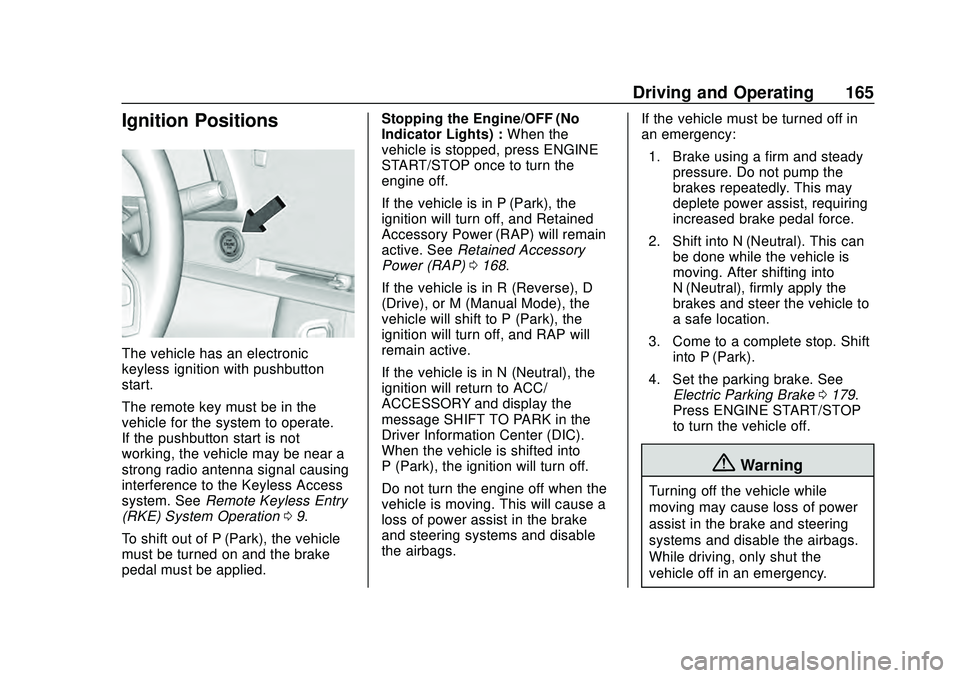
Ignition Positions
The vehicle has an electronic
keyless ignition with pushbutton
start.
The remote key must be in the
vehicle for the system to operate.
If the pushbutton start is not
working, the vehicle may be near a
strong radio antenna signal causing
interference to the Keyless Access
system. SeeRemote Keyless Entry
(RKE) System Operation 09.
To shift out of P (Park), the vehicle
must be turned on and the brake
pedal must be applied. Stopping the Engine/OFF (No
Indicator Lights) :
When the
vehicle is stopped, press ENGINE
START/STOP once to turn the
engine off.
If the vehicle is in P (Park), the
ignition will turn off, and Retained
Accessory Power (RAP) will remain
active. See Retained Accessory
Power (RAP) 0168.
If the vehicle is in R (Reverse), D
(Drive), or M (Manual Mode), the
vehicle will shift to P (Park), the
ignition will turn off, and RAP will
remain active.
If the vehicle is in N (Neutral), the
ignition will return to ACC/
ACCESSORY and display the
message SHIFT TO PARK in the
Driver Information Center (DIC).
When the vehicle is shifted into
P (Park), the ignition will turn off.
Do not turn the engine off when the
vehicle is moving. This will cause a
loss of power assist in the brake
and steering systems and disable
the airbags. If the vehicle must be turned off in
an emergency:
1. Brake using a firm and steady pressure. Do not pump the
brakes repeatedly. This may
deplete power assist, requiring
increased brake pedal force.
2. Shift into N (Neutral). This can be done while the vehicle is
moving. After shifting into
N (Neutral), firmly apply the
brakes and steer the vehicle to
a safe location.
3. Come to a complete stop. Shift into P (Park).
4. Set the parking brake. See Electric Parking Brake 0179.
Press ENGINE START/STOP
to turn the vehicle off.
{Warning
Turning off the vehicle while
moving may cause loss of power
assist in the brake and steering
systems and disable the airbags.
While driving, only shut the
vehicle off in an emergency.
Page 167 of 336
Chevrolet Corvette Owner Manual (GMNA-Localizing-U.S./Canada/Mexico-
12470550) - 2020 - CRC - 4/23/20
166 Driving and Operating
If the vehicle cannot be pulled over
and must be turned off while driving,
press and hold ENGINE START/
STOP for more than two seconds,
or press twice within five seconds.
ACC/ACCESSORY (Amber
Indicator Light) :This mode allows
the use of some electrical
accessories when the engine is off.
With the ignition off, pressing the
button one time without the brake
pedal applied will place the ignition
in ACC/ACCESSORY.
The ignition will switch from ACC/
ACCESSORY to off after
five minutes to prevent battery
rundown.
ON/RUN/START (Green Indicator
Light) : This mode is for driving and
starting. With the ignition off and the
brake pedal applied, pressing the
button once will place the ignition in
ON/RUN/START. Once engine
cranking begins, release the button.
Engine cranking will continue until
the engine starts. See Starting the
Engine 0166. The ignition will then
remain in ON/RUN. Service Mode
This power mode is available for
service and diagnostics, and to
verify the proper operation of the
malfunction indicator lamp as may
be required for emission inspection
purposes. With the vehicle off and
the brake pedal not applied,
pressing and holding ENGINE
START/STOP for more than
five seconds will place the vehicle in
Service Mode. The instruments and
audio systems will operate as they
do in ON/RUN, but the vehicle will
not be able to be driven. The engine
will not start in Service Mode. Press
ENGINE START/STOP again to turn
the vehicle off.
Starting the Engine
Caution
If you add electrical parts or
accessories, you could change
the way the engine operates. Any
resulting damage would not be
(Continued)
Caution (Continued)
covered by the vehicle warranty.
SeeAdd-On Electrical Equipment
0 208.
Caution
Do not try to shift to P (Park) if the
vehicle is moving. If you do, you
could damage the transmission.
Shift to P (Park) only when the
vehicle is stopped.
Place the transmission in P (Park)
or N (Neutral). To restart the vehicle
when it is already moving, use
N (Neutral) only.
Starting the Vehicle
The remote key must be inside the
vehicle for the ignition to work.
Cell phone chargers can interfere
with the operation of the Keyless
Access system. Battery chargers
should not be plugged in when
starting or turning off the engine.