parking brake CHEVROLET CORVETTE 2020 Owner's Manual
[x] Cancel search | Manufacturer: CHEVROLET, Model Year: 2020, Model line: CORVETTE, Model: CHEVROLET CORVETTE 2020Pages: 336, PDF Size: 5.21 MB
Page 7 of 336
Chevrolet Corvette Owner Manual (GMNA-Localizing-U.S./Canada/Mexico-
12470550) - 2020 - CRC - 4/23/20
6 Introduction
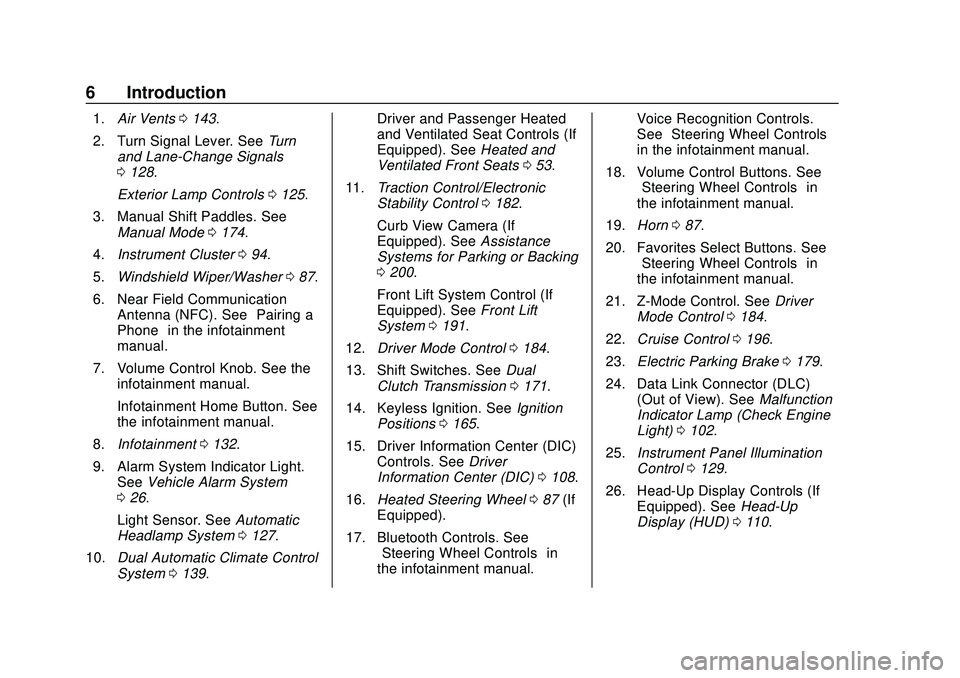
1.Air Vents 0143.
2. Turn Signal Lever. See Turn
and Lane-Change Signals
0 128.
Exterior Lamp Controls 0125.
3. Manual Shift Paddles. See Manual Mode 0174.
4. Instrument Cluster 094.
5. Windshield Wiper/Washer 087.
6. Near Field Communication Antenna (NFC). See “Pairing a
Phone” in the infotainment
manual.
7. Volume Control Knob. See the infotainment manual.
Infotainment Home Button. See
the infotainment manual.
8. Infotainment 0132.
9. Alarm System Indicator Light. See Vehicle Alarm System
0 26.
Light Sensor. See Automatic
Headlamp System 0127.
10. Dual Automatic Climate Control
System 0139. Driver and Passenger Heated
and Ventilated Seat Controls (If
Equipped). See
Heated and
Ventilated Front Seats 053.
11. Traction Control/Electronic
Stability Control 0182.
Curb View Camera (If
Equipped). See Assistance
Systems for Parking or Backing
0 200.
Front Lift System Control (If
Equipped). See Front Lift
System 0191.
12. Driver Mode Control 0184.
13. Shift Switches. See Dual
Clutch Transmission 0171.
14. Keyless Ignition. See Ignition
Positions 0165.
15. Driver Information Center (DIC) Controls. See Driver
Information Center (DIC) 0108.
16. Heated Steering Wheel 087 (If
Equipped).
17. Bluetooth Controls. See “Steering Wheel Controls” in
the infotainment manual. Voice Recognition Controls.
See
“Steering Wheel Controls”
in the infotainment manual.
18. Volume Control Buttons. See “Steering Wheel Controls” in
the infotainment manual.
19. Horn 087.
20. Favorites Select Buttons. See “Steering Wheel Controls” in
the infotainment manual.
21. Z-Mode Control. See Driver
Mode Control 0184.
22. Cruise Control 0196.
23. Electric Parking Brake 0179.
24. Data Link Connector (DLC) (Out of View). See Malfunction
Indicator Lamp (Check Engine
Light) 0102.
25. Instrument Panel Illumination
Control 0129.
26. Head-Up Display Controls (If Equipped). See Head-Up
Display (HUD) 0110.
Page 17 of 336
Chevrolet Corvette Owner Manual (GMNA-Localizing-U.S./Canada/Mexico-
12470550) - 2020 - CRC - 4/23/20
16 Keys, Doors, and Windows
Other conditions can affect the
performance of the remote key. See
Remote Keyless Entry (RKE)
System09.
You have a total of 30 minutes of
engine running time. The maximum
run time of a single start is
15 minutes, and it will shut off
automatically. You could do three
10 minute starts if you manually
shut off after 10 minutes. The last
10 minute start would shut off
automatically as your total
30 minutes will have been used.
Starting the Engine Using Remote
Start
1. Press
Stwice on the remote
key. The turn signal lamps will
flash. The lamps flash to
confirm the request to remote
start the vehicle has been
received. During the remote
start, the doors will be locked
and the parking lamps will
remain on as long as the
engine is running. 2. The engine will shut off after
15 minutes or after the
remainder of the 30 minute
total running time is used,
unless you stop the remote
start before engine running has
completed or the ignition is
turned on.
3. Press the brake pedal and turn the ignition on to drive the
vehicle.
Total Engine Run Time
Remote start can be used for up to
30 minutes of total engine run time.
After two remote starts of
15 minutes, or multiple shorter time
starts totaling 30 minutes have been
used, the vehicle's ignition must be
turned on and then off before the
remote start can be used again.
Canceling a Remote Start
To cancel a remote start, do any of
the following:
. Press
S. The parking lamps will
turn off. .
Turn on the hazard warning
flashers.
. Turn the vehicle on and then
back off.
Conditions in Which Remote Start
Will Not Work
The remote start will not operate if
any of the following occur:
. The ignition is in any mode other
than off.
. A remote key is in the vehicle.
. The hatch/trunk is not closed.
. The convertible top is not fully
open or closed.
. The tonneau cover is not closed.
. The hazard warning flashers
are on.
. There is an emission control
system malfunction.
. The engine coolant temperature
is too high.
. The oil pressure is low.
. The 30 minutes of engine run
time have been used.
Page 39 of 336
Chevrolet Corvette Owner Manual (GMNA-Localizing-U.S./Canada/Mexico-
12470550) - 2020 - CRC - 4/23/20
38 Keys, Doors, and Windows
Removing the Roof Panel
{Warning
Do not remove a roof panel while
the vehicle is moving. The panel
could fall into the vehicle and
strike an occupant and cause you
to lose control. It could also fly off
and strike another vehicle.
Remove the roof panel only when
the vehicle is parked.
It may be necessary to have help
removing the roof panel.
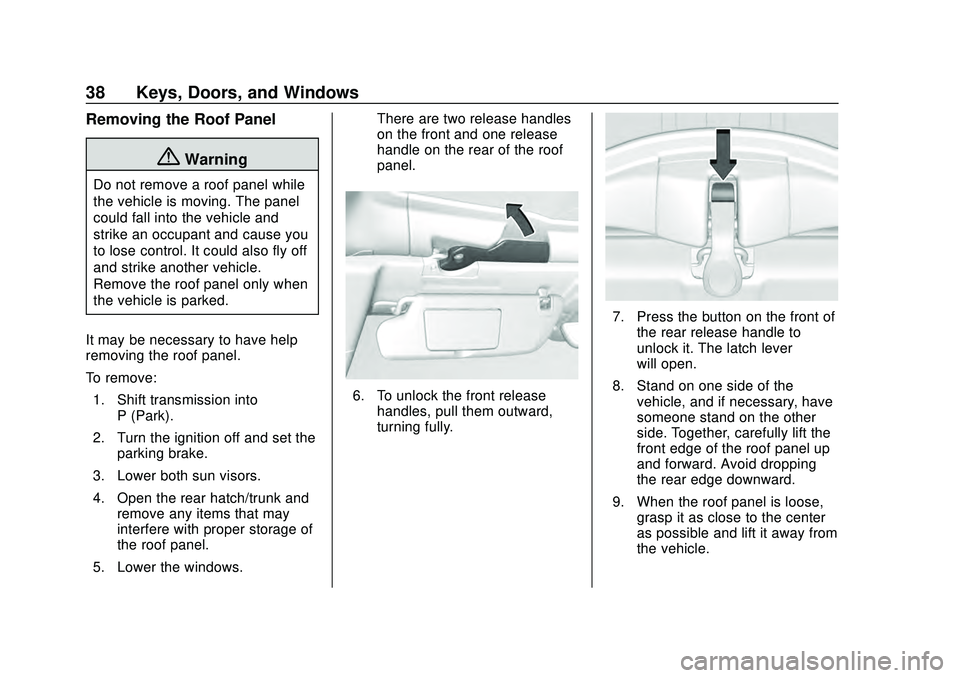
To remove: 1. Shift transmission into P (Park).
2. Turn the ignition off and set the parking brake.
3. Lower both sun visors.
4. Open the rear hatch/trunk and remove any items that may
interfere with proper storage of
the roof panel.
5. Lower the windows. There are two release handles
on the front and one release
handle on the rear of the roof
panel.
6. To unlock the front release
handles, pull them outward,
turning fully.
7. Press the button on the front ofthe rear release handle to
unlock it. The latch lever
will open.
8. Stand on one side of the vehicle, and if necessary, have
someone stand on the other
side. Together, carefully lift the
front edge of the roof panel up
and forward. Avoid dropping
the rear edge downward.
9. When the roof panel is loose, grasp it as close to the center
as possible and lift it away from
the vehicle.
Page 41 of 336
Chevrolet Corvette Owner Manual (GMNA-Localizing-U.S./Canada/Mexico-
12470550) - 2020 - CRC - 4/23/20
40 Keys, Doors, and Windows
{Warning
Do not push from the sides of the
roof panel when seating the panel
into the upper receivers for
storage. Pushing from the sides
may result in injury from pinched
fingers. Only push along the top
edge of the roof panel.
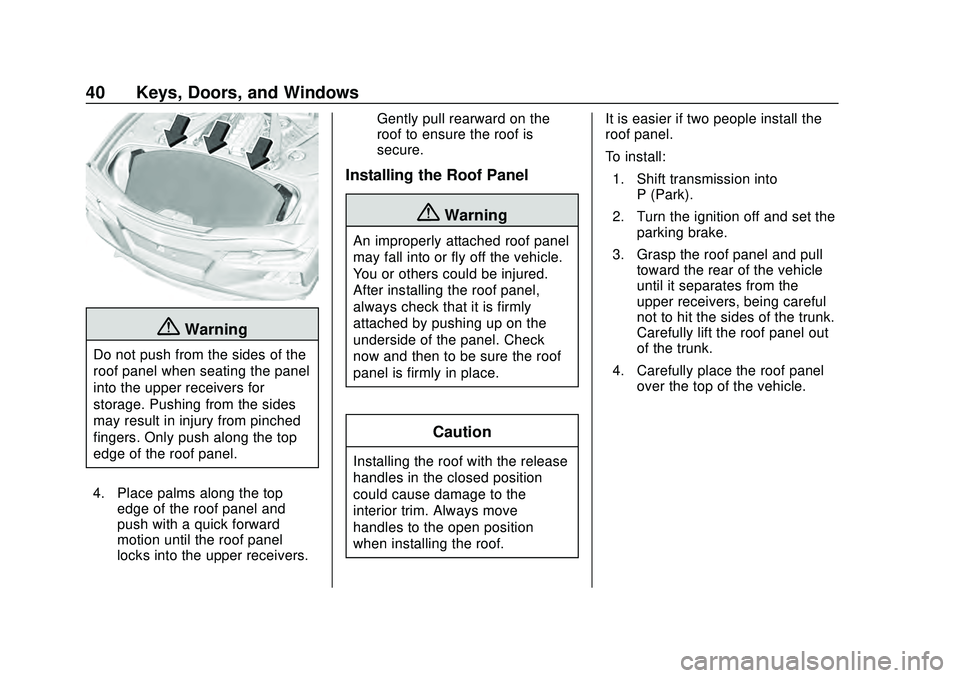
4. Place palms along the top edge of the roof panel and
push with a quick forward
motion until the roof panel
locks into the upper receivers. Gently pull rearward on the
roof to ensure the roof is
secure.
Installing the Roof Panel
{Warning
An improperly attached roof panel
may fall into or fly off the vehicle.
You or others could be injured.
After installing the roof panel,
always check that it is firmly
attached by pushing up on the
underside of the panel. Check
now and then to be sure the roof
panel is firmly in place.
Caution
Installing the roof with the release
handles in the closed position
could cause damage to the
interior trim. Always move
handles to the open position
when installing the roof.
It is easier if two people install the
roof panel.
To install:
1. Shift transmission into P (Park).
2. Turn the ignition off and set the parking brake.
3. Grasp the roof panel and pull toward the rear of the vehicle
until it separates from the
upper receivers, being careful
not to hit the sides of the trunk.
Carefully lift the roof panel out
of the trunk.
4. Carefully place the roof panel over the top of the vehicle.
Page 87 of 336
Chevrolet Corvette Owner Manual (GMNA-Localizing-U.S./Canada/Mexico-
12470550) - 2020 - CRC - 4/23/20
86 Instruments and Controls
Instruments and
Controls
Controls
Steering Wheel Adjustment . . . . 87
Steering Wheel Controls . . . . . . . 87
Heated Steering Wheel . . . . . . . . 87
Horn . . . . . . . . . . . . . . . . . . . . . . . . . . . 87
Windshield Wiper/Washer . . . . . . 87
Compass . . . . . . . . . . . . . . . . . . . . . . 88
Clock . . . . . . . . . . . . . . . . . . . . . . . . . . 89
Power Outlets . . . . . . . . . . . . . . . . . 89
Wireless Charging . . . . . . . . . . . . . 90
Warning Lights, Gauges, and
Indicators
Warning Lights, Gauges, andIndicators . . . . . . . . . . . . . . . . . . . . 93
Instrument Cluster . . . . . . . . . . . . . 94
Speedometer . . . . . . . . . . . . . . . . . . 98
Odometer . . . . . . . . . . . . . . . . . . . . . . 98
Trip Odometer . . . . . . . . . . . . . . . . . 98
Tachometer . . . . . . . . . . . . . . . . . . . . 98
Fuel Gauge . . . . . . . . . . . . . . . . . . . . 98
Engine Coolant Temperature Gauge . . . . . . . . . . . . . . . . . . . . . . . . 99
Transmission Temperature Gauge . . . . . . . . . . . . . . . . . . . . . . . . 99 Seat Belt Reminders . . . . . . . . . . . 99
Airbag Readiness Light . . . . . . . 100
Passenger Airbag Status
Indicator . . . . . . . . . . . . . . . . . . . . 100
Charging System Light . . . . . . . 101
Malfunction Indicator Lamp
(Check Engine Light) . . . . . . . . 102
Front Lift System Light . . . . . . . 103
Brake System Warning Light . . . . . . . . . . . . . . . . . . . . . . . . 104
Electric Parking Brake Light . . . . . . . . . . . . . . . . . . . . . . . . 104
Service Electric Parking Brake Light . . . . . . . . . . . . . . . . . . . . . . . . 105
Antilock Brake System (ABS) Warning Light . . . . . . . . . . . . . . . 105
Traction Off Light . . . . . . . . . . . . . 105
Traction Control System (TCS)/ Electronic Stability Control
Light . . . . . . . . . . . . . . . . . . . . . . . . 106
Electronic Stability Control (ESC) Off Light . . . . . . . . . . . . . . 106
Tire Pressure Light . . . . . . . . . . . 106
Engine Oil Pressure Light . . . . 107
Security Light . . . . . . . . . . . . . . . . . 107
High-Beam On Light . . . . . . . . . . 107
Lamps On Reminder . . . . . . . . . 108
Cruise Control Light . . . . . . . . . . 108
Door Ajar Light . . . . . . . . . . . . . . . 108
Information Displays
Driver Information Center (DIC) . . . . . . . . . . . . . . . . 108
Head-Up Display (HUD) . . . . . . 110
Vehicle Messages
Vehicle Messages . . . . . . . . . . . . 114
Engine Power Messages . . . . . 115
Vehicle Speed Messages . . . . . 115
Vehicle Personalization
Vehicle Personalization . . . . . . . 116
Universal Remote System
Universal Remote System . . . . 121
Universal Remote System Programming . . . . . . . . . . . . . . . 121
Universal Remote System Operation . . . . . . . . . . . . . . . . . . . 123
Page 105 of 336
Chevrolet Corvette Owner Manual (GMNA-Localizing-U.S./Canada/Mexico-
12470550) - 2020 - CRC - 4/23/20
104 Instruments and Controls
If equipped, this light will flash to
indicate when the front of the
vehicle is being raised or lowered.
An up or down arrow in the light will
display, depending on the direction
of movement. The light will stay lit
while the front is fully raised.
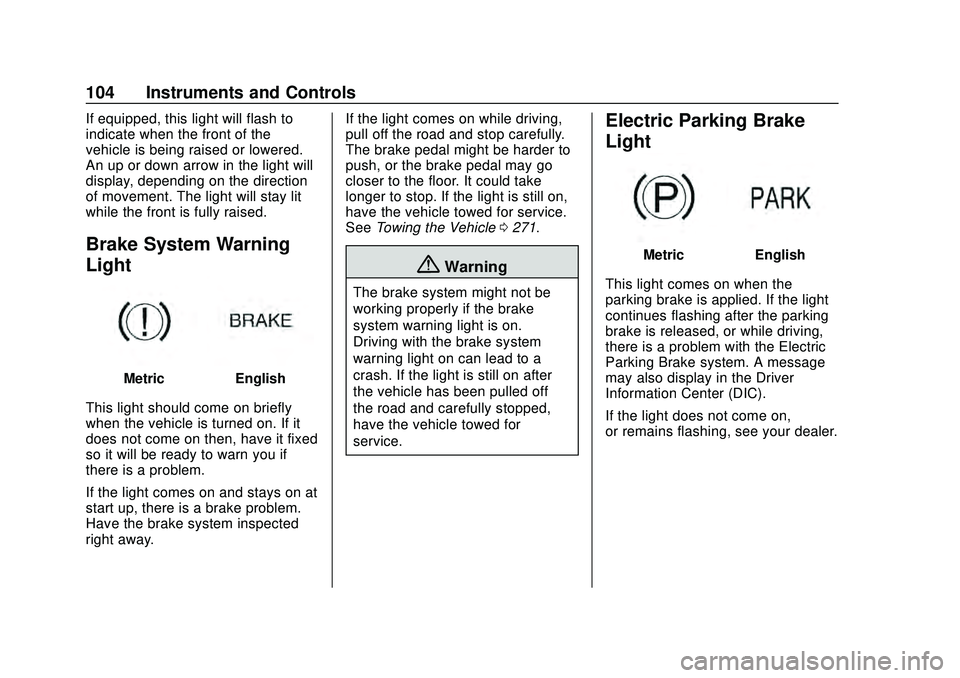
Brake System Warning
Light
MetricEnglish
This light should come on briefly
when the vehicle is turned on. If it
does not come on then, have it fixed
so it will be ready to warn you if
there is a problem.
If the light comes on and stays on at
start up, there is a brake problem.
Have the brake system inspected
right away. If the light comes on while driving,
pull off the road and stop carefully.
The brake pedal might be harder to
push, or the brake pedal may go
closer to the floor. It could take
longer to stop. If the light is still on,
have the vehicle towed for service.
See
Towing the Vehicle 0271.
{Warning
The brake system might not be
working properly if the brake
system warning light is on.
Driving with the brake system
warning light on can lead to a
crash. If the light is still on after
the vehicle has been pulled off
the road and carefully stopped,
have the vehicle towed for
service.
Electric Parking Brake
Light
MetricEnglish
This light comes on when the
parking brake is applied. If the light
continues flashing after the parking
brake is released, or while driving,
there is a problem with the Electric
Parking Brake system. A message
may also display in the Driver
Information Center (DIC).
If the light does not come on,
or remains flashing, see your dealer.
Page 106 of 336
Chevrolet Corvette Owner Manual (GMNA-Localizing-U.S./Canada/Mexico-
12470550) - 2020 - CRC - 4/23/20
Instruments and Controls 105
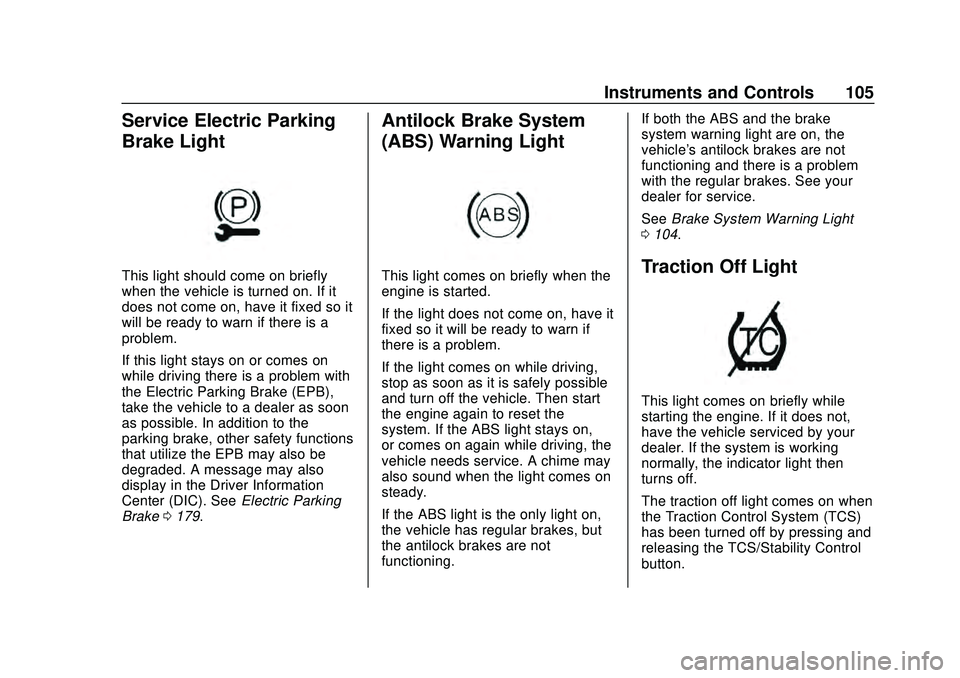
Service Electric Parking
Brake Light
This light should come on briefly
when the vehicle is turned on. If it
does not come on, have it fixed so it
will be ready to warn if there is a
problem.
If this light stays on or comes on
while driving there is a problem with
the Electric Parking Brake (EPB),
take the vehicle to a dealer as soon
as possible. In addition to the
parking brake, other safety functions
that utilize the EPB may also be
degraded. A message may also
display in the Driver Information
Center (DIC). SeeElectric Parking
Brake 0179.
Antilock Brake System
(ABS) Warning Light
This light comes on briefly when the
engine is started.
If the light does not come on, have it
fixed so it will be ready to warn if
there is a problem.
If the light comes on while driving,
stop as soon as it is safely possible
and turn off the vehicle. Then start
the engine again to reset the
system. If the ABS light stays on,
or comes on again while driving, the
vehicle needs service. A chime may
also sound when the light comes on
steady.
If the ABS light is the only light on,
the vehicle has regular brakes, but
the antilock brakes are not
functioning. If both the ABS and the brake
system warning light are on, the
vehicle's antilock brakes are not
functioning and there is a problem
with the regular brakes. See your
dealer for service.
See
Brake System Warning Light
0 104.Traction Off Light
This light comes on briefly while
starting the engine. If it does not,
have the vehicle serviced by your
dealer. If the system is working
normally, the indicator light then
turns off.
The traction off light comes on when
the Traction Control System (TCS)
has been turned off by pressing and
releasing the TCS/Stability Control
button.
Page 118 of 336
Chevrolet Corvette Owner Manual (GMNA-Localizing-U.S./Canada/Mexico-
12470550) - 2020 - CRC - 4/23/20
Instruments and Controls 117
SeeDriver Mode Control 0184.
Brake Response
Touch Tour, Sport, or Track.
See Driver Mode Control 0184.
Climate and Air Quality
Touch and the following may
display:
.
Auto Fan Speed
. Auto Cooled Seats
. Auto Heated Seats
. Auto Defog
. Auto Rear Defog
Auto Fan Speed
This setting specifies the amount of
airflow when the climate control fan
setting is Auto Fan.
Touch Low, Medium, or High.
Auto Cooled Seats
When enabled, this feature will
automatically activate the ventilated
seats at the level required by the
interior temperature. See Heated
and Ventilated Front Seats 053. Touch Off or On.
Auto Heated Seats
This setting automatically turns on
and regulates the heated seats
when the cabin temperature is cool.
The auto heated seats can be
turned off by using the heated seat
buttons on the center stack. See
Heated and Ventilated Front Seats
0
53.
If equipped with Auto Heated
Steering Wheel, this feature will turn
on when the Auto Heated Seats
turn on.
Touch Off or On.
Auto Defog
This setting, when set to On, will
automatically react to temperature
and humidity conditions that may
cause fogging.
Touch Off or On.
Auto Rear Defog
This setting automatically turns the
rear window defogger on when it is
cold outside.
Touch Off or On.
Collision / Detection Systems
Touch and the following may
display:
. Park Assist
. Side Blind Zone Alert
. Rear Cross Traffic Alert
Park Assist
This allows the feature to be turned
on or off. See Assistance Systems
for Parking or Backing 0200.
Touch Off or On.
Side Blind Zone Alert
This allows this feature to be turned
on or off. See Side Blind Zone Alert
(SBZA) 0202.
Touch Off or On.
Rear Cross Traffic Alert
This setting specifies if an alert will
display when the vehicle detects
approaching rear cross traffic when
in R (Reverse). See Assistance
Systems for Parking or Backing
0 200.
Touch Off or On.
Page 146 of 336
Chevrolet Corvette Owner Manual (GMNA-Localizing-U.S./Canada/Mexico-
12470550) - 2020 - CRC - 4/23/20
Driving and Operating 145
Driving and
Operating
Driving Information
Driving for Better FuelEconomy . . . . . . . . . . . . . . . . . . . . 146
Distracted Driving . . . . . . . . . . . . 146
Defensive Driving . . . . . . . . . . . . . 147
Drunk Driving . . . . . . . . . . . . . . . . . 147
Control of a Vehicle . . . . . . . . . . . 148
Braking . . . . . . . . . . . . . . . . . . . . . . . 148
Steering . . . . . . . . . . . . . . . . . . . . . . 148
Off-Road Recovery . . . . . . . . . . . 149
Loss of Control . . . . . . . . . . . . . . . 150
Track Events and Competitive Driving (Z51 Only) . . . . . . . . . . 150
Driving on Wet Roads . . . . . . . . 156
Hill and Mountain Roads . . . . . 157
Winter Driving . . . . . . . . . . . . . . . . 158
If the Vehicle Is Stuck . . . . . . . . 159
Vehicle Load Limits . . . . . . . . . . . 160
Starting and Operating
New Vehicle Break-In . . . . . . . . . 163
Front Air Dam (and Splitter) . . . . . . . . . . . . . . . . . . . . . 164
Composite Materials . . . . . . . . . . 164
Ignition Positions . . . . . . . . . . . . . 165 Starting the Engine . . . . . . . . . . . 166
Retained Accessory
Power (RAP) . . . . . . . . . . . . . . . . 168
Shifting Into Park . . . . . . . . . . . . . 168
Shifting out of Park . . . . . . . . . . . 169
Parking over Things That Burn . . . . . . . . . . . . . . . . . . . 169
Active Fuel Management . . . . . 169
Extended Parking . . . . . . . . . . . . 169
Engine Exhaust
Engine Exhaust . . . . . . . . . . . . . . 170
Running the Vehicle While Parked . . . . . . . . . . . . . . . . . . . . . . 171
Dual Clutch Transmission
Dual Clutch Transmission . . . . 171
Manual Mode . . . . . . . . . . . . . . . . . 174
Brakes
Electric Brake Boost . . . . . . . . . . 179
Antilock BrakeSystem (ABS) . . . . . . . . . . . . . . . 179
Electric Parking Brake . . . . . . . . 179
Brake Assist . . . . . . . . . . . . . . . . . . 181
Hill Start Assist (HSA) . . . . . . . . 181
Ride Control Systems
Traction Control/Electronic Stability Control . . . . . . . . . . . . . 182
Hill Rollback Control . . . . . . . . . . 184
Driver Mode Control . . . . . . . . . . 184 Front Lift System . . . . . . . . . . . . . 191
Competitive Driving Mode . . . . 192
Limited-Slip Differential
(without Z51) . . . . . . . . . . . . . . . . 195
Limited-Slip Differential
(with Z51) . . . . . . . . . . . . . . . . . . . 195
Cruise Control
Cruise Control . . . . . . . . . . . . . . . . 196
Driver Assistance Systems
Driver Assistance Systems . . . 199
Assistance Systems forParking or Backing . . . . . . . . . . 200
Side Blind Zone Alert (SBZA) . . . . . . . . . . . . . . . . 202
Fuel
Top Tier Fuel . . . . . . . . . . . . . . . . . 204
Recommended Fuel . . . . . . . . . . 204
Prohibited Fuels . . . . . . . . . . . . . . 205
Fuels in Foreign Countries . . . 205
Fuel Additives . . . . . . . . . . . . . . . . 205
Filling the Tank . . . . . . . . . . . . . . . 205
Filling a Portable FuelContainer . . . . . . . . . . . . . . . . . . . 207
Trailer Towing
General TowingInformation . . . . . . . . . . . . . . . . . . 208
Page 149 of 336
Chevrolet Corvette Owner Manual (GMNA-Localizing-U.S./Canada/Mexico-
12470550) - 2020 - CRC - 4/23/20
148 Driving and Operating
Warning (Continued)
judgment can be affected by even
a small amount of alcohol. You
can have a serious—or even
fatal —collision if you drive after
drinking.
Do not drink and drive or ride with
a driver who has been drinking.
Ride home in a cab; or if you are
with a group, designate a driver
who will not drink.
Control of a Vehicle
Braking, steering, and accelerating
are important factors in helping to
control a vehicle while driving.
Braking
Braking action involves perception
time and reaction time. Deciding to
push the brake pedal is perception
time. Actually doing it is
reaction time. Average driver reaction time is
about three-quarters of a second. In
that time, a vehicle moving at
100 km/h (60 mph) travels 20 m
(66 ft), which could be a lot of
distance in an emergency.
Helpful braking tips to keep in mind
include:
.
Keep enough distance between
you and the vehicle in front
of you.
. Avoid needless heavy braking.
. Keep pace with traffic.
If the engine ever stops or a brake
fault occurs, the brakes may lose
power assist. More effort will be
required to stop the vehicle. It may
take longer to stop.
Steering
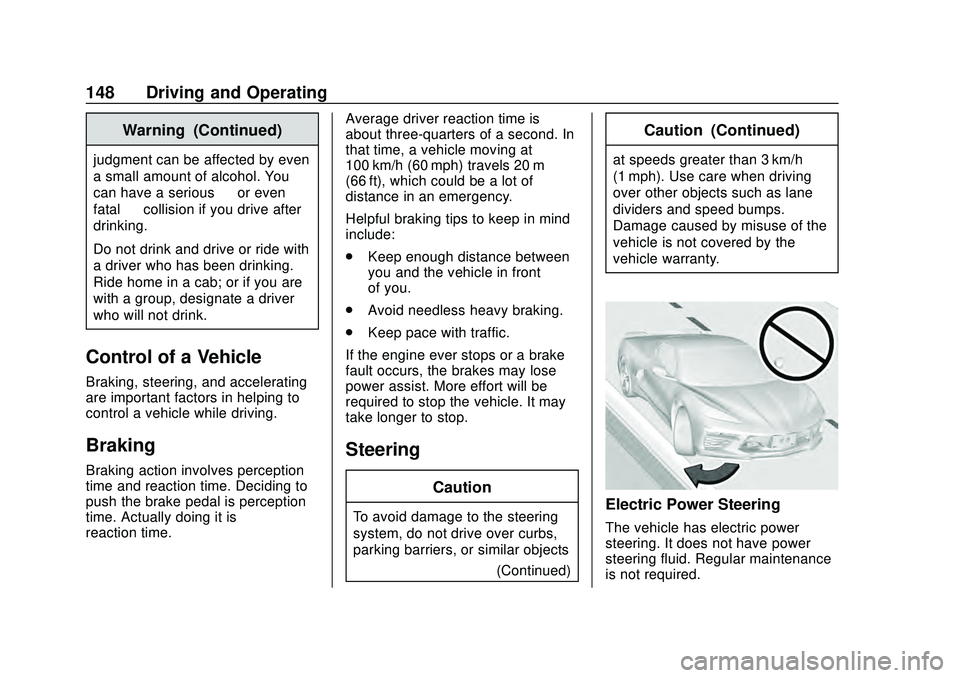
Caution
To avoid damage to the steering
system, do not drive over curbs,
parking barriers, or similar objects (Continued)
Caution (Continued)
at speeds greater than 3 km/h
(1 mph). Use care when driving
over other objects such as lane
dividers and speed bumps.
Damage caused by misuse of the
vehicle is not covered by the
vehicle warranty.
Electric Power Steering
The vehicle has electric power
steering. It does not have power
steering fluid. Regular maintenance
is not required.