warning CHEVROLET CORVETTE 2021 Manual Online
[x] Cancel search | Manufacturer: CHEVROLET, Model Year: 2021, Model line: CORVETTE, Model: CHEVROLET CORVETTE 2021Pages: 338, PDF Size: 6.56 MB
Page 224 of 338
Chevrolet Corvette Owner Manual (GMNA-Localizing-U.S./Canada/Mexico-
14622938) - 2021 - CRC - 2/10/21
Driving and Operating 223
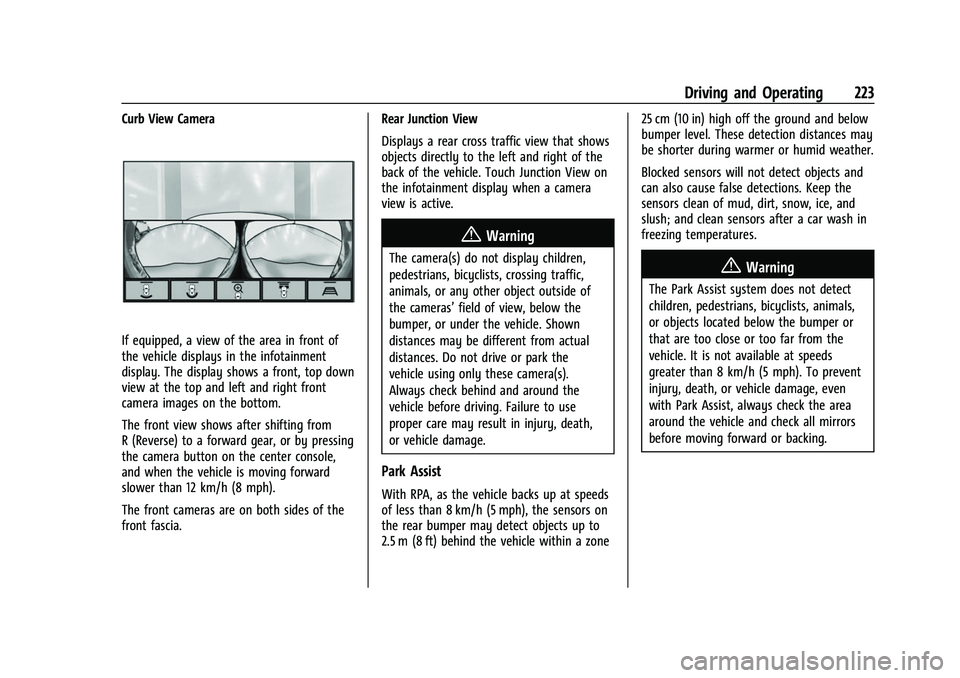
Curb View Camera
If equipped, a view of the area in front of
the vehicle displays in the infotainment
display. The display shows a front, top down
view at the top and left and right front
camera images on the bottom.
The front view shows after shifting from
R (Reverse) to a forward gear, or by pressing
the camera button on the center console,
and when the vehicle is moving forward
slower than 12 km/h (8 mph).
The front cameras are on both sides of the
front fascia.Rear Junction View
Displays a rear cross traffic view that shows
objects directly to the left and right of the
back of the vehicle. Touch Junction View on
the infotainment display when a camera
view is active.
{Warning
The camera(s) do not display children,
pedestrians, bicyclists, crossing traffic,
animals, or any other object outside of
the cameras’
field of view, below the
bumper, or under the vehicle. Shown
distances may be different from actual
distances. Do not drive or park the
vehicle using only these camera(s).
Always check behind and around the
vehicle before driving. Failure to use
proper care may result in injury, death,
or vehicle damage.
Park Assist
With RPA, as the vehicle backs up at speeds
of less than 8 km/h (5 mph), the sensors on
the rear bumper may detect objects up to
2.5 m (8 ft) behind the vehicle within a zone 25 cm (10 in) high off the ground and below
bumper level. These detection distances may
be shorter during warmer or humid weather.
Blocked sensors will not detect objects and
can also cause false detections. Keep the
sensors clean of mud, dirt, snow, ice, and
slush; and clean sensors after a car wash in
freezing temperatures.
{Warning
The Park Assist system does not detect
children, pedestrians, bicyclists, animals,
or objects located below the bumper or
that are too close or too far from the
vehicle. It is not available at speeds
greater than 8 km/h (5 mph). To prevent
injury, death, or vehicle damage, even
with Park Assist, always check the area
around the vehicle and check all mirrors
before moving forward or backing.
Page 225 of 338
Chevrolet Corvette Owner Manual (GMNA-Localizing-U.S./Canada/Mexico-
14622938) - 2021 - CRC - 2/10/21
224 Driving and Operating
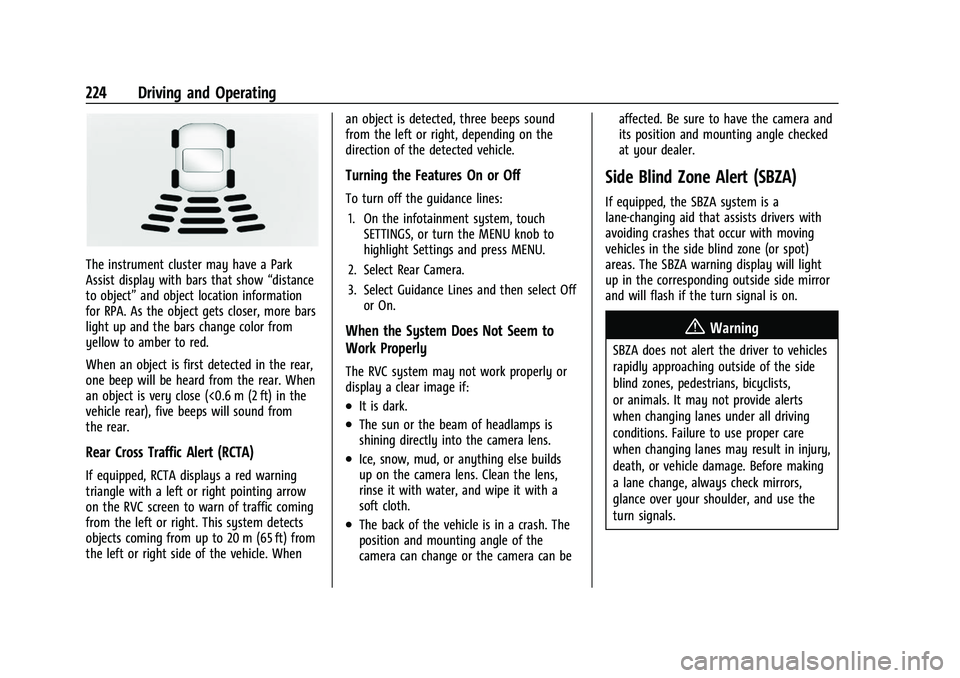
The instrument cluster may have a Park
Assist display with bars that show“distance
to object” and object location information
for RPA. As the object gets closer, more bars
light up and the bars change color from
yellow to amber to red.
When an object is first detected in the rear,
one beep will be heard from the rear. When
an object is very close (<0.6 m (2 ft) in the
vehicle rear), five beeps will sound from
the rear.
Rear Cross Traffic Alert (RCTA)
If equipped, RCTA displays a red warning
triangle with a left or right pointing arrow
on the RVC screen to warn of traffic coming
from the left or right. This system detects
objects coming from up to 20 m (65 ft) from
the left or right side of the vehicle. When an object is detected, three beeps sound
from the left or right, depending on the
direction of the detected vehicle.
Turning the Features On or Off
To turn off the guidance lines:
1. On the infotainment system, touch SETTINGS, or turn the MENU knob to
highlight Settings and press MENU.
2. Select Rear Camera.
3. Select Guidance Lines and then select Off or On.
When the System Does Not Seem to
Work Properly
The RVC system may not work properly or
display a clear image if:
.It is dark.
.The sun or the beam of headlamps is
shining directly into the camera lens.
.Ice, snow, mud, or anything else builds
up on the camera lens. Clean the lens,
rinse it with water, and wipe it with a
soft cloth.
.The back of the vehicle is in a crash. The
position and mounting angle of the
camera can change or the camera can be affected. Be sure to have the camera and
its position and mounting angle checked
at your dealer.
Side Blind Zone Alert (SBZA)
If equipped, the SBZA system is a
lane-changing aid that assists drivers with
avoiding crashes that occur with moving
vehicles in the side blind zone (or spot)
areas. The SBZA warning display will light
up in the corresponding outside side mirror
and will flash if the turn signal is on.
{Warning
SBZA does not alert the driver to vehicles
rapidly approaching outside of the side
blind zones, pedestrians, bicyclists,
or animals. It may not provide alerts
when changing lanes under all driving
conditions. Failure to use proper care
when changing lanes may result in injury,
death, or vehicle damage. Before making
a lane change, always check mirrors,
glance over your shoulder, and use the
turn signals.
Page 226 of 338
Chevrolet Corvette Owner Manual (GMNA-Localizing-U.S./Canada/Mexico-
14622938) - 2021 - CRC - 2/10/21
Driving and Operating 225
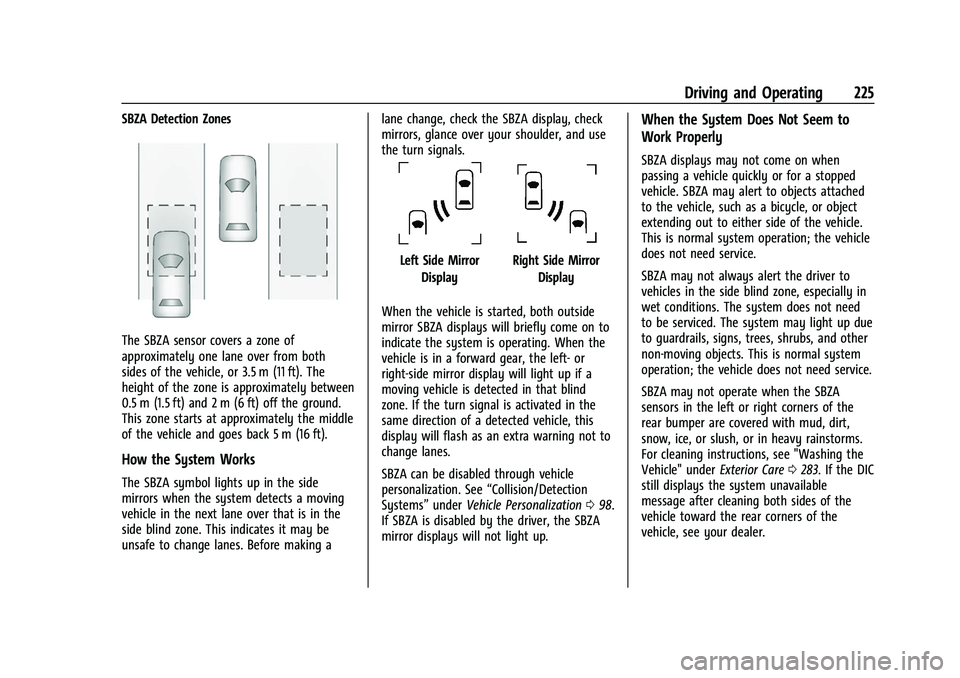
SBZA Detection Zones
The SBZA sensor covers a zone of
approximately one lane over from both
sides of the vehicle, or 3.5 m (11 ft). The
height of the zone is approximately between
0.5 m (1.5 ft) and 2 m (6 ft) off the ground.
This zone starts at approximately the middle
of the vehicle and goes back 5 m (16 ft).
How the System Works
The SBZA symbol lights up in the side
mirrors when the system detects a moving
vehicle in the next lane over that is in the
side blind zone. This indicates it may be
unsafe to change lanes. Before making alane change, check the SBZA display, check
mirrors, glance over your shoulder, and use
the turn signals.
Left Side Mirror
DisplayRight Side Mirror Display
When the vehicle is started, both outside
mirror SBZA displays will briefly come on to
indicate the system is operating. When the
vehicle is in a forward gear, the left- or
right-side mirror display will light up if a
moving vehicle is detected in that blind
zone. If the turn signal is activated in the
same direction of a detected vehicle, this
display will flash as an extra warning not to
change lanes.
SBZA can be disabled through vehicle
personalization. See “Collision/Detection
Systems” underVehicle Personalization 098.
If SBZA is disabled by the driver, the SBZA
mirror displays will not light up.
When the System Does Not Seem to
Work Properly
SBZA displays may not come on when
passing a vehicle quickly or for a stopped
vehicle. SBZA may alert to objects attached
to the vehicle, such as a bicycle, or object
extending out to either side of the vehicle.
This is normal system operation; the vehicle
does not need service.
SBZA may not always alert the driver to
vehicles in the side blind zone, especially in
wet conditions. The system does not need
to be serviced. The system may light up due
to guardrails, signs, trees, shrubs, and other
non-moving objects. This is normal system
operation; the vehicle does not need service.
SBZA may not operate when the SBZA
sensors in the left or right corners of the
rear bumper are covered with mud, dirt,
snow, ice, or slush, or in heavy rainstorms.
For cleaning instructions, see "Washing the
Vehicle" under Exterior Care0283. If the DIC
still displays the system unavailable
message after cleaning both sides of the
vehicle toward the rear corners of the
vehicle, see your dealer.
Page 228 of 338
Chevrolet Corvette Owner Manual (GMNA-Localizing-U.S./Canada/Mexico-
14622938) - 2021 - CRC - 2/10/21
Driving and Operating 227
Caution (Continued)
.Fuel containing metals such as
methylcyclopentadienyl manganese
tricarbonyl (MMT), which can damage
the emissions control system and
spark plugs.
.Fuel with a posted octane rating of
less than the recommended fuel. Using
this fuel will lower fuel economy and
performance, and may decrease the
life of the emissions catalyst.
Fuels in Foreign Countries
The U.S., Canada, and Mexico post fuel
octane ratings in anti-knock index (AKI). For
fuel not to use in a foreign country, see
Prohibited Fuels0226.
Fuel Additives
TOP TIER Detergent Gasoline is highly
recommended for use with your vehicle.
If your country does not have TOP TIER
Detergent Gasoline, add ACDelco Fuel
System Treatment Plus−Gasoline to the
vehicle’s gasoline fuel tank at every oil
change or 15 000 km (9,000 mi), whichever
occurs first. TOP TIER Detergent Gasoline and
ACDelco Fuel System Treatment Plus −Gasoline will help keep your vehicle’s
engine fuel deposit free and performing
optimally.
Filling the Tank
An arrow on the fuel gauge indicates which
side of the vehicle the fuel door is on. See
Fuel Gauge
083.
{Warning
Fuel vapors and fuel fires burn violently
and can cause injury or death.
Follow these guidelines to help avoid
injuries to you and others:
.Read and follow all the instructions on
the fuel pump island.
.Turn off the engine when refueling.
.Keep sparks, flames, and smoking
materials away from fuel.
.Do not leave the fuel pump
unattended.
.Avoid using electronic devices while
refueling.
.Do not re-enter the vehicle while
pumping fuel.
(Continued)
Warning (Continued)
.Keep children away from the fuel
pump and never let children
pump fuel.
.Before touching the fill nozzle, touch a
metallic object to discharge static
electricity from your body.
.Fuel can spray out if the fill nozzle is
inserted too quickly. This spray can
happen if the tank is nearly full, and is
more likely in hot weather. Insert the
fill nozzle slowly and wait for any hiss
noise to stop before beginning to
flow fuel.
The fuel door unlocks when the vehicle
doors are unlocked. See Remote Keyless
Entry (RKE) System Operation 07.
Page 229 of 338
Chevrolet Corvette Owner Manual (GMNA-Localizing-U.S./Canada/Mexico-
14622938) - 2021 - CRC - 2/10/21
228 Driving and Operating
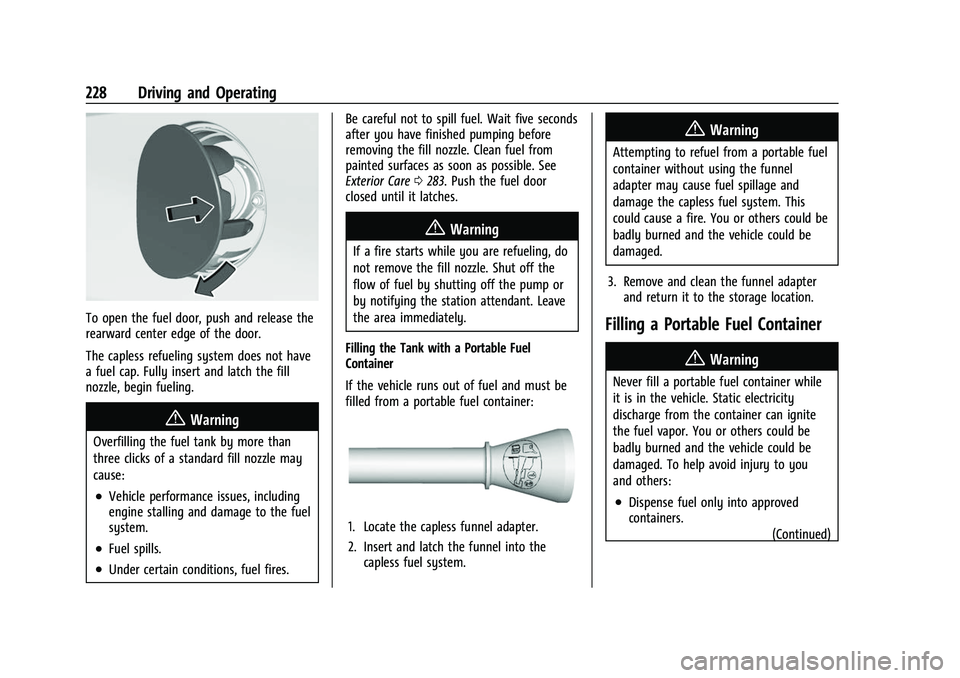
To open the fuel door, push and release the
rearward center edge of the door.
The capless refueling system does not have
a fuel cap. Fully insert and latch the fill
nozzle, begin fueling.
{Warning
Overfilling the fuel tank by more than
three clicks of a standard fill nozzle may
cause:
.Vehicle performance issues, including
engine stalling and damage to the fuel
system.
.Fuel spills.
.Under certain conditions, fuel fires.Be careful not to spill fuel. Wait five seconds
after you have finished pumping before
removing the fill nozzle. Clean fuel from
painted surfaces as soon as possible. See
Exterior Care
0283. Push the fuel door
closed until it latches.
{Warning
If a fire starts while you are refueling, do
not remove the fill nozzle. Shut off the
flow of fuel by shutting off the pump or
by notifying the station attendant. Leave
the area immediately.
Filling the Tank with a Portable Fuel
Container
If the vehicle runs out of fuel and must be
filled from a portable fuel container:
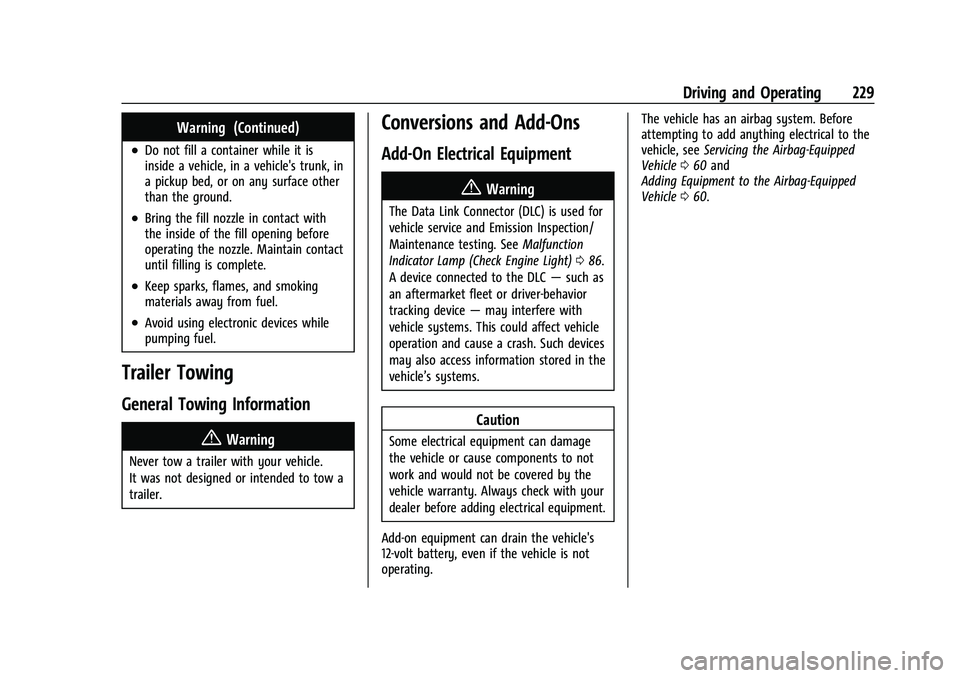
1. Locate the capless funnel adapter.
2. Insert and latch the funnel into the capless fuel system.
{Warning
Attempting to refuel from a portable fuel
container without using the funnel
adapter may cause fuel spillage and
damage the capless fuel system. This
could cause a fire. You or others could be
badly burned and the vehicle could be
damaged.
3. Remove and clean the funnel adapter and return it to the storage location.
Filling a Portable Fuel Container
{Warning
Never fill a portable fuel container while
it is in the vehicle. Static electricity
discharge from the container can ignite
the fuel vapor. You or others could be
badly burned and the vehicle could be
damaged. To help avoid injury to you
and others:
.Dispense fuel only into approved
containers.
(Continued)
Page 230 of 338
Chevrolet Corvette Owner Manual (GMNA-Localizing-U.S./Canada/Mexico-
14622938) - 2021 - CRC - 2/10/21
Driving and Operating 229
Warning (Continued)
.Do not fill a container while it is
inside a vehicle, in a vehicle's trunk, in
a pickup bed, or on any surface other
than the ground.
.Bring the fill nozzle in contact with
the inside of the fill opening before
operating the nozzle. Maintain contact
until filling is complete.
.Keep sparks, flames, and smoking
materials away from fuel.
.Avoid using electronic devices while
pumping fuel.
Trailer Towing
General Towing Information
{Warning
Never tow a trailer with your vehicle.
It was not designed or intended to tow a
trailer.
Conversions and Add-Ons
Add-On Electrical Equipment
{Warning
The Data Link Connector (DLC) is used for
vehicle service and Emission Inspection/
Maintenance testing. SeeMalfunction
Indicator Lamp (Check Engine Light) 086.
A device connected to the DLC —such as
an aftermarket fleet or driver-behavior
tracking device —may interfere with
vehicle systems. This could affect vehicle
operation and cause a crash. Such devices
may also access information stored in the
vehicle’s systems.
Caution
Some electrical equipment can damage
the vehicle or cause components to not
work and would not be covered by the
vehicle warranty. Always check with your
dealer before adding electrical equipment.
Add-on equipment can drain the vehicle's
12-volt battery, even if the vehicle is not
operating. The vehicle has an airbag system. Before
attempting to add anything electrical to the
vehicle, see
Servicing the Airbag-Equipped
Vehicle 060 and
Adding Equipment to the Airbag-Equipped
Vehicle 060.
Page 231 of 338

Chevrolet Corvette Owner Manual (GMNA-Localizing-U.S./Canada/Mexico-
14622938) - 2021 - CRC - 2/10/21
230 Vehicle Care
Vehicle Care
General Information
General Information . . . . . . . . . . . . . . . . . . . 231
California Proposition 65 Warning . . . . . 231
California Perchlorate MaterialsRequirements . . . . . . . . . . . . . . . . . . . . . . . . 231
Accessories and Modifications . . . . . . . . . 231
Lifting the Vehicle . . . . . . . . . . . . . . . . . . . . . 232
Vehicle Checks
Doing Your Own Service Work . . . . . . . . . 233
Underhood Compartment Overview . . . 234
Engine Compartment Overview . . . . . . . . 235
Engine Oil . . . . . . . . . . . . . . . . . . . . . . . . . . . . . 237
Engine Oil Life System . . . . . . . . . . . . . . . . . 241
Dual Clutch Transmission Fluid . . . . . . . . 241
Dual Clutch Transmission Fluid Life System . . . . . . . . . . . . . . . . . . . . . . . . . . . . . . 242
Engine Air Filter Life System . . . . . . . . . . 242
Engine Air Cleaner/Filter . . . . . . . . . . . . . . . 243
Cooling System . . . . . . . . . . . . . . . . . . . . . . . . 245
Engine Overheating . . . . . . . . . . . . . . . . . . . 248
Washer Fluid . . . . . . . . . . . . . . . . . . . . . . . . . . 249
Brakes . . . . . . . . . . . . . . . . . . . . . . . . . . . . . . . . 249
Brake Fluid . . . . . . . . . . . . . . . . . . . . . . . . . . . . . 251
Battery - North America . . . . . . . . . . . . . . . 251
Park Brake and P (Park) Mechanism Check . . . . . . . . . . . . . . . . . . . . . . . . . . . . . . . . 252
Wiper Blade Replacement . . . . . . . . . . . . . 253 Windshield Replacement . . . . . . . . . . . . . . . 253
Gas Strut(s) . . . . . . . . . . . . . . . . . . . . . . . . . . . 254
Headlamp Aiming
Front Headlamp Aiming . . . . . . . . . . . . . . . 254
Bulb Replacement
LED Lighting . . . . . . . . . . . . . . . . . . . . . . . . . . . 255
Electrical System
Electrical System Overload . . . . . . . . . . . . . 255
Fuses and Circuit Breakers . . . . . . . . . . . . . 255
Instrument Panel Fuse Block . . . . . . . . . . 256
Rear Compartment Fuse Block . . . . . . . . . 258
Wheels and Tires
Tires . . . . . . . . . . . . . . . . . . . . . . . . . . . . . . . . . . . 261
All-Season Tires . . . . . . . . . . . . . . . . . . . . . . . 262
Winter Tires . . . . . . . . . . . . . . . . . . . . . . . . . . . 262
Run-Flat Tires . . . . . . . . . . . . . . . . . . . . . . . . . . 262
Low-Profile Tires . . . . . . . . . . . . . . . . . . . . . . . 263
Summer Tires . . . . . . . . . . . . . . . . . . . . . . . . . 263
Tire Sidewall Labeling . . . . . . . . . . . . . . . . . 263
Tire Designations . . . . . . . . . . . . . . . . . . . . . . 264
Tire Terminology and Definitions . . . . . . 265
Tire Pressure . . . . . . . . . . . . . . . . . . . . . . . . . . 267
Tire Pressure for High-Speed
Operation . . . . . . . . . . . . . . . . . . . . . . . . . . . 268
Tire Pressure Monitor System . . . . . . . . . 269
Tire Pressure Monitor Operation . . . . . . 270
Tire Inspection . . . . . . . . . . . . . . . . . . . . . . . . . 272
Tire Rotation . . . . . . . . . . . . . . . . . . . . . . . . . . 272 When It Is Time for New Tires . . . . . . . . 273
Buying New Tires . . . . . . . . . . . . . . . . . . . . . 274
Different Size Tires and Wheels . . . . . . . . 275
Uniform Tire Quality Grading . . . . . . . . . . 275
Wheel Alignment and Tire Balance . . . . 277
Wheel Replacement . . . . . . . . . . . . . . . . . . . 277
Tire Chains . . . . . . . . . . . . . . . . . . . . . . . . . . . . 278
If a Tire Goes Flat . . . . . . . . . . . . . . . . . . . . . 278
Jump Starting
Jump Starting - North America . . . . . . . . 278
Towing the Vehicle
Towing the Vehicle . . . . . . . . . . . . . . . . . . . . 281
Recreational Vehicle Towing . . . . . . . . . . . 283
Appearance Care
Exterior Care . . . . . . . . . . . . . . . . . . . . . . . . . . 283
Interior Care . . . . . . . . . . . . . . . . . . . . . . . . . . 288
Floor Mats . . . . . . . . . . . . . . . . . . . . . . . . . . . . 290
Page 232 of 338
Chevrolet Corvette Owner Manual (GMNA-Localizing-U.S./Canada/Mexico-
14622938) - 2021 - CRC - 2/10/21
Vehicle Care 231
General Information
For service and parts needs, visit your
dealer. You will receive genuine GM parts
and GM-trained and supported service
people.
Genuine GM parts have one of these marks:
California Proposition 65 Warning
{Warning
Most motor vehicles, including this one,
as well as many of its service parts and
fluids, contain and/or emit chemicals
known to the State of California to cause(Continued)
Warning (Continued)
cancer and birth defects or other
reproductive harm. Engine exhaust, many
parts and systems, many fluids, and
some component wear by-products
contain and/or emit these chemicals. For
more information go to
www.P65Warnings.ca.gov/
passenger-vehicle.
See Battery - North America 0251 and
Jump Starting - North America 0278 and
the back cover.
California Perchlorate Materials
Requirements
Certain types of automotive applications,
such as airbag initiators, seat belt
pretensioners, and lithium batteries
contained in electronic keys, may contain
perchlorate materials. Perchlorate Material –
special handling may apply. See
www.dtsc.ca.gov/hazardouswaste/
perchlorate.
Accessories and Modifications
Adding non-dealer accessories or making
modifications to the vehicle can affect
vehicle performance and safety, including
such things as airbags, braking, stability,
ride and handling, emissions systems,
aerodynamics, durability, and electronic
systems like antilock brakes, traction control,
and stability control. These accessories or
modifications could even cause malfunction
or damage not covered by the vehicle
warranty.
Damage to suspension components caused
by modifying vehicle height outside of
factory settings will not be covered by the
vehicle warranty.
Damage to vehicle components resulting
from modifications or the installation or use
of non-GM certified parts, including control
module or software modifications, is not
covered under the terms of the vehicle
warranty and may affect remaining
warranty coverage for affected parts.
GM Accessories are designed to complement
and function with other systems on the
vehicle. See your dealer to accessorize the
vehicle using genuine GM Accessories
installed by a dealer technician.
Page 233 of 338
Chevrolet Corvette Owner Manual (GMNA-Localizing-U.S./Canada/Mexico-
14622938) - 2021 - CRC - 2/10/21
232 Vehicle Care
Also, seeAdding Equipment to the
Airbag-Equipped Vehicle 060.
Lifting the Vehicle
{Warning
Lifting a vehicle can cause an injury. The
vehicle can slip off the jack and roll over
you or other people. You and they could
be badly injured. Find a level place to lift
your vehicle. To help prevent the vehicle
from moving:
1. Set the parking brake firmly.
2. Put the transmission in P (Park).
3. Turn off the engine.
To be even more certain the vehicle will
not move, put blocks in front of and
behind the wheels.
{Warning
Getting under a vehicle when it is lifted
on a jack is dangerous. If the vehicle slips
off the jack, you could be badly injured
or killed. Never get under a vehicle when
it is supported only by a jack.
{Warning
Raising the vehicle with the jack
improperly positioned can damage the
vehicle or the vehicle may fall and cause
injury to you or others.
If a jack is used to lift the vehicle, follow the
instructions that came with the jack, and be
sure to use the correct lifting points to
avoid damaging the vehicle.
Caution
Lifting the vehicle improperly can damage
it and result in costly repairs not covered
by the vehicle warranty. To lift the
vehicle properly and prevent vehicle
damage:
.Be sure to place a block or pad
between the jack and the vehicle.
.Lift only in the areas shown in the
following illustrations.
For additional information, see your
dealer and the service manual.
Caution
The front jack pads must not contact the
rocker panels, the front fenders, or the
floor pan. If they do, damage may occur.
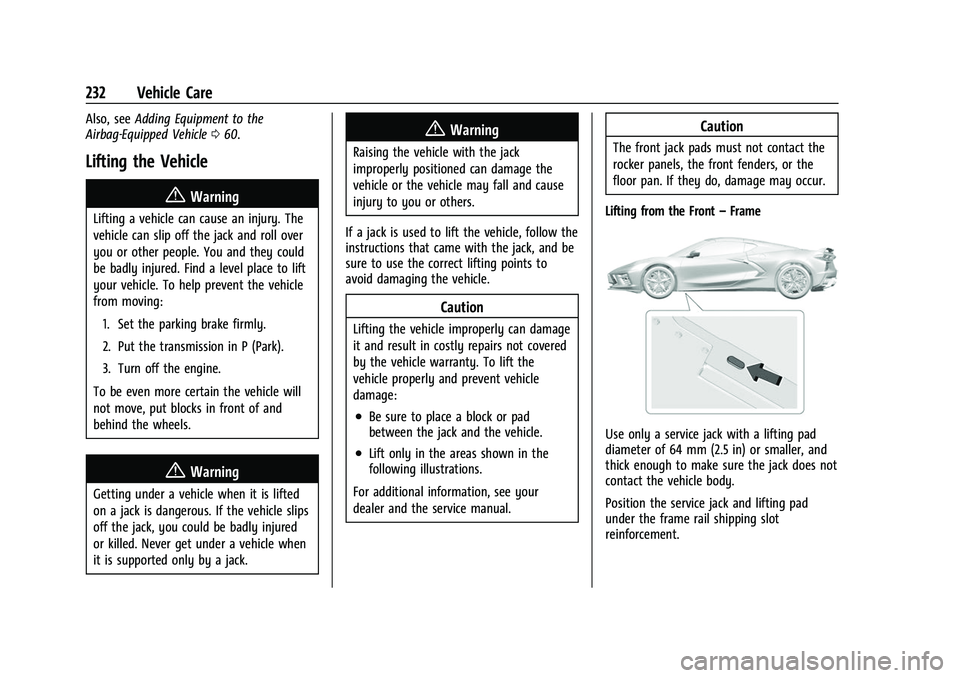
Lifting from the Front –Frame
Use only a service jack with a lifting pad
diameter of 64 mm (2.5 in) or smaller, and
thick enough to make sure the jack does not
contact the vehicle body.
Position the service jack and lifting pad
under the frame rail shipping slot
reinforcement.
Page 234 of 338
Chevrolet Corvette Owner Manual (GMNA-Localizing-U.S./Canada/Mexico-
14622938) - 2021 - CRC - 2/10/21
Vehicle Care 233
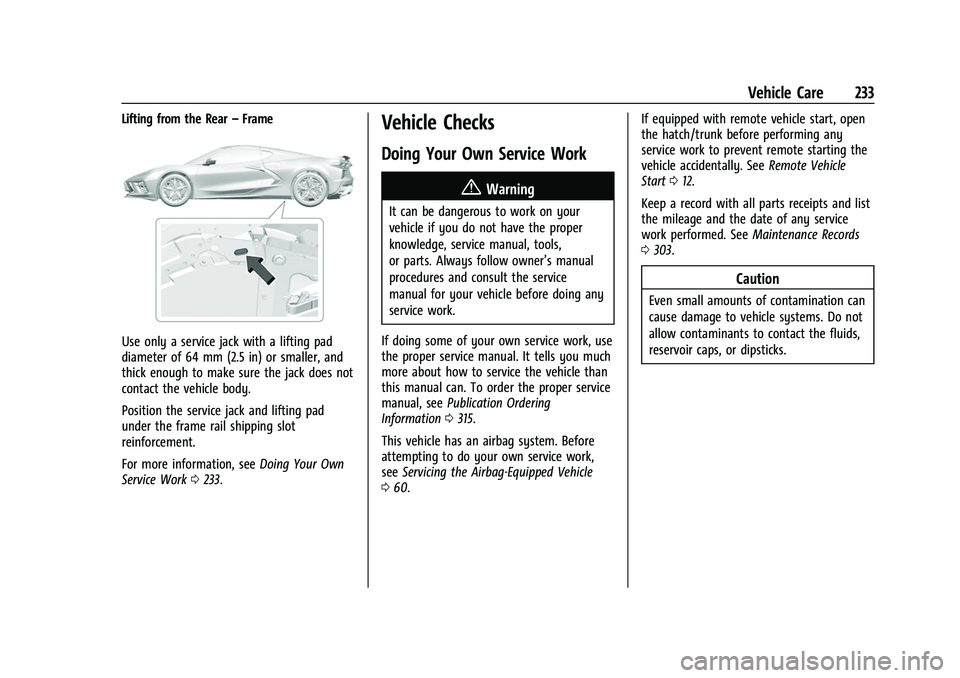
Lifting from the Rear–Frame
Use only a service jack with a lifting pad
diameter of 64 mm (2.5 in) or smaller, and
thick enough to make sure the jack does not
contact the vehicle body.
Position the service jack and lifting pad
under the frame rail shipping slot
reinforcement.
For more information, see Doing Your Own
Service Work 0233.
Vehicle Checks
Doing Your Own Service Work
{Warning
It can be dangerous to work on your
vehicle if you do not have the proper
knowledge, service manual, tools,
or parts. Always follow owner’s manual
procedures and consult the service
manual for your vehicle before doing any
service work.
If doing some of your own service work, use
the proper service manual. It tells you much
more about how to service the vehicle than
this manual can. To order the proper service
manual, see Publication Ordering
Information 0315.
This vehicle has an airbag system. Before
attempting to do your own service work,
see Servicing the Airbag-Equipped Vehicle
0 60. If equipped with remote vehicle start, open
the hatch/trunk before performing any
service work to prevent remote starting the
vehicle accidentally. See
Remote Vehicle
Start 012.
Keep a record with all parts receipts and list
the mileage and the date of any service
work performed. See Maintenance Records
0 303.
Caution
Even small amounts of contamination can
cause damage to vehicle systems. Do not
allow contaminants to contact the fluids,
reservoir caps, or dipsticks.