cruise control CHEVROLET CORVETTE 2024 User Guide
[x] Cancel search | Manufacturer: CHEVROLET, Model Year: 2024, Model line: CORVETTE, Model: CHEVROLET CORVETTE 2024Pages: 362, PDF Size: 6.62 MB
Page 178 of 362
Chevrolet Corvette Owner Manual (GMNA-Localizing-U.S./Canada/Mexico-
17272984) - 2024 - CRC - 2/20/23
Driving and Operating 177
Starting and Operating
New Vehicle Break-In
Follow these recommended guidelines
during the first 2 414 km (1,500 mi) of driving
this vehicle. Parts have a break-in period and
performance will be better in the long run.
During the first 800 km (500 mi), engine
torque will be limited in low gears.
To remove the engine torque limitation after
the initial 500-mile break-in period, turn the
vehicle off, and open and close the driver
door. Ensure all doors are closed for
15 minutes.
For the first 322 km (200 mi):
.To break in new tires, drive at moderate
speeds and avoid hard cornering.
.New brake linings also need a break-in
period. Avoid making hard stops. This is
recommended every time brake linings
are replaced.
For the first 800 km (500 mi):
.Avoid full throttle starts and abrupt stops.
.Do not exceed 4000 rpm.
.Avoid driving at any one constant speed,
fast or slow, including the use of cruise
control.
.Avoid downshifting to brake or slow the
vehicle when the engine speed will
exceed 4000 rpm.
.Do not let the engine labor. Never lug the
engine. This rule applies at all times, not
just during the break-in period.
For the first 2 414 km (1,500 mi):
.Do not participate in track events, sport
driving schools, or similar activities.
.Check engine oil with every refueling and
add if necessary. Oil and fuel
consumption may be higher than normal.
Front Air Dam (and Splitter)
If equipped, the front air dam and splitter
have minimal ground clearance.
Under normal operation, the components
will occasionally contact some road surfaces
(speed bumps, driveway ramps, etc.). This
can be heard inside the vehicle as a scraping
noise. This is normal and does not indicate a
problem.
Use care when approaching bumps or
objects on road surfaces and avoid them
when possible.
If equipped, the Front Lift System may be
used to increase front air dam or splitter
clearance. See Front Lift System 0205.
Composite Materials
This vehicle may be equipped with parts
containing carbon fiber, sheet-molding
compound, or other composite materials.
Dealer-installed accessories may also contain
composite materials. These parts and
accessories may include the splitter or rocker
extensions.
{Warning
Exposed edges of parts containing carbon
fiber and other composite materials can
be sharp. Contact with these parts could
result in injury. Use caution to avoid
contacting these parts, including when
washing the vehicle. If the parts are
damaged, replace the parts promptly
with replacements from your dealer.
{Warning
Rocker extensions may break under
pressure, resulting in property damage or
injury. Do not stand on the rocker
extension or use it as a step.
Page 188 of 362
Chevrolet Corvette Owner Manual (GMNA-Localizing-U.S./Canada/Mexico-
17272984) - 2024 - CRC - 2/20/23
Driving and Operating 187
Manual Mode
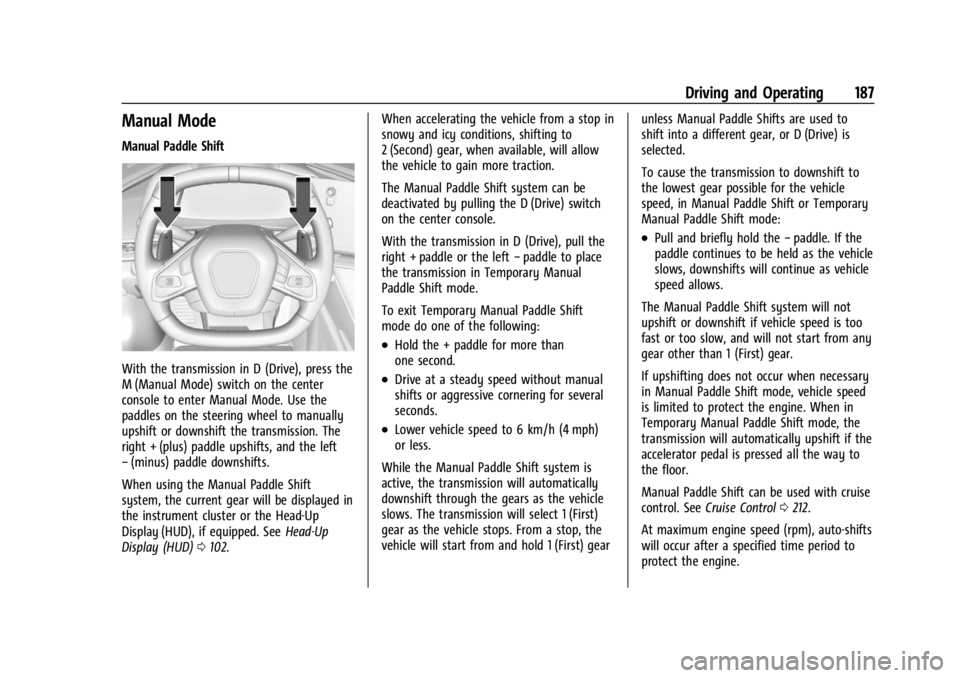
Manual Paddle Shift
With the transmission in D (Drive), press the
M (Manual Mode) switch on the center
console to enter Manual Mode. Use the
paddles on the steering wheel to manually
upshift or downshift the transmission. The
right + (plus) paddle upshifts, and the left
−(minus) paddle downshifts.
When using the Manual Paddle Shift
system, the current gear will be displayed in
the instrument cluster or the Head-Up
Display (HUD), if equipped. See Head-Up
Display (HUD) 0102. When accelerating the vehicle from a stop in
snowy and icy conditions, shifting to
2 (Second) gear, when available, will allow
the vehicle to gain more traction.
The Manual Paddle Shift system can be
deactivated by pulling the D (Drive) switch
on the center console.
With the transmission in D (Drive), pull the
right + paddle or the left
−paddle to place
the transmission in Temporary Manual
Paddle Shift mode.
To exit Temporary Manual Paddle Shift
mode do one of the following:
.Hold the + paddle for more than
one second.
.Drive at a steady speed without manual
shifts or aggressive cornering for several
seconds.
.Lower vehicle speed to 6 km/h (4 mph)
or less.
While the Manual Paddle Shift system is
active, the transmission will automatically
downshift through the gears as the vehicle
slows. The transmission will select 1 (First)
gear as the vehicle stops. From a stop, the
vehicle will start from and hold 1 (First) gear unless Manual Paddle Shifts are used to
shift into a different gear, or D (Drive) is
selected.
To cause the transmission to downshift to
the lowest gear possible for the vehicle
speed, in Manual Paddle Shift or Temporary
Manual Paddle Shift mode:
.Pull and briefly hold the
−paddle. If the
paddle continues to be held as the vehicle
slows, downshifts will continue as vehicle
speed allows.
The Manual Paddle Shift system will not
upshift or downshift if vehicle speed is too
fast or too slow, and will not start from any
gear other than 1 (First) gear.
If upshifting does not occur when necessary
in Manual Paddle Shift mode, vehicle speed
is limited to protect the engine. When in
Temporary Manual Paddle Shift mode, the
transmission will automatically upshift if the
accelerator pedal is pressed all the way to
the floor.
Manual Paddle Shift can be used with cruise
control. See Cruise Control 0212.
At maximum engine speed (rpm), auto-shifts
will occur after a specified time period to
protect the engine.
Page 196 of 362
Chevrolet Corvette Owner Manual (GMNA-Localizing-U.S./Canada/Mexico-
17272984) - 2024 - CRC - 2/20/23
Driving and Operating 195
If cruise control is being used when TCS
begins to limit wheel spin, the cruise control
will automatically disengage. Cruise control
may be reengaged when road conditions
allow. SeeCruise Control 0212.
If the driver disables TCS, cruise control will
disengage. Cruise control will also be
disabled if Performance Traction
Management (PTM) is selected, or if
StabiliTrak is turned off.
Both systems come on automatically when
the vehicle is started and begins to move.
The systems may be heard or felt while
they are operating or while performing
diagnostic checks. This is normal and does
not mean there is a problem with the
vehicle.
It is recommended to leave both systems on
for normal driving conditions, but it may be
necessary to turn TCS off if the vehicle gets
stuck in sand, mud, ice, or snow. See If the
Vehicle Is Stuck 0173 and “Turning the
Systems Off and On” later in this section.
The indicator light for both systems is in the
instrument cluster. This light will:
.Flash when TCS is limiting wheel spin
.Flash when StabiliTrak/ESC is activated
.Flash when ABS is active
.Turn on and stay on when either system
is not working
If either system fails to turn on or to
activate, a message displays in the Driver
Information Center (DIC), and
=comes on
and stays on to indicate that the system is
inactive and is not assisting the driver in
maintaining control. The vehicle is safe to
drive, but driving should be adjusted
accordingly.
If
=comes on and stays on:
1. Stop the vehicle.
2. Turn the engine off and wait 15 seconds.
3. Start the engine. Drive the vehicle. If
=comes on and
stays on, the vehicle may need more time
to diagnose the problem. If the condition
persists, see your dealer.
Turning the Systems Off and On
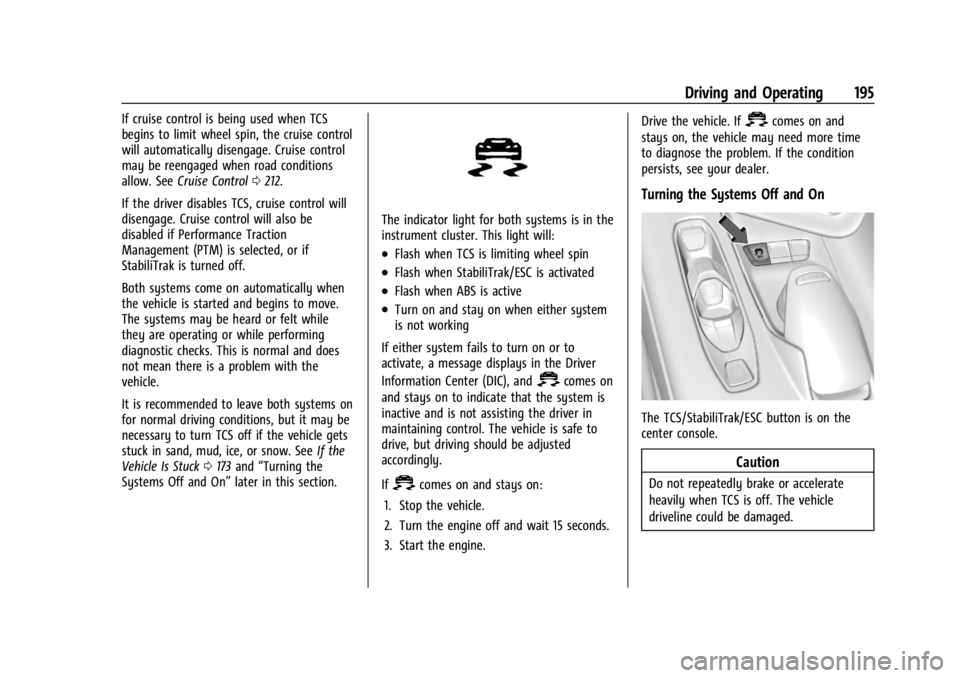
The TCS/StabiliTrak/ESC button is on the
center console.
Caution
Do not repeatedly brake or accelerate
heavily when TCS is off. The vehicle
driveline could be damaged.
Page 213 of 362
Chevrolet Corvette Owner Manual (GMNA-Localizing-U.S./Canada/Mexico-
17272984) - 2024 - CRC - 2/20/23
212 Driving and Operating
Cruise Control
Cruise control allows the vehicle to maintain
a constant speed without keeping your foot
on the accelerator pedal at speeds of about
40 km/h (25 mph) or above. Cruise control
does not work at speeds below about
40 km/h (25 mph).
{Warning
Cruise control can be dangerous where
you cannot drive safely at a steady
speed. Do not use cruise control on
winding roads or in heavy traffic.
Cruise control can be dangerous on
slippery roads. On such roads, fast
changes in tire traction can cause
excessive wheel slip, and you could lose
control. Do not use cruise control on
slippery roads.
Cruise control will disengage if:
.The Traction Control System (TCS) or
StabiliTrak/Electronic Stability Control
(ESC) system activates to limit wheel spin.
See Traction Control/Electronic Stability
Control 0194.
.TCS or StabiliTrak/ESC is turned off.
.The brakes are applied.
When road conditions allow you to safely
use it again, cruise control can be turned
back on.
For E-Ray models, cruise control is not
available in Shuttle Mode or Stealth Mode.
See Driver Mode Control 0196.
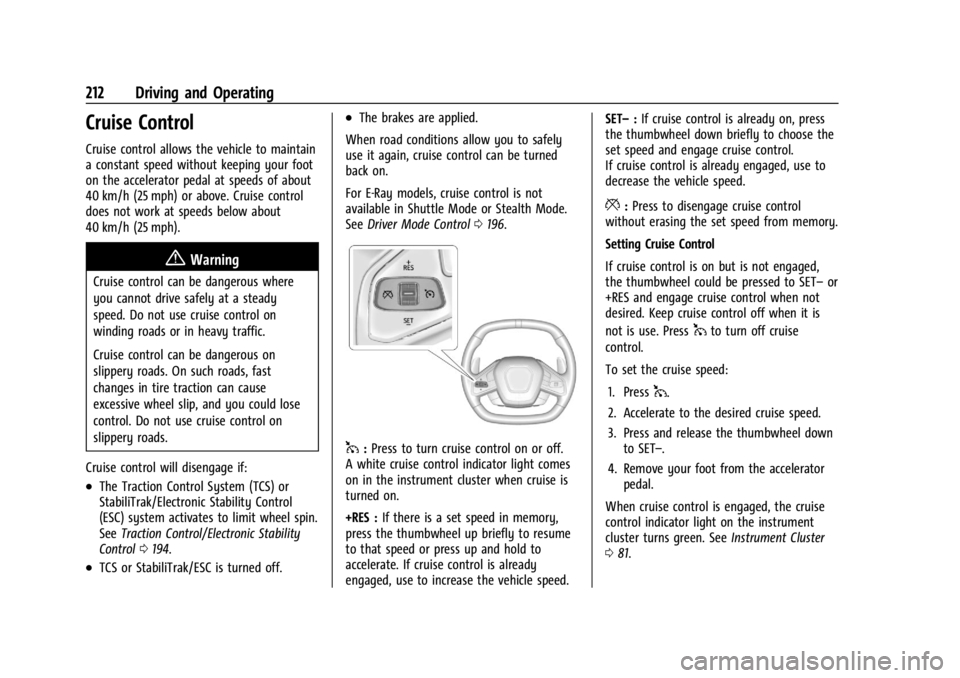
1:Press to turn cruise control on or off.
A white cruise control indicator light comes
on in the instrument cluster when cruise is
turned on.
+RES : If there is a set speed in memory,
press the thumbwheel up briefly to resume
to that speed or press up and hold to
accelerate. If cruise control is already
engaged, use to increase the vehicle speed. SET–
:If cruise control is already on, press
the thumbwheel down briefly to choose the
set speed and engage cruise control.
If cruise control is already engaged, use to
decrease the vehicle speed.
*: Press to disengage cruise control
without erasing the set speed from memory.
Setting Cruise Control
If cruise control is on but is not engaged,
the thumbwheel could be pressed to SET– or
+RES and engage cruise control when not
desired. Keep cruise control off when it is
not is use. Press
1to turn off cruise
control.
To set the cruise speed:
1. Press
1.
2. Accelerate to the desired cruise speed.
3. Press and release the thumbwheel down to SET–.
4. Remove your foot from the accelerator pedal.
When cruise control is engaged, the cruise
control indicator light on the instrument
cluster turns green. See Instrument Cluster
0 81.
Page 214 of 362
Chevrolet Corvette Owner Manual (GMNA-Localizing-U.S./Canada/Mexico-
17272984) - 2024 - CRC - 2/20/23
Driving and Operating 213
Resuming a Set Speed
If cruise control is engaged at a set speed
and then the brakes are applied or
*is
pressed, cruise control is disengaged without
erasing the set speed from memory.
Once the vehicle reaches a speed of
40 km/h (25 mph) or more, briefly press the
thumbwheel up to +RES and release it to
engage cruise control at the previous set
speed.
Increasing Speed While Using Cruise Control
If cruise control is already engaged:
.Accelerate to the desired cruise speed
using the accelerator pedal. When the
desired higher cruise speed is reached,
briefly press the thumbwheel down to
SET– and release it, and then remove
your foot from the accelerator pedal. The
vehicle will now cruise at the higher set
speed.
.Press and hold the thumbwheel up to
+RES until the desired speed is reached,
then release it.
.To increase the vehicle speed in small
increments, briefly press the thumbwheel
up to +RES and release it. For each press,
the vehicle speed increases by about
1 km/h (1 mph). The speedometer reading can be displayed
in either English or metric units. See
Settings
0 142. The increment value used depends on
the units displayed.
Reducing Speed While Using Cruise Control
If cruise control is already engaged:
.Press and hold the thumbwheel down to
SET– until the desired lower speed is
reached, then release it.
.To decrease the vehicle speed in small
increments, briefly press the thumbwheel
down to SET– and release it. For each
press, the vehicle speed decreases by
about 1 km/h (1 mph).
Passing Another Vehicle While Using Cruise
Control
To pass another vehicle while cruise control
is engaged, use the accelerator pedal to
increase the vehicle speed. When you
remove your foot from the accelerator
pedal, the vehicle will slow down to the
previously set speed. While pressing the
accelerator pedal or shortly following the
release to override cruise control, briefly
pressing and releasing the thumbwheel
down to SET– will result in the cruise speed
being set to the current vehicle speed. Using Cruise Control on Hills
How well cruise control works on a hill
depends on the vehicle speed, load, and the
steepness of the hill. When going up a steep
hill, you may need to apply the accelerator
pedal to maintain the cruise speed. When
going downhill, you may need to brake or
shift to a lower gear to keep the vehicle
speed down. If the brake pedal is applied,
cruise control will disengage.
Cruise Control in Manual Paddle Shift Gear
Selection
When the vehicle is in M (Manual Mode)
and the manual paddle shift controls are not
being used, cruise control operates in the
same manner as D (Drive).
When the vehicle is in M (Manual Mode)
and the manual paddle shift controls are
being used, cruise control operates as
follows:
.If cruise control is engaged and a gear is
selected with the manual paddle shift
controls, the vehicle speed is maintained
in the driver selected gear and will not
automatically upshift or downshift the
transmission while the driver gear
selection is active.
Page 215 of 362
Chevrolet Corvette Owner Manual (GMNA-Localizing-U.S./Canada/Mexico-
17272984) - 2024 - CRC - 2/20/23
214 Driving and Operating
.If driving in hilly terrain, cruise control
may not be able to maintain vehicle
speed if an upshift or downshift is not
selected by the driver. While driving on
hilly terrain and cruise control is engaged
with a manual paddle shift gear selection,
the driver must select the proper gear for
the terrain or shift into D (Drive) for fully
automatic transmission operation. See
Manual Mode0187.
Ending Cruise Control
There are four ways to end cruise control:
.Lightly apply the brake pedal.
.Press*.
.Press1.
.Shift the transmission to N (Neutral).
Erasing Speed Memory
The cruise control set speed is erased from
memory if
1is pressed or when the vehicle
is turned off.
Advanced Driver Assistance
Systems
This vehicle may have features that work
together to help avoid crashes or reduce
crash damage while driving, backing, and
parking. Read this entire section before
using these systems.
{Warning
Do not rely on the Driver Assistance
Systems. These systems do not replace
the need for paying attention and driving
safely. You may not hear or see alerts or
warnings provided by these systems.
Failure to use proper care when driving
may result in injury, death, or vehicle
damage. See Defensive Driving 0157.
Under many conditions, these systems
will not:
.Detect children, pedestrians, bicyclists,
or animals.
.Detect vehicles or objects outside the
area monitored by the system.
.Work at all driving speeds. (Continued)
Warning (Continued)
.Warn you or provide you with enough
time to avoid a crash.
.Work under poor visibility or bad
weather conditions.
.Work if the detection sensor is not
cleaned or is covered by ice, snow,
mud, or dirt.
.Work if the detection sensor is
covered up, such as with a sticker,
magnet, or metal plate.
.Work if the area surrounding the
detection sensor is damaged or not
properly repaired.
Complete attention is always required
while driving, and you should be ready to
take action and apply the brakes and/or
steer the vehicle to avoid crashes.
Audible Alert
Some driver assistance features alert the
driver of obstacles by beeping. To view
available settings for this feature, touch the
Settings icon on the infotainment home
page. Select “Vehicle”to display the list of
available options and select “Comfort and
Convenience”.
Page 224 of 362
Chevrolet Corvette Owner Manual (GMNA-Localizing-U.S./Canada/Mexico-
17272984) - 2024 - CRC - 2/20/23
Driving and Operating 223
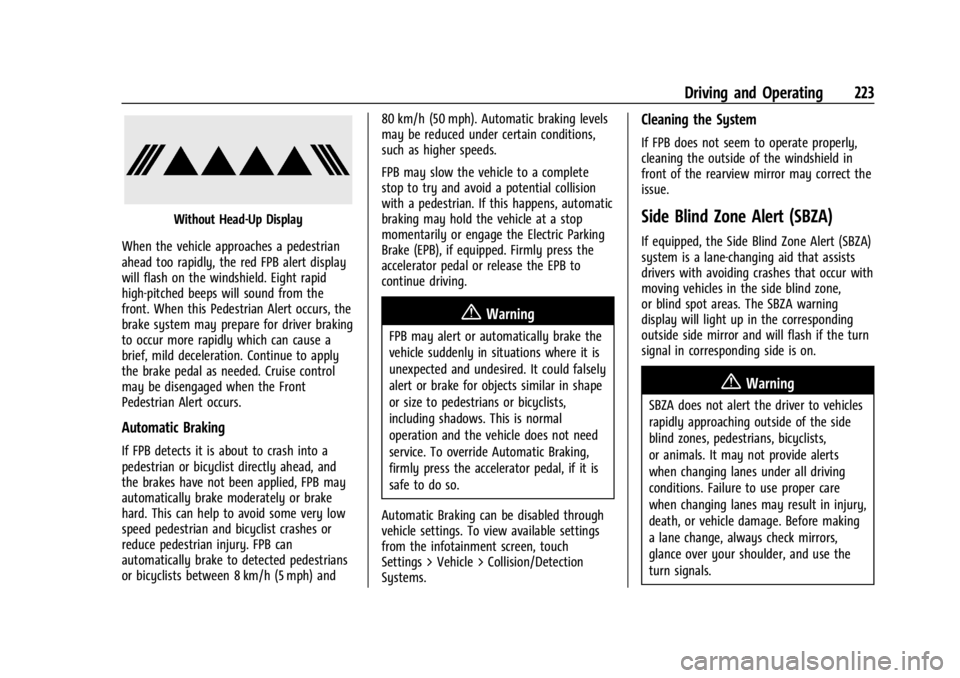
Without Head-Up Display
When the vehicle approaches a pedestrian
ahead too rapidly, the red FPB alert display
will flash on the windshield. Eight rapid
high-pitched beeps will sound from the
front. When this Pedestrian Alert occurs, the
brake system may prepare for driver braking
to occur more rapidly which can cause a
brief, mild deceleration. Continue to apply
the brake pedal as needed. Cruise control
may be disengaged when the Front
Pedestrian Alert occurs.
Automatic Braking
If FPB detects it is about to crash into a
pedestrian or bicyclist directly ahead, and
the brakes have not been applied, FPB may
automatically brake moderately or brake
hard. This can help to avoid some very low
speed pedestrian and bicyclist crashes or
reduce pedestrian injury. FPB can
automatically brake to detected pedestrians
or bicyclists between 8 km/h (5 mph) and 80 km/h (50 mph). Automatic braking levels
may be reduced under certain conditions,
such as higher speeds.
FPB may slow the vehicle to a complete
stop to try and avoid a potential collision
with a pedestrian. If this happens, automatic
braking may hold the vehicle at a stop
momentarily or engage the Electric Parking
Brake (EPB), if equipped. Firmly press the
accelerator pedal or release the EPB to
continue driving.
{Warning
FPB may alert or automatically brake the
vehicle suddenly in situations where it is
unexpected and undesired. It could falsely
alert or brake for objects similar in shape
or size to pedestrians or bicyclists,
including shadows. This is normal
operation and the vehicle does not need
service. To override Automatic Braking,
firmly press the accelerator pedal, if it is
safe to do so.
Automatic Braking can be disabled through
vehicle settings. To view available settings
from the infotainment screen, touch
Settings > Vehicle > Collision/Detection
Systems.
Cleaning the System
If FPB does not seem to operate properly,
cleaning the outside of the windshield in
front of the rearview mirror may correct the
issue.
Side Blind Zone Alert (SBZA)
If equipped, the Side Blind Zone Alert (SBZA)
system is a lane-changing aid that assists
drivers with avoiding crashes that occur with
moving vehicles in the side blind zone,
or blind spot areas. The SBZA warning
display will light up in the corresponding
outside side mirror and will flash if the turn
signal in corresponding side is on.
{Warning
SBZA does not alert the driver to vehicles
rapidly approaching outside of the side
blind zones, pedestrians, bicyclists,
or animals. It may not provide alerts
when changing lanes under all driving
conditions. Failure to use proper care
when changing lanes may result in injury,
death, or vehicle damage. Before making
a lane change, always check mirrors,
glance over your shoulder, and use the
turn signals.
Page 352 of 362

Chevrolet Corvette Owner Manual (GMNA-Localizing-U.S./Canada/Mexico-
17272984) - 2024 - CRC - 2/20/23
Index 351
Child RestraintsInfants and Young Children . . . . . . . . . . . . . 63
Lower Anchors and Tethers for
Children . . . . . . . . . . . . . . . . . . . . . . . . . . . . . . . 67
Older Children . . . . . . . . . . . . . . . . . . . . . . . . . . 62
Securing . . . . . . . . . . . . . . . . . . . . . . . . . . . . . . . . 67
Systems . . . . . . . . . . . . . . . . . . . . . . . . . . . . . . . . 65
Circuit Breakers . . . . . . . . . . . . . . . . . . . . . . . . . . 273
Cleaning Exterior Care . . . . . . . . . . . . . . . . . . . . . . . . . . . 306
Interior Care . . . . . . . . . . . . . . . . . . . . . . . . . . . . 311
Climate Control Systems Dual Automatic . . . . . . . . . . . . . . . . . . . . . . . . 150
Clock . . . . . . . . . . . . . . . . . . . . . . . . . . . . . . . . . . . . . 76
Cluster, Instrument . . . . . . . . . . . . . . . . . . . . . . . .81
Collision Alert Forward (FCA) System . . . . . . . . . . . . . . . . . 218
Collision Damage Repair . . . . . . . . . . . . . . . . . 335
Compartment Underhood . . . . . . . . . . . . . . . . . . . . . . . . . . . . 235
Compartments
Storage . . . . . . . . . . . . . . . . . . . . . . . . . . . . . . . . . . 71
Compass . . . . . . . . . . . . . . . . . . . . . . . . . . . . . . . . . . 76
Competition Oriented Tires . . . . . . . . . . . . . . .281
Composite Materials . . . . . . . . . . . . . . . . . . . . . . 177
Connected Services Connections . . . . . . . . . . . . . . . . . . . . . . . . . . . 346
Diagnostics . . . . . . . . . . . . . . . . . . . . . . . . . . . . 348 Connected Services (cont'd)
Navigation . . . . . . . . . . . . . . . . . . . . . . . . . . . . . 346
Connections Connected Services . . . . . . . . . . . . . . . . . . . . 346
Control Hill Rollback . . . . . . . . . . . . . . . . . . . . . . . . . . . 196
Traction and Electronic Stability . . . . . . . 194
Control of a Vehicle . . . . . . . . . . . . . . . . . . . . . . 157
Controls Steering Wheel . . . . . . . . . . . . . . . . . . . . . . . . . 119
Convenience Net . . . . . . . . . . . . . . . . . . . . . . . . . . .73
Convertible Top . . . . . . . . . . . . . . . . . . . . . . . . . . . 34
Convex Mirrors . . . . . . . . . . . . . . . . . . . . . . . . . . . 24
Coolant Engine Temperature Gauge . . . . . . . . . . . . . 87
Engine Temperature Warning Light . . . . . 96
Cooling . . . . . . . . . . . . . . . . . . . . . . . . . . . . . . . . . . 150
Cooling System . . . . . . . . . . . . . . . . . . . . . 257, 260
Courtesy Lamps . . . . . . . . . . . . . . . . . . . . . . . . . . . 113
Courtesy Transportation Program . . . . . . . . 334
Cruise Control . . . . . . . . . . . . . . . . . . . . . . . . . . . . 212 Light . . . . . . . . . . . . . . . . . . . . . . . . . . . . . . . . . . . . 99
Cupholders . . . . . . . . . . . . . . . . . . . . . . . . . . . . . . . . 71
Customer Assistance Offices . . . . . . . . . . . . . . . . . . . . . . . . . . . . . . . . . 331
Text Telephone (TTY) Users . . . . . . . . . . . . 331
Customer Information Publications Ordering Information . . . . . 337 Customer Satisfaction Procedure . . . . . . . . . 329
Cybersecurity . . . . . . . . . . . . . . . . . . . . . . . . . . . . 339
D
Damage Repair, Collision . . . . . . . . . . . . . . . . . 335
Danger, Warning, and Caution . . . . . . . . . . . . . .2
Dashboard . . . . . . . . . . . . . . . . . . . . . . . . . . . . . . . . . 4
Data Collection
Infotainment System . . . . . . . . . . . . . . . . . . 340
OnStar . . . . . . . . . . . . . . . . . . . . . . . . . . . . . . . . . 340
Data Recorder Performance . . . . . . . . . . . . . . . . . . . . . . . . . . . 130
Data Recorders, Event . . . . . . . . . . . . . . . . . . . 339
Daytime Running Lamps (DRL) . . . . . . . . . . . . 111
Defensive Driving . . . . . . . . . . . . . . . . . . . . . . . . . 157
Delayed Locking . . . . . . . . . . . . . . . . . . . . . . . . . . .16
Destination . . . . . . . . . . . . . . . . . . . . . . . . . . . . . . . 127
Diagnostics Connected Services . . . . . . . . . . . . . . . . . . . . 348
Differential, Limited-Slip . . . . . . . . . . . . . . . . . . 211
Disabled Vehicle Transporting . . . . . . . . . . . . . . . . . . . . . . . . . . . 303
Distracted Driving . . . . . . . . . . . . . . . . . . . . . . . . . . . . . . . . 156
Distracted Driving . . . . . . . . . . . . . . . . . . . . . . . . 156
Diversity Antenna System . . . . . . . . . . . . . . . .124
Door Ajar Light . . . . . . . . . . . . . . . . . . . . . . . . . . . . . . . 99
Page 356 of 362

Chevrolet Corvette Owner Manual (GMNA-Localizing-U.S./Canada/Mexico-
17272984) - 2024 - CRC - 2/20/23
Index 355
Lights (cont'd)Antilock Brake System (ABS)
Warning . . . . . . . . . . . . . . . . . . . . . . . . . . . . . . 93
Automatic Emergency Braking (AEB) Disabled . . . . . . . . . . . . . . . . . . . . . . . . . . . . . . 94
Brake System Warning . . . . . . . . . . . . . . . . . 92
Charging System . . . . . . . . . . . . . . . . . . . . . . . 90
Check Engine (Malfunction Indicator) . . . . . . . . . . . . . . . . . . . . . . . . . . . . . 90
Cruise Control Light . . . . . . . . . . . . . . . . . . . . . 99
Door Ajar . . . . . . . . . . . . . . . . . . . . . . . . . . . . . . . 99
Driver Mode Control . . . . . . . . . . . . . . . . . . . . 96
Electric Parking Brake . . . . . . . . . . . . . . . . . . . 92
Electronic Stability Control (ESC), Off . . . 95
Engine Coolant Temperature Warning . . . . . . . . . . . . . . . . . . . . . . . . . . . . . . 96
Engine Oil Pressure . . . . . . . . . . . . . . . . . . . . . 97
Front Lift System . . . . . . . . . . . . . . . . . . . . . . . 91
Gauges and Indicators . . . . . . . . . . . . . . . . . . 80
High-Beam On . . . . . . . . . . . . . . . . . . . . . . . . . . 98
Hybrid Battery Charging . . . . . . . . . . . . . . . . 87
Lane Keep Assist . . . . . . . . . . . . . . . . . . . . . . . . 94
Low Fuel Warning . . . . . . . . . . . . . . . . . . . . . . 97
Seat Belt Reminders . . . . . . . . . . . . . . . . . . . . 88
Security . . . . . . . . . . . . . . . . . . . . . . . . . . . . . . . . . 98
Service Electric Parking Brake . . . . . . . . . . . 92
Tire Pressure . . . . . . . . . . . . . . . . . . . . . . . . . . . . 97 Lights (cont'd)
Traction Control System
(TCS)/Electronic Stability Control
Light . . . . . . . . . . . . . . . . . . . . . . . . . . . . . . . . . . 95
Traction Off . . . . . . . . . . . . . . . . . . . . . . . . . . . . . 95
Limited-Slip Differential . . . . . . . . . . . . . . . . . . . 211
Locks Automatic Door . . . . . . . . . . . . . . . . . . . . . . . . . 16
Delayed Locking . . . . . . . . . . . . . . . . . . . . . . . . 16
Door . . . . . . . . . . . . . . . . . . . . . . . . . . . . . . . . . . . . . 13
Lockout Protection . . . . . . . . . . . . . . . . . . . . . . 16
Loss of Control . . . . . . . . . . . . . . . . . . . . . . . . . . 159
Low Fuel Warning Light . . . . . . . . . . . . . . . . . . 97
Low-Profile Tires . . . . . . . . . . . . . . . . . . . . . . . . . .281
Lower Anchors and Tethers for Children (LATCH System) . . . . . . . . . . . . . . . . 67
Lumbar Adjustment . . . . . . . . . . . . . . . . . . . . . . . .41 Front Seats . . . . . . . . . . . . . . . . . . . . . . . . . . . . . 41
M
MaintenanceRecords . . . . . . . . . . . . . . . . . . . . . . . . . . . . . . . . 323
Maintenance Schedule . . . . . . . . . . . . . . . . . . . 316 Recommended Fluids andLubricants . . . . . . . . . . . . . . . . . . . . . . . . . . . . 320
Malfunction Indicator Lamp . . . . . . . . . . . . . . . 90
Manual
Mode . . . . . . . . . . . . . . . . . . . . . . . . . . . . . . . . . . 187 Maps . . . . . . . . . . . . . . . . . . . . . . . . . . . . . . . . . . . . 126
Media
Avoiding Untrusted Devices . . . . . . . . . . . . 124
Memory Seats . . . . . . . . . . . . . . . . . . . . . . . . . . . . .41
Messages Engine Power . . . . . . . . . . . . . . . . . . . . . . . . . . 106
Vehicle . . . . . . . . . . . . . . . . . . . . . . . . . . . . . . . . 105
Vehicle Speed . . . . . . . . . . . . . . . . . . . . . . . . . . 106
Mirrors Automatic Dimming . . . . . . . . . . . . . . . . . . . . 26
Automatic Dimming Rearview . . . . . . . . . . 26
Convex . . . . . . . . . . . . . . . . . . . . . . . . . . . . . . . . . 24
Folding . . . . . . . . . . . . . . . . . . . . . . . . . . . . . . . . . 25
Heated . . . . . . . . . . . . . . . . . . . . . . . . . . . . . . . . . 26
Interior Rearview . . . . . . . . . . . . . . . . . . . . . . . 26
Power . . . . . . . . . . . . . . . . . . . . . . . . . . . . . . . . . . 25
Rear Camera . . . . . . . . . . . . . . . . . . . . . . . . . . . . 27
Tilt in Reverse . . . . . . . . . . . . . . . . . . . . . . . . . . 26
Mode Driver Control . . . . . . . . . . . . . . . . . . . . . . . . . 196
Monitor System, Tire Pressure . . . . . . . . . . . 288
Multi-Point Vehicle Inspection (MPVI) . . . . .318
N
Navigation Connected Services . . . . . . . . . . . . . . . . . . . . 346
Destination . . . . . . . . . . . . . . . . . . . . . . . . . . . . . 127
Symbols . . . . . . . . . . . . . . . . . . . . . . . . . . . . . . . 126