port CHEVROLET CORVETTE 2024 Workshop Manual
[x] Cancel search | Manufacturer: CHEVROLET, Model Year: 2024, Model line: CORVETTE, Model: CHEVROLET CORVETTE 2024Pages: 362, PDF Size: 6.62 MB
Page 178 of 362
Chevrolet Corvette Owner Manual (GMNA-Localizing-U.S./Canada/Mexico-
17272984) - 2024 - CRC - 2/20/23
Driving and Operating 177
Starting and Operating
New Vehicle Break-In
Follow these recommended guidelines
during the first 2 414 km (1,500 mi) of driving
this vehicle. Parts have a break-in period and
performance will be better in the long run.
During the first 800 km (500 mi), engine
torque will be limited in low gears.
To remove the engine torque limitation after
the initial 500-mile break-in period, turn the
vehicle off, and open and close the driver
door. Ensure all doors are closed for
15 minutes.
For the first 322 km (200 mi):
.To break in new tires, drive at moderate
speeds and avoid hard cornering.
.New brake linings also need a break-in
period. Avoid making hard stops. This is
recommended every time brake linings
are replaced.
For the first 800 km (500 mi):
.Avoid full throttle starts and abrupt stops.
.Do not exceed 4000 rpm.
.Avoid driving at any one constant speed,
fast or slow, including the use of cruise
control.
.Avoid downshifting to brake or slow the
vehicle when the engine speed will
exceed 4000 rpm.
.Do not let the engine labor. Never lug the
engine. This rule applies at all times, not
just during the break-in period.
For the first 2 414 km (1,500 mi):
.Do not participate in track events, sport
driving schools, or similar activities.
.Check engine oil with every refueling and
add if necessary. Oil and fuel
consumption may be higher than normal.
Front Air Dam (and Splitter)
If equipped, the front air dam and splitter
have minimal ground clearance.
Under normal operation, the components
will occasionally contact some road surfaces
(speed bumps, driveway ramps, etc.). This
can be heard inside the vehicle as a scraping
noise. This is normal and does not indicate a
problem.
Use care when approaching bumps or
objects on road surfaces and avoid them
when possible.
If equipped, the Front Lift System may be
used to increase front air dam or splitter
clearance. See Front Lift System 0205.
Composite Materials
This vehicle may be equipped with parts
containing carbon fiber, sheet-molding
compound, or other composite materials.
Dealer-installed accessories may also contain
composite materials. These parts and
accessories may include the splitter or rocker
extensions.
{Warning
Exposed edges of parts containing carbon
fiber and other composite materials can
be sharp. Contact with these parts could
result in injury. Use caution to avoid
contacting these parts, including when
washing the vehicle. If the parts are
damaged, replace the parts promptly
with replacements from your dealer.
{Warning
Rocker extensions may break under
pressure, resulting in property damage or
injury. Do not stand on the rocker
extension or use it as a step.
Page 186 of 362
Chevrolet Corvette Owner Manual (GMNA-Localizing-U.S./Canada/Mexico-
17272984) - 2024 - CRC - 2/20/23
Driving and Operating 185
The vehicle will not shift into P (Park) if it is
moving too fast. Stop the vehicle and shift
into P (Park).
To shift into and out of P (Park), seeShifting
Into Park 0181 and
Shifting out of Park 0182.
R : Use this gear to back up.
If the vehicle is shifted into R (Reverse) while
the speed is too high, the vehicle will shift
into N (Neutral). Reduce vehicle speed and
try the shift again.
To shift into R (Reverse): 1. Bring the vehicle to a complete stop.
2. Pull the R (Reverse) switch on the center console.
To shift out of R (Reverse): 1. Bring the vehicle to a complete stop.
2. Shift into the desired gear.
At low vehicle speeds, R (Reverse) can be
used to rock the vehicle back and forth to
get out of snow, ice, or sand without
damaging the transmission. See If the
Vehicle Is Stuck 0173. N :
In this position, the engine does not
connect with the wheels. To restart the
engine when the vehicle is already moving,
use N (Neutral) only.
{Warning
Shifting into a drive gear while the
engine is running at high speed is
dangerous. Unless your foot is firmly on
the brake pedal, the vehicle could move
very rapidly. You could lose control and
hit people or objects. Do not shift into a
drive gear while the engine is running at
high speed.
Caution
Shifting out of P (Park) or N (Neutral) with
the engine running at high speed may
damage the transmission. The repairs
would not be covered by the vehicle
warranty. Be sure the engine is not
running at high speed when shifting the
vehicle.
Caution
The vehicle is not designed to stay in
N (Neutral) for extended periods of time.
It will automatically shift into P (Park).
To shift into N (Neutral), press and hold the
N (Neutral) switch until the N indicator
is red.
To shift out of N (Neutral): 1. Bring the vehicle to a complete stop.
2. Shift into the desired gear.
Maintaining N (Neutral) with Engine Off
This vehicle includes a method of keeping
the vehicle in N (Neutral) while the engine
is off.
This method is not to be used for vehicle
towing. If the vehicle needs to be towed,
see Transporting a Disabled Vehicle 0303.
Driver Remains in Vehicle : To place the
vehicle in N (Neutral) with the engine off
and the vehicle occupied:
1. Ensure the vehicle is on level ground, the engine is running and the vehicle is in
P (Park).
Page 192 of 362
Chevrolet Corvette Owner Manual (GMNA-Localizing-U.S./Canada/Mexico-
17272984) - 2024 - CRC - 2/20/23
Driving and Operating 191
Standard Exit :Engine power is reapplied to
the wheels gently to support normal vehicle
operation on public roads. This occurs when
paddles are released under any of the these
conditions:
.Accelerator pedal is fully released
.Vehicle speed is above 10 km/h (6 mph)
.Vehicle is in R (Reverse)
.Paddles are released separately
If the vehicle was in Temporary Manual
Paddle Shift mode before entering Double
Paddle Declutch, the vehicle will return to
D (Drive) with automatic shifting upon
exiting Double Paddle Declutch.
Rapid Exit : This is intended for use at a
closed course race track and not on public
roads. Engine power is reapplied to the
wheels quickly to support spirited driving.
The rate of launch is dependent on how
much the accelerator pedal is pressed when
the paddles are released. The further the
accelerator pedal is pressed, the greater the
rate of launch. Tire spin may occur if the
Traction Control System (TCS) is turned off
while performing a Rapid Exit. Rapid Exit
launch occurs when all of the following
conditions are met:
.Vehicle speed is below 10 km/h (6 mph)
.Vehicle is in D (Drive) or
M (Manual Mode)
.Both paddles are released at the
same time
With the accelerator fully pressed and the
engine at the rev limiter, peak performance
only occurs if the paddles are released
within a short period of time after reaching
the rev limit (i.e., a few seconds).
Manual Launch : While the vehicle is in
Double Paddle Declutch, Manual Launch can
be activated to gain more precise control
over the engine speed to prepare for a
Standard or Rapid Exit. To activate this
feature, first enter Double Paddle Declutch,
then release and repull either the + paddle
or −paddle while keeping the opposite
paddle held. The Performance Transmission
Active Light will illuminate in the gauge
cluster to indicate that Manual Launch has
been activated. See Performance
Transmission Active 093. When Manual
Launch is active, the engine will respond
differently when the accelerator pedal is
pressed compared to normal Double Paddle
Declutch. The accelerator pedal must be
pressed further to increase the engine rpm
and a lower engine rpm limit will be
applied. This feature also provides faster engine response during a Rapid Exit if any
of the Performance Traction Management
(PTM) modes or Electronic Stability Control
(ESC) Off has been selected. To exit Manual
Launch, release both the + paddle and
−
paddle. The vehicle will also exit Double
Paddle Declutch and the engine will
reconnect to the wheels. A Standard Exit or
Rapid Exit will be performed based on the
same conditions listed previously.
{Warning
When exiting Double Paddle Declutch, the
vehicle may move rapidly. You could lose
control and cause a crash with nearby
people or objects. Be ready to release the
accelerator pedal or apply the brakes
immediately if the vehicle moves too
quickly. Do not use the Double Paddle
Declutch when people or objects are near.
Drive Systems
All-Wheel Drive
If equipped with E-Ray, advanced electric
All-Wheel Drive (eAWD) delivers power to all
four wheels and adjusts automatically to the
driving conditions. The eAWD system
continuously varies the drive power to the
Page 197 of 362
Chevrolet Corvette Owner Manual (GMNA-Localizing-U.S./Canada/Mexico-
17272984) - 2024 - CRC - 2/20/23
196 Driving and Operating
To turn off only TCS, press and release@.
The Traction Off light
iilluminates in the
instrument cluster. To turn TCS on again,
press and release
@. The Traction Off light
idisplayed in the instrument cluster will
turn off.
If TCS is limiting wheel spin when
@is
pressed, the system will not turn off until
the wheels stop spinning.
To turn off both TCS and StabiliTrak/ESC,
press and hold
@until the Traction Off
light
iand StabiliTrak/ESC OFF light@
illuminate and stay on in the instrument
cluster.
To turn TCS and StabiliTrak/ESC on again,
press and release
@. The Traction Off light
iand StabiliTrak/ESC OFF light@in the
instrument cluster turn off.
If the Tire Pressure Monitor System (TPMS)
system is malfunctioning and the DIC
displays SERVICE TIRE MONITOR SYSTEM,
StabiliTrak/ESC will be affected as follows:
.StabiliTrak/ESC cannot be turned off by
the driver.
.If StabiliTrak/ESC is off, it will be turned
on automatically.
.Competitive Driving Mode or Performance
Traction Management is unavailable.
.StabiliTrak/ESC will feel different in aiding
and maintaining directional control.
Adding accessories can affect the vehicle
performance. See Accessories and
Modifications 0232.
For Z06 Models Only
When the convertible top is down or the
removable hard top is removed from the
vehicle and ESC is in Competitive Mode,
Performance Traction Management (PTM)
mode, or if it has been turned off, the ESC
Off light will turn off when the vehicle
exceeds 160 km/h (100 mph), indicating that
StabiliTrak/ESC is fully enabled.
Hill Rollback Control
If the vehicle is in gear and inadvertently
rolls backwards, Hill Rollback Control helps
limit the rollback to a very low speed.
A noise may be heard while the vehicle
speed is actively being controlled. A Driver
Information Center (DIC) message displays
when active.
Driver Mode Control
Driver Mode Control (DMC) allows the driver
to adjust the overall driving experience to
better suit preference by selecting different
modes.
Drive mode availability and affected driver
systems are dependent upon vehicle trim
level, region, and optional features. Driver
modes may include: Weather, Tour, Sport,
and Track, along with two customizable
modes: My mode and Z-mode.
If equipped with E-Ray, there are two
additional EV drive modes and a Hybrid
Battery Charging (Charge+) feature. The two
EV drive modes, Shuttle and Stealth mode,
can be used without turning on the engine.
The Charge+ feature affects how each drive
mode operates.
Climate controls are disabled when in EV
drive modes, since the engine needs to be
running to generate heat or operate the air
conditioning system. The engine autostarts
when climate controls are turned on.
If equipped, the heated and cooled seats,
and the heated steering wheel are enabled
in EV drive modes.
Page 198 of 362
Chevrolet Corvette Owner Manual (GMNA-Localizing-U.S./Canada/Mexico-
17272984) - 2024 - CRC - 2/20/23
Driving and Operating 197
When each mode is selected, an indicator
will come on in the instrument cluster and
stay on.
Mode Activation
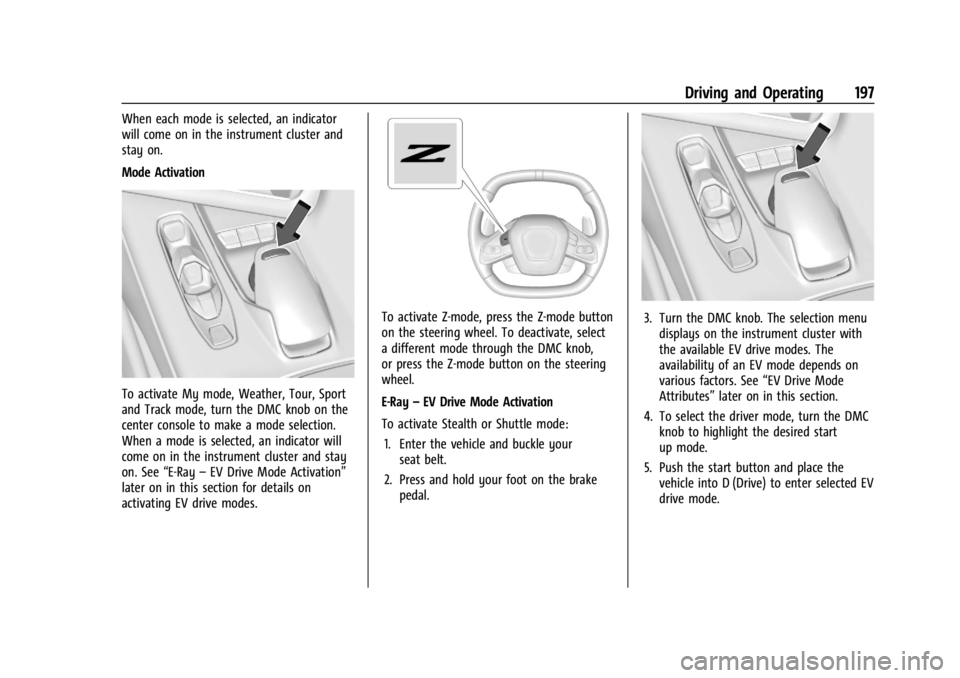
To activate My mode, Weather, Tour, Sport
and Track mode, turn the DMC knob on the
center console to make a mode selection.
When a mode is selected, an indicator will
come on in the instrument cluster and stay
on. See“E-Ray–EV Drive Mode Activation”
later on in this section for details on
activating EV drive modes.
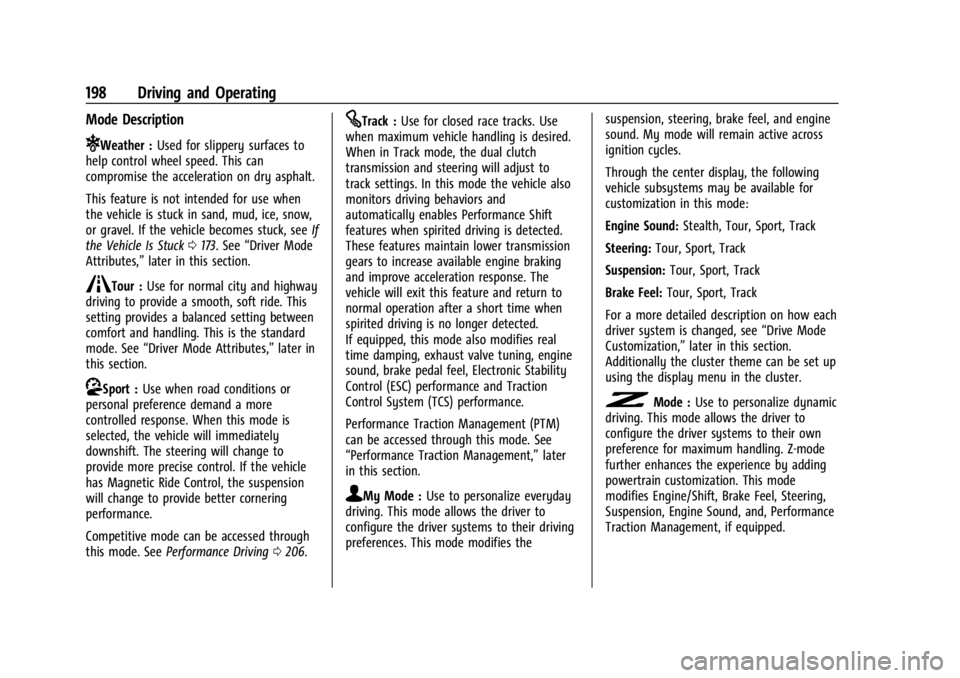
To activate Z-mode, press the Z-mode button
on the steering wheel. To deactivate, select
a different mode through the DMC knob,
or press the Z-mode button on the steering
wheel.
E-Ray –EV Drive Mode Activation
To activate Stealth or Shuttle mode: 1. Enter the vehicle and buckle your seat belt.
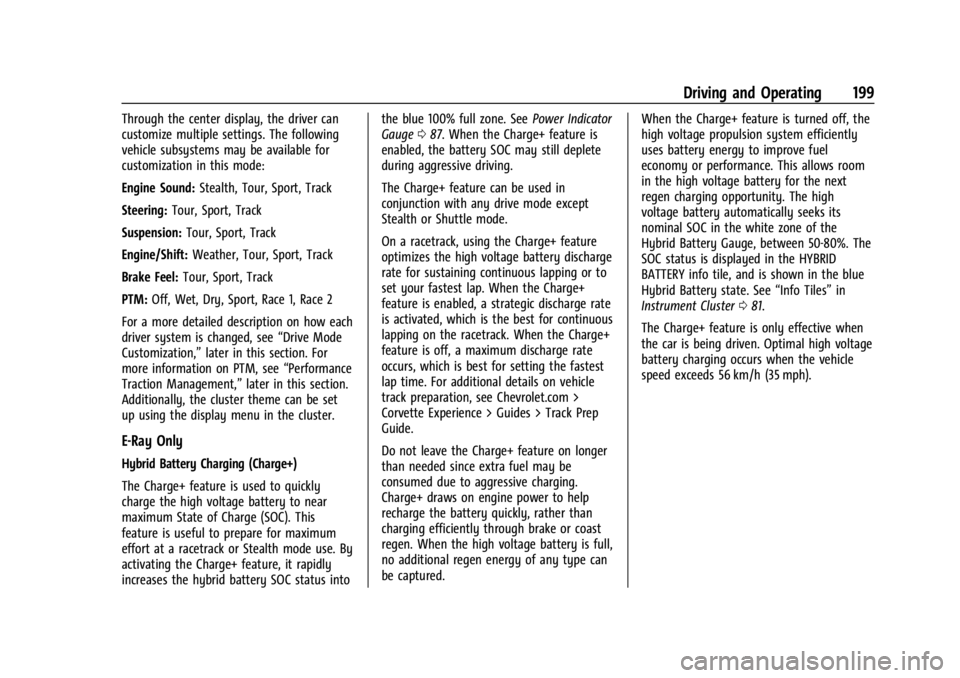
2. Press and hold your foot on the brake pedal.3. Turn the DMC knob. The selection menudisplays on the instrument cluster with
the available EV drive modes. The
availability of an EV mode depends on
various factors. See “EV Drive Mode
Attributes” later on in this section.
4. To select the driver mode, turn the DMC knob to highlight the desired start
up mode.
5. Push the start button and place the vehicle into D (Drive) to enter selected EV
drive mode.
Page 199 of 362
Chevrolet Corvette Owner Manual (GMNA-Localizing-U.S./Canada/Mexico-
17272984) - 2024 - CRC - 2/20/23
198 Driving and Operating
Mode Description
uWeather :Used for slippery surfaces to
help control wheel speed. This can
compromise the acceleration on dry asphalt.
This feature is not intended for use when
the vehicle is stuck in sand, mud, ice, snow,
or gravel. If the vehicle becomes stuck, see If
the Vehicle Is Stuck 0173. See “Driver Mode
Attributes,” later in this section.
sTour :Use for normal city and highway
driving to provide a smooth, soft ride. This
setting provides a balanced setting between
comfort and handling. This is the standard
mode. See “Driver Mode Attributes,” later in
this section.
rSport : Use when road conditions or
personal preference demand a more
controlled response. When this mode is
selected, the vehicle will immediately
downshift. The steering will change to
provide more precise control. If the vehicle
has Magnetic Ride Control, the suspension
will change to provide better cornering
performance.
Competitive mode can be accessed through
this mode. See Performance Driving 0206.
tTrack : Use for closed race tracks. Use
when maximum vehicle handling is desired.
When in Track mode, the dual clutch
transmission and steering will adjust to
track settings. In this mode the vehicle also
monitors driving behaviors and
automatically enables Performance Shift
features when spirited driving is detected.
These features maintain lower transmission
gears to increase available engine braking
and improve acceleration response. The
vehicle will exit this feature and return to
normal operation after a short time when
spirited driving is no longer detected.
If equipped, this mode also modifies real
time damping, exhaust valve tuning, engine
sound, brake pedal feel, Electronic Stability
Control (ESC) performance and Traction
Control System (TCS) performance.
Performance Traction Management (PTM)
can be accessed through this mode. See
“Performance Traction Management,” later
in this section.
qMy Mode : Use to personalize everyday
driving. This mode allows the driver to
configure the driver systems to their driving
preferences. This mode modifies the suspension, steering, brake feel, and engine
sound. My mode will remain active across
ignition cycles.
Through the center display, the following
vehicle subsystems may be available for
customization in this mode:
Engine Sound:
Stealth, Tour, Sport, Track
Steering: Tour, Sport, Track
Suspension: Tour, Sport, Track
Brake Feel: Tour, Sport, Track
For a more detailed description on how each
driver system is changed, see “Drive Mode
Customization,” later in this section.
Additionally the cluster theme can be set up
using the display menu in the cluster.
vMode : Use to personalize dynamic
driving. This mode allows the driver to
configure the driver systems to their own
preference for maximum handling. Z-mode
further enhances the experience by adding
powertrain customization. This mode
modifies Engine/Shift, Brake Feel, Steering,
Suspension, Engine Sound, and, Performance
Traction Management, if equipped.
Page 200 of 362
Chevrolet Corvette Owner Manual (GMNA-Localizing-U.S./Canada/Mexico-
17272984) - 2024 - CRC - 2/20/23
Driving and Operating 199
Through the center display, the driver can
customize multiple settings. The following
vehicle subsystems may be available for
customization in this mode:
Engine Sound:Stealth, Tour, Sport, Track
Steering: Tour, Sport, Track
Suspension: Tour, Sport, Track
Engine/Shift: Weather, Tour, Sport, Track
Brake Feel: Tour, Sport, Track
PTM: Off, Wet, Dry, Sport, Race 1, Race 2
For a more detailed description on how each
driver system is changed, see “Drive Mode
Customization,” later in this section. For
more information on PTM, see “Performance
Traction Management,” later in this section.
Additionally, the cluster theme can be set
up using the display menu in the cluster.
E-Ray Only
Hybrid Battery Charging (Charge+)
The Charge+ feature is used to quickly
charge the high voltage battery to near
maximum State of Charge (SOC). This
feature is useful to prepare for maximum
effort at a racetrack or Stealth mode use. By
activating the Charge+ feature, it rapidly
increases the hybrid battery SOC status into the blue 100% full zone. See
Power Indicator
Gauge 087. When the Charge+ feature is
enabled, the battery SOC may still deplete
during aggressive driving.
The Charge+ feature can be used in
conjunction with any drive mode except
Stealth or Shuttle mode.
On a racetrack, using the Charge+ feature
optimizes the high voltage battery discharge
rate for sustaining continuous lapping or to
set your fastest lap. When the Charge+
feature is enabled, a strategic discharge rate
is activated, which is the best for continuous
lapping on the racetrack. When the Charge+
feature is off, a maximum discharge rate
occurs, which is best for setting the fastest
lap time. For additional details on vehicle
track preparation, see Chevrolet.com >
Corvette Experience > Guides > Track Prep
Guide.
Do not leave the Charge+ feature on longer
than needed since extra fuel may be
consumed due to aggressive charging.
Charge+ draws on engine power to help
recharge the battery quickly, rather than
charging efficiently through brake or coast
regen. When the high voltage battery is full,
no additional regen energy of any type can
be captured. When the Charge+ feature is turned off, the
high voltage propulsion system efficiently
uses battery energy to improve fuel
economy or performance. This allows room
in the high voltage battery for the next
regen charging opportunity. The high
voltage battery automatically seeks its
nominal SOC in the white zone of the
Hybrid Battery Gauge, between 50-80%. The
SOC status is displayed in the HYBRID
BATTERY info tile, and is shown in the blue
Hybrid Battery state. See
“Info Tiles”in
Instrument Cluster 081.
The Charge+ feature is only effective when
the car is being driven. Optimal high voltage
battery charging occurs when the vehicle
speed exceeds 56 km/h (35 mph).
Page 203 of 362
Chevrolet Corvette Owner Manual (GMNA-Localizing-U.S./Canada/Mexico-
17272984) - 2024 - CRC - 2/20/23
202 Driving and Operating
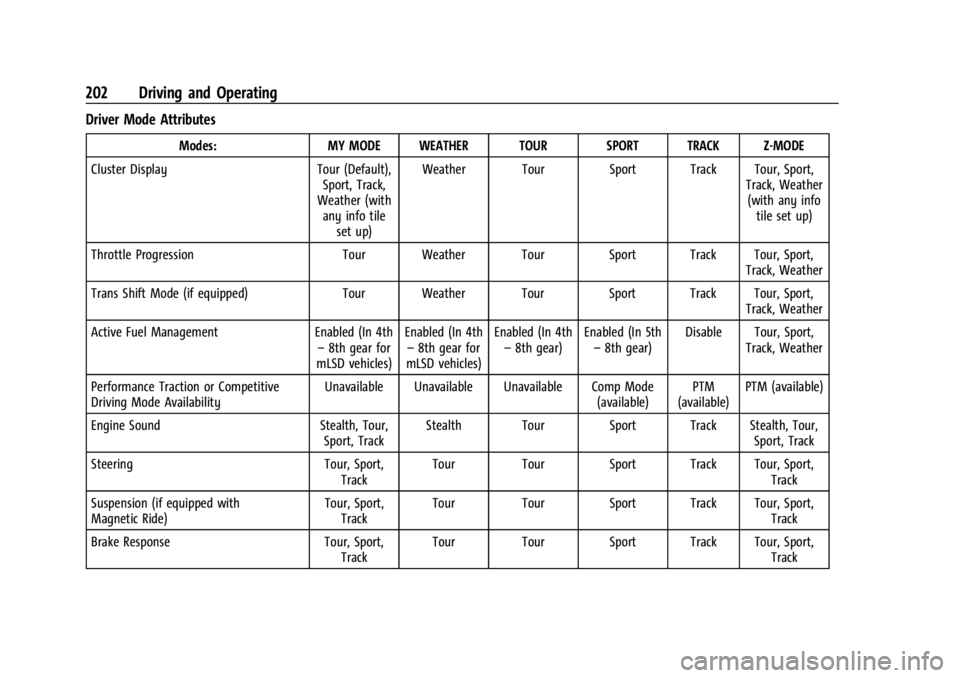
Driver Mode Attributes
Modes:MY MODE WEATHER TOUR SPORT TRACK Z-MODE
Cluster Display Tour (Default),
Sport, Track,
Weather (with any info tile
set up) Weather Tour Sport Track Tour, Sport,
Track, Weather(with any info tile set up)
Throttle Progression Tour Weather Tour Sport Track Tour, Sport,
Track, Weather
Trans Shift Mode (if equipped) Tour Weather Tour Sport Track Tour, Sport,
Track, Weather
Active Fuel Management Enabled (In 4th
– 8th gear for
mLSD vehicles) Enabled (In 4th
– 8th gear for
mLSD vehicles) Enabled (In 4th
– 8th gear) Enabled (In 5th
– 8th gear) Disable Tour, Sport,
Track, Weather
Performance Traction or Competitive
Driving Mode Availability Unavailable Unavailable Unavailable Comp Mode
(available)PTM
(available) PTM (available)
Engine Sound Stealth, Tour,
Sport, Track Stealth Tour Sport Track Stealth, Tour,
Sport, Track
Steering Tour, Sport,
Track Tour Tour Sport Track Tour, Sport,
Track
Suspension (if equipped with
Magnetic Ride) Tour, Sport,
Track Tour Tour Sport Track Tour, Sport,
Track
Brake Response Tour, Sport,
Track Tour Tour Sport Track Tour, Sport,
Track
Page 204 of 362
Chevrolet Corvette Owner Manual (GMNA-Localizing-U.S./Canada/Mexico-
17272984) - 2024 - CRC - 2/20/23
Driving and Operating 203
Cluster Display
For more information on the display themes
of the Drive modes on the instrument
cluster, seeInstrument Cluster 081 >
Options > Display themes.
Throttle Progression
Adjusts throttle sensitivity by selecting how
quickly or slowly the throttle reacts to
input.
Throttle Progression is a preset of
Powertrain and cannot be modified or
changed independently.
Transmission Shift Operation
Basic:
.Transmission upshifts and downshifts are
selected based on vehicle speed and
accelerator position to optimize comfort
and fuel economy during mild driving
conditions.
Driver Influenced Gear Selection:
.Aggressive driving will influence both the
upshift and downshift points in all modes.
When engaged, the Performance
Transmission Active light displays. See
Performance Transmission Active 093.
When Performance Transmission is
activated from a standstill, by selecting PTM Race 1 or Race 2, the transmission
shift map is in the most aggressive state
where upshifts are only achieved at high
revolutions per minute (rpm), downshifts
happen early, and the lowest gear is
selected for cornering. Transmission
behavior will transition to a level
appropriate to the current driving
behavior after a short period of time.
If PTM Race 1 or Race 2 are not selected,
the Performance Transmission Active
behavior still activates automatically after
a sustained period of performance driving
is detected. See
“Performance Traction
Management (PTM)” later on in this
section.
.Criteria which have influence are: driving
mode, accelerator, brakes, lateral, and
longitudinal loading.
.Changes in gear selection behavior due to
aggressive driving can include:
‐ Downshifting early with higher rpm’s
during aggressive braking (i.e. entering
a corner)
‐ Altering upshifts while experiencing
lateral acceleration
‐ Not upshifting when the accelerator is
released to avoid unnecessary shifts if
the accelerator is re-applied ‐
Recognizing sporty driving and
anticipating upcoming corners with the
appropriate gear selection entering and
exiting
.Driver Modes
‐Driver influenced changes are effective
in all driving modes, however the
aggressiveness of the transmission
response will increase between Tour,
Sport, and Track modes respectively.
Active Fuel Management (Engine Cylinder
Shuts Off)
If equipped with Active Fuel Management
(AFM), the engine uses driver demand to
deactivate cylinders to improve fuel
performance. When accelerating, V8 mode is
prevalent. For lighter throttle applications,
the system may disable cylinders to run in
4-cylinder mode to save fuel.
Active Fuel Management is a preset of
Powertrain and cannot be modified or
changed independently.
Page 205 of 362
Chevrolet Corvette Owner Manual (GMNA-Localizing-U.S./Canada/Mexico-
17272984) - 2024 - CRC - 2/20/23
204 Driving and Operating
Engine Sound
Caution
Using a stealth engine sound setting
during spirited driving will cause the
exhaust system to overheat and damage
the variable exhaust valves. Do not use
this setting when auto-crossing or driving
on high speed tracks.
If available, engine sound settings change
when the variable exhaust valves open.
Steering (Assist Effort)
Adjusts from a lighter steering feel to
reduced assist for more steering feel.
Magnetic Ride Control
If equipped, this feature adjusts the shock
dampening firmness based on driving
conditions to improve comfort and
performance.
Drive Mode Customization
The vehicle is equipped to modify the
following vehicle settings base on vehicle
content. Through the infotainment home
screen, select Settings > Vehicle > “Drive
Mode Customization” to customize and
personalize My mode and/or Z-mode.
Engine Sound
Engine Sound adjusts the volume of engine
noise. Setting range from quietest to loudest
volume as you move from Stealth through
Track.
.Stealth, Tour, Sport, Track
Steering
This setting adjusts the effort required to
turn the steering wheel. The steering wheel
offers better feedback but requires more
effort as you move from Tour to Track.
.Tour, Sport, Track
Suspension
This setting adjusts the firmness of the
suspension in the vehicle. Suspension adjust
stiffness of the shocks and/or springs. The
ride is more comfortable at lower settings
and is stiffer at higher settings for better
control.
.Tour, Sport, Track Engine/Shift
This setting adjusts the throttle response,
gear shifting and engine performance. An
increased throttle response enhances the
acceleration feel as you move toward Track,
but with a comfort trade-off due to more
aggressive gear shifting.
.Weather, Tour, Sport, Track
Brake Feel
This setting adjusts the brake pedal
response. Settings range from a slower
response for more comfortable driving to
the quickest response for quicker
deceleration. Track allows for improved
pedal precision at higher decelerations for
high performance driving.
.Tour, Sport, Track
Performance Traction Management (PTM)
To activate PTM through Z-Mode, configure
Z-Mode to the desired PTM state in the
center stack (Settings > Vehicle > Drive
Mode Customization > Z-Mode). Press the
Z-Mode button once to activate Z-Mode.
When PTM is configured on, a message will
appear in the Driver Information Center
(DIC) “Z-Mode Active —Press Again for PTM
On —ESC May be Disabled.”