port CHEVROLET CORVETTE 2024 Repair Manual
[x] Cancel search | Manufacturer: CHEVROLET, Model Year: 2024, Model line: CORVETTE, Model: CHEVROLET CORVETTE 2024Pages: 362, PDF Size: 6.62 MB
Page 206 of 362
Chevrolet Corvette Owner Manual (GMNA-Localizing-U.S./Canada/Mexico-
17272984) - 2024 - CRC - 2/20/23
Driving and Operating 205
To confirm, and enter PTM, press the
Z-Mode button again. The PTM state can
now be modified using the mode knob or
changing the Z-Mode setting in the center
stack. Both the Z-Mode and PTM indicators
will be displayed.
To cancel, press the center dismiss button
on the steering wheel (Z-Mode remains
active). Selecting PTM states may modify
other Z-Mode customization options.
.Off, Wet, Dry, Sport, Race 1, Race 2
Front Lift System
A two-position lift actuator (one per damper)
with 35 mm (1.5 in) of stroke will
hydraulically raise the front of the vehicle to
provide approximately 50 mm (2 in) of
increased clearance in approximately
three seconds (height and time will vary by
vehicle). The Front Lift System will allow
you to lift the front of the vehicle to enter a
driveway, driving over curbs, speed bumps
or onto ramps or a trailer.
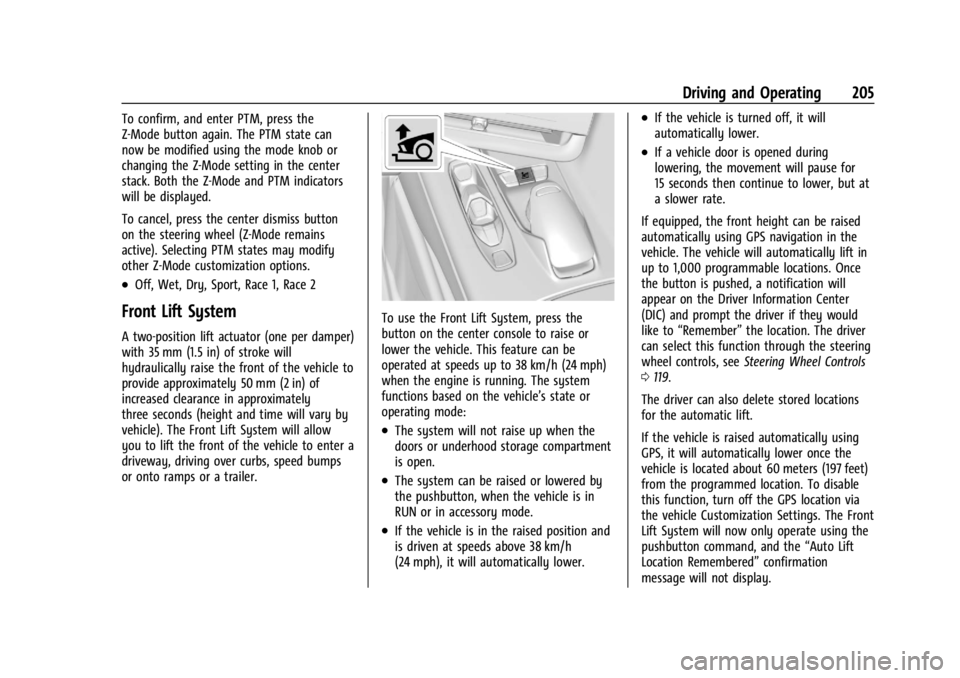
To use the Front Lift System, press the
button on the center console to raise or
lower the vehicle. This feature can be
operated at speeds up to 38 km/h (24 mph)
when the engine is running. The system
functions based on the vehicle’s state or
operating mode:
.The system will not raise up when the
doors or underhood storage compartment
is open.
.The system can be raised or lowered by
the pushbutton, when the vehicle is in
RUN or in accessory mode.
.If the vehicle is in the raised position and
is driven at speeds above 38 km/h
(24 mph), it will automatically lower.
.If the vehicle is turned off, it will
automatically lower.
.If a vehicle door is opened during
lowering, the movement will pause for
15 seconds then continue to lower, but at
a slower rate.
If equipped, the front height can be raised
automatically using GPS navigation in the
vehicle. The vehicle will automatically lift in
up to 1,000 programmable locations. Once
the button is pushed, a notification will
appear on the Driver Information Center
(DIC) and prompt the driver if they would
like to “Remember” the location. The driver
can select this function through the steering
wheel controls, see Steering Wheel Controls
0 119.
The driver can also delete stored locations
for the automatic lift.
If the vehicle is raised automatically using
GPS, it will automatically lower once the
vehicle is located about 60 meters (197 feet)
from the programmed location. To disable
this function, turn off the GPS location via
the vehicle Customization Settings. The Front
Lift System will now only operate using the
pushbutton command, and the “Auto Lift
Location Remembered” confirmation
message will not display.
Page 209 of 362
Chevrolet Corvette Owner Manual (GMNA-Localizing-U.S./Canada/Mexico-
17272984) - 2024 - CRC - 2/20/23
208 Driving and Operating
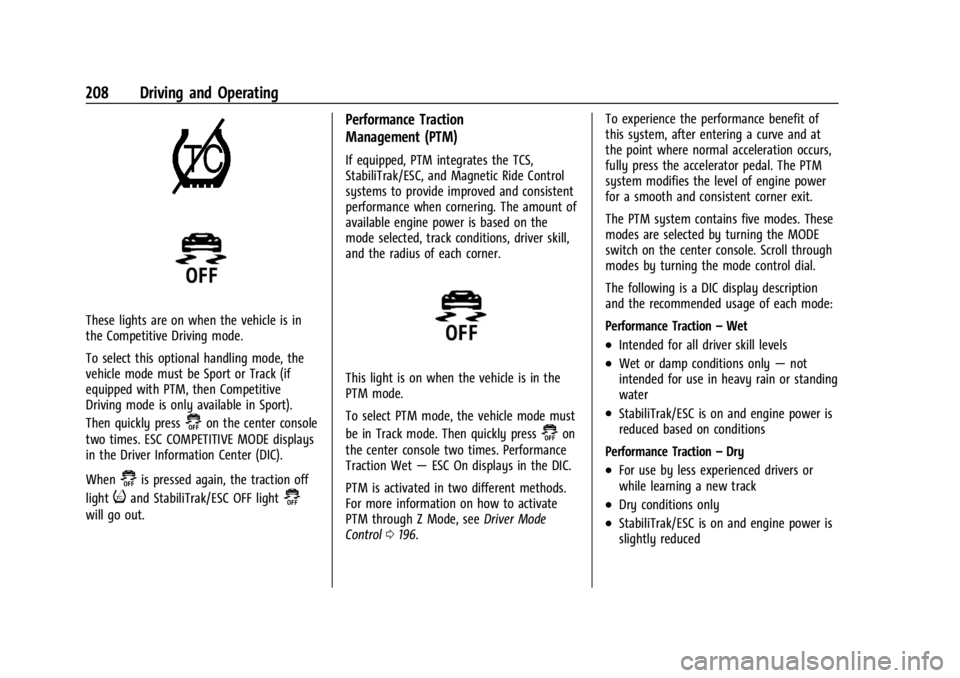
These lights are on when the vehicle is in
the Competitive Driving mode.
To select this optional handling mode, the
vehicle mode must be Sport or Track (if
equipped with PTM, then Competitive
Driving mode is only available in Sport).
Then quickly press
@on the center console
two times. ESC COMPETITIVE MODE displays
in the Driver Information Center (DIC).
When
@is pressed again, the traction off
light
iand StabiliTrak/ESC OFF light@
will go out.
Performance Traction
Management (PTM)
If equipped, PTM integrates the TCS,
StabiliTrak/ESC, and Magnetic Ride Control
systems to provide improved and consistent
performance when cornering. The amount of
available engine power is based on the
mode selected, track conditions, driver skill,
and the radius of each corner.
This light is on when the vehicle is in the
PTM mode.
To select PTM mode, the vehicle mode must
be in Track mode. Then quickly press
@on
the center console two times. Performance
Traction Wet —ESC On displays in the DIC.
PTM is activated in two different methods.
For more information on how to activate
PTM through Z Mode, see Driver Mode
Control 0196. To experience the performance benefit of
this system, after entering a curve and at
the point where normal acceleration occurs,
fully press the accelerator pedal. The PTM
system modifies the level of engine power
for a smooth and consistent corner exit.
The PTM system contains five modes. These
modes are selected by turning the MODE
switch on the center console. Scroll through
modes by turning the mode control dial.
The following is a DIC display description
and the recommended usage of each mode:
Performance Traction
–Wet
.Intended for all driver skill levels
.Wet or damp conditions only —not
intended for use in heavy rain or standing
water
.StabiliTrak/ESC is on and engine power is
reduced based on conditions
Performance Traction –Dry
.For use by less experienced drivers or
while learning a new track
.Dry conditions only
.StabiliTrak/ESC is on and engine power is
slightly reduced
Page 210 of 362
Chevrolet Corvette Owner Manual (GMNA-Localizing-U.S./Canada/Mexico-
17272984) - 2024 - CRC - 2/20/23
Driving and Operating 209
Performance Traction–Sport
.For use by drivers who are familiar with
the track
.Dry conditions only
.Requires more driving skill than
Performance Traction –Dry
.StabiliTrak/ESC is on and more engine
power is available than in Performance
Traction –Dry
Performance Traction –Race 1
.For use by drivers who are familiar with
the track
.Dry conditions only
.Requires more driving skill than
Performance Traction –Dry or
Performance Traction –Sport
.StabiliTrak/ESC is off and available engine
power is the same as Performance
Traction –Sport
Performance Traction –Race 2
.For use by experienced drivers who are
familiar with the track
.Dry conditions only
.Requires more driving skill than in other
modes
.StabiliTrak/ESC is off and engine power is
available for maximum cornering speed Press and release
@to turn off PTM and
return to the TCS and StabiliTrak/ESC
systems. The traction off light
iand
StabiliTrak Off light
@will go out.
Launch Control (Sport and Track
Mode Only)
A Launch Control feature is available, within
Competitive Driving mode or PTM, on all
vehicles to allow the driver to achieve high
levels of vehicle acceleration in a straight
line. Launch Control is a form of TCS that
manages tire spin, and transmissions clutch,
while launching the vehicle. This feature is
intended for use during closed course race
events where consistent zero to
60 and quarter mile times are desirable.
Caution
The new vehicle break-in period should be
completed before using the launch
control feature, otherwise performance
will be limited and damage may occur to
the powertrain/engine. See New Vehicle
Break-In 0177. Launch Control is only available when the
following criteria are met:
.Competitive Driving mode or any of the
PTM modes are selected (if equipped). See
Driver Mode Control
0196.
.The steering wheel must be straight.
.The driver door must be closed.
.The vehicle must be in D (Drive) or
M (Manual mode).
.The parking brake must not be engaged.
Launching the Vehicle
.Ensure the vehicle is in Competitive
Driving mode or any of the PTM modes.
.The brake pedal must be firmly pressed
to the floor, equivalent to a panic brake
event.
.While maintaining the brake pedal, the
accelerator pedal is rapidly applied to
wide open throttle. If the vehicle rolls due
to wide open throttle or engine speed
does not exceed 3,000 Revolutions Per
Minute (RPM), release the throttle, press
the brake pedal more firmly, and reapply
the accelerator to wide open throttle.
.If the engine is cold, the vehicle may
be limited to 3000 rpm until
conditions are suitable for
acceleration.
Page 212 of 362
Chevrolet Corvette Owner Manual (GMNA-Localizing-U.S./Canada/Mexico-
17272984) - 2024 - CRC - 2/20/23
Driving and Operating 211
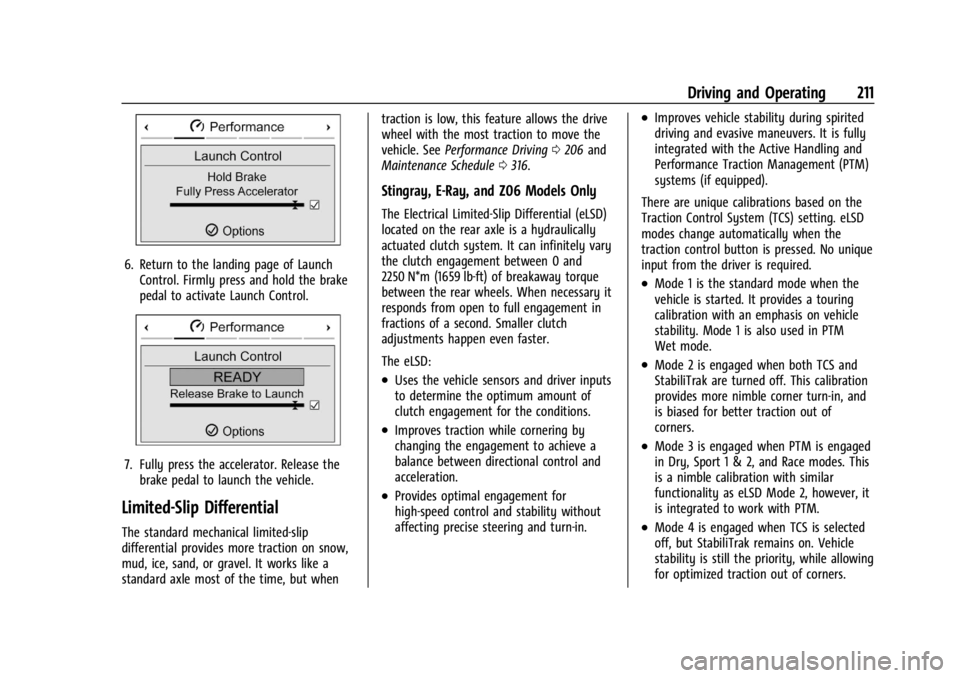
6. Return to the landing page of LaunchControl. Firmly press and hold the brake
pedal to activate Launch Control.
7. Fully press the accelerator. Release thebrake pedal to launch the vehicle.
Limited-Slip Differential
The standard mechanical limited-slip
differential provides more traction on snow,
mud, ice, sand, or gravel. It works like a
standard axle most of the time, but when traction is low, this feature allows the drive
wheel with the most traction to move the
vehicle. See
Performance Driving 0206 and
Maintenance Schedule 0316.
Stingray, E-Ray, and Z06 Models Only
The Electrical Limited-Slip Differential (eLSD)
located on the rear axle is a hydraulically
actuated clutch system. It can infinitely vary
the clutch engagement between 0 and
2250 N*m (1659 lb-ft) of breakaway torque
between the rear wheels. When necessary it
responds from open to full engagement in
fractions of a second. Smaller clutch
adjustments happen even faster.
The eLSD:
.Uses the vehicle sensors and driver inputs
to determine the optimum amount of
clutch engagement for the conditions.
.Improves traction while cornering by
changing the engagement to achieve a
balance between directional control and
acceleration.
.Provides optimal engagement for
high-speed control and stability without
affecting precise steering and turn-in.
.Improves vehicle stability during spirited
driving and evasive maneuvers. It is fully
integrated with the Active Handling and
Performance Traction Management (PTM)
systems (if equipped).
There are unique calibrations based on the
Traction Control System (TCS) setting. eLSD
modes change automatically when the
traction control button is pressed. No unique
input from the driver is required.
.Mode 1 is the standard mode when the
vehicle is started. It provides a touring
calibration with an emphasis on vehicle
stability. Mode 1 is also used in PTM
Wet mode.
.Mode 2 is engaged when both TCS and
StabiliTrak are turned off. This calibration
provides more nimble corner turn-in, and
is biased for better traction out of
corners.
.Mode 3 is engaged when PTM is engaged
in Dry, Sport 1 & 2, and Race modes. This
is a nimble calibration with similar
functionality as eLSD Mode 2, however, it
is integrated to work with PTM.
.Mode 4 is engaged when TCS is selected
off, but StabiliTrak remains on. Vehicle
stability is still the priority, while allowing
for optimized traction out of corners.
Page 228 of 362
Chevrolet Corvette Owner Manual (GMNA-Localizing-U.S./Canada/Mexico-
17272984) - 2024 - CRC - 2/20/23
Driving and Operating 227
is normal system operation; the vehicle does
not need service. Turn LKA off if these
conditions continue.
Fuel
Top Tier Fuel
GM recommends the use of TOP TIER
Detergent Gasoline to keep the engine clean,
reduce engine deposits, and maintain
optimal vehicle performance. Look for the
TOP TIER Logo or see www.toptiergas.com
for a list of TOP TIER Detergent Gasoline
marketers and applicable countries.
Recommended Fuel
Premium unleaded gasoline meeting ASTM
specification D4814 with a posted octane
rating (R+M)/2 of 91 or greater is required.
The use of the correct fuel is an important
part of the proper maintenance of the
vehicle and a condition of the vehicle
warranty. If heavy knocking is heard when
using gasoline rated at 91 or greater, the
engine needs service.
Do not use any fuel labeled E85 or FlexFuel.
Do not use gasoline with ethanol levels
greater than 15% by volume.
Prohibited Fuels
Caution
Do not use fuels with any of the
following conditions; doing so may
damage the vehicle and void its
warranty:
.For vehicles that are not FlexFuel, fuel
labeled greater than 15% ethanol by
volume, such as mid-level ethanol
blends (16–50% ethanol), E85,
or FlexFuel.
.Fuel with any amount of methanol,
methylal, ferrocene, and aniline. These
fuels can corrode metal fuel system
parts or damage plastic and rubber
parts.
.Fuel containing metals such as
methylcyclopentadienyl manganese
tricarbonyl (MMT), which can damage
the emissions control system and
spark plugs.
.Fuel with a posted octane rating of
less than the recommended fuel. Using
this fuel will lower fuel economy and
performance, and may decrease the
life of the emissions catalyst.
Page 230 of 362

Chevrolet Corvette Owner Manual (GMNA-Localizing-U.S./Canada/Mexico-
17272984) - 2024 - CRC - 2/20/23
Driving and Operating 229
The capless refueling system does not have
a fuel cap. Fully insert and latch the fill
nozzle, begin fueling.
{Warning
Overfilling the fuel tank by more than
three clicks of a standard fill nozzle may
cause:
.Vehicle performance issues, including
engine stalling and damage to the fuel
system.
.Fuel spills.
.Under certain conditions, fuel fires.
Be careful not to spill fuel. Wait five seconds
after you have finished pumping before
removing the fill nozzle. Clean fuel from
painted surfaces as soon as possible. See
Exterior Care 0306. Push the fuel door
closed until it latches.
{Warning
If a fire starts while you are refueling, do
not remove the fill nozzle. Shut off the
flow of fuel by shutting off the pump or
by notifying the station attendant. Leave
the area immediately. Filling the Tank with a Portable Fuel
Container
If the vehicle runs out of fuel and must be
filled from a portable fuel container:
1. Locate the capless funnel adapter.
2. Insert and latch the funnel into the
capless fuel system.
{Warning
Attempting to refuel from a portable fuel
container without using the funnel
adapter may cause fuel spillage and
damage the capless fuel system. This
could cause a fire. You or others could be
badly burned and the vehicle could be
damaged.
3. Remove and clean the funnel adapter and return it to the storage location.
Filling a Portable Fuel Container
{Warning
Never fill a portable fuel container while
it is in the vehicle. Static electricity
discharge from the container can ignite
the fuel vapor. You or others could be
badly burned and the vehicle could be
damaged. To help avoid injury to you
and others:
.Dispense fuel only into approved
containers.
.Do not fill a container while it is
inside a vehicle, in a vehicle's trunk, in
a pickup bed, or on any surface other
than the ground.
.Bring the fill nozzle in contact with
the inside of the fill opening before
operating the nozzle. Maintain contact
until filling is complete.
.Keep sparks, flames, and smoking
materials away from fuel.
.Avoid using electronic devices while
pumping fuel.
Page 232 of 362
Chevrolet Corvette Owner Manual (GMNA-Localizing-U.S./Canada/Mexico-
17272984) - 2024 - CRC - 2/20/23
Vehicle Care 231
Vehicle Care
General Information
General Information . . . . . . . . . . . . . . . . . . . 232
California Perchlorate MaterialsRequirements . . . . . . . . . . . . . . . . . . . . . . . . 232
Accessories and Modifications . . . . . . . . . 232
Lifting the Vehicle . . . . . . . . . . . . . . . . . . . . . 232
Vehicle Storage . . . . . . . . . . . . . . . . . . . . . . . . 234
Vehicle Checks
Doing Your Own Service Work . . . . . . . . 234
Underhood Compartment Overview . . . 235
Engine Compartment Overview . . . . . . . . 238
Engine Oil (5.5L LT6 Engine) . . . . . . . . . . . 246
Engine Oil (6.2L LT2 Engine) . . . . . . . . . . . 249
Engine Oil Life System . . . . . . . . . . . . . . . . . 252
Dual Clutch Transmission Fluid . . . . . . . . 253
Dual Clutch Transmission Fluid Life System . . . . . . . . . . . . . . . . . . . . . . . . . . . . . . 253
Engine Air Filter Life System . . . . . . . . . . 254
Engine Air Cleaner/Filter . . . . . . . . . . . . . . . 255
Cooling System (Engine) . . . . . . . . . . . . . . . 257
Cooling System (Electrified Propulsion) . . . . . . . . . . . . . . . . . . . . . . . . . . 260
Engine Overheating . . . . . . . . . . . . . . . . . . . . 261
Washer Fluid . . . . . . . . . . . . . . . . . . . . . . . . . . 262
Brakes . . . . . . . . . . . . . . . . . . . . . . . . . . . . . . . . . 262
Brake Pad Life System (If Equipped) . . . 264
Brake Fluid . . . . . . . . . . . . . . . . . . . . . . . . . . . . 265 Battery - North America . . . . . . . . . . . . . . . 266
Park Brake and P (Park) Mechanism
Check . . . . . . . . . . . . . . . . . . . . . . . . . . . . . . . 269
Wiper Blade Replacement . . . . . . . . . . . . . 270
Windshield Replacement . . . . . . . . . . . . . . 270
Gas Strut(s) . . . . . . . . . . . . . . . . . . . . . . . . . . . 270
Headlamp Aiming
Front Headlamp Aiming . . . . . . . . . . . . . . . . 271
Bulb Replacement
LED Lighting . . . . . . . . . . . . . . . . . . . . . . . . . . . 271
Electrical System
Electrical System Overload . . . . . . . . . . . . . 272
Fuses and Circuit Breakers . . . . . . . . . . . . . 273
Instrument Panel Fuse Block . . . . . . . . . . . 273
Rear Compartment Fuse Block . . . . . . . . . 276
Wheels and Tires
Tires . . . . . . . . . . . . . . . . . . . . . . . . . . . . . . . . . . . 279
All-Season Tires . . . . . . . . . . . . . . . . . . . . . . . 280
Winter Tires . . . . . . . . . . . . . . . . . . . . . . . . . . . 280
Run-Flat Tires . . . . . . . . . . . . . . . . . . . . . . . . . 280
Low-Profile Tires . . . . . . . . . . . . . . . . . . . . . . . 281
Competition Oriented Tires . . . . . . . . . . . . 281
Summer Tires . . . . . . . . . . . . . . . . . . . . . . . . . 282
Tire Sidewall Labeling . . . . . . . . . . . . . . . . . 282
Tire Designations . . . . . . . . . . . . . . . . . . . . . . 283
Tire Terminology and Definitions . . . . . . 284
Tire Pressure . . . . . . . . . . . . . . . . . . . . . . . . . . 286 Tire Pressure for High-Speed
Operation . . . . . . . . . . . . . . . . . . . . . . . . . . . . 287
Tire Pressure Monitor System . . . . . . . . . 288
Tire Pressure Monitor Operation . . . . . . 289
Tire Inspection . . . . . . . . . . . . . . . . . . . . . . . . . 291
Tire Rotation . . . . . . . . . . . . . . . . . . . . . . . . . . 292
When It Is Time for New Tires . . . . . . . . 293
Buying New Tires . . . . . . . . . . . . . . . . . . . . . 294
Different Size Tires and Wheels . . . . . . . 295
Uniform Tire Quality Grading . . . . . . . . . 295
Wheel Alignment and Tire Balance . . . . 296
Wheel Replacement . . . . . . . . . . . . . . . . . . . 297
Tire Chains . . . . . . . . . . . . . . . . . . . . . . . . . . . . 298
If a Tire Goes Flat . . . . . . . . . . . . . . . . . . . . . 298
Jump Starting
Jump Starting - North America . . . . . . . . 299
Towing the Vehicle
Transporting a Disabled Vehicle . . . . . . . 303
Recreational Vehicle Towing . . . . . . . . . . 306
Appearance Care
Exterior Care . . . . . . . . . . . . . . . . . . . . . . . . . . 306
Interior Care . . . . . . . . . . . . . . . . . . . . . . . . . . . 311
Floor Mats . . . . . . . . . . . . . . . . . . . . . . . . . . . . . 314
Page 233 of 362
Chevrolet Corvette Owner Manual (GMNA-Localizing-U.S./Canada/Mexico-
17272984) - 2024 - CRC - 2/20/23
232 Vehicle Care
General Information
For service and parts needs, visit your
dealer. You will receive genuine GM parts
and GM-trained and supported service
people.
Genuine GM parts have one of these marks:
California Perchlorate Materials
Requirements
Certain types of automotive applications,
such as airbag initiators, seat belt
pretensioners, and lithium batteries
contained in electronic keys, may contain
perchlorate materials. Perchlorate Material–
special handling may apply. See
www.dtsc.ca.gov/hazardouswaste/
perchlorate.
Accessories and Modifications
Adding non-dealer accessories or making
modifications to the vehicle can affect
vehicle performance and safety, including
such things as airbags, braking, stability,
ride and handling, emissions systems,
aerodynamics, durability, Driver Assistance
Systems, and electronic systems like antilock
brakes, traction control, and stability control.
These accessories or modifications could
even cause malfunction or damage not
covered by the vehicle warranty.
Damage to suspension components caused
by modifying vehicle height outside of
factory settings will not be covered by the
vehicle warranty. Damage to vehicle components resulting
from modifications or the installation or use
of non-GM certified parts, including control
module or software modifications, is not
covered under the terms of the vehicle
warranty and may affect remaining
warranty coverage for affected parts.
GM Accessories are designed to complement
and function with other systems on the
vehicle. See your dealer to accessorize the
vehicle using genuine GM Accessories
installed by a dealer technician.
Also, see
Adding Equipment to the
Airbag-Equipped Vehicle 061.
Lifting the Vehicle
{Warning
Lifting a vehicle can cause an injury. The
vehicle can slip off the jack and roll over
you or other people. You and they could
be badly injured. Find a level place to lift
your vehicle. To help prevent the vehicle
from moving:
1. Set the parking brake firmly.
2. Put the transmission in P (Park). (Continued)
Page 234 of 362
Chevrolet Corvette Owner Manual (GMNA-Localizing-U.S./Canada/Mexico-
17272984) - 2024 - CRC - 2/20/23
Vehicle Care 233
Warning (Continued)
3. Turn off the engine.
To be even more certain the vehicle will
not move, put blocks in front of and
behind the wheels.
{Warning
Getting under a vehicle when it is lifted
on a jack is dangerous. If the vehicle slips
off the jack, you could be badly injured
or killed. Never get under a vehicle when
it is supported only by a jack.
{Warning
Raising the vehicle with the jack
improperly positioned can damage the
vehicle or the vehicle may fall and cause
injury to you or others.
If a jack is used to lift the vehicle, follow the
instructions that came with the jack, and be
sure to use the correct lifting points to
avoid damaging the vehicle.
Caution
Lifting the vehicle improperly can damage
it and result in costly repairs not covered
by the vehicle warranty. To lift the
vehicle properly and prevent vehicle
damage:
.Be sure to place a block or pad
between the jack and the vehicle.
.Lift only in the areas shown in the
following illustrations.
For additional information, see your
dealer and the service manual.
Caution
The front jack pads must not contact the
rocker panels, the front fenders, or the
floor pan. If they do, damage may occur. Lifting from the Front
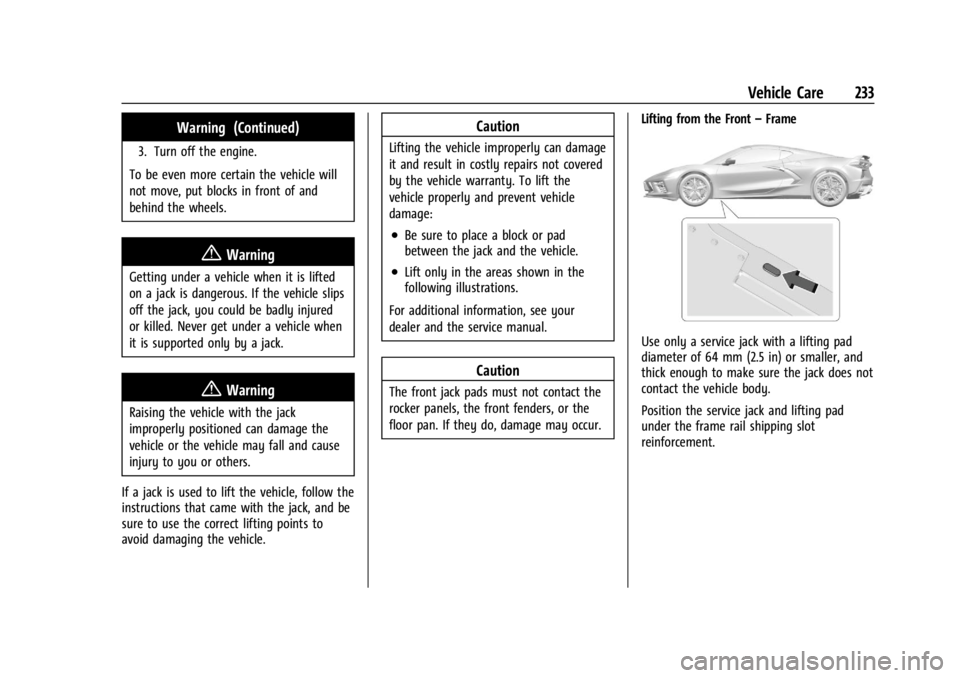
–Frame
Use only a service jack with a lifting pad
diameter of 64 mm (2.5 in) or smaller, and
thick enough to make sure the jack does not
contact the vehicle body.
Position the service jack and lifting pad
under the frame rail shipping slot
reinforcement.
Page 247 of 362
Chevrolet Corvette Owner Manual (GMNA-Localizing-U.S./Canada/Mexico-
17272984) - 2024 - CRC - 2/20/23
246 Vehicle Care
Engine Oil (5.5L LT6 Engine)
To ensure proper engine performance and
long life, pay careful attention to engine oil.
Follow these important steps:
.Use engine oil approved to the proper
specification and of the proper viscosity
grade. See“Selecting the Right Engine
Oil” later in this section.
.Check the engine oil level regularly and
maintain the proper oil level. See
“Checking Engine Oil” and“When to Add
Engine Oil” later in this section.
.Change the engine oil at the appropriate
time. SeeEngine Oil Life System 0252.
.Always dispose of engine oil properly. See
“What to Do with Used Oil” in this
section.
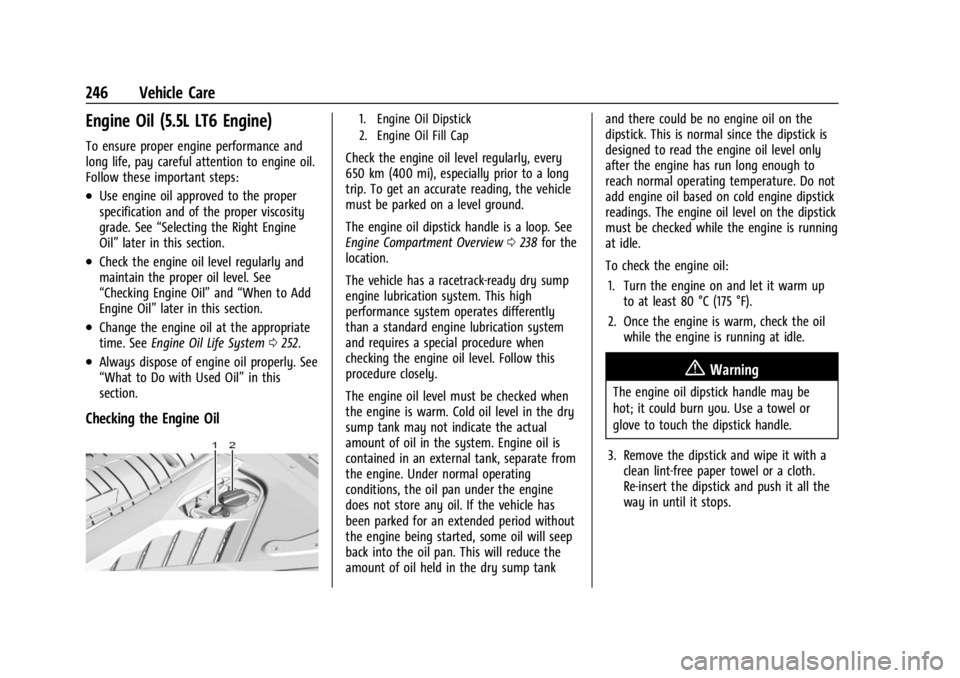
Checking the Engine Oil
1. Engine Oil Dipstick
2. Engine Oil Fill Cap
Check the engine oil level regularly, every
650 km (400 mi), especially prior to a long
trip. To get an accurate reading, the vehicle
must be parked on a level ground.
The engine oil dipstick handle is a loop. See
Engine Compartment Overview 0238 for the
location.
The vehicle has a racetrack-ready dry sump
engine lubrication system. This high
performance system operates differently
than a standard engine lubrication system
and requires a special procedure when
checking the engine oil level. Follow this
procedure closely.
The engine oil level must be checked when
the engine is warm. Cold oil level in the dry
sump tank may not indicate the actual
amount of oil in the system. Engine oil is
contained in an external tank, separate from
the engine. Under normal operating
conditions, the oil pan under the engine
does not store any oil. If the vehicle has
been parked for an extended period without
the engine being started, some oil will seep
back into the oil pan. This will reduce the
amount of oil held in the dry sump tank and there could be no engine oil on the
dipstick. This is normal since the dipstick is
designed to read the engine oil level only
after the engine has run long enough to
reach normal operating temperature. Do not
add engine oil based on cold engine dipstick
readings. The engine oil level on the dipstick
must be checked while the engine is running
at idle.
To check the engine oil:
1. Turn the engine on and let it warm up to at least 80 °C (175 °F).
2. Once the engine is warm, check the oil while the engine is running at idle.
{Warning
The engine oil dipstick handle may be
hot; it could burn you. Use a towel or
glove to touch the dipstick handle.
3. Remove the dipstick and wipe it with a clean lint-free paper towel or a cloth.
Re-insert the dipstick and push it all the
way in until it stops.