ECO mode CHEVROLET CORVETTE C6 2012 User Guide
[x] Cancel search | Manufacturer: CHEVROLET, Model Year: 2012, Model line: CORVETTE C6, Model: CHEVROLET CORVETTE C6 2012Pages: 432, PDF Size: 5.73 MB
Page 134 of 432
Black plate (20,1)Chevrolet Corvette Owner Manual - 2012
5-20 Instruments and Controls
If the light continues to flash, stop
and park the vehicle. Turn the
vehicle off, wait at least 10 seconds,
and restart the engine. If the light is
still flashing, follow the previous
steps and see your dealer for
service as soon as possible.
Light On Steady:An emission
control system malfunction has
been detected on the vehicle.
Diagnosis and service might be
required.
The following may correct an
emission system malfunction:
.Check that the fuel cap is fully
installed. See Filling the Tank on
page 9‑51. The diagnostic
system can determine if the
fuel cap has been left off or
improperly installed. A loose or
missing fuel cap allows fuel to
evaporate into the atmosphere.
A few driving trips with the cap
properly installed should turn the
light off.
.Check that good quality fuel is
used. Poor fuel quality causes
the engine not to run as
efficiently as designed and may
cause: stalling after start-up,
stalling when the vehicle is
changed into gear, misfiring,
hesitation on acceleration,
or stumbling on acceleration.
These conditions might go away
once the engine is warmed up.
If one or more of these
conditions occurs, change the
fuel brand used. It will require at
least one full tank of the proper
fuel to turn the light off.
See Recommended Fuel on
page 9‑48.
If none of the above have made
the light turn off, your dealer can
check the vehicle. The dealer has
the proper test equipment and
diagnostic tools to fix any
mechanical or electrical problems
that might have developed.Emissions Inspection and
Maintenance Programs
Some local governments may have
programs to inspect the on-vehicle
emission control equipment.
For the inspection, the emission
system test equipment is
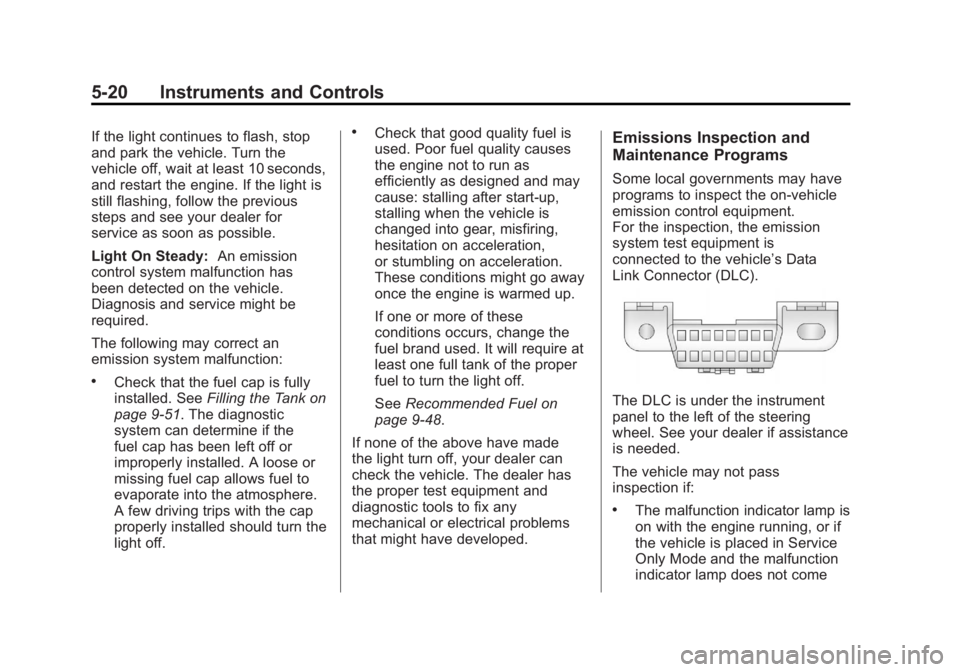
connected to the vehicle’s Data
Link Connector (DLC).
The DLC is under the instrument
panel to the left of the steering
wheel. See your dealer if assistance
is needed.
The vehicle may not pass
inspection if:
.The malfunction indicator lamp is
on with the engine running, or if
the vehicle is placed in Service
Only Mode and the malfunction
indicator lamp does not come
Page 140 of 432
Black plate (26,1)Chevrolet Corvette Owner Manual - 2012
5-26 Instruments and Controls
Information Displays
Driver Information
Center (DIC)
The Driver Information Center (DIC)
display is located on the instrument
panel cluster and shows driver
personalization features and
warning/status messages.
The DIC comes on when the ignition
is turned on. After displaying
CORVETTE BY CHEVROLET, the
DIC shows the information that was
last displayed before the engine
was turned off.
If a problem is detected, a warning
message appears on the DIC
display. SeeVehicle Messages on
page 5‑35 for more information.
DIC Operation and Displays
Depending on the features on the
vehicle, the drive gear may display
on the DIC. See “Manual Paddle
Shift” under Automatic Transmission on page 9‑27
andHead-Up Display
(HUD) on page 5‑31 for more
information.
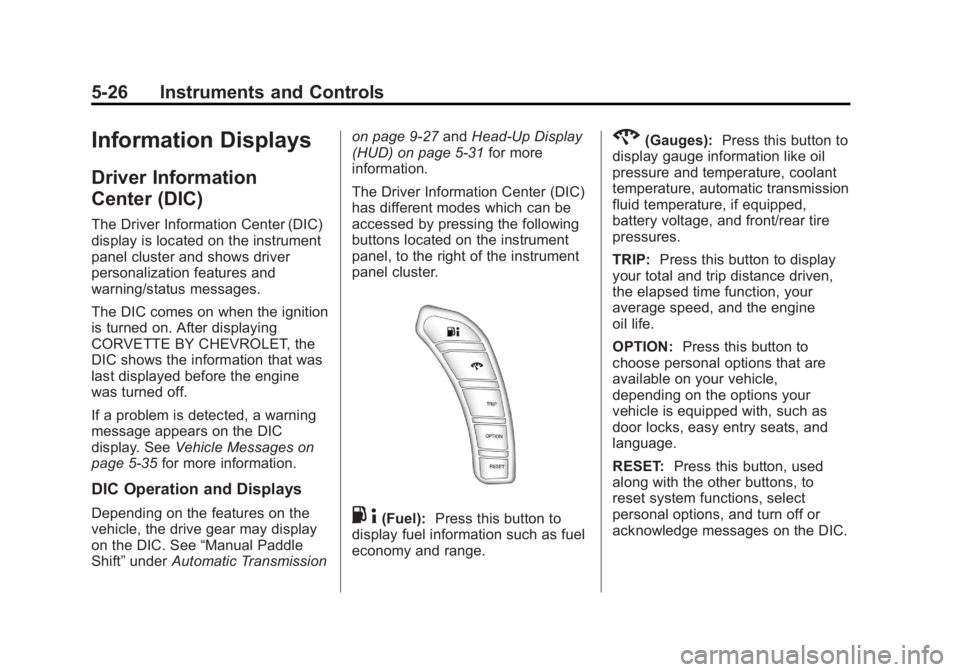
The Driver Information Center (DIC)
has different modes which can be
accessed by pressing the following
buttons located on the instrument
panel, to the right of the instrument
panel cluster.. 4(Fuel): Press this button to
display fuel information such as fuel
economy and range.
2(Gauges): Press this button to
display gauge information like oil
pressure and temperature, coolant
temperature, automatic transmission
fluid temperature, if equipped,
battery voltage, and front/rear tire
pressures.
TRIP: Press this button to display
your total and trip distance driven,
the elapsed time function, your
average speed, and the engine
oil life.
OPTION: Press this button to
choose personal options that are
available on your vehicle,
depending on the options your
vehicle is equipped with, such as
door locks, easy entry seats, and
language.
RESET: Press this button, used
along with the other buttons, to
reset system functions, select
personal options, and turn off or
acknowledge messages on the DIC.
Page 141 of 432
Black plate (27,1)Chevrolet Corvette Owner Manual - 2012
Instruments and Controls 5-27
Fuel Button
The fuel button displays average
fuel economy and instantaneous
fuel economy, calculated for your
specific driving conditions, and
range information.
Average Fuel Economy:The
average fuel economy is viewed as
a long-term approximation of your
overall driving conditions. You
should reset the average fuel
economy display every time you
refuel. If you press the RESET
button in this mode while you are
driving, the system will reset this
display and begin figuring fuel
economy from that point in time.
Press the fuel button to display
average fuel economy, such as:
.AVERAGE FUEL ECONOMY
11.7 L/100 km or
.AVERAGE FUEL ECONOMY
20.1 MPG Instantaneous Fuel Economy:
Instantaneous fuel economy reflects
only the fuel economy that the
vehicle has right now and will
change frequently as driving
conditions change. Unlike average
fuel economy, this menu item
cannot be reset.
Press the fuel button again to
display instantaneous fuel economy,
such as:
.INSTANT FUEL ECONOMY
11.7 L/100 km or
.INSTANT FUEL ECONOMY
20.1 MPG
Fuel Range: The range calculates
the remaining distance you can
drive without refueling. It is based
on fuel economy and the fuel
remaining in the tank. Press the fuel button again to
display the range, such as:
.RANGE 48 km or
.RANGE 30 MI
If the LOW FUEL warning is
displayed or if RANGE is less than
64 km (40 miles), the display will
read RANGE LOW.
The fuel economy data used to
determine fuel range is an average
of recent driving conditions. As your
driving conditions change, this data
is gradually updated automatically.
If the vehicle has been idling for a
long time, the range displayed on
the DIC could be abnormally low.
The vehicle must be driven
8 to 16 km (5 to 10 miles) to get an
accurate reading.
Page 158 of 432
Black plate (44,1)Chevrolet Corvette Owner Manual - 2012
5-44 Instruments and Controls
Ride Control System
Messages
ACTIVE HANDLING
This message displays when the
Active Handling System is
operating. The Active Handling
System is a computer controlled
system that assists the driver in
controlling the vehicle in difficult
driving conditions. You may feel or
hear the system working and see
the ACTIVE HANDLING message
displayed in the DIC. This message
stays on for a few seconds following
the active handling event. This is
normal when the system is
operating. SeeActive Handling
System on page 9‑38 andBraking
on page 9‑4.
ACTIVE HANDLING READY
This message displays when the
functional check of the Active
Handling System has been
completed. See Active Handling
System on page 9‑38 for more
information.
COMPETITIVE DRIVING MODE
This message displays and a
sound will be heard when the
Competitive Driving mode is
selected. The instrument panel
cluster light will be on when the
Competitive Driving mode is
selected. If your vehicle is equipped
with a manual transmission,
Launch Control is available when
this mode is selected. The Traction
Control System (TCS) will not be
operating while in the Competitive
Driving mode. Adjust your driving
accordingly. This system is available
on all models except ZR1 and Z06. See
Competitive Driving Mode on
page 9‑39, including the “Launch
Control” information.
MAXIMUM SPEED 129 km/h
(80 MPH)
This message displays when a
malfunction is present in the
Selective Ride Control system.
The vehicle speed will be limited to
a value determined by the vehicle
when the shock absorber system
has failed and the shocks are in
their full soft mode. Have the vehicle
serviced by your dealer as soon as
possible.
To acknowledge the message, press
the RESET button. The message
reappears every 10 minutes until
this condition changes.
Page 161 of 432
Black plate (47,1)Chevrolet Corvette Owner Manual - 2012
Instruments and Controls 5-47
INOPERATIVE, and MAXIMUM
SPEED 129 km/h (80 MPH) will
display together. SeeSelective Ride
Control on page 9‑43 for more
information.
SERVICE TRACTION SYSTEM
If this message displays when you
are driving, there is a problem with
the Traction Control System (TCS)
and the vehicle is in need of
service. See your dealer. When this
message is displayed, the system
will not limit wheel spin. Adjust your
driving accordingly.
The traction control system (TCS)
warning light on the instrument
panel cluster will also turn on and a
sound will be heard.
When this message is displayed,
the computer controlled systems will
not assist the driver in controlling
the vehicle. Have the system
repaired by your dealer as soon
as possible. Adjust your driving
accordingly. See Traction Control
System (TCS) on page 9‑36 for
more information. To acknowledge the message,
press the RESET button.
SHOCKS INOPERATIVE
This message displays when a
malfunction is present in the
Selective Ride Control system
which is causing the shocks to
be in their full soft mode. This is a
warning to the driver that the vehicle
handling may be affected. Have the
vehicle serviced by your dealer as
soon as possible.
To acknowledge the message, press
the RESET button . The message
reappears every 10 minutes until
this condition changes.
TRACTION SYSTEM ACTIVE
This message displays when the
Traction Control System (TCS) is
limiting wheel spin. Slippery road
conditions may exist if this message
is displayed, so adjust your driving
accordingly. The message stays on
for a few seconds after the TCS
stops limiting wheel spin. See
Traction Control System (TCS) on
page 9‑36
for more information.
TRACTION SYSTEM AND
ACTIVE HANDLING –OFF
This message displays, the
instrument panel cluster light turns
on, and a sound will be heard when
the Traction Control System (TCS)
and Active Handling System are
turned off by pressing the Active
Handling System button on the
center console for five seconds.
The Antilock Brake System (ABS)
remains on with the TCS and Active
Handling System off. Adjust your
driving accordingly. See Traction
Control System (TCS) on page 9‑36
and Active Handling System on
page 9‑38 for more information.
To acknowledge this message,
press the RESET button.
Page 166 of 432
Black plate (52,1)Chevrolet Corvette Owner Manual - 2012
5-52 Instruments and Controls
SeeRun-Flat Tires on page 10‑56,
Vehicle Load Limits on page 9‑14,
Tire Pressure on page 10‑62, and
Tire Pressure Monitor System on
page 10‑64. The DIC also shows
the tire pressure values. See Driver
Information Center (DIC) on
page 5‑26.
To acknowledge the message, press
the RESET button. A message
reappears every 10 minutes until the
condition is corrected.
Transmission Messages
SERVICE TRANSMISSION
This message displays when there
is a problem with the transmission.
See your dealer for service.
SHIFT TO PARK
If the vehicle has an automatic
transmission, this message displays
if the vehicle is not in P (Park) when
the engine is being turned off. The vehicle will be in ACCESSORY.
Once the shift lever is moved to
P (Park), the vehicle will turn off.
The vehicle will remain in
ACCESSORY, without the 20 minute
time-out period, until the shift lever
is moved to P (Park) or until the
driver presses the pushbutton to
restart the vehicle. See
Ignition
Positions on page 9‑20 for more
information.
TRANSMISSION HOT IDLE
ENGINE
This message displays and four
chimes sound if the transmission
fluid temperature rises above
132°C (270°F) or rises rapidly.
The transmission may shift gears
or apply the torque converter clutch
to reduce the fluid temperature.
Driving aggressively or driving
on long hills can cause the
transmission fluid temperature to be
higher than normal. If this message
appears, you may continue to drive at a slower speed. Monitor the
transmission fluid temperature and
allow it to cool to at least 110°C
(230°F). The transmission fluid
temperature can be monitored with
the gauges button on the DIC.
See
“DIC Operation and Displays”
under Driver Information Center
(DIC) on page 5‑26 andAutomatic
Transmission Fluid on page 10‑20.
Also check the engine coolant
temperature. If it is also hot, see
Engine Overheating on page 10‑30.
If this message is displayed during
normal vehicle operation on flat
roads, the vehicle may need
service. See your dealer for an
inspection.
If driving in a performance or
competitive manner, the use of
(S) Sport Automatic Mode or
(S) Sport Manual Paddle Shift
gear selection is recommended.
See Automatic Transmission on
page 9‑27 for more information.
Page 167 of 432
Black plate (53,1)Chevrolet Corvette Owner Manual - 2012
Instruments and Controls 5-53
To acknowledge the message,
press the RESET button.
The message reappears every
10 minutes until this condition
changes. If you do not press the
RESET button, the message
remains on the display until the
condition changes.
UPSHIFT NOW
SeeManual Transmission on
page 9‑32.
Vehicle Reminder
Messages
ACCESSORY MODE ON
This message displays when the
vehicle is in accessory mode.
ICE POSSIBLE
This message displays when the
outside air temperature is cold
enough to create icy road
conditions. Adjust your driving
accordingly.
OPTIONS UNAVAILABLE
This message displays for a few
seconds if a RKE transmitter that is
not labeled 1 or 2 is used and you
try to personalize the features on
the vehicle by pressing the OPTION
button. The personalization system
will not recognize the transmitter
and the DIC will not display the
current driver number or the menus
used to set personalizations.
The personalization features will
then be set to the default states.
See Vehicle Personalization on
page 5‑54 for more information.
SET PARK BRAKE FOR
SEAT RECALL
If the vehicle has a manual
transmission, this message displays
if you try to recall the memory
positions when the ignition is on
and the parking brake is not set.
If the vehicle is on, you must set
the parking brake in order for the
memory positions to recall.
SeeMemory Seats on page 3‑4 for
more information.
Washer Fluid Messages
CHECK WASHER FLUID
See Washer Fluid on page 10‑34.
Page 169 of 432
Black plate (55,1)Chevrolet Corvette Owner Manual - 2012
Instruments and Controls 5-55
Entering the Personal
Options Menu
To enter the personal options menu,
use the following steps:
1. If you have an automatictransmission vehicle, turn the
vehicle on with the shift lever in
P (Park).
If you have a manual
transmission vehicle, turn the
vehicle on with the parking
brake set.
To avoid excessive drain on the
battery, it is recommended that
the headlamps are turned off.
2. Press the OPTION button and you will enter the PERSONAL
OPTIONS menu. The DIC will display the current
driver number (1 or 2) for a
few seconds and then will
display instructions on which
buttons to use for setting the
personalizations. The RESET
button is used to select a
setting for a particular feature.
The OPTION button is used to
move to the next feature.
3. Press the OPTION button while the instruction screen is
displayed to enter the first
personalization menu item.
4. Once you have cycled through all of the personal options,
pressing the OPTION button a
final time exits the personal
options menu. In addition,
if no button is pressed within
45 seconds, the DIC will exit the
personal options menu. Personal Options
The following options are available
for programming:
Display Units:
This option allows
you to choose the measurement
units.
Press the OPTION button until
DISPLAY UNITS appears on the
display, then press the RESET
button to scroll through the
following modes:
.ENGLISH (default)
.METRIC
If you choose ENGLISH, all
information will be displayed in
English units.
If you choose METRIC, all
information will be displayed in
metric units.
When the mode you want is
selected, press the OPTION button
to set your choice and advance to
the next personal option.
Page 171 of 432
Black plate (57,1)Chevrolet Corvette Owner Manual - 2012
Instruments and Controls 5-57
When the mode you want is
selected, press the OPTION button
to set your choice and advance to
the next personal option.
Approach Lights:This option
briefly turns on the parking lamps,
the high-beam headlamps, and the
back-up lamps during low light
periods when the RKE transmitter is
used to unlock the vehicle.
Press the OPTION button until
APPROACH LIGHTS appears on
the display, then press the RESET
button to scroll through the following
modes:
.OFF
.ON (default)
If you choose OFF, this option will
turn off.
If you choose ON, the parking
lamps, the high-beam headlamps,
and the back-up lamps will come on for 20 seconds during
low light periods when all of the
following occur:
.You press the unlock button on
the RKE transmitter.
.Both of the doors are closed.
.The vehicle is off or in RAP.
The lamps remain on for 20 seconds
or until a door is opened, the lock
button on the RKE transmitter is
pressed, or the vehicle is no longer
off or in RAP.
See Remote Keyless Entry (RKE)
System on page 2‑3 for more
information.
When the mode you want is
selected, press the OPTION button
to set your choice and advance to
the next personal option.
Twilight Delay: This option allows
you to set the amount of time
you want the parking lamps and
high-beam headlamps to remain
on after you exit the vehicle. This will occur when the vehicle is
off or in RAP and the headlamps
are on due to the automatic
headlamp system. The parking
lamps and high-beam headlamps
will remain on until the driver
selected time expires, the exterior
lamp control is activated, or the
vehicle is no longer off or in RAP.
Press the OPTION button until
TWILIGHT DELAY appears on the
display, then press the RESET
button to scroll through the following
modes:
.OFF
.15 S
.30 S (default)
.90 S
If you choose OFF, this option will
turn off.
If you choose 15 S, the twilight
delay time will be set to 15 seconds.
If you choose 30 S, the twilight
delay time will be set to 30 seconds.
Page 172 of 432
Black plate (58,1)Chevrolet Corvette Owner Manual - 2012
5-58 Instruments and Controls
If you choose 90 S, the twilight
delay time will be set to 90 seconds.
When the mode you want is
selected, press the OPTION button
to set your choice and advance to
the next personal option.
Flash at Unlock:This option
activates the front and rear turn
signals for two short flashes when
the unlock or hatch/trunk button on
the RKE transmitter is pressed.
This will only occur when the
vehicle is off.
Press the OPTION button until
FLASH AT UNLOCK appears on the
display, then press the RESET
button to scroll through the following
modes:
.YES (default)
.NO
If you choose YES, the front and
rear turn signals will flash twice
when you press the unlock button or
the hatch/trunk button on the RKE
transmitter. If you choose NO, this option will
turn off.
When the mode you want is
selected, press the OPTION button
to set your choice and advance to
the next personal option.
Flash at Lock:
This option
activates the front and rear turn
signals for one long flash when the
lock button on the RKE transmitter
is pressed. This will only occur
when the vehicle is off. If the lock
button on the RKE transmitter is
pressed again within five seconds,
the horn will sound regardless of
which setting you have selected.
Press the OPTION button until
FLASH AT LOCK appears on the
display, then press the RESET
button to scroll through the following
modes:
.YES (default)
.NO If you choose YES, the front and
rear turn signals will flash once
when you press the lock button on
the RKE transmitter.
If you choose NO, this option will
turn off.
When the mode you want is
selected, press the OPTION button
to set your choice and advance to
the next personal option.
FOB Reminder:
This option
sounds the horn three times when
the driver door is closed and there is
a RKE transmitter inside the interior
of the vehicle. This will only occur
when the vehicle is off.
Press the OPTION button until FOB
REMINDER appears on the display,
then press the RESET button to
scroll through the following modes:
.YES
.NO (default)