ECO mode CHEVROLET CORVETTE C6 2012 Owner's Manual
[x] Cancel search | Manufacturer: CHEVROLET, Model Year: 2012, Model line: CORVETTE C6, Model: CHEVROLET CORVETTE C6 2012Pages: 432, PDF Size: 5.73 MB
Page 173 of 432

Black plate (59,1)Chevrolet Corvette Owner Manual - 2012
Instruments and Controls 5-59
If you choose YES, the horn will
sound three times when a RKE
transmitter is inside of the vehicle
while the ignition is turned off and
the driver door is closed.
If you choose NO, this option will
turn off.
When the mode you want is
selected, press the OPTION button
to set your choice and advance to
the next personal option.
Passive Door Locking:This
option allows you to select whether
the doors automatically lock during
normal vehicle exit. When the
ignition is turned off and all doors
become closed, the vehicle will
determine how many RKE
transmitters remain in the vehicle
interior. If at least one RKE
transmitter has been removed from
the interior of the vehicle, the doors
will lock after a short delay.
For example, if there are two RKE
transmitters in the vehicle and one
is removed, the other will be locked in. The RKE transmitter locked in
the vehicle can still be used to start
the vehicle or unlock the doors,
if needed. A person approaching the
outside of the locked vehicle without
an authorized RKE transmitter,
however, will not be able to open
the door, even with a transmitter in
the vehicle.
You may temporarily disable the
passive door locking feature by
pressing the door unlock switch for
three seconds on an open door.
Passive door locking will then
remain disabled until a door lock
switch is pressed or until the power
mode transitions from the off
power mode.
Press the OPTION button until
PASSIVE DOOR LOCKING appears
on the display, then press the
RESET button to scroll through the
following modes:
.OFF (default)
.SILENT
.HORNIf you choose OFF, this option will
turn off.
If you choose SILENT, the doors will
automatically lock a short time after
you remove a RKE transmitter from
the interior of the vehicle and close
both doors.
If you choose HORN, the doors will
automatically lock and the horn will
sound a short time after you remove
a RKE transmitter from the interior
of the vehicle and close both doors.
If you are parking in a quiet area
and do not want the horn to sound
when the doors lock, press the lock
button on the RKE transmitter
immediately after removing it from
the interior and closing the doors.
This will lock the doors and cancel
the passive locking for this ignition
cycle.
When the mode you want is
selected, press the OPTION button
to set your choice and advance to
the next personal option.
Page 175 of 432

Black plate (61,1)Chevrolet Corvette Owner Manual - 2012
Instruments and Controls 5-61
Press the OPTION button until
LANGUAGE appears on the display,
then press the RESET button to
scroll through the following modes:
.ENGLISH (default)
.DEUTSCH (German)
.FRANCAIS (French)
.ITALIANO (Italian)
.ESPANOL (Spanish)
.JAPANESE
If you choose a language that you
do not understand, press the
OPTION and RESET buttons for
five seconds. The DIC will begin
displaying all of the various
languages one by one for as long
as the buttons are pressed. When
the desired language is displayed,
release the buttons and the DIC will
set to this language.
When the mode you want is
selected, press the OPTION button
to set your choice and advance to
the next personal option. Personalize Name:
This option
allows you to type in a name or
greeting that will appear on the DIC
display whenever the corresponding
RKE transmitter (1 or 2) is used or
one of the memory buttons (1 or 2)
located on the driver door is
pressed.
Press the OPTION button until
PERSONALIZE NAME appears on
the display, then press the RESET
button to scroll through the following
modes:
.YES
.NO (default)
If you choose YES, you can type in
a name that will appear on the DIC
display.
To program a name, use the
following procedure:
1. Enter the PERSONAL OPTIONS menu and select the driver
number (1 or 2) that you would
like to program by following the instructions listed previously
under
“Entering the Personal
Options Menu”.
2. Press the OPTION button until the PERSONALIZE NAME
option appears on the display.
3. Select YES under PERSONALIZE NAME by
pressing the RESET button.
4. Press the OPTION button and a cursor will display where you
can insert a letter.
5. Press the OPTION button again until the letter you want is
displayed. To scroll through the
letters faster and without a
beeping noise, keep the
OPTIONS button depressed.
There are alpha/numeric
characters and a blank space
available.
Page 180 of 432
Black plate (66,1)Chevrolet Corvette Owner Manual - 2012
5-66 Instruments and Controls
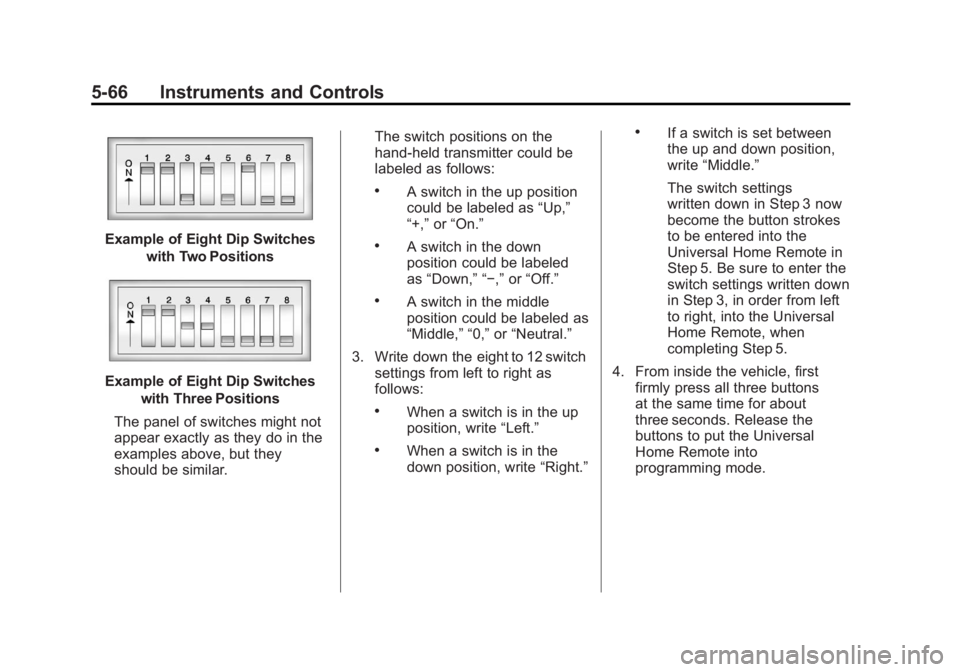
Example of Eight Dip Switcheswith Two Positions
Example of Eight Dip Switcheswith Three Positions
The panel of switches might not
appear exactly as they do in the
examples above, but they
should be similar. The switch positions on the
hand-held transmitter could be
labeled as follows:
.A switch in the up position
could be labeled as
“Up,”
“+,” or“On.”
.A switch in the down
position could be labeled
as “Down,” “−,” or“Off.”
.A switch in the middle
position could be labeled as
“Middle,” “0,” or“Neutral.”
3. Write down the eight to 12 switch settings from left to right as
follows:
.When a switch is in the up
position, write “Left.”
.When a switch is in the
down position, write “Right.”
.If a switch is set between
the up and down position,
write“Middle.”
The switch settings
written down in Step 3 now
become the button strokes
to be entered into the
Universal Home Remote in
Step 5. Be sure to enter the
switch settings written down
in Step 3, in order from left
to right, into the Universal
Home Remote, when
completing Step 5.
4. From inside the vehicle, first firmly press all three buttons
at the same time for about
three seconds. Release the
buttons to put the Universal
Home Remote into
programming mode.
Page 182 of 432
Black plate (68,1)Chevrolet Corvette Owner Manual - 2012
5-68 Instruments and Controls
Universal Remote System
Operation
Press and hold the appropriate
button for at least one-half second.
The indicator light comes on while
the signal is being transmitted.
Operation can occur:
.If the vehicle is in
accessory mode.
.If the vehicle is running.
.If the vehicle is in Retained
Accessory Mode (RAP).
SeeRetained Accessory Power
(RAP) on page 9‑24 for more
information.
.Up to an additional 10 minutes
after RAP finishes.
.Up to 10 minutes after any door
is opened.
Reprogramming Universal
Home Remote Buttons
Any of the three buttons can be
reprogrammed by repeating the
instructions.
Erasing Universal Home
Remote Buttons
The programmed buttons should be
erased when the vehicle is sold or
the lease ends.
To erase either Rolling Code or
Fixed Code on the Universal Home
Remote device:
1. Press and hold the two outside buttons at the same time for
approximately 20 seconds, until
the indicator lights, located
directly above the buttons, begin
to blink rapidly.
2. Once the indicator lights begin to blink, release both buttons.
The codes from all buttons are
erased. For help or information on the
Universal Home Remote System,
call the customer assistance phone
number under
Customer Assistance
Offices (U.S. and Canada) on
page 13‑5 orCustomer Assistance
Offices (Mexico) on page 13‑6.
Page 203 of 432
Black plate (13,1)Chevrolet Corvette Owner Manual - 2012
Infotainment System 7-13
Single CD Radio:
Press RPT to hear a track over
again; REPEAT displays. Press
again to turn off repeat; REPEAT
OFF displays.
RDM (Random):Press to hear the
tracks in random, rather than
sequential order.
CD Radio:
Press and release RDM until
RANDOM DISC PLAY displays.
Press and release RDM until
RANDOM OFF displays to turn off
random play.
R(Song List): The Song List
feature can save 20 track selections.
To save tracks:
1. If S-LIST is displayed, press
R
to turn it off.
2. Select the desired CD by pressing the numbered
pushbutton and then use
u
orO/eknob to select the
track to be saved. 3. Press and hold
Runtil a beep
sounds and ADDED SONG
displays.
4. Repeat Steps 2 and 3 to save other selections.
SONGLIST FULL displays if more
than 20 selections are stored.
To play tracks:
1. Press
R. One beep sounds and
S-LIST displays. The recorded
tracks begin to play in the order
they were saved.
2. Press
toruto go back or
forward within the saved tracks.
To delete tracks:
1. Press
Rto turn song list on.
S-LIST displays.
2. Press
toru, and use
the
O/eknob to select the
desired track to be deleted.
3. Press and hold
Runtil SONG
REMOVED displays. After a track has been deleted, the
remaining tracks are moved up the
list. When another track is added to
the song list, the track is added to
the end of the list.
To delete the entire song list:
1. Press
Rto turn song list on.
S-LIST displays.
2. Press and hold
Rfor more than
four seconds. One beep sounds
and SONGLIST EMPTY displays
to confirm that the song list has
been deleted.
If a CD is ejected, and the song
list contains saved tracks from
that CD, those tracks are
automatically deleted from the
song list. Any tracks saved to the
song list again are added to the
bottom of the list.
To end song list mode, press
R.
One beep sounds and S-LIST is
removed from the display.
Page 206 of 432
Black plate (16,1)Chevrolet Corvette Owner Manual - 2012
7-16 Infotainment System
Auxiliary Devices
Using the Auxiliary Input Jack
The radio system has an auxiliary
input jack located on the right side
of the faceplate. This is not an audio
output; do not plug the headphone
set into the front auxiliary input jack.
An external audio device can be
connected to the auxiliary input jack
for use as another source for audio
listening.
Drivers are encouraged to set up
any auxiliary device while the
vehicle is in P (Park). SeeDefensive
Driving on page 9‑3.
Connect a 3.5 mm (1/8 in) cable to
the radio’s front auxiliary input jack
to use a portable audio player.
The radio displays AUX INPUT
DEVICE when a device is
connected and begins playing
audio from that device. Top Knob (Power/Volume):
Turn
to increase or decrease the volume
of the portable player. Additional
volume adjustments can be made
from the portable device.
BAND: Press to listen to the radio
while a portable audio device is
playing. The portable audio device
continues playing.
CD/AUX (CD/Auxiliary): Press to
play a CD while a portable audio
device is playing. Press again and
the system begins playing audio
from the connected portable audio
player. If a portable audio player is
connected, AUX INPUT DEVICE
displays. If a portable audio player
is not connected, AUX INPUT
DEVICE does not display.
Phone
Bluetooth
For vehicles equipped with
Bluetooth capability, the system can
interact with many cell phones,
allowing:
.Placement and receipt of calls in
a hands-free mode.
.Sharing of the cell phone’s
address book or contact list with
the vehicle.
To minimize driver distraction,
before driving, and with the vehicle
parked:
.Become familiar with the
features of the cell phone.
Organize the phone book and
contact lists clearly and delete
duplicate or rarely used entries.
If possible, program speed dial
or other shortcuts.
.Review the controls and
operation of the infotainment
system.
Page 215 of 432
Black plate (1,1)Chevrolet Corvette Owner Manual - 2012
Climate Controls 8-1
Climate Controls
Climate Control Systems
Dual Automatic ClimateControl System . . . . . . . . . . . . . . 8-1
Air Vents
Air Vents . . . . . . . . . . . . . . . . . . . . . . 8-6
Maintenance
Passenger CompartmentAir Filter . . . . . . . . . . . . . . . . . . . . . 8-7
Climate Control Systems
Dual Automatic Climate Control System
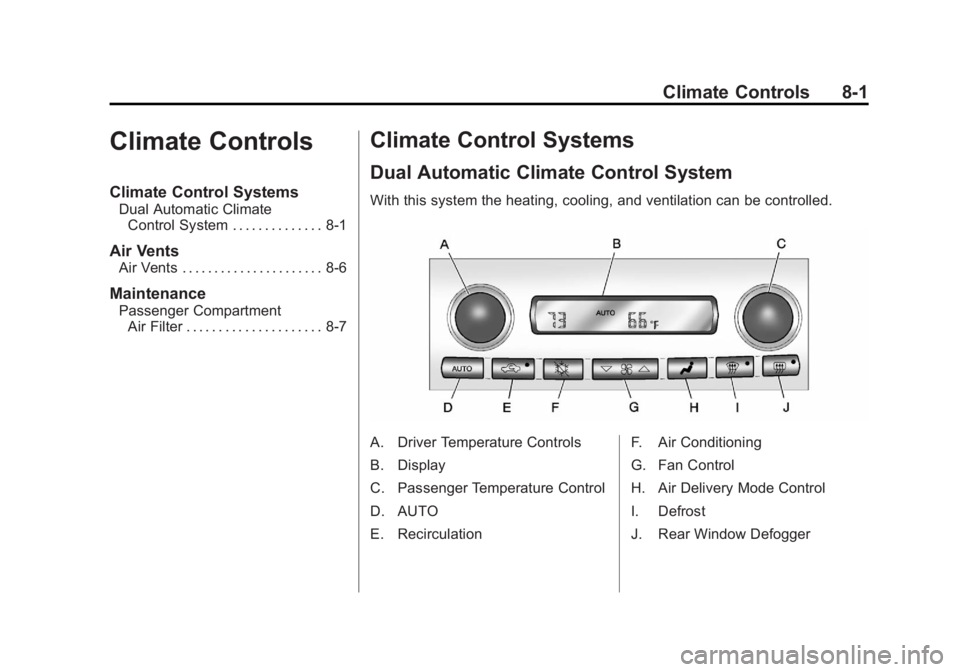
With this system the heating, cooling, and ventilation can be controlled.
A. Driver Temperature Controls
B. Display
C. Passenger Temperature Control
D. AUTO
E. Recirculation F. Air Conditioning
G. Fan Control
H. Air Delivery Mode Control
I. Defrost
J. Rear Window Defogger
Page 216 of 432
Black plate (2,1)Chevrolet Corvette Owner Manual - 2012
8-2 Climate Controls
When the vehicle is first started,
the display shows the driver's
temperature setting, the outside
temperature, the fan speed, and the
air delivery, for about 10 seconds.
The outside temperature is shown
in the center of the display.
The digital display will show the
readings in Fahrenheit or Celsius.
See“Personal Options” under
Vehicle Personalization on
page 5‑54 for information on
changing your display.
Automatic Operation
AUTO (Automatic): Press the
AUTO button to place the entire
system in the automatic mode.
When automatic operation is active,
the system automatically controls
the inside temperature, the air
delivery mode, and the fan speed. After a 10 second display of the
current settings, the word AUTO,
the driver's temperature setting and
the outside temperature will be
shown. The system operates to
reach the set temperature as quickly
as possible. The AUTO control
system works best with the windows
up and the removable roof installed
or the convertible top up.
1. Press the AUTO button.
2. Adjust the temperature to a
comfortable setting between
16°C (60°F) and 32°C (90°F).
Choosing the coldest or warmest
temperature setting will not
cause the system to heat or cool
any faster. A setting of 23°C
(73°F) is suggested.
In cold weather, the system will
start at reduced fan speeds to
avoid blowing cold air into
your vehicle until warmer air is available. The system starts out
blowing air at the floor but may
change modes automatically as
the vehicle warms up to maintain
the chosen temperature setting.
The length of time needed for
warm up depends on the outside
temperature and the length of
time that has elapsed since the
vehicle was last driven.
3. Wait for the system to regulate. This may take from 10 to
30 minutes. Then adjust the
temperature, if necessary.
Do not cover the solar sensor
located in the center of the
instrument panel, near the
windshield. For more information
on the solar sensor, see “Sensors”
later in this section.
Page 218 of 432
Black plate (4,1)Chevrolet Corvette Owner Manual - 2012
8-4 Climate Controls
1(Defrost):This mode clears the
windows of fog or frost more quickly.
Air is directed to the windshield, with
a small amount directed to the side
window outlets. The indicator light
comes on and the digital display will
show the defrost mode symbol and
fan speed when the front defrost
mode is being used. In this mode,
the system automatically turns off
the recirculation and runs the air
conditioning compressor, unless the
outside temperature is at or below
freezing. Recirculation cannot be
selected while in the defrost mode.
Pressing
1again will return the
system to the last operating mode.
For severe ice conditions, turn the
driver's temperature knob to 32°C
(90°F) while in defrost mode.
Do not drive the vehicle until all the
windows are clear.
^(Air Conditioning Off): Press to
turn the air conditioning compressor
off. Press AUTO to return to
automatic operation. When in
AUTO, the air conditioning
compressor comes on automatically,
as needed.
Air conditioning does not operate
at temperatures below about
2°C to 4°C (35°F to 40°F).
In temperatures above 4°C (40°F),
the air conditioning cannot be
turned off in defrost and defog,
as it helps to remove moisture from
the vehicle. It also helps to keep the
windows clear.
You may notice a slight change in
engine performance when the air
conditioning compressor shuts off
and turns on again. This is normal.
The system is designed to make
adjustments to help with fuel
economy while still maintaining the
selected temperature. On hot days, open the windows to
let hot inside air escape; then close
them. This helps to reduce the time
it takes for the vehicle to cool down.
It also helps the system to operate
more efficiently.
For quick cool down on hot days
press the AUTO button and
adjust the temperature to a cool,
comfortable setting. To achieve
maximum cool down, do the
following:
1. Select
Hmode.
2. Press
?.
3. Select the a/c on.
4. Select the coolest temperature.
5. Select the highest fan speed.
Using these settings together for
long periods of time may cause
the air inside of your vehicle to
become too dry. To prevent this
Page 223 of 432
Black plate (1,1)Chevrolet Corvette Owner Manual - 2012
Driving and Operating 9-1
Driving and
Operating
Driving Information
Distracted Driving . . . . . . . . . . . . . 9-2
Defensive Driving . . . . . . . . . . . . . 9-3
Drunk Driving . . . . . . . . . . . . . . . . . 9-3
Control of a Vehicle . . . . . . . . . . . 9-4
Braking . . . . . . . . . . . . . . . . . . . . . . . 9-4
Steering . . . . . . . . . . . . . . . . . . . . . . . 9-4
Off-Road Recovery . . . . . . . . . . . . 9-5
Loss of Control . . . . . . . . . . . . . . . . 9-5
Racing or Other CompetitiveDriving . . . . . . . . . . . . . . . . . . . . . . . 9-6
Driving on Wet Roads . . . . . . . . . 9-9
Highway Hypnosis . . . . . . . . . . . 9-10
Hill and Mountain Roads . . . . . 9-10
Winter Driving . . . . . . . . . . . . . . . . 9-11
If the Vehicle Is Stuck . . . . . . . . 9-13
Vehicle Load Limits . . . . . . . . . . 9-14
Starting and Operating
New Vehicle Break-In . . . . . . . . 9-18
Front Air Dam . . . . . . . . . . . . . . . 9-19
Ignition Positions . . . . . . . . . . . . 9-20
Starting the Engine . . . . . . . . . . 9-22
Retained Accessory Power (RAP) . . . . . . . . . . . . . . . 9-24
Shifting Into Park (Automatic
Transmission) . . . . . . . . . . . . . . 9-24
Shifting out of Park . . . . . . . . . . 9-25
Parking (Manual Transmission) . . . . . . . . . . . . . . 9-26
Parking over Things That Burn . . . . . . . . . . . . . . . . . . 9-26
Engine Exhaust
Engine Exhaust . . . . . . . . . . . . . . 9-26
Running the Vehicle WhileParked . . . . . . . . . . . . . . . . . . . . . 9-27
Automatic Transmission
Automatic Transmission . . . . . 9-27
Manual Mode . . . . . . . . . . . . . . . . 9-29
Manual Transmission
Manual Transmission . . . . . . . . 9-32
Brakes
Antilock BrakeSystem (ABS) . . . . . . . . . . . . . . 9-35
Parking Brake . . . . . . . . . . . . . . . 9-36
Brake Assist . . . . . . . . . . . . . . . . . 9-36
Ride Control Systems
Traction Control System (TCS) . . . . . . . . . . . . . . 9-36
Active Handling System . . . . . 9-38
Competitive Driving Mode . . . 9-39
Limited-Slip Rear Axle . . . . . . . 9-43
Selective Ride Control . . . . . . . 9-43
Cruise Control
Cruise Control . . . . . . . . . . . . . . . 9-45