display CHEVROLET CORVETTE C7 2018 Repair Manual
[x] Cancel search | Manufacturer: CHEVROLET, Model Year: 2018, Model line: CORVETTE C7, Model: CHEVROLET CORVETTE C7 2018Pages: 353, PDF Size: 6.48 MB
Page 191 of 353
Chevrolet Corvette Owner Manual (GMNA-Localizing-U.S./Canada/Mexico-
11374030) - 2018 - crc - 4/4/17
190 Driving and Operating
Using ABS
Do not pump the brakes. Just hold
the brake pedal down firmly and let
ABS work. You may hear the ABS
pump or motor operating and feel
the brake pedal pulsate. This is
normal.
Braking in Emergencies
ABS allows you to steer and brake
at the same time. In many
emergencies, steering can help
more than even the very best
braking.
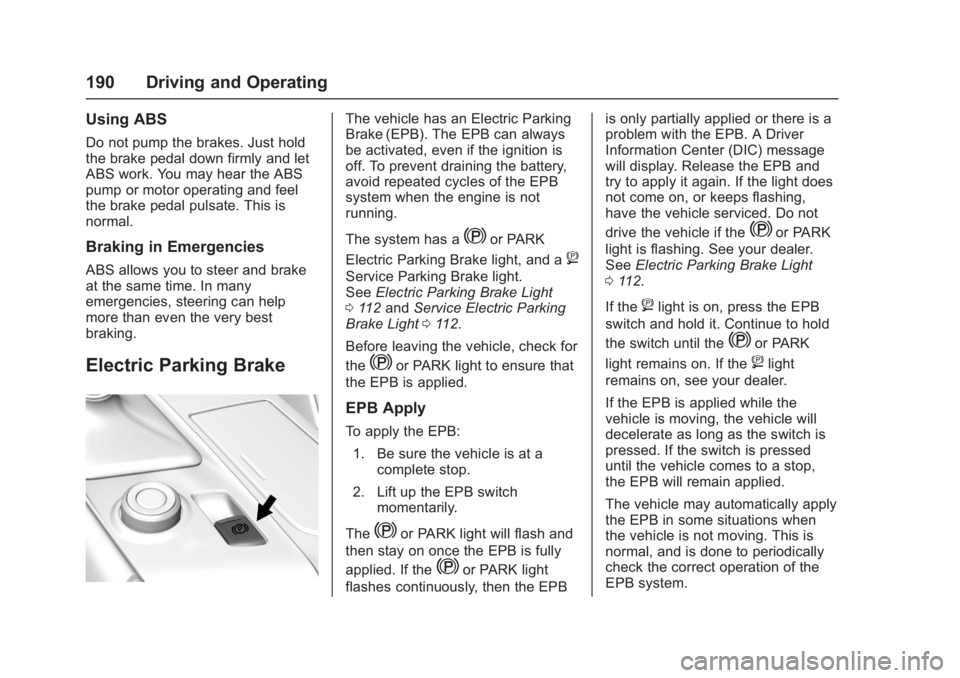
Electric Parking Brake
The vehicle has an Electric Parking
Brake (EPB). The EPB can always
be activated, even if the ignition is
off. To prevent draining the battery,
avoid repeated cycles of the EPB
system when the engine is not
running.
The system has a
Yor PARK
Electric Parking Brake light, and a
8
Service Parking Brake light.
See Electric Parking Brake Light
0 112 and Service Electric Parking
Brake Light 0112.
Before leaving the vehicle, check for
the
Yor PARK light to ensure that
the EPB is applied.
EPB Apply
To apply the EPB:
1. Be sure the vehicle is at a complete stop.
2. Lift up the EPB switch momentarily.
The
Yor PARK light will flash and
then stay on once the EPB is fully
applied. If the
Yor PARK light
flashes continuously, then the EPB is only partially applied or there is a
problem with the EPB. A Driver
Information Center (DIC) message
will display. Release the EPB and
try to apply it again. If the light does
not come on, or keeps flashing,
have the vehicle serviced. Do not
drive the vehicle if the
Yor PARK
light is flashing. See your dealer.
See Electric Parking Brake Light
0 112.
If the
8light is on, press the EPB
switch and hold it. Continue to hold
the switch until the
Yor PARK
light remains on. If the
8light
remains on, see your dealer.
If the EPB is applied while the
vehicle is moving, the vehicle will
decelerate as long as the switch is
pressed. If the switch is pressed
until the vehicle comes to a stop,
the EPB will remain applied.
The vehicle may automatically apply
the EPB in some situations when
the vehicle is not moving. This is
normal, and is done to periodically
check the correct operation of the
EPB system.
Page 194 of 353
Chevrolet Corvette Owner Manual (GMNA-Localizing-U.S./Canada/Mexico-
11374030) - 2018 - crc - 4/4/17
Driving and Operating 193
The indicator light for both systems
is in the instrument cluster. This
light will:
.Flash when TCS is limiting
wheel spin
. Flash when StabiliTrak is
activated
. Turn on and stay on when either
system is not working
If either system fails to turn on or to
activate, a message displays in the
Driver Information Center (DIC), and
dcomes on and stays on to
indicate that the system is inactive
and is not assisting the driver in
maintaining control. The vehicle is
safe to drive, but driving should be
adjusted accordingly.
If
dcomes on and stays on:
1. Stop the vehicle.
2. Turn the engine off and wait 15 seconds.
3. Start the engine. Drive the vehicle. If
dcomes on
and stays on, the vehicle may need
more time to diagnose the problem.
If the condition persists, see your
dealer.
Turning the Systems Off
and On
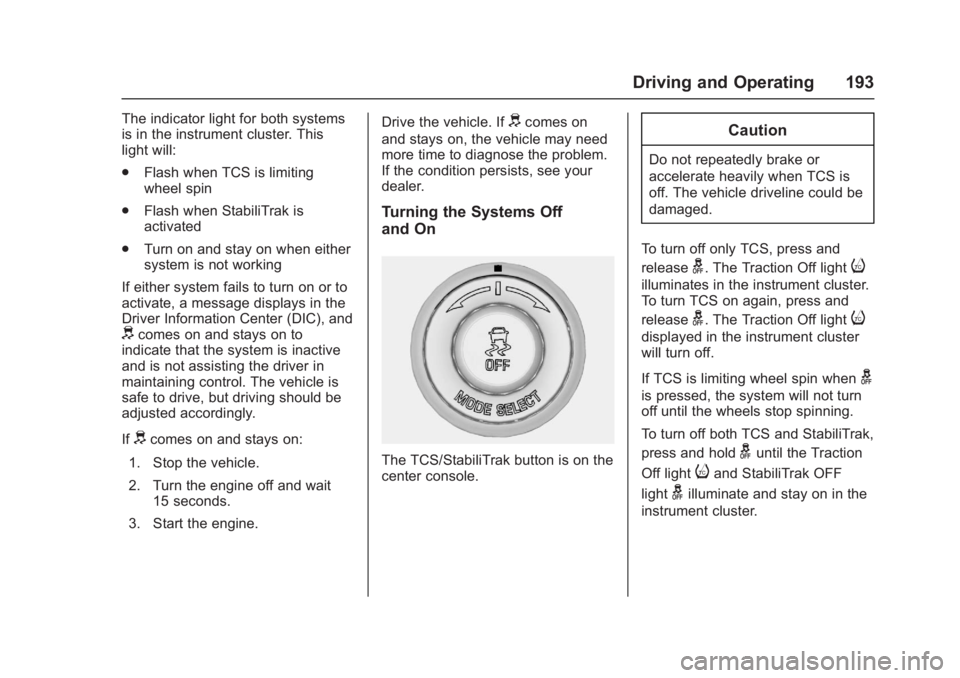
The TCS/StabiliTrak button is on the
center console.
Caution
Do not repeatedly brake or
accelerate heavily when TCS is
off. The vehicle driveline could be
damaged.
To turn off only TCS, press and
release
g. The Traction Off lighti
illuminates in the instrument cluster.
To turn TCS on again, press and
release
g. The Traction Off lighti
displayed in the instrument cluster
will turn off.
If TCS is limiting wheel spin when
g
is pressed, the system will not turn
off until the wheels stop spinning.
To turn off both TCS and StabiliTrak,
press and hold
guntil the Traction
Off light
iand StabiliTrak OFF
light
gilluminate and stay on in the
instrument cluster.
Page 195 of 353
Chevrolet Corvette Owner Manual (GMNA-Localizing-U.S./Canada/Mexico-
11374030) - 2018 - crc - 4/4/17
194 Driving and Operating
To turn TCS and StabiliTrak on
again, press and release
g. The
Traction Off light
iand StabiliTrak
OFF light
gin the instrument cluster
turn off.
If the Tire Pressure Monitor System
(TPMS) system is malfunctioning
and the DIC displays SERVICE
TIRE MONITOR SYSTEM,
StabiliTrak will be affected as
follows:
. StabiliTrak cannot be turned off
by the driver.
. If StabiliTrak is off, it will be
turned on automatically.
. Competitive Driving Mode or
Performance Traction
Management is unavailable.
. StabiliTrak will feel different in
aiding and maintaining
directional control.
Adding accessories can affect the
vehicle performance. See
Accessories and Modifications
0 213.
Driver Mode Control
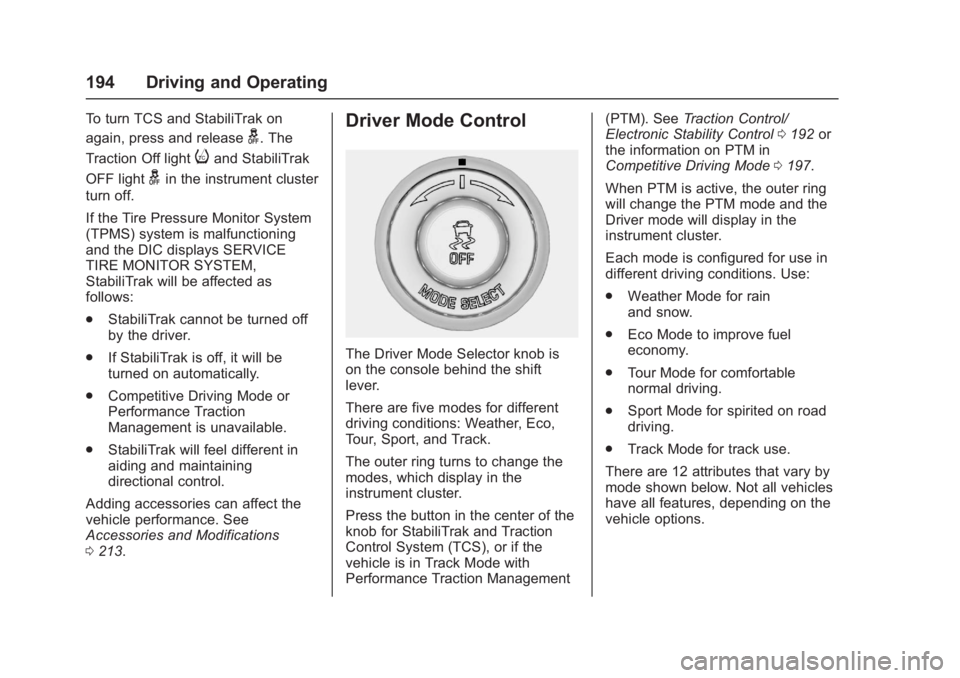
The Driver Mode Selector knob is
on the console behind the shift
lever.
There are five modes for different
driving conditions: Weather, Eco,
Tour, Sport, and Track.
The outer ring turns to change the
modes, which display in the
instrument cluster.
Press the button in the center of the
knob for StabiliTrak and Traction
Control System (TCS), or if the
vehicle is in Track Mode with
Performance Traction Management (PTM). See
Traction Control/
Electronic Stability Control 0192 or
the information on PTM in
Competitive Driving Mode 0197.
When PTM is active, the outer ring
will change the PTM mode and the
Driver mode will display in the
instrument cluster.
Each mode is configured for use in
different driving conditions. Use:
. Weather Mode for rain
and snow.
. Eco Mode to improve fuel
economy.
. Tour Mode for comfortable
normal driving.
. Sport Mode for spirited on road
driving.
. Track Mode for track use.
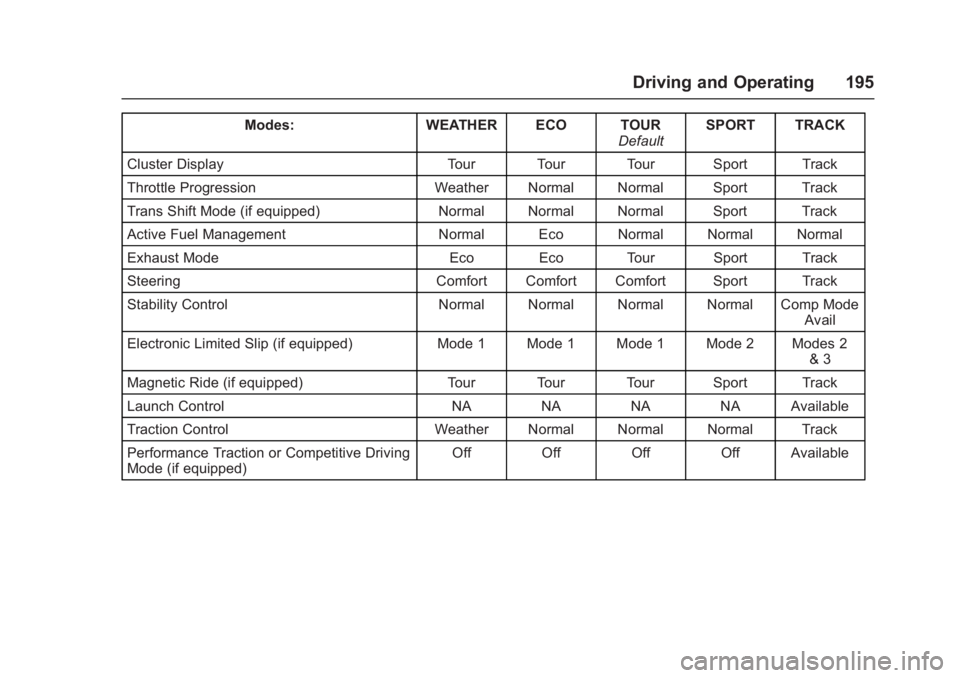
There are 12 attributes that vary by
mode shown below. Not all vehicles
have all features, depending on the
vehicle options.
Page 196 of 353
Chevrolet Corvette Owner Manual (GMNA-Localizing-U.S./Canada/Mexico-
11374030) - 2018 - crc - 4/4/17
Driving and Operating 195
Modes:WEATHER ECO TOUR
DefaultSPORT TRACK
Cluster Display Tour Tour Tour Sport Track
Throttle Progression Weather Normal Normal Sport Track
Trans Shift Mode (if equipped) Normal Normal Normal Sport Track
Active Fuel Management Normal Eco Normal Normal Normal
Exhaust Mode Eco Eco Tour Sport Track
Steering Comfort Comfort Comfort Sport Track
Stability Control Normal Normal Normal Normal Comp Mode
Avail
Electronic Limited Slip (if equipped) Mode 1 Mode 1 Mode 1 Mode 2 Modes 2
& 3
Magnetic Ride (if equipped) Tour Tour Tour Sport Track
Launch Control NA NA NA NA Available
Traction Control Weather Normal Normal Normal Track
Performance Traction or Competitive Driving
Mode (if equipped) Off Off Off Off Available
Page 197 of 353
Chevrolet Corvette Owner Manual (GMNA-Localizing-U.S./Canada/Mexico-
11374030) - 2018 - crc - 4/4/17
196 Driving and Operating
Driver Mode Selector Attributes
Affected
Instrument Cluster Display
Configures the gauge cluster
display for each mode when linked
(default):
.Tour: Modern theme which
features displays for audio and
navigation.
. Sport: Classic easy to read
Sports Car gauges.
. Track: Gauges design based on
Corvette Racing display with lap
timer.
Throttle Progression
Adjusts throttle sensitivity by
selecting how quickly or slowly the
throttle reacts to input.
Transmission Shift Mode −Paddle
Shift Automatic
. Adjusts to either a smoother or
firmer shift.
. Sport –Performance Algorithm
Liftfoot (PAL) recognizes
aggressive throttle maneuvers
and holds lower gears for greater engine braking and
enhanced vehicle control when
not using paddles. (Available in
Sport or Track Mode.)
. Track –Performance Algorithm
Shift (PAS) recognizes
aggressive cornering, heavy
braking, and high acceleration to
select and hold lower gears
when not using paddles.
Active Fuel Management (engine
cylinder shuts off)
4-Cylinder Mode
. Normal with automatic
transmission: The engine uses
8-cylinder mode when
accelerating, but changes to
4-cylinder mode when coasting.
. With manual transmission:
Active Fuel Management only
active in Eco Mode.
. Off in Manual Mode with
automatic transmission unless in
Eco Mode.
. Eco keeps the engine in
4-cylinder mode unless heavy
acceleration is needed. Exhaust (variable mode exhaust
system)
Changes when the variable exhaust
valves open.
Steering (Assist Effort)
Adjusts from a lighter steering feel
to reduced assist for more
steering feel.
Magnetic Ride Control (if
equipped)
Adjusts the shock dampening
firmness based on driving
conditions to improve comfort and
performance.
Launch Control
Available only in Track Mode for
maximum
“off-the-line” acceleration
when in Competitive or PTM modes.
Stability Control
. Competitive Driving Mode allows
less computer control to permit
some slide and drift and is
selected with
g–only available
in Sport or Track Mode.
Page 199 of 353
Chevrolet Corvette Owner Manual (GMNA-Localizing-U.S./Canada/Mexico-
11374030) - 2018 - crc - 4/4/17
198 Driving and Operating
In order to select this optional
handling mode, the vehicle mode
must be in Sport or Track Mode. In
vehicles equipped with Performance
Traction Management (PTM), the
Competitive Driving Mode is only
available in Sport Mode. In vehicles
not equipped with PTM, the
Competitive Driving Mode is
available in Sport and Track Mode.
Then quickly press
gon the center
console two times. STABILITRAK
COMPETITIVE MODE displays in
the Driver Information Center (DIC).
When
gis pressed again, the
traction off light
iand StabiliTrak
OFF light
gwill go out.
Performance Traction
Management (Z06, Grand
Sport, and Stingray with FE4)
Performance Traction Management
(PTM) integrates the Traction
Control, StabiliTrak, and Magnetic
Ride Control systems to provide
improved and consistent
performance when cornering. The
amount of available engine power is based on the mode selected, track
conditions, driver skill, and the
radius of each corner.
This light is on when the vehicle is
in the PTM mode.
To select this optional handling
mode, the vehicle mode must be
Track. Then quickly press the TCS/
StabiliTrak
gbutton on the center
console two times. PERF TRAC 1 -
WET ACTIVE HANDLING ON
displays in the DIC.
To experience the performance
benefit of this system, after entering
a curve and at the point where
normal acceleration occurs, fully
push the accelerator pedal. The
PTM system will modify the level of
engine power for a smooth and
consistent corner exit.
The PTM system contains five
modes. These modes are selected
by turning the Selective Ride
Control/Performance Traction
Management MODE SELECT knob
on the center console. Scroll up or
down through modes 1–5 by turning
the MODE SELECT knob to the
right or left.
The following is a DIC display
description and the recommended
usage of each mode:
Page 201 of 353
Chevrolet Corvette Owner Manual (GMNA-Localizing-U.S./Canada/Mexico-
11374030) - 2018 - crc - 4/4/17
200 Driving and Operating
on the instrument cluster and the
appropriate DIC message
displays.
. The vehicle is not moving.
. The steering wheel is pointing
straight.
Manual Transmissions
. The clutch is pressed and the
vehicle is in 1 (First) gear.
. The accelerator pedal is rapidly
applied to wide open throttle.
The Launch Control feature will
initially limit engine speed as the
driver rapidly applies the accelerator
pedal to wide open throttle. Allow
the engine rpm to stabilize.
A smooth, quick release of the
clutch, while maintaining the fully
pressed accelerator pedal, will
manage wheel slip. Complete shifts
as described in Manual
Transmission 0186.
Automatic Transmissions
. The brake pedal must be firmly
pressed to the floor, equivalent
to a panic brake event. .
The accelerator pedal is rapidly
applied to wide open throttle. (If
the vehicle rolls due to wide
open throttle, release the
throttle, press the brake pedal
more firmly, and re-apply the
accelerator to wide open
throttle.)
The Launch Control feature will
initially limit engine speed as the
driver rapidly applies the accelerator
pedal to wide open throttle. Allow
the engine rpm to stabilize.
A smooth, quick release of the
brake pedal, while maintaining the
fully pressed accelerator pedal, will
manage wheel slip.
After the vehicle is launched, the
system continues in Competitive
Driving Mode or Performance
Traction Management.
Competitive Driving Mode, PTM,
and Launch Control are systems
designed for a closed course race
track and not intended for use on
public roads. The systems are not
intended to compensate for lack of
driver experience or familiarity with
the race track.Limited-Slip Differential
(Stingray without
Z51 Only)
If equipped, the mechanical
limited-slip differential can give more
traction on snow, mud, ice, sand,
or gravel. It works like a standard
axle most of the time, but when
traction is low, this feature allows
the drive wheel with the most
traction to move the vehicle. For
vehicles with limited-slip differential,
driven under severe conditions, the
rear axle fluid should be changed.
See Competitive Driving Mode
0 197 andMaintenance Schedule
0 299.
Limited-Slip Differential
(Z06, Grand Sport, and
Stingray with Z51)
If equipped, the Electronic
Limited-Slip Differential (eLSD) is
automatically activated. eLSD
actively monitors vehicle sensors
and driver inputs to determine the
Page 203 of 353
Chevrolet Corvette Owner Manual (GMNA-Localizing-U.S./Canada/Mexico-
11374030) - 2018 - crc - 4/4/17
202 Driving and Operating
1:Press to turn cruise control on
or off. A white indicator comes on in
the instrument cluster when cruise
is turned on.
RES/+ : If there is a set speed in
memory, press briefly to resume to
that speed or press and hold to
accelerate. If cruise control is
already engaged, use to increase
vehicle speed.
SET/– :Press briefly to set the
speed and activate cruise control.
If cruise control is already engaged,
use to decrease vehicle speed.
*: Press to disengage cruise
control without erasing the set
speed from memory.
The speedometer reading can be
displayed in either English or metric
units. See Instrument Cluster 099.
The increment value used depends
on the units displayed. Setting Cruise Control
If
1is on when not in use, SET/–
or
RES/+ could get pressed and go
into cruise when not desired. Keep
1off when cruise is not
being used.
1. Press
1to turn the cruise
system on.
2. Get up to the desired speed.
3. Press and release SET/– on
the steering wheel.
4. Remove foot from the accelerator.
The cruise control indicator on the
instrument cluster turns green after
cruise control has been set to the
desired speed. See Instrument
Cluster 099.
Resuming a Set Speed
If the cruise control is set at a
desired speed and then the brakes
are applied or
*is pressed, the
cruise control is disengaged without
erasing the set speed from memory. Once the vehicle reaches about
40 km/h (25 mph) or more, briefly
press RES/+. The vehicle returns to
the previous set speed.
Increasing Speed While Using
Cruise Control
Do one of the following:
.
Press and hold RES/+ until the
desired speed is reached, then
release it.
. To increase vehicle speed in
small increments, briefly press
RES/+. For each press, the
vehicle goes about 1.6 km/h
(1 mph) faster.
Reducing Speed While Using
Cruise Control
Do one of the following:
. Press and hold SET/– until the
desired lower speed is reached,
then release it.
. To decrease the vehicle speed in
small increments, briefly press
SET/–. For each press, the
vehicle goes about 1.6 km/h
(1 mph) slower.
Page 205 of 353
Chevrolet Corvette Owner Manual (GMNA-Localizing-U.S./Canada/Mexico-
11374030) - 2018 - crc - 4/4/17
204 Driving and Operating
Driver Assistance
Systems
Assistance Systems for
Parking or Backing
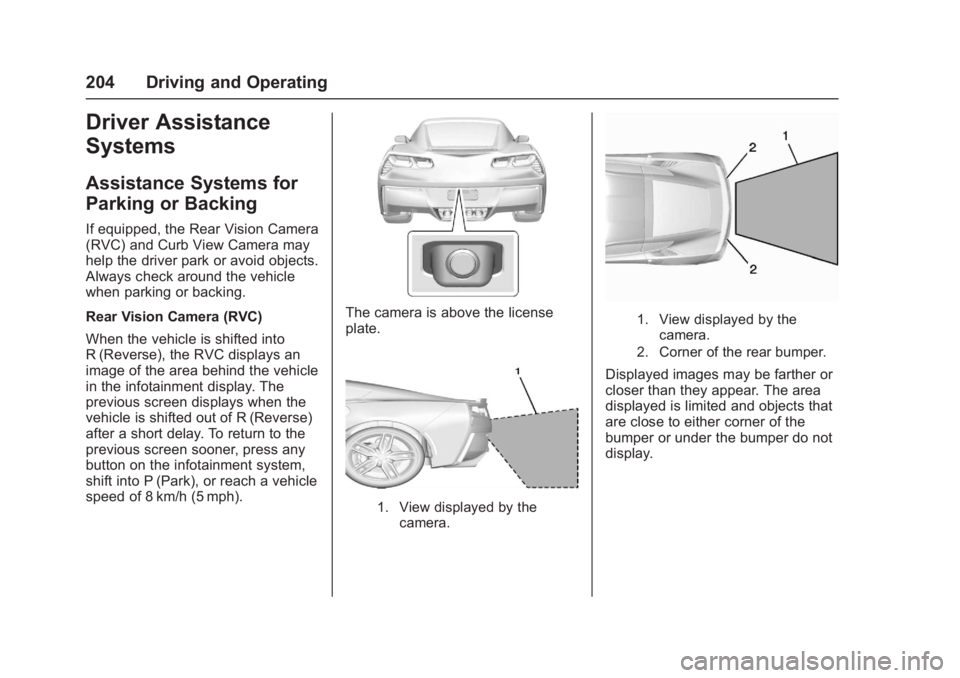
If equipped, the Rear Vision Camera
(RVC) and Curb View Camera may
help the driver park or avoid objects.
Always check around the vehicle
when parking or backing.
Rear Vision Camera (RVC)
When the vehicle is shifted into
R (Reverse), the RVC displays an
image of the area behind the vehicle
in the infotainment display. The
previous screen displays when the
vehicle is shifted out of R (Reverse)
after a short delay. To return to the
previous screen sooner, press any
button on the infotainment system,
shift into P (Park), or reach a vehicle
speed of 8 km/h (5 mph).
The camera is above the license
plate.
1. View displayed by thecamera.
1. View displayed by thecamera.
2. Corner of the rear bumper.
Displayed images may be farther or
closer than they appear. The area
displayed is limited and objects that
are close to either corner of the
bumper or under the bumper do not
display.
Page 206 of 353
Chevrolet Corvette Owner Manual (GMNA-Localizing-U.S./Canada/Mexico-
11374030) - 2018 - crc - 4/4/17
Driving and Operating 205
Curb View Camera
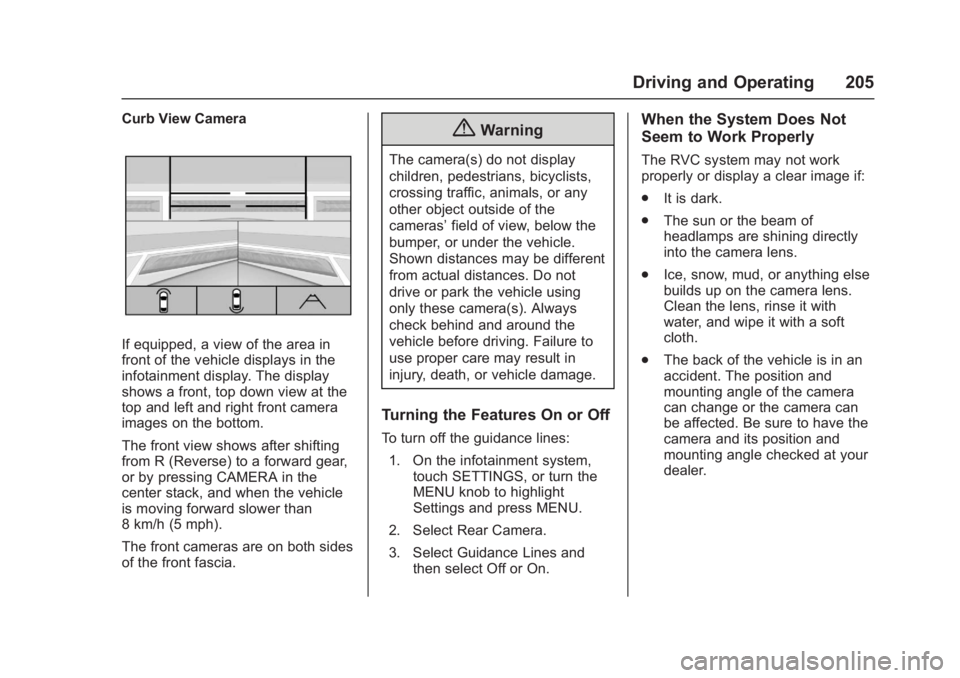
If equipped, a view of the area in
front of the vehicle displays in the
infotainment display. The display
shows a front, top down view at the
top and left and right front camera
images on the bottom.
The front view shows after shifting
from R (Reverse) to a forward gear,
or by pressing CAMERA in the
center stack, and when the vehicle
is moving forward slower than
8 km/h (5 mph).
The front cameras are on both sides
of the front fascia.
{Warning
The camera(s) do not display
children, pedestrians, bicyclists,
crossing traffic, animals, or any
other object outside of the
cameras’field of view, below the
bumper, or under the vehicle.
Shown distances may be different
from actual distances. Do not
drive or park the vehicle using
only these camera(s). Always
check behind and around the
vehicle before driving. Failure to
use proper care may result in
injury, death, or vehicle damage.
Turning the Features On or Off
To turn off the guidance lines:
1. On the infotainment system, touch SETTINGS, or turn the
MENU knob to highlight
Settings and press MENU.
2. Select Rear Camera.
3. Select Guidance Lines and then select Off or On.
When the System Does Not
Seem to Work Properly
The RVC system may not work
properly or display a clear image if:
.It is dark.
. The sun or the beam of
headlamps are shining directly
into the camera lens.
. Ice, snow, mud, or anything else
builds up on the camera lens.
Clean the lens, rinse it with
water, and wipe it with a soft
cloth.
. The back of the vehicle is in an
accident. The position and
mounting angle of the camera
can change or the camera can
be affected. Be sure to have the
camera and its position and
mounting angle checked at your
dealer.