turn signal CHEVROLET CORVETTE C7 2018 Owners Manual
[x] Cancel search | Manufacturer: CHEVROLET, Model Year: 2018, Model line: CORVETTE C7, Model: CHEVROLET CORVETTE C7 2018Pages: 353, PDF Size: 6.48 MB
Page 8 of 353

Chevrolet Corvette Owner Manual (GMNA-Localizing-U.S./Canada/Mexico-
11374030) - 2018 - crc - 3/29/17
In Brief 7
1.Air Vents 0151.
2. Turn Signal Lever. See Turn
and Lane-Change Signals
0 138.
Exterior Lamp Controls 0135.
3. Manual Shift Paddles (If Equipped). See Manual
Mode 0183.
Active Rev Match Paddles
(If Equipped). See Active Rev
Match 0188.
4. Instrument Cluster 099.
5. Windshield Wiper/Washer 095.
6. Instrument Panel Storage Button. See Instrument Panel
Storage 090.
7. Passenger Airbag Status Indicator. See Passenger
Sensing System 075.
8. Light Sensor. See Automatic
Headlamp System 0137.
9. Hazard Warning Flashers
0138.
10. Infotainment 0141. 11. Passenger Temperature
Control. See Dual Automatic
Climate Control System 0147.
Passenger Heated and
Ventilated Seat Controls
(If Equipped). See Heated and
Ventilated Front Seats 062.
12. Driver and Redundant Passenger Heated and
Ventilated Seat Controls
(If Equipped). See Heated and
Ventilated Front Seats 062.
13. Dual Automatic Climate Control
System 0147.
14. Electric Parking Brake 0190.
15. MODE SELECT Knob. See Competitive Driving Mode
0197.
16. Shift Lever (Manual Shown). SeeAutomatic Transmission
0 182 orManual Transmission
0 186.
17. Keyless Ignition. See Ignition
Positions 0175.
18. Bluetooth Controls. See “Steering Wheel Controls” in
the infotainment manual. Voice Recognition Controls.
See
“Steering Wheel Controls”
in the infotainment manual.
Driver Information Center (DIC)
Controls. See Driver
Information Center (DIC) 0116.
19. See “Steering Wheel Controls”
in the infotainment manual.
20. Horn 095.
21. Steering Wheel Adjustment
095 (Out of View).
22. Cruise Control 0201.
23. Hood Release (Out of View). SeeHood 0216.
24. Data Link Connector (DLC) (Out of View). See Malfunction
Indicator Lamp 0109.
25. Hatch/Trunk Release Button. SeeHatch (Trunk) 038.
Intrusion and Inclination
Sensors Disable Switch. See
Vehicle Alarm System 040.
26. Head-Up Display Controls (If Equipped). See Head-Up
Display (HUD) 0118.
27. Power Mirrors 043.
Page 10 of 353
Chevrolet Corvette Owner Manual (GMNA-Localizing-U.S./Canada/Mexico-
11374030) - 2018 - crc - 3/29/17
In Brief 9
2. Immediately press and hold/
for at least four seconds or until
the turn signal lamps flash.
Start the vehicle normally after
entering.
When the vehicle starts, the parking
lamps will turn on.
Remote start can be extended.
Canceling a Remote Start
To cancel a remote start, do one of
the following:
. Press and hold
/until the
parking lamps turn off.
. Turn on the hazard warning
flashers.
. Turn the vehicle on and then off.
See Remote Vehicle Start 033.
Door Locks
To lock or unlock a door from the
outside, press
QorKon the
Remote Keyless Entry (RKE)
transmitter.
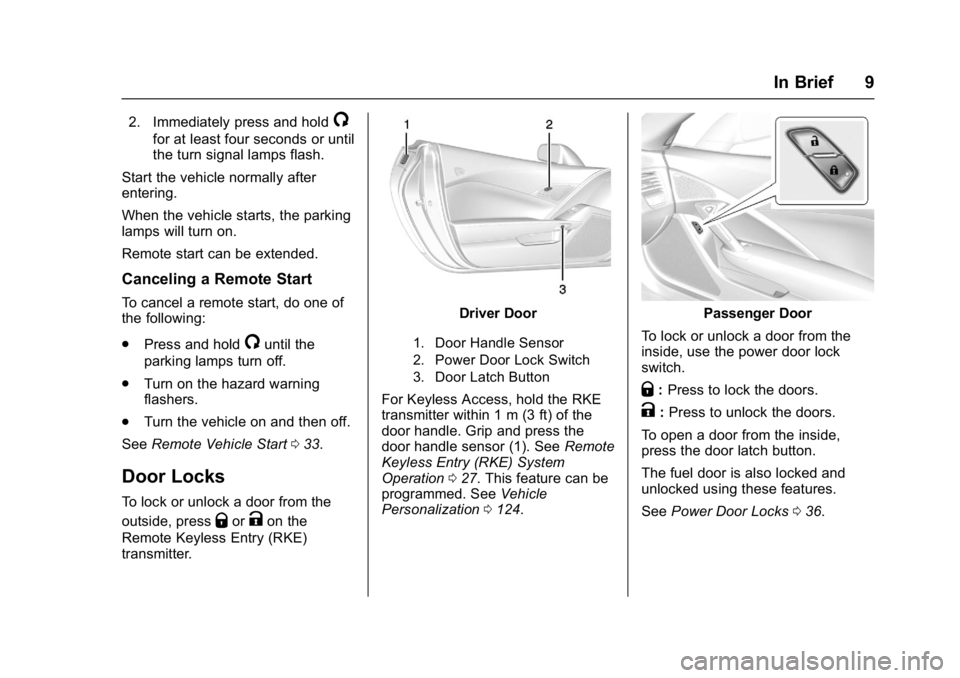
Driver Door
1. Door Handle Sensor
2. Power Door Lock Switch
3. Door Latch Button
For Keyless Access, hold the RKE
transmitter within 1 m (3 ft) of the
door handle. Grip and press the
door handle sensor (1). See Remote
Keyless Entry (RKE) System
Operation 027. This feature can be
programmed. See Vehicle
Personalization 0124.
Passenger Door
To lock or unlock a door from the
inside, use the power door lock
switch.
Q: Press to lock the doors.
K:Press to unlock the doors.
To open a door from the inside,
press the door latch button.
The fuel door is also locked and
unlocked using these features.
See Power Door Locks 036.
Page 27 of 353
Chevrolet Corvette Owner Manual (GMNA-Localizing-U.S./Canada/Mexico-
11374030) - 2018 - crc - 4/4/17
26 Keys, Doors, and Windows
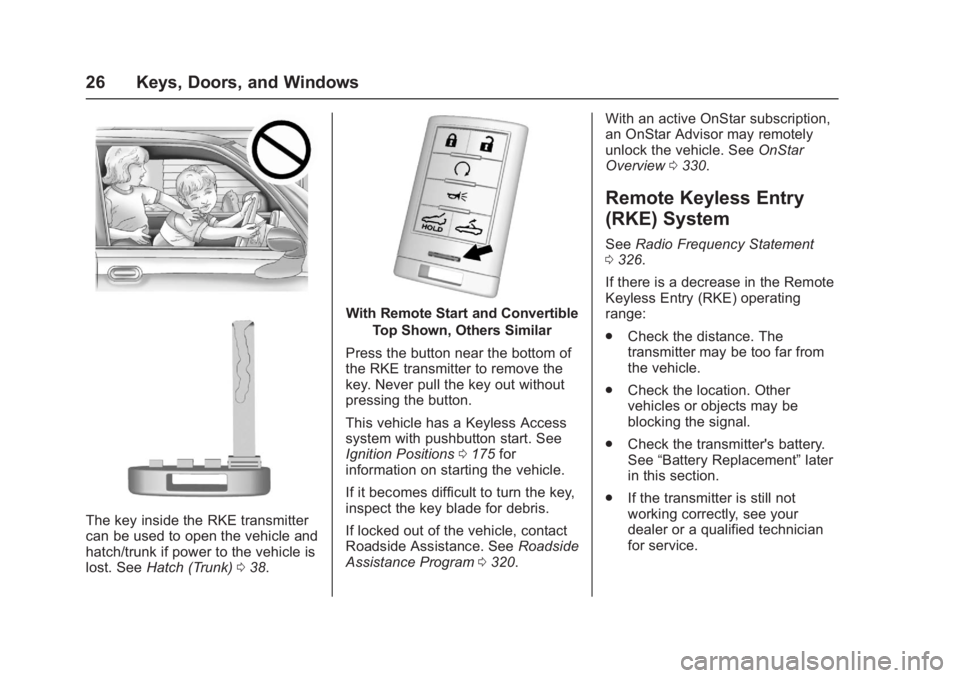
The key inside the RKE transmitter
can be used to open the vehicle and
hatch/trunk if power to the vehicle is
lost. SeeHatch (Trunk) 038.
With Remote Start and Convertible
Top Shown, Others Similar
Press the button near the bottom of
the RKE transmitter to remove the
key. Never pull the key out without
pressing the button.
This vehicle has a Keyless Access
system with pushbutton start. See
Ignition Positions 0175 for
information on starting the vehicle.
If it becomes difficult to turn the key,
inspect the key blade for debris.
If locked out of the vehicle, contact
Roadside Assistance. See Roadside
Assistance Program 0320. With an active OnStar subscription,
an OnStar Advisor may remotely
unlock the vehicle. See
OnStar
Overview 0330.
Remote Keyless Entry
(RKE) System
See Radio Frequency Statement
0 326.
If there is a decrease in the Remote
Keyless Entry (RKE) operating
range:
. Check the distance. The
transmitter may be too far from
the vehicle.
. Check the location. Other
vehicles or objects may be
blocking the signal.
. Check the transmitter's battery.
See “Battery Replacement” later
in this section.
. If the transmitter is still not
working correctly, see your
dealer or a qualified technician
for service.
Page 28 of 353
Chevrolet Corvette Owner Manual (GMNA-Localizing-U.S./Canada/Mexico-
11374030) - 2018 - crc - 4/4/17
Keys, Doors, and Windows 27
Remote Keyless Entry
(RKE) System Operation
The Keyless Access system allows
for vehicle entry when the Remote
Keyless Entry (RKE) transmitter is
within 1 m (3 ft). See“Keyless
Access Operation” later in this
section.
The RKE transmitter functions may
work up to 60 m (197 ft) away from
the vehicle.
Other conditions can affect the
performance of the transmitter. See
Remote Keyless Entry (RKE)
System 026.
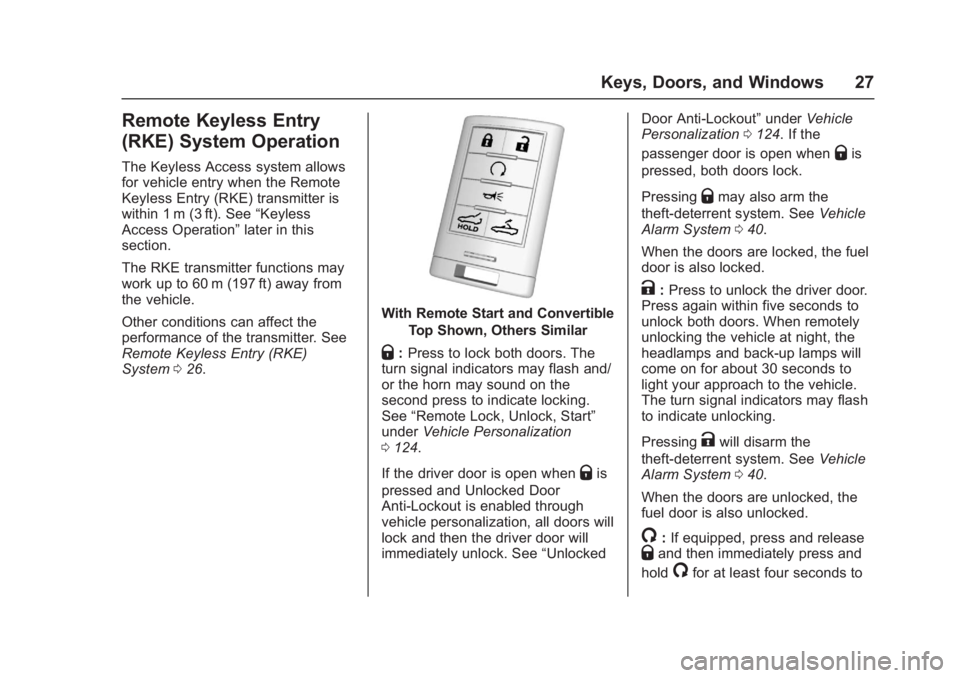
With Remote Start and Convertible
Top Shown, Others Similar
Q:Press to lock both doors. The
turn signal indicators may flash and/
or the horn may sound on the
second press to indicate locking.
See “Remote Lock, Unlock, Start”
under Vehicle Personalization
0 124.
If the driver door is open when
Qis
pressed and Unlocked Door
Anti-Lockout is enabled through
vehicle personalization, all doors will
lock and then the driver door will
immediately unlock. See “UnlockedDoor Anti-Lockout”
underVehicle
Personalization 0124. If the
passenger door is open when
Qis
pressed, both doors lock.
Pressing
Qmay also arm the
theft-deterrent system. See Vehicle
Alarm System 040.
When the doors are locked, the fuel
door is also locked.
K: Press to unlock the driver door.
Press again within five seconds to
unlock both doors. When remotely
unlocking the vehicle at night, the
headlamps and back-up lamps will
come on for about 30 seconds to
light your approach to the vehicle.
The turn signal indicators may flash
to indicate unlocking.
Pressing
Kwill disarm the
theft-deterrent system. See Vehicle
Alarm System 040.
When the doors are unlocked, the
fuel door is also unlocked.
/: If equipped, press and releaseQand then immediately press and
hold
/for at least four seconds to
Page 29 of 353
Chevrolet Corvette Owner Manual (GMNA-Localizing-U.S./Canada/Mexico-
11374030) - 2018 - crc - 4/4/17
28 Keys, Doors, and Windows
start the engine from outside the
vehicle using the RKE transmitter.
SeeRemote Vehicle Start 033.
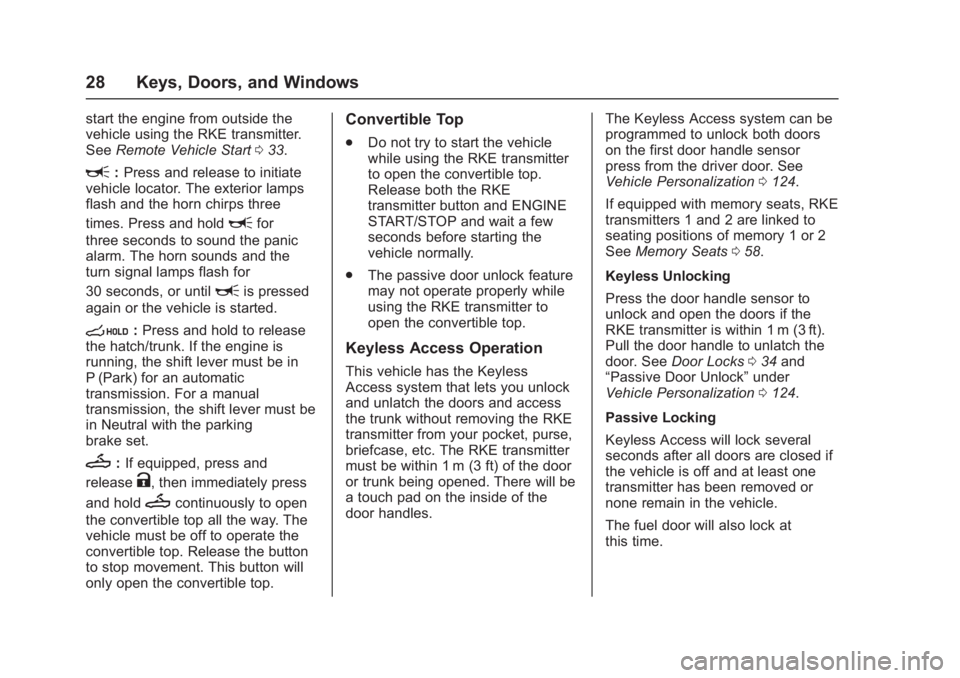
L:Press and release to initiate
vehicle locator. The exterior lamps
flash and the horn chirps three
times. Press and hold
Lfor
three seconds to sound the panic
alarm. The horn sounds and the
turn signal lamps flash for
30 seconds, or until
Lis pressed
again or the vehicle is started.
s: Press and hold to release
the hatch/trunk. If the engine is
running, the shift lever must be in
P (Park) for an automatic
transmission. For a manual
transmission, the shift lever must be
in Neutral with the parking
brake set.
M: If equipped, press and
release
K, then immediately press
and hold
Mcontinuously to open
the convertible top all the way. The
vehicle must be off to operate the
convertible top. Release the button
to stop movement. This button will
only open the convertible top.
Convertible Top
. Do not try to start the vehicle
while using the RKE transmitter
to open the convertible top.
Release both the RKE
transmitter button and ENGINE
START/STOP and wait a few
seconds before starting the
vehicle normally.
. The passive door unlock feature
may not operate properly while
using the RKE transmitter to
open the convertible top.
Keyless Access Operation
This vehicle has the Keyless
Access system that lets you unlock
and unlatch the doors and access
the trunk without removing the RKE
transmitter from your pocket, purse,
briefcase, etc. The RKE transmitter
must be within 1 m (3 ft) of the door
or trunk being opened. There will be
a touch pad on the inside of the
door handles. The Keyless Access system can be
programmed to unlock both doors
on the first door handle sensor
press from the driver door. See
Vehicle Personalization
0124.
If equipped with memory seats, RKE
transmitters 1 and 2 are linked to
seating positions of memory 1 or 2
See Memory Seats 058.
Keyless Unlocking
Press the door handle sensor to
unlock and open the doors if the
RKE transmitter is within 1 m (3 ft).
Pull the door handle to unlatch the
door. See Door Locks 034 and
“Passive Door Unlock” under
Vehicle Personalization 0124.
Passive Locking
Keyless Access will lock several
seconds after all doors are closed if
the vehicle is off and at least one
transmitter has been removed or
none remain in the vehicle.
The fuel door will also lock at
this time.
Page 30 of 353
Chevrolet Corvette Owner Manual (GMNA-Localizing-U.S./Canada/Mexico-
11374030) - 2018 - crc - 4/4/17
Keys, Doors, and Windows 29
If other electronic devices interfere
with the RKE transmitter signal, the
vehicle may not detect the RKE
transmitter inside the vehicle.
If passive locking is enabled, the
doors may lock with the RKE
transmitter inside the vehicle. Do
not leave the RKE transmitter in an
unattended vehicle.
To customize whether the doors
automatically lock when exiting the
vehicle, see“Passive Door Lock”
under Vehicle Personalization
0 124.
Temporary Disable of Passive
Locking
Temporarily disable the passive
locking by pressing and holding
K
on the interior door switch with a
door open for at least four seconds,
or until three chimes are heard.
Passive locking will then remain
disabled until
Qon the interior door
is pressed, or until the vehicle is
turned on. To customize the doors to
automatically lock when exiting the
vehicle, see
“Remote Lock, Unlock,
Start” under Vehicle Personalization
0 124.
Remote Left in Vehicle Alert
When the vehicle is turned off and
an RKE transmitter is left in the
vehicle, the horn will chirp three
times after both doors are closed.
To turn on or off see “Remote Left in
Vehicle Alert” underVehicle
Personalization 0124.
Remote No Longer in Vehicle Alert
If the vehicle is on, with a door
open, and then all doors are closed,
the vehicle will check for RKE
transmitter(s) inside. If an RKE
transmitter is not detected, the DIC
will display NO REMOTE
DETECTED and the horn will chirp
three times. This occurs only once
each time the vehicle is driven. To
turn on or off see Vehicle
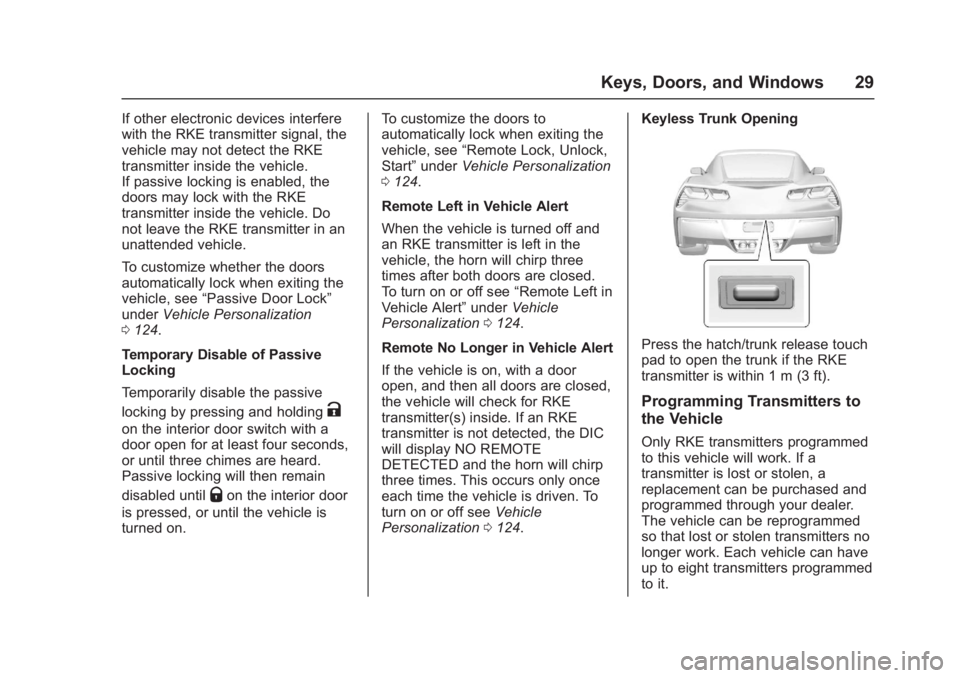
Personalization 0124. Keyless Trunk Opening
Press the hatch/trunk release touch
pad to open the trunk if the RKE
transmitter is within 1 m (3 ft).
Programming Transmitters to
the Vehicle
Only RKE transmitters programmed
to this vehicle will work. If a
transmitter is lost or stolen, a
replacement can be purchased and
programmed through your dealer.
The vehicle can be reprogrammed
so that lost or stolen transmitters no
longer work. Each vehicle can have
up to eight transmitters programmed
to it.
Page 32 of 353
Chevrolet Corvette Owner Manual (GMNA-Localizing-U.S./Canada/Mexico-
11374030) - 2018 - crc - 4/4/17
Keys, Doors, and Windows 31
The DIC displays REMOTE
LEARN PENDING
PLEASE WAIT.
5. Put the key back into the RKE transmitter.
6. Wait for 10 minutes until the DIC displays PRESS ENGINE
START BUTTON TO LEARN,
then press ENGINE
START/STOP.
The DIC reads REMOTE
LEARN PENDING,
PLEASE WAIT.
7. Repeat Step 6 two additional times. After the third time all
previously known transmitters
will no longer work with the
vehicle. Remaining transmitters
can be relearned during the
next steps. The DIC display
should now show READY FOR
REMOTE #1.
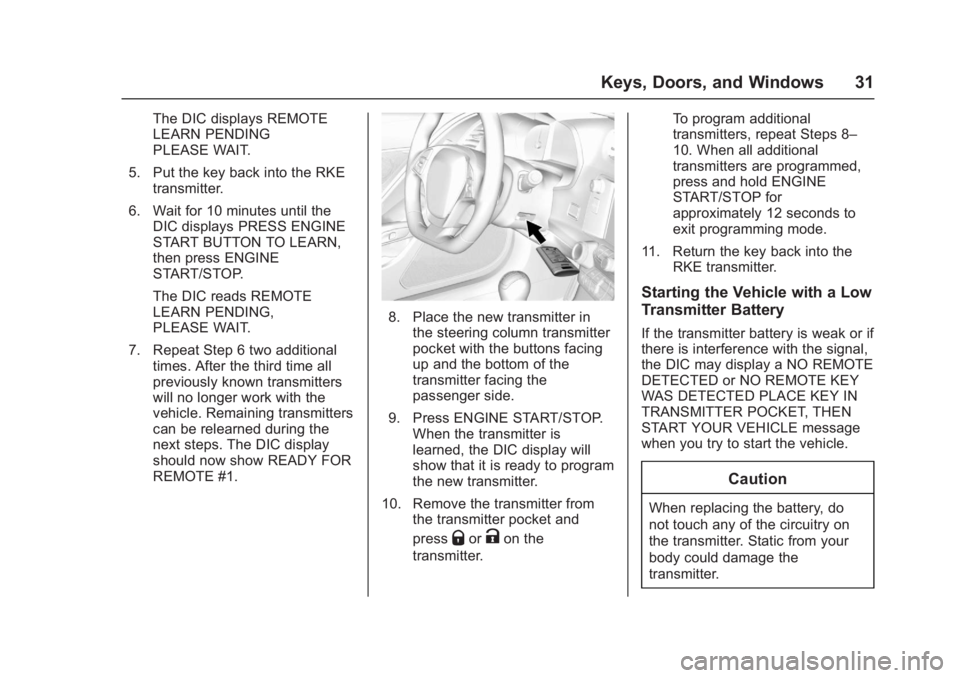
8. Place the new transmitter inthe steering column transmitter
pocket with the buttons facing
up and the bottom of the
transmitter facing the
passenger side.
9. Press ENGINE START/STOP. When the transmitter is
learned, the DIC display will
show that it is ready to program
the new transmitter.
10. Remove the transmitter from the transmitter pocket and
press
QorKon the
transmitter. To program additional
transmitters, repeat Steps 8–
10. When all additional
transmitters are programmed,
press and hold ENGINE
START/STOP for
approximately 12 seconds to
exit programming mode.
11. Return the key back into the RKE transmitter.
Starting the Vehicle with a Low
Transmitter Battery
If the transmitter battery is weak or if
there is interference with the signal,
the DIC may display a NO REMOTE
DETECTED or NO REMOTE KEY
WAS DETECTED PLACE KEY IN
TRANSMITTER POCKET, THEN
START YOUR VEHICLE message
when you try to start the vehicle.
Caution
When replacing the battery, do
not touch any of the circuitry on
the transmitter. Static from your
body could damage the
transmitter.
Page 34 of 353
Chevrolet Corvette Owner Manual (GMNA-Localizing-U.S./Canada/Mexico-
11374030) - 2018 - crc - 4/4/17
Keys, Doors, and Windows 33
3. Remove the old battery. Do notuse a metal object.
4. Insert the new battery on the back housing, positive side
facing down. Replace with a
CR2032 or equivalent battery.
5. Align the key release button and snap the transmitter back
together.
Remote Vehicle Start
If equipped, this feature allows the
engine to be started from outside
the vehicle.
/:This button will be on the RKE
transmitter if the vehicle has remote
start.
The climate control system will use
the previous settings during a
remote start. The rear window
defogger may come on during
remote start based on cold ambient
conditions. The rear defog indicator
light does not come on during a
remote start. During a remote start, the heated or
ventilated seats, if equipped, may
turn on automatically. See
Heated
and Ventilated Front Seats 062.
Laws in some local communities
may restrict the use of remote
starters. For example, some laws
may require a person using remote
start to have the vehicle in view.
Check local regulations for any
requirements.
If the vehicle is low on fuel, do not
use the remote start feature. The
vehicle may run out of fuel.
The RKE transmitter range may be
less while the vehicle is running.
Other conditions can affect the
performance of the transmitter. See
Remote Keyless Entry (RKE)
System 026.
Starting the Engine Using Remote
Start
1. Press and release
Qon the
RKE transmitter.
2. Immediately press and hold
/
for at least four seconds or until
the turn signal lamps flash. The lamps flash to confirm the
request to remote start the
vehicle has been received.
During the remote start, the
doors will be locked and the
parking lamps will remain on as
long as the engine is running.
The engine will shut off after
10 minutes unless a time
extension is done.
3. To drive, have the RKE transmitter in the vehicle, press
the brake pedal, and then start
the vehicle.
Extending Engine Run Time
The engine run time can also be
extended by another 10 minutes,
if during the first 10 minutes
Steps 1 and 2 are repeated while
the engine is still running. An
extension can be requested
30 seconds after starting. This
provides a total of 20 minutes.
The remote start can only be
extended once per ignition cycle.
Page 41 of 353
Chevrolet Corvette Owner Manual (GMNA-Localizing-U.S./Canada/Mexico-
11374030) - 2018 - crc - 4/4/17
40 Keys, Doors, and Windows
Vehicle Security
This vehicle has theft-deterrent
features; however, they do not make
the vehicle impossible to steal.
Vehicle Alarm System
This vehicle has an anti-theft alarm
system.
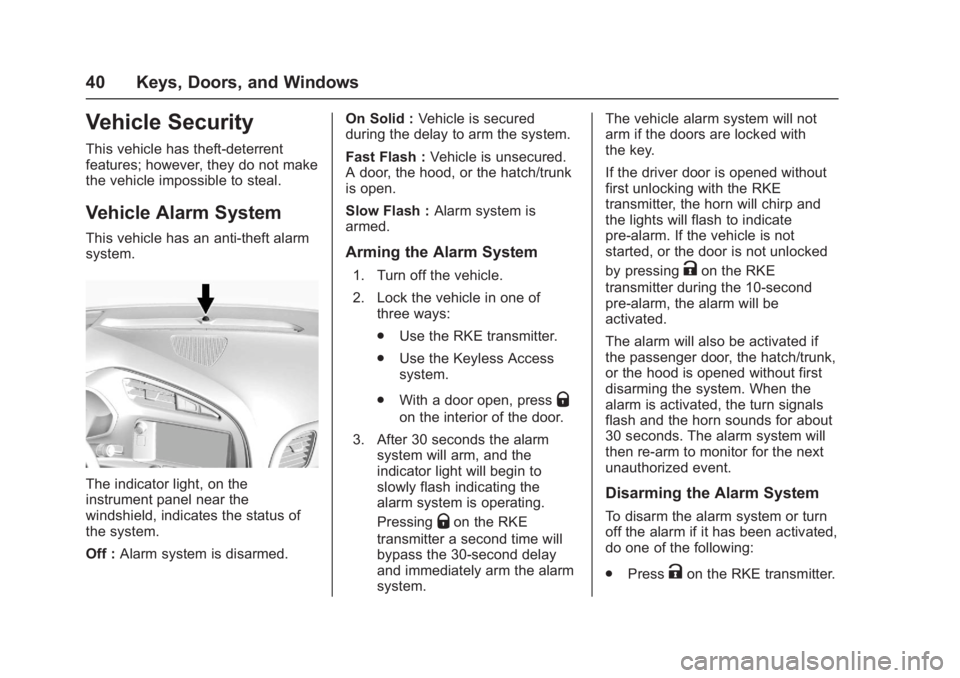
The indicator light, on the
instrument panel near the
windshield, indicates the status of
the system.
Off :Alarm system is disarmed. On Solid :
Vehicle is secured
during the delay to arm the system.
Fast Flash : Vehicle is unsecured.
A door, the hood, or the hatch/trunk
is open.
Slow Flash : Alarm system is
armed.
Arming the Alarm System
1. Turn off the vehicle.
2. Lock the vehicle in one of three ways:
.Use the RKE transmitter.
. Use the Keyless Access
system.
. With a door open, press
Q
on the interior of the door.
3. After 30 seconds the alarm system will arm, and the
indicator light will begin to
slowly flash indicating the
alarm system is operating.
Pressing
Qon the RKE
transmitter a second time will
bypass the 30-second delay
and immediately arm the alarm
system. The vehicle alarm system will not
arm if the doors are locked with
the key.
If the driver door is opened without
first unlocking with the RKE
transmitter, the horn will chirp and
the lights will flash to indicate
pre-alarm. If the vehicle is not
started, or the door is not unlocked
by pressing
Kon the RKE
transmitter during the 10-second
pre-alarm, the alarm will be
activated.
The alarm will also be activated if
the passenger door, the hatch/trunk,
or the hood is opened without first
disarming the system. When the
alarm is activated, the turn signals
flash and the horn sounds for about
30 seconds. The alarm system will
then re-arm to monitor for the next
unauthorized event.
Disarming the Alarm System
To disarm the alarm system or turn
off the alarm if it has been activated,
do one of the following:
. Press
Kon the RKE transmitter.
Page 97 of 353
Chevrolet Corvette Owner Manual (GMNA-Localizing-U.S./Canada/Mexico-
11374030) - 2018 - crc - 3/29/17
96 Instruments and Controls
nL: Pull the windshield wiper
lever toward you to spray washer
fluid and activate the wipers. The
wipers will continue until the lever is
released or the maximum wash time
is reached. When the lever is
released, additional wipes may
occur depending on how long the
windshield washer had been
activated. See Washer Fluid0237
for information on filling the
windshield washer fluid reservoir.
Clear snow and ice from the wiper
blades and windshield before using
them. If frozen to the windshield,
carefully loosen or thaw them.
Damaged blades should be
replaced. See Wiper Blade
Replacement 0243.
Heavy snow or ice can overload the
wiper motor.
Wiper Parking
If the ignition is turned off while the
wipers are on LO, HI, or INT, they
will immediately stop. If the windshield wiper lever is then
moved to OFF before the driver
door is opened or within 10 minutes,
the wipers will restart and move to
the base of the windshield.
If the ignition is turned off while the
wipers are performing wipes due to
windshield washing, the wipers
continue to run until they reach the
base of the windshield.
Compass
The vehicle may have a compass
display on the center stack. The
compass receives its heading and
other information from the Global
Positioning System (GPS) antenna,
Electronic Stability Control, and
vehicle speed information.
The compass system is designed to
operate for a certain number of
miles or degrees of turn before
needing a signal from the GPS
satellites. When the compass
display shows CAL, drive the
vehicle for a short distance in an
open area where it can receive a
GPS signal. The compass systemwill automatically determine when a
GPS signal is restored and provide
a heading again.
Clock
The infotainment system controls
are used to access the time and
date settings through the menu
system. See
“Home Page” in the
infotainment manual for information
about how to use the menu system.
Setting the Clock
Time
To set the time:
1. From the Home Page, touch SETTINGS, then touch Time
and Date.
2. Touch Set Time, then touch
RorQto increase or
decrease hours or minutes,
and change AM or PM.
3. Touch 12-24 Hr for a 12 or 24 hour clock.
4. Touch
}to go back to the
previous menu.