maintenance schedule CHEVROLET CORVETTE C8 2021 Owner's Manual
[x] Cancel search | Manufacturer: CHEVROLET, Model Year: 2021, Model line: CORVETTE C8, Model: CHEVROLET CORVETTE C8 2021Pages: 339, PDF Size: 6.44 MB
Page 304 of 339
Chevrolet Corvette Owner Manual (GMNA-Localizing-U.S./Canada/Mexico-
14622938) - 2021 - CRC - 9/22/20
Service and Maintenance 303
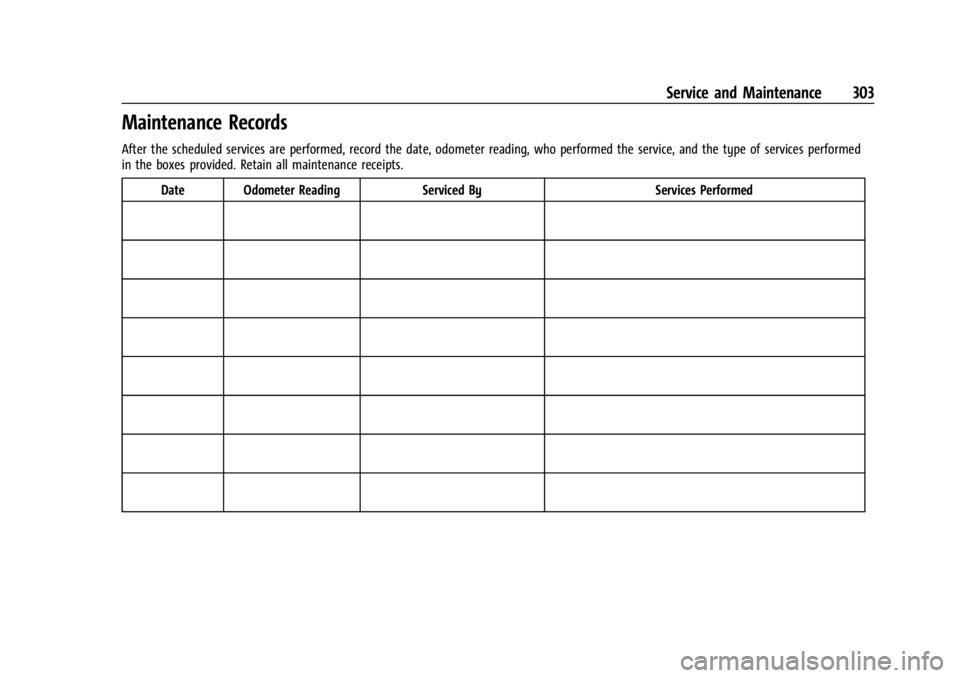
Maintenance Records
After the scheduled services are performed, record the date, odometer reading, who performed the service, and the type of services performed
in the boxes provided. Retain all maintenance receipts.Date Odometer Reading Serviced By Services Performed
Page 312 of 339
Chevrolet Corvette Owner Manual (GMNA-Localizing-U.S./Canada/Mexico-
14622938) - 2021 - CRC - 9/22/20
Customer Information 311
G:View maintenance schedules, alerts, and
Vehicle Diagnostic Information. Schedule
service appointments.
I: View service records from your
dealership and add your own.
D: Select a preferred dealer and view
locations, maps, phone numbers, and hours.
r: Track your vehicle’s warranty
information.
J: View active recalls by Vehicle
Identification Number (VIN). See Vehicle
Identification Number (VIN) 0304.
H:Manage your profile and payment
information. View your GM Rewards Card
earnings and My Chevrolet Rewards points.
F: Chat with online help representatives.
Visit my.chevrolet.com and create an
account today.
Chevrolet Owner Centre (Canada)
mychevrolet.ca
Visit the Chevrolet Owner Centre at
mychevrolet.ca (English) or my.chevrolet.ca
(French) to access similar benefits to the
U.S. site.
GM Mobility Reimbursement
Program
This program is available to qualified
applicants for cost reimbursement, up to
certain limits, of eligible aftermarket
adaptive equipment required for the vehicle,
such as hand controls or a wheelchair/
scooter lift for the vehicle.
To learn about the GM Mobility program,
see www.gmmobility.com or call the GM
Mobility Assistance Center at 1-800-323-9935.
Text Telephone (TTY) users, call
1-800-833-9935.
General Motors of Canada also has a
Mobility program. See www.gm.ca, or call
1-800-GM-DRIVE (800-463-7483) for details.
TTY users call 1-800-263-3830.
Roadside Assistance Program
For U.S.-purchased vehicles, call
1-800-243-8872. (Text Telephone (TTY):
1-888-889-2438.)
For Canadian-purchased vehicles, call
1-800-268-6800.
Service is available 24 hours a day, 365 days
a year.
Calling for Assistance
When calling Roadside Assistance, have the
following information ready:
.Your name, home address, and home
telephone number
.Telephone number of your location
.Location of the vehicle
.Model, year, color, and license plate
number of the vehicle
.Odometer reading, Vehicle Identification
Number (VIN), and delivery date of the
vehicle
.Description of the problem
Page 317 of 339
Chevrolet Corvette Owner Manual (GMNA-Localizing-U.S./Canada/Mexico-
14622938) - 2021 - CRC - 9/22/20
316 Customer Information
with that company. In such cases, you can
have control of the repair and parts choices
as long as the cost stays within reasonable
limits.
Publication Ordering Information
Service Manuals
Service manuals have the diagnosis and
repair information on the engine,
transmission, axle, suspension, brakes,
electrical system, steering system, body, etc.
Customer Literature
Owner’s manuals are written specifically for
owners and are intended to provide basic
operational information about the vehicle.
The owner’s manual includes the
Maintenance Schedule for all models.
Customer literature publications available for
purchase include owner’s manuals, warranty
manuals, and portfolios. Portfolios include an
owner’s manual, warranty manual,
if applicable, and zip lock bag or pouch.
Current and Past Models
Service manuals and customer literature are
available for many current and past model
year GM vehicles.To order, call 1-800-551-4123 Monday–Friday,
8:00 a.m.–6:00 p.m. eastern time
For credit card orders only (VISA,
MasterCard, or Discover), see Helm, Inc. at:
www.helminc.com.
To order by mail, write to:
Helm, Incorporated
Attention: Customer Service
47911 Halyard Drive
Plymouth, MI 48170
Make checks payable in U.S. funds.
Radio Frequency Statement
This vehicle uses license-exempt transmitters
/ receivers / systems that operate on a
radio frequency that complies with Part 15/
Part 18 of the Federal Communications
Commission (FCC) rules and with Innovation,
Science and Economic Development (ISED)
Canada's license-exempt RSS(s) / RSP-100 /
ICES-GEN.
Operation is subject to the following two
conditions:
1. The device may not cause harmful interference. 2. The device must accept any interference
received, including interference that may
cause undesired operation of the device.
Changes or modifications to any of these
systems by other than an authorized service
facility could void authorization to use this
equipment.
Reporting Safety Defects
Reporting Safety Defects to the
United States Government
If you believe that your vehicle has a
defect which could cause a crash or
could cause injury or death, you should
immediately inform the National
Highway Traffic Safety Administration
(NHTSA) in addition to notifying General
Motors.
If NHTSA receives similar complaints, it
may open an investigation, and if it
finds that a safety defect exists in a
group of vehicles, it may order a recall
and remedy campaign. However, NHTSA
cannot become involved in individual
problems between you, your dealer,
or General Motors.
Page 328 of 339
Chevrolet Corvette Owner Manual (GMNA-Localizing-U.S./Canada/Mexico-
14622938) - 2021 - CRC - 9/22/20
Connected Services 327
.Locate the vehicle on a map (U.S.
market only).
.Turn the vehicle's Wi-Fi hotspot on/off,
manage settings, and monitor data
consumption, if equipped.
.Locate a dealer and schedule service.
.Request Roadside Assistance.
.Set a parking reminder with pin drop,
take a photo, make a note, and set a
timer.
.Connect with Chevrolet on social media.
Features are subject to change. For
myChevrolet mobile app information and
compatibility, see my.chevrolet.com.
An active OnStar or connected service plan
may be required. A compatible device,
factory-installed remote start, and power
locks are required. Data rates apply. See
www.onstar.com for details and system
limitations.
Remote Services
Contact an OnStar Advisor to unlock the
doors or sound the horn and flash the
lamps.
Marketplace
OnStar Advisors can provide offers from
restaurants and retailers on your route, help
locate hotels, or book a room. These services
vary by market.
Diagnostics
By monitoring and reporting on the vehicle’s
key systems, OnStar Advanced Diagnostics,
if equipped, provides a way to keep up on
maintenance. Capabilities vary by model.
See www.onstar.com for details and system
limitations. Features are subject to change.
For updates on feature capabilities, see
my.chevrolet.com. Message and data rates
may apply.
Page 334 of 339

Chevrolet Corvette Owner Manual (GMNA-Localizing-U.S./Canada/Mexico-
14622938) - 2021 - CRC - 9/22/20
Index 333
Lighting (cont'd)Illumination Control . . . . . . . . . . . . . . . . . . . 108
LED . . . . . . . . . . . . . . . . . . . . . . . . . . . . . . . . . . . . 254
Lights Airbag Readiness . . . . . . . . . . . . . . . . . . . . . . . 84
Antilock Brake System (ABS)Warning . . . . . . . . . . . . . . . . . . . . . . . . . . . . . . 88
Brake System Warning . . . . . . . . . . . . . . . . . 87
Charging System . . . . . . . . . . . . . . . . . . . . . . . 85
Check Engine (Malfunction Indicator) . . . . . . . . . . . . . . . . . . . . . . . . . . . . . 86
Cruise Control . . . . . . . . . . . . . . . . . . . . . . . . . . 91
Door Ajar . . . . . . . . . . . . . . . . . . . . . . . . . . . . . . . 91
Electric Parking Brake . . . . . . . . . . . . . . . . . . . 88
Electronic Stability Control (ESC), Off . . . . . . . . . . . . . . . . . . . . . . . . . . . . . 90
Engine Oil Pressure . . . . . . . . . . . . . . . . . . . . . 90
Flash-to-Pass . . . . . . . . . . . . . . . . . . . . . . . . . . . 106
Front Lift System . . . . . . . . . . . . . . . . . . . . . . . 87
High-Beam On . . . . . . . . . . . . . . . . . . . . . . . . . . 91
High/Low Beam Changer . . . . . . . . . . . . . . 105
Seat Belt Reminders . . . . . . . . . . . . . . . . . . . . 84
Security . . . . . . . . . . . . . . . . . . . . . . . . . . . . . . . . . 91
Service Electric Parking Brake . . . . . . . . . . . 88
Tire Pressure . . . . . . . . . . . . . . . . . . . . . . . . . . . . 90
Traction Off . . . . . . . . . . . . . . . . . . . . . . . . . . . . . 89
Limited-Slip Differential . . . . . . . . . . . . . . . . . . . 217 Locks
Automatic Door . . . . . . . . . . . . . . . . . . . . . . . . . 16
Delayed Locking . . . . . . . . . . . . . . . . . . . . . . . . 16
Door . . . . . . . . . . . . . . . . . . . . . . . . . . . . . . . . . . . . 14
Lockout Protection . . . . . . . . . . . . . . . . . . . . . . . 17
Loss of Control . . . . . . . . . . . . . . . . . . . . . . . . . . 179
Low-Profile Tires . . . . . . . . . . . . . . . . . . . . . . . . . 263
Lower Anchors and Tethers for Children (LATCH System) . . . . . . . . . . . . . . . . 66
Lumbar Adjustment . . . . . . . . . . . . . . . . . . . . . . . 40 Front Seats . . . . . . . . . . . . . . . . . . . . . . . . . . . . . 40
M
Maintenance
Records . . . . . . . . . . . . . . . . . . . . . . . . . . . . . . . . 303
Maintenance and Care Additional . . . . . . . . . . . . . . . . . . . . . . . . . . . . . 298
Maintenance Schedule . . . . . . . . . . . . . . . . . . . 293 Recommended Fluids andLubricants . . . . . . . . . . . . . . . . . . . . . . . . . . . . 301
Malfunction Indicator Lamp . . . . . . . . . . . . . . . 86
Manual Mode . . . . . . . . . . . . . . . . . . . . . . . . . . . 200
Map Data Updates . . . . . . . . . . . . . . . . . . . . . . . 136
Maps . . . . . . . . . . . . . . . . . . . . . . . . . . . . . . . . . . . . .128
Media Avoiding Untrusted Devices . . . . . . . . . . . . 120
Memory Seats . . . . . . . . . . . . . . . . . . . . . . . . . . . . .41 Messages
Engine Power . . . . . . . . . . . . . . . . . . . . . . . . . . . 97
Vehicle . . . . . . . . . . . . . . . . . . . . . . . . . . . . . . . . . 97
Vehicle Speed . . . . . . . . . . . . . . . . . . . . . . . . . . . 97
Mirror Rear Camera . . . . . . . . . . . . . . . . . . . . . . . . . . . . 27
Mirrors
Automatic Dimming . . . . . . . . . . . . . . . . . . . . 26
Automatic Dimming Rearview . . . . . . . . . . 26
Convex . . . . . . . . . . . . . . . . . . . . . . . . . . . . . . . . . 24
Folding . . . . . . . . . . . . . . . . . . . . . . . . . . . . . . . . . 25
Heated . . . . . . . . . . . . . . . . . . . . . . . . . . . . . . . . . 26
Manual Rearview . . . . . . . . . . . . . . . . . . . . . . . 26
Power . . . . . . . . . . . . . . . . . . . . . . . . . . . . . . . . . . 25
Tilt in Reverse . . . . . . . . . . . . . . . . . . . . . . . . . . 26
Mirrors, Interior Rearview . . . . . . . . . . . . . . . . . 26
Mode . . . . . . . . . . . . . . . . . . . . . . . . . . . . . . . . . . . . 207
Driver Control . . . . . . . . . . . . . . . . . . . . . . . . . 207
Monitor System, Tire Pressure . . . . . . . . . . . 269
N
Navigation Connected Services . . . . . . . . . . . . . . . . . . . . 325
Destination . . . . . . . . . . . . . . . . . . . . . . . . . . . . 129
Using the System . . . . . . . . . . . . . . . . . . . . . . 125
Navigation Symbols . . . . . . . . . . . . . . . . . . . . . .128
Net, Convenience . . . . . . . . . . . . . . . . . . . . . . . . . .72
New Vehicle Break-In . . . . . . . . . . . . . . . . . . . . 190