control CHEVROLET CRUZE 2011 1.G User Guide
[x] Cancel search | Manufacturer: CHEVROLET, Model Year: 2011, Model line: CRUZE, Model: CHEVROLET CRUZE 2011 1.GPages: 394, PDF Size: 6.89 MB
Page 17 of 394
Black plate (11,1)Chevrolet Cruze Owner Manual - 2011
In Brief 1-11
Steering Wheel
Adjustment
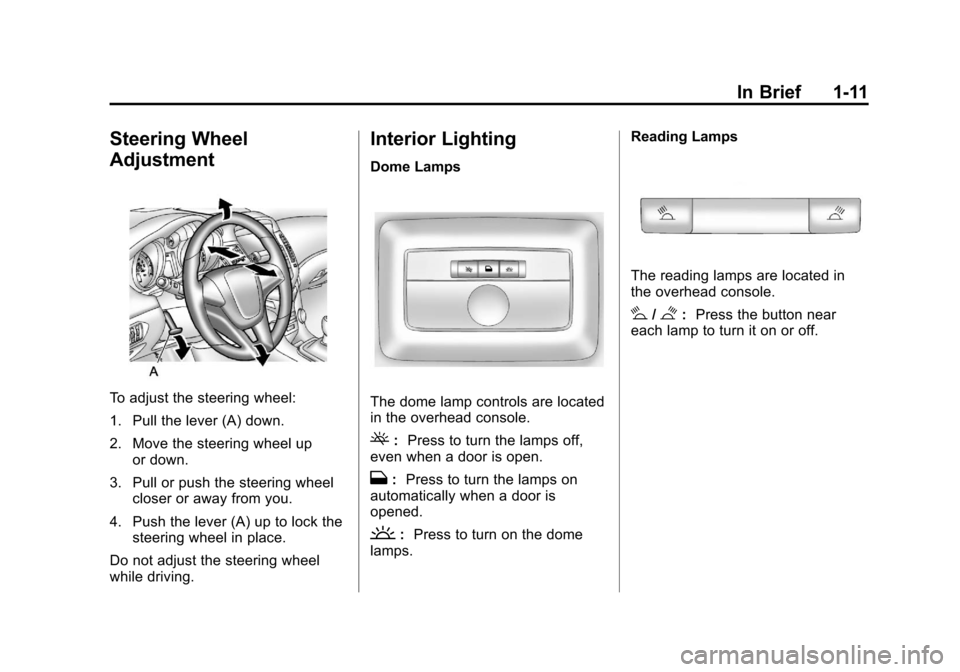
To adjust the steering wheel:
1. Pull the lever (A) down.
2. Move the steering wheel upor down.
3. Pull or push the steering wheel closer or away from you.
4. Push the lever (A) up to lock the steering wheel in place.
Do not adjust the steering wheel
while driving.
Interior Lighting
Dome Lamps
The dome lamp controls are located
in the overhead console.
(: Press to turn the lamps off,
even when a door is open.
H: Press to turn the lamps on
automatically when a door is
opened.
': Press to turn on the dome
lamps. Reading Lamps
The reading lamps are located in
the overhead console.
#/$:
Press the button near
each lamp to turn it on or off.
Page 18 of 394
Black plate (12,1)Chevrolet Cruze Owner Manual - 2011
1-12 In Brief
Instrument Panel Illumination
Control
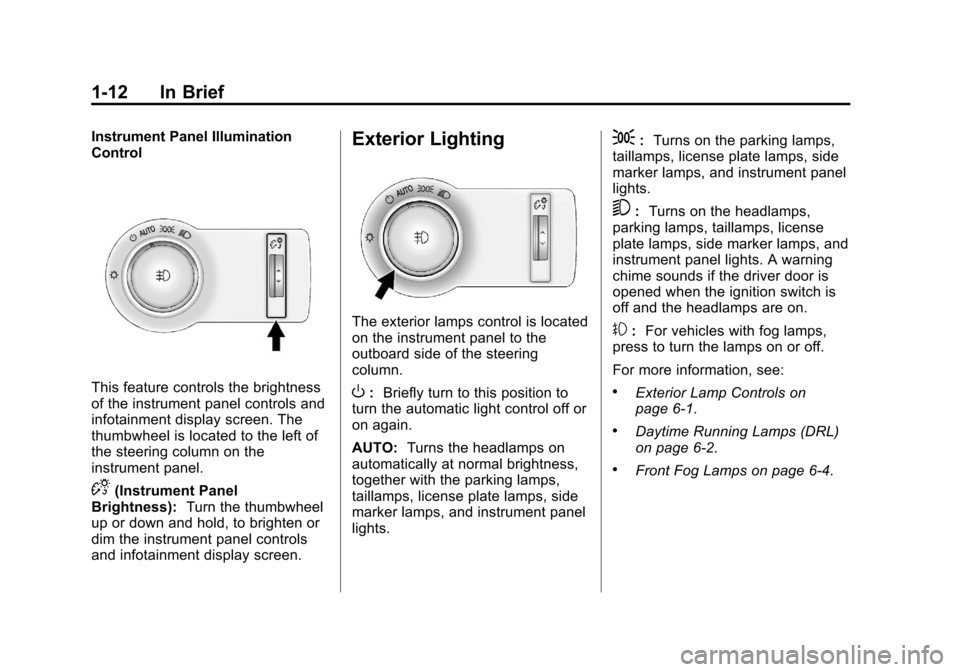
This feature controls the brightness
of the instrument panel controls and
infotainment display screen. The
thumbwheel is located to the left of
the steering column on the
instrument panel.
D(Instrument Panel
Brightness): Turn the thumbwheel
up or down and hold, to brighten or
dim the instrument panel controls
and infotainment display screen.
Exterior Lighting
The exterior lamps control is located
on the instrument panel to the
outboard side of the steering
column.
O: Briefly turn to this position to
turn the automatic light control off or
on again.
AUTO: Turns the headlamps on
automatically at normal brightness,
together with the parking lamps,
taillamps, license plate lamps, side
marker lamps, and instrument panel
lights.
;: Turns on the parking lamps,
taillamps, license plate lamps, side
marker lamps, and instrument panel
lights.
5: Turns on the headlamps,
parking lamps, taillamps, license
plate lamps, side marker lamps, and
instrument panel lights. A warning
chime sounds if the driver door is
opened when the ignition switch is
off and the headlamps are on.
#: For vehicles with fog lamps,
press to turn the lamps on or off.
For more information, see:
.Exterior Lamp Controls on
page 6‑1.
.Daytime Running Lamps (DRL)
on page 6‑2.
.Front Fog Lamps on page 6‑4.
Page 20 of 394
Black plate (14,1)Chevrolet Cruze Owner Manual - 2011
1-14 In Brief
Climate Controls
The heating, cooling, defrosting, and
ventilation for the vehicle can be
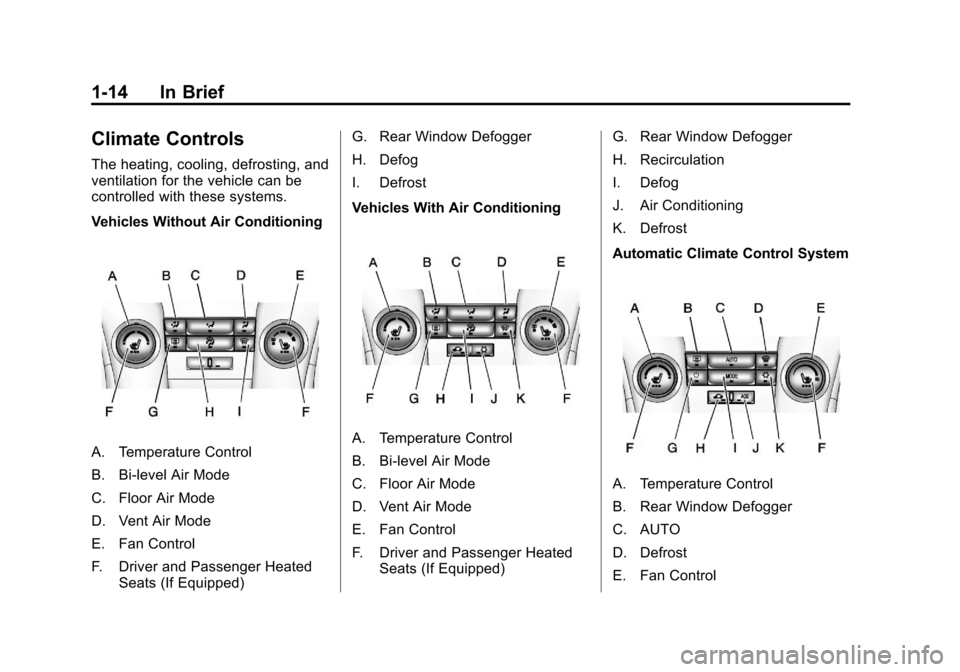
controlled with these systems.
Vehicles Without Air Conditioning
A. Temperature Control
B. Bi-level Air Mode
C. Floor Air Mode
D. Vent Air Mode
E. Fan Control
F. Driver and Passenger HeatedSeats (If Equipped) G. Rear Window Defogger
H. Defog
I. Defrost
Vehicles With Air ConditioningA. Temperature Control
B. Bi-level Air Mode
C. Floor Air Mode
D. Vent Air Mode
E. Fan Control
F. Driver and Passenger Heated
Seats (If Equipped) G. Rear Window Defogger
H. Recirculation
I. Defog
J. Air Conditioning
K. Defrost
Automatic Climate Control System
A. Temperature Control
B. Rear Window Defogger
C. AUTO
D. Defrost
E. Fan Control
Page 21 of 394
Black plate (15,1)Chevrolet Cruze Owner Manual - 2011
In Brief 1-15
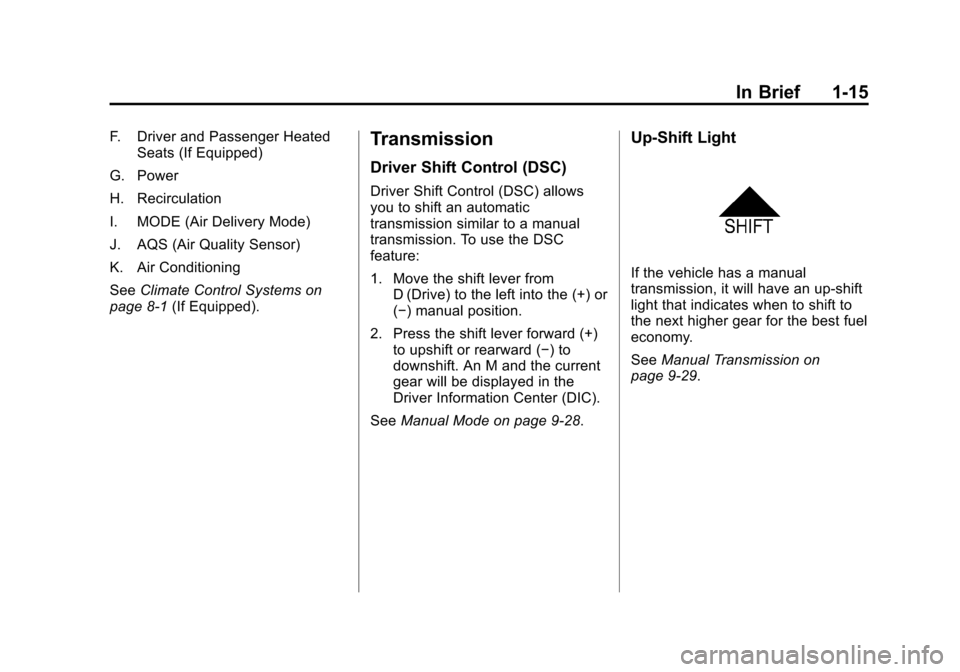
F. Driver and Passenger HeatedSeats (If Equipped)
G. Power
H. Recirculation
I. MODE (Air Delivery Mode)
J. AQS (Air Quality Sensor)
K. Air Conditioning
See Climate Control Systems on
page 8‑1 (If Equipped).Transmission
Driver Shift Control (DSC)
Driver Shift Control (DSC) allows
you to shift an automatic
transmission similar to a manual
transmission. To use the DSC
feature:
1. Move the shift lever from
D (Drive) to the left into the (+) or
(−) manual position.
2. Press the shift lever forward (+) to upshift or rearward (−) to
downshift. An M and the current
gear will be displayed in the
Driver Information Center (DIC).
See Manual Mode on page 9‑28.
Up‐Shift Light
If the vehicle has a manual
transmission, it will have an up-shift
light that indicates when to shift to
the next higher gear for the best fuel
economy.
SeeManual Transmission on
page 9‑29.
Page 23 of 394
Black plate (17,1)Chevrolet Cruze Owner Manual - 2011
In Brief 1-17
Satellite Radio
Vehicles with an XM™Satellite
Radio tuner and a valid XM Satellite
Radio subscription can receive XM
programming.
XM Satellite Radio Service
XM is a satellite radio service based
in the 48 contiguous United States
and 10 Canadian provinces. XM
Satellite Radio has a wide variety of
programming and commercial-free
music, coast to coast, and in
digital-quality sound. A fee is
required to receive the XM service.
For more information refer to:
.www.xmradio.com or call
1-800-929-2100 (U.S.).
.www.xmradio.ca or call
1-877-438-9677 (Canada).
For more information, see Satellite
Radio on page 7‑13.
Portable Audio Devices
This vehicle may have a 3.5 mm
(1/8 in) auxiliary input and a USB
port located in the center console.
External devices such as iPods
®,
laptop computers, MP3 players, CD
changers, and USB storage devices
may be connected, depending on
the audio system.
For more information, see Auxiliary
Devices on page 7‑20.
Bluetooth®
The Bluetooth®system allows users
with a Bluetooth-enabled cell phone
to make and receive hands-free
calls using the vehicle audio
system, microphone, and controls.
The Bluetooth-enabled cell phone
must be paired with the in-vehicle
Bluetooth system before it can be
used in the vehicle. Not all phones
will support all functions.
See Bluetooth (Overview) on
page 7‑23 orBluetooth
(Infotainment Controls) on
page 7‑24 orBluetooth (Voice
Recognition) on page 7‑28.
Page 24 of 394
Black plate (18,1)Chevrolet Cruze Owner Manual - 2011
1-18 In Brief
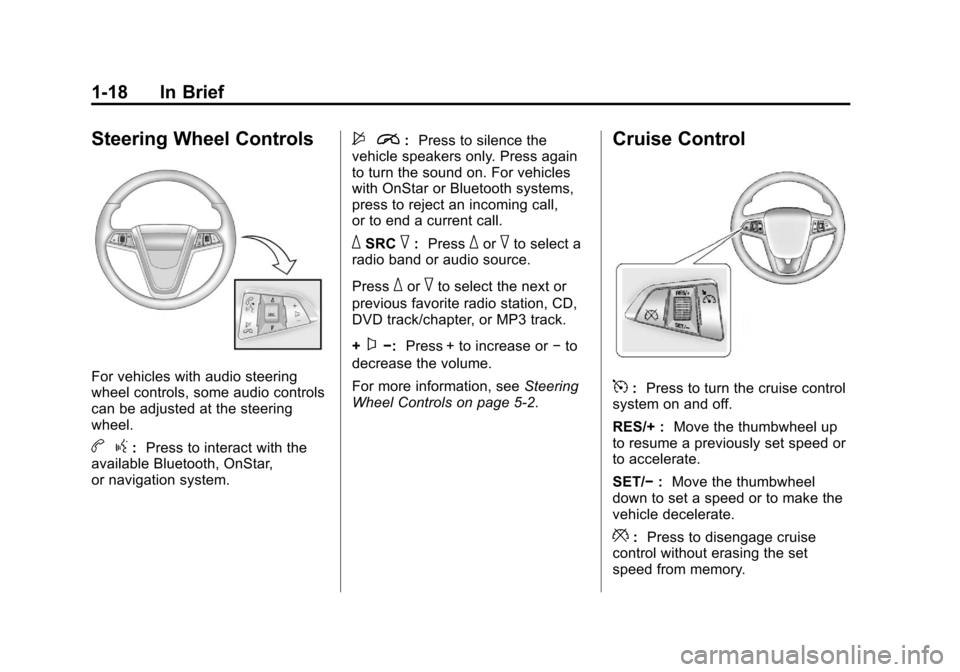
Steering Wheel Controls
For vehicles with audio steering
wheel controls, some audio controls
can be adjusted at the steering
wheel.
bg:Press to interact with the
available Bluetooth, OnStar,
or navigation system.
$ i:Press to silence the
vehicle speakers only. Press again
to turn the sound on. For vehicles
with OnStar or Bluetooth systems,
press to reject an incoming call,
or to end a current call.
_SRC^: Press_or^to select a
radio band or audio source.
Press
_or^to select the next or
previous favorite radio station, CD,
DVD track/chapter, or MP3 track.
+
x−: Press + to increase or −to
decrease the volume.
For more information, see Steering
Wheel Controls on page 5‑2.
Cruise Control
5: Press to turn the cruise control
system on and off.
RES/+ : Move the thumbwheel up
to resume a previously set speed or
to accelerate.
SET/− :Move the thumbwheel
down to set a speed or to make the
vehicle decelerate.
*: Press to disengage cruise
control without erasing the set
speed from memory.
Page 25 of 394
Black plate (19,1)Chevrolet Cruze Owner Manual - 2011
In Brief 1-19
SeeCruise Control on page 9‑36.
Navigation System
If the vehicle has a navigation
system, there is a separate
navigation system manual that
includes information on the radio,
audio players, and navigation
system.
The navigation system provides
detailed maps of most major
freeways and roads. After a
destination has been set, the
system provides turn-by-turn
instructions for reaching the
destination. In addition, the system
can help locate a variety of points of
interest (POI), such as banks,
airports, restaurants, and more.
See the Navigation System manual
for more information.
Driver Information
Center (DIC)
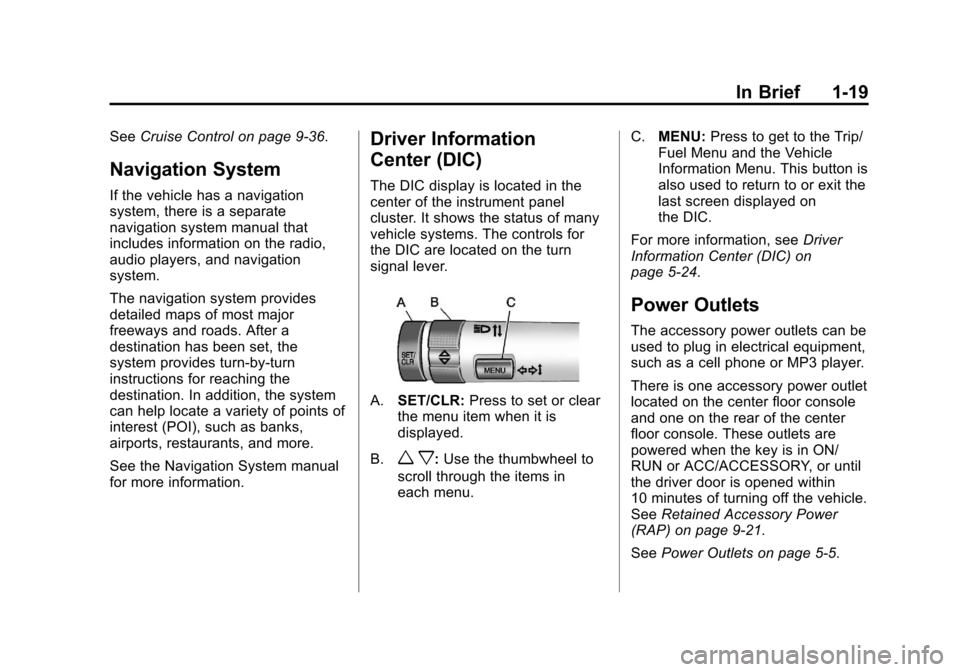
The DIC display is located in the
center of the instrument panel
cluster. It shows the status of many
vehicle systems. The controls for
the DIC are located on the turn
signal lever.
A.SET/CLR: Press to set or clear
the menu item when it is
displayed.
B.
w x: Use the thumbwheel to
scroll through the items in
each menu. C.
MENU: Press to get to the Trip/
Fuel Menu and the Vehicle
Information Menu. This button is
also used to return to or exit the
last screen displayed on
the DIC.
For more information, see Driver
Information Center (DIC) on
page 5‑24.
Power Outlets
The accessory power outlets can be
used to plug in electrical equipment,
such as a cell phone or MP3 player.
There is one accessory power outlet
located on the center floor console
and one on the rear of the center
floor console. These outlets are
powered when the key is in ON/
RUN or ACC/ACCESSORY, or until
the driver door is opened within
10 minutes of turning off the vehicle.
See Retained Accessory Power
(RAP) on page 9‑21.
See Power Outlets on page 5‑5.
Page 26 of 394
Black plate (20,1)Chevrolet Cruze Owner Manual - 2011
1-20 In Brief
Performance and
Maintenance
Traction Control
System (TCS)
The traction control system limits
wheel spin. The system is on when
the vehicle is started.
.To turn off traction control, press
and release
glocated on the
console.
iilluminates and the
appropriate DIC message
displays. See Vehicle Messages
(Canada Base Level) on
page 5‑27 orVehicle Messages
(Canada Uplevel and United
States) on page 5‑28.
.Press and releasegagain to
turn traction control back on.
For more information, see Traction
Control System (TCS) on
page 9‑33.
StabiliTrak®System
The StabiliTrak system assists with
directional control of the vehicle in
difficult driving conditions. The
system is on when the vehicle is
started.
.To turn off both Traction Control
and StabiliTrak, press and hold
guntilgandiilluminate and
the appropriate DIC message
displays. See Vehicle Messages
(Canada Base Level) on
page 5‑27 orVehicle Messages
(Canada Uplevel and United
States) on page 5‑28.
.Pressgagain to turn on both
systems.
For more information, see
StabiliTrak
®System on page 9‑34.
Tire Pressure Monitor
This vehicle may have a Tire
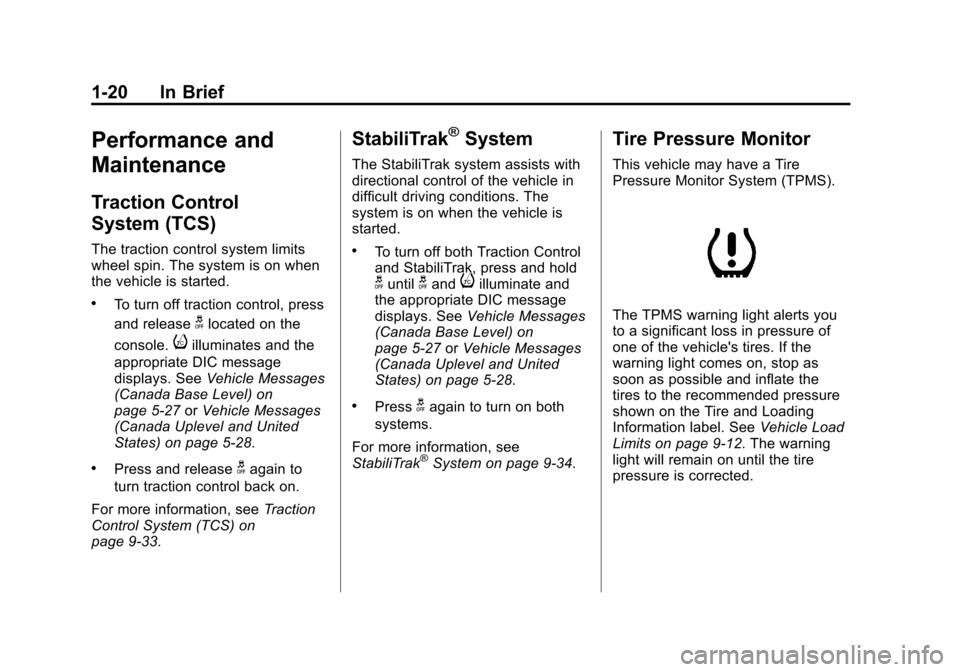
Pressure Monitor System (TPMS).
The TPMS warning light alerts you
to a significant loss in pressure of
one of the vehicle's tires. If the
warning light comes on, stop as
soon as possible and inflate the
tires to the recommended pressure
shown on the Tire and Loading
Information label. See Vehicle Load
Limits on page 9‑12. The warning
light will remain on until the tire
pressure is corrected.
Page 28 of 394
Black plate (22,1)Chevrolet Cruze Owner Manual - 2011
1-22 In Brief
Driving for Better Fuel
Economy
Driving habits can affect fuel
mileage. Here are some driving tips
to get the best fuel economy
possible.
.Avoid fast starts and accelerate
smoothly.
.Brake gradually and avoid
abrupt stops.
.Avoid idling the engine for long
periods of time.
.When road and weather
conditions are appropriate, use
cruise control.
.Always follow posted speed
limits or drive more slowly when
conditions require.
.Keep vehicle tires properly
inflated.
.Combine several trips into a
single trip.
.Replace the vehicle's tires with
the same TPC Spec number
molded into the tire's sidewall
near the size.
.Follow recommended scheduled
maintenance.
Roadside Assistance
Program
U.S.:1-800-243-8872
TTY Users: 1-888-889-2438
Canada: 1-800-268-6800
As the owner of a new Chevrolet,
you are automatically enrolled in the
Roadside Assistance program. This
program provides technically trained
advisors who are available 24 hours
a day, 365 days a year, to give
minor repair information or make
towing arrangements.
For more information see Roadside
Assistance Program on page 13‑6. Roadside Assistance and OnStar
If you have a current OnStar
subscription, press the
Qbutton
and the current GPS location will be
sent to an OnStar advisor who will
assess your problem, contact
Roadside Assistance, and relay
your exact location to get the help
you need.
Online Owner Center
The Online Owner Center is a
complimentary service that includes
online service reminders, vehicle
maintenance tips, online owner
manual, special privileges,
and more.
Sign up today at:
www.chevyownercenter.com
(U.S.) or www.gm.ca (Canada).
Page 30 of 394
Black plate (24,1)Chevrolet Cruze Owner Manual - 2011
1-24 In Brief
hardware. The vehicle has to have a
working electrical system and
adequate battery power for the
OnStar equipment to operate.
OnStar service may not work if the
OnStar equipment isn’t properly
installed or you haven’t maintained
it and the vehicle is in good working
order and in compliance with all
government regulations. If you try to
add, connect, or modify any
equipment or software in the
vehicle, OnStar service may not
work. Other problems OnStar can’t
control may prevent service to you,
such as hills, tall buildings, tunnels,
weather, electrical system design
and architecture of the vehicle,
damage to important parts of the
vehicle in a crash, or wireless phone
network congestion or jamming.See
Radio Frequency Statement on
page 13‑16 for information
regarding Part 15 of the Federal
Communications Commission (FCC)
rules and Industry Canada
Standards RSS-210/220/310.
OnStar Steering Wheel
Controls
This vehicle may have ab g/$
i
Talk/Mute button that can be
used to interact with OnStar
Hands-Free calling. See Steering
Wheel Controls on page 5‑2 for
more information.
On some vehicles, the
$ ito dial
phone extensions. See the OnStar
Owner's Guide for more information.
Your Responsibility
Increase the volume of the radio if
the OnStar Advisor cannot be
heard.
If the light next to the OnStar
buttons is red, the system may not
be functioning properly. Push the
Q
button and request a vehicle
diagnostic. If the light appears clear
(no light appears), your OnStar
subscription has expired and all
services have been deactivated.
Push the
Qbutton to confirm that
the OnStar equipment is active.