radio CHEVROLET CRUZE 2012 1.G Owners Manual
[x] Cancel search | Manufacturer: CHEVROLET, Model Year: 2012, Model line: CRUZE, Model: CHEVROLET CRUZE 2012 1.GPages: 400, PDF Size: 6.88 MB
Page 1 of 400

Black plate (1,1)Chevrolet Cruze Owner Manual - 2012
2012 Chevrolet Cruze Owner ManualM
In Brief. . . . . . . . . . . . . . . . . . . . . . . . 1-1
Instrument Panel . . . . . . . . . . . . . . 1-2
Initial Drive Information . . . . . . . . 1-4
Vehicle Features . . . . . . . . . . . . . 1-15
Performance and Maintenance . . . . . . . . . . . . . . . . 1-19
Keys, Doors, and Windows . . . . . . . . . . . . . . . . . . . . 2-1
Keys and Locks . . . . . . . . . . . . . . . 2-2
Doors . . . . . . . . . . . . . . . . . . . . . . . . 2-12
Vehicle Security . . . . . . . . . . . . . . 2-14
Exterior Mirrors . . . . . . . . . . . . . . . 2-15
Interior Mirrors . . . . . . . . . . . . . . . . 2-17
Windows . . . . . . . . . . . . . . . . . . . . . 2-18
Roof . . . . . . . . . . . . . . . . . . . . . . . . . . 2-21 Seats and Restraints
. . . . . . . . . 3-1
Head Restraints . . . . . . . . . . . . . . . 3-2
Front Seats . . . . . . . . . . . . . . . . . . . . 3-3
Rear Seats . . . . . . . . . . . . . . . . . . . . 3-8
Safety Belts . . . . . . . . . . . . . . . . . . 3-10
Airbag System . . . . . . . . . . . . . . . . 3-19
Child Restraints . . . . . . . . . . . . . . 3-33
Storage . . . . . . . . . . . . . . . . . . . . . . . 4-1
Storage Compartments . . . . . . . . 4-1
Additional Storage
Features . . . . . . . . . . . . . . . . . . . . . 4-2
Instruments and Controls . . . . 5-1
Controls . . . . . . . . . . . . . . . . . . . . . . . 5-2
Warning Lights, Gauges, and
Indicators . . . . . . . . . . . . . . . . . . . . 5-7
Information Displays . . . . . . . . . . 5-23
Vehicle Messages . . . . . . . . . . . . 5-28
Vehicle Personalization . . . . . . . 5-34 Lighting
. . . . . . . . . . . . . . . . . . . . . . . 6-1
Exterior Lighting . . . . . . . . . . . . . . . 6-1
Interior Lighting . . . . . . . . . . . . . . . . 6-5
Lighting Features . . . . . . . . . . . . . . 6-6
Infotainment System . . . . . . . . . 7-1
Introduction . . . . . . . . . . . . . . . . . . . . 7-2
Radio . . . . . . . . . . . . . . . . . . . . . . . . . 7-12
Audio Players . . . . . . . . . . . . . . . . 7-18
Phone . . . . . . . . . . . . . . . . . . . . . . . . 7-23
Trademarks and License
Agreements . . . . . . . . . . . . . . . . . 7-35
Climate Controls . . . . . . . . . . . . . 8-1
Climate Control Systems . . . . . . 8-1
Air Vents . . . . . . . . . . . . . . . . . . . . . . . 8-6
Page 7 of 400
Black plate (1,1)Chevrolet Cruze Owner Manual - 2012
In Brief 1-1
In Brief
Instrument Panel
Instrument Panel Overview . . . . 1-2
Initial Drive Information
Initial Drive Information . . . . . . . . 1-4
Remote Keyless Entry (RKE)System . . . . . . . . . . . . . . . . . . . . . . 1-4
Remote Vehicle Start . . . . . . . . . 1-5
Door Locks . . . . . . . . . . . . . . . . . . . 1-6
Seat Adjustment . . . . . . . . . . . . . . 1-7
Heated Seats . . . . . . . . . . . . . . . . . 1-9
Head Restraint Adjustment . . . . 1-9
Safety Belts . . . . . . . . . . . . . . . . . . . 1-9
Passenger Sensing System . . . . . . . . . . . . . . . . . . . . . 1-10
Mirror Adjustment . . . . . . . . . . . . 1-10 Steering Wheel
Adjustment . . . . . . . . . . . . . . . . . 1-11
Interior Lighting . . . . . . . . . . . . . . 1-11
Exterior Lighting . . . . . . . . . . . . . 1-12
Windshield Wiper/Washer . . . . 1-13
Climate Controls . . . . . . . . . . . . . 1-14
Transmission . . . . . . . . . . . . . . . . 1-15Vehicle Features
Radio(s) . . . . . . . . . . . . . . . . . . . . . 1-15
Satellite Radio . . . . . . . . . . . . . . . 1-16
Portable Audio Devices . . . . . . 1-17
Bluetooth
®. . . . . . . . . . . . . . . . . . . 1-17
Steering Wheel Controls . . . . . 1-17
Cruise Control . . . . . . . . . . . . . . . 1-18
Navigation System . . . . . . . . . . . 1-18
Driver Information Center (DIC) . . . . . . . . . . . . . . . 1-18
Ultrasonic Parking Assist . . . . 1-19
Power Outlets . . . . . . . . . . . . . . . 1-19
Performance and Maintenance
Traction Control System (TCS) . . . . . . . . . . . . . . 1-19
StabiliTrak
®System . . . . . . . . . 1-20
Tire Pressure Monitor . . . . . . . . 1-20
Tire Sealant and Compressor Kit . . . . . . . . . . . . . 1-20
Engine Oil Life System . . . . . . 1-21
Driving for Better Fuel Economy . . . . . . . . . . . . . . . . . . . 1-21
Roadside Assistance Program . . . . . . . . . . . . . . . . . . . . 1-22
OnStar
®. . . . . . . . . . . . . . . . . . . . . 1-22
Page 9 of 400

Black plate (3,1)Chevrolet Cruze Owner Manual - 2012
In Brief 1-3
A.Exterior Lamp Controls on
page 6‑1.
Front Fog Lamps on page 6‑4
(If Equipped).
Instrument Panel Illumination
Control on page 6‑5.
B. Air Vents on page 8‑6.
C. Headlamp High/Low-Beam
Changer on page 6‑2.
Turn and Lane‐Change Lever.
See Turn and Lane-Change
Signals on page 6‑4.
Driver Information Center (DIC)
Buttons. See Driver Information
Center (DIC) on page 5‑23.
D. Instrument Cluster on page 5‑8.
E. Horn on page 5‑3.
F. Driver Information Center (DIC)
on page 5‑23.
G. Steering Wheel Controls on
page 5‑2. H.
Windshield Wiper/Washer on
page 5‑3.
I. Infotainment on page 7‑2.
Satellite Radio on page 7‑14
(If Equipped).
J. Infotainment Display Screen.
K. Instrument Panel Storage on
page 4‑1.
L. Light Sensor. See Automatic
Headlamp System on page 6‑3.
M. Passenger Airbag. See Where
Are the Airbags? on page 3‑21.
N. Hood Release. See Hood on
page 10‑4.
O. Data Link Connector (DLC) (Out of View). See Malfunction
Indicator Lamp on page 5‑13.
P. Instrument Panel Fuse Block on
page 10‑40.
Q. Cruise Control on page 9‑40. R.
Steering Wheel Adjustment on
page 5‑2.
S. Driver Airbag. See Where Are
the Airbags? on page 3‑21.
T. Ignition Switch or Keyless Ignition Button (If Equipped).
See Ignition Positions (Key
Access) on page 9‑15 or
Ignition Positions (Keyless
Access) on page 9‑18.
U. Driver Knee Airbag. See Where
Are the Airbags? on page 3‑21.
V. Power Door Locks on
page 2‑11.
W. Hazard Warning Flashers on
page 6‑3.
X. Shift Lever. See Automatic
Transmission on page 9‑29 or
Manual Transmission on
page 9‑33.
Y. Traction Control System (TCS)
on page 9‑37.
StabiliTrak
®System on
page 9‑38.
Page 21 of 400
Black plate (15,1)Chevrolet Cruze Owner Manual - 2012
In Brief 1-15
F. Driver and Passenger HeatedSeats (If Equipped)
G. Power
H. Recirculation
I. MODE (Air Delivery Mode)
J. AQS (Air Quality Sensor)
K. Air Conditioning
See Climate Control Systems on
page 8‑1 orAutomatic Climate
Control System on page 8‑3
(If Equipped).Transmission
Manual Mode
Driver Shift Control (DSC) allows
the automatic transmission to be
shifted similar to a manual
transmission.
Electronic Range Select (ERS)
allows for the selection of a range
of gears.
See Manual Mode on page 9‑31.
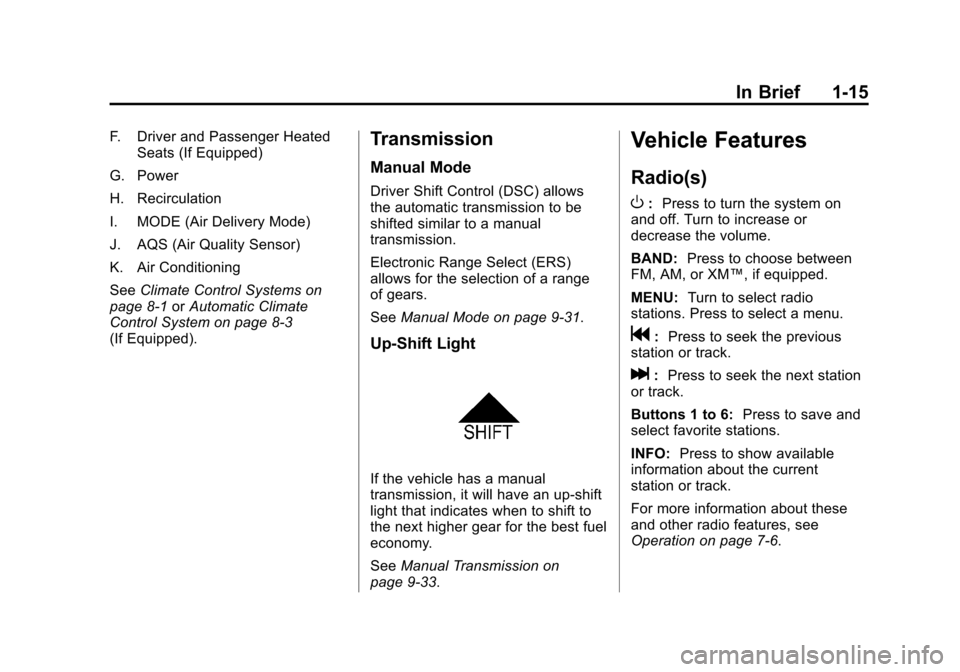
Up‐Shift Light
If the vehicle has a manual
transmission, it will have an up-shift
light that indicates when to shift to
the next higher gear for the best fuel
economy.
SeeManual Transmission on
page 9‑33.
Vehicle Features
Radio(s)
O
: Press to turn the system on
and off. Turn to increase or
decrease the volume.
BAND: Press to choose between
FM, AM, or XM™, if equipped.
MENU: Turn to select radio
stations. Press to select a menu.
g: Press to seek the previous
station or track.
l: Press to seek the next station
or track.
Buttons 1 to 6: Press to save and
select favorite stations.
INFO: Press to show available
information about the current
station or track.
For more information about these
and other radio features, see
Operation on page 7‑6.
Page 22 of 400
Black plate (16,1)Chevrolet Cruze Owner Manual - 2012
1-16 In Brief
Storing a Favorite Station
Stations from all bands can be
stored in the favorite lists in any
order. Up to six stations can be
stored in each favorite page and the
number of available favorite pages
can be set.
To store the station to a position in
the list, press the corresponding
numeric button 1 to 6 until a beep
is heard.
For more information, see“Storing a
Station as a Favorite” inAM-FM
Radio on page 7‑12.
Setting the Clock
Adjusting the Time
The clock menu can be only be
used with the radio on while in ON/
RUN or ACC/ACCESSORY.
1. Press the CONFIG button and select Time Settings.
2. Select Set Time.
3. Turn the MENU knob to adjust the highlighted number. 4. Press the MENU knob to select
the next number.
5. To save the time and return to the Time Settings menu, press
the BACK button at any time or
press the MENU knob after
adjusting the minutes.
Setting the 12/24 Hour Format
1. Press the CONFIG button and select Time Settings.
2. Highlight 12/24 Hour Format.
3. Press the MENU knob to select the 12 hour or 24 hour display
format.
See Clock on page 5‑5.
Satellite Radio
Vehicles with an XM™ sxatellite
radio tuner and a valid XM satellite
radio subscription can receive
XM programming.
XM Satellite Radio Service
XM is a satellite radio service based
in the 48 contiguous United States
and 10 Canadian provinces. XM
satellite radio has a wide variety of
programming and commercial-free
music, coast to coast, and in
digital-quality sound. A fee is
required to receive the XM service.
For more information refer to:
.www.xmradio.com or call
1-800-929-2100 (U.S.).
.www.xmradio.ca or call
1-877-438-9677 (Canada).
For more information, see Satellite
Radio on page 7‑14.
Page 23 of 400
Black plate (17,1)Chevrolet Cruze Owner Manual - 2012
In Brief 1-17
Portable Audio Devices
Some vehicles have a 3.5 mm
(1/8 in) auxiliary input and a USB
port located in the center console.
External devices such as iPods
®,
laptop computers, MP3 players,
CD changers, and USB storage
devices may be connected,
depending on the audio system.
For more information, see Auxiliary
Devices on page 7‑20.
Bluetooth®
The Bluetooth system allows users
with a Bluetooth-enabled cell phone
to make and receive hands-free
calls using the vehicle audio
system, microphone, and controls.
The Bluetooth-enabled cell phone
must be paired with the in-vehicle
Bluetooth system before it can be
used in the vehicle. Not all phones
will support all functions. See
Bluetooth (Overview) on
page 7‑23 orBluetooth
(Infotainment Controls) on
page 7‑25 orBluetooth (Voice
Recognition) on page 7‑29.
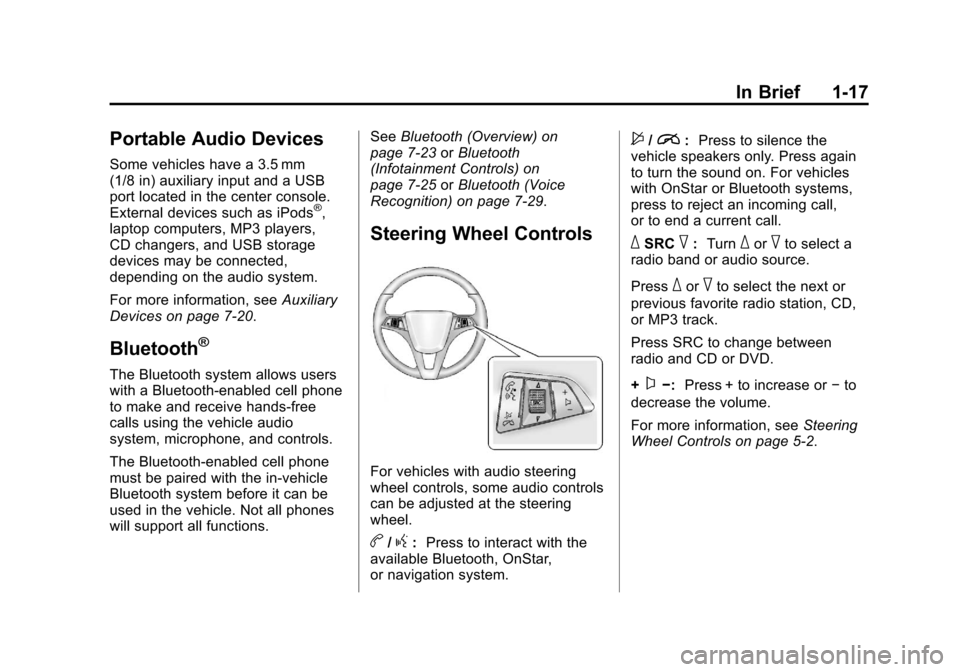
Steering Wheel Controls
For vehicles with audio steering
wheel controls, some audio controls
can be adjusted at the steering
wheel.
b/g: Press to interact with the
available Bluetooth, OnStar,
or navigation system.
$/i: Press to silence the
vehicle speakers only. Press again
to turn the sound on. For vehicles
with OnStar or Bluetooth systems,
press to reject an incoming call,
or to end a current call.
_SRC^: Turn_or^to select a
radio band or audio source.
Press
_or^to select the next or
previous favorite radio station, CD,
or MP3 track.
Press SRC to change between
radio and CD or DVD.
+
x−: Press + to increase or −to
decrease the volume.
For more information, see Steering
Wheel Controls on page 5‑2.
Page 24 of 400
Black plate (18,1)Chevrolet Cruze Owner Manual - 2012
1-18 In Brief
Cruise Control
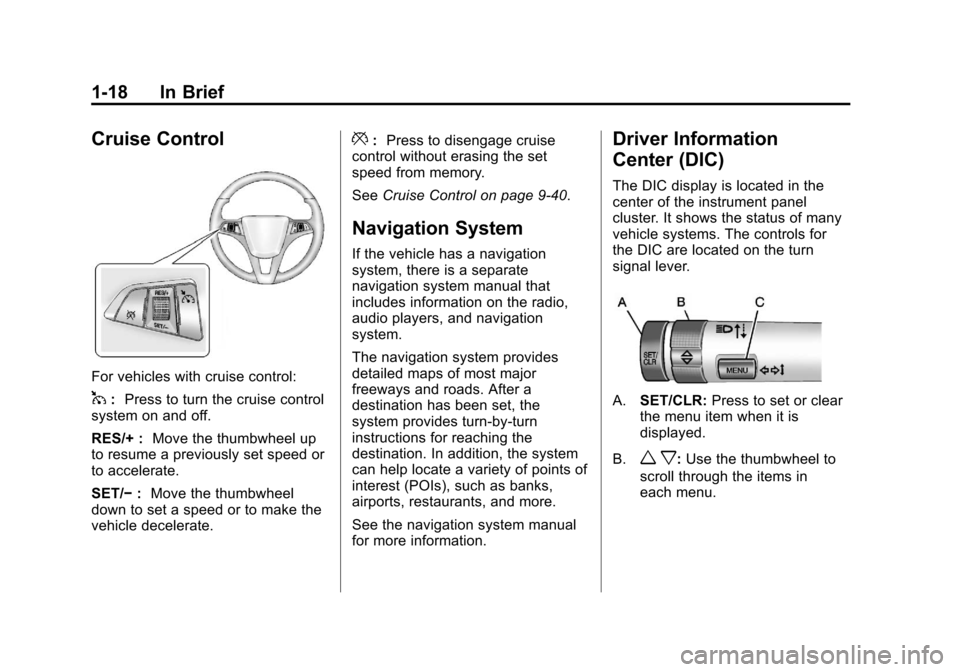
For vehicles with cruise control:
1:Press to turn the cruise control
system on and off.
RES/+ : Move the thumbwheel up
to resume a previously set speed or
to accelerate.
SET/− :Move the thumbwheel
down to set a speed or to make the
vehicle decelerate.
*: Press to disengage cruise
control without erasing the set
speed from memory.
See Cruise Control on page 9‑40.
Navigation System
If the vehicle has a navigation
system, there is a separate
navigation system manual that
includes information on the radio,
audio players, and navigation
system.
The navigation system provides
detailed maps of most major
freeways and roads. After a
destination has been set, the
system provides turn-by-turn
instructions for reaching the
destination. In addition, the system
can help locate a variety of points of
interest (POIs), such as banks,
airports, restaurants, and more.
See the navigation system manual
for more information.
Driver Information
Center (DIC)
The DIC display is located in the
center of the instrument panel
cluster. It shows the status of many
vehicle systems. The controls for
the DIC are located on the turn
signal lever.
A.SET/CLR: Press to set or clear
the menu item when it is
displayed.
B.
w x: Use the thumbwheel to
scroll through the items in
each menu.
Page 29 of 400
Black plate (23,1)Chevrolet Cruze Owner Manual - 2012
In Brief 1-23
Automatic Crash Response,
Emergency Services, Crisis Assist,
Stolen Vehicle Assistance, Vehicle
Diagnostics, Remote Door Unlock,
Roadside Assistance, Turn‐by‐Turn
Navigation, and Hands‐Free Calling
are available on most vehicles. Not
all OnStar services are available on
all vehicles. For more information,
see the OnStar Owner's Guide; visit
www.onstar.com (U.S.) or
www.onstar.ca (Canada); contact
OnStar at 1-888-4-ONSTAR
(1‐888‐466‐7827) or TTY
1‐877‐248‐2080; or push
the
Qbutton to speak with an
OnStar Advisor 24 hours a day,
seven days a week.
For a full description of OnStar
services and system limitations, see
the OnStar Owner's Guide in the
glove box. OnStar service is subject to the
OnStar Terms and Conditions
included in the OnStar Glove
Box Kit.
OnStar service requires wireless
communication networks and the
Global Positioning System (GPS)
satellite network. Not all OnStar
services are available everywhere
or on all vehicles at all times.
OnStar service cannot work unless
the vehicle is in a place where
OnStar has an agreement with a
wireless service provider for service
in that area, and the wireless
service provider has coverage,
network capacity, reception, and
technology compatible with OnStar's
service. Service involving location
information about the vehicle cannot
work unless GPS signals are
available, unobstructed, and
compatible with the OnStar
hardware. The vehicle must have a
working electrical system and
adequate battery power for the
OnStar equipment to operate.OnStar service may not work if the
OnStar equipment is not properly
installed or you have not maintained
it even if the vehicle is in good
working order and in compliance
with all government regulations.
If you try to add, connect, or modify
any equipment or software in the
vehicle, OnStar service may not
work. Other problems beyond
OnStar's control may prevent
service to you, such as hills, tall
buildings, tunnels, weather,
electrical system design and
architecture of the vehicle, damage
to important parts of the vehicle in a
crash, or wireless phone network
congestion or jamming.
See
Radio Frequency Statement on
page 13‑16 for information
regarding Part 15 of the Federal
Communications Commission (FCC)
rules and Industry Canada
Standards RSS-GEN/210/220/310.
Page 30 of 400
Black plate (24,1)Chevrolet Cruze Owner Manual - 2012
1-24 In Brief
OnStar Steering Wheel
Controls
This vehicle may have Talk/Mute
buttons that can be used to interact
with OnStar Hands-Free calling.
SeeSteering Wheel Controls on
page 5‑2 for more information.
On some vehicles, the Talk/Mute
buttons can be used to dial phone
extensions. See the OnStar Owner's
Guide for more information.
Your Responsibility
Increase the volume of the radio if
the OnStar Advisor cannot be
heard.
If the light next to the OnStar
buttons is red, the system may not
be functioning properly.
Push
Qand request a vehicle
diagnostic. If the light appears clear
(no light appears), your OnStar
subscription has expired and all
services have been deactivated.
Push
Qto confirm that the OnStar
equipment is active.
Page 33 of 400
Black plate (3,1)Chevrolet Cruze Owner Manual - 2012
Keys, Doors, and Windows 2-3
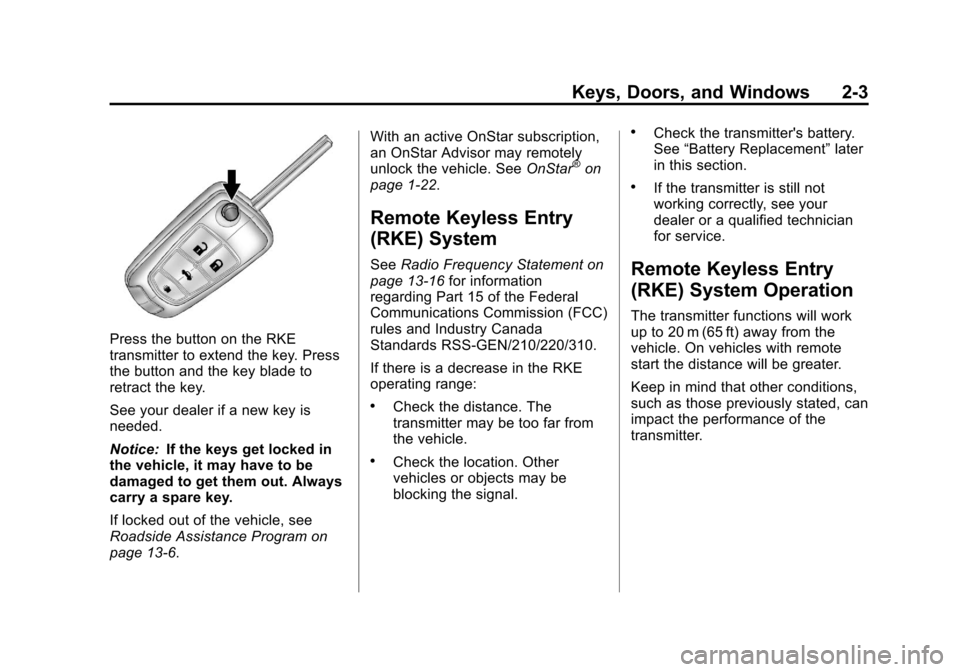
Press the button on the RKE
transmitter to extend the key. Press
the button and the key blade to
retract the key.
See your dealer if a new key is
needed.
Notice:If the keys get locked in
the vehicle, it may have to be
damaged to get them out. Always
carry a spare key.
If locked out of the vehicle, see
Roadside Assistance Program on
page 13‑6. With an active OnStar subscription,
an OnStar Advisor may remotely
unlock the vehicle. See
OnStar
®on
page 1‑22.
Remote Keyless Entry
(RKE) System
See Radio Frequency Statement on
page 13‑16 for information
regarding Part 15 of the Federal
Communications Commission (FCC)
rules and Industry Canada
Standards RSS-GEN/210/220/310.
If there is a decrease in the RKE
operating range:
.Check the distance. The
transmitter may be too far from
the vehicle.
.Check the location. Other
vehicles or objects may be
blocking the signal.
.Check the transmitter's battery.
See “Battery Replacement” later
in this section.
.If the transmitter is still not
working correctly, see your
dealer or a qualified technician
for service.
Remote Keyless Entry
(RKE) System Operation
The transmitter functions will work
up to 20 m (65 ft) away from the
vehicle. On vehicles with remote
start the distance will be greater.
Keep in mind that other conditions,
such as those previously stated, can
impact the performance of the
transmitter.