parking brake CHEVROLET CRUZE 2016 1.G Owner's Manual
[x] Cancel search | Manufacturer: CHEVROLET, Model Year: 2016, Model line: CRUZE, Model: CHEVROLET CRUZE 2016 1.GPages: 377, PDF Size: 6.35 MB
Page 288 of 377
Chevrolet Cruze Owner Manual (GMNA-Localizing-U.S./Canada/Mexico-
9234744) - 2016 - CRC - 3/9/16
Vehicle Care 287
matched to the tire/wheel positions,
using a TPMS relearn tool, in the
following order: driver side front tire,
passenger side front tire, passenger
side rear tire, and driver side rear.
See your dealer for service or to
purchase a relearn tool. A TPMS
relearn tool can also be purchased.
See Tire Pressure Monitor
Sensor Activation Tool at
www.gmtoolsandequipment.com or
call 1-800-GM TOOLS
(1-800-468-6657).
There are two minutes to match the
first tire/wheel position, and
five minutes overall to match all four
tire/wheel positions. If it takes
longer, the matching process stops
and must be restarted.
The TPMS sensor matching
process is:1. Set the parking brake.
2. Turn the ignition to ON/RUN with the engine off or place the
vehicle power mode in ON/
RUN/START. See Ignition
Positions (Keyless Access)
0 206 orIgnition Positions (Key
Access) 0204. 3. Uplevel DIC Only: Make sure
the Tire Pressure info page
option is turned on. The info
pages on the DIC can be
turned on and off through the
Settings menu. See Driver
Information Center (DIC)
(Uplevel Cluster) 0133 or
Driver Information Center (DIC)
(Base Level Cluster) 0130.
4. If the vehicle has an uplevel DIC, use the DIC controls on
the right side of the steering
wheel to scroll to the Tire
Pressure screen under the DIC
info page.
If the vehicle has a base level
DIC, press MENU to select the
Vehicle Information Menu in
the DIC. Use the thumbwheel
to scroll to the Tire Pressure
Menu item screen.
5. If the vehicle has an uplevel DIC, press and hold the
V
(Set/Reset) button in the center
of the DIC controls.
If the vehicle has a base level
DIC, press SET/CLR to begin
the sensor matching process. A message requesting
acceptance of the process may
display.
If the vehicle has a base level
DIC, press SET/CLR again to
confirm the selection.
The horn sounds twice to
signal the receiver is in relearn
mode and the TIRE
LEARNING ACTIVE message
displays on the DIC screen.
6. Start with the driver side front tire.
7. Place the relearn tool against the tire sidewall, near the valve
stem. Then press the button to
activate the TPMS sensor.
A horn chirp confirms that the
sensor identification code has
been matched to this tire and
wheel position.
8. Proceed to the passenger side front tire, and repeat the
procedure in Step 7.
9. Proceed to the passenger side rear tire, and repeat the
procedure in Step 7.
Page 291 of 377
Chevrolet Cruze Owner Manual (GMNA-Localizing-U.S./Canada/Mexico-
9234744) - 2016 - CRC - 3/9/16
290 Vehicle Care
tire manufacture date is the last four
digits of the DOT Tire Identification
Number (TIN) which is molded into
one side of the tire sidewall. The
first two digits represent the week
(01–52) and the last two digits, the
year. For example, the third week of
the year 2010 would have a
four-digit DOT date of 0310.
Vehicle Storage
Tires age when stored normally
mounted on a parked vehicle. Park
a vehicle that will be stored for at
least a month in a cool, dry, clean
area away from direct sunlight to
slow aging. This area should be free
of grease, gasoline, or other
substances that can deteriorate
rubber.
Parking for an extended period can
cause flat spots on the tires that
may result in vibrations while
driving. When storing a vehicle for
at least a month, remove the tires or
raise the vehicle to reduce the
weight from the tires.
Buying New Tires
GM has developed and matched
specific tires for the vehicle. The
original equipment tires installed
were designed to meet General
Motors Tire Performance Criteria
Specification (TPC Spec)
system rating. When
replacement tires are needed,
GM strongly recommends
buying tires with the same TPC
Spec rating.
GM's exclusive TPC Spec
system considers over a dozen
critical specifications that impact
the overall performance of the
vehicle, including brake system
performance, ride and handling,
traction control, and tire
pressure monitoring
performance. GM's TPC Spec
number is molded onto the tire's
sidewall near the tire size. If the
tires have an all-season tread
design, the TPC Spec numberwill be followed by MS for mud
and snow. See
Tire Sidewall
Labeling 0277.
GM recommends replacing worn
tires in complete sets of four.
Uniform tread depth on all tires
will help to maintain the
performance of the vehicle.
Braking and handling
performance may be adversely
affected if all the tires are not
replaced at the same time.
If proper rotation and
maintenance have been done,
all four tires should wear out at
about the same time. See Tire
Rotation 0288. However, if it is
necessary to replace only one
axle set of worn tires, place the
new tires on the rear axle.
Winter tires with the same speed
rating as the original equipment
tires may not be available for H,
V, W, Y and ZR speed rated
tires. Never exceed the winter
Page 297 of 377
Chevrolet Cruze Owner Manual (GMNA-Localizing-U.S./Canada/Mexico-
9234744) - 2016 - CRC - 3/9/16
296 Vehicle Care
Warning (Continued)
be badly injured or killed if the
vehicle slips off the jack. If a jack
is provided with the vehicle, only
use it for changing a flat tire.
If a tire goes flat, avoid further tire
and wheel damage by driving slowly
to a level place, well off the road,
if possible. Turn on the hazard
warning flashers. See Hazard
Warning Flashers 0154.
{Warning
Changing a tire can be
dangerous. The vehicle can slip
off the jack and roll over or fall
causing injury or death. Find a
level place to change the tire. To
help prevent the vehicle from
moving:
1. Set the parking brake firmly. (Continued)
Warning (Continued)
2. Put an automatictransmission in P (Park) or a
manual transmission in
1 (First) or R (Reverse).
3. Turn off the engine and do not restart while the vehicle
is raised.
4. Do not allow passengers to remain in the vehicle.
5. Place wheel blocks, if equipped, on both sides of
the tire at the opposite
corner of the tire being
changed.
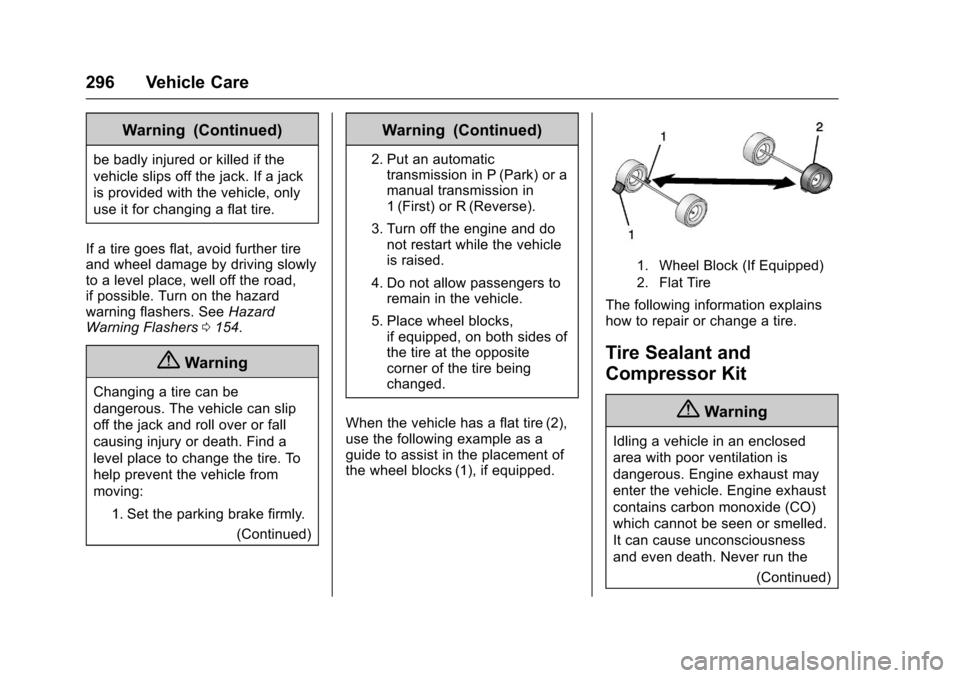
When the vehicle has a flat tire (2),
use the following example as a
guide to assist in the placement of
the wheel blocks (1), if equipped.
1. Wheel Block (If Equipped)
2. Flat Tire
The following information explains
how to repair or change a tire.
Tire Sealant and
Compressor Kit
{Warning
Idling a vehicle in an enclosed
area with poor ventilation is
dangerous. Engine exhaust may
enter the vehicle. Engine exhaust
contains carbon monoxide (CO)
which cannot be seen or smelled.
It can cause unconsciousness
and even death. Never run the (Continued)
Page 311 of 377
Chevrolet Cruze Owner Manual (GMNA-Localizing-U.S./Canada/Mexico-
9234744) - 2016 - CRC - 3/9/16
310 Vehicle Care
Caution
Ignoring these steps could result
in costly damage to the vehicle
that would not be covered by the
vehicle warranty. Trying to start
the vehicle by pushing or pulling it
will not work, and it could damage
the vehicle.
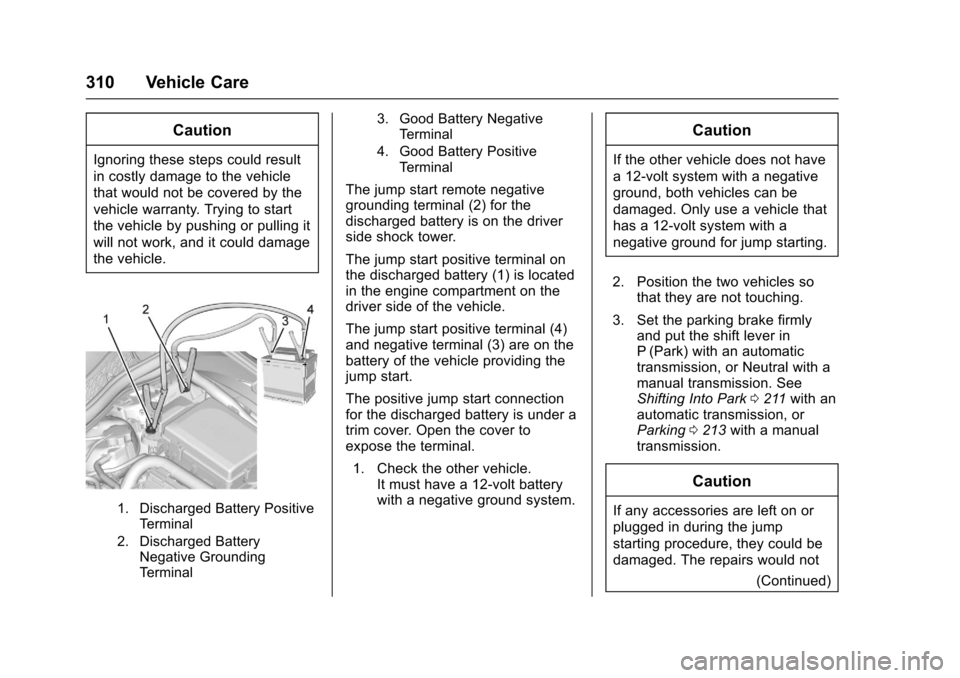
1. Discharged Battery PositiveTerminal
2. Discharged Battery Negative Grounding
Terminal 3. Good Battery Negative
Terminal
4. Good Battery Positive Terminal
The jump start remote negative
grounding terminal (2) for the
discharged battery is on the driver
side shock tower.
The jump start positive terminal on
the discharged battery (1) is located
in the engine compartment on the
driver side of the vehicle.
The jump start positive terminal (4)
and negative terminal (3) are on the
battery of the vehicle providing the
jump start.
The positive jump start connection
for the discharged battery is under a
trim cover. Open the cover to
expose the terminal.
1. Check the other vehicle. It must have a 12-volt battery
with a negative ground system.
Caution
If the other vehicle does not have
a 12-volt system with a negative
ground, both vehicles can be
damaged. Only use a vehicle that
has a 12-volt system with a
negative ground for jump starting.
2. Position the two vehicles so that they are not touching.
3. Set the parking brake firmly and put the shift lever in
P (Park) with an automatic
transmission, or Neutral with a
manual transmission. See
Shifting Into Park 0211 with an
automatic transmission, or
Parking 0213 with a manual
transmission.
Caution
If any accessories are left on or
plugged in during the jump
starting procedure, they could be
damaged. The repairs would not
(Continued)
Page 316 of 377
Chevrolet Cruze Owner Manual (GMNA-Localizing-U.S./Canada/Mexico-
9234744) - 2016 - CRC - 3/9/16
Vehicle Care 315
2. Shift an automatic transmissioninto P (Park) or a manual
transmission into 1 (First) gear.
3. Set the parking brake.
4. Clamp the steering wheel in a straight-ahead position with a
clamping device designed for
towing.
5. Turn the ignition off.
6. Secure the vehicle to the dolly.
7. Release the parking brake.
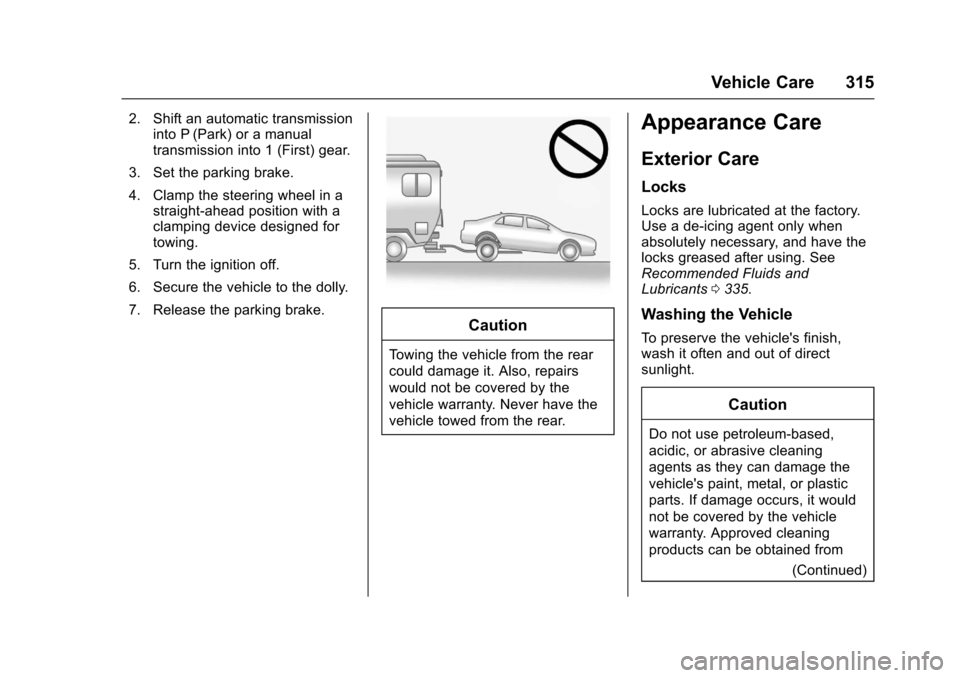
Caution
Towing the vehicle from the rear
could damage it. Also, repairs
would not be covered by the
vehicle warranty. Never have the
vehicle towed from the rear.
Appearance Care
Exterior Care
Locks
Locks are lubricated at the factory.
Use a de-icing agent only when
absolutely necessary, and have the
locks greased after using. See
Recommended Fluids and
Lubricants 0335.
Washing the Vehicle
To preserve the vehicle's finish,
wash it often and out of direct
sunlight.
Caution
Do not use petroleum-based,
acidic, or abrasive cleaning
agents as they can damage the
vehicle's paint, metal, or plastic
parts. If damage occurs, it would
not be covered by the vehicle
warranty. Approved cleaning
products can be obtained from
(Continued)
Page 329 of 377

Chevrolet Cruze Owner Manual (GMNA-Localizing-U.S./Canada/Mexico-
9234744) - 2016 - CRC - 3/9/16
328 Service and Maintenance
.Lubricate body components. See
Exterior Care 0315.
. Check starter switch. See Starter
Switch Check 0260.
. Check automatic transmission
shift lock control function. See
Automatic Transmission Shift
Lock Control Function
Check 0261.
. Check ignition transmission lock.
See Ignition Transmission Lock
Check 0261. .
Check parking brake and
automatic transmission park
mechanism. See Park Brake and
P (Park) Mechanism
Check 0261.
. Check accelerator pedal for
damage, high effort, or binding.
Replace if needed.
. Visually inspect gas strut for
signs of wear, cracks, or other
damage. Check the hold open
ability of the strut. See your
dealer if service is required. .
Check tire sealant expiration
date, if equipped. See Tire
Sealant and Compressor
Kit 0296.
. Inspect sunroof track and seal,
if equipped. See Sunroof053.
Page 368 of 377

Chevrolet Cruze Owner Manual (GMNA-Localizing-U.S./Canada/Mexico-
9234744) - 2016 - CRC - 3/9/16
Index 367
Assistance Systems forDriving . . . . . . . . . . . . . . . . . . . . . . . . 228
Assistance Systems for Parking and Backing . . . . . . . . . . 226
Audio Theft-Deterrent Feature . . . . . . . 160
Automatic
Climate Control System . . . . . . . 188
Door Locks . . . . . . . . . . . . . . . . . . . . . 43
Headlamp System . . . . . . . . . . . . 153
Transmission . . . . . . . . . . . . . . . . . 214
Transmission Fluid . . . . . . . . . . . 249
Automatic Transmission Manual Mode . . . . . . . . . . . . . . . . . 216
Shift Lock Control FunctionCheck . . . . . . . . . . . . . . . . . . . . . . . 261
Avoiding Untrusted Media Devices . . . . . . . . . . . . . . . . . . . . . . . 167
B
BatteryExterior Lighting BatterySaver . . . . . . . . . . . . . . . . . . . . . . . 158
Power Protection . . . . . . . . . . . . . 158
Voltage and Charging Messages . . . . . . . . . . . . . . . . . . . 136
Battery - North America . . . . 259, 309
Blade Replacement, Wiper . . . . . 262 Bluetooth
Overview . . . . . . . . . . . . . . . . 168, 169
Brake System Warning Light . . . . . . . . 124
Brakes . . . . . . . . . . . . . . . . . . . . . . . . . . 257 Antilock . . . . . . . . . . . . . . . . . . . . . . . 219
Assist . . . . . . . . . . . . . . . . . . . . . . . . . 221
Fluid . . . . . . . . . . . . . . . . . . . . . . . . . . 258
Parking . . . . . . . . . . . . . . . . . . . . . . . 220
System Messages . . . . . . . . . . . . 136
Braking . . . . . . . . . . . . . . . . . . . . . . . . . 195
Break-In, New Vehicle . . . . . . . . . . 204
Bulb Replacement . . . . . . . . . . . . . . 267
Halogen Bulbs . . . . . . . . . . . . . . . . 263
Headlamp Aiming . . . . . . . . . . . . . 263
Headlamps . . . . . . . . . . . . . . . . . . . 263
Headlamps and Front TurnSignal . . . . . . . . . . . . . . . . . . . . . . . 264
High Intensity Discharge (HID) Lighting . . . . . . . . . . . . . . . 263
Taillamps and Back-up
Lamps . . . . . . . . . . . . . . . . . . . . . . 265
Buying New Tires . . . . . . . . . . . . . . . 290
C
Calibration . . . . . . . . . . . . . . . . . . . . . . 106
California Fuel Requirements . . . . . . . . . . . 236 California (cont'd)
Perchlorate Materials
Requirements . . . . . . . . . . . . . . . 242
California
Proposition
65 Warning . . . . . . . . . .241, 259, 309
Canadian Vehicle Owners . . . . . . . . 2
Capacities and Specifications . . . . . . . . . . . . . . . . . 339
Carbon Monoxide Engine Exhaust . . . . . . . . . . . . . . . 213
Trunk . . . . . . . . . . . . . . . . . . . . . . . . . . . 44
Winter Driving . . . . . . . . . . . . . . . . 198
Caution, Danger, and Warning . . . . 3
Center Console Storage . . . . . . . . 102
Chains, Tire . . . . . . . . . . . . . . . . . . . . 294
Charging Wireless . . . . . . . . . . . . . . . . . . . . . . .110
Charging System Light . . . . . . . . . 122
Check Ignition Transmission Lock . . . 261
Malfunction IndicatorEngine Light . . . . . . . . . . . . . . . . 122
Child Restraints Infants and Young Children . . . . . 84
Lower Anchors and Tethersfor Children . . . . . . . . . . . . . . . . . . . 89
Older Children . . . . . . . . . . . . . . . . . . 82
Page 373 of 377

Chevrolet Cruze Owner Manual (GMNA-Localizing-U.S./Canada/Mexico-
9234744) - 2016 - CRC - 3/9/16
372 Index
Messages (cont'd)Brake System . . . . . . . . . . . . . . . . 136
Compass . . . . . . . . . . . . . . . . . . . . . 136
Door Ajar . . . . . . . . . . . . . . . . . . . . . 137
Engine Cooling System . . . . . . . 137
Engine Oil . . . . . . . . . . . . . . . . . . . . 138
Engine Power . . . . . . . . . . . . . . . . 138
Fuel System . . . . . . . . . . . . . . . . . . 138
Key and Lock . . . . . . . . . . . . . . . . . 138
Lamp . . . . . . . . . . . . . . . . . . . . . . . . . 139
Object Detection System . . . . . 139
Ride Control System . . . . . . . . . . 141
Safety Belt . . . . . . . . . . . . . . . . . . . . 141
Security . . . . . . . . . . . . . . . . . . . . . . 141
Service Vehicle . . . . . . . . . . . . . . . 142
Starting the Vehicle . . . . . . . . . . . 142
Tire . . . . . . . . . . . . . . . . . . . . . . . . . . . 142
Transmission . . . . . . . . . . . . . . . . . 143
Vehicle . . . . . . . . . . . . . . . . . . . . . . . 136
Vehicle Reminder . . . . . . . . . . . . . 143
Mirrors Automatic DimmingRearview . . . . . . . . . . . . . . . . . . . . . . 50
Convex . . . . . . . . . . . . . . . . . . . . . . . . . 49
Folding . . . . . . . . . . . . . . . . . . . . . . . . . 50
Heated . . . . . . . . . . . . . . . . . . . . . . . . . 50
Manual Rearview . . . . . . . . . . . . . . . 50
Power . . . . . . . . . . . . . . . . . . . . . . . . . . 49 Mirrors, Interior Rearview . . . . . . . . 50
Monitor System, Tire
Pressure . . . . . . . . . . . . . . . . . . . . . . 284
Multi-band Antenna . . . . . . . . . . . . . 166
N
Navigation OnStar®. . . . . . . . . . . . . . . . . . . . . . 357
New Vehicle Break-In . . . . . . . . . . . 204
O
Object Detection System Messages . . . . . . . . . . . . . . . . . . . . . 139
Odometer . . . . . . . . . . . . . . . . . . . . . . . 117 Trip . . . . . . . . . . . . . . . . . . . . . . . . . . . .117
Off-Road Recovery . . . . . . . . . . . . . . . . . . . . . 196
Oil Engine . . . . . . . . . . . . . . . . . . . . . . . . 246
Engine Oil Life System . . . . . . . 248
Messages . . . . . . . . . . . . . . . . . . . . 138
Pressure Light . . . . . . . . . . . . . . . . 127
Older Children, Restraints . . . . . . . 82
Online Owner Center . . . . . . . . . . . 345
OnStar
®Additional
Information . . . . . . . . . . . . . . . . . . . . 360
OnStar
®Connections . . . . . . . . . . . 358
OnStar®Diagnostics . . . . . . . . . . . . 360
OnStar®Emergency . . . . . . . . . . . . 357 OnStar
®Navigation . . . . . . . . . . . . . 357
OnStar®Overview . . . . . . . . . . . . . . 356
OnStar®Security . . . . . . . . . . . . . . . 357
Operation Fog Lamps . . . . . . . . . . . . . . . . . . . 155
Infotainment System . . . . . . . . . . 162
Ordering
Service Publications . . . . . . . . . . 351
Outlets Power . . . . . . . . . . . . . . . . . . . . . . . . 108
Overheating, Engine . . . . . . . . . . . . 255
Overview . . . . . . . . . . . . . . . . . . . . . . . 161
P
Park
Shifting Into . . . . . . . . . . . . . . . . . . . .211
Shifting Out of . . . . . . . . . . . . . . . . 212
Parking . . . . . . . . . . . . . . . . . . . . . . . . . 213 Brake . . . . . . . . . . . . . . . . . . . . . . . . . 220
Brake and P (Park)Mechanism Check . . . . . . . . . . 261
Over Things That Burn . . . . . . . 213
Parking or Backing Assistance Systems . . . . . . . . . . 226
Passenger Airbag Status Indicator . . . . . . . . . . . . . . . . . . . . . . 121
Passenger Compartment Air Filter . . . . . . . . . . . . . . . . . . . . . . . . . . 192
Passenger Sensing System . . . . . 76