low oil pressure CHEVROLET CRUZE 2017 2.G User Guide
[x] Cancel search | Manufacturer: CHEVROLET, Model Year: 2017, Model line: CRUZE, Model: CHEVROLET CRUZE 2017 2.GPages: 405, PDF Size: 6.76 MB
Page 271 of 405
Chevrolet Cruze Owner Manual (GMNA-Localizing-U.S./Canada/Mexico-
9803785) - 2017 - CRC - 4/13/16
270 Vehicle Care
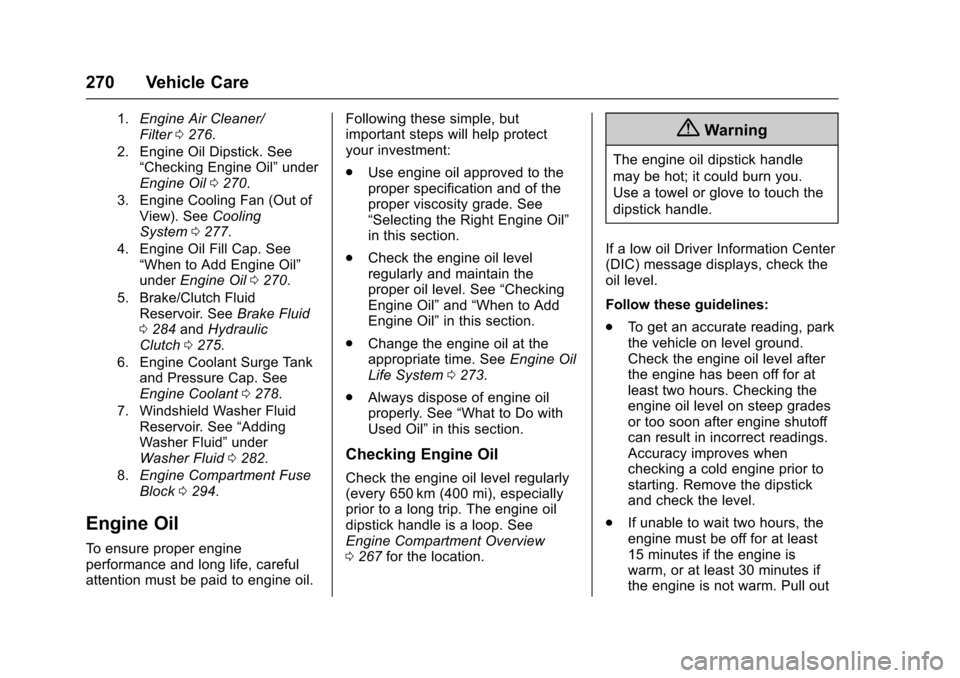
1.Engine Air Cleaner/
Filter0276.
2. Engine Oil Dipstick. See “Checking Engine Oil” under
Engine Oil0270.
3. Engine Cooling Fan (Out of View). See
Cooling
System 0277.
4. Engine Oil Fill Cap. See “When to Add Engine Oil”
under
Engine Oil 0270.
5. Brake/Clutch Fluid Reservoir. See
Brake Fluid
0 284andHydraulic
Clutch 0275.
6. Engine Coolant Surge Tank and Pressure Cap. See
Engine Coolant 0278.
7. Windshield Washer Fluid Reservoir. See “Adding
Washer Fluid” under
Washer Fluid0282.
8.
Engine Compartment Fuse
Block 0294.
Engine Oil
To ensure proper engine
performance and long life, careful
attention must be paid to engine oil. Following these simple, but
important steps will help protect
your investment:
.
Use engine oil approved to the
proper specification and of the
proper viscosity grade. See
“Selecting the Right Engine Oil”
in this section.
. Check the engine oil level
regularly and maintain the
proper oil level. See “Checking
Engine Oil” and“When to Add
Engine Oil” in this section.
. Change the engine oil at the
appropriate time. See Engine Oil
Life System 0273.
. Always dispose of engine oil
properly. See “What to Do with
Used Oil” in this section.
Checking Engine Oil
Check the engine oil level regularly
(every 650 km (400 mi), especially
prior to a long trip. The engine oil
dipstick handle is a loop. See
Engine Compartment Overview
0267 for the location.
{Warning
The engine oil dipstick handle
may be hot; it could burn you.
Use a towel or glove to touch the
dipstick handle.
If a low oil Driver Information Center
(DIC) message displays, check the
oil level.
Follow these guidelines:
. To get an accurate reading, park
the vehicle on level ground.
Check the engine oil level after
the engine has been off for at
least two hours. Checking the
engine oil level on steep grades
or too soon after engine shutoff
can result in incorrect readings.
Accuracy improves when
checking a cold engine prior to
starting. Remove the dipstick
and check the level.
. If unable to wait two hours, the
engine must be off for at least
15 minutes if the engine is
warm, or at least 30 minutes if
the engine is not warm. Pull out
Page 280 of 405
Chevrolet Cruze Owner Manual (GMNA-Localizing-U.S./Canada/Mexico-
9803785) - 2017 - CRC - 4/13/16
Vehicle Care 279
Caution
If improper coolant mixture,
inhibitors, or additives are used in
the vehicle cooling system, the
engine could overheat and be
damaged. Too much water in the
mixture can freeze and crack
engine cooling parts. The repairs
would not be covered by the
vehicle warranty. Use only the
proper mixture of engine coolant
for the cooling system. See
Recommended Fluids and
Lubricants0361.
Never dispose of engine coolant by
putting it in the trash, pouring it on
the ground, or into sewers, streams,
or bodies of water. Have the coolant
changed by an authorized service
center, familiar with legal
requirements regarding used
coolant disposal. This will help
protect the environment and your
health.
Checking Coolant
The vehicle must be on a level
surface when checking the coolant
level.
Check to see if coolant is visible in
the coolant surge tank. If the coolant
inside the coolant surge tank is
boiling, do not do anything else until
it cools down. If coolant is visible
but the coolant level is not at the
indicated mark, add a 50/50 mixture
of clean, drinkable water and
DEX-COOL coolant at the coolant
surge tank, but be sure the cooling
system is cool before this is done.
See Engine Overheating 0281.
The coolant surge tank is located in
the engine compartment on the
driver side of the vehicle. See
Engine Compartment
Overview 0267.
How to Add Coolant to the
Coolant Surge Tank
Caution
This vehicle has a specific
coolant fill procedure. Failure to
follow this procedure could cause
the engine to overheat and be
severely damaged.
If no problem is found, check to see
if coolant is visible in the coolant
surge tank. If coolant is visible but
the coolant level is not at the
indicated level mark, add a
50/50 mixture of clean, drinkable
water and DEX-COOL coolant at the
coolant surge tank, but be sure the
cooling system, including the
coolant surge tank pressure cap, is
cool before you do it.
{Warning
Steam and scalding liquids from a
hot cooling system can blow out
and burn you badly. They are (Continued)
Page 281 of 405
Chevrolet Cruze Owner Manual (GMNA-Localizing-U.S./Canada/Mexico-
9803785) - 2017 - CRC - 4/13/16
280 Vehicle Care
Warning (Continued)
under pressure, and if you turn
the coolant surge tank pressure
cap—even a little —they can
come out at high speed. Never
turn the cap when the cooling
system, including the coolant
surge tank pressure cap, is hot.
Wait for the cooling system and
coolant surge tank pressure cap
to cool if you ever have to turn
the pressure cap.
{Warning
Adding only plain water or some
other liquid to the cooling system
can be dangerous. Plain water
and other liquids, can boil before
the proper coolant mixture will.
The coolant warning system is set
for the proper coolant mixture.
With plain water or the wrong
mixture, the engine could get too
hot but you would not get the
(Continued)
Warning (Continued)
overheat warning. The engine
could catch fire and you or
others could be burned. Use a
50/50 mixture of clean, drinkable
water and DEX-COOL coolant.
Caution
In cold weather, water can freeze
and crack the engine, radiator,
heater core, and other parts. Use
the recommended coolant and
the proper coolant mixture.
{Warning
You can be burned if you spill
coolant on hot engine parts.
Coolant contains ethylene glycol
and it will burn if the engine parts
are hot enough. Do not spill
coolant on a hot engine.
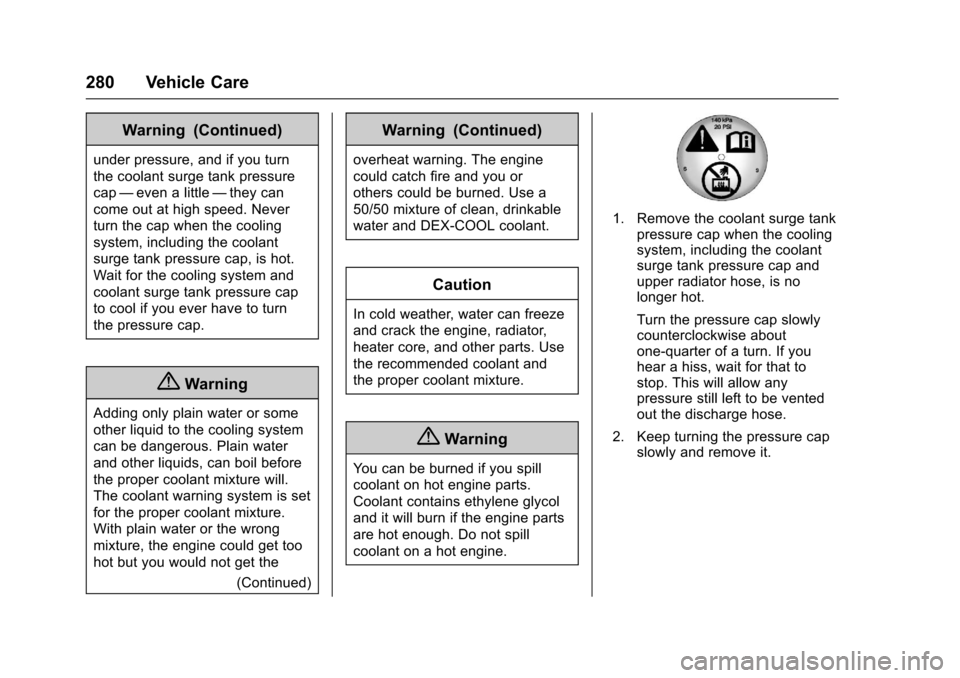
1. Remove the coolant surge tankpressure cap when the cooling
system, including the coolant
surge tank pressure cap and
upper radiator hose, is no
longer hot.
Turn the pressure cap slowly
counterclockwise about
one-quarter of a turn. If you
hear a hiss, wait for that to
stop. This will allow any
pressure still left to be vented
out the discharge hose.
2. Keep turning the pressure cap slowly and remove it.
Page 348 of 405
Chevrolet Cruze Owner Manual (GMNA-Localizing-U.S./Canada/Mexico-
9803785) - 2017 - CRC - 4/13/16
Vehicle Care 347
corrosion. Larger areas of finish
damage can be corrected in your
dealer's body and paint shop.
Chemical Paint Spotting
Airborne pollutants can fall upon
and attack painted vehicle surfaces
causing blotchy, ring-shaped
discolorations, and small, irregular
dark spots etched into the paint
surface. See“Finish Care”
previously in this section.
Interior Care
To prevent dirt particle abrasions,
regularly clean the vehicle's interior.
Immediately remove any soils.
Newspapers or dark garments can
transfer color to the vehicle’s
interior.
Use a soft bristle brush to remove
dust from knobs and crevices on the
instrument cluster. Using a mild
soap solution, immediately remove
hand lotions, sunscreen, and insect
repellent from all interior surfaces or
permanent damage may result. Use cleaners specifically designed
for the surfaces being cleaned to
prevent permanent damage. Apply
all cleaners directly to the cleaning
cloth. Do not spray cleaners on any
switches or controls. Remove
cleaners quickly.
Before using cleaners, read and
follow all safety instructions on the
label. While cleaning the interior,
open the doors and windows to get
proper ventilation.
To prevent damage, do not clean
the interior using the following
cleaners or techniques:
.
Never use a razor or any other
sharp object to remove soil from
any interior surface.
. Never use a brush with stiff
bristles.
. Never rub any surface
aggressively or with too much
pressure.
. Do not use laundry detergents or
dishwashing soaps with
degreasers. For liquid cleaners,
use approximately 20 drops per
3.8 L (1 gal) of water. A concentrated soap solution will
create streaks and attract dirt.
Do not use solutions that contain
strong or caustic soap.
. Do not heavily saturate the
upholstery when cleaning.
. Do not use solvents or cleaners
containing solvents.
Interior Glass
To clean, use a terry cloth fabric
dampened with water. Wipe droplets
left behind with a clean dry cloth.
If necessary, use a commercial
glass cleaner after cleaning with
plain water.
Caution
To prevent scratching, never use
abrasive cleaners on automotive
glass. Abrasive cleaners or
aggressive cleaning may damage
the rear window defogger.
Cleaning the windshield with water
during the first three to six months
of ownership will reduce tendency
to fog.
Page 354 of 405
Chevrolet Cruze Owner Manual (GMNA-Localizing-U.S./Canada/Mexico-
9803785) - 2017 - CRC - 4/13/16
Service and Maintenance 353
Once a Year (Minimum)
.On vehicles with diesel engines,
it is recommended to drain the
diesel fuel filter of water when
the WATER IN FUEL -
CONTACT SERVICE message
displays or a minimum of once
a year.
Engine Oil Change
When the CHANGE ENGINE OIL
SOON DIC message displays, have
the engine oil and filter changed
within the next 1 000 km/600 mi.
If driven under the best conditions,
the engine oil life system may not
indicate the need for vehicle service
for up to a year. The engine oil and
filter must be changed at least once
a year and the oil life system must
be reset. Your trained dealer
technician can perform this work.
If the engine oil life system is reset
accidentally, service the vehicle
within 5 000 km/3,000 mi since the
last service. Reset the oil life
system when the oil is changed.
See Engine Oil Life System 0273.
Tire Rotation and Required
Services Every 12 000 km/
7,500 mi
Rotate the tires, if recommended for
the vehicle, and perform the
following services. See Tire
Rotation 0314.
. Check engine oil level and oil
life percentage. If needed,
change engine oil and filter, and
reset oil life system. See Engine
Oil 0270 andEngine Oil Life
System 0273.
. Check engine coolant level. See
Engine Coolant 0278.
. Check windshield washer fluid
level. See Washer Fluid 0282.
. Visually inspect windshield wiper
blades for wear, cracking,
or contamination. See Exterior
Care 0342. Replace worn or
damaged wiper blades. See
Wiper Blade
Replacement 0288. .
Check tire inflation pressures.
See Tire Pressure 0308.
. Inspect tire wear. See Tire
Inspection 0314.
. Visually check for fluid leaks.
. Inspect engine air cleaner filter.
See Engine Air Cleaner/
Filter 0276.
. Inspect brake system. See
Exterior Care 0342.
. Visually inspect steering,
suspension, and chassis
components for damaged, loose,
or missing parts or signs of
wear. See Exterior Care 0342.
. Check restraint system
components. See Safety System
Check 072.
. Visually inspect fuel system for
damage or leaks.
. Visually inspect exhaust system
and nearby heat shields for
loose or damaged parts.
Page 387 of 405
Chevrolet Cruze Owner Manual (GMNA-Localizing-U.S./Canada/Mexico-
9803785) - 2017 - CRC - 4/13/16
386 OnStar
from each other and use a
combination of letters, numbers,
and symbols to increase the
security.
. Change the default name of the
SSID (Service Set Identifier).
This is your network’s name that
is visible to other wireless
devices. Choose a unique name
and avoid family names or
vehicle descriptions.
OnStar Wi-Fi
®Hotspot (If
Equipped)
The vehicle may have a built-in
Wi-Fi hotspot that provides access
to the Internet and web content at
4G LTE speed. Up to seven mobile
devices can be connected. A data
plan is required. Use the in-vehicle
controls only when it is safe to
do so.
1. To retrieve Wi-Fi hotspot information, press
=, wait for
the prompt, then say “Wi-Fi
settings.” On some vehicles,
touch Wi-Fi Settings on the
screen. 2. The Wi-Fi settings will display
the Wi-Fi hotspot name (SSID),
password, and on some
vehicles, the connection type
(no Internet connection, 3G,
4G, 4G LTE), and signal quality
(poor, good, excellent).
3. To change the SSID or password, press
Qor call
1-888-4ONSTAR to connect
with an Advisor.
After initial set-up, your vehicle’s
Wi-Fi hotspot will connect
automatically to your mobile
devices. Manage data usage by
turning Wi-Fi on or off on your
mobile device, using the
RemoteLink mobile app, or by
contacting an OnStar Advisor.
OnStar RemoteLink
®Mobile App
(If Equipped)
Download the OnStar RemoteLink
mobile app to select Apple
®iOS,
Android™, BlackBerry®,
or Windows®mobile devices.
OnStar Subscribers can access the
following services from a mobile
device: .
Remotely start/stop the vehicle,
if factory-equipped.
. Lock/unlock doors, if equipped
with automatic locks.
. Activate the horn and lamps.
. Check the vehicle’s fuel level, oil
life, or tire pressure,
if factory-equipped with the Tire
Pressure Monitor System.
. Send directions to the vehicle.
. Locate the vehicle on a map
(U.S. market only).
. Turn the vehicle's Wi-Fi hotspot
on/off, manage settings, and
monitor data consumption,
if equipped.
For OnStar RemoteLink information
and compatibility, see
www.onstar.com (U.S.) or
www.onstar.ca (Canada).
Remote Services
Contact an OnStar Advisor to
unlock the doors or sound the horn
and flash the lamps.
Page 399 of 405

Chevrolet Cruze Owner Manual (GMNA-Localizing-U.S./Canada/Mexico-
9803785) - 2017 - CRC - 4/13/16
398 Index
How to Wear Safety BeltsProperly . . . . . . . . . . . . . . . . . . . . . . . . 68
Hydraulic Clutch . . . . . . . . . . . . . . . . 275
I
Ignition Positions . . . . . . . . . . 210, 212
Ignition Transmission Lock Check . . . . . . . . . . . . . . . . . . . . . . . . . 287
Immobilizer . . . . . . . . . . . . . . . . . . . . . . 51
Indicator Vehicle Ahead . . . . . . . . . . . . . . . . 130
Infants and Young Children,
Restraints . . . . . . . . . . . . . . . . . . . . . . 87
Infotainment . . . . . . . . . . . . . . . . . . . . 166
Infotainment System . . . . . . . . . . . . 382
Instrument Cluster . . . . . . . . . . . . . . 116
Instrument Panel Overview . . . . . . . 6
Interior Rearview Mirrors . . . . . . . . . 54
Introduction . . . . . . . . . . . . . . . . . . . . . . . 2
J
Jump Starting - North America . . . . . . . . . . . . . . . . . . . . . . . 336
K
Key and Lock Messages . . . . . . . . 143
Keyless EntryRemote (RKE) System . . . . . 34, 36
Keys . . . . . . . . . . . . . . . . . . . . . . . . . . . . . 31
L
Labeling, Tire Sidewall . . . . . . . . . . 303
Lamps Courtesy . . . . . . . . . . . . . . . . . . . . . . 163
Daytime Running (DRL) . . . . . . 160
Dome . . . . . . . . . . . . . . . . . . . . . . . . . 163
Exterior Controls . . . . . . . . . . . . . . 158
Exterior Lighting BatterySaver . . . . . . . . . . . . . . . . . . . . . . . 165
Malfunction Indicator . . . . . . . . . 126
Messages . . . . . . . . . . . . . . . . . . . . 144
On Reminder . . . . . . . . . . . . . . . . . 133
Reading . . . . . . . . . . . . . . . . . . . . . . 163
Taillamps and Back-up . . . . . . . 291
Lane Change Alert (LCA) . . . . . . . 245
Lane Departure Warning (LDW) . . . . . . . . . . . . . . . . 247
Lane Keep Assist (LKA) . . . . . . . . 247
Lane Keep Assist Light . . . . . . . . . 129
Lap-Shoulder Belt . . . . . . . . . . . . . . . 69
LATCH System Replacing Parts after aCrash . . . . . . . . . . . . . . . . . . . . . . . . . 99
LATCH, Lower Anchors and
Tethers for Children . . . . . . . . . . . . 92
Liftgate . . . . . . . . . . . . . . . . . . . . . . . . . . 49
Lighting Entry . . . . . . . . . . . . . . . . . . . . . . . . . 164 Lighting (cont'd)
Exit . . . . . . . . . . . . . . . . . . . . . . . . . . . 164
Illumination Control . . . . . . . . . . . 163
Lights . . . . . . . . . . . . . . . . . . . . . . . . . . . 129
Airbag Readiness . . . . . . . . . . . . . 125
Antilock Brake System(ABS) Warning . . . . . . . . . . . . . . 129
Brake System Warning . . . . . . . 128
Charging System . . . . . . . . . . . . . 126
Cruise Control . . . . . . . . . . . . . . . . 133
Diesel Exhaust Fluid (DEF) . . . 132
Door Ajar . . . . . . . . . . . . . . . . . . . . . 134
Engine Oil Pressure . . . . . . . . . . 132
Flash-to-Pass . . . . . . . . . . . . . . . . . 160
Front Fog Lamp . . . . . . . . . . . . . . 133
High-Beam On . . . . . . . . . . . . . . . . 133
High/Low Beam Changer . . . . . 160
Low Fuel Warning . . . . . . . . . . . . 132
Safety Belt Reminders . . . . . . . . 124
Security . . . . . . . . . . . . . . . . . . . . . . 133
StabiliTrak
®OFF . . . . . . . . . . . . . 130
Tire Pressure . . . . . . . . . . . . . . . . . 131
Traction Control System (TCS)/StabiliTrak
®. . . . . . . . . . 131
Traction Off . . . . . . . . . . . . . . . . . . . 130
Up-Shift . . . . . . . . . . . . . . . . . . . . . . 129
Wait to Start . . . . . . . . . . . . . . . . . . 131
Page 400 of 405

Chevrolet Cruze Owner Manual (GMNA-Localizing-U.S./Canada/Mexico-
9803785) - 2017 - CRC - 4/13/16
Index 399
LocksAutomatic Door . . . . . . . . . . . . . . . . . 46
Delayed Locking . . . . . . . . . . . . . . . . 45
Door . . . . . . . . . . . . . . . . . . . . . . . . . . . . 44
Lockout Protection . . . . . . . . . . . . . . 46
Power Door . . . . . . . . . . . . . . . . . . . . . 45
Safety . . . . . . . . . . . . . . . . . . . . . . . . . . 46
Loss of Control . . . . . . . . . . . . . . . . . 203
Low Fuel Warning Light . . . . . . . . . 132
Low-Profile Tires . . . . . . . . . . . . . . . . 302
Lower Anchors and Tethers for Children (LATCH
System) . . . . . . . . . . . . . . . . . . . . . . . . 92
M
MaintenanceRecords . . . . . . . . . . . . . . . . . . . . . . 364
Maintenance and Care Additional . . . . . . . . . . . . . . . . . . . . . 358
Maintenance Schedule . . . . . . . . . 352 Recommended Fluids and
Lubricants . . . . . . . . . . . . . . . . . . . 361
Malfunction Indicator Lamp . . . . . 126
Manual Mode . . . . . . . . . . . . . . . . . . . 230
Manual Transmission . . . . . . . . . . . 231 Fluid . . . . . . . . . . . . . . . . . . . . . . . . . . 275
Media Avoiding Untrusted Devices . . 174 Messages
Airbag System . . . . . . . . . . . . . . . . 146
Battery Voltage and
Charging . . . . . . . . . . . . . . . . . . . . 140
Brake System . . . . . . . . . . . . . . . . 140
Compass . . . . . . . . . . . . . . . . . . . . . 140
Diesel Exhaust Fluid . . . . . . . . . . 142
Diesel Particulate Filter . . . . . . . 143
Door Ajar . . . . . . . . . . . . . . . . . . . . . 141
Engine Cooling System . . . . . . . 141
Engine Oil . . . . . . . . . . . . . . . . . . . . 142
Engine Power . . . . . . . . . . . . . . . . 142
Fuel System . . . . . . . . . . . . . . . . . . 142
Key and Lock . . . . . . . . . . . . . . . . . 143
Lamp . . . . . . . . . . . . . . . . . . . . . . . . . 144
Object Detection System . . . . . 144
Ride Control System . . . . . . . . . . 146
Safety Belt . . . . . . . . . . . . . . . . . . . . 146
Security . . . . . . . . . . . . . . . . . . . . . . 146
Service Vehicle . . . . . . . . . . . . . . . 147
Starting the Vehicle . . . . . . . . . . . 147
Tire . . . . . . . . . . . . . . . . . . . . . . . . . . . 147
Transmission . . . . . . . . . . . . . . . . . 148
Vehicle . . . . . . . . . . . . . . . . . . . . . . . 140
Vehicle Reminder . . . . . . . . . . . . . 148
Vehicle Speed . . . . . . . . . . . . . . . . 149 Mirrors
Automatic Dimming
Rearview . . . . . . . . . . . . . . . . . . . . . . 54
Convex . . . . . . . . . . . . . . . . . . . . . . . . . 53
Folding . . . . . . . . . . . . . . . . . . . . . . . . . 54
Heated . . . . . . . . . . . . . . . . . . . . . . . . . 54
Manual Rearview . . . . . . . . . . . . . . . 54
Power . . . . . . . . . . . . . . . . . . . . . . . . . . 53
Mirrors, Interior Rearview . . . . . . . . 54
Monitor System, Tire Pressure . . . . . . . . . . . . . . . . . . . . . . 310
Multi-band Antenna . . . . . . . . . . . . . 173
N
Navigation OnStar®. . . . . . . . . . . . . . . . . . . . . . 385
New Vehicle Break-In . . . . . . . . . . . 210
O
Object Detection System
Messages . . . . . . . . . . . . . . . . . . . . . 144
Odometer . . . . . . . . . . . . . . . . . . . . . . . 121
Trip . . . . . . . . . . . . . . . . . . . . . . . . . . . 121
Off-Road Recovery . . . . . . . . . . . . . . . . . . . . . 202
Oil Engine . . . . . . . . . . . . . . . . . . . . . . . . 270
Engine Oil Life System . . . . . . . 273
Messages . . . . . . . . . . . . . . . . . . . . 142