lights CHEVROLET CRUZE 2018 User Guide
[x] Cancel search | Manufacturer: CHEVROLET, Model Year: 2018, Model line: CRUZE, Model: CHEVROLET CRUZE 2018Pages: 404, PDF Size: 4.64 MB
Page 157 of 404
Chevrolet Cruze Owner Manual (GMNA-Localizing-U.S./Canada/Mexico-
11348462) - 2018 - crc - 5/15/17
156 Lighting
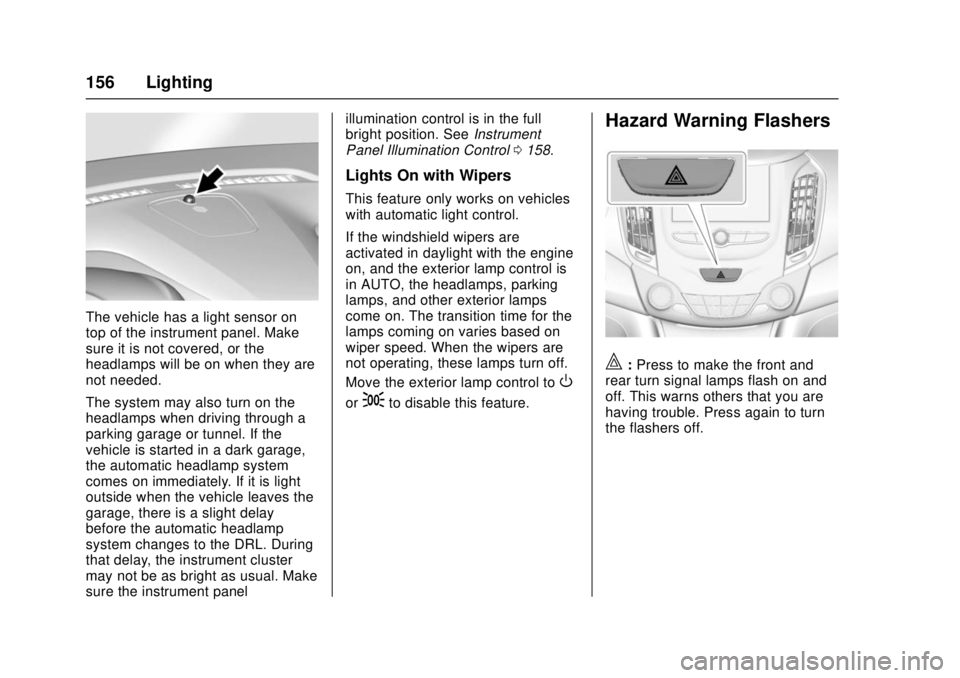
The vehicle has a light sensor on
top of the instrument panel. Make
sure it is not covered, or the
headlamps will be on when they are
not needed.
The system may also turn on the
headlamps when driving through a
parking garage or tunnel. If the
vehicle is started in a dark garage,
the automatic headlamp system
comes on immediately. If it is light
outside when the vehicle leaves the
garage, there is a slight delay
before the automatic headlamp
system changes to the DRL. During
that delay, the instrument cluster
may not be as bright as usual. Make
sure the instrument panelillumination control is in the full
bright position. See
Instrument
Panel Illumination Control 0158.
Lights On with Wipers
This feature only works on vehicles
with automatic light control.
If the windshield wipers are
activated in daylight with the engine
on, and the exterior lamp control is
in AUTO, the headlamps, parking
lamps, and other exterior lamps
come on. The transition time for the
lamps coming on varies based on
wiper speed. When the wipers are
not operating, these lamps turn off.
Move the exterior lamp control to
O
or;to disable this feature.
Hazard Warning Flashers
|:Press to make the front and
rear turn signal lamps flash on and
off. This warns others that you are
having trouble. Press again to turn
the flashers off.
Page 194 of 404
Chevrolet Cruze Owner Manual (GMNA-Localizing-U.S./Canada/Mexico-
11348462) - 2018 - crc - 5/15/17
Climate Controls 193
according to ambient conditions.
The rear defog may come on during
remote start based on cold ambient
conditions. The rear defog indicator
light does not come on during a
remote start. If the vehicle has front
heated seats, they may come on
during a remote start. The heated
seat indicator lights do not come on
during a remote start.
SeeRemote Vehicle Start 042 and
Heated Front Seats 064.
Sensors
The solar sensor, on top of the
instrument panel near the
windshield, monitors the solar heat.
The climate control system uses the
sensor information to adjust the
temperature, fan speed,
recirculation, and air delivery mode
for best comfort.
If the sensor is covered, the
automatic climate control system
may not work properly.
Air Vents
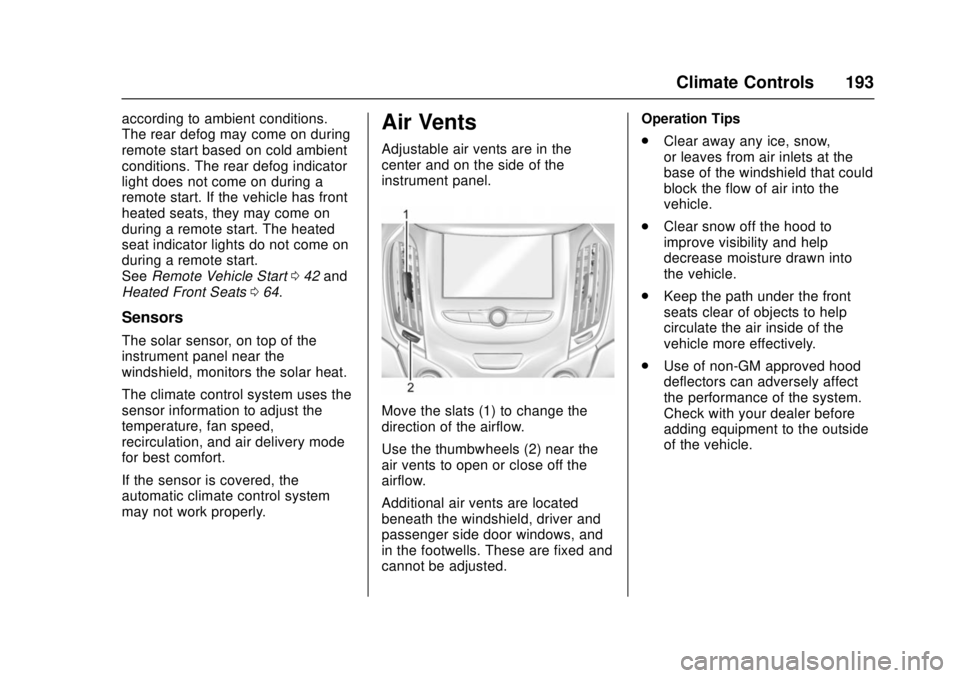
Adjustable air vents are in the
center and on the side of the
instrument panel.
Move the slats (1) to change the
direction of the airflow.
Use the thumbwheels (2) near the
air vents to open or close off the
airflow.
Additional air vents are located
beneath the windshield, driver and
passenger side door windows, and
in the footwells. These are fixed and
cannot be adjusted. Operation Tips
.
Clear away any ice, snow,
or leaves from air inlets at the
base of the windshield that could
block the flow of air into the
vehicle.
. Clear snow off the hood to
improve visibility and help
decrease moisture drawn into
the vehicle.
. Keep the path under the front
seats clear of objects to help
circulate the air inside of the
vehicle more effectively.
. Use of non-GM approved hood
deflectors can adversely affect
the performance of the system.
Check with your dealer before
adding equipment to the outside
of the vehicle.
Page 208 of 404
Chevrolet Cruze Owner Manual (GMNA-Localizing-U.S./Canada/Mexico-
11348462) - 2018 - crc - 5/15/17
Driving and Operating 207
Do not turn the engine off when the
vehicle is moving. This will cause a
loss of power assist in the brake
and steering systems and disable
the airbags.
If the vehicle must be shut off in an
emergency:1. Brake using a firm and steady pressure. Do not pump the
brakes repeatedly. This may
deplete power assist, requiring
increased brake pedal force.
2. Shift the vehicle to N (Neutral). This can be done while the
vehicle is moving. After shifting
to N (Neutral), continue to
firmly apply the brakes and
steer the vehicle to a safe
location.
3. Come to a complete stop. Shift to P (Park) with an automatic
transmission, or Neutral with a
manual transmission. Turn the
ignition to off.
4. Set the parking brake. See Parking Brake 0229.{Warning
Turning off the vehicle while
moving may cause loss of power
assist in the brake and steering
systems and disable the airbags.
While driving, only shut the
vehicle off in an emergency.
If the vehicle cannot be pulled over
and must be shut off while driving,
turn the ignition to ACC/
ACCESSORY.
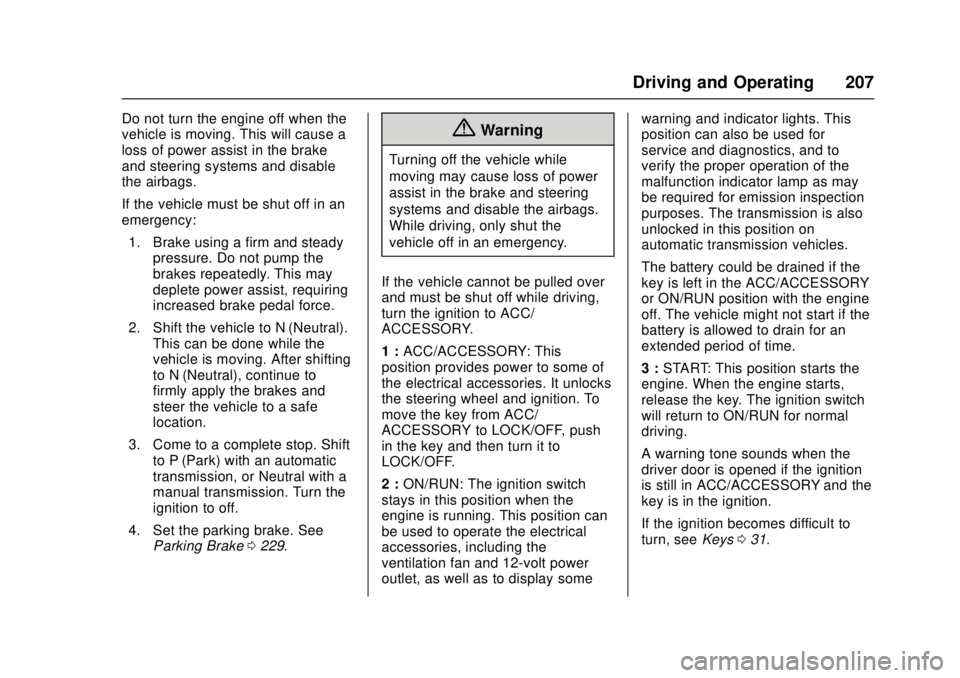
1 : ACC/ACCESSORY: This
position provides power to some of
the electrical accessories. It unlocks
the steering wheel and ignition. To
move the key from ACC/
ACCESSORY to LOCK/OFF, push
in the key and then turn it to
LOCK/OFF.
2 : ON/RUN: The ignition switch
stays in this position when the
engine is running. This position can
be used to operate the electrical
accessories, including the
ventilation fan and 12-volt power
outlet, as well as to display some warning and indicator lights. This
position can also be used for
service and diagnostics, and to
verify the proper operation of the
malfunction indicator lamp as may
be required for emission inspection
purposes. The transmission is also
unlocked in this position on
automatic transmission vehicles.
The battery could be drained if the
key is left in the ACC/ACCESSORY
or ON/RUN position with the engine
off. The vehicle might not start if the
battery is allowed to drain for an
extended period of time.
3 :
START: This position starts the
engine. When the engine starts,
release the key. The ignition switch
will return to ON/RUN for normal
driving.
A warning tone sounds when the
driver door is opened if the ignition
is still in ACC/ACCESSORY and the
key is in the ignition.
If the ignition becomes difficult to
turn, see Keys031.
Page 239 of 404
Chevrolet Cruze Owner Manual (GMNA-Localizing-U.S./Canada/Mexico-
11348462) - 2018 - crc - 5/15/17
238 Driving and Operating
(65 ft) from the left or right side of
the vehicle. When an object is
detected, three beeps sound from
the left or right, depending on the
direction of the detected vehicle.
Turning the Features On or Off
PressXon the center console to
turn the Rear Parking Assist and
RCTA on or off. The indicator light
next to the button comes on when
the features are on and turns off
when the features have been
disabled.
To turn the rear parking assist
symbols or guidance lines on or off,
see “Rear Camera” underVehicle
Personalization 0145.
RCTA can also be turned on or off
through vehicle personalization. See
“Collision/Detection Systems” under
Vehicle Personalization 0145.
Assistance Systems for
Driving
If equipped, when driving the
vehicle in a forward gear, Forward
Collision Alert (FCA), Lane
Departure Warning (LDW), Lane
Keep Assist (LKA), Side Blind Zone
Alert (SBZA), and/or Lane Change
Alert (LCA) can help to avoid a
crash or reduce crash damage.
Forward Collision Alert
(FCA) System
If equipped, the FCA system may
help to avoid or reduce the harm
caused by front-end crashes. When
approaching a vehicle ahead too
quickly, FCA provides a flashing red
alert on the windshield and rapidly
beeps. FCA also lights an amber
visual alert if following another
vehicle much too closely.
FCA detects vehicles within a
distance of approximately 60 m
(197 ft) and operates at speeds
above 8 km/h (5 mph).
{Warning
FCA is a warning system and
does not apply the brakes. When
approaching a slower-moving or
stopped vehicle ahead too rapidly,
or when following a vehicle too
closely, FCA may not provide a
warning with enough time to help
avoid a crash. It also may not
provide any warning at all. FCA
does not warn of pedestrians,
animals, signs, guardrails,
bridges, construction barrels,
or other objects. Be ready to take
action and apply the brakes. See
Defensive Driving 0197.
FCA can be disabled with either the
FCA steering wheel control or,
if equipped, through vehicle
personalization. See “Collision/
Detection Systems” underVehicle
Personalization 0145.
Page 242 of 404
Chevrolet Cruze Owner Manual (GMNA-Localizing-U.S./Canada/Mexico-
11348462) - 2018 - crc - 5/15/17
Driving and Operating 241
Warning (Continued)
Before making a lane change,
always check mirrors, glance over
your shoulder, and use the turn
signals.
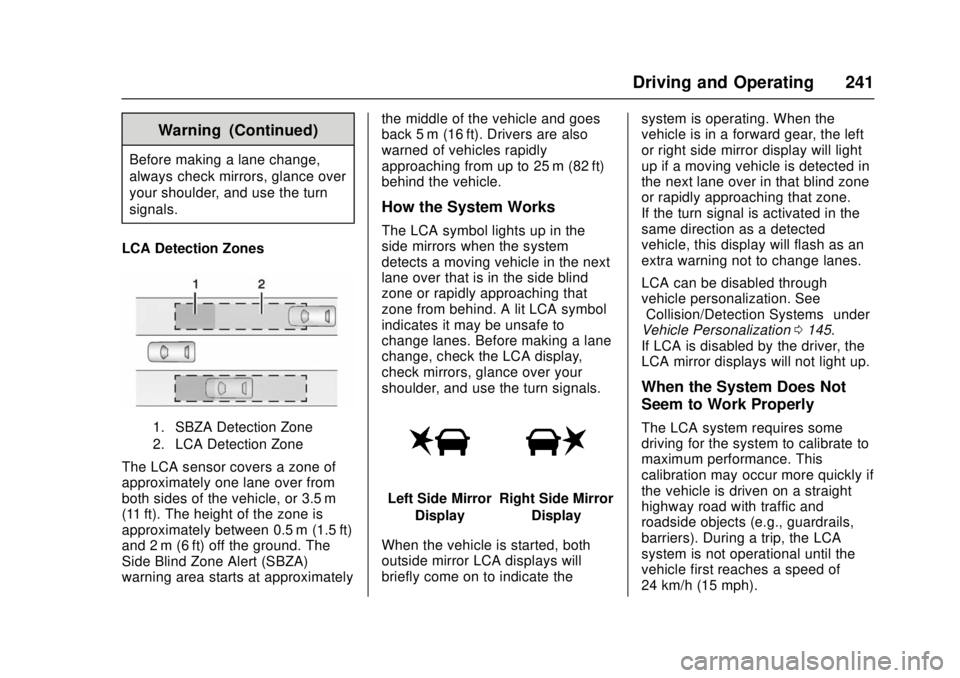
LCA Detection Zones
1. SBZA Detection Zone
2. LCA Detection Zone
The LCA sensor covers a zone of
approximately one lane over from
both sides of the vehicle, or 3.5 m
(11 ft). The height of the zone is
approximately between 0.5 m (1.5 ft)
and 2 m (6 ft) off the ground. The
Side Blind Zone Alert (SBZA)
warning area starts at approximately the middle of the vehicle and goes
back 5 m (16 ft). Drivers are also
warned of vehicles rapidly
approaching from up to 25 m (82 ft)
behind the vehicle.
How the System Works
The LCA symbol lights up in the
side mirrors when the system
detects a moving vehicle in the next
lane over that is in the side blind
zone or rapidly approaching that
zone from behind. A lit LCA symbol
indicates it may be unsafe to
change lanes. Before making a lane
change, check the LCA display,
check mirrors, glance over your
shoulder, and use the turn signals.
Left Side Mirror
DisplayRight Side Mirror Display
When the vehicle is started, both
outside mirror LCA displays will
briefly come on to indicate the system is operating. When the
vehicle is in a forward gear, the left
or right side mirror display will light
up if a moving vehicle is detected in
the next lane over in that blind zone
or rapidly approaching that zone.
If the turn signal is activated in the
same direction as a detected
vehicle, this display will flash as an
extra warning not to change lanes.
LCA can be disabled through
vehicle personalization. See
“Collision/Detection Systems”
under
Vehicle Personalization 0145.
If LCA is disabled by the driver, the
LCA mirror displays will not light up.
When the System Does Not
Seem to Work Properly
The LCA system requires some
driving for the system to calibrate to
maximum performance. This
calibration may occur more quickly if
the vehicle is driven on a straight
highway road with traffic and
roadside objects (e.g., guardrails,
barriers). During a trip, the LCA
system is not operational until the
vehicle first reaches a speed of
24 km/h (15 mph).
Page 335 of 404
Chevrolet Cruze Owner Manual (GMNA-Localizing-U.S./Canada/Mexico-
11348462) - 2018 - crc - 5/15/17
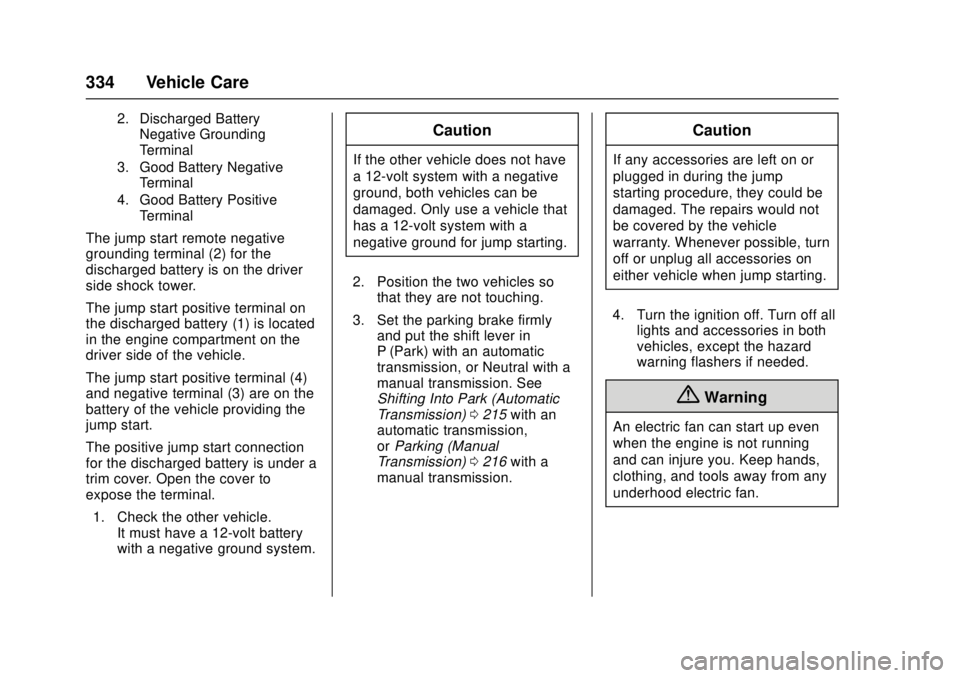
334 Vehicle Care
2. Discharged BatteryNegative Grounding
Terminal
3. Good Battery Negative Terminal
4. Good Battery Positive Terminal
The jump start remote negative
grounding terminal (2) for the
discharged battery is on the driver
side shock tower.
The jump start positive terminal on
the discharged battery (1) is located
in the engine compartment on the
driver side of the vehicle.
The jump start positive terminal (4)
and negative terminal (3) are on the
battery of the vehicle providing the
jump start.
The positive jump start connection
for the discharged battery is under a
trim cover. Open the cover to
expose the terminal.
1. Check the other vehicle. It must have a 12-volt battery
with a negative ground system.
Caution
If the other vehicle does not have
a 12-volt system with a negative
ground, both vehicles can be
damaged. Only use a vehicle that
has a 12-volt system with a
negative ground for jump starting.
2. Position the two vehicles so that they are not touching.
3. Set the parking brake firmly and put the shift lever in
P (Park) with an automatic
transmission, or Neutral with a
manual transmission. See
Shifting Into Park (Automatic
Transmission) 0215 with an
automatic transmission,
or Parking (Manual
Transmission) 0216 with a
manual transmission.
Caution
If any accessories are left on or
plugged in during the jump
starting procedure, they could be
damaged. The repairs would not
be covered by the vehicle
warranty. Whenever possible, turn
off or unplug all accessories on
either vehicle when jump starting.
4. Turn the ignition off. Turn off all lights and accessories in both
vehicles, except the hazard
warning flashers if needed.
{Warning
An electric fan can start up even
when the engine is not running
and can injure you. Keep hands,
clothing, and tools away from any
underhood electric fan.
Page 358 of 404
Chevrolet Cruze Owner Manual (GMNA-Localizing-U.S./Canada/Mexico-
11348462) - 2018 - crc - 5/15/17
Service and Maintenance 357
.To avoid break-down or failure to
start the vehicle, maintain a
battery with full cranking power.
. Trained dealer technicians have
the diagnostic equipment to test
the battery and ensure that the
connections and cables are
corrosion-free.
Belts
. Belts may need replacing if they
squeak or show signs of
cracking or splitting.
. Trained dealer technicians have
access to tools and equipment
to inspect the belts and
recommend adjustment or
replacement when necessary.
. A message may indicate when
scheduled maintenance on the
timing belt and other
components is required.
Brakes
Brakes stop the vehicle and are
crucial to safe driving.
. Signs of brake wear may include
chirping, grinding, or squealing
noises, or difficulty stopping. .
Trained dealer technicians have
access to tools and equipment
to inspect the brakes and
recommend quality parts
engineered for the vehicle.
Fluids
Proper fluid levels and approved
fluids protect the vehicle’s systems
and components. See
Recommended Fluids and
Lubricants 0359 for GM approved
fluids.
. Engine oil and windshield
washer fluid levels should be
checked at every fuel fill.
. Instrument cluster lights may
come on to indicate that fluids
may be low and need to be
filled.
Hoses
Hoses transport fluids and should
be regularly inspected to ensure
that there are no cracks or leaks.
With a multi-point inspection, your
dealer can inspect the hoses and
advise if replacement is needed. Lamps
Properly working headlamps,
taillamps, and brake lamps are
important to see and be seen on
the road.
.
Signs that the headlamps need
attention include dimming, failure
to light, cracking, or damage.
The brake lamps need to be
checked periodically to ensure
that they light when braking.
. With a multi-point inspection,
your dealer can check the lamps
and note any concerns.
Shocks and Struts
Shocks and struts help aid in control
for a smoother ride.
. Signs of wear may include
steering wheel vibration, bounce/
sway while braking, longer
stopping distance, or uneven
tire wear.
. As part of the multi-point
inspection, trained dealer
technicians can visually inspect
the shocks and struts for signs
Page 397 of 404

Chevrolet Cruze Owner Manual (GMNA-Localizing-U.S./Canada/Mexico-
11348462) - 2018 - crc - 5/15/17
396 Index
Fuel (cont'd)Cold Weather Operation . . . . . . 250
Diesel Engines . . . . . . . . . . . . . . . 246
Economy Driving . . . . . . . . . . . . . . . 28
Filling a Portable Fuel
Container . . . . . . . . . . . . . . . . . . . 256
Filling the Tank . . . . . . . . . . . . . . . 254
Filter . . . . . . . . . . . . . . . . . . . . . . . . . . 280
Filter Replacement . . . . . . . . . . . 254
Foreign Countries . . . . . . . . . . . . 245
Gauge . . . . . . . . . . . . . . . . . . . . . . . . 126
Low Fuel Warning Light . . . . . . . 136
Requirements, California . . . . . 245
Running out of Fuel . . . . . . . . . . . 253
Water in Fuel . . . . . . . . . . . . . . . . . 250
What to Use in the U.S. . . . . . . 246
Fuel for Diesel Engines . . . . . . . . . 246
Fuses Engine Compartment FuseBlock . . . . . . . . . . . . . . . . . . . . . . . . 291
Fuses and Circuit Breakers . . . 290
Instrument Panel Fuse Block . . . . . . . . . . . . . . . . . . . . . . . . 295
G
Gas Strut(s) . . . . . . . . . . . . . . . . . . . . 283
GaugesEngine Coolant
Temperature . . . . . . . . . . . . . . . . 127 Gauges (cont'd)
Fuel . . . . . . . . . . . . . . . . . . . . . . . . . . 126
Odometer . . . . . . . . . . . . . . . . . . . . . 125
Speedometer . . . . . . . . . . . . . . . . . 125
Tachometer . . . . . . . . . . . . . . . . . . . 125
Trip Odometer . . . . . . . . . . . . . . . . 125
Warning Lights and
Indicators . . . . . . . . . . . . . . . . . . . .119
General Information
Service and Maintenance . . . . . 349
Towing . . . . . . . . . . . . . . . . . . . . . . . . 257
Vehicle Care . . . . . . . . . . . . . . . . . . 259
Glove Box . . . . . . . . . . . . . . . . . . . . . . 107
GM Mobility Reimbursement Program . . . . . . . . . . . . . . . . . . . . . . . 371
H
Halogen Bulbs . . . . . . . . . . . . . . . . . . 284
Hands-Free Phone . . . . . . . . . . . . . 181
Hazard Warning Flashers . . . . . . . 156
Head Restraints . . . . . . . . . . . . . . . . . 61
HeadlampsAiming . . . . . . . . . . . . . . . . . . . . . . . . 284
Automatic . . . . . . . . . . . . . . . . . . . . . 155
Bulb Replacement . . . . . . . 284, 285
Daytime RunningLamps (DRL) . . . . . . . . . . . . . . . . 155
Flash-to-Pass . . . . . . . . . . . . . . . . . 155 Headlamps (cont'd)
High Intensity Discharge
(HID) Lighting . . . . . . . . . . . . . . . 285
High-Beam On Light . . . . . . . . . . 137
High/Low Beam Changer . . . . . 155
Lamps On Reminder . . . . . . . . . 137
Heated Rear Seats . . . . . . . . . . . . . . . . . . . . . 68
Steering Wheel . . . . . . . . . . . . . . . . 111
Heated Front Seats . . . . . . . . . . . . . . 64
Heated Mirrors . . . . . . . . . . . . . . . . . . . 55
Heater Engine . . . . . . . . . . . . . . . . . . . . . . . . 213
Heating . . . . . . . . . . . . . . .186, 188, 190
High-Beam On Light . . . . . . . . . . . . 137
High-Speed Operation . . . . . . . . . . 306
Hill and Mountain Roads . . . . . . . . 200
Home Page . . . . . . . . . . . . . . . . . . . . . 164
Hood . . . . . . . . . . . . . . . . . . . . . . . . . . . 261
Horn . . . . . . . . . . . . . . . . . . . . . . . . . . . . 111
How to Wear Seat Belts
Properly . . . . . . . . . . . . . . . . . . . . . . . . 70
HVAC . . . . . . . . . . . . . . . . .186, 188, 190
Hydraulic Clutch . . . . . . . . . . . . . . . . 270
Page 398 of 404

Chevrolet Cruze Owner Manual (GMNA-Localizing-U.S./Canada/Mexico-
11348462) - 2018 - crc - 5/15/17
Index 397
I
Ignition Positions . . . . . . . . . . 206, 208
Ignition Transmission LockCheck . . . . . . . . . . . . . . . . . . . . . . . . . 281
Immobilizer . . . . . . . . . . . . . . . . . . . . . . 53
Indicator
Vehicle Ahead . . . . . . . . . . . . . . . . 133
Infants and Young Children, Restraints . . . . . . . . . . . . . . . . . . . . . . 89
Infotainment . . . . . . . . . . . . . . . . . . . . 161
Infotainment System . . . . . . . . . . . . 380
Instrument Cluster . . . . . . . . . . . . . . 120
Instrument Panel Overview . . . . . . . 6
Interior Rearview Mirrors . . . . . . . . . 55
Introduction . . . . . . . . . . . . . . . . . . . . . . . 2
J
Jump Starting - North
America . . . . . . . . . . . . . . . . . . . . . . . 333
K
Keyless EntryRemote (RKE) System . . . . . 34, 36
Keys . . . . . . . . . . . . . . . . . . . . . . . . . . . . . 31
L
Labeling, Tire Sidewall . . . . . . . . . . 300
Lamps Courtesy . . . . . . . . . . . . . . . . . . . . . . 158
Daytime Running (DRL) . . . . . . 155 Lamps (cont'd)
Dome . . . . . . . . . . . . . . . . . . . . . . . . . 158
Exterior Controls . . . . . . . . . . . . . . 153
Exterior Lighting Battery
Saver . . . . . . . . . . . . . . . . . . . . . . . 160
License Plate . . . . . . . . . . . . . . . . . 289
Malfunction Indicator (Check Engine) . . . . . . . . . . . . . 130
On Reminder . . . . . . . . . . . . . . . . . 137
Reading . . . . . . . . . . . . . . . . . . . . . . 158
Taillamps and Back-up . . . . . . . 286
Lane Change Alert (LCA) . . . . . . . 240
Lane Departure Warning (LDW) . . . . . . . . . . . . . . . . 242
Lane Keep Assist (LKA) . . . . . . . . 242
Lane Keep Assist Light . . . . . . . . . 133
Lap-Shoulder Belt . . . . . . . . . . . . . . . 71
LATCH System Replacing Parts after aCrash . . . . . . . . . . . . . . . . . . . . . . . 101
LATCH, Lower Anchors and Tethers for Children . . . . . . . . . . . . 94
Liftgate . . . . . . . . . . . . . . . . . . . . . . . . . . 50
Lighting
Entry . . . . . . . . . . . . . . . . . . . . . . . . . 159
Exit . . . . . . . . . . . . . . . . . . . . . . . . . . . 159
Illumination Control . . . . . . . . . . . 158 Lights
Airbag Readiness . . . . . . . . . . . . . 128
Antilock Brake System
(ABS) Warning . . . . . . . . . . . . . . 132
Brake System Warning . . . . . . . 132
Charging System . . . . . . . . . . . . . 130
Check Engine (Malfunction Indicator) . . . . . . . . . . . . . . . . . . . . 130
Cruise Control . . . . . . . . . . . . . . . . 137
Diesel Exhaust Fluid (DEF) . . . 136
Door Ajar . . . . . . . . . . . . . . . . . . . . . 137
Engine Oil Pressure . . . . . . . . . . 135
Flash-to-Pass . . . . . . . . . . . . . . . . . 155
Front Fog Lamp . . . . . . . . . . . . . . 137
High-Beam On . . . . . . . . . . . . . . . . 137
High/Low Beam Changer . . . . . 155
Lane Keep Assist . . . . . . . . . . . . . 133
Low Fuel Warning . . . . . . . . . . . . 136
Seat Belt Reminders . . . . . . . . . . 128
Security . . . . . . . . . . . . . . . . . . . . . . 136
StabiliTrak OFF . . . . . . . . . . . . . . . 134
Tire Pressure . . . . . . . . . . . . . . . . . 135
Traction Control System (TCS)/StabiliTrak . . . . . . . . . . . . 134
Traction Off . . . . . . . . . . . . . . . . . . . 134
Up-Shift . . . . . . . . . . . . . . . . . . . . . . 133
Wait to Start . . . . . . . . . . . . . . . . . . 135
Page 403 of 404

Chevrolet Cruze Owner Manual (GMNA-Localizing-U.S./Canada/Mexico-
11348462) - 2018 - crc - 5/15/17
402 Index
UpdatesSoftware . . . . . . . . . . . . . . . . . . . . . . 165
USB Port . . . . . . . . . . . . . . . . . . . . . . . 169
Using This Manual . . . . . . . . . . . . . . . . 2
V
Vehicle Alarm System . . . . . . . . . . . . . . . . . . 51
Canadian Owners . . . . . . . . . . . . . . . 2
Control . . . . . . . . . . . . . . . . . . . . . . . 197
Identification Number (VIN) . . . 363
Load Limits . . . . . . . . . . . . . . . . . . . 202
Messages . . . . . . . . . . . . . . . . . . . . 144
Personalization . . . . . . . . . . . . . . . 145
Remote Start . . . . . . . . . . . . . . . . . . . 42
Security . . . . . . . . . . . . . . . . . . . . . . . . 51
Speed Messages . . . . . . . . . . . . . 144
Towing . . . . . . . . . . . . . . . . . . . . . . . . 336
Vehicle Ahead Indicator . . . . . . . . 133
Vehicle Care Storing the Tire Sealant
and Compressor Kit . . . . . . . . . 326
Tire Pressure . . . . . . . . . . . . . . . . . 305
Vehicle Data Recording and Privacy . . . . . . . . . . . . . . . . . . . . . . . . 379
Ventilation, Air . . . . . . . . . . . . . . . . . . 193
Visors . . . . . . . . . . . . . . . . . . . . . . . . . . . 58
W
Wait to Start Light . . . . . . . . . . . . . . 135
Warning
Brake System Light . . . . . . . . . . . 132
Caution and Danger . . . . . . . . . . . . . 3
Lane Departure (LDW) . . . . . . . 242
Warning Lights, Gauges, and Indicators . . . . . . . . . . . . . . . . . . . . . 119
Warnings Hazard Flashers . . . . . . . . . . . . . . 156
Washer Fluid . . . . . . . . . . . . . . . . . . . 276
Water in Fuel . . . . . . . . . . . . . . . . . . . 250
What Fuel to Use in Canada . . . . 248
What Fuel to Use in the U.S. . . . 246
Wheels Alignment and Tire Balance . . 316
Different Size . . . . . . . . . . . . . . . . . 314
Replacement . . . . . . . . . . . . . . . . . 316
When It Is Time for New
Tires . . . . . . . . . . . . . . . . . . . . . . . . . . 312
Where to Put the Restraint . . . . . . 93
Wi-Fi . . . . . . . . . . . . . . . . . . . . . . . . . . . 384
Windows . . . . . . . . . . . . . . . . . . . . . . . . 56 Power . . . . . . . . . . . . . . . . . . . . . . . . . . 56
Windshield Wiper/Washer . . . . . . . . . . . . . . . . . 111
Winter Driving . . . . . . . . . . . . . . . . . . . . . . . . 201 Winter Tires . . . . . . . . . . . . . . . . . . . . 299
Wiper Blade Replacement . . . . . . 282
Wipers
Rear Washer . . . . . . . . . . . . . . . . . .112
Wireless Charging . . . . . . . . . . . . . . 117