mirror CHEVROLET CRUZE 2019 Track Prep Guide
[x] Cancel search | Manufacturer: CHEVROLET, Model Year: 2019, Model line: CRUZE, Model: CHEVROLET CRUZE 2019Pages: 379, PDF Size: 5.91 MB
Page 165 of 379
Chevrolet Cruze Owner Manual (GMNA-Localizing-U.S./Canada/Mexico-
12146336) - 2019 - crc - 10/22/18
164 Driving and Operating
.Pay attention to special road
signs (e.g., falling rocks area,
winding roads, long grades,
passing or no-passing zones)
and take appropriate action.
Winter Driving
Driving on Snow or Ice
Snow or ice between the tires and
the road creates less traction or
grip, so drive carefully. Wet ice can
occur at about 0 °C (32 °F) when
freezing rain begins to fall. Avoid
driving on wet ice or in freezing rain
until roads can be treated.
For Slippery Road Driving:
.Accelerate gently. Accelerating
too quickly causes the wheels to
spin and makes the surface
under the tires slick.
. Turn on Traction Control. See
Traction Control/Electronic
Stability Control 0196.
. The Antilock Brake System
(ABS) improves vehicle stability
during hard stops, but the
brakes should be applied sooner than when on dry pavement.
See
Antilock Brake System
(ABS) 0193.
. Allow greater following distance
and watch for slippery spots. Icy
patches can occur on otherwise
clear roads in shaded areas.
The surface of a curve or an
overpass can remain icy when
the surrounding roads are clear.
Avoid sudden steering
maneuvers and braking while
on ice.
. Turn off cruise control.
Blizzard Conditions
Stop the vehicle in a safe place and
signal for help. Stay with the vehicle
unless there is help nearby.
If possible, use Roadside
Assistance. See Roadside
Assistance Program 0345. To get
help and keep everyone in the
vehicle safe:
. Turn on the hazard warning
flashers.
. Tie a red cloth to an outside
mirror.
{Warning
Snow can trap engine exhaust
under the vehicle. This may
cause exhaust gases to get
inside. Engine exhaust contains
carbon monoxide (CO), which
cannot be seen or smelled. It can
cause unconsciousness and even
death.
If the vehicle is stuck in snow:
. Clear snow from the base of
the vehicle, especially any
blocking the exhaust pipe.
. Open a window about 5 cm
(2 in) on the vehicle side
that is away from the wind,
to bring in fresh air.
. Fully open the air outlets on
or under the instrument
panel.
. Adjust the climate control
system to circulate the air
inside the vehicle and set
(Continued)
Page 202 of 379
Chevrolet Cruze Owner Manual (GMNA-Localizing-U.S./Canada/Mexico-
12146336) - 2019 - crc - 10/22/18
Driving and Operating 201
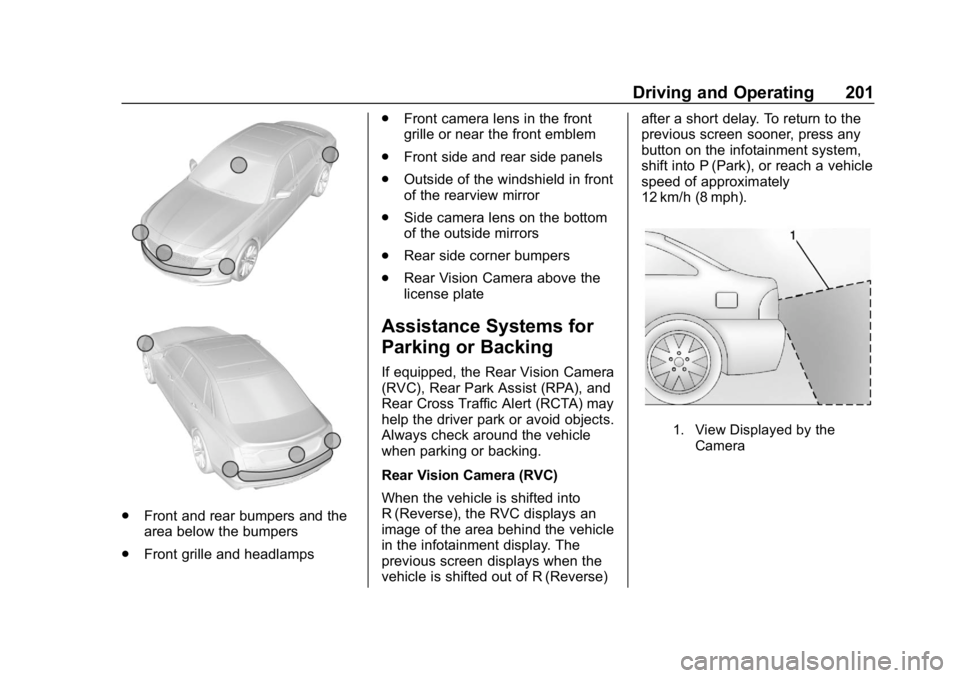
.Front and rear bumpers and the
area below the bumpers
. Front grille and headlamps .
Front camera lens in the front
grille or near the front emblem
. Front side and rear side panels
. Outside of the windshield in front
of the rearview mirror
. Side camera lens on the bottom
of the outside mirrors
. Rear side corner bumpers
. Rear Vision Camera above the
license plate
Assistance Systems for
Parking or Backing
If equipped, the Rear Vision Camera
(RVC), Rear Park Assist (RPA), and
Rear Cross Traffic Alert (RCTA) may
help the driver park or avoid objects.
Always check around the vehicle
when parking or backing.
Rear Vision Camera (RVC)
When the vehicle is shifted into
R (Reverse), the RVC displays an
image of the area behind the vehicle
in the infotainment display. The
previous screen displays when the
vehicle is shifted out of R (Reverse) after a short delay. To return to the
previous screen sooner, press any
button on the infotainment system,
shift into P (Park), or reach a vehicle
speed of approximately
12 km/h (8 mph).
1. View Displayed by the
Camera
Page 203 of 379
Chevrolet Cruze Owner Manual (GMNA-Localizing-U.S./Canada/Mexico-
12146336) - 2019 - crc - 10/22/18
202 Driving and Operating
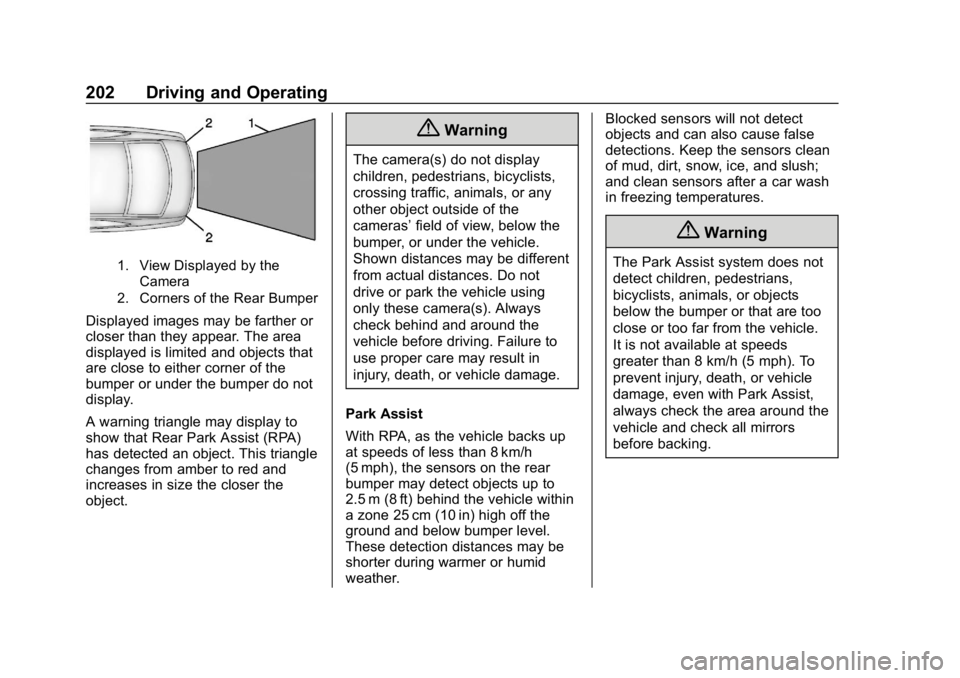
1. View Displayed by theCamera
2. Corners of the Rear Bumper
Displayed images may be farther or
closer than they appear. The area
displayed is limited and objects that
are close to either corner of the
bumper or under the bumper do not
display.
A warning triangle may display to
show that Rear Park Assist (RPA)
has detected an object. This triangle
changes from amber to red and
increases in size the closer the
object.
{Warning
The camera(s) do not display
children, pedestrians, bicyclists,
crossing traffic, animals, or any
other object outside of the
cameras’ field of view, below the
bumper, or under the vehicle.
Shown distances may be different
from actual distances. Do not
drive or park the vehicle using
only these camera(s). Always
check behind and around the
vehicle before driving. Failure to
use proper care may result in
injury, death, or vehicle damage.
Park Assist
With RPA, as the vehicle backs up
at speeds of less than 8 km/h
(5 mph), the sensors on the rear
bumper may detect objects up to
2.5 m (8 ft) behind the vehicle within
a zone 25 cm (10 in) high off the
ground and below bumper level.
These detection distances may be
shorter during warmer or humid
weather. Blocked sensors will not detect
objects and can also cause false
detections. Keep the sensors clean
of mud, dirt, snow, ice, and slush;
and clean sensors after a car wash
in freezing temperatures.
{Warning
The Park Assist system does not
detect children, pedestrians,
bicyclists, animals, or objects
below the bumper or that are too
close or too far from the vehicle.
It is not available at speeds
greater than 8 km/h (5 mph). To
prevent injury, death, or vehicle
damage, even with Park Assist,
always check the area around the
vehicle and check all mirrors
before backing.
Page 210 of 379
Chevrolet Cruze Owner Manual (GMNA-Localizing-U.S./Canada/Mexico-
12146336) - 2019 - crc - 10/22/18
Driving and Operating 209
{Warning
FPB may alert or automatically
brake the vehicle suddenly in
situations where it is unexpected
and undesired. It could falsely
alert or brake for objects similar in
shape or size to pedestrians,
including shadows. This is normal
operation and the vehicle does
not need service. To override
Automatic Braking, firmly press
the accelerator pedal, if it is safe
to do so.
Automatic Braking can be disabled
through vehicle personalization. See
“Front Pedestrian Detection” in
“Collision/Detection Systems” under
Vehicle Personalization 0139.
{Warning
Using the Front Pedestrian
Braking system while towing a
trailer could cause you to lose
(Continued)
Warning (Continued)
control of the vehicle and crash.
Turn the system to Alert or Off
when towing a trailer.
Cleaning the System
If FPB does not seem to operate
properly, cleaning the outside of the
windshield in front of the rearview
mirror may correct the issue.
Side Blind Zone
Alert (SBZA)
If equipped, the SBZA system is a
lane-changing aid that assists
drivers with avoiding crashes that
occur with moving vehicles in the
side blind zone (or spot) areas.
When the vehicle is in a forward
gear, the left or right side mirror
display will light up if a moving
vehicle is detected in that blind
zone. If the turn signal is activated
and a vehicle is also detected on
the same side, the display will flash
as an extra warning not to change lanes. Since this system is part of
the Lane Change Alert (LCA)
system, read the entire LCA section
before using this feature.
Lane Change Alert (LCA)
If equipped, the LCA system is a
lane-changing aid that assists
drivers with avoiding lane change
crashes that occur with moving
vehicles in the side blind zone (or
spot) areas or with vehicles rapidly
approaching these areas from
behind. The LCA warning display
will light up in the corresponding
outside side mirror and will flash if
the turn signal is on.
{Warning
LCA does not alert the driver to
vehicles outside of the system
detection zones, pedestrians,
bicyclists, or animals. It may not
provide alerts when changing
lanes under all driving conditions.
Failure to use proper care when
(Continued)
Page 211 of 379
Chevrolet Cruze Owner Manual (GMNA-Localizing-U.S./Canada/Mexico-
12146336) - 2019 - crc - 10/22/18
210 Driving and Operating
Warning (Continued)
changing lanes may result in
injury, death, or vehicle damage.
Before making a lane change,
always check mirrors, glance over
your shoulder, and use the turn
signals.
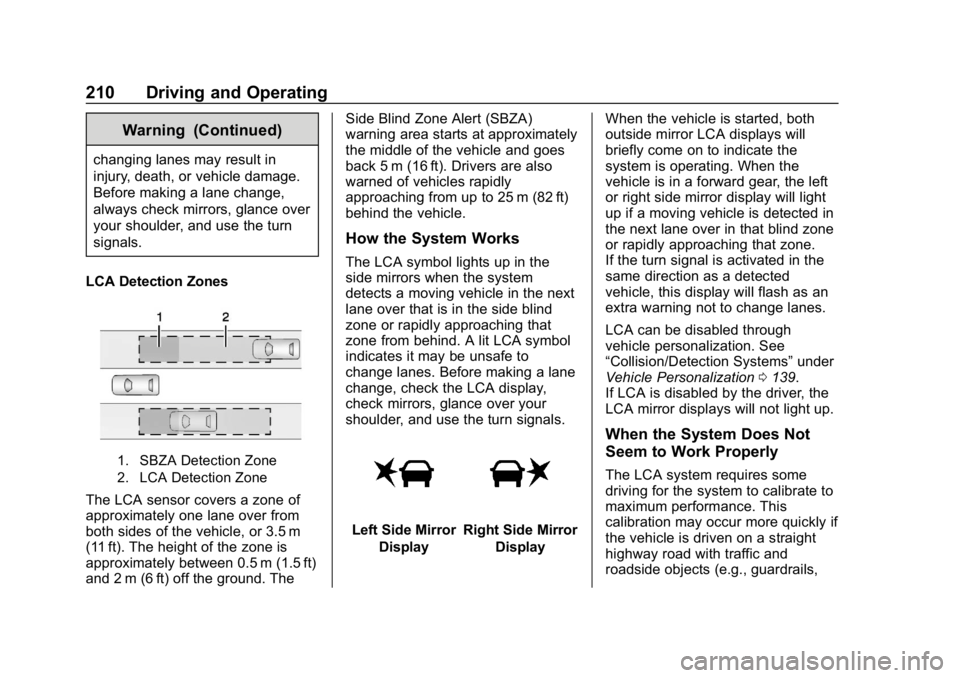
LCA Detection Zones
1. SBZA Detection Zone
2. LCA Detection Zone
The LCA sensor covers a zone of
approximately one lane over from
both sides of the vehicle, or 3.5 m
(11 ft). The height of the zone is
approximately between 0.5 m (1.5 ft)
and 2 m (6 ft) off the ground. The Side Blind Zone Alert (SBZA)
warning area starts at approximately
the middle of the vehicle and goes
back 5 m (16 ft). Drivers are also
warned of vehicles rapidly
approaching from up to 25 m (82 ft)
behind the vehicle.
How the System Works
The LCA symbol lights up in the
side mirrors when the system
detects a moving vehicle in the next
lane over that is in the side blind
zone or rapidly approaching that
zone from behind. A lit LCA symbol
indicates it may be unsafe to
change lanes. Before making a lane
change, check the LCA display,
check mirrors, glance over your
shoulder, and use the turn signals.
Left Side Mirror
DisplayRight Side Mirror Display When the vehicle is started, both
outside mirror LCA displays will
briefly come on to indicate the
system is operating. When the
vehicle is in a forward gear, the left
or right side mirror display will light
up if a moving vehicle is detected in
the next lane over in that blind zone
or rapidly approaching that zone.
If the turn signal is activated in the
same direction as a detected
vehicle, this display will flash as an
extra warning not to change lanes.
LCA can be disabled through
vehicle personalization. See
“Collision/Detection Systems”
under
Vehicle Personalization 0139.
If LCA is disabled by the driver, the
LCA mirror displays will not light up.
When the System Does Not
Seem to Work Properly
The LCA system requires some
driving for the system to calibrate to
maximum performance. This
calibration may occur more quickly if
the vehicle is driven on a straight
highway road with traffic and
roadside objects (e.g., guardrails,
Page 213 of 379
Chevrolet Cruze Owner Manual (GMNA-Localizing-U.S./Canada/Mexico-
12146336) - 2019 - crc - 10/22/18
212 Driving and Operating
camera to detect lane markings
between 60 km/h (37 mph) and
180 km/h (112 mph).
{Warning
The LKA system does not
continuously steer the vehicle.
It may not keep the vehicle in the
lane or give a Lane Departure
Warning (LDW) alert, even if a
lane marking is detected.
The LKA and LDW systems
may not:. Provide an alert or enough
steering assist to avoid a
lane departure or crash.
. Detect lane markings under
poor weather or visibility
conditions. This can occur if
the windshield or
headlamps are blocked by
dirt, snow, or ice, if they are
not in proper condition, or if
the sun shines directly into
the camera.
(Continued)
Warning (Continued)
.Detect road edges.
. Detect lanes on winding or
hilly roads.
If LKA only detects lane markings
on one side of the road, it will
only assist or provide an LDW
alert when approaching the lane
on the side where it has detected
a lane marking. Even with LKA
and LDW, you must steer the
vehicle. Always keep your
attention on the road and
maintain proper vehicle position
within the lane, or vehicle
damage, injury, or death could
occur. Always keep the
windshield, headlamps, and
camera sensors clean and in
good repair. Do not use LKA in
bad weather conditions.
{Warning
Using LKA while towing a trailer
or on slippery roads could cause
loss of control of the vehicle and
a crash. Turn the system off.
How the System Works
The LKA camera sensor is on the
windshield ahead of the rearview
mirror.
To turn LKA on and off, press
A
on the steering wheel.
When on,
Ais green if LKA is
available to assist and provide LDW
alerts. It may assist by gently
turning the steering wheel and
display
Aas amber if the vehicle
approaches a detected lane marking
without using a turn signal in that
direction. It may also provide an
LDW alert by flashing
Aamber
as the lane marking is crossed.
Additionally, there may be three
beeps on the right or left, depending
on the lane departure direction.
Page 266 of 379
Chevrolet Cruze Owner Manual (GMNA-Localizing-U.S./Canada/Mexico-
12146336) - 2019 - crc - 10/22/18
Vehicle Care 265
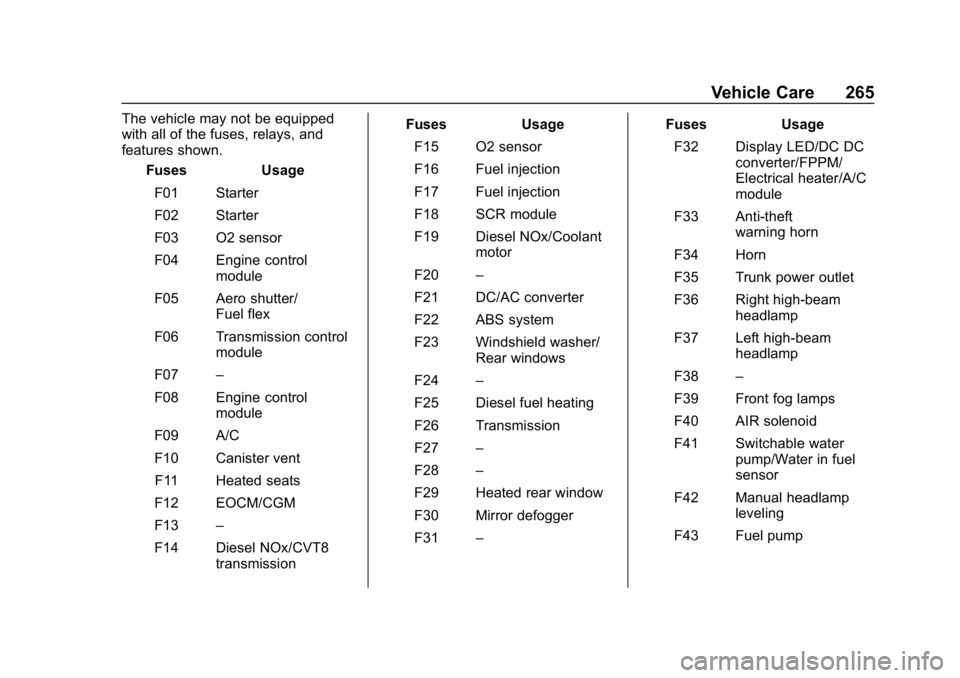
The vehicle may not be equipped
with all of the fuses, relays, and
features shown.Fuses Usage
F01 Starter
F02 Starter
F03 O2 sensor
F04 Engine control module
F05 Aero shutter/ Fuel flex
F06 Transmission control module
F07 –
F08 Engine control module
F09 A/C
F10 Canister vent
F11 Heated seats
F12 EOCM/CGM
F13 –
F14 Diesel NOx/CVT8 transmission Fuses Usage
F15 O2 sensor
F16 Fuel injection
F17 Fuel injection
F18 SCR module
F19 Diesel NOx/Coolant motor
F20 –
F21 DC/AC converter
F22 ABS system
F23 Windshield washer/ Rear windows
F24 –
F25 Diesel fuel heating
F26 Transmission
F27 –
F28 –
F29 Heated rear window
F30 Mirror defogger
F31 – Fuses Usage
F32 Display LED/DC DC converter/FPPM/
Electrical heater/A/C
module
F33 Anti-theft warning horn
F34 Horn
F35 Trunk power outlet
F36 Right high-beam headlamp
F37 Left high-beam headlamp
F38 –
F39 Front fog lamps
F40 AIR solenoid
F41 Switchable water pump/Water in fuel
sensor
F42 Manual headlamp leveling
F43 Fuel pump
Page 267 of 379
Chevrolet Cruze Owner Manual (GMNA-Localizing-U.S./Canada/Mexico-
12146336) - 2019 - crc - 10/22/18
266 Vehicle Care
FusesUsage
F44 Inside rear view mirror/Rear vision
camera/Trailer
F45 Heated steering wheel
F46 Instrument cluster
F47 Steering column lock
F48 Rear wiper
F49 –
F50 –
F51 –
F52 Engine/Transmission control module
F53 –
F54 Windshield wiper
F55 Diesel NOx
F56 –
F57 –
Relays Usage
K01 Starter Relays
Usage
K02 A/C control
K03 Engine functions
K04 –
K05 Starter
K06 Diesel fuel heating/ Secondary air
induction
K07 Right low-beam headlamp/Right
daytime
running lamp
K08 Transmission
K09 Diesel NOx
K10 Fuel pump K11 –
K12 High-beam headlamps
K13 Left daytime running lamp/Left low-beam
headlamp
K14 Run/Crank Relays
Usage
K15 Mirror defogger/Rear window defogger/
Anti-theft warning
sensor
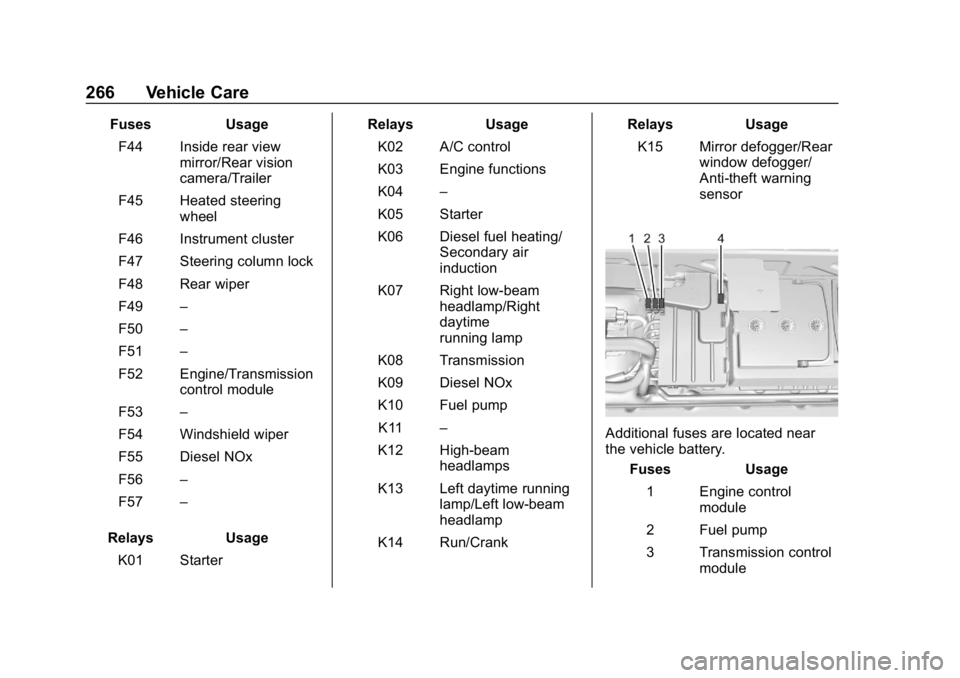
Additional fuses are located near
the vehicle battery.
Fuses Usage
1 Engine control module
2 Fuel pump
3 Transmission control module
Page 270 of 379
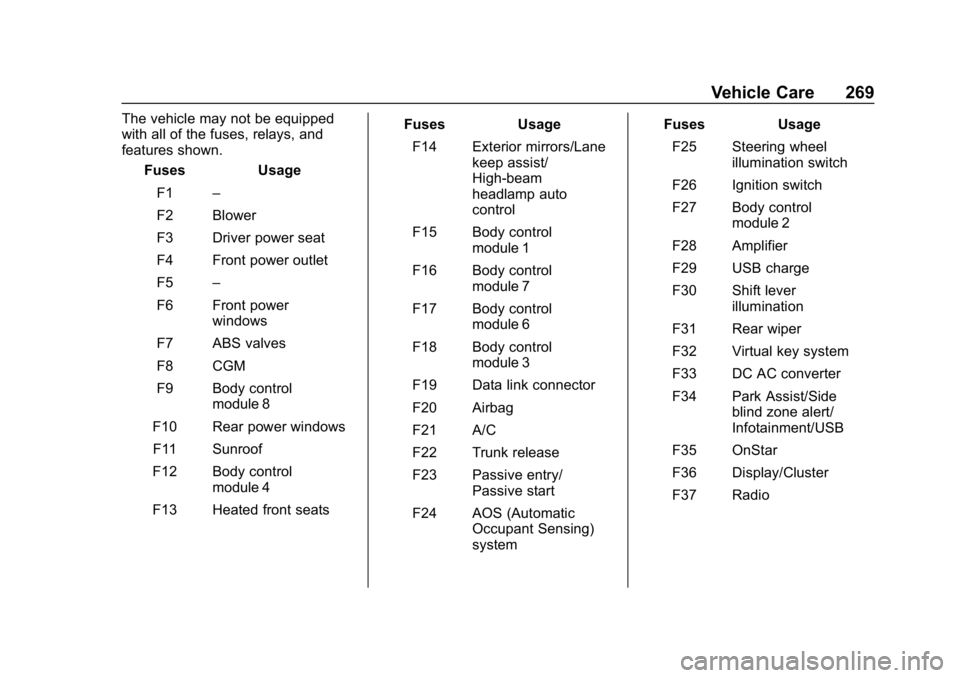
Chevrolet Cruze Owner Manual (GMNA-Localizing-U.S./Canada/Mexico-
12146336) - 2019 - crc - 10/22/18
Vehicle Care 269
The vehicle may not be equipped
with all of the fuses, relays, and
features shown.Fuses Usage
F1 –
F2 Blower
F3 Driver power seat
F4 Front power outlet
F5 –
F6 Front power windows
F7 ABS valves
F8 CGM
F9 Body control module 8
F10 Rear power windows F11 Sunroof
F12 Body control module 4
F13 Heated front seats Fuses Usage
F14 Exterior mirrors/Lane keep assist/
High-beam
headlamp auto
control
F15 Body control module 1
F16 Body control module 7
F17 Body control module 6
F18 Body control module 3
F19 Data link connector
F20 Airbag
F21 A/C
F22 Trunk release
F23 Passive entry/ Passive start
F24 AOS (Automatic Occupant Sensing)
system Fuses Usage
F25 Steering wheel illumination switch
F26 Ignition switch
F27 Body control module 2
F28 Amplifier
F29 USB charge
F30 Shift lever illumination
F31 Rear wiper
F32 Virtual key system
F33 DC AC converter
F34 Park Assist/Side blind zone alert/
Infotainment/USB
F35 OnStar
F36 Display/Cluster
F37 Radio
Page 370 of 379

Chevrolet Cruze Owner Manual (GMNA-Localizing-U.S./Canada/Mexico-
12146336) - 2019 - crc - 10/22/18
Index 369
Cleaning (cont'd)Interior Care . . . . . . . . . . . . . . . . . . 317
Climate Control Systems . . . . . . . 151 Air Conditioning . . . . . . . . . . . . . . 151
Automatic . . . . . . . . . . . . . . . . . . . . . 153
Heating . . . . . . . . . . . . . . . . . . . . . . . 151
Clock . . . . . . . . . . . . . . . . . . . . . . . . . . . 113
Cluster, Instrument . . . . . . . . . . . . . 115
Cold Weather Operation . . . . . . . . 217
Collision Damage Repair . . . . . . . 348
Compact Spare Tire . . . . . . . . . . . . 305
Compartments Storage . . . . . . . . . . . . . . . . . . . . . . . 106
Compass . . . . . . . . . . . . . . . . . . . . . . . 113
Compressor Kit, Tire Sealant . . . 293
Connected Services
Connections . . . . . . . . . . . . . . . . . . 364
Diagnostics . . . . . . . . . . . . . . . . . . . 366
Navigation . . . . . . . . . . . . . . . . . . . . 363
Connections Connected Services . . . . . . . . . . 364
Control Traction and Electronic
Stability . . . . . . . . . . . . . . . . . . . . . 196
Control of a Vehicle . . . . . . . . . . . . . 160
Convex Mirrors . . . . . . . . . . . . . . . . . . 52
Coolant Engine Temperature Gauge . . 121 Cooling . . . . . . . . . . . . . . . . . . . . 151, 153
Cooling System . . . . . . . . . . . . . . . . . 242
Courtesy Lamps . . . . . . . . . . . . . . . . 148
Courtesy Transportation
Program . . . . . . . . . . . . . . . . . . . . . . . 347
Cover Cargo . . . . . . . . . . . . . . . . . . . . . . . . . 108
Cruise Control . . . . . . . . . . . . . . . . . . 197 Light . . . . . . . . . . . . . . . . . . . . . . . . . . 131
Cupholders . . . . . . . . . . . . . . . . . . . . . 106
Customer Assistance . . . . . . . . . . . 344 Offices . . . . . . . . . . . . . . . . . . . . . . . . 343
Text Telephone (TTY)Users . . . . . . . . . . . . . . . . . . . . . . . 344
Customer Information Publications Ordering
Information . . . . . . . . . . . . . . . . . . 350
Customer Satisfaction Procedure . . . . . . . . . . . . . . . . . . . . . 341
D
Damage Repair, Collision . . . . . . . 348
Danger, Warning, and Caution . . . . 2
Data CollectionInfotainment System . . . . . . . . . . 354
OnStar . . . . . . . . . . . . . . . . . . . . . . . 354
Data Recorders, Event . . . . . . . . . 353 Daytime Running
Lamps (DRL) . . . . . . . . . . . . . . . . . . 145
Defensive Driving . . . . . . . . . . . . . . . 160
Delayed Locking . . . . . . . . . . . . . . . . . 44
Diagnostics Connected Services . . . . . . . . . . 366
Diesel Exhaust Fluid . . . . . . . . . . . . 183
Diesel Exhaust Fluid (DEF)
Warning Light . . . . . . . . . . . . . . . . . 130
Diesel Particulate Filter . . . . . . . . . 182
Distracted Driving . . . . . . . . . . . . . . . 159
Dome Lamps . . . . . . . . . . . . . . . . . . . 148
Door Ajar Light . . . . . . . . . . . . . . . . . . . . . 131
Delayed Locking . . . . . . . . . . . . . . . . 44
Locks . . . . . . . . . . . . . . . . . . . . . . . . . . . 42
Power Locks . . . . . . . . . . . . . . . . . . . . 44
Drive Belt Routing, Engine . . . . . . 340
Driver Assistance Systems . . . . . 200
Driver Information Center (DIC) . . . . . . . . . . . . . 132, 135
Driving Assistance Systems . . . . . . . . . . 203
Defensive . . . . . . . . . . . . . . . . . . . . . 160
Drunk . . . . . . . . . . . . . . . . . . . . . . . . . 160
For Better Fuel Economy . . . . . . . 27
Hill and Mountain Roads . . . . . . 163
If the Vehicle is Stuck . . . . . . . . . 165