park assist CHEVROLET CRUZE 2019 Track Prep Guide
[x] Cancel search | Manufacturer: CHEVROLET, Model Year: 2019, Model line: CRUZE, Model: CHEVROLET CRUZE 2019Pages: 379, PDF Size: 5.91 MB
Page 201 of 379
Chevrolet Cruze Owner Manual (GMNA-Localizing-U.S./Canada/Mexico-
12146336) - 2019 - crc - 10/22/18
200 Driving and Operating
Driver Assistance
Systems
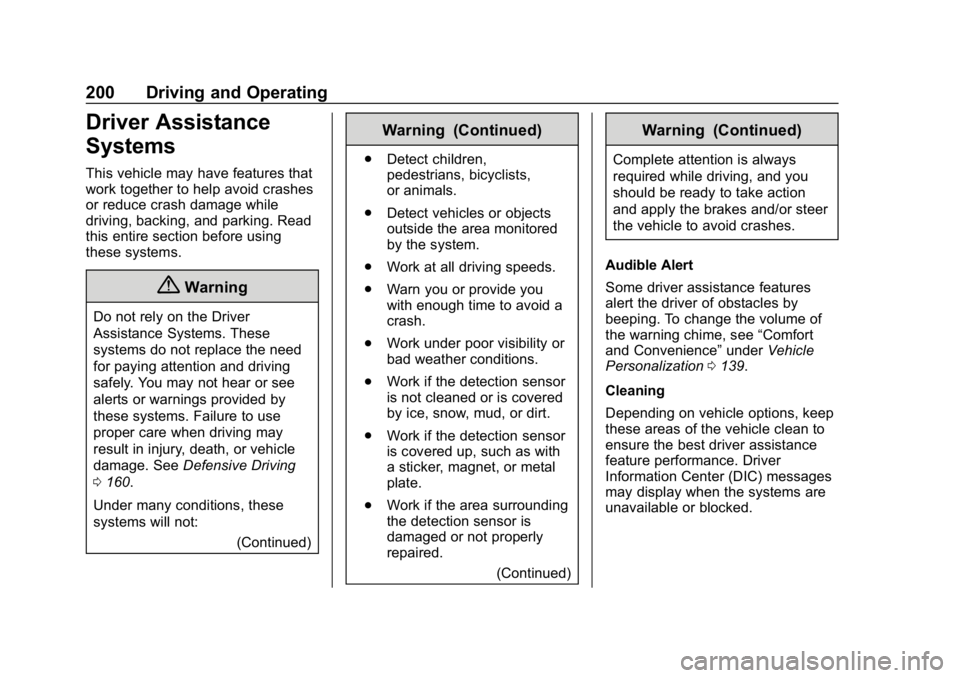
This vehicle may have features that
work together to help avoid crashes
or reduce crash damage while
driving, backing, and parking. Read
this entire section before using
these systems.
{Warning
Do not rely on the Driver
Assistance Systems. These
systems do not replace the need
for paying attention and driving
safely. You may not hear or see
alerts or warnings provided by
these systems. Failure to use
proper care when driving may
result in injury, death, or vehicle
damage. SeeDefensive Driving
0 160.
Under many conditions, these
systems will not: (Continued)
Warning (Continued)
.Detect children,
pedestrians, bicyclists,
or animals.
. Detect vehicles or objects
outside the area monitored
by the system.
. Work at all driving speeds.
. Warn you or provide you
with enough time to avoid a
crash.
. Work under poor visibility or
bad weather conditions.
. Work if the detection sensor
is not cleaned or is covered
by ice, snow, mud, or dirt.
. Work if the detection sensor
is covered up, such as with
a sticker, magnet, or metal
plate.
. Work if the area surrounding
the detection sensor is
damaged or not properly
repaired.
(Continued)
Warning (Continued)
Complete attention is always
required while driving, and you
should be ready to take action
and apply the brakes and/or steer
the vehicle to avoid crashes.
Audible Alert
Some driver assistance features
alert the driver of obstacles by
beeping. To change the volume of
the warning chime, see “Comfort
and Convenience” underVehicle
Personalization 0139.
Cleaning
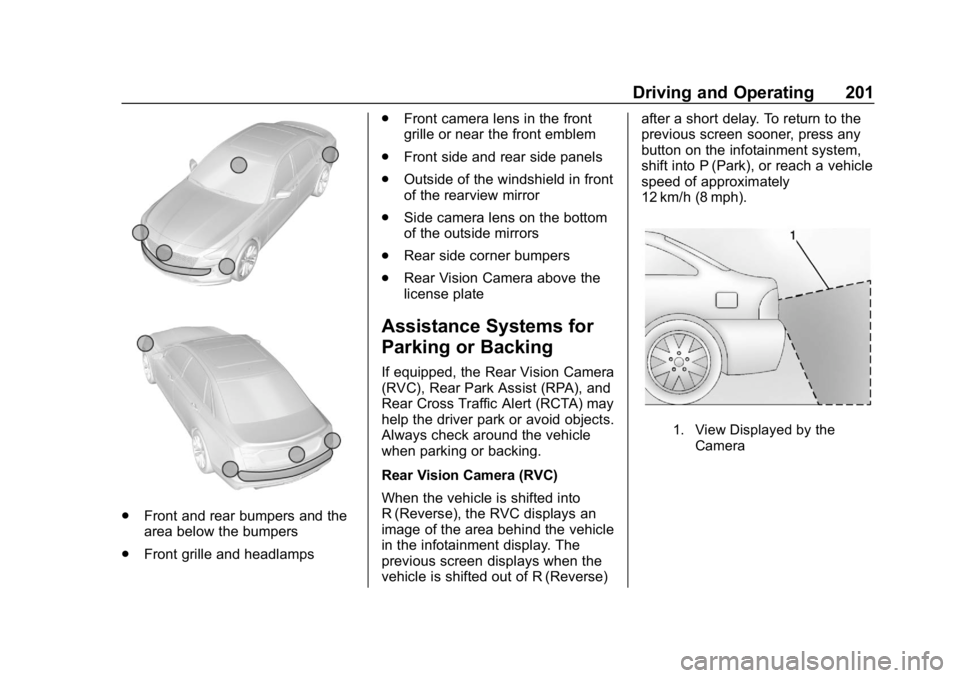
Depending on vehicle options, keep
these areas of the vehicle clean to
ensure the best driver assistance
feature performance. Driver
Information Center (DIC) messages
may display when the systems are
unavailable or blocked.
Page 202 of 379
Chevrolet Cruze Owner Manual (GMNA-Localizing-U.S./Canada/Mexico-
12146336) - 2019 - crc - 10/22/18
Driving and Operating 201
.Front and rear bumpers and the
area below the bumpers
. Front grille and headlamps .
Front camera lens in the front
grille or near the front emblem
. Front side and rear side panels
. Outside of the windshield in front
of the rearview mirror
. Side camera lens on the bottom
of the outside mirrors
. Rear side corner bumpers
. Rear Vision Camera above the
license plate
Assistance Systems for
Parking or Backing
If equipped, the Rear Vision Camera
(RVC), Rear Park Assist (RPA), and
Rear Cross Traffic Alert (RCTA) may
help the driver park or avoid objects.
Always check around the vehicle
when parking or backing.
Rear Vision Camera (RVC)
When the vehicle is shifted into
R (Reverse), the RVC displays an
image of the area behind the vehicle
in the infotainment display. The
previous screen displays when the
vehicle is shifted out of R (Reverse) after a short delay. To return to the
previous screen sooner, press any
button on the infotainment system,
shift into P (Park), or reach a vehicle
speed of approximately
12 km/h (8 mph).
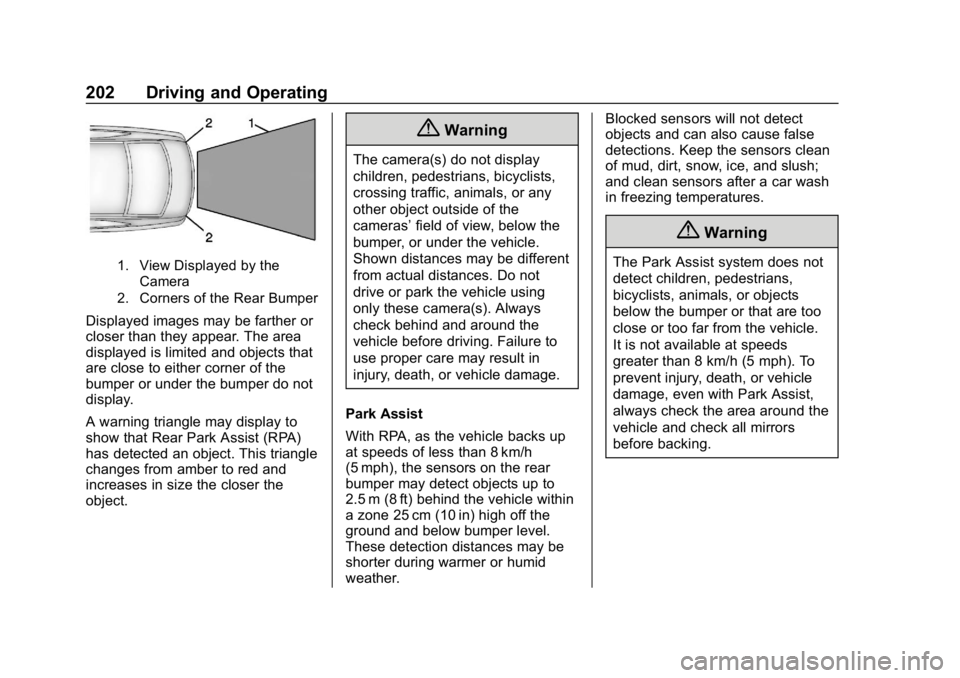
1. View Displayed by the
Camera
Page 203 of 379
Chevrolet Cruze Owner Manual (GMNA-Localizing-U.S./Canada/Mexico-
12146336) - 2019 - crc - 10/22/18
202 Driving and Operating
1. View Displayed by theCamera
2. Corners of the Rear Bumper
Displayed images may be farther or
closer than they appear. The area
displayed is limited and objects that
are close to either corner of the
bumper or under the bumper do not
display.
A warning triangle may display to
show that Rear Park Assist (RPA)
has detected an object. This triangle
changes from amber to red and
increases in size the closer the
object.
{Warning
The camera(s) do not display
children, pedestrians, bicyclists,
crossing traffic, animals, or any
other object outside of the
cameras’ field of view, below the
bumper, or under the vehicle.
Shown distances may be different
from actual distances. Do not
drive or park the vehicle using
only these camera(s). Always
check behind and around the
vehicle before driving. Failure to
use proper care may result in
injury, death, or vehicle damage.
Park Assist
With RPA, as the vehicle backs up
at speeds of less than 8 km/h
(5 mph), the sensors on the rear
bumper may detect objects up to
2.5 m (8 ft) behind the vehicle within
a zone 25 cm (10 in) high off the
ground and below bumper level.
These detection distances may be
shorter during warmer or humid
weather. Blocked sensors will not detect
objects and can also cause false
detections. Keep the sensors clean
of mud, dirt, snow, ice, and slush;
and clean sensors after a car wash
in freezing temperatures.
{Warning
The Park Assist system does not
detect children, pedestrians,
bicyclists, animals, or objects
below the bumper or that are too
close or too far from the vehicle.
It is not available at speeds
greater than 8 km/h (5 mph). To
prevent injury, death, or vehicle
damage, even with Park Assist,
always check the area around the
vehicle and check all mirrors
before backing.
Page 204 of 379
Chevrolet Cruze Owner Manual (GMNA-Localizing-U.S./Canada/Mexico-
12146336) - 2019 - crc - 10/22/18
Driving and Operating 203
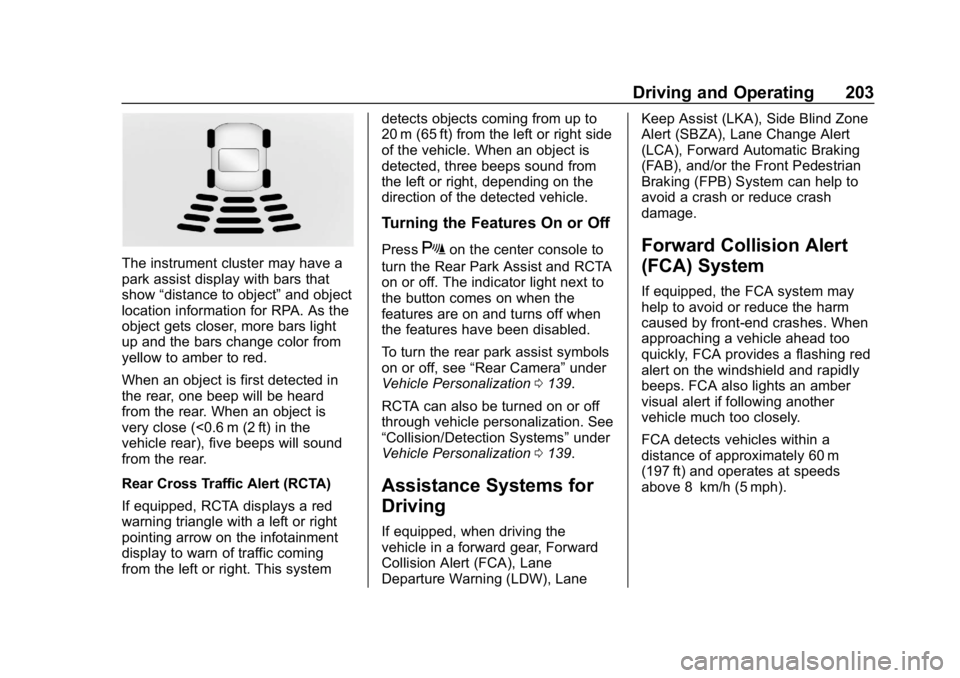
The instrument cluster may have a
park assist display with bars that
show“distance to object” and object
location information for RPA. As the
object gets closer, more bars light
up and the bars change color from
yellow to amber to red.
When an object is first detected in
the rear, one beep will be heard
from the rear. When an object is
very close (<0.6 m (2 ft) in the
vehicle rear), five beeps will sound
from the rear.
Rear Cross Traffic Alert (RCTA)
If equipped, RCTA displays a red
warning triangle with a left or right
pointing arrow on the infotainment
display to warn of traffic coming
from the left or right. This system detects objects coming from up to
20 m (65 ft) from the left or right side
of the vehicle. When an object is
detected, three beeps sound from
the left or right, depending on the
direction of the detected vehicle.
Turning the Features On or Off
PressXon the center console to
turn the Rear Park Assist and RCTA
on or off. The indicator light next to
the button comes on when the
features are on and turns off when
the features have been disabled.
To turn the rear park assist symbols
on or off, see “Rear Camera” under
Vehicle Personalization 0139.
RCTA can also be turned on or off
through vehicle personalization. See
“Collision/Detection Systems” under
Vehicle Personalization 0139.
Assistance Systems for
Driving
If equipped, when driving the
vehicle in a forward gear, Forward
Collision Alert (FCA), Lane
Departure Warning (LDW), Lane Keep Assist (LKA), Side Blind Zone
Alert (SBZA), Lane Change Alert
(LCA), Forward Automatic Braking
(FAB), and/or the Front Pedestrian
Braking (FPB) System can help to
avoid a crash or reduce crash
damage.
Forward Collision Alert
(FCA) System
If equipped, the FCA system may
help to avoid or reduce the harm
caused by front-end crashes. When
approaching a vehicle ahead too
quickly, FCA provides a flashing red
alert on the windshield and rapidly
beeps. FCA also lights an amber
visual alert if following another
vehicle much too closely.
FCA detects vehicles within a
distance of approximately 60 m
(197 ft) and operates at speeds
above 8 km/h (5 mph).
Page 270 of 379
Chevrolet Cruze Owner Manual (GMNA-Localizing-U.S./Canada/Mexico-
12146336) - 2019 - crc - 10/22/18
Vehicle Care 269
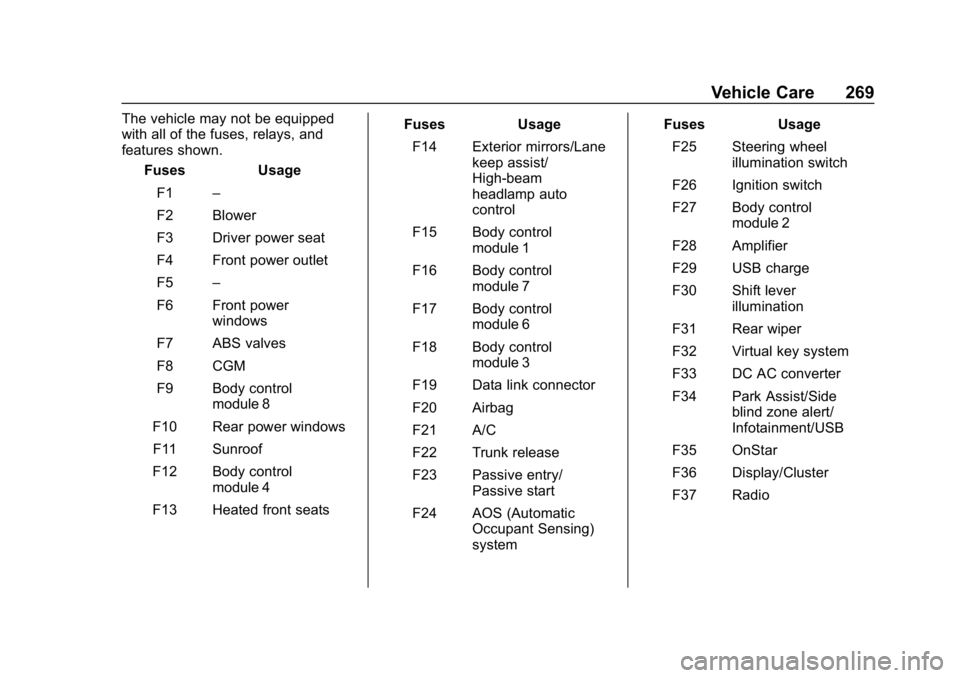
The vehicle may not be equipped
with all of the fuses, relays, and
features shown.Fuses Usage
F1 –
F2 Blower
F3 Driver power seat
F4 Front power outlet
F5 –
F6 Front power windows
F7 ABS valves
F8 CGM
F9 Body control module 8
F10 Rear power windows F11 Sunroof
F12 Body control module 4
F13 Heated front seats Fuses Usage
F14 Exterior mirrors/Lane keep assist/
High-beam
headlamp auto
control
F15 Body control module 1
F16 Body control module 7
F17 Body control module 6
F18 Body control module 3
F19 Data link connector
F20 Airbag
F21 A/C
F22 Trunk release
F23 Passive entry/ Passive start
F24 AOS (Automatic Occupant Sensing)
system Fuses Usage
F25 Steering wheel illumination switch
F26 Ignition switch
F27 Body control module 2
F28 Amplifier
F29 USB charge
F30 Shift lever illumination
F31 Rear wiper
F32 Virtual key system
F33 DC AC converter
F34 Park Assist/Side blind zone alert/
Infotainment/USB
F35 OnStar
F36 Display/Cluster
F37 Radio
Page 360 of 379
Chevrolet Cruze Owner Manual (GMNA-Localizing-U.S./Canada/Mexico-
12146336) - 2019 - crc - 10/22/18
OnStar 359
Languages
The vehicle can be programmed to
respond in multiple languages.
Press
Qand ask for an Advisor.
Advisors are available in English,
Spanish, and French. Available
languages may vary by country.
Potential Issues
OnStar cannot perform Remote
Door Unlock or Stolen Vehicle
Assistance after the vehicle has
been off continuously for 10 days
without an ignition cycle. If the
vehicle has not been started for
10 days, OnStar can contact
Roadside Assistance or a locksmith
to help gain access to the vehicle.
Global Positioning
System (GPS)
. Obstruction of the GPS can
occur in a large city with tall
buildings; in parking garages;
around airports; in tunnels and
underpasses; or in an area with
very dense trees. If GPS signals
are not available, the OnStar
system should still operate to call OnStar. However, OnStar
could have difficulty identifying
the exact location.
. In emergency situations, OnStar
can use the last stored GPS
location to send to emergency
responders.
A temporary loss of GPS can cause
loss of the ability to send a
Turn-by-Turn Navigation route. The
Advisor may give a verbal route or
may ask for a call back after the
vehicle is driven into an open area.
Cellular and GPS Antennas
Cellular reception is required for
OnStar to send remote signals to
the vehicle. Do not place items over
or near the antenna to prevent
blocking cellular and GPS signal
reception.
Unable to Connect to OnStar
Message
If there is limited cellular coverage
or the cellular network has reached
maximum capacity, this message may come on. Press
Qto try the
call again or try again after driving a
few miles into another cellular area.
Vehicle and Power Issues
OnStar services require a vehicle
electrical system, wireless service,
and GPS satellite technologies to be
available and operating for features
to function properly. These systems
may not operate if the battery is
discharged or disconnected.
Add-on Electrical Equipment
The OnStar system is integrated
into the electrical architecture of the
vehicle. Do not add any electrical
equipment. See Add-On Electrical
Equipment 0226. Added electrical
equipment may interfere with the
operation of the OnStar system and
cause it to not operate.
Vehicle Software Updates
OnStar or GM may remotely deliver
software updates or changes to the
vehicle without further notice or
consent. These updates or changes
may enhance or maintain safety,
Page 366 of 379
Chevrolet Cruze Owner Manual (GMNA-Localizing-U.S./Canada/Mexico-
12146336) - 2019 - crc - 10/22/18
Connected Services 365
vehicles, the SSID and
password can be changed in
the Wi-Fi Hotspot menu.
After initial set-up, your vehicle’s
Wi-Fi hotspot will connect
automatically to your mobile
devices. Manage data usage by
turning Wi-Fi on or off on your
mobile device, using the
myChevrolet mobile app, or by
contacting an OnStar Advisor. On
some vehicles, Wi-Fi can also be
managed from the Wi-Fi
Hotspot menu.
MyChevrolet Mobile App (If
Available)
Download the myChevrolet mobile
app to compatible Apple and
Android smartphones. Chevrolet
users can access the following
services from a smartphone:
. Remotely start/stop the vehicle,
if factory-equipped.
. Lock/unlock doors, if equipped
with automatic locks.
. Activate the horn and lamps. .
Check the vehicle’s fuel level, oil
life, or tire pressure,
if factory-equipped with the Tire
Pressure Monitor System.
. Send destinations to the vehicle.
. Locate the vehicle on a map
(U.S. market only).
. Turn the vehicle's Wi-Fi hotspot
on/off, manage settings, and
monitor data consumption,
if equipped.
. Locate a dealer and schedule
service.
. Request roadside assistance.
. Set a parking reminder with pin
drop, take a photo, make a note,
and set a timer.
. Connect with Chevrolet on social
media.
Features are subject to change. For
myChevrolet mobile app information
and compatibility, see
my.chevrolet.com.
An active OnStar or connected
service plan may be required.
A compatible device, factory-installed remote start, and
power locks are required. Data rates
apply. See www.onstar.com for
details and system limitations.
Remote Services
Contact an OnStar Advisor to
unlock the doors or sound the horn
and flash the lamps.
Marketplace
OnStar Advisors can provide offers
from restaurants and retailers on
your route, help locate hotels,
or book a room. These services
vary by market.
OnStar Hands-Free Calling
Make and receive calls with the
built-in wireless calling service,
which requires available minutes.
Functionality of the Voice Command
button may vary by vehicle and
region. For some vehicles, press
=
to open the OnStar app on the
infotainment display, then select
Hands-Free calling. For other
vehicles press
=as follows.
Page 368 of 379

Chevrolet Cruze Owner Manual (GMNA-Localizing-U.S./Canada/Mexico-
12146336) - 2019 - crc - 10/22/18
Index 367
IndexA
Accessories andModifications . . . . . . . . . . . . . . . . . . 230
Accessory Power . . . . . . . . . . . . . . . 179
Add-On Electrical Equipment . . . 226
Additional Information OnStar . . . . . . . . . . . . . . . . . . . . . . . 357
Additional Maintenance and Care . . . . . . . . . . . . . . . . . . . . . . 330
Air Cleaner/Filter, Engine . . . . . . . 241
Air Conditioning . . . . . . . . . . . 151, 153
Air Filter, Passenger
Compartment . . . . . . . . . . . . . . . . . 157
Air Vents . . . . . . . . . . . . . . . . . . . . . . . 156
Airbag System
Check . . . . . . . . . . . . . . . . . . . . . . . . . . 85
How Does an AirbagRestrain? . . . . . . . . . . . . . . . . . . . . . 78
Passenger Sensing System . . . . 79
What Makes an Airbag
Inflate? . . . . . . . . . . . . . . . . . . . . . . . . 77
What Will You See after an Airbag Inflates? . . . . . . . . . . . . . . . 78
When Should an Airbag
Inflate? . . . . . . . . . . . . . . . . . . . . . . . . 76
Where Are the Airbags? . . . . . . . . 75 Airbags
Adding Equipment to the
Vehicle . . . . . . . . . . . . . . . . . . . . . . . . 84
Passenger Status Indicator . . . 123
Readiness Light . . . . . . . . . . . . . . 122
Servicing Airbag-Equipped Vehicles . . . . . . . . . . . . . . . . . . . . . . . 84
System Check . . . . . . . . . . . . . . . . . . 73
Alarm Vehicle Security . . . . . . . . . . . . . . . . 49
Alert
Lane Change . . . . . . . . . . . . . . . . . 209
Side Blind Zone (SBZA) . . . . . . 209
All-Season Tires . . . . . . . . . . . . . . . . 270
Antilock Brake System (ABS) . . . 193 Warning Light . . . . . . . . . . . . . . . . . 126
Appearance Care Exterior . . . . . . . . . . . . . . . . . . . . . . . 312
Interior . . . . . . . . . . . . . . . . . . . . . . . . 317
Assistance Program, Roadside . . . . . . . . . . . . . . . . . . . . . . 345
Assistance Systems for Driving . . . . . . . . . . . . . . . . . . . . . . . . 203
Assistance Systems for Parking and Backing . . . . . . . . . . 201
Auto Stop Stop/Start System . . . . . . . . . . . . 176
Page 369 of 379

Chevrolet Cruze Owner Manual (GMNA-Localizing-U.S./Canada/Mexico-
12146336) - 2019 - crc - 10/22/18
368 Index
AutomaticClimate Control System . . . . . . . 153
Door Locks . . . . . . . . . . . . . . . . . . . . . 44
Forward Braking . . . . . . . . . . . . . . 205
Headlamp System . . . . . . . . . . . . 145
Transmission . . . . . . . . . . . . . . . . . 189
Transmission Fluid . . . . . . . . . . . 240
Automatic Transmission Manual Mode . . . . . . . . . . . . . . . . . 192
Shift Lock Control FunctionCheck . . . . . . . . . . . . . . . . . . . . . . . 251
B
Battery
Exterior Lighting BatterySaver . . . . . . . . . . . . . . . . . . . . . . . 149
Power Protection . . . . . . . . . . . . . 149
Battery - North America . . . . 250, 306
Biodiesel . . . . . . . . . . . . . . . . . . . . . . . 216
Blade Replacement, Wiper . . . . . 252
Brake System Warning Light . . . . . . . . 126
Brakes . . . . . . . . . . . . . . . . . . . . . . . . . . 248 Antilock . . . . . . . . . . . . . . . . . . . . . . . 193
Assist . . . . . . . . . . . . . . . . . . . . . . . . . 195
Fluid . . . . . . . . . . . . . . . . . . . . . . . . . . 249
Parking . . . . . . . . . . . . . . . . . . . . . . . 194 Braking . . . . . . . . . . . . . . . . . . . . . . . . . 160
Automatic Forward . . . . . . . . . . . 205
Braking System Front Pedestrian (FPB) . . . . . . . 207
Break-In, New Vehicle . . . . . . . . . . 169
Bulb Replacement Fog Lamps . . . . . . . . . . . . . . . . . . . 257
Halogen Bulbs . . . . . . . . . . . . . . . . 255
Headlamp Aiming . . . . . . . . . . . . . 255
Headlamps . . . . . . . . . . . . . . . . . . . 255
Headlamps and Front Turn
Signal . . . . . . . . . . . . . . . . . . . . . . . 255
License Plate Lamps . . . . . . . . . 261
Taillamps and Back-up Lamps . . . . . . . . . . . . . . . . . . . . . . 257
Buying New Tires . . . . . . . . . . . . . . . 286
C
Calibration . . . . . . . . . . . . . . . . . . . . . . 113
California Perchlorate Materials
Requirements . . . . . . . . . . . . . . . 230
California Proposition
65 Warning . . . . . . . . . .229, 250, 306, Back Cover
Canadian Vehicle Owners . . . . . . . . 2 Capacities and
Specifications . . . . . . . . . . . . . . . . . 338
Carbon Monoxide Engine Exhaust . . . . . . . . . . . . . . . 181
Liftgate . . . . . . . . . . . . . . . . . . . . . . . . . 47
Trunk . . . . . . . . . . . . . . . . . . . . . . . . . . . 46
Winter Driving . . . . . . . . . . . . . . . . 164
Cargo Cover . . . . . . . . . . . . . . . . . . . . . . . . . 108
Caution, Danger, and Warning . . . . 2
Center Console Storage . . . . . . . . 106
Chains, Tire . . . . . . . . . . . . . . . . . . . . 291
Charging System Light . . . . . . . . . 123
Check Engine Light (MalfunctionIndicator) . . . . . . . . . . . . . . . . . . . . 124
Ignition Transmission Lock . . . 252
Child Restraints Infants and Young Children . . . . . 87
ISOFIX . . . . . . . . . . . . . . . . . . . . . . . 100
Lower Anchors and Tethersfor Children . . . . . . . . . . . . . . . . . . . 92
Older Children . . . . . . . . . . . . . . . . . . 86
Securing . . . . . . . . . . . . . . . . . 101, 103
Systems . . . . . . . . . . . . . . . . . . . . . . . . 90
Circuit Breakers . . . . . . . . . . . . . . . . 262
Cleaning Exterior Care . . . . . . . . . . . . . . . . . 312
Page 374 of 379

Chevrolet Cruze Owner Manual (GMNA-Localizing-U.S./Canada/Mexico-
12146336) - 2019 - crc - 10/22/18
Index 373
Lights (cont'd)Up-Shift . . . . . . . . . . . . . . . . . . . . . . 127
Wait to Start . . . . . . . . . . . . . . . . . . 129
Locks
Automatic Door . . . . . . . . . . . . . . . . . 44
Delayed Locking . . . . . . . . . . . . . . . . 44
Door . . . . . . . . . . . . . . . . . . . . . . . . . . . . 42
Lockout Protection . . . . . . . . . . . . . . 44
Power Door . . . . . . . . . . . . . . . . . . . . . 44
Safety . . . . . . . . . . . . . . . . . . . . . . . . . . 45
Loss of Control . . . . . . . . . . . . . . . . . 162
Low Fuel Warning Light . . . . . . . . . 130
Low-Profile Tires . . . . . . . . . . . . . . . . 271
Lower Anchors and Tethers for Children (LATCH
System) . . . . . . . . . . . . . . . . . . . . . . . . 92
M
MaintenanceRecords . . . . . . . . . . . . . . . . . . . . . . 336
Maintenance and Care Additional . . . . . . . . . . . . . . . . . . . . . 330
Maintenance Schedule . . . . . . . . . 324 Recommended Fluids and
Lubricants . . . . . . . . . . . . . . . . . . . 333
Malfunction Indicator Lamp . . . . . 124
Manual Mode . . . . . . . . . . . . . . . . . . . 192 Messages
Engine Power . . . . . . . . . . . . . . . . 138
Vehicle . . . . . . . . . . . . . . . . . . . . . . . 138
Vehicle Speed . . . . . . . . . . . . . . . . 138
Mirrors Convex . . . . . . . . . . . . . . . . . . . . . . . . . 52
Folding . . . . . . . . . . . . . . . . . . . . . . . . . 52
Heated . . . . . . . . . . . . . . . . . . . . . . . . . 52
Manual Rearview . . . . . . . . . . . . . . . 53
Power . . . . . . . . . . . . . . . . . . . . . . . . . . 52
Mirrors, Interior Rearview . . . . . . . . 53
Monitor System, Tire
Pressure . . . . . . . . . . . . . . . . . . . . . . 279
N
NavigationConnected Services . . . . . . . . . . 363
New Vehicle Break-In . . . . . . . . . . . 169
O
Odometer . . . . . . . . . . . . . . . . . . . . . . . 119 Trip . . . . . . . . . . . . . . . . . . . . . . . . . . . .119
Off-Road Recovery . . . . . . . . . . . . . . . . . . . . . 161
Oil Engine . . . . . . . . . . . . . . . . . . . . . . . . 236
Engine Oil Life System . . . . . . . 239
Pressure Light . . . . . . . . . . . . . . . . 129
Older Children, Restraints . . . . . . . 86 Online Owner Center . . . . . . . . . . . 344
OnStar . . . . . . . . . . . . . . . . . . . . . . . . . 354
OnStar Additional
Information . . . . . . . . . . . . . . . . . . . . 357
OnStar Emergency . . . . . . . . . . . . . 356
OnStar Overview . . . . . . . . . . . . . . . 355
OnStar Security . . . . . . . . . . . . . . . . 357
Operation Fog Lamps . . . . . . . . . . . . . . . . . . . 147
Outlets Power . . . . . . . . . . . . . . . . . . . . . . . . .113
Overheating, Engine . . . . . . . . . . . . 246
P
Park Shifting Into . . . . . . . . . . . . . . . . . . . 179
Shifting Out of . . . . . . . . . . . . . . . . 180
Park Assist . . . . . . . . . . . . . . . . . . . . . 201
Parking Brake . . . . . . . . . . . . . . . . . . . . . . . . . 194
Brake and P (Park)Mechanism Check . . . . . . . . . . 252
Extended . . . . . . . . . . . . . . . . . . . . . 180
Over Things That Burn . . . . . . . 180
Parking or Backing Assistance Systems . . . . . . . . . . 201
Passenger Airbag Status Indicator . . . . . . . . . . . . . . . . . . . . . . 123