power steering CHEVROLET CRUZE 2019 Track Prep Guide
[x] Cancel search | Manufacturer: CHEVROLET, Model Year: 2019, Model line: CRUZE, Model: CHEVROLET CRUZE 2019Pages: 379, PDF Size: 5.91 MB
Page 172 of 379
Chevrolet Cruze Owner Manual (GMNA-Localizing-U.S./Canada/Mexico-
12146336) - 2019 - crc - 10/22/18
Driving and Operating 171
The ignition will switch from ACC/
ACCESSORY to OFF after
five minutes to prevent battery
rundown.
ON/RUN/START :This mode has a
green light and is for starting the
engine and driving. With the ignition
off, and the brake or clutch pedal
applied, pressing the button once
will place the ignition system in ON/
RUN/START. Once engine cranking
begins, release the button. Engine
cranking will continue until the
engine starts. See Starting the
Engine 0173. The ignition will then
remain in ON/RUN.
Service Mode
This power mode is available for
service and diagnostics, and to
verify the proper operation of the
malfunction indicator lamp as may
be required for emission inspection
purposes. With the vehicle off and
the brake pedal not applied,
pressing and holding ENGINE
START/STOP for more than
five seconds will place the vehicle in
Service Mode. The instruments and
audio systems will operate as they do in ON/RUN, but the vehicle will
not be able to be driven. The engine
will not start in Service Mode. Press
ENGINE START/STOP again to turn
the vehicle off.
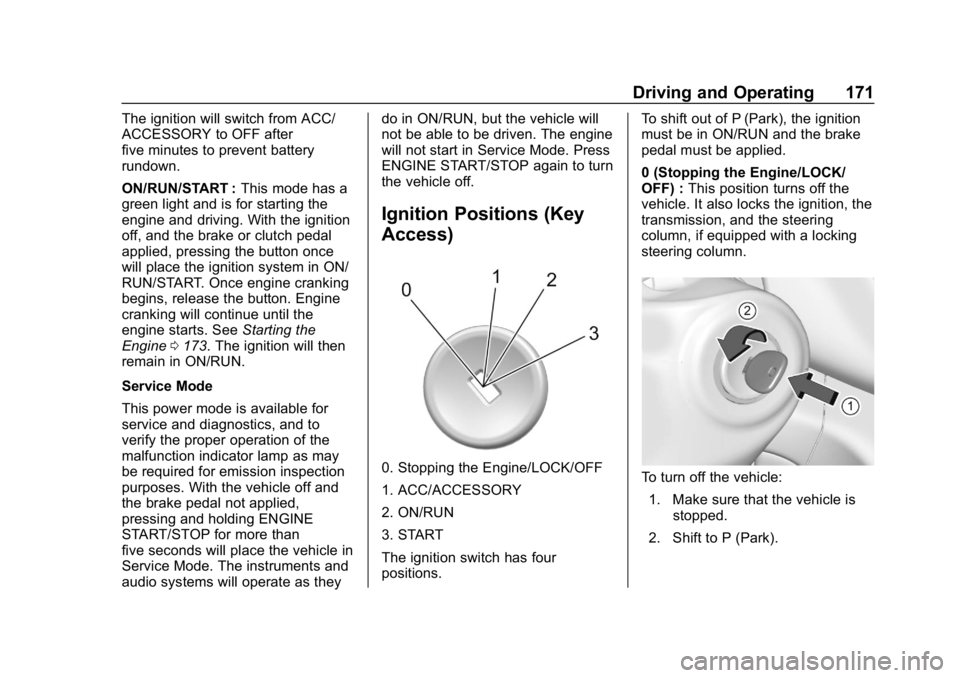
Ignition Positions (Key
Access)
0. Stopping the Engine/LOCK/OFF
1. ACC/ACCESSORY
2. ON/RUN
3. START
The ignition switch has four
positions.
To shift out of P (Park), the ignition
must be in ON/RUN and the brake
pedal must be applied.
0 (Stopping the Engine/LOCK/
OFF) :
This position turns off the
vehicle. It also locks the ignition, the
transmission, and the steering
column, if equipped with a locking
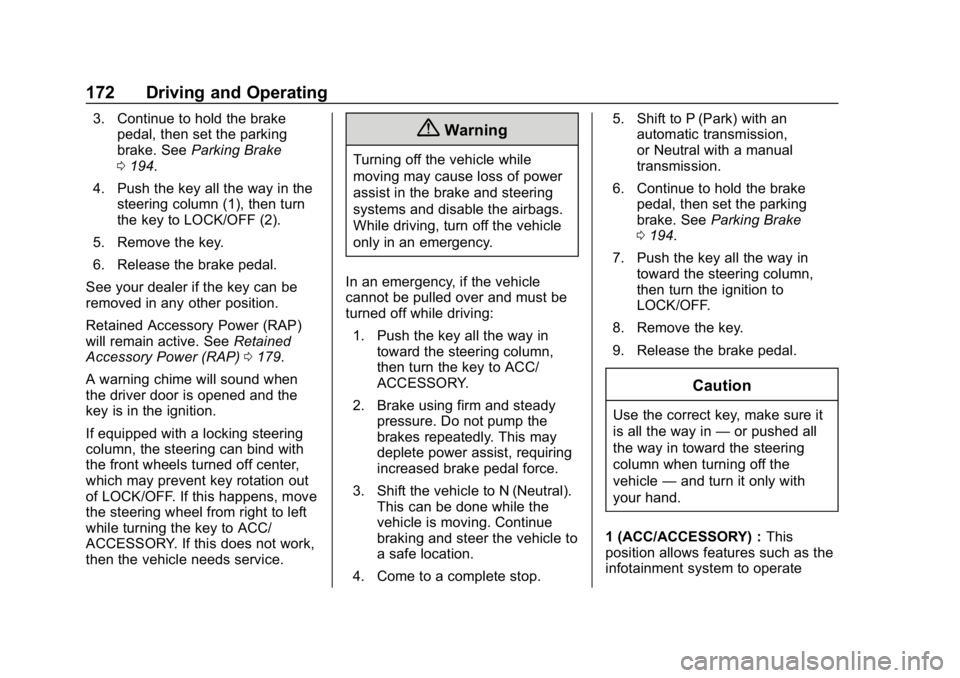
steering column.To turn off the vehicle:
1. Make sure that the vehicle is stopped.
2. Shift to P (Park).
Page 173 of 379
Chevrolet Cruze Owner Manual (GMNA-Localizing-U.S./Canada/Mexico-
12146336) - 2019 - crc - 10/22/18
172 Driving and Operating
3. Continue to hold the brakepedal, then set the parking
brake. See Parking Brake
0 194.
4. Push the key all the way in the steering column (1), then turn
the key to LOCK/OFF (2).
5. Remove the key.
6. Release the brake pedal.
See your dealer if the key can be
removed in any other position.
Retained Accessory Power (RAP)
will remain active. See Retained
Accessory Power (RAP) 0179.
A warning chime will sound when
the driver door is opened and the
key is in the ignition.
If equipped with a locking steering
column, the steering can bind with
the front wheels turned off center,
which may prevent key rotation out
of LOCK/OFF. If this happens, move
the steering wheel from right to left
while turning the key to ACC/
ACCESSORY. If this does not work,
then the vehicle needs service.{Warning
Turning off the vehicle while
moving may cause loss of power
assist in the brake and steering
systems and disable the airbags.
While driving, turn off the vehicle
only in an emergency.
In an emergency, if the vehicle
cannot be pulled over and must be
turned off while driving: 1. Push the key all the way in toward the steering column,
then turn the key to ACC/
ACCESSORY.
2. Brake using firm and steady pressure. Do not pump the
brakes repeatedly. This may
deplete power assist, requiring
increased brake pedal force.
3. Shift the vehicle to N (Neutral). This can be done while the
vehicle is moving. Continue
braking and steer the vehicle to
a safe location.
4. Come to a complete stop. 5. Shift to P (Park) with an
automatic transmission,
or Neutral with a manual
transmission.
6. Continue to hold the brake pedal, then set the parking
brake. See Parking Brake
0 194.
7. Push the key all the way in toward the steering column,
then turn the ignition to
LOCK/OFF.
8. Remove the key.
9. Release the brake pedal.
Caution
Use the correct key, make sure it
is all the way in —or pushed all
the way in toward the steering
column when turning off the
vehicle —and turn it only with
your hand.
1 (ACC/ACCESSORY) : This
position allows features such as the
infotainment system to operate
Page 174 of 379
Chevrolet Cruze Owner Manual (GMNA-Localizing-U.S./Canada/Mexico-
12146336) - 2019 - crc - 10/22/18
Driving and Operating 173
while the vehicle is off. It also
unlocks the steering column,
if equipped with a locking steering
column. Use this position if the
vehicle must be pushed or towed.
SeeRetained Accessory Power
(RAP) 0179.
From ON/RUN, push the key all the
way in toward the steering column,
then turn the key to ACC/
ACCESSORY.
If the key is left in ACC/
ACCESSORY with the engine off,
the battery could drain and the
vehicle may not start.
A warning chime will sound when
the driver door is opened and the
key is in the ignition.
2 (ON/RUN) : This position can be
used to operate the electrical
accessories and to display some
instrument cluster warning and
indicator lights. This position can
also be used for service and
diagnostics, and to verify the proper
operation of the malfunction
indicator lamp as may be required
for emission inspection purposes. The switch stays in this position
when the engine is running. The
transmission is also unlocked in this
position.
If the key is left in ON/RUN with the
engine off, the battery could drain
and the vehicle may not start.
3 (START) :
This is the position that
starts the engine. When the engine
starts, release the key. The ignition
returns to ON/RUN for driving.
Starting the Engine
Place the transmission in the
proper gear.
Caution
If you add electrical parts or
accessories, you could change
the way the engine operates. Any
resulting damage would not be
covered by the vehicle warranty.
See Add-On Electrical Equipment
0 226. Move the shift lever to P (Park) or
N (Neutral). To restart the vehicle
when it is already moving, use
N (Neutral) only.
Caution
Do not try to shift to P (Park) if the
vehicle is moving. If you do, you
could damage the transmission.
Shift to P (Park) only when the
vehicle is stopped.
Gasoline Engine Starting
Procedure (Key Access) 1. With your foot off the accelerator pedal, turn the
ignition key to START. When
the engine starts, let go of the
key. The idle speed will go
down as the engine warms. Do
not race the engine
immediately after starting it.
Allow the oil to warm up and
lubricate all moving parts.
Page 270 of 379
Chevrolet Cruze Owner Manual (GMNA-Localizing-U.S./Canada/Mexico-
12146336) - 2019 - crc - 10/22/18
Vehicle Care 269
The vehicle may not be equipped
with all of the fuses, relays, and
features shown.Fuses Usage
F1 –
F2 Blower
F3 Driver power seat
F4 Front power outlet
F5 –
F6 Front power windows
F7 ABS valves
F8 CGM
F9 Body control module 8
F10 Rear power windows F11 Sunroof
F12 Body control module 4
F13 Heated front seats Fuses Usage
F14 Exterior mirrors/Lane keep assist/
High-beam
headlamp auto
control
F15 Body control module 1
F16 Body control module 7
F17 Body control module 6
F18 Body control module 3
F19 Data link connector
F20 Airbag
F21 A/C
F22 Trunk release
F23 Passive entry/ Passive start
F24 AOS (Automatic Occupant Sensing)
system Fuses Usage
F25 Steering wheel illumination switch
F26 Ignition switch
F27 Body control module 2
F28 Amplifier
F29 USB charge
F30 Shift lever illumination
F31 Rear wiper
F32 Virtual key system
F33 DC AC converter
F34 Park Assist/Side blind zone alert/
Infotainment/USB
F35 OnStar
F36 Display/Cluster
F37 Radio
Page 317 of 379
Chevrolet Cruze Owner Manual (GMNA-Localizing-U.S./Canada/Mexico-
12146336) - 2019 - crc - 10/22/18
316 Vehicle Care
Caution
Using petroleum-based tire
dressing products on the vehicle
may damage the paint finish and/
or tires. When applying a tire
dressing, always wipe off any
overspray from all painted
surfaces on the vehicle.
Wheels and Wheel Trim
Use a soft, clean cloth with mild
soap and water to clean the wheels.
After rinsing thoroughly with clean
water, dry with a soft, clean towel.
A wax may then be applied.
Caution
Chrome wheels and chrome
wheel trim may be damaged if the
vehicle is not washed after driving
on roads that have been sprayed
with magnesium chloride or
calcium chloride. These are used
on roads for conditions such as(Continued)
Caution (Continued)
dust and ice. Always wash the
chrome with soap and water after
exposure.
Caution
To avoid surface damage on
wheels and wheel trim, do not
use strong soaps, chemicals,
abrasive polishes, cleaners,
or brushes. Use only GM
approved cleaners. Do not drive
the vehicle through an automatic
car wash that uses silicon carbide
tire/wheel cleaning brushes.
Damage could occur and the
repairs would not be covered by
the vehicle warranty.
Brake System
Visually inspect brake lines and
hoses for proper hook-up, binding,
leaks, cracks, chafing, etc. Inspect
disc brake pads for wear and rotors for surface condition. Inspect drum
brake linings/shoes for wear or
cracks. Inspect all other brake parts.
Steering, Suspension, and
Chassis Components
Visually inspect steering,
suspension, and chassis
components for damaged, loose,
or missing parts or signs of wear at
least once a year.
Inspect power steering for proper
attachment, connections, binding,
leaks, cracks, chafing, etc.
Visually check constant velocity joint
boots and axle seals for leaks.
Body Component Lubrication
Lubricate all key lock cylinders,
hood hinges, decklid hinges, steel
fuel door hinge, unless the
components are plastic. Applying
silicone grease on weatherstrips
with a clean cloth will make them
last longer, seal better, and not stick
or squeak.
Page 326 of 379

Chevrolet Cruze Owner Manual (GMNA-Localizing-U.S./Canada/Mexico-
12146336) - 2019 - crc - 10/22/18
Service and Maintenance 325
change or more often as
needed. SeeEngine Air Cleaner/
Filter 0241.
. Inspect brake system. See
Exterior Care 0312.
. Visually inspect steering,
suspension, and chassis
components for damage,
including cracks or tears in the
rubber boots, loose or missing
parts, or signs of wear at least
once a year. See Exterior Care
0 312.
. Inspect power steering for
proper attachment, connections,
binding, leaks, cracks,
chafing, etc.
. Visually inspect halfshafts and
drive shafts for excessive wear,
lubricant leaks, and/or damage
including: tube dents or cracks,
constant velocity joint or
universal joint looseness,
cracked or missing boots, loose
or missing boot clamps, center
bearing excessive looseness,
loose or missing fasteners, and
axle seal leaks. .
Check restraint system
components. See Safety System
Check 072.
. Visually inspect fuel system for
damage or leaks.
. Visually inspect exhaust system
and nearby heat shields for
loose or damaged parts.
. Lubricate body components. See
Exterior Care 0312.
. Check starter switch. See Starter
Switch Check 0251.
. Check automatic transmission
shift lock control function. See
Automatic Transmission Shift
Lock Control Function Check
0251.
. Check ignition transmission lock.
See Ignition Transmission Lock
Check 0252.
. Check parking brake and
automatic transmission park
mechanism. See Park Brake and
P (Park) Mechanism Check
0 252. .
Check accelerator pedal for
damage, high effort, or binding.
Replace if needed.
. Visually inspect gas strut for
signs of wear, cracks, or other
damage. Check the hold open
ability of the strut. If the hold
open ability is low, service the
gas strut. See Gas Strut(s)
0 254.
. Check tire sealant expiration
date, if equipped. See Tire
Sealant and Compressor Kit
0 293.
. Inspect sunroof track and seal,
if equipped. See Sunroof055.
Page 376 of 379

Chevrolet Cruze Owner Manual (GMNA-Localizing-U.S./Canada/Mexico-
12146336) - 2019 - crc - 10/22/18
Index 375
Sealant Kit, Tire . . . . . . . . . . . . . . . . 293
Seat Belts . . . . . . . . . . . . . . . . . . . . . . . 66Care . . . . . . . . . . . . . . . . . . . . . . . . . . . . 72
Extender . . . . . . . . . . . . . . . . . . . . . . . . 72
How to Wear Seat BeltsProperly . . . . . . . . . . . . . . . . . . . . . . . 67
Lap-Shoulder Belt . . . . . . . . . . . . . . 69
Reminders . . . . . . . . . . . . . . . . . . . . 121
Replacing after a Crash . . . . . . . . 73
Use During Pregnancy . . . . . . . . . . 71
Seats
Adjustment, Front . . . . . . . . . . . . . . . 59
Head Restraints . . . . . . . . . . . . . . . . 58
Heated Front . . . . . . . . . . . . . . . . . . . 62
Power Adjustment, Front . . . . . . . 60
Rear . . . . . . . . . . . . . . . . . . . . . . . . . . . . 63
Reclining Seatbacks . . . . . . . . . . . . 60
Securing Child Restraints . . . . . . . . . . . . . . . . 101, 103
Security Light . . . . . . . . . . . . . . . . . . . . . . . . . . 130
OnStar . . . . . . . . . . . . . . . . . . . . . . . 357
Vehicle . . . . . . . . . . . . . . . . . . . . . . . . . 49
Vehicle Alarm . . . . . . . . . . . . . . . . . . . 49
Service . . . . . . . . . . . . . . . . . . . . . . . . . 157
Accessories andModifications . . . . . . . . . . . . . . . . 230
Climate Control System . . . . . . . 151 Service (cont'd)
Doing Your Own Work . . . . . . . . 230
Maintenance Records . . . . . . . . 336
Maintenance, General
Information . . . . . . . . . . . . . . . . . . 322
Parts Identification Label . . . . . 337
Scheduling Appointments . . . . . 347
Services Special Application . . . . . . . . . . . 329
Servicing the Airbag . . . . . . . . . . . . . 84
Shift Lock Control Function Check, Automatic
Transmission . . . . . . . . . . . . . . . . . . 251
Shifting
Into Park . . . . . . . . . . . . . . . . . . . . . . 179
Out of Park . . . . . . . . . . . . . . . . . . . 180
Side Blind Zone Alert (SBZA) . . . 209
Signals, Turn and Lane-Change . . . . . . . . . . . . . . . . . 147
Spare Tire Compact . . . . . . . . . . . . . . . . . . . . . . 305
Special Application Services . . . . 329
Specifications and Capacities . . . . . . . . . . . . . . . . . . . . . 338
Speedometer . . . . . . . . . . . . . . . . . . . 119
StabiliTrak OFF Light . . . . . . . . . . . . . . . . . . . . . 128
Start Assist, Hill . . . . . . . . . . . . . . . . . 195 Start Vehicle, Remote . . . . . . . . . . . 40
Starter Switch Check . . . . . . . . . . . 251
Starting the Engine . . . . . . . . . . . . . 173
Steering . . . . . . . . . . . . . . . . . . . . . . . . 161
Heated Wheel . . . . . . . . . . . . . . . . .110
Wheel Adjustment . . . . . . . . . . . . .110
Wheel Controls . . . . . . . . . . . . . . . .110
Stop/Start System . . . . . . . . . . . . . . 176
Storage Areas Cargo Cover . . . . . . . . . . . . . . . . . . 108
Center Console . . . . . . . . . . . . . . . 106
Glove Box . . . . . . . . . . . . . . . . . . . . 106
Storage Compartments . . . . . . . . . 106
Storing the Tire Sealant and Compressor Kit . . . . . . . . . . . . . . . 299
Struts
Gas . . . . . . . . . . . . . . . . . . . . . . . . . . . 254
Stuck Vehicle . . . . . . . . . . . . . . . . . . . 165
Sun Visors . . . . . . . . . . . . . . . . . . . . . . . 55
Sunroof . . . . . . . . . . . . . . . . . . . . . . . . . . 55
Symbols . . . . . . . . . . . . . . . . . . . . . . . . . . 3
System Forward CollisionAlert (FCA) . . . . . . . . . . . . . . . . . . 203
Infotainment . . . . . . . . . . . . . 150, 354
Systems Driver Assistance . . . . . . . . . . . . . 200