remote control CHEVROLET CRUZE HATCHBACK 2017 User Guide
[x] Cancel search | Manufacturer: CHEVROLET, Model Year: 2017, Model line: CRUZE HATCHBACK, Model: CHEVROLET CRUZE HATCHBACK 2017Pages: 405, PDF Size: 6.76 MB
Page 145 of 405
Chevrolet Cruze Owner Manual (GMNA-Localizing-U.S./Canada/Mexico-
9803785) - 2017 - CRC - 4/13/16
144 Instruments and Controls
Remote Keyless Entry (RKE)
System Operation (Keyless
Access)036.
NO REMOTE DETECTED
PRESS BRAKE TO RESTART
or NO REMOTE DETECTED
PRESS CLUTCH TO RESTART
This message displays if the RKE
transmitter is no longer detected in
the vehicle. Press the brake pedal
or clutch and the engine start/stop
button to restart the vehicle.
REMOTE LEFT IN VEHICLE
This message displays when
leaving the vehicle with the RKE
transmitter still inside.
REPLACE BATTERY IN
REMOTE KEY
This message displays when the
battery in the RKE transmitter needs
to be replaced.
Lamp Messages
AUTOMATIC LIGHT
CONTROL ON
This message is displayed when the
automatic light control has been
turned on. See Automatic Headlamp
System 0160.
AUTOMATIC LIGHT
CONTROL OFF
This message is displayed when the
automatic light control has been
turned off. See Automatic Headlamp
System 0160.
XXX TURN INDICATOR
FAILURE
When one of the turn signals is out,
this message displays to show
which bulb needs to be replaced.
See Bulb Replacement 0289 and
Replacement Bulbs 0293 for more
information on turn signal bulb
replacement.
TURN SIGNAL ON
This message is displayed if the
turn signal has been left on. Turn off
the turn signal.
Object Detection System
Messages
FORWARD COLLISION
ALERT OFF
This message displays when the
Forward Collision Alert has been
turned off.
FRONT CAMERA BLOCKED
CLEAN WINDSHIELD
This message displays when the
camera is blocked. Cleaning the
outside of the windshield behind the
rearview mirror may correct the
issue. The Lane Keep Assist (LKA)
and the Lane Departure Warning
(LDW) system will not operate.
Forward Collision Alert (FCA) may
not work or may not work as well.
LANE CHANGE ALERT OFF
This message indicates that the
driver has turned the Side Blind
Zone Alert (SBZA) and Lane
Change Alert (LCA) systems off.
Page 153 of 405
Chevrolet Cruze Owner Manual (GMNA-Localizing-U.S./Canada/Mexico-
9803785) - 2017 - CRC - 4/13/16
152 Instruments and Controls
Text Scroll
Select to see text scroll on the
screen.
Select Off or On.
Tone Settings
Select to adjust the radio tone. See
Operation0169 or“Tone Settings”
under “AM-FM Radio” in the
infotainment manual.
Auto Volume
This feature adjusts the volume
based on vehicle speed and
ambient noise.
Select Off, Low, Medium-Low,
Medium, Medium-High, or High.
Maximum Startup Volume
This feature sets the maximum
startup volume. If the vehicle is
started and the volume is greater
than this level, the volume is
adjusted to this level. To set the
maximum startup volume, turn the
MENU knob or press + or −to
increase or decrease. Audio Cue Volume
This feature sets the volume of
audio files played at system startup
and shutdown.
Select On, then press + or
−to
increase or decrease the volume.
Vehicle
Select and the following may
display:
. Climate and Air Quality
. Collision/Detection Systems
. Comfort and Convenience
. Lighting
. Power Door Locks
. Remote Lock, Unlock, Start
Climate and Air Quality
Select and the following may
display:
. Auto Fan Speed
. Auto Defog
. Auto Rear Defog Auto Fan Speed
This feature will set the auto fan
speed.
Select Low, Medium, or High.
Auto Defog
When turned on and high humidity
is detected, the climate control
system may adjust to outside air
supply and turn on the air
conditioner or the heater. The fan
speed may slightly increase to help
prevent fogging. When high
humidity is no longer detected, the
system will return to its prior
operation.
Select Off or On.
Page 154 of 405
Chevrolet Cruze Owner Manual (GMNA-Localizing-U.S./Canada/Mexico-
9803785) - 2017 - CRC - 4/13/16
Instruments and Controls 153
Auto Rear Defog
When on, this feature turns on the
rear defogger at vehicle start when
the interior temperature is cold and
fog is likely. The auto rear defog
function can be canceled by
pressing
1. See“Rear Window
Defogger” underClimate Control
Systems (With Air Conditioning)
0 190 orClimate Control Systems
(With Heater Only) 0192 or
Automatic Climate Control
System 0193.
Select Off or On.
Collision/Detection Systems
Select and the following may
display:
. Park Assist
. Rear Cross Traffic Alert
Park Assist
If equipped, this feature can assist
in backing up and parking the
vehicle. See Assistance Systems for
Parking or Backing 0240.
Select On or Off. Rear Cross Traffic Alert
This allows the Rear Cross Traffic
Alert feature to be turned on or off.
Select On or Off. See
“Rear Cross
Traffic Alert (RCTA)” inAssistance
Systems for Parking or
Backing 0240.
Comfort and Convenience
Select and the following may
display:
.
Chime Volume
Chime Volume
This allows the selection of the
chime volume level.
Turn the MENU knob, touch + or −
to adjust the volume, or select
Normal or High.
Lighting
Select and the following may
display:
. Vehicle Locator Lights
. Exit Lighting Vehicle Locator Lights
This feature will flash the exterior
lamps and allows some of the
exterior lamps and most of the
interior lamps to turn on briefly
when
Kon the Remote Keyless
Entry (RKE) transmitter is pressed
to locate the vehicle.
Select Off or On.
Exit Lighting
This allows the selection of how
long the exterior lamps stay on
when leaving the vehicle when it is
dark outside.
Select Off, 30 Seconds, 60
Seconds, or 120 Seconds.
Power Door Locks
Select and the following may
display:
. Unlocked Door Anti Lock Out
. Auto Door Unlock
. Delayed Door Lock
Page 155 of 405
Chevrolet Cruze Owner Manual (GMNA-Localizing-U.S./Canada/Mexico-
9803785) - 2017 - CRC - 4/13/16
154 Instruments and Controls
Unlocked Door Anti Lock Out
When on, this feature will keep the
driver door from locking until the
door is closed. If this feature is
turned on, the Delayed Door Lock
menu will not be available.
Select Off or On.
Auto Door Unlock
This allows selection of which of the
doors will automatically unlock when
the vehicle is shifted into P (Park)
with an automatic transmission or
when the vehicle is turned off with a
manual transmission.
Select Off, All Doors, or Driver Door.
Delayed Door Lock
When on, this feature will delay the
locking of the doors. To override the
delay, press the power door lock
switch on the door.
Select Off or On.
Remote Lock, Unlock, Start
Select and the following may
display:
.Remote Unlock Light Feedback .
Remote Lock Feedback
. Remote Door Unlock
. Remote Start Auto Heat Seats
. Passive Door Unlock
. Passive Door Lock
. Remote Left in Vehicle Alert
Remote Unlock Light Feedback
When on, the exterior lamps will
flash when unlocking the vehicle
with the RKE transmitter.
Select Off or Flash Lights.
Remote Lock Feedback
This allows selection of what type of
feedback is given when locking the
vehicle with the RKE transmitter.
Select Off, Lights and Horn, Lights
Only, or Horn Only.
Remote Door Unlock
This allows selection of which doors
will unlock when pressing
Kon the
RKE transmitter.
Select All Doors or Driver Door. Remote Start Auto Heat Seats
If equipped and turned on, this
feature will turn the heated seats on
when using remote start on
cold days.
Select Off or On.
Passive Door Unlock
This allows the selection of what
doors will unlock when using the
button on the driver door to unlock
the vehicle.
Select All Doors or Driver Door.
Passive Door Lock
This feature can be turned on, off,
or on with feedback. See
Remote
Keyless Entry (RKE) System
Operation (Key Access) 034 or
Remote Keyless Entry (RKE)
System Operation (Keyless
Access) 036.
Select Off, On with Horn
Chirp, or On.
Remote Left in Vehicle Alert
This feature sounds an alert when
the RKE transmitter is left in the
vehicle.
Page 165 of 405
Chevrolet Cruze Owner Manual (GMNA-Localizing-U.S./Canada/Mexico-
9803785) - 2017 - CRC - 4/13/16
164 Lighting
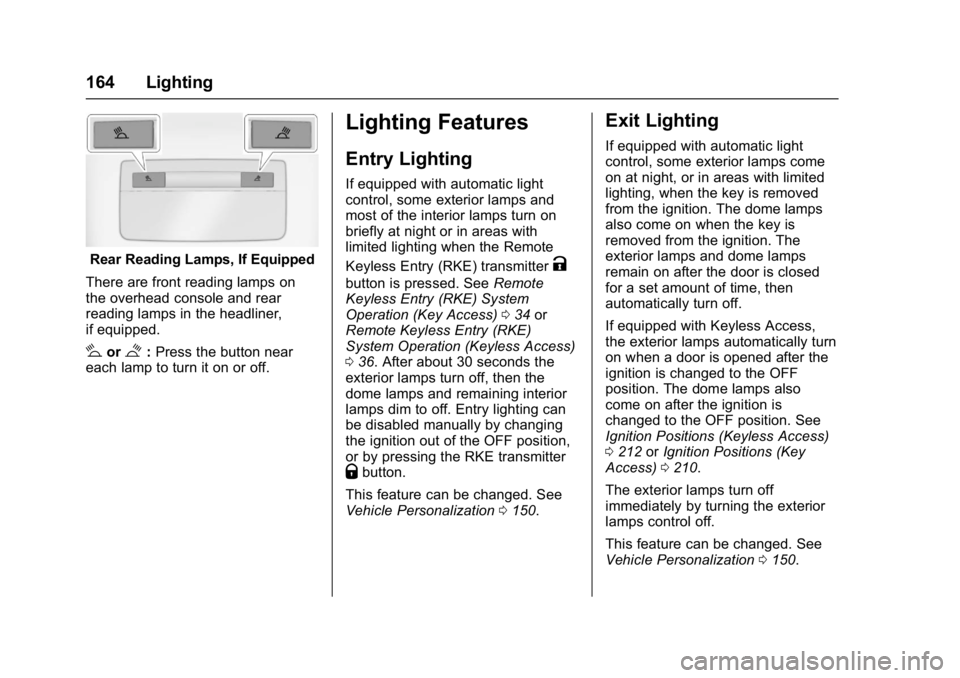
Rear Reading Lamps, If Equipped
There are front reading lamps on
the overhead console and rear
reading lamps in the headliner,
if equipped.
#or$: Press the button near
each lamp to turn it on or off.
Lighting Features
Entry Lighting
If equipped with automatic light
control, some exterior lamps and
most of the interior lamps turn on
briefly at night or in areas with
limited lighting when the Remote
Keyless Entry (RKE) transmitter
K
button is pressed. See Remote
Keyless Entry (RKE) System
Operation (Key Access) 034 or
Remote Keyless Entry (RKE)
System Operation (Keyless Access)
0 36. After about 30 seconds the
exterior lamps turn off, then the
dome lamps and remaining interior
lamps dim to off. Entry lighting can
be disabled manually by changing
the ignition out of the OFF position,
or by pressing the RKE transmitter
Qbutton.
This feature can be changed. See
Vehicle Personalization 0150.
Exit Lighting
If equipped with automatic light
control, some exterior lamps come
on at night, or in areas with limited
lighting, when the key is removed
from the ignition. The dome lamps
also come on when the key is
removed from the ignition. The
exterior lamps and dome lamps
remain on after the door is closed
for a set amount of time, then
automatically turn off.
If equipped with Keyless Access,
the exterior lamps automatically turn
on when a door is opened after the
ignition is changed to the OFF
position. The dome lamps also
come on after the ignition is
changed to the OFF position. See
Ignition Positions (Keyless Access)
0212 orIgnition Positions (Key
Access) 0210.
The exterior lamps turn off
immediately by turning the exterior
lamps control off.
This feature can be changed. See
Vehicle Personalization 0150.
Page 197 of 405
Chevrolet Cruze Owner Manual (GMNA-Localizing-U.S./Canada/Mexico-
9803785) - 2017 - CRC - 4/13/16
196 Climate Controls
If equipped with heated outside
mirrors, they turn on when the rear
window defogger button is on and
help to clear fog or frost from the
surface of the mirrors. SeeHeated
Mirrors 054.
Caution
Do not try to clear frost or other
material from the inside of the
front windshield and rear window
with a razor blade or anything
else that is sharp. This may
damage the rear window
defogger grid and affect the
radio's ability to pick up stations
clearly. The repairs would not be
covered by the vehicle warranty.
MorL:If equipped, press to turn
the heated seats on or off. See
Heated Front Seats 064. Remote Start Climate Control
Operation :
If the vehicle is
equipped with the remote vehicle
start feature, the climate control
system may run when the vehicle is
started remotely with settings
according to ambient conditions.
The rear defog may come on during
remote start based on cold ambient
conditions. The rear defog indicator
light does not come on during a
remote start. If the vehicle has front
heated seats, they may come on
during a remote start. The heated
seat indicator lights do not come on
during a remote start. See Remote
Vehicle Start 042 and Heated Front
Seats 064.
Sensors
The solar sensor, on top of the
instrument panel near the
windshield, monitors the solar heat.
The climate control system uses the
sensor information to adjust the
temperature, fan speed,
recirculation, and air delivery mode
for best comfort.
If the sensor is covered, the
automatic climate control system
may not work properly.
Page 387 of 405
Chevrolet Cruze Owner Manual (GMNA-Localizing-U.S./Canada/Mexico-
9803785) - 2017 - CRC - 4/13/16
386 OnStar
from each other and use a
combination of letters, numbers,
and symbols to increase the
security.
. Change the default name of the
SSID (Service Set Identifier).
This is your network’s name that
is visible to other wireless
devices. Choose a unique name
and avoid family names or
vehicle descriptions.
OnStar Wi-Fi
®Hotspot (If
Equipped)
The vehicle may have a built-in
Wi-Fi hotspot that provides access
to the Internet and web content at
4G LTE speed. Up to seven mobile
devices can be connected. A data
plan is required. Use the in-vehicle
controls only when it is safe to
do so.
1. To retrieve Wi-Fi hotspot information, press
=, wait for
the prompt, then say “Wi-Fi
settings.” On some vehicles,
touch Wi-Fi Settings on the
screen. 2. The Wi-Fi settings will display
the Wi-Fi hotspot name (SSID),
password, and on some
vehicles, the connection type
(no Internet connection, 3G,
4G, 4G LTE), and signal quality
(poor, good, excellent).
3. To change the SSID or password, press
Qor call
1-888-4ONSTAR to connect
with an Advisor.
After initial set-up, your vehicle’s
Wi-Fi hotspot will connect
automatically to your mobile
devices. Manage data usage by
turning Wi-Fi on or off on your
mobile device, using the
RemoteLink mobile app, or by
contacting an OnStar Advisor.
OnStar RemoteLink
®Mobile App
(If Equipped)
Download the OnStar RemoteLink
mobile app to select Apple
®iOS,
Android™, BlackBerry®,
or Windows®mobile devices.
OnStar Subscribers can access the
following services from a mobile
device: .
Remotely start/stop the vehicle,
if factory-equipped.
. Lock/unlock doors, if equipped
with automatic locks.
. Activate the horn and lamps.
. Check the vehicle’s fuel level, oil
life, or tire pressure,
if factory-equipped with the Tire
Pressure Monitor System.
. Send directions to the vehicle.
. Locate the vehicle on a map
(U.S. market only).
. Turn the vehicle's Wi-Fi hotspot
on/off, manage settings, and
monitor data consumption,
if equipped.
For OnStar RemoteLink information
and compatibility, see
www.onstar.com (U.S.) or
www.onstar.ca (Canada).
Remote Services
Contact an OnStar Advisor to
unlock the doors or sound the horn
and flash the lamps.
Page 389 of 405
Chevrolet Cruze Owner Manual (GMNA-Localizing-U.S./Canada/Mexico-
9803785) - 2017 - CRC - 4/13/16
388 OnStar
OnStar Additional
Information
In-Vehicle Audio Messages
Audio messages may play important
information at the following times:
.Prior to vehicle purchase.
Press
Qto set up an account.
. With the OnStar Basic Plan,
every 60 days.
. After change in ownership and
at 90 days.
Transferring Service
PressQto request account transfer
eligibility information. The Advisor
can cancel or change account
information.
Selling/Transferring the
Vehicle
Call 1-888-4ONSTAR
(1-888-466-7827) immediately to
terminate your OnStar services if
the vehicle is disposed of, sold,
transferred, or if the lease ends.
Reactivation for Subsequent
Owners
PressQand follow the prompts to
speak to an Advisor as soon as
possible. The Advisor will update
vehicle records and explain OnStar
service options.
How OnStar Service Works
Automatic Crash Response,
Emergency Services, Crisis Assist,
Stolen Vehicle Assistance,
Advanced Vehicle Diagnostics,
Remote Services, Roadside
Assistance, Turn-by-Turn
Navigation, and Hands-Free Calling
are available on most vehicles. Not
all OnStar services are available
everywhere or on all vehicles. For
more information, a full description
of OnStar services, system
limitations, and OnStar User Terms,
Privacy Statement, and Software
Terms:
. Call 1-888-4ONSTAR
(1-888-466-7827).
. See www.onstar.com (U.S.).
. See www.onstar.ca (Canada). .
Call TTY 1-877-248-2080.
. Press
Qto speak with an
Advisor.
OnStar services cannot work unless
the vehicle is in a place where
OnStar has an agreement with a
wireless service provider for service
in that area. The wireless service
provider must also have coverage,
network capacity, reception, and
technology compatible with OnStar
services. Service involving location
information about the vehicle cannot
work unless GPS signals are
available, unobstructed, and
compatible with the OnStar
hardware. OnStar services may not
work if the OnStar equipment is not
properly installed or it has not been
properly maintained. If equipment or
software is added, connected,
or modified, OnStar services may
not work. Other problems beyond
the control of OnStar —such as
hills, tall buildings, tunnels, weather,
electrical system design and
architecture of the vehicle, damage
Page 399 of 405

Chevrolet Cruze Owner Manual (GMNA-Localizing-U.S./Canada/Mexico-
9803785) - 2017 - CRC - 4/13/16
398 Index
How to Wear Safety BeltsProperly . . . . . . . . . . . . . . . . . . . . . . . . 68
Hydraulic Clutch . . . . . . . . . . . . . . . . 275
I
Ignition Positions . . . . . . . . . . 210, 212
Ignition Transmission Lock Check . . . . . . . . . . . . . . . . . . . . . . . . . 287
Immobilizer . . . . . . . . . . . . . . . . . . . . . . 51
Indicator Vehicle Ahead . . . . . . . . . . . . . . . . 130
Infants and Young Children,
Restraints . . . . . . . . . . . . . . . . . . . . . . 87
Infotainment . . . . . . . . . . . . . . . . . . . . 166
Infotainment System . . . . . . . . . . . . 382
Instrument Cluster . . . . . . . . . . . . . . 116
Instrument Panel Overview . . . . . . . 6
Interior Rearview Mirrors . . . . . . . . . 54
Introduction . . . . . . . . . . . . . . . . . . . . . . . 2
J
Jump Starting - North America . . . . . . . . . . . . . . . . . . . . . . . 336
K
Key and Lock Messages . . . . . . . . 143
Keyless EntryRemote (RKE) System . . . . . 34, 36
Keys . . . . . . . . . . . . . . . . . . . . . . . . . . . . . 31
L
Labeling, Tire Sidewall . . . . . . . . . . 303
Lamps Courtesy . . . . . . . . . . . . . . . . . . . . . . 163
Daytime Running (DRL) . . . . . . 160
Dome . . . . . . . . . . . . . . . . . . . . . . . . . 163
Exterior Controls . . . . . . . . . . . . . . 158
Exterior Lighting BatterySaver . . . . . . . . . . . . . . . . . . . . . . . 165
Malfunction Indicator . . . . . . . . . 126
Messages . . . . . . . . . . . . . . . . . . . . 144
On Reminder . . . . . . . . . . . . . . . . . 133
Reading . . . . . . . . . . . . . . . . . . . . . . 163
Taillamps and Back-up . . . . . . . 291
Lane Change Alert (LCA) . . . . . . . 245
Lane Departure Warning (LDW) . . . . . . . . . . . . . . . . 247
Lane Keep Assist (LKA) . . . . . . . . 247
Lane Keep Assist Light . . . . . . . . . 129
Lap-Shoulder Belt . . . . . . . . . . . . . . . 69
LATCH System Replacing Parts after aCrash . . . . . . . . . . . . . . . . . . . . . . . . . 99
LATCH, Lower Anchors and
Tethers for Children . . . . . . . . . . . . 92
Liftgate . . . . . . . . . . . . . . . . . . . . . . . . . . 49
Lighting Entry . . . . . . . . . . . . . . . . . . . . . . . . . 164 Lighting (cont'd)
Exit . . . . . . . . . . . . . . . . . . . . . . . . . . . 164
Illumination Control . . . . . . . . . . . 163
Lights . . . . . . . . . . . . . . . . . . . . . . . . . . . 129
Airbag Readiness . . . . . . . . . . . . . 125
Antilock Brake System(ABS) Warning . . . . . . . . . . . . . . 129
Brake System Warning . . . . . . . 128
Charging System . . . . . . . . . . . . . 126
Cruise Control . . . . . . . . . . . . . . . . 133
Diesel Exhaust Fluid (DEF) . . . 132
Door Ajar . . . . . . . . . . . . . . . . . . . . . 134
Engine Oil Pressure . . . . . . . . . . 132
Flash-to-Pass . . . . . . . . . . . . . . . . . 160
Front Fog Lamp . . . . . . . . . . . . . . 133
High-Beam On . . . . . . . . . . . . . . . . 133
High/Low Beam Changer . . . . . 160
Low Fuel Warning . . . . . . . . . . . . 132
Safety Belt Reminders . . . . . . . . 124
Security . . . . . . . . . . . . . . . . . . . . . . 133
StabiliTrak
®OFF . . . . . . . . . . . . . 130
Tire Pressure . . . . . . . . . . . . . . . . . 131
Traction Control System (TCS)/StabiliTrak
®. . . . . . . . . . 131
Traction Off . . . . . . . . . . . . . . . . . . . 130
Up-Shift . . . . . . . . . . . . . . . . . . . . . . 129
Wait to Start . . . . . . . . . . . . . . . . . . 131
Page 402 of 405

Chevrolet Cruze Owner Manual (GMNA-Localizing-U.S./Canada/Mexico-
9803785) - 2017 - CRC - 4/13/16
Index 401
RecordsMaintenance . . . . . . . . . . . . . . . . . . 364
Recreational Vehicle Towing . . . . 339
Reimbursement Program, GM Mobility . . . . . . . . . . . . . . . . . . . 373
Remote Keyless Entry (RKE) System . . . . . . . . . . 33, 34, 36
Remote Vehicle Start . . . . . . . . . . . . 42
Replacement Bulbs . . . . . . . . . . . . . 293
Replacement Parts Airbags . . . . . . . . . . . . . . . . . . . . . . . . . 85
Maintenance . . . . . . . . . . . . . . . . . . 362
Replacing Airbag System . . . . . . . . 85
Replacing LATCH System Parts after a Crash . . . . . . . . . . . . . 99
Replacing Safety Belt System
Parts after a Crash . . . . . . . . . . . . . 73
Reporting Safety Defects Canadian Government . . . . . . . . 380
General Motors . . . . . . . . . . . . . . . 381
U.S. Government . . . . . . . . . . . . . 380
Restraints Where to Put . . . . . . . . . . . . . . . . . . . 91
Retained Accessory Power (RAP) . . . . . . . . . . . . . . . . . . 219
Ride Control Systems Messages . . . . . . . . . . . . . . . . . . . . 146 Roads
Driving, Wet . . . . . . . . . . . . . . . . . . 203
Roadside Assistance Program . . . . . . . . . . . . . . . . . . . . . . . 373
Roof Sunroof . . . . . . . . . . . . . . . . . . . . . . . . . 57
Rotation, Tires . . . . . . . . . . . . . . . . . . 314
Routing, Engine Drive Belt . . . . . . 368
Running out of Fuel . . . . . . . . . . . . . 258
Running the Vehicle While Parked . . . . . . . . . . . . . . . . . . . . . . . . 222
S
Safety Belts . . . . . . . . . . . . . . . . . . . . . 67
Care . . . . . . . . . . . . . . . . . . . . . . . . . . . . 72
Extender . . . . . . . . . . . . . . . . . . . . . . . . 72
How to Wear Safety BeltsProperly . . . . . . . . . . . . . . . . . . . . . . . 68
Lap-Shoulder Belt . . . . . . . . . . . . . . 69
Messages . . . . . . . . . . . . . . . . . . . . 146
Reminders . . . . . . . . . . . . . . . . . . . . 124
Replacing after a Crash . . . . . . . . 73
Use During Pregnancy . . . . . . . . . . 71
Safety Defects Reporting Canadian Government . . . . . . . . 380
General Motors . . . . . . . . . . . . . . . 381
U.S. Government . . . . . . . . . . . . . 380
Safety Locks . . . . . . . . . . . . . . . . . . . . . 46
Safety System Check . . . . . . . . . . . . 72 Satellite Radio . . . . . . . . . . . . . . . . . . 171
Scheduling Appointments . . . . . . . 375
Sealant Kit, Tire . . . . . . . . . . . . . . . . 322
Seats
Adjustment, Front . . . . . . . . . . . . . . . 61
Head Restraints . . . . . . . . . . . . . . . . 60
Heated Front . . . . . . . . . . . . . . . . . . . 64
Power Adjustment, Front . . . . . . . 62
Rear . . . . . . . . . . . . . . . . . . . . . . . . . . . . 65
Reclining Seatbacks . . . . . . . . . . . . 62
Securing Child Restraints . . . 99, 101
Security
Light . . . . . . . . . . . . . . . . . . . . . . . . . . 133
Messages . . . . . . . . . . . . . . . . . . . . 146
OnStar
®. . . . . . . . . . . . . . . . . . . . . . 384
Vehicle . . . . . . . . . . . . . . . . . . . . . . . . . 50
Vehicle Alarm . . . . . . . . . . . . . . . . . . . 50
Service . . . . . . . . . . . . . . . . . . . . . . . . . 197 Accessories andModifications . . . . . . . . . . . . . . . . 265
Climate Control
System . . . . . . . . . . . . . . . . . 190, 192
Doing Your Own Work . . . . . . . . 265
Engine Soon Light . . . . . . . . . . . . 126
Maintenance Records . . . . . . . . 364
Maintenance, General Information . . . . . . . . . . . . . . . . . . 351
Parts Identification Label . . . . . 365