lock CHEVROLET DYNASTY 1993 Service Manual
[x] Cancel search | Manufacturer: CHEVROLET, Model Year: 1993, Model line: DYNASTY, Model: CHEVROLET DYNASTY 1993Pages: 2438, PDF Size: 74.98 MB
Page 623 of 2438
(3) Secure arm to pivot with attaching nut and
tighten 17 to 22 N Im (155 to 195 in. lbs.) torque.
(4) Close head cover and remove pin from arm pin
hole.
WIPER ARM ADJUSTMENT
FRONT ARM ADJUSTMENT
(1) Cycle the wiper motor into the PARK position.
(2) Check the tips of the blades in blackout area.
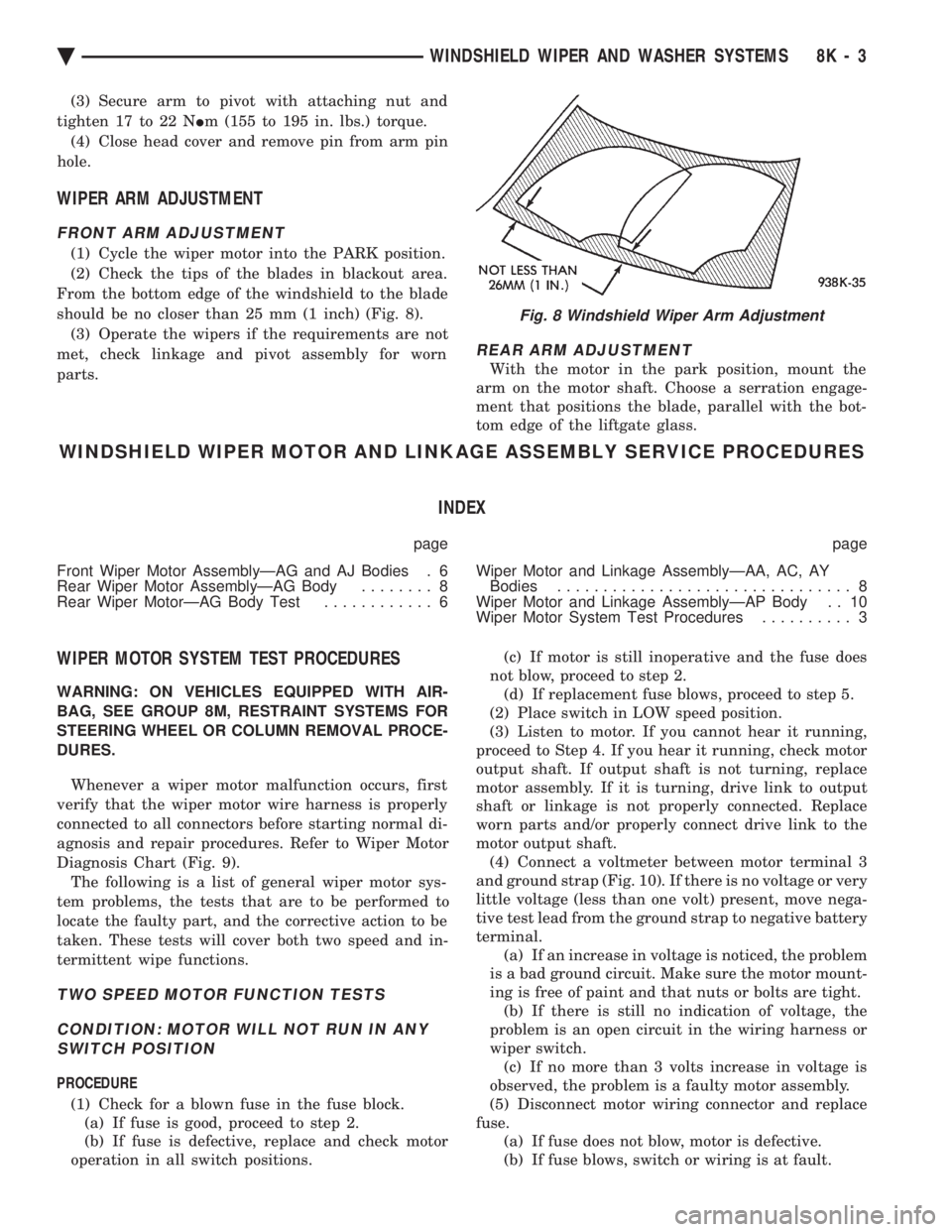
From the bottom edge of the windshield to the blade
should be no closer than 25 mm (1 inch) (Fig. 8). (3) Operate the wipers if the requirements are not
met, check linkage and pivot assembly for worn
parts.
REAR ARM ADJUSTMENT
With the motor in the park position, mount the
arm on the motor shaft. Choose a serration engage-
ment that positions the blade, parallel with the bot-
tom edge of the liftgate glass.
WINDSHIELD WIPER MOTOR AND LINKAGE ASSEMBLY SERVICE PROCEDURES
INDEX
page page
Front Wiper Motor AssemblyÐAG and AJ Bodies . 6
Rear Wiper Motor AssemblyÐAG Body ........ 8
Rear Wiper MotorÐAG Body Test ............ 6 Wiper Motor and Linkage AssemblyÐAA, AC, AY
Bodies ................................ 8
Wiper Motor and Linkage AssemblyÐAP Body . . 10
Wiper Motor System Test Procedures .......... 3
WIPER MOTOR SYSTEM TEST PROCEDURES
WARNING: ON VEHICLES EQUIPPED WITH AIR-
BAG, SEE GROUP 8M, RESTRAINT SYSTEMS FOR
STEERING WHEEL OR COLUMN REMOVAL PROCE-
DURES.
Whenever a wiper motor malfunction occurs, first
verify that the wiper motor wire harness is properly
connected to all connectors before starting normal di-
agnosis and repair procedures. Refer to Wiper Motor
Diagnosis Chart (Fig. 9). The following is a list of general wiper motor sys-
tem problems, the tests that are to be performed to
locate the faulty part, and the corrective action to be
taken. These tests will cover both two speed and in-
termittent wipe functions.
TWO SPEED MOTOR FUNCTION TESTS
CONDITION: MOTOR WILL NOT RUN IN ANY SWITCH POSITION
PROCEDURE
(1) Check for a blown fuse in the fuse block. (a) If fuse is good, proceed to step 2.
(b) If fuse is defective, replace and check motor
operation in all switch positions. (c) If motor is still inoperative and the fuse does
not blow, proceed to step 2. (d) If replacement fuse blows, proceed to step 5.
(2) Place switch in LOW speed position.
(3) Listen to motor. If you cannot hear it running,
proceed to Step 4. If you hear it running, check motor
output shaft. If output shaft is not turning, replace
motor assembly. If it is turning, drive link to output
shaft or linkage is not properly connected. Replace
worn parts and/or properly connect drive link to the
motor output shaft. (4) Connect a voltmeter between motor terminal 3
and ground strap (Fig. 10). If there is no voltage or very
little voltage (less than one volt) present, move nega-
tive test lead from the ground strap to negative battery
terminal. (a) If an increase in voltage is noticed, the problem
is a bad ground circuit. Make sure the motor mount-
ing is free of paint and that nuts or bolts are tight. (b) If there is still no indication of voltage, the
problem is an open circuit in the wiring harness or
wiper switch. (c) If no more than 3 volts increase in voltage is
observed, the problem is a faulty motor assembly.
(5) Disconnect motor wiring connector and replace
fuse. (a) If fuse does not blow, motor is defective.
(b) If fuse blows, switch or wiring is at fault.
Fig. 8 Windshield Wiper Arm Adjustment
Ä WINDSHIELD WIPER AND WASHER SYSTEMS 8K - 3
Page 628 of 2438
(4) Remove the cowl top plastic screen.
(5) Remove pivot screws.
(6) Remove wiper motor cover and disconnect wiring
harness. (7) Remove three motor mounting nuts.
(8) Push pivots down into plenum chamber and pull
motor out until it clears the mounting studs. Then
move it as far to the drivers side or outboard as it will
go. Pull right pivot and link out through opening. Shift
motor to opposite side or inboard of opening and
remove motor, left link and pivot. (9) Clamp motor crank in a vise and remove nut
from end of motor shaft. Do not rotate motor output
shaft from PARK position.
INSTALLATION
(1) Assemble linkage to motor. Make sure crank fits
over D slot on motor shaft. Tighten mounting nut to 10
to 11 N Im (90 to 100 in. lbs.) torque. Be sure motor is
still in park position before assembling to linkage, if
not temporarily connect motor to wiring and operate
switch to position motor in park before assembling
linkage. (2) Place left pivot and link into plenum chamber.(a) Slide it all the way to the left or outboard side
until motor clears studs and crank is behind sheet
metal. (b) Push right pivot and link through opening.
(c) Move assembly right and position motor on
studs.
(3) Install three motor mounting nuts and tighten 7
to8N Im (60 70 in. lbs.) torque.
(4) Position pivots and install pivot screws and
tighten 7 to 8 N Im (60 to 70 in. lbs.) torque.
(5) Connect wiring to motor.
(6) Install motor cover. Tighten screws to 4 N Im (35
in. lbs.) torque. (7) Attach reservoir hose to T-connector through hole
provided in cowl screen. (8) Use plastic fasteners to install cowl screen.
(9) Install arm and blade assemblies. Refer to Wiper
Arm Adjustment. Connect arm washer hoses to
T-connector.
REAR WIPER MOTOR ASSEMBLYÐAG BODY
REMOVAL
(1) Remove arm and blade assembly, refer to Arm
and Blade Removal. (2) Unlock and open liftgate.
(3) Remove trim panel refer to Group 23, Body.
(4) Disconnect feed wire connector from motor.
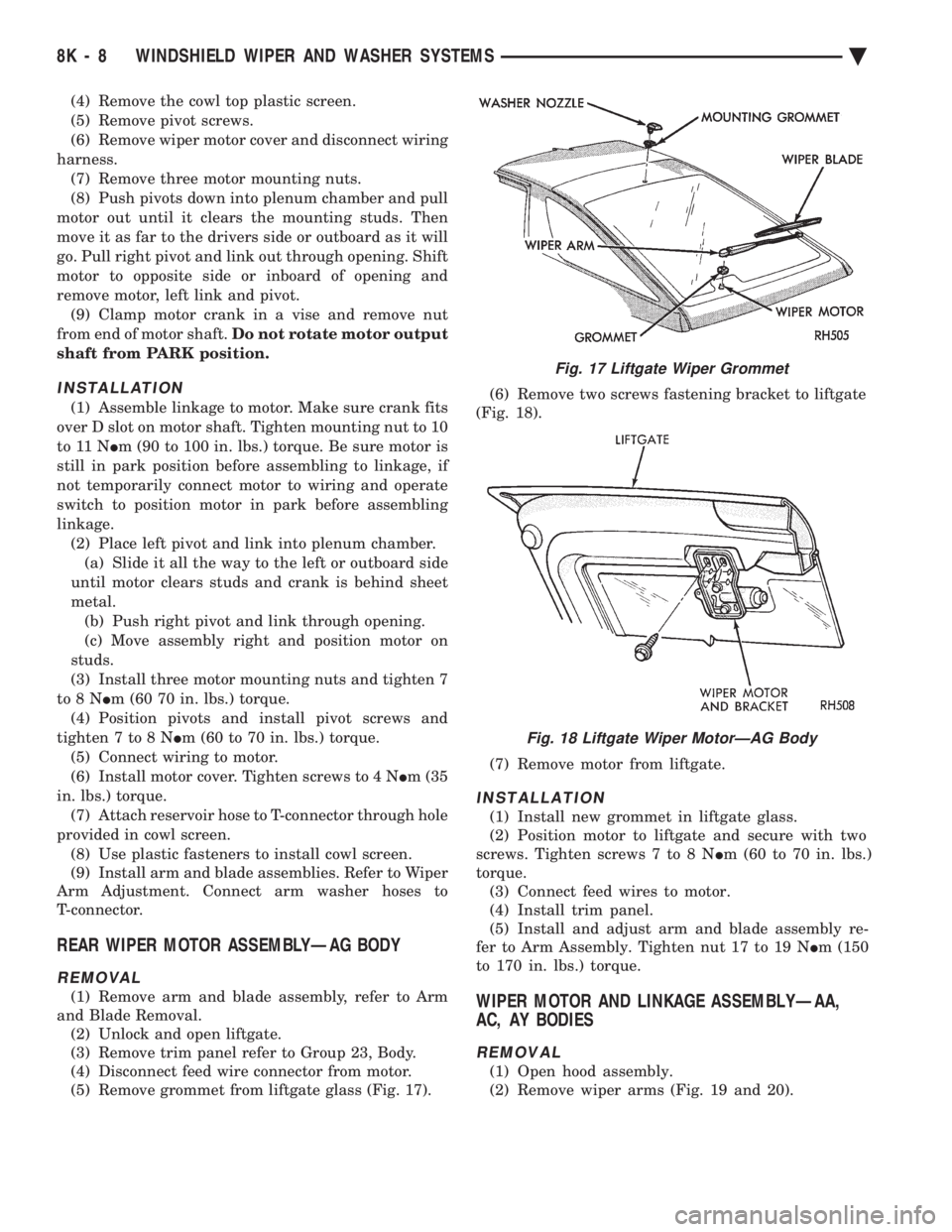
(5) Remove grommet from liftgate glass (Fig. 17). (6) Remove two screws fastening bracket to liftgate
(Fig. 18).
(7) Remove motor from liftgate.
INSTALLATION
(1) Install new grommet in liftgate glass.
(2) Position motor to liftgate and secure with two
screws. Tighten screws 7 to 8 N Im (60 to 70 in. lbs.)
torque. (3) Connect feed wires to motor.
(4) Install trim panel.
(5) Install and adjust arm and blade assembly re-
fer to Arm Assembly. Tighten nut 17 to 19 N Im (150
to 170 in. lbs.) torque.
WIPER MOTOR AND LINKAGE ASSEMBLYÐAA,
AC, AY BODIES
REMOVAL
(1) Open hood assembly.
(2) Remove wiper arms (Fig. 19 and 20).
Fig. 17 Liftgate Wiper Grommet
Fig. 18 Liftgate Wiper MotorÐAG Body
8K - 8 WINDSHIELD WIPER AND WASHER SYSTEMS Ä
Page 633 of 2438
CONDITION: WIPERS START TO WIPE, BUT STOP BEFORE ONE COMPLETE CYCLE ANDDO NOT RETURN TO PARK POSITION
PROCEDURE
(1) Verify that motor will park when the column
switch is put in the OFF position. (2) Set wiper control switch to maximum DELAY
and allow motor to run until it stops during the wipe
cycle. When motor stops, disconnect 25-way blue con-
nector from the body controller. (3) Connect positive lead of voltmeter to pin 20 of
blue connector and negative lead to the metal case of
the body controller. (a) If voltmeter reads 0, check wiring for an open
circuit. (b) If voltmeter reads 10 to 15 volts, proceed to
step 4.
(4) Using an ohmmeter or continuity tester; (a) Check for continuity between pins 20 and 24
of blue connector of the body controller. (b) Reverse ohmmeter leads on pins 20 and 24,
again checking for continuity. (c) If continuity between pins 20 and 24 is not
observed in both steps a and b, replace the body
controller.
CONDITION: EXCESSIVE DELAY OF MORE THAN 30 SECONDS OR INADEQUATEVARIATION IN DELAY
PROCEDURE
(1) Variations in delay should be as follows: (a) Minimum delay control to extreme counter-
clockwise position before first detent of 1/2 to 2 sec-
onds. (b) Maximum delay control to extreme clockwise
position before OFF detent of 15 to 25 seconds.
(2) If there is excessive delay or no variations in
delay, remove the wiper motor wiring harness while
the motor is parked in the OFF position. (3) Remove 25-way blue connector from the body
controller. (4) Set wiper control switch to maximum DELAY
position. (5) With ignition switch in ON position, measure
voltage between pin 9 of black connector and a good
ground. (a) If voltmeter reads 0, proceed to step 6.
(b) If voltmeter reads 10 to 15 volts, proceed to
step 7.
(6) Set wiper control switch to minimum DELAY
position and measure voltage between pin 9 of blue
connector and a good ground. If voltmeter reads 0,
check for an open circuit in the intermittent wipe
wiring harness. (7) Remove wiper motor circuit fuse. (8) Using an ohmmeter, measure the resistance be-
tween pins 9 and 22 of the body controller 25-way
black connector. Set the wiper control switch first to
minimum DELAY and then maximum DELAY. (a) If resistance reading at minimum DELAY
setting is between 0 and 15 ohms, and at maxi-
mum DELAY setting the resistance is between
240,000 and 400,000 ohms, replace the body con-
troller. (b) If the resistance values above are not ob-
tained, replace the wiper control switch.
CONDITION: WIPERS DO NOT RUN CONTINUALLY WHEN WASH CONTROL ISOPERATED DURING DELAY MODE
PROCEDURE
(1) Disconnect 25-way blue connector from the
body controller (2) Using a voltmeter, connect the positive lead to
pin 10 of the (Black) connector. Connect negative
lead to the body computer metal case. (3) Set wiper control switch to DELAY position.
(4) Depress wash switch.
(5) If voltage reads 0, check switch relay and wir-
ing. (6) If voltage is between 10 and 15 volts, the prob-
lem is in the body controller.
CONDITION: IN DELAY MODE, WIPERS RUN CONTINUALLY WHEN WASH IS OPERATEDBUT DO NOT PROVIDE FOUR EXTRA WIPESWHEN WASH CONTROL IS RELEASED
PROCEDURE
Replace body controller.
CONDITION: WIPERS START ERRATICALLY DURING DELAY MODE
PROCEDURE
(1) Verify that the ground connection at the in-
strument panel is making a good connection, free
from paint and is tight. (2) Verify that the motor ground strap is making
good contact and that the motor mounting bolts are
tight. (3) Verify that the wiring connections to the body
controller, wiper motor, and wiper motor switch are
tight and free of corrosion. (4) If condition is not corrected, problem is with
the body controller
Ä WINDSHIELD WIPER AND WASHER SYSTEMS 8K - 13
Page 634 of 2438
INTERMITTENT WIPER FUNCTION TESTS
CONDITION: EXCESSIVE DELAY OF MORE THAN 30 SECONDS OR INADEQUATEVARIATION IN DELAY
PROCEDURE
Variations in delay should be as follows:
(1) Minimum delay control to extreme counter-
clockwise position before first detent of one half to
two seconds. (2) Maximum delay control to extreme clockwise
position before off detent of ten to thirty seconds. (3) If there is excessive delay or no variations in
delay proceed to intermittent wipe switch test.
CONDITION: IN DELAY MODE WIPERS RUN CONTINUALLY WHEN WASH IS OPERATEDBUT DO NOT PROVIDE AN EXTRA WIPEWHEN THE WASH CONTROL IS RELEASED
PROCEDURE
Replace the control unit.
CONDITION: WIPERS START ERRATICALLY DURING DELAY MODE
PROCEDURE
(1) Verify that the ground connection at the in-
strument panel is making good connection, free from
paint and is tight. (2) Verify that the motor ground strap is making
good contact and that the motor mounting bolts are
tight. (3) Verify that the wiring ground connections for
the intermittent wipe control unit and the wiper
switch are tight. (4) If condition is not corrected, replace control
unit.
STANDARD WIPER SWITCH TEST
AP BODY
To test the switch, first disconnect the switch wires
from the body wiring in the steering column. Using
an ohmmeter, test for continuity between the termi-
nals of the switch, as indicated in the following con-
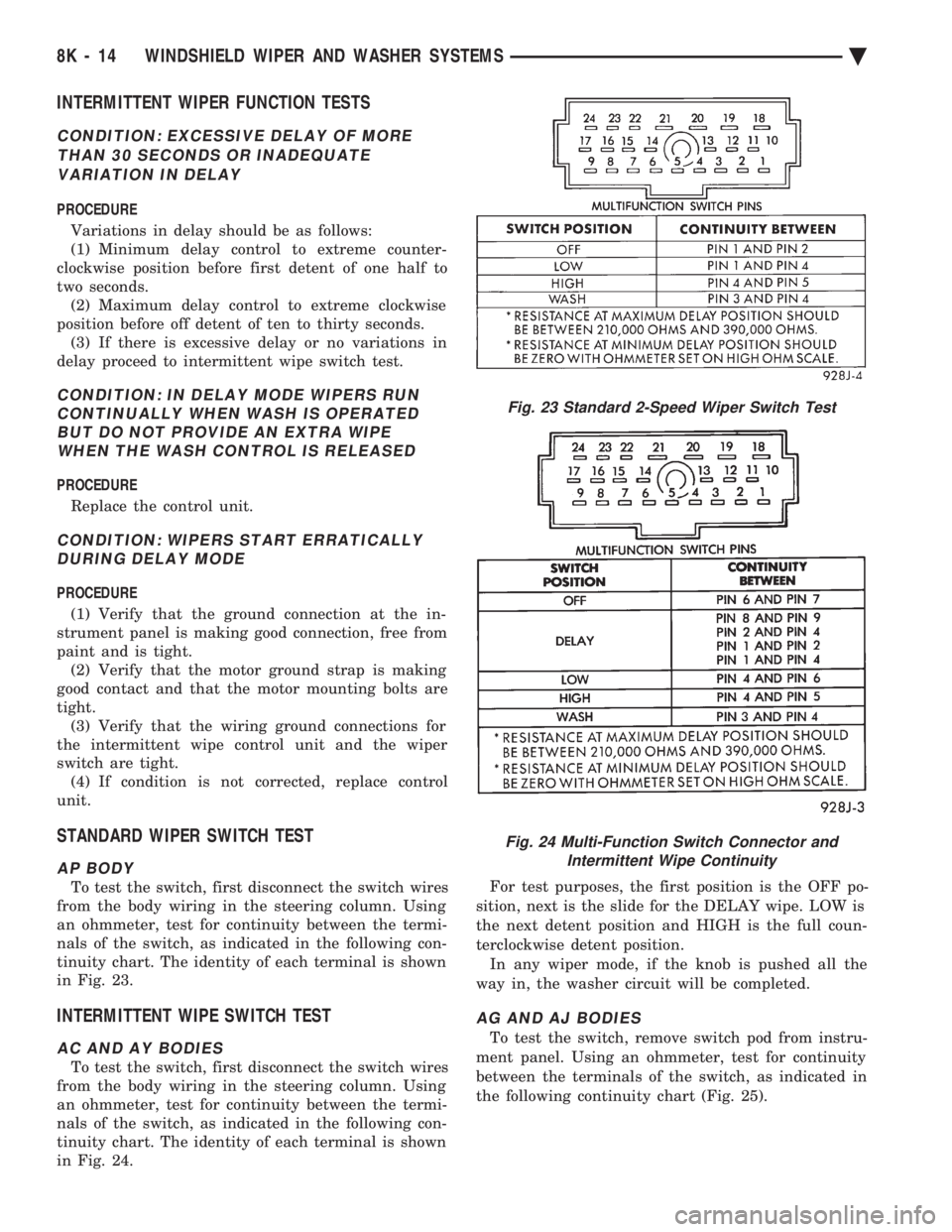
tinuity chart. The identity of each terminal is shown
in Fig. 23.
INTERMITTENT WIPE SWITCH TEST
AC AND AY BODIES
To test the switch, first disconnect the switch wires
from the body wiring in the steering column. Using
an ohmmeter, test for continuity between the termi-
nals of the switch, as indicated in the following con-
tinuity chart. The identity of each terminal is shown
in Fig. 24. For test purposes, the first position is the OFF po-
sition, next is the slide for the DELAY wipe. LOW is
the next detent position and HIGH is the full coun-
terclockwise detent position. In any wiper mode, if the knob is pushed all the
way in, the washer circuit will be completed.
AG AND AJ BODIES
To test the switch, remove switch pod from instru-
ment panel. Using an ohmmeter, test for continuity
between the terminals of the switch, as indicated in
the following continuity chart (Fig. 25).
Fig. 23 Standard 2-Speed Wiper Switch Test
Fig. 24 Multi-Function Switch Connector and Intermittent Wipe Continuity
8K - 14 WINDSHIELD WIPER AND WASHER SYSTEMS Ä
Page 638 of 2438
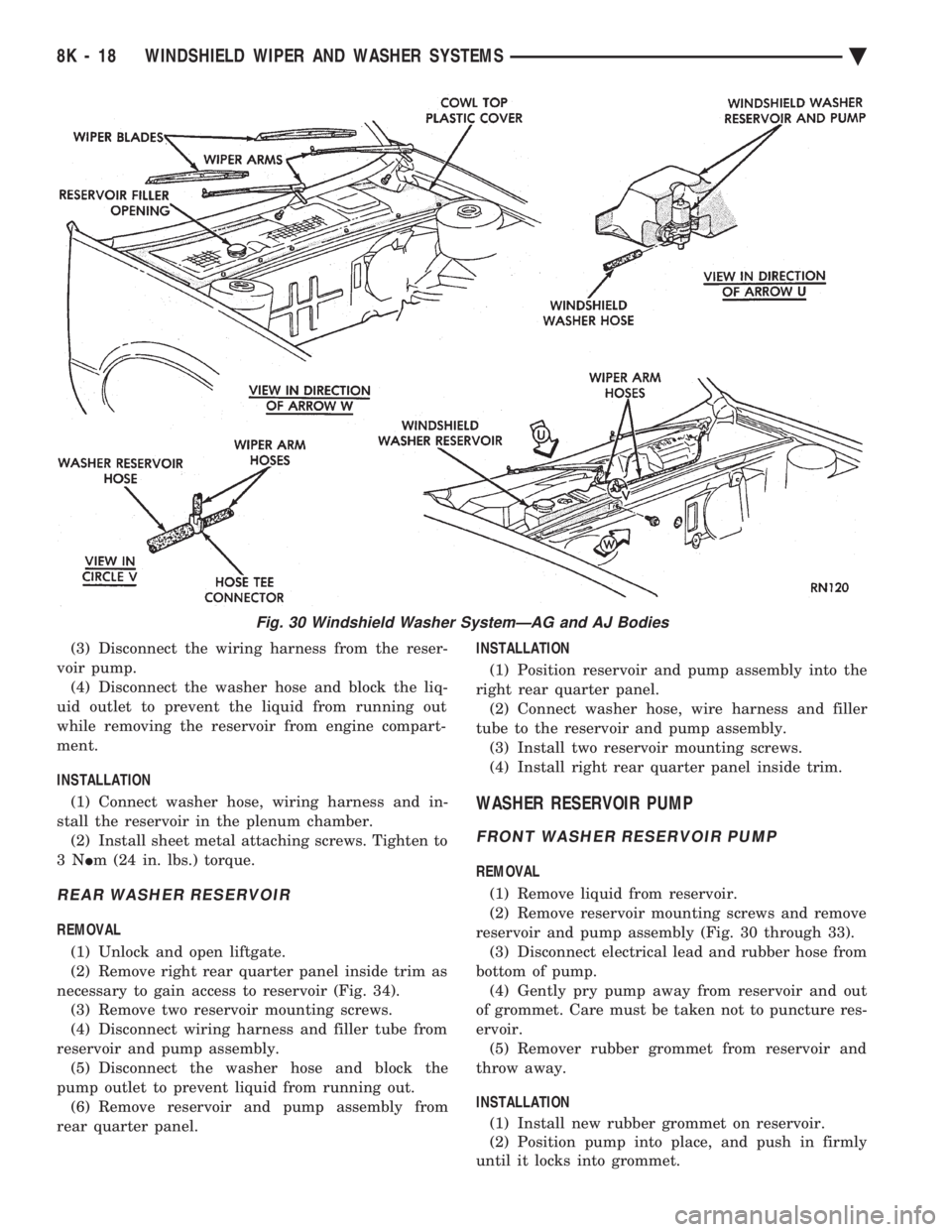
(3) Disconnect the wiring harness from the reser-
voir pump. (4) Disconnect the washer hose and block the liq-
uid outlet to prevent the liquid from running out
while removing the reservoir from engine compart-
ment.
INSTALLATION (1) Connect washer hose, wiring harness and in-
stall the reservoir in the plenum chamber. (2) Install sheet metal attaching screws. Tighten to
3N Im (24 in. lbs.) torque.
REAR WASHER RESERVOIR
REMOVAL
(1) Unlock and open liftgate.
(2) Remove right rear quarter panel inside trim as
necessary to gain access to reservoir (Fig. 34). (3) Remove two reservoir mounting screws.
(4) Disconnect wiring harness and filler tube from
reservoir and pump assembly. (5) Disconnect the washer hose and block the
pump outlet to prevent liquid from running out. (6) Remove reservoir and pump assembly from
rear quarter panel. INSTALLATION
(1) Position reservoir and pump assembly into the
right rear quarter panel. (2) Connect washer hose, wire harness and filler
tube to the reservoir and pump assembly. (3) Install two reservoir mounting screws.
(4) Install right rear quarter panel inside trim.
WASHER RESERVOIR PUMP
FRONT WASHER RESERVOIR PUMP
REMOVAL
(1) Remove liquid from reservoir.
(2) Remove reservoir mounting screws and remove
reservoir and pump assembly (Fig. 30 through 33). (3) Disconnect electrical lead and rubber hose from
bottom of pump. (4) Gently pry pump away from reservoir and out
of grommet. Care must be taken not to puncture res-
ervoir. (5) Remover rubber grommet from reservoir and
throw away.
INSTALLATION (1) Install new rubber grommet on reservoir.
(2) Position pump into place, and push in firmly
until it locks into grommet.
Fig. 30 Windshield Washer SystemÐAG and AJ Bodies
8K - 18 WINDSHIELD WIPER AND WASHER SYSTEMS Ä
Page 643 of 2438

LAMPS
CONTENTS
page page
BULB APPLICATION TABLE ............... 38
CONCEALED HEADLAMPS ................ 27
EXTERIOR LAMP SWITCHES AND HEADLAMP ALIGNMENT ........................... 3
EXTERIOR LAMP SYSTEMS .............. 25
EXTERIOR LAMPSÐAA BODY ............. 7
EXTERIOR LAMPSÐAC BODY ............ 10 EXTERIOR LAMPSÐAG BODY
............ 14
EXTERIOR LAMPSÐAJ BODY ............ 16
EXTERIOR LAMPSÐAP BODY ............ 19
EXTERIOR LAMPSÐAY-BODY ............ 22
GENERAL INFORMATION .................. 1
ILLUMINATED ENTRY SYSTEM ........... 33
GENERAL INFORMATION
Each vehicle is equipped with lamps used for illumi-
nating and indicating purposes. A circuit must have a
good ground to be complete. Circuit ground occurs
when the lamp socket makes contact with the metal
body. On vehicles with plastic lamps, a wire between
the socket and the body makes the grounds. When changing lamp bulbs, check the socket for
corrosion. If corrosion is present, clean contacts with a
wire brush and coat the inside of the socket with
Mopar tMulti-purpose Grease or equivalent.
CAUTION: Do not touch the glass of halogen bulbs
with fingers or any possibly oily surface, reduced
bulb life will result.
BODY IDENTIFICATION
Throughout this Group, references are made to the
vehicle family or body code. To decode the vehicle
identification plates, refer to the Introduction Section
at the front of this manual.
DIAGNOSTIC PROCEDURES
Begin electrical system failure diagnosis by testing
all related fuses and circuit breakers in the fuse block
and engine compartment. When a vehicle experiences problems with the head-
lamp system, verify the condition of the battery con-
nections, charging system, headlamp bulbs, wire con-
nectors, relay, high beam dimmer switch and headlamp
switch. Refer to Wiring Diagrams manual for compo-
nent locations and circuit information.
SYMPTOM
Headlamps are dim when engine is idling of
with ignition turned OFF. Canada cars must
have lamps ON. ACTION
² Clean battery terminal clamps and posts. Refer to
Group 8B, Battery/Starter/Generator Service for
proper procedures.
² Test charging system output. Refer to Group 8A,
Battery/Starting/Charging Systems Diagnostics for
proper testing procedures.
² Test for high resistance in headlamp circuits.
² Defective headlamp bulb.
SYMPTOM
Bulbs burn out frequently.
ACTION
² Test charging system output. Refer to Group 8A,
Battery/Starting/Charging Systems Diagnostics for
proper testing procedures.
² Check for loose or corroded connector terminals or
splices in headlamp circuits. Refer to Wiring Diagrams
manual for component and splice locations.
SYMPTOM
Headlamps are dim with engine running above
idle. Canada cars must have lamps ON.
ACTION
² Test charging system output. Refer to Group 8A,
Battery/Starting/Charging Systems Diagnostics for
proper testing procedures.
² Test for high resistance in headlamp circuits.
² Defective headlamp bulb.
SYMPTOM
Headlamps flash randomly.
ACTION
² Test for poor circuit ground.
² Test for high resistance in headlamp circuits.
Ä LAMPS 8L - 1
Page 649 of 2438
EXTERIOR LAMPSÐAA BODY INDEX
page page
Center High-Mounted Stop Lamp (CHMSL) Bulb . . 9
Fog Lamp ............................... 9
Fog Lamp Bulb ........................... 9
Front Side Marker Lamp or Bulb .............. 7
Headlamp Bulb ........................... 7 Headlamp Lens
........................... 7
License Plate Lamp or BulbÐAA/P Body ....... 8
License Plate LampsÐAA/C Body ............. 8
Park and Turn Signal Lamp or Bulb ........... 7
Tail, Stop and Turn Signal and Back-Up Lamp . . . 8
HEADLAMP BULB
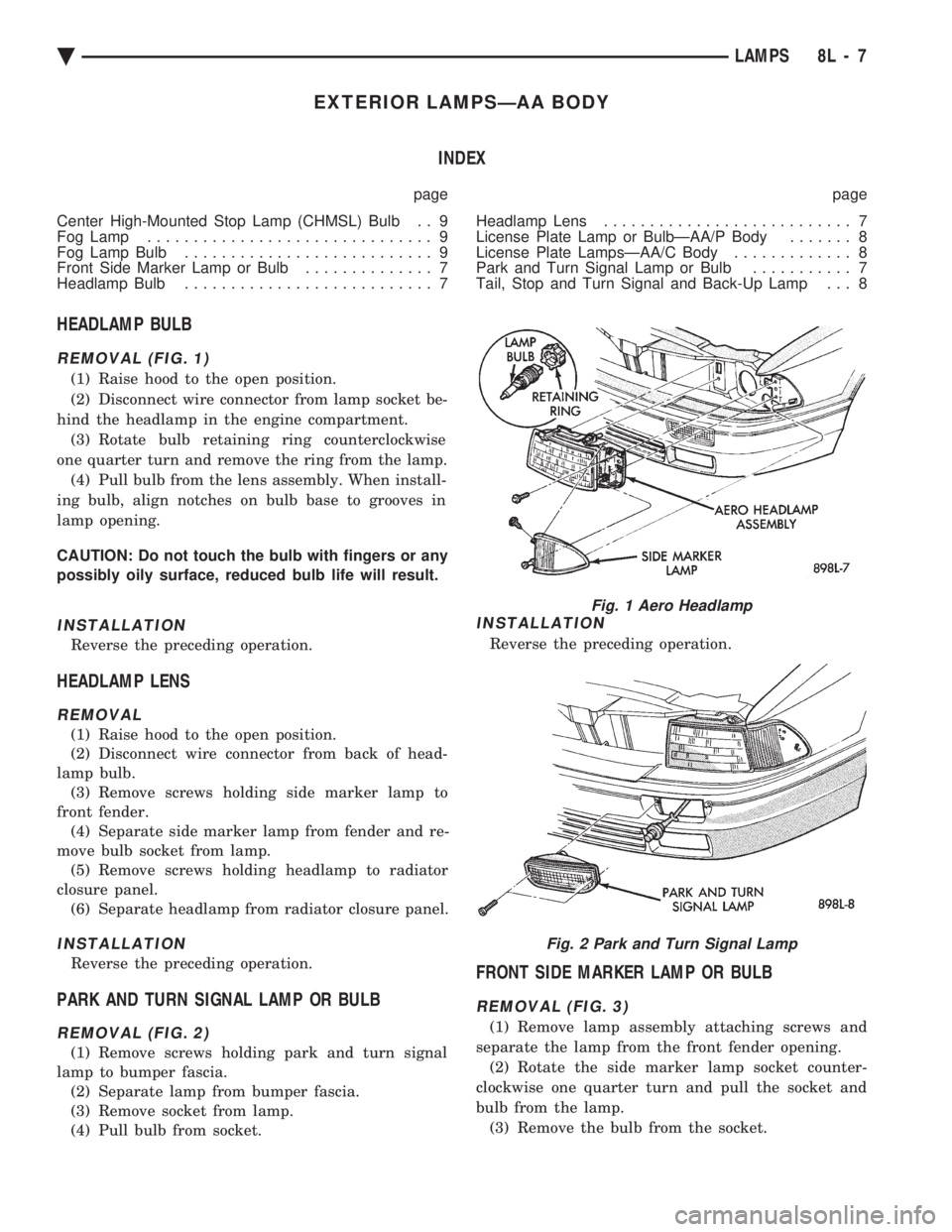
REMOVAL (FIG. 1)
(1) Raise hood to the open position.
(2) Disconnect wire connector from lamp socket be-
hind the headlamp in the engine compartment. (3) Rotate bulb retaining ring counterclockwise
one quarter turn and remove the ring from the lamp. (4) Pull bulb from the lens assembly. When install-
ing bulb, align notches on bulb base to grooves in
lamp opening.
CAUTION: Do not touch the bulb with fingers or any
possibly oily surface, reduced bulb life will result.
INSTALLATION
Reverse the preceding operation.
HEADLAMP LENS
REMOVAL
(1) Raise hood to the open position.
(2) Disconnect wire connector from back of head-
lamp bulb. (3) Remove screws holding side marker lamp to
front fender. (4) Separate side marker lamp from fender and re-
move bulb socket from lamp. (5) Remove screws holding headlamp to radiator
closure panel. (6) Separate headlamp from radiator closure panel.
INSTALLATION
Reverse the preceding operation.
PARK AND TURN SIGNAL LAMP OR BULB
REMOVAL (FIG. 2)
(1) Remove screws holding park and turn signal
lamp to bumper fascia. (2) Separate lamp from bumper fascia.
(3) Remove socket from lamp.
(4) Pull bulb from socket.
INSTALLATION
Reverse the preceding operation.
FRONT SIDE MARKER LAMP OR BULB
REMOVAL (FIG. 3)
(1) Remove lamp assembly attaching screws and
separate the lamp from the front fender opening. (2) Rotate the side marker lamp socket counter-
clockwise one quarter turn and pull the socket and
bulb from the lamp. (3) Remove the bulb from the socket.
Fig. 1 Aero Headlamp
Fig. 2 Park and Turn Signal Lamp
Ä LAMPS 8L - 7
Page 651 of 2438
CENTER HIGH-MOUNTED STOP LAMP (CHMSL)
BULB
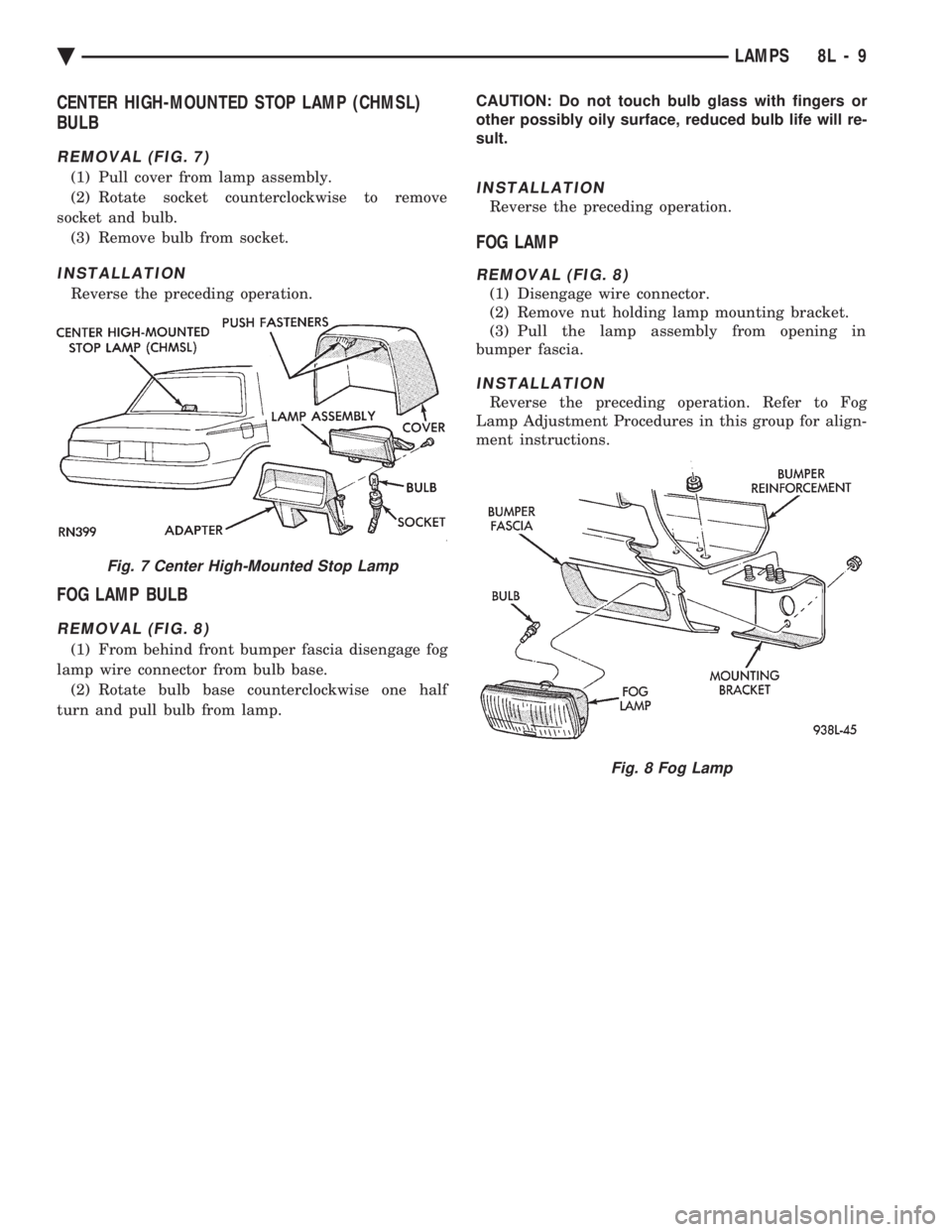
REMOVAL (FIG. 7)
(1) Pull cover from lamp assembly.
(2) Rotate socket counterclockwise to remove
socket and bulb. (3) Remove bulb from socket.
INSTALLATION
Reverse the preceding operation.
FOG LAMP BULB
REMOVAL (FIG. 8)
(1) From behind front bumper fascia disengage fog
lamp wire connector from bulb base. (2) Rotate bulb base counterclockwise one half
turn and pull bulb from lamp. CAUTION: Do not touch bulb glass with fingers or
other possibly oily surface, reduced bulb life will re-
sult.
INSTALLATION
Reverse the preceding operation.
FOG LAMP
REMOVAL (FIG. 8)
(1) Disengage wire connector.
(2) Remove nut holding lamp mounting bracket.
(3) Pull the lamp assembly from opening in
bumper fascia.
INSTALLATION
Reverse the preceding operation. Refer to Fog
Lamp Adjustment Procedures in this group for align-
ment instructions.
Fig. 7 Center High-Mounted Stop Lamp
Fig. 8 Fog Lamp
Ä LAMPS 8L - 9
Page 652 of 2438
EXTERIOR LAMPSÐAC BODY INDEX
page page
Aero Headlamp Bulb ...................... 10
Aero Headlamp Housing ................... 11
Aero HeadlampsÐAC/D-Body ............... 10
Center High Mounted Stop Lamp (CHMSL) ..... 13
Center High-Mounted Stop Lamp (CHMSL) Bulb . 13
Cornering Lamp Assembly .................. 12
Cornering Lamp Bulb ..................... 12
Front Side Marker BulbÐAC/C-Body .......... 12
Front Side Marker LampÐAC/C-Body ......... 12
Headlamp Diagnosis ...................... 10 Headlamp Sealed BeamÐAC/C Body
......... 10
License Plate Lamp/Bulb ................... 13
Park/Turn Signal Lamp or BulbÐAC/C-Body .... 11
Park/Turn Signal Lamp or BulbÐAC/D-Body .... 11
Rear Side Marker Lamp BulbÐAC/C-Body ..... 13
Rear Side Marker LampÐAC/C-Body ......... 13
Tail, Stop, Turn Signal, Back-Up and Side Marker LampÐAC/D-Body ...................... 12
Tail, Stop, Turn Signal, Back-Up LampÐAC/C or AY/S-Body ............................ 12
HEADLAMP DIAGNOSIS
Refer to the Headlamp Diagnosis at the beginning of
this Group. Refer to Wiring Diagrams Manual for
circuit and component locations.
HEADLAMP SEALED BEAMÐAC/C BODY
REMOVAL
(1) Turn the headlight switch ON.
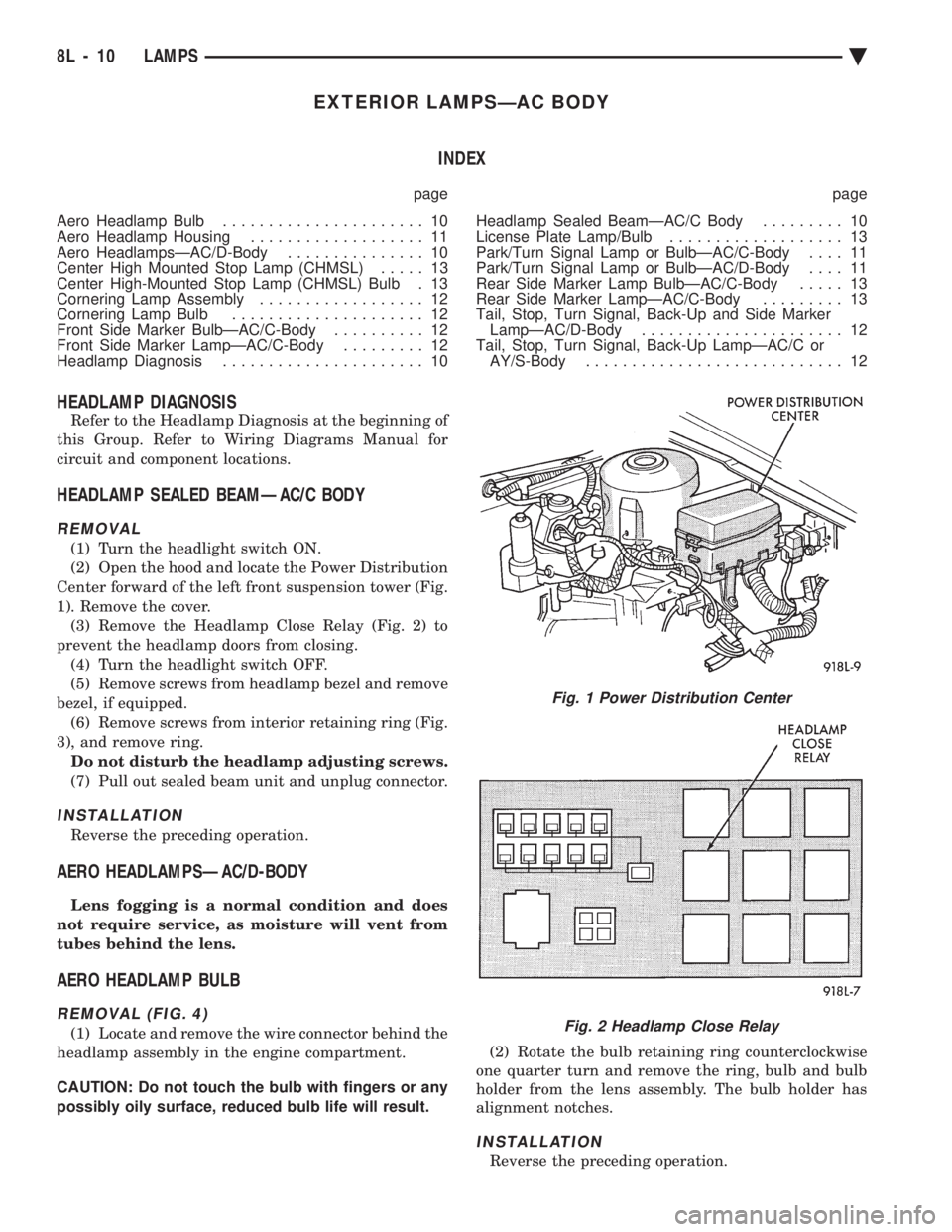
(2) Open the hood and locate the Power Distribution
Center forward of the left front suspension tower (Fig.
1). Remove the cover. (3) Remove the Headlamp Close Relay (Fig. 2) to
prevent the headlamp doors from closing. (4) Turn the headlight switch OFF.
(5) Remove screws from headlamp bezel and remove
bezel, if equipped. (6) Remove screws from interior retaining ring (Fig.
3), and remove ring. Do not disturb the headlamp adjusting screws.
(7) Pull out sealed beam unit and unplug connector.
INSTALLATION
Reverse the preceding operation.
AERO HEADLAMPSÐAC/D-BODY
Lens fogging is a normal condition and does
not require service, as moisture will vent from
tubes behind the lens.
AERO HEADLAMP BULB
REMOVAL (FIG. 4)
(1) Locate and remove the wire connector behind the
headlamp assembly in the engine compartment.
CAUTION: Do not touch the bulb with fingers or any
possibly oily surface, reduced bulb life will result. (2) Rotate the bulb retaining ring counterclockwise
one quarter turn and remove the ring, bulb and bulb
holder from the lens assembly. The bulb holder has
alignment notches.
INSTALLATION
Reverse the preceding operation.
Fig. 1 Power Distribution Center
Fig. 2 Headlamp Close Relay
8L - 10 LAMPS Ä
Page 654 of 2438
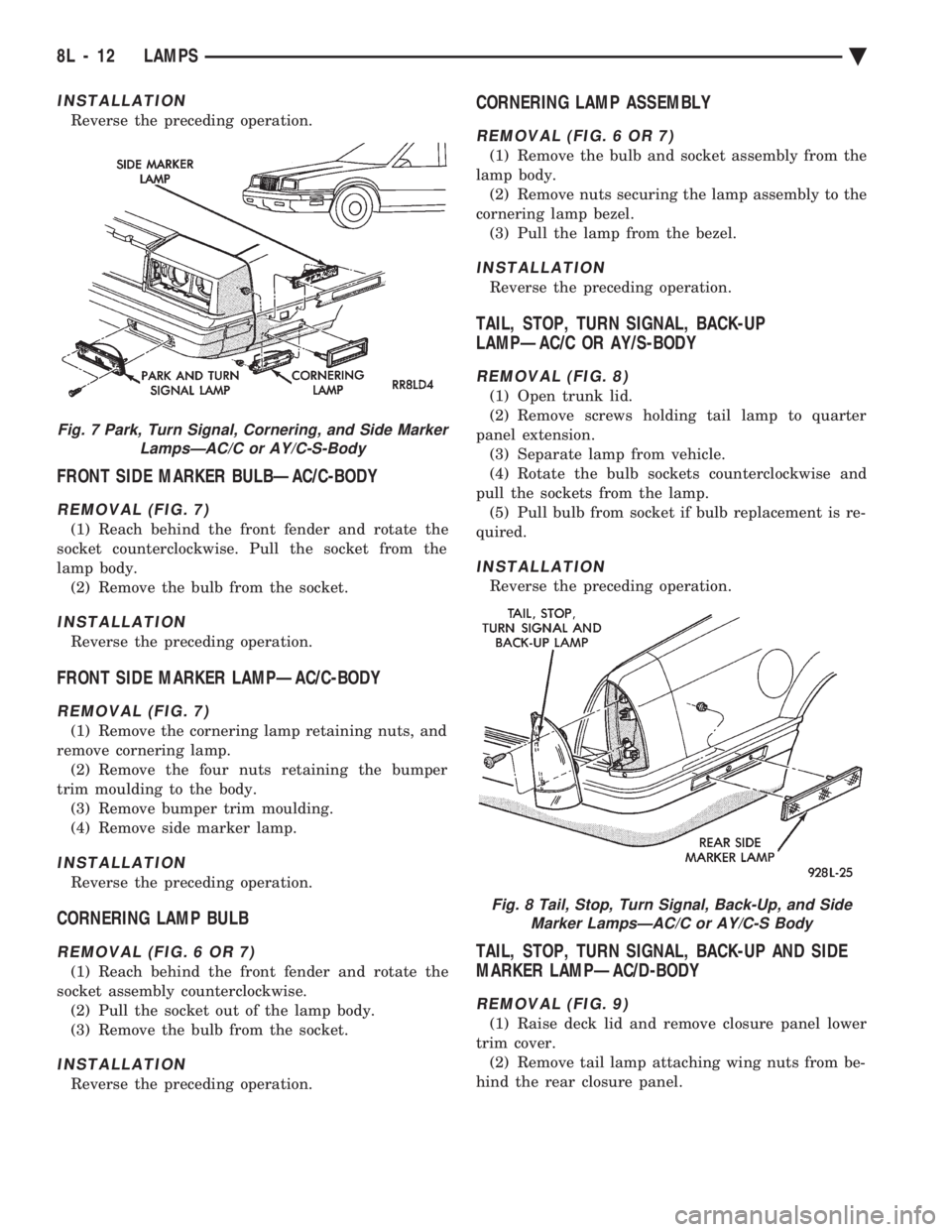
INSTALLATION
Reverse the preceding operation.
FRONT SIDE MARKER BULBÐAC/C-BODY
REMOVAL (FIG. 7)
(1) Reach behind the front fender and rotate the
socket counterclockwise. Pull the socket from the
lamp body. (2) Remove the bulb from the socket.
INSTALLATION
Reverse the preceding operation.
FRONT SIDE MARKER LAMPÐAC/C-BODY
REMOVAL (FIG. 7)
(1) Remove the cornering lamp retaining nuts, and
remove cornering lamp. (2) Remove the four nuts retaining the bumper
trim moulding to the body. (3) Remove bumper trim moulding.
(4) Remove side marker lamp.
INSTALLATION
Reverse the preceding operation.
CORNERING LAMP BULB
REMOVAL (FIG. 6 OR 7)
(1) Reach behind the front fender and rotate the
socket assembly counterclockwise. (2) Pull the socket out of the lamp body.
(3) Remove the bulb from the socket.
INSTALLATION
Reverse the preceding operation.
CORNERING LAMP ASSEMBLY
REMOVAL (FIG. 6 OR 7)
(1) Remove the bulb and socket assembly from the
lamp body. (2) Remove nuts securing the lamp assembly to the
cornering lamp bezel. (3) Pull the lamp from the bezel.
INSTALLATION
Reverse the preceding operation.
TAIL, STOP, TURN SIGNAL, BACK-UP
LAMPÐAC/C OR AY/S-BODY
REMOVAL (FIG. 8)
(1) Open trunk lid.
(2) Remove screws holding tail lamp to quarter
panel extension. (3) Separate lamp from vehicle.
(4) Rotate the bulb sockets counterclockwise and
pull the sockets from the lamp. (5) Pull bulb from socket if bulb replacement is re-
quired.
INSTALLATION
Reverse the preceding operation.
TAIL, STOP, TURN SIGNAL, BACK-UP AND SIDE
MARKER LAMPÐAC/D-BODY
REMOVAL (FIG. 9)
(1) Raise deck lid and remove closure panel lower
trim cover. (2) Remove tail lamp attaching wing nuts from be-
hind the rear closure panel.
Fig. 7 Park, Turn Signal, Cornering, and Side Marker LampsÐAC/C or AY/C-S-Body
Fig. 8 Tail, Stop, Turn Signal, Back-Up, and SideMarker LampsÐAC/C or AY/C-S Body
8L - 12 LAMPS Ä