lock CHEVROLET DYNASTY 1993 Service Manual
[x] Cancel search | Manufacturer: CHEVROLET, Model Year: 1993, Model line: DYNASTY, Model: CHEVROLET DYNASTY 1993Pages: 2438, PDF Size: 74.98 MB
Page 559 of 2438
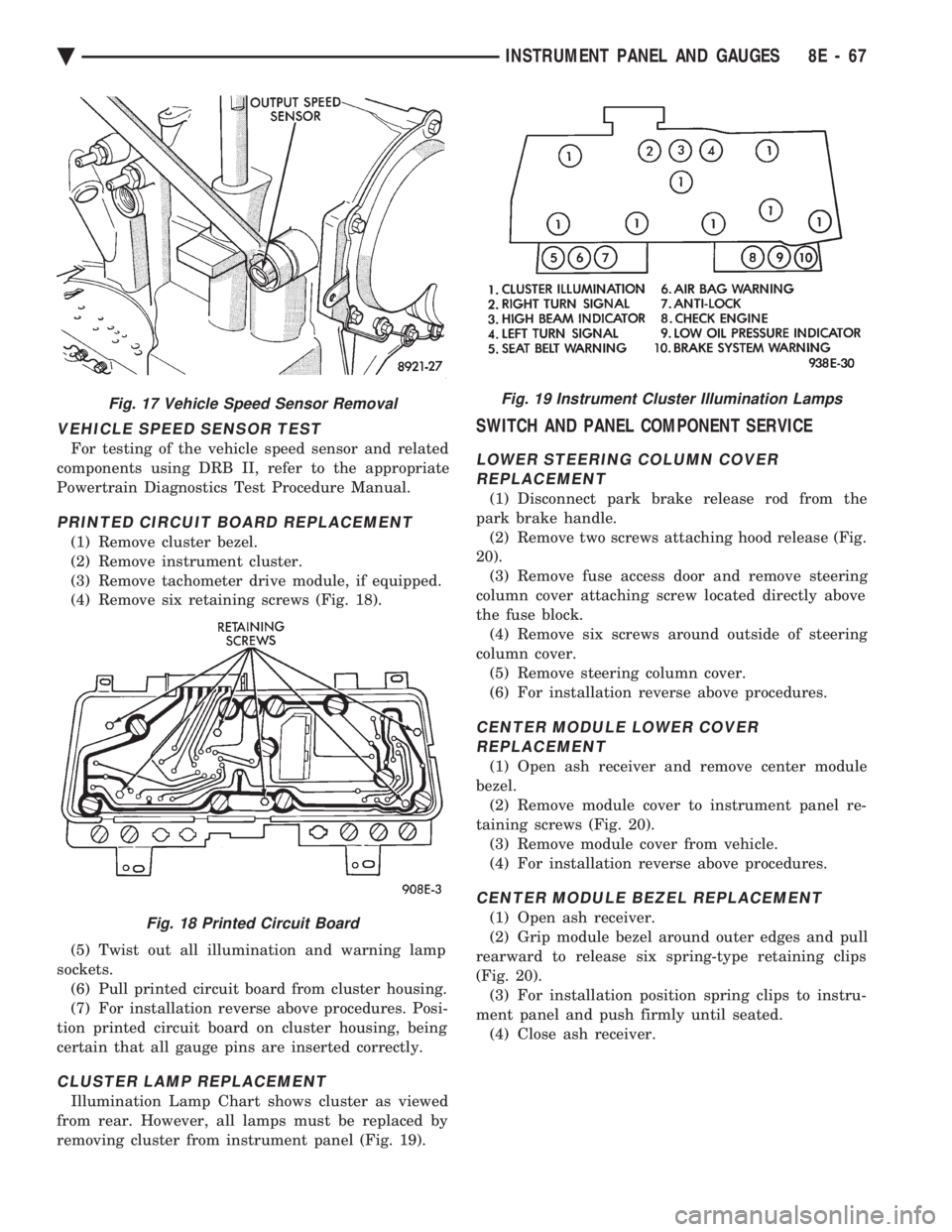
VEHICLE SPEED SENSOR TEST
For testing of the vehicle speed sensor and related
components using DRB II, refer to the appropriate
Powertrain Diagnostics Test Procedure Manual.
PRINTED CIRCUIT BOARD REPLACEMENT
(1) Remove cluster bezel.
(2) Remove instrument cluster.
(3) Remove tachometer drive module, if equipped.
(4) Remove six retaining screws (Fig. 18).
(5) Twist out all illumination and warning lamp
sockets. (6) Pull printed circuit board from cluster housing.
(7) For installation reverse above procedures. Posi-
tion printed circuit board on cluster housing, being
certain that all gauge pins are inserted correctly.
CLUSTER LAMP REPLACEMENT
Illumination Lamp Chart shows cluster as viewed
from rear. However, all lamps must be replaced by
removing cluster from instrument panel (Fig. 19).
SWITCH AND PANEL COMPONENT SERVICE
LOWER STEERING COLUMN COVER REPLACEMENT
(1) Disconnect park brake release rod from the
park brake handle. (2) Remove two screws attaching hood release (Fig.
20). (3) Remove fuse access door and remove steering
column cover attaching screw located directly above
the fuse block. (4) Remove six screws around outside of steering
column cover. (5) Remove steering column cover.
(6) For installation reverse above procedures.
CENTER MODULE LOWER COVER REPLACEMENT
(1) Open ash receiver and remove center module
bezel. (2) Remove module cover to instrument panel re-
taining screws (Fig. 20). (3) Remove module cover from vehicle.
(4) For installation reverse above procedures.
CENTER MODULE BEZEL REPLACEMENT
(1) Open ash receiver.
(2) Grip module bezel around outer edges and pull
rearward to release six spring-type retaining clips
(Fig. 20). (3) For installation position spring clips to instru-
ment panel and push firmly until seated. (4) Close ash receiver.
Fig. 17 Vehicle Speed Sensor Removal
Fig. 18 Printed Circuit Board
Fig. 19 Instrument Cluster Illumination Lamps
Ä INSTRUMENT PANEL AND GAUGES 8E - 67
Page 561 of 2438
HEATER CONTROL LAMP REPLACEMENT
(1) Remove heater control. Refer to A/C Heater
Control for removal. (2) Pull control far enough to gain access to the
lamp socket. (3) Replace lamp. To remove lamp rotate socket
counter clockwise. To install rotate clockwise. (4) For installation reverse above procedures.
A/C CONTROL LAMP REPLACEMENT
(1) Remove heater control. Refer to A/C Heater
Control for removal. (2) Pry temperature and blower switch knobs off
with flat blade tool. To protect cosmetic face place
cardboard or similar material on the face plate while
prying. (3) Remove face plate by lifting on the six tabs.
Three on top and three on bottom of the face plate. (4) Replace lamp.
(5) For installation reverse above procedures.
HEATER CONTROL BLOWER SWITCHREPLACEMENT
(1) Remove heater control. Refer to A/C Heater
Control for removal. (2) Pry temperature and blower switch knobs off
with flat blade tool. To protect cosmetic face place
cardboard or similar material on the face plate while
prying. (3) Remove face plate by lifting on the six tabs.
Three on top and three on bottom of the face plate. (4) Pry blower switch off with flat blade tool. To
protect cosmetic face, place cardboard or similar ma-
terial on the face plate while prying. (5) To replace, line up blower switch terminals and
press firmly until the it bottoms out on the housing. (6) For installation reverse above procedures.
A/C CONTROL BLOWER SWITCHREPLACEMENT
(1) Remove heater control. Refer to A/C Heater
Control for removal. (2) Position the temperature knob at the maximum
heat position to gain screw access. (3) Remove two screws holding the blower switch
located on top of the control. (4) Pry the blower switch off with a flat blade tool.
(5) To replace, line up blower switch terminals and
press firmly until the it bottoms out on the housing. (6) For installation reverse above procedures.
GLOVE BOX MODULE REPLACEMENT
(1) Disconnect battery negative cable and isolate
or remove fuse #13 prior to removing switch or wires
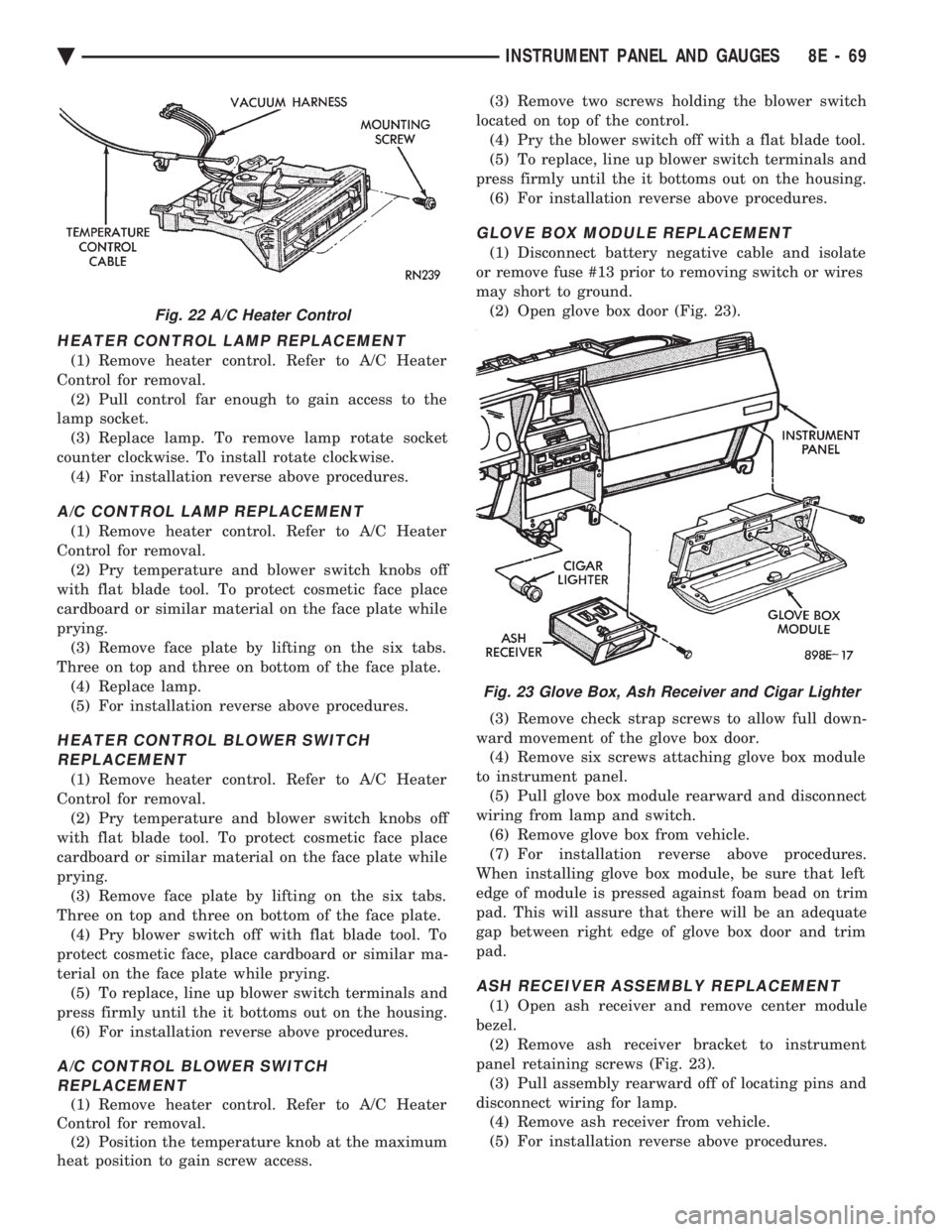
may short to ground. (2) Open glove box door (Fig. 23).
(3) Remove check strap screws to allow full down-
ward movement of the glove box door. (4) Remove six screws attaching glove box module
to instrument panel. (5) Pull glove box module rearward and disconnect
wiring from lamp and switch. (6) Remove glove box from vehicle.
(7) For installation reverse above procedures.
When installing glove box module, be sure that left
edge of module is pressed against foam bead on trim
pad. This will assure that there will be an adequate
gap between right edge of glove box door and trim
pad.
ASH RECEIVER ASSEMBLY REPLACEMENT
(1) Open ash receiver and remove center module
bezel. (2) Remove ash receiver bracket to instrument
panel retaining screws (Fig. 23). (3) Pull assembly rearward off of locating pins and
disconnect wiring for lamp. (4) Remove ash receiver from vehicle.
(5) For installation reverse above procedures.
Fig. 22 A/C Heater Control
Fig. 23 Glove Box, Ash Receiver and Cigar Lighter
Ä INSTRUMENT PANEL AND GAUGES 8E - 69
Page 564 of 2438
(2) Pry cover up and forward until released from
instrument panel pad. (3) Lift top cover upward and rearward to remove
from vehicle. (4) For installation place top cover on panel open-
ing. Be certain that blades of top cover are located in
the retaining spring clips. (5) Push forward and down to engage in pad.
INSTRUMENT PANEL REPLACEMENT
CAUTION: Disconnect negative battery cable, in en-
gine compartment, before servicing instrument
panel.
(1) Remove windshield wiper arms.
(2) Open hood and remove cowl top plastic cover.
(3) Remove windshield washer reservoir.
(4) Pull connector loose from the A/C resistor block
and push wiring and grommet through bulkhead into
passenger compartment. (5) Remove the console/consolette assembly.
(6) Remove the passive restraint seat belt logic
control module wiring. (7) Remove six attaching nuts securing the instru-
ment panel to console support brace. (8) Remove the instrument panel to console sup-
port brace with the Air Bag System Diagnostic Mod-
ule attached. (9) Remove right and left cowl side and scuff plate
trim moldings. (10) Remove left and right A-pillar trim moldings.
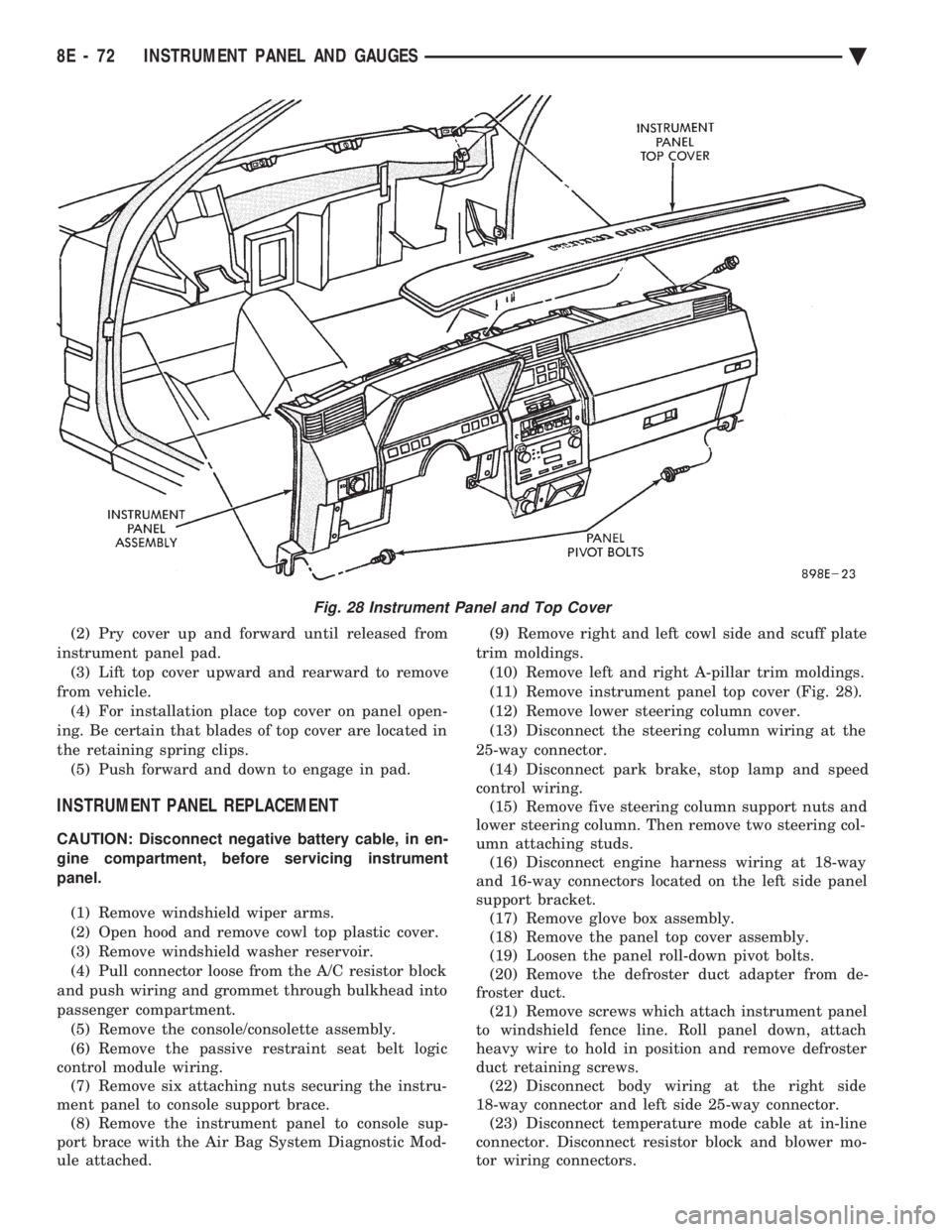
(11) Remove instrument panel top cover (Fig. 28).
(12) Remove lower steering column cover.
(13) Disconnect the steering column wiring at the
25-way connector. (14) Disconnect park brake, stop lamp and speed
control wiring. (15) Remove five steering column support nuts and
lower steering column. Then remove two steering col-
umn attaching studs. (16) Disconnect engine harness wiring at 18-way
and 16-way connectors located on the left side panel
support bracket. (17) Remove glove box assembly.
(18) Remove the panel top cover assembly.
(19) Loosen the panel roll-down pivot bolts.
(20) Remove the defroster duct adapter from de-
froster duct. (21) Remove screws which attach instrument panel
to windshield fence line. Roll panel down, attach
heavy wire to hold in position and remove defroster
duct retaining screws. (22) Disconnect body wiring at the right side
18-way connector and left side 25-way connector. (23) Disconnect temperature mode cable at in-line
connector. Disconnect resistor block and blower mo-
tor wiring connectors.
Fig. 28 Instrument Panel and Top Cover
8E - 72 INSTRUMENT PANEL AND GAUGES Ä
Page 597 of 2438
HORNS
CONTENTS
page page
GENERAL INFORMATION .................. 1
HORN SWITCH REPLACEMENT ............ 3 TESTING HORN SYSTEM
................. 1
GENERAL INFORMATION
WARNING: ON VEHICLES EQUIPPED WITH AIR
BAG, SEE GROUP 8M, RESTRAINT SYSTEMS FOR
STEERING WHEEL OR COLUMN REMOVAL PROCE-
DURES.
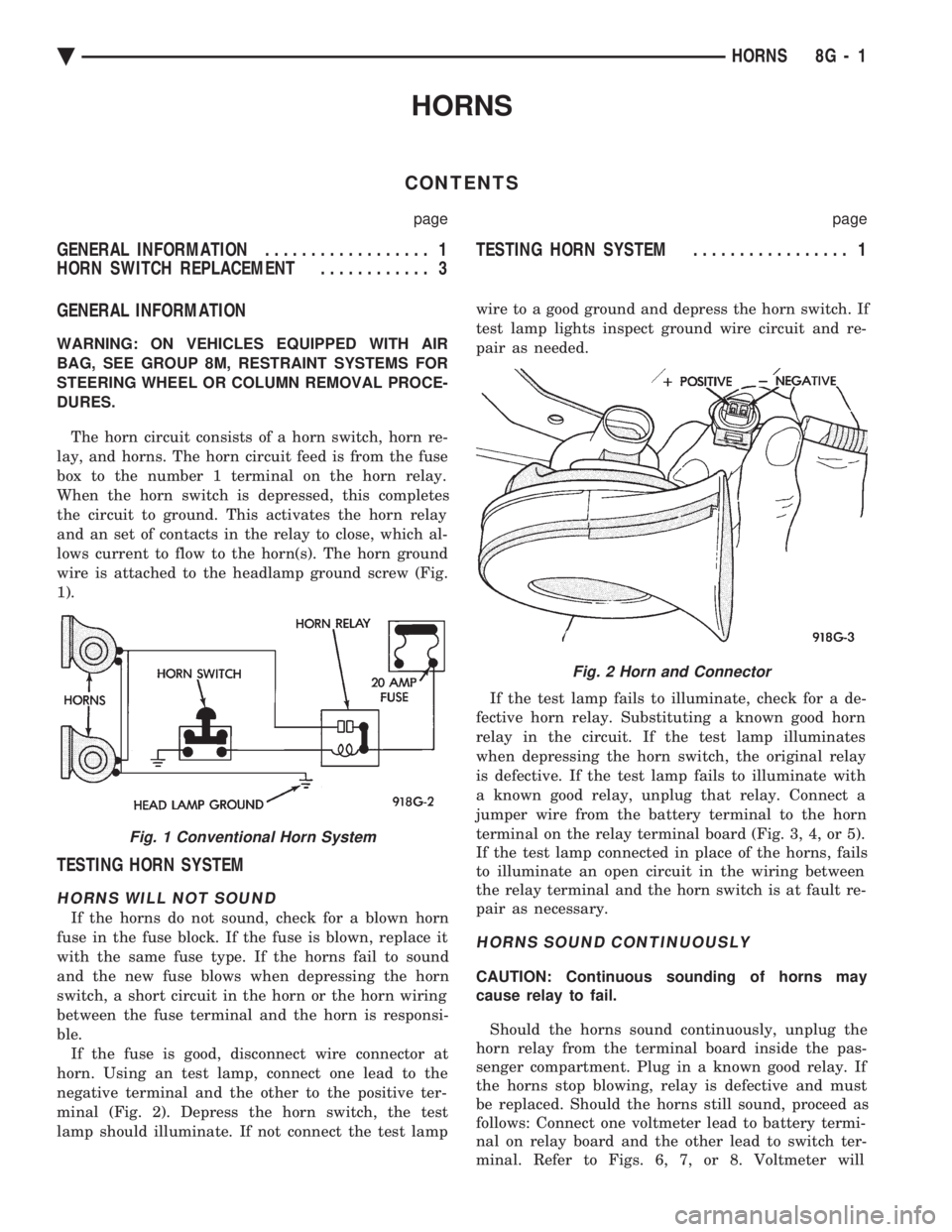
The horn circuit consists of a horn switch, horn re-
lay, and horns. The horn circuit feed is from the fuse
box to the number 1 terminal on the horn relay.
When the horn switch is depressed, this completes
the circuit to ground. This activates the horn relay
and an set of contacts in the relay to close, which al-
lows current to flow to the horn(s). The horn ground
wire is attached to the headlamp ground screw (Fig.
1).
TESTING HORN SYSTEM
HORNS WILL NOT SOUND
If the horns do not sound, check for a blown horn
fuse in the fuse block. If the fuse is blown, replace it
with the same fuse type. If the horns fail to sound
and the new fuse blows when depressing the horn
switch, a short circuit in the horn or the horn wiring
between the fuse terminal and the horn is responsi-
ble. If the fuse is good, disconnect wire connector at
horn. Using an test lamp, connect one lead to the
negative terminal and the other to the positive ter-
minal (Fig. 2). Depress the horn switch, the test
lamp should illuminate. If not connect the test lamp wire to a good ground and depress the horn switch. If
test lamp lights inspect ground wire circuit and re-
pair as needed.
If the test lamp fails to illuminate, check for a de-
fective horn relay. Substituting a known good horn
relay in the circuit. If the test lamp illuminates
when depressing the horn switch, the original relay
is defective. If the test lamp fails to illuminate with
a known good relay, unplug that relay. Connect a
jumper wire from the battery terminal to the horn
terminal on the relay terminal board (Fig. 3, 4, or 5).
If the test lamp connected in place of the horns, fails
to illuminate an open circuit in the wiring between
the relay terminal and the horn switch is at fault re-
pair as necessary.
HORNS SOUND CONTINUOUSLY
CAUTION: Continuous sounding of horns may
cause relay to fail.
Should the horns sound continuously, unplug the
horn relay from the terminal board inside the pas-
senger compartment. Plug in a known good relay. If
the horns stop blowing, relay is defective and must
be replaced. Should the horns still sound, proceed as
follows: Connect one voltmeter lead to battery termi-
nal on relay board and the other lead to switch ter-
minal. Refer to Figs. 6, 7, or 8. Voltmeter will
Fig. 1 Conventional Horn System
Fig. 2 Horn and Connector
Ä HORNS 8G - 1
Page 606 of 2438
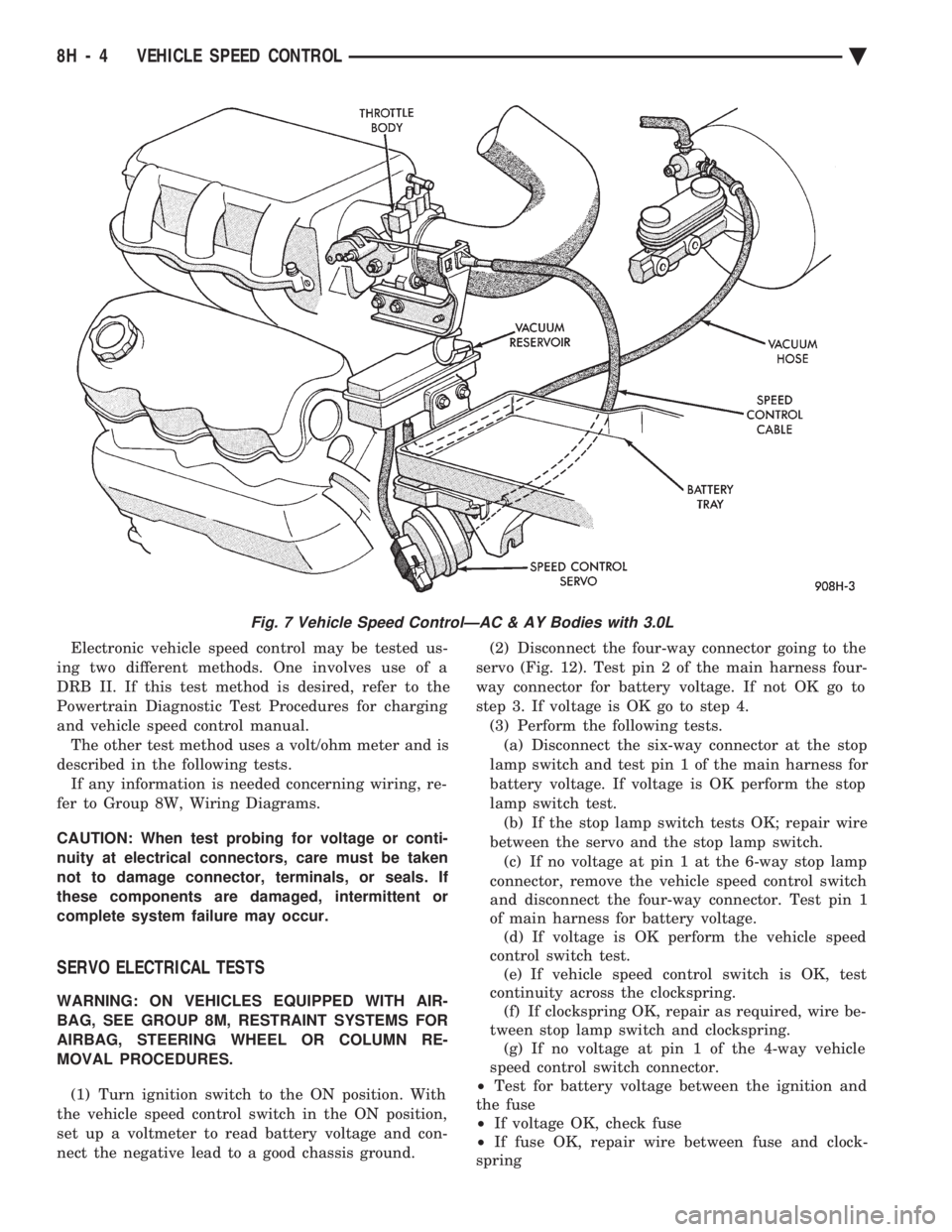
Electronic vehicle speed control may be tested us-
ing two different methods. One involves use of a
DRB II. If this test method is desired, refer to the
Powertrain Diagnostic Test Procedures for charging
and vehicle speed control manual. The other test method uses a volt/ohm meter and is
described in the following tests. If any information is needed concerning wiring, re-
fer to Group 8W, Wiring Diagrams.
CAUTION: When test probing for voltage or conti-
nuity at electrical connectors, care must be taken
not to damage connector, terminals, or seals. If
these components are damaged, intermittent or
complete system failure may occur.
SERVO ELECTRICAL TESTS
WARNING: ON VEHICLES EQUIPPED WITH AIR-
BAG, SEE GROUP 8M, RESTRAINT SYSTEMS FOR
AIRBAG, STEERING WHEEL OR COLUMN RE-
MOVAL PROCEDURES.
(1) Turn ignition switch to the ON position. With
the vehicle speed control switch in the ON position,
set up a voltmeter to read battery voltage and con-
nect the negative lead to a good chassis ground. (2) Disconnect the four-way connector going to the
servo (Fig. 12). Test pin 2 of the main harness four-
way connector for battery voltage. If not OK go to
step 3. If voltage is OK go to step 4. (3) Perform the following tests.(a) Disconnect the six-way connector at the stop
lamp switch and test pin 1 of the main harness for
battery voltage. If voltage is OK perform the stop
lamp switch test. (b) If the stop lamp switch tests OK; repair wire
between the servo and the stop lamp switch. (c) If no voltage at pin 1 at the 6-way stop lamp
connector, remove the vehicle speed control switch
and disconnect the four-way connector. Test pin 1
of main harness for battery voltage. (d) If voltage is OK perform the vehicle speed
control switch test. (e) If vehicle speed control switch is OK, test
continuity across the clockspring. (f) If clockspring OK, repair as required, wire be-
tween stop lamp switch and clockspring. (g) If no voltage at pin 1 of the 4-way vehicle
speed control switch connector.
² Test for battery voltage between the ignition and
the fuse
² If voltage OK, check fuse
² If fuse OK, repair wire between fuse and clock-
spring
Fig. 7 Vehicle Speed ControlÐAC & AY Bodies with 3.0L
8H - 4 VEHICLE SPEED CONTROL Ä
Page 612 of 2438
(4) Disconnect electrical connector and vacuum
hose. (5) Pull cable away from servo to expose retaining
clip and remove clip attaching cable to servo.
INSTALLATION
(1) With throttle in full open position align hole in
vehicle speed control cable sleeve with hole in servo
pin and install retaining clip. (2) Connect vacuum hose to servo.
(3) Connect electrical connector.
(4) Position mounting bracket and install screws
attaching bracket and tighten to 12 N Im (105 in.
lbs.) torque. (5) Insert servo studs through holes in vehicle
speed control cable and mounting bracket. (6) Install nuts, tighten to 7 N Im (60 in. lbs.)
torque.
VEHICLE SPEED CONTROL SWITCH REMOVAL
The vehicle speed control switch is mounted in the
steering wheel and wired through the clock spring
device under the steering wheel hub (Fig.1).
WARNING: IF REMOVAL OF AIR BAG MODULE IS
NECESSARY, REFER TO GROUP 8M, RESTRAINT
SYSTEMS.
REMOVAL
(1) Turn off ignition.
(2) Remove two screws from back side of steering
wheel. (3) Rock switch away from air bag or horn pad
while lifting switch out of steering wheel. (4) Disconnect 4-way electrical connector.
INSTALLATION
(1) Turn off ignition.
(2) Connect 4-way electrical connector from clock
spring to switch. (3) Place switch in steering wheel, sliding the for-
ward edge of switch under air bag or horn pad. Line
up locating pins on switch with holes in steering
wheel frame. (4) Attach switch to wheel with two screws start-
ing with the screw at the left end of the switch.
8H - 10 VEHICLE SPEED CONTROL Ä
Page 613 of 2438
TURN SIGNALS AND HAZARD WARNING FLASHER
CONTENTS
page page
AG AND AJ BODIES ..................... 1
CHIME FUNCTIONÐAC, AG, AJ AND AY .... 1
DUAL-FUNCTION SWITCHÐAG AND AJ BODIES.5
GENERAL INFORMATION .................. 1
HAZARD WARNING SYSTEM .............. 1
MULTI-FUNCTION SWITCHÐAA, AC, AP AND AY BODIES .............................. 2 REMOTE TURN SIGNAL SWITCH REMOVALÐAG
AND AJ BODIES ....................... 5
TESTING PROCEDURES ................... 2
TURN SIGNAL AND HAZARD WARNING FLASHER LOCATION ............................ 6
TURN SIGNAL RELAYSÐAG AND AJ BODIES . 6
GENERAL INFORMATION
WARNING: ON VEHICLES EQUIPPED WITH AIR-
BAG, SEE GROUP 8M, RESTRAINT SYSTEMS FOR
AIRBAG REMOVAL PROCEDURES.
TURN SIGNALSÐAC, AY, AA AND AP BODIES
The turn signals are part of the multi-function switch.
Which contains electrical circuitry for turn signal, cor-
nering lamps, hazard warning, headlamp beam select,
headlamp optical horn, windshield wiper, pulse wipe
and windshield washer switching. The integrated switch
assembly is mounted to the left hand side of the steer-
ing column. When the driver wishes to signal his inten-
tions to change direction of travel, he moves the lever
upward to cause the right signals to flash and down-
ward to cause the left signals to flash. After completion
of a turn the system is deactivated automatically. As
the steering wheel returns to the straight ahead posi-
tion, a canceling cam of two lobes molded to the clock-
spring mechanism comes in contact with the cancel
actuator on the turn signal multi-function switch as-
sembly. Either cam lobe, pushing on the cancel actua-
tor, returns the switch to the off position. If only momentary signaling such as indication of a
lane change is desired, the switch is actuated to a left
or right intermediate detent position. In this position
the signal lamps flash as described above, but the
switch returns to the OFF position as soon as the lever
is released.
When the system is activated, 1 of 2 indicator
lamps mounted in the instrument cluster flashes in
unison with the turn signal lamps, indicating to the
driver that the system is operating.
AG AND AJ BODIES
The turn signals are actuated with lever on the left
side of the instrument panel switch pod. When the
driver wishes to signal his intentions to change di- rection of travel, he moves the lever upward to cause
the right signals to flash and downward to cause the
left signals to flash. After completion of a turn the system is deacti-
vated automatically. The cancellation switch in the
steering column sends a signal to a remote turn sig-
nal switch in the switch pod to cancel the turn signal
function. As the steering wheel returns to the
straight ahead position from a turn, a cancel cam
which is located on the steering wheel contacts a
cancel flipper located on the cancellation switch.
When the flipper is contacted by the cancel cam in
the proper rotational direction, the cancel switch
sends a signal to the remote turn signal switch. If only momentary signaling such as indication of a
lane change is desired, the switch is actuated to a
left or right intermediate detent position. In this po-
sition the signal lamps flash as described above, but
the switch returns to the OFF position as soon as the
lever is released. When the system is activated, 1 of 2 indicator
lamps mounted in the instrument cluster flashes in
unison with the turn signal lamps, indicating to the
driver that the system is operating.
HAZARD WARNING SYSTEM
The hazard warning system is actuated by a push
button located on the top of the steering column be-
tween the steering wheel and the instrument panel.
The hazard switch is identified with a double trian-
gle on top of the button. Push and release the button
to turn the hazard function ON or OFF. The button
will move out from the steering column in the ON
position and will remain in toward the column in the
OFF position.
CHIME FUNCTIONÐAC, AG, AJ AND AY
The chime will sound after the vehicle has traveled
a distance of 0.6 miles at a speed above 15 miles per
hour.
Ä TURN SIGNALS AND HAZARD WARNING FLASHER 8J - 1
Page 617 of 2438
DUAL-FUNCTION SWITCHÐAG AND AJ BODIES
REMOVAL
(1) Disconnect negative battery cable.
(2) Tilt column only remove tilt lever.
(3) Remove three attaching screws, in the upper
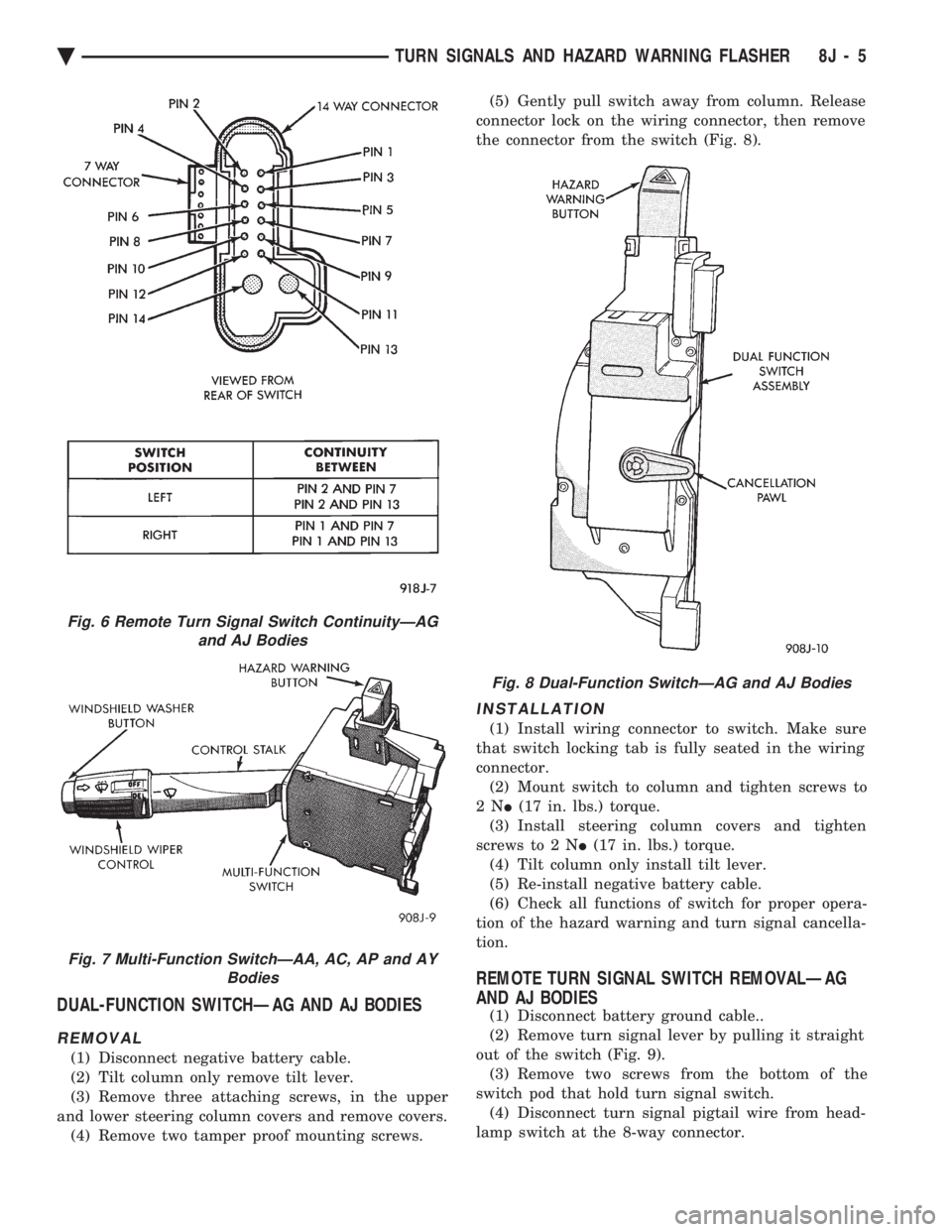
and lower steering column covers and remove covers. (4) Remove two tamper proof mounting screws. (5) Gently pull switch away from column. Release
connector lock on the wiring connector, then remove
the connector from the switch (Fig. 8).
INSTALLATION
(1) Install wiring connector to switch. Make sure
that switch locking tab is fully seated in the wiring
connector. (2) Mount switch to column and tighten screws to
2N I(17 in. lbs.) torque.
(3) Install steering column covers and tighten
screws to 2 N I(17 in. lbs.) torque.
(4) Tilt column only install tilt lever.
(5) Re-install negative battery cable.
(6) Check all functions of switch for proper opera-
tion of the hazard warning and turn signal cancella-
tion.
REMOTE TURN SIGNAL SWITCH REMOVALÐAG
AND AJ BODIES
(1) Disconnect battery ground cable..
(2) Remove turn signal lever by pulling it straight
out of the switch (Fig. 9). (3) Remove two screws from the bottom of the
switch pod that hold turn signal switch. (4) Disconnect turn signal pigtail wire from head-
lamp switch at the 8-way connector.
Fig. 6 Remote Turn Signal Switch ContinuityÐAG and AJ Bodies
Fig. 7 Multi-Function SwitchÐAA, AC, AP and AY Bodies
Fig. 8 Dual-Function SwitchÐAG and AJ Bodies
Ä TURN SIGNALS AND HAZARD WARNING FLASHER 8J - 5
Page 621 of 2438
WINDSHIELD WIPER AND WASHER SYSTEMS
CONTENTS
page page
GENERAL WIPER INFORMATION ........... 1
INTERMITTENT WINDSHIELD WIPER MOTOR AND SWITCH SERVICE PROCEDURES .... 12
WINDSHIELD WASHERS ................. 17 WINDSHIELD WIPER BLADE AND ARM SERVICE
PROCEDURES ......................... 1
WINDSHIELD WIPER MOTOR AND LINKAGE ASSEMBLY SERVICE PROCEDURES ....... 3
GENERAL WIPER INFORMATION
WARNING: ON VEHICLES EQUIPPED WITH AIR-
BAG, SEE GROUP 8M, RESTRAINT SYSTEMS FOR
STEERING WHEEL OR COLUMN REMOVAL PROCE-
DURES.
The windshield wipers can be operated with the
windshield wiper switch only when the ignition
switch is in the ACCESSORY or IGNITION position.
A fuse, located in the fuse block, protects the cir-
cuitry of the wiper system and the vehicle. The wiper motor has permanent magnet fields. The speeds are determined by current flow to the appro-
priate set of brushes. The intermittent wipe system, in addition to low
and high speed, has a delay mode. The delay mode
has a range of 2 to 15 seconds. This is accomplished
by a variable resistor in the wiper switch and is con-
trolled electrically by a relay. The wiper system completes the wipe cycle when
the switch is turned OFF. The blades park in the
lowest portion of the wipe pattern.
WINDSHIELD WIPER BLADE AND ARM SERVICE PROCEDURES
WIPER BLADES
Wiper blades, exposed to the weather for a long pe-
riod of time, tend to lose their wiping effectiveness.
Periodic cleaning of the wiper blade is suggested to
remove the accumulation of salt and road film. The
wiper blades, arms, and windshield should be cleaned
with a sponge or cloth and a mild detergent or nona-
brasive cleaner. If the blades continue to streak or
smear, they should be replaced.
WIPER BLADE ELEMENT CHANGE
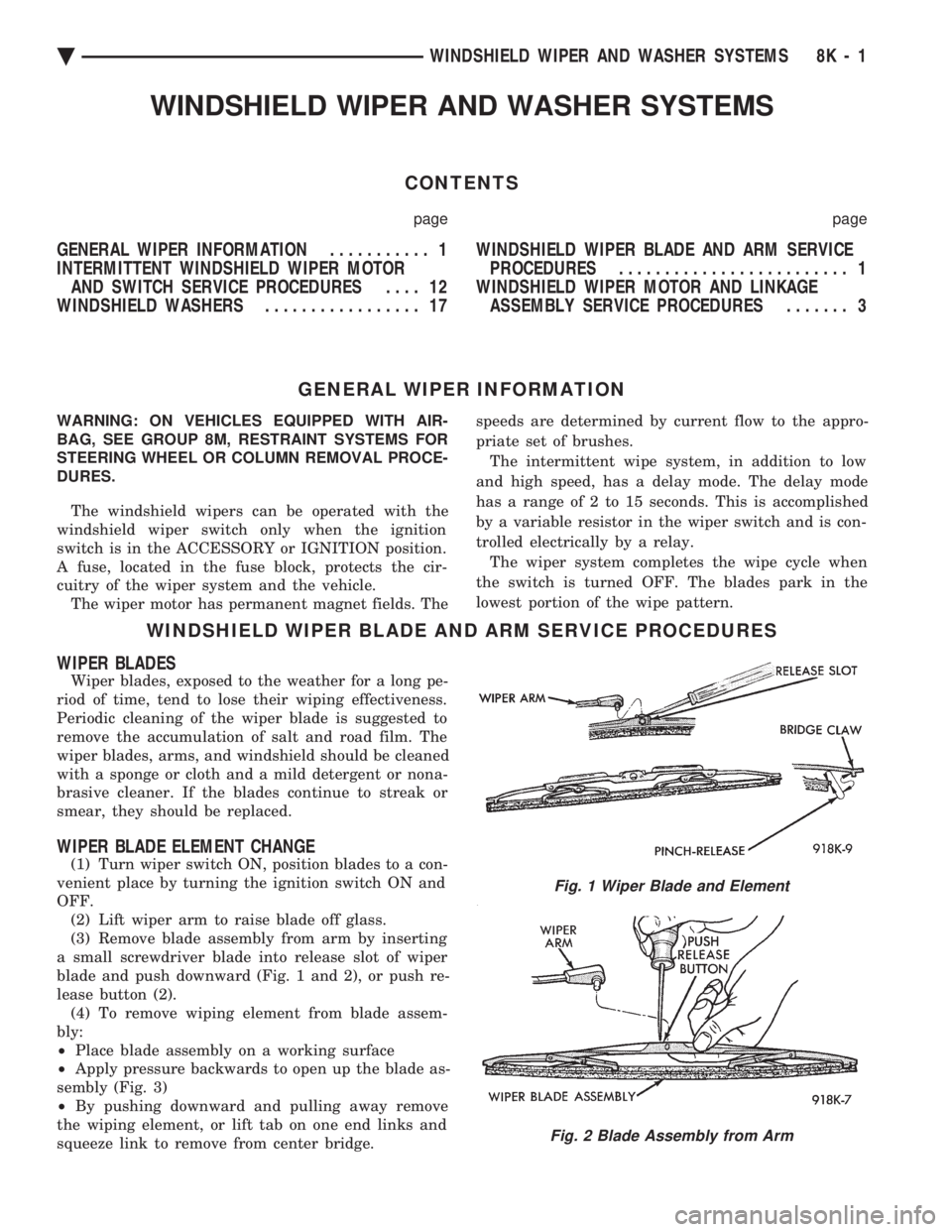
(1) Turn wiper switch ON, position blades to a con-
venient place by turning the ignition switch ON and
OFF. (2) Lift wiper arm to raise blade off glass.
(3) Remove blade assembly from arm by inserting
a small screwdriver blade into release slot of wiper
blade and push downward (Fig. 1 and 2), or push re-
lease button (2). (4) To remove wiping element from blade assem-
bly:
² Place blade assembly on a working surface
² Apply pressure backwards to open up the blade as-
sembly (Fig. 3)
² By pushing downward and pulling away remove
the wiping element, or lift tab on one end links and
squeeze link to remove from center bridge.
Fig. 1 Wiper Blade and Element
Fig. 2 Blade Assembly from Arm
Ä WINDSHIELD WIPER AND WASHER SYSTEMS 8K - 1
Page 622 of 2438

² Slide end link off element from claws of other link
(Fig. 4), or by grasping the rubber element where the
channel is and pull the element out for replacement. (5) To install reverse above procedures.
(6) Check each bridge claw for positive locking
when installing blade element, and blade assembly
for positive locking.
WIPER ARM REPLACEMENT
AG AND AJ BODIES
REMOVAL
Lift the arm to permit the latch (Fig. 5) to be
pulled out to the holding position then release the
arm. Arm front will remain off windshield in this po-
sition. Remove the arm from the pivot using a rock-
ing motion.
INSTALLATION For proper installation of wiper arm, refer to Wiper
Arm Adjustment.
AA, AC, AP AND AY BODIES
REMOVAL
(1) Lift the wiper arm and place a 3.17mm (1/8
inch) pin into the arm pin hole (Fig. 6).
(3) Remove the wiper arm from the pivot using a
rocking motion.
INSTALLATION
(1) Clean the wiper pivot shaft of any metal filings
using a wire brush. (2) Position wiper arm so that the blade tip is
19.05 mm (3/4 inch) from the top of the cowl screen.
Fig. 3 Wiper Element
Fig. 4 Wiping Element from Blade Assembly
Fig. 5 Removing Wiper ArmÐAG and AJ Bodies
Fig. 6 Removing Wiper ArmÐAA, AC, AP and AY Bodies 16
(2) Lift the head cover (Fig. 7) and remove the
wiper arm attaching nut.
Fig. 7 Wiper Arm Head Cover and NutÐAA, AC, AP and AY Bodies
8K - 2 WINDSHIELD WIPER AND WASHER SYSTEMS Ä