brake CHEVROLET DYNASTY 1993 Service Manual
[x] Cancel search | Manufacturer: CHEVROLET, Model Year: 1993, Model line: DYNASTY, Model: CHEVROLET DYNASTY 1993Pages: 2438, PDF Size: 74.98 MB
Page 552 of 2438
CLUSTER BEZEL REPLACEMENT
(1) Remove four screws holding bezel to instru-
ment panel (Fig. 7). (2) Remove bezel over steering wheel. (3) For installation reverse above procedures.
CLUSTER MASK AND LENS
REMOVAL
(1) Remove instrument cluster bezel.
(2) Remove five screws holding mask and lens to
cluster. (3) Remove mask and lens.
(4) For installation reverse above procedures.
CLUSTER ASSEMBLY REPLACEMENT
(1) Disconnect battery to assure no Air Bag Sys-
tem fault codes are stored. (2) Remove cluster bezel (Fig. 7).
(3) Remove the upper steering column cover.
(4) Remove the four screws attaching cluster hous-
ing to the base panel. (5) Pull cluster rearward, reach behind cluster and
disconnect the two wiring harnesses. (6) Remove cluster assembly.
INSTALLATION (1) Connect wiring harnesses.
(2) Position cluster and secure to base panel with
four screws. (3) Install upper and lower steering column cover.
(4) Install cluster bezel.
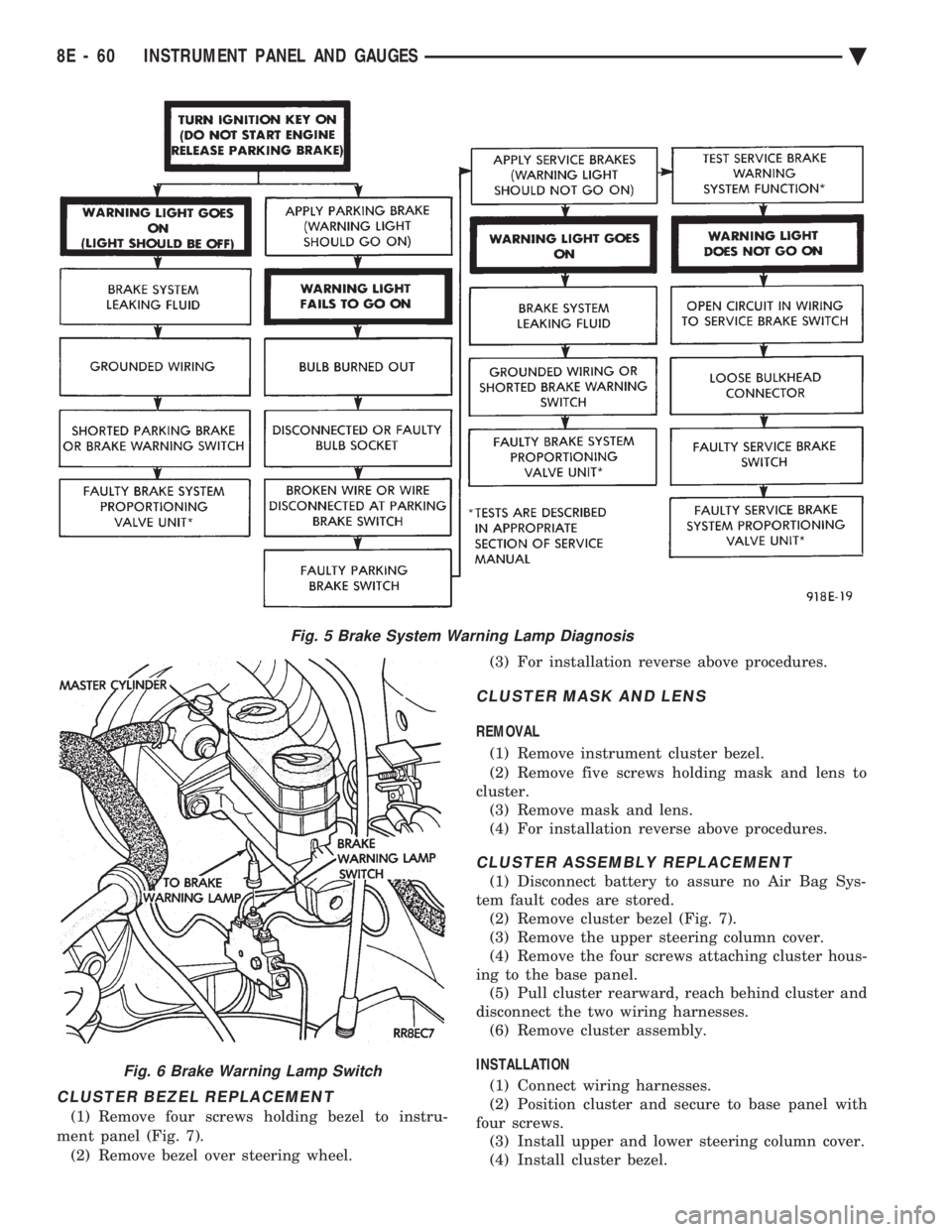
Fig. 5 Brake System Warning Lamp Diagnosis
Fig. 6 Brake Warning Lamp Switch
8E - 60 INSTRUMENT PANEL AND GAUGES Ä
Page 559 of 2438
VEHICLE SPEED SENSOR TEST
For testing of the vehicle speed sensor and related
components using DRB II, refer to the appropriate
Powertrain Diagnostics Test Procedure Manual.
PRINTED CIRCUIT BOARD REPLACEMENT
(1) Remove cluster bezel.
(2) Remove instrument cluster.
(3) Remove tachometer drive module, if equipped.
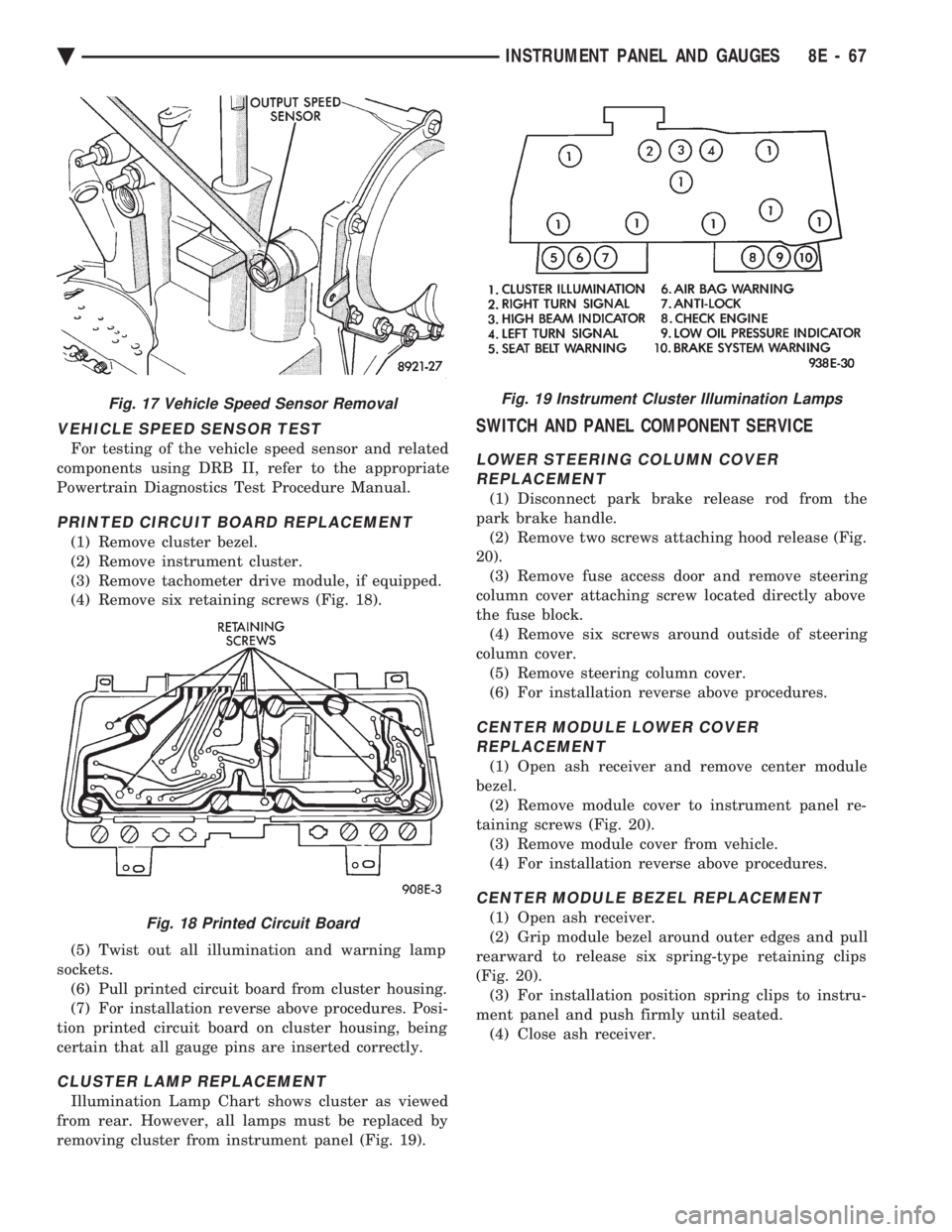
(4) Remove six retaining screws (Fig. 18).
(5) Twist out all illumination and warning lamp
sockets. (6) Pull printed circuit board from cluster housing.
(7) For installation reverse above procedures. Posi-
tion printed circuit board on cluster housing, being
certain that all gauge pins are inserted correctly.
CLUSTER LAMP REPLACEMENT
Illumination Lamp Chart shows cluster as viewed
from rear. However, all lamps must be replaced by
removing cluster from instrument panel (Fig. 19).
SWITCH AND PANEL COMPONENT SERVICE
LOWER STEERING COLUMN COVER REPLACEMENT
(1) Disconnect park brake release rod from the
park brake handle. (2) Remove two screws attaching hood release (Fig.
20). (3) Remove fuse access door and remove steering
column cover attaching screw located directly above
the fuse block. (4) Remove six screws around outside of steering
column cover. (5) Remove steering column cover.
(6) For installation reverse above procedures.
CENTER MODULE LOWER COVER REPLACEMENT
(1) Open ash receiver and remove center module
bezel. (2) Remove module cover to instrument panel re-
taining screws (Fig. 20). (3) Remove module cover from vehicle.
(4) For installation reverse above procedures.
CENTER MODULE BEZEL REPLACEMENT
(1) Open ash receiver.
(2) Grip module bezel around outer edges and pull
rearward to release six spring-type retaining clips
(Fig. 20). (3) For installation position spring clips to instru-
ment panel and push firmly until seated. (4) Close ash receiver.
Fig. 17 Vehicle Speed Sensor Removal
Fig. 18 Printed Circuit Board
Fig. 19 Instrument Cluster Illumination Lamps
Ä INSTRUMENT PANEL AND GAUGES 8E - 67
Page 564 of 2438
(2) Pry cover up and forward until released from
instrument panel pad. (3) Lift top cover upward and rearward to remove
from vehicle. (4) For installation place top cover on panel open-
ing. Be certain that blades of top cover are located in
the retaining spring clips. (5) Push forward and down to engage in pad.
INSTRUMENT PANEL REPLACEMENT
CAUTION: Disconnect negative battery cable, in en-
gine compartment, before servicing instrument
panel.
(1) Remove windshield wiper arms.
(2) Open hood and remove cowl top plastic cover.
(3) Remove windshield washer reservoir.
(4) Pull connector loose from the A/C resistor block
and push wiring and grommet through bulkhead into
passenger compartment. (5) Remove the console/consolette assembly.
(6) Remove the passive restraint seat belt logic
control module wiring. (7) Remove six attaching nuts securing the instru-
ment panel to console support brace. (8) Remove the instrument panel to console sup-
port brace with the Air Bag System Diagnostic Mod-
ule attached. (9) Remove right and left cowl side and scuff plate
trim moldings. (10) Remove left and right A-pillar trim moldings.
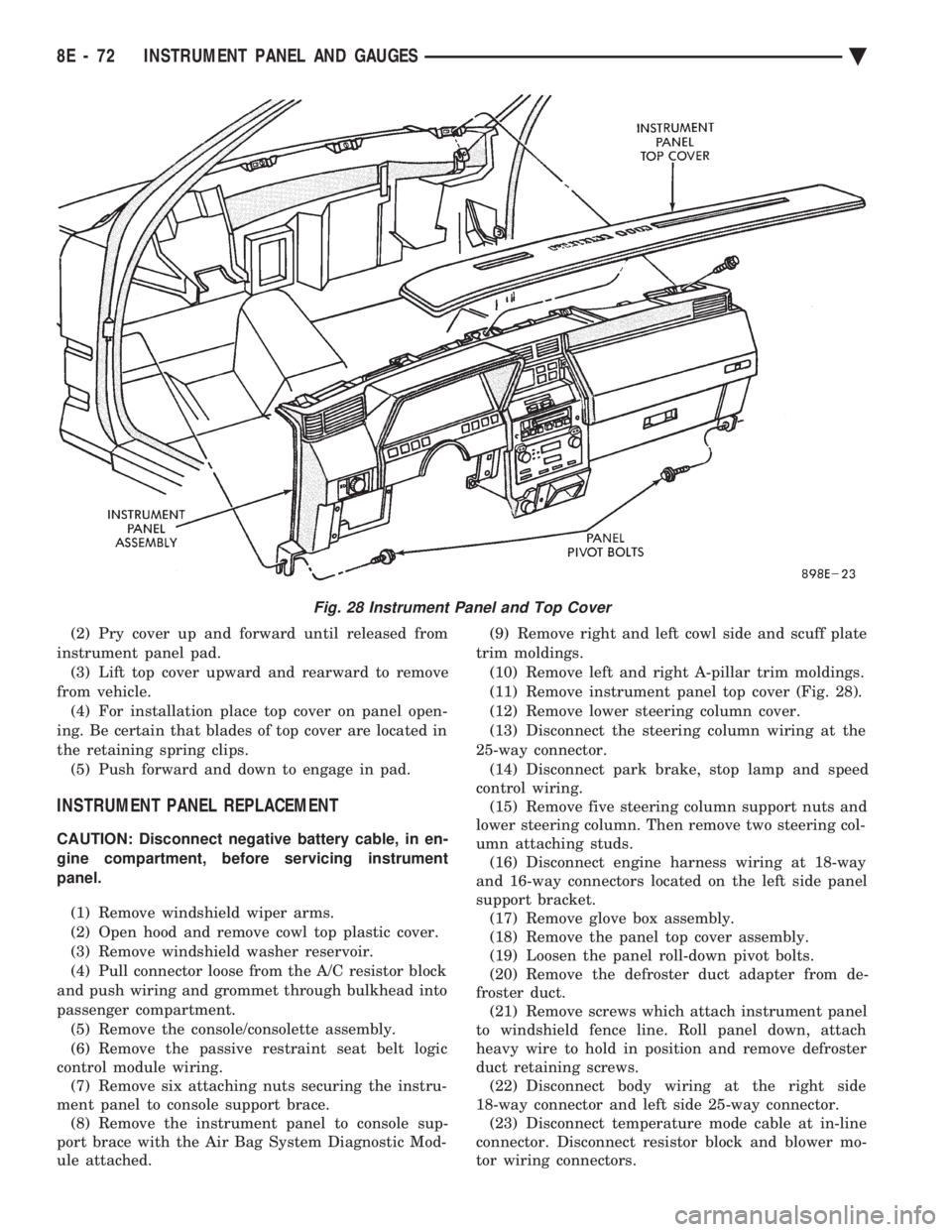
(11) Remove instrument panel top cover (Fig. 28).
(12) Remove lower steering column cover.
(13) Disconnect the steering column wiring at the
25-way connector. (14) Disconnect park brake, stop lamp and speed
control wiring. (15) Remove five steering column support nuts and
lower steering column. Then remove two steering col-
umn attaching studs. (16) Disconnect engine harness wiring at 18-way
and 16-way connectors located on the left side panel
support bracket. (17) Remove glove box assembly.
(18) Remove the panel top cover assembly.
(19) Loosen the panel roll-down pivot bolts.
(20) Remove the defroster duct adapter from de-
froster duct. (21) Remove screws which attach instrument panel
to windshield fence line. Roll panel down, attach
heavy wire to hold in position and remove defroster
duct retaining screws. (22) Disconnect body wiring at the right side
18-way connector and left side 25-way connector. (23) Disconnect temperature mode cable at in-line
connector. Disconnect resistor block and blower mo-
tor wiring connectors.
Fig. 28 Instrument Panel and Top Cover
8E - 72 INSTRUMENT PANEL AND GAUGES Ä
Page 603 of 2438
VEHICLE SPEED CONTROL
CONTENTS
page page
CHECKING FOR FAULT CODE .............. 3
DIAGNOSIS PROCEDURES ................ 2
GENERAL INFORMATION .................. 1
INOPERATIVE SYSTEM ................... 3
POWERTRAIN CONTROL MODULE ELECTRICAL TEST ................................ 5
ROAD TEST ............................ 2
SERVO ELECTRICAL TESTS ............... 4
SERVO UNIT ............................ 9 SERVO VACUUM TEST
................... 9
STOP LAMP VEHICLE SPEED CONTROL SWITCH TEST ......................... 8
VACUUM SUPPLY TEST .................. 9
VEHICLE SPEED CONTROL SWITCH REMOVAL ........................... 10
VEHICLE SPEED CONTROL SWITCH TEST . . . 8
VEHICLE SPEED CONTROL ELECTRICAL TESTS ............................... 3
GENERAL INFORMATION
The vehicle speed control is electronically con-
trolled and vacuum operated. The electronic control
is integrated into the powertrain control module, lo-
cated next to battery. The controls are located on the
steering wheel and consist of the ON/OFF, RESUME/
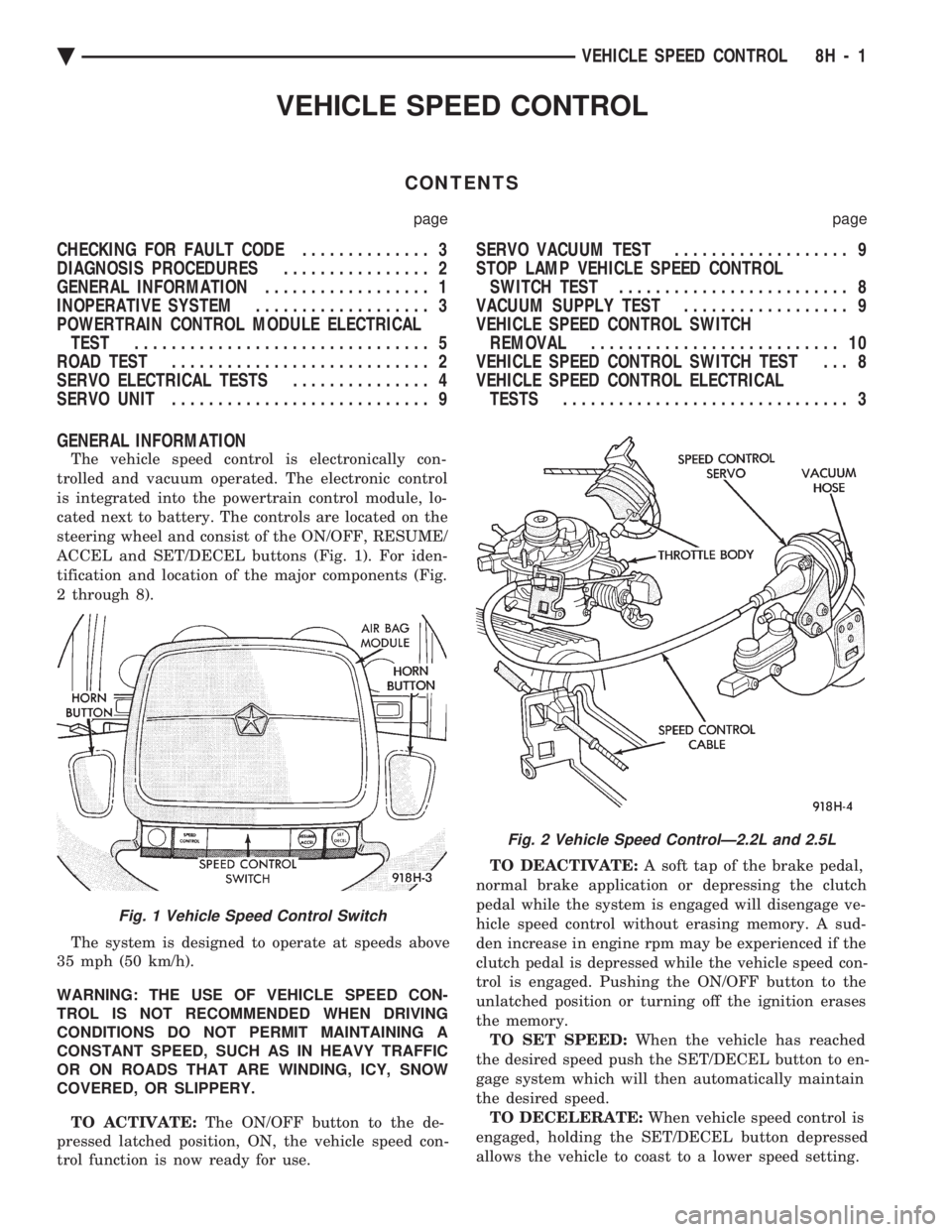
ACCEL and SET/DECEL buttons (Fig. 1). For iden-
tification and location of the major components (Fig.
2 through 8).
The system is designed to operate at speeds above
35 mph (50 km/h).
WARNING: THE USE OF VEHICLE SPEED CON-
TROL IS NOT RECOMMENDED WHEN DRIVING
CONDITIONS DO NOT PERMIT MAINTAINING A
CONSTANT SPEED, SUCH AS IN HEAVY TRAFFIC
OR ON ROADS THAT ARE WINDING, ICY, SNOW
COVERED, OR SLIPPERY.
TO ACTIVATE: The ON/OFF button to the de-
pressed latched position, ON, the vehicle speed con-
trol function is now ready for use. TO DEACTIVATE:
A soft tap of the brake pedal,
normal brake application or depressing the clutch
pedal while the system is engaged will disengage ve-
hicle speed control without erasing memory. A sud-
den increase in engine rpm may be experienced if the
clutch pedal is depressed while the vehicle speed con-
trol is engaged. Pushing the ON/OFF button to the
unlatched position or turning off the ignition erases
the memory. TO SET SPEED: When the vehicle has reached
the desired speed push the SET/DECEL button to en-
gage system which will then automatically maintain
the desired speed. TO DECELERATE: When vehicle speed control is
engaged, holding the SET/DECEL button depressed
allows the vehicle to coast to a lower speed setting.
Fig. 1 Vehicle Speed Control Switch
Fig. 2 Vehicle Speed ControlÐ2.2L and 2.5L
Ä VEHICLE SPEED CONTROL 8H - 1
Page 604 of 2438
TO RESUME: After disengaging the vehicle speed
control by tapping the brake pedal or clutch pedal,
push the RESUME/ACCEL button to return vehicle
to the previously set speed. TO ACCELERATE: While vehicle speed control is
engaged, hold the RESUME/ACCEL button de-
pressed and release at a new desired speed. This will
allow the vehicle to continuously accelerate and set
at a higher speed setting. TAP-UP:
When the vehicle speed control is en-
gaged, tapping the RESUME/ACCEL button will in-
crease the speed setting by 2 mph (3 km/h). The
system will respond to multiple tap-ups. TO ACCELERATE for PASSING: Depress the
accelerator as you would normally. When the pedal
is released the vehicle will return to the speed set-
ting in memory.
DIAGNOSIS PROCEDURES
Whenever a vehicle speed control malfunction oc-
curs, first verify that the vehicle speed control wire
harness is properly connected to all connectors before
starting normal diagnosis and repair procedures. Re-
fer to Electronic Vehicle Speed Control Diagnosis
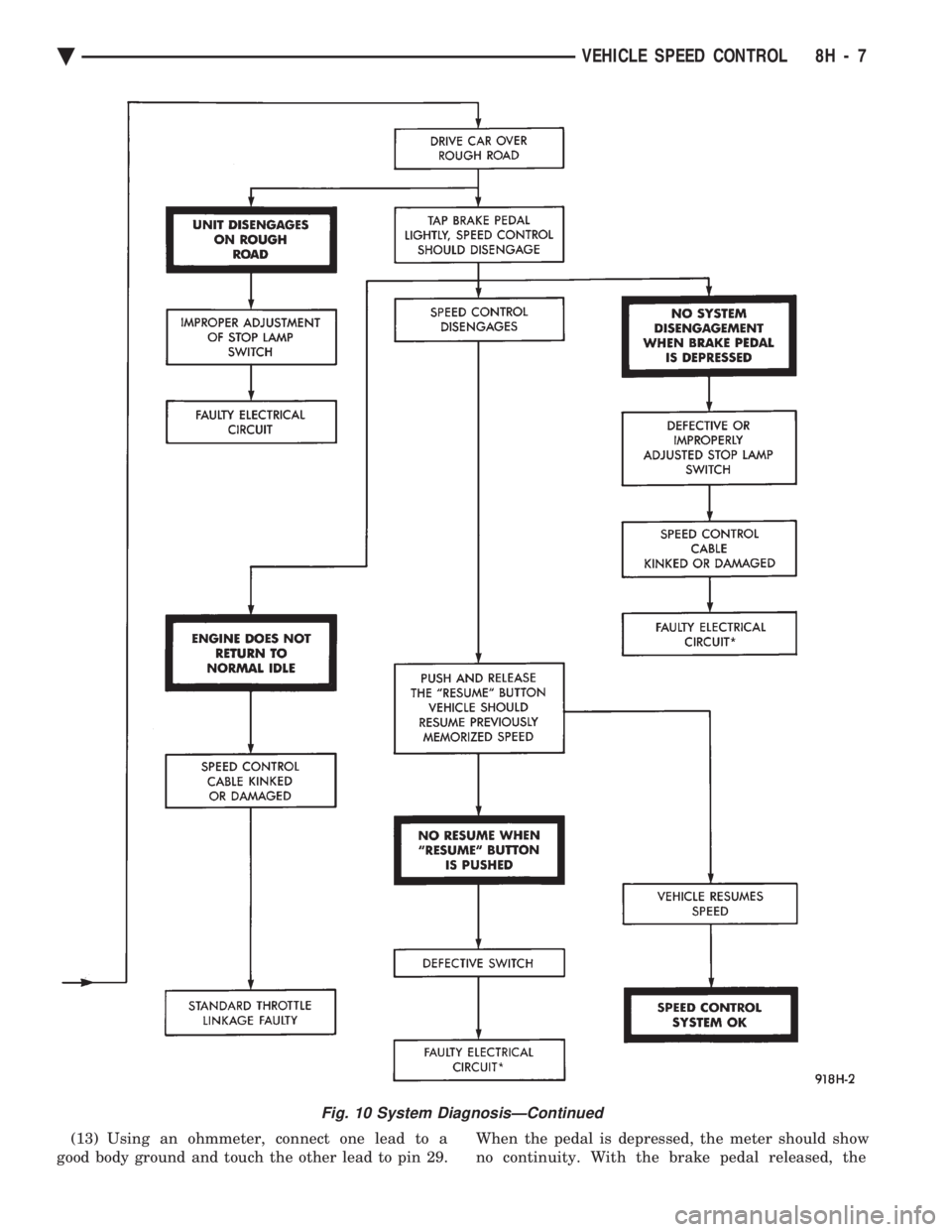
Chart or Vehicle Speed Control Circuit (Fig. 9, 10
and 11). A poor connection can cause a complete or inter-
mittent malfunction and is also the only connection
in the circuit, that can not be tested. For this reason,
a loose connection may be misdiagnosed as a compo-
nent malfunction. Also, check all vacuum connections for tightness
and cracked hoses.
ROAD TEST
Road test vehicle to verify reports of vehicle speed
control malfunction. The road test should include at-
tention to the speedometer. Speedometer operation
should be smooth and without flutter at all speeds. Flutter in the speedometer indicates a problem
which might cause surging in the vehicle speed con-
trol. The cause of any speedometer deficiencies
should be corrected before proceeding.
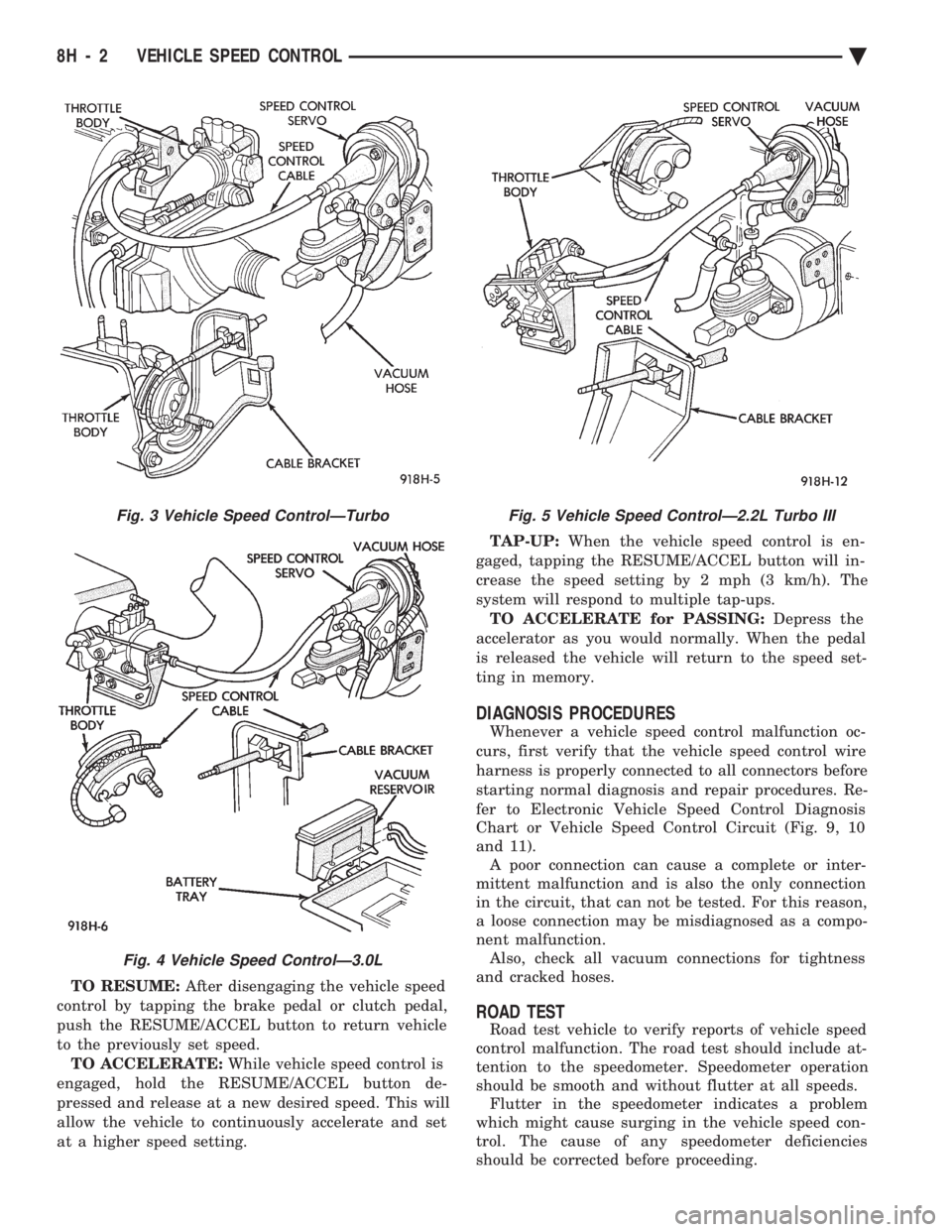
Fig. 3 Vehicle Speed ControlÐTurbo
Fig. 4 Vehicle Speed ControlÐ3.0L
Fig. 5 Vehicle Speed ControlÐ2.2L Turbo III
8H - 2 VEHICLE SPEED CONTROL Ä
Page 609 of 2438
(13) Using an ohmmeter, connect one lead to a
good body ground and touch the other lead to pin 29. When the pedal is depressed, the meter should show
no continuity. With the brake pedal released, the
Fig. 10 System DiagnosisÐContinued
Ä VEHICLE SPEED CONTROL 8H - 7
Page 611 of 2438
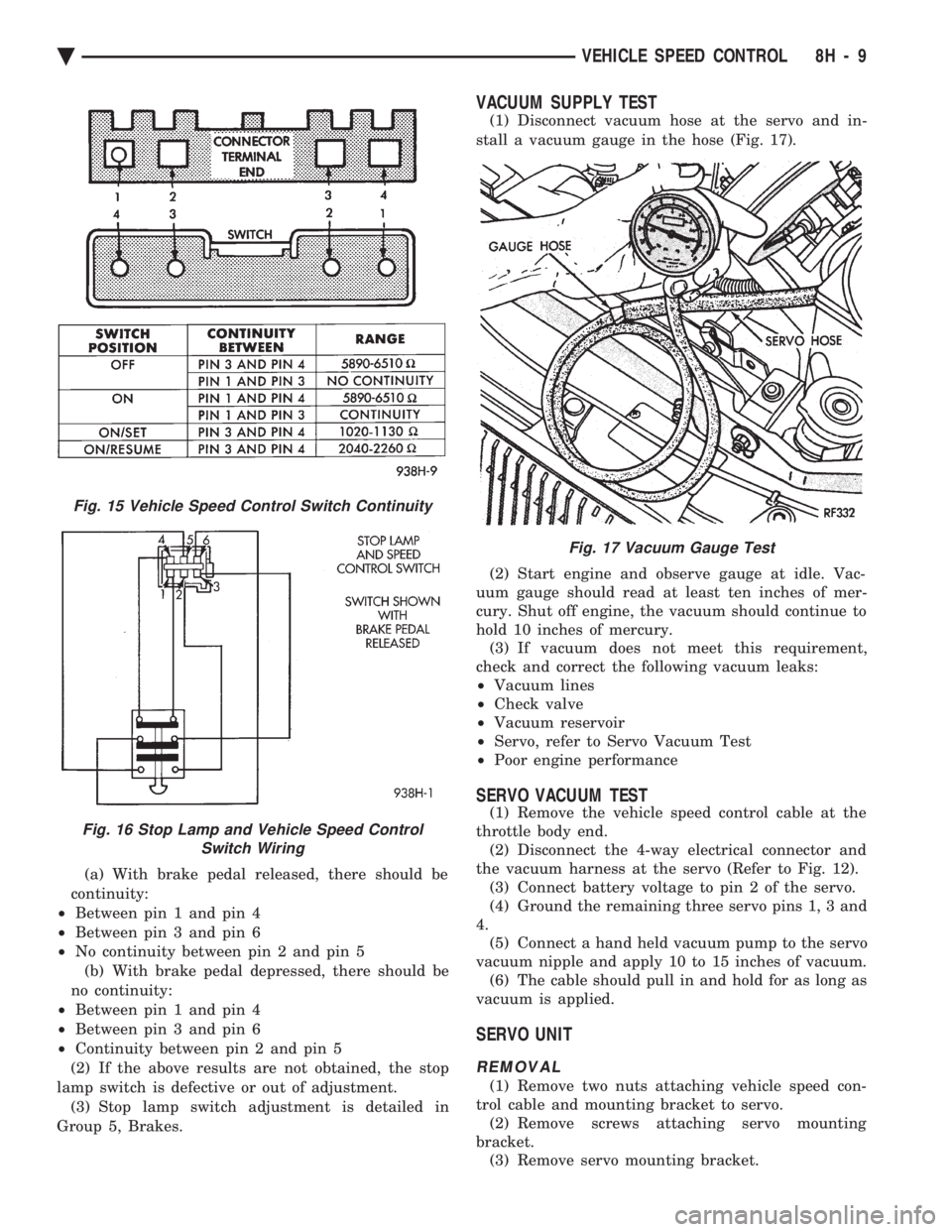
(a) With brake pedal released, there should be
continuity:
² Between pin 1 and pin 4
² Between pin 3 and pin 6
² No continuity between pin 2 and pin 5
(b) With brake pedal depressed, there should be
no continuity:
² Between pin 1 and pin 4
² Between pin 3 and pin 6
² Continuity between pin 2 and pin 5
(2) If the above results are not obtained, the stop
lamp switch is defective or out of adjustment. (3) Stop lamp switch adjustment is detailed in
Group 5, Brakes.
VACUUM SUPPLY TEST
(1) Disconnect vacuum hose at the servo and in-
stall a vacuum gauge in the hose (Fig. 17).
(2) Start engine and observe gauge at idle. Vac-
uum gauge should read at least ten inches of mer-
cury. Shut off engine, the vacuum should continue to
hold 10 inches of mercury. (3) If vacuum does not meet this requirement,
check and correct the following vacuum leaks:
² Vacuum lines
² Check valve
² Vacuum reservoir
² Servo, refer to Servo Vacuum Test
² Poor engine performance
SERVO VACUUM TEST
(1) Remove the vehicle speed control cable at the
throttle body end. (2) Disconnect the 4-way electrical connector and
the vacuum harness at the servo (Refer to Fig. 12). (3) Connect battery voltage to pin 2 of the servo.
(4) Ground the remaining three servo pins 1, 3 and
4. (5) Connect a hand held vacuum pump to the servo
vacuum nipple and apply 10 to 15 inches of vacuum. (6) The cable should pull in and hold for as long as
vacuum is applied.
SERVO UNIT
REMOVAL
(1) Remove two nuts attaching vehicle speed con-
trol cable and mounting bracket to servo. (2) Remove screws attaching servo mounting
bracket. (3) Remove servo mounting bracket.
Fig. 15 Vehicle Speed Control Switch Continuity
Fig. 16 Stop Lamp and Vehicle Speed Control Switch Wiring
Fig. 17 Vacuum Gauge Test
Ä VEHICLE SPEED CONTROL 8H - 9
Page 680 of 2438
BULB APPLICATION TABLE
GENERAL INFORMATION
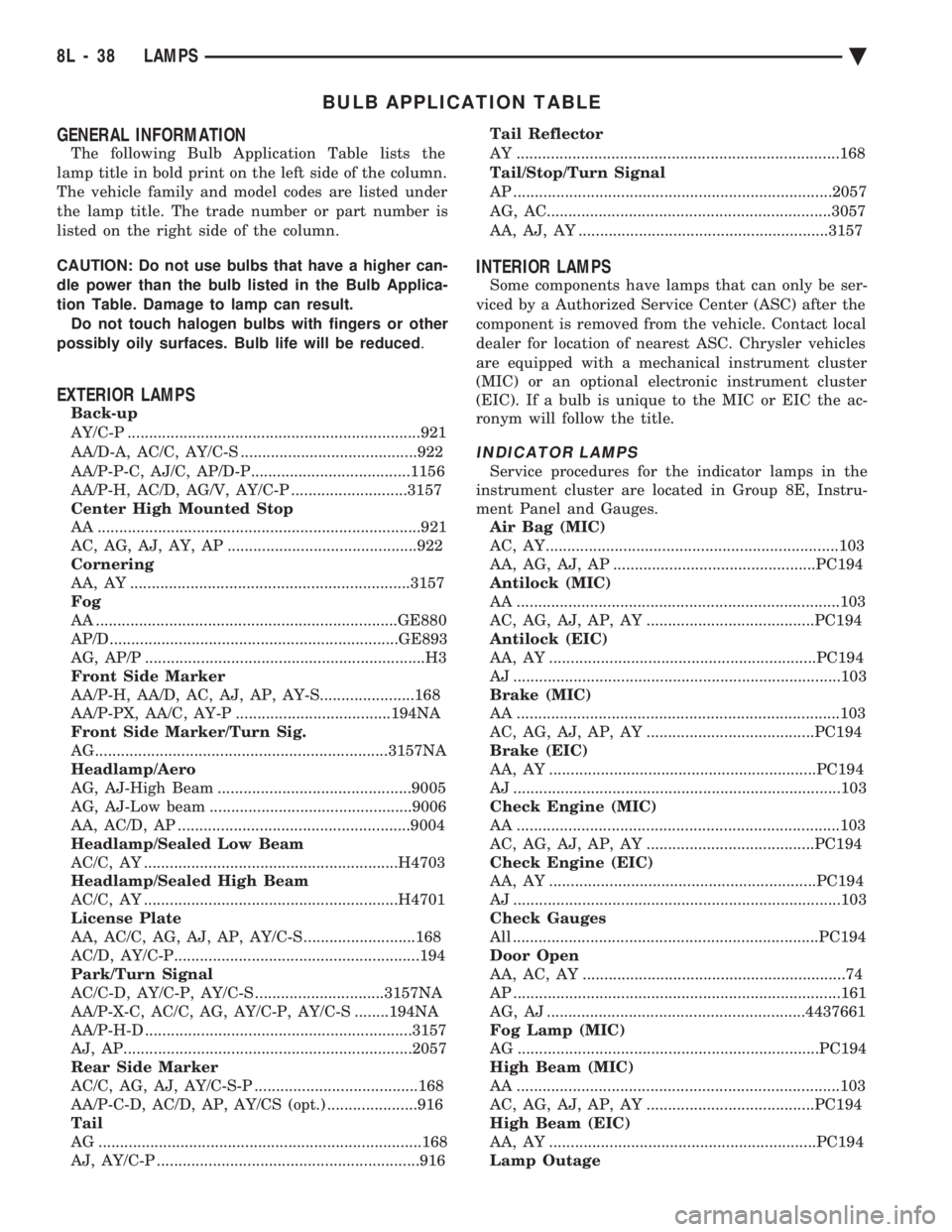
The following Bulb Application Table lists the
lamp title in bold print on the left side of the column.
The vehicle family and model codes are listed under
the lamp title. The trade number or part number is
listed on the right side of the column.
CAUTION: Do not use bulbs that have a higher can-
dle power than the bulb listed in the Bulb Applica-
tion Table. Damage to lamp can result. Do not touch halogen bulbs with fingers or other
possibly oily surfaces. Bulb life will be reduced .
EXTERIOR LAMPS
Back-up
AY/C-P ....................................................................921
AA/D-A, AC/C, AY/C-S .........................................922
AA/P-P-C, AJ/C, AP/D-P.....................................1156
AA/P-H, AC/D, AG/V, AY/C-P ...........................3157
Center High Mounted Stop
AA ...........................................................................921
AC, AG, AJ, AY, AP ............................................922
Cornering
AA, AY .................................................................3157
Fog
AA ......................................................................GE880
AP/D...................................................................GE893
AG, AP/P .................................................................H3
Front Side Marker
AA/P-H, AA/D, AC, AJ, AP, AY-S......................168
AA/P-PX, AA/C, AY-P ....................................194NA
Front Side Marker/Turn Sig.
AG....................................................................3157NA
Headlamp/Aero
AG, AJ-High Beam .............................................9005
AG, AJ-Low beam ...............................................9006
AA, AC/D, AP ......................................................9004
Headlamp/Sealed Low Beam
AC/C, AY ...........................................................H4703
Headlamp/Sealed High Beam
AC/C, AY ...........................................................H4701
License Plate
AA, AC/C, AG, AJ, AP, AY/C-S ..........................168
AC/D, AY/C-P.........................................................194
Park/Turn Signal
AC/C-D, AY/C-P, AY/C-S ..............................3157NA
AA/P-X-C, AC/C, AG, AY/C-P, AY/C-S ........194NA
AA/P-H-D ..............................................................3157
AJ, AP...................................................................2057
Rear Side Marker
AC/C, AG, AJ, AY/C-S-P ......................................168
AA/P-C-D, AC/D, AP, AY/CS (opt.) .....................916
Tail
AG ...........................................................................168
AJ, AY/C-P .............................................................916 Tail Reflector
AY ...........................................................................168
Tail/Stop/Turn Signal
AP ..........................................................................2057
AG, AC..................................................................3057
AA, AJ, AY ..........................................................3157
INTERIOR LAMPS
Some components have lamps that can only be ser-
viced by a Authorized Service Center (ASC) after the
component is removed from the vehicle. Contact local
dealer for location of nearest ASC. Chrysler vehicles
are equipped with a mechanical instrument cluster
(MIC) or an optional electronic instrument cluster
(EIC). If a bulb is unique to the MIC or EIC the ac-
ronym will follow the title.
INDICATOR LAMPS
Service procedures for the indicator lamps in the
instrument cluster are located in Group 8E, Instru-
ment Panel and Gauges. Air Bag (MIC)
AC, AY....................................................................103
AA, AG, AJ, AP ...............................................PC194
Antilock (MIC)
AA ...........................................................................103
AC, AG, AJ, AP, AY .......................................PC194
Antilock (EIC)
AA, AY ..............................................................PC194
AJ ............................................................................103
Brake (MIC)
AA ...........................................................................103
AC, AG, AJ, AP, AY .......................................PC194
Brake (EIC)
AA, AY ..............................................................PC194
AJ ............................................................................103
Check Engine (MIC)
AA ...........................................................................103
AC, AG, AJ, AP, AY .......................................PC194
Check Engine (EIC)
AA, AY ..............................................................PC194
AJ ............................................................................103
Check Gauges
All .......................................................................PC194
Door Open
AA, AC, AY .............................................................74
AP ............................................................................161
AG, AJ ............................................................4437661
Fog Lamp (MIC)
AG ......................................................................PC194
High Beam (MIC)
AA ...........................................................................103
AC, AG, AJ, AP, AY .......................................PC194
High Beam (EIC)
AA, AY ..............................................................PC194
Lamp Outage
8L - 38 LAMPS Ä
Page 769 of 2438
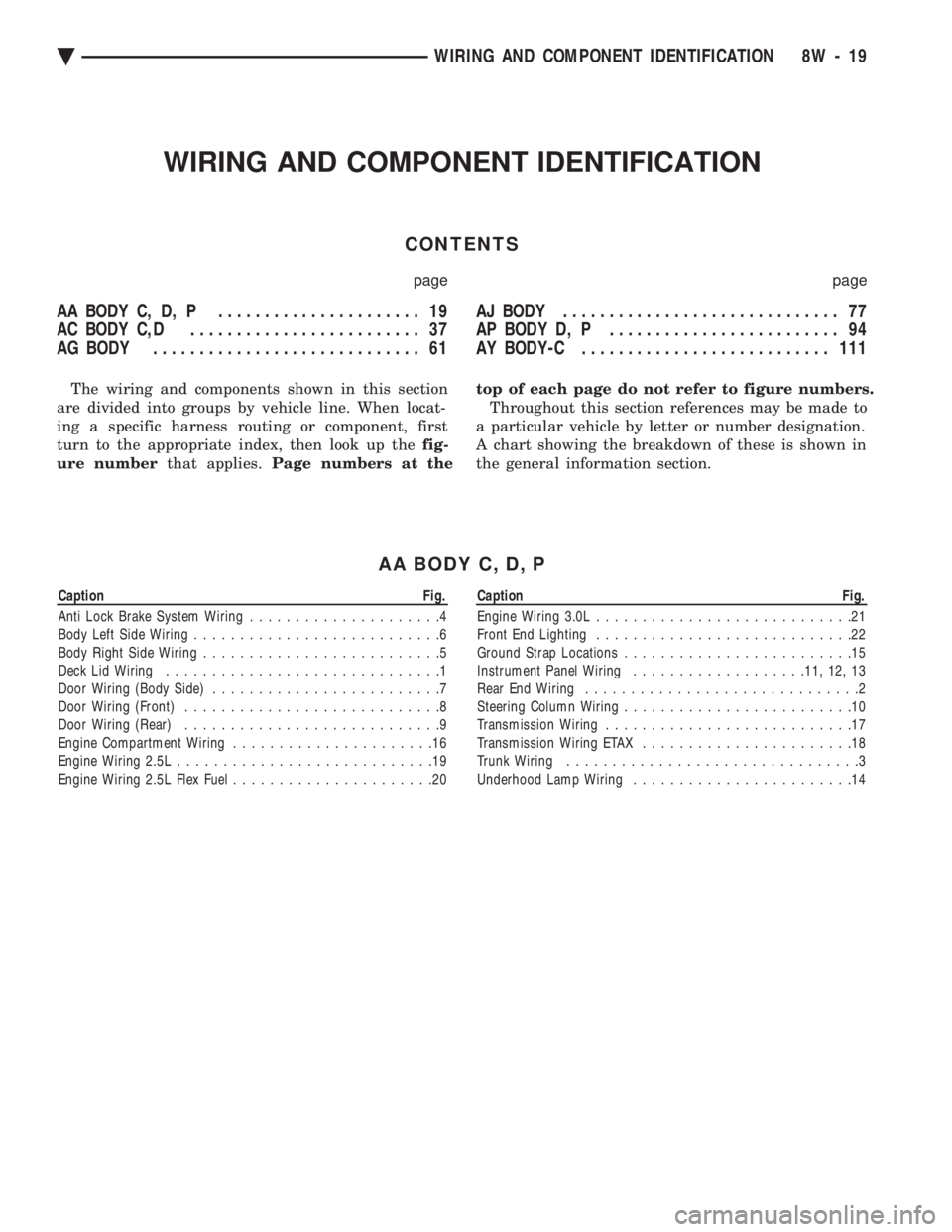
WIRING AND COMPONENT IDENTIFICATION
CONTENTS
page page
AA BODY C, D, P ...................... 19
AC BODY C,D ......................... 37
AG BODY ............................. 61 AJ BODY
.............................. 77
AP BODY D, P ......................... 94
AY BODY-C ........................... 111
The wiring and components shown in this section
are divided into groups by vehicle line. When locat-
ing a specific harness routing or component, first
turn to the appropriate index, then look up the fig-
ure number that applies.Page numbers at the top of each page do not refer to figure numbers.
Throughout this section references may be made to
a particular vehicle by letter or number designation.
A chart showing the breakdown of these is shown in
the general information section.
AA BODY C, D, P
Caption Fig.
Anti Lock Brake System Wiring .....................4
Body Left Side Wiring ...........................6
Body Right Side Wiring ..........................5
Deck Lid Wiring ..............................1
Door Wiring (Body Side) .........................7
Door Wiring (Front) ............................8
Door Wiring (Rear) ............................9
Engine Compartment Wiring ......................16
Engine Wiring 2.5L ............................19
Engine Wiring 2.5L Flex Fuel ......................20Caption Fig.
Engine Wiring 3.0L ............................21
Front End Lighting ............................22
Ground Strap Locations .........................15
Instrument Panel Wiring .................. .11, 12, 13
Rear End Wiring ..............................2
Steering Column Wiring .........................10
Transmission Wiring ...........................17
Transmission Wiring ETAX .......................18
Trunk Wiring ................................3
Underhood Lamp Wiring ........................14
Ä WIRING AND COMPONENT IDENTIFICATION 8W - 19
Page 771 of 2438
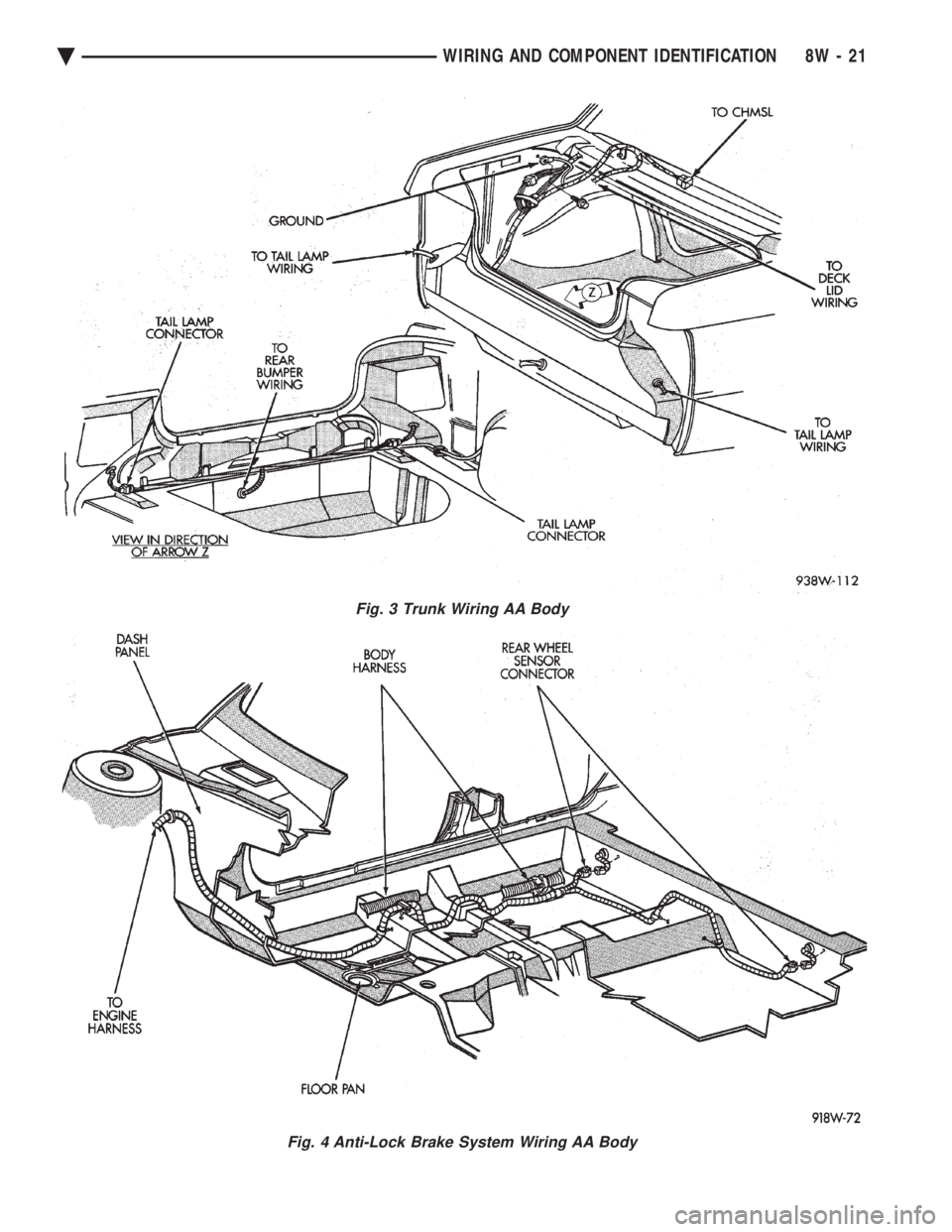
Fig. 3 Trunk Wiring AA Body
Fig. 4 Anti-Lock Brake System Wiring AA Body
Ä WIRING AND COMPONENT IDENTIFICATION 8W - 21