ignition CHEVROLET EPICA 2004 1.G Service Manual
[x] Cancel search | Manufacturer: CHEVROLET, Model Year: 2004, Model line: EPICA, Model: CHEVROLET EPICA 2004 1.GPages: 338, PDF Size: 2.38 MB
Page 148 of 338
Adjusting the Speakers (Balance/Fade)
SOUND (Balance/Fade):To adjust the balance
between the right and the left speakers, press this button
until BAL appears on the display. Then turn the volume
knob to increase or to decrease the balance between the
right and the left speakers. The display will show the
balance level. When finished making your selection,
press this button to select the balance level.
To adjust the fade between the front and the rear
speakers, press this button until FAD appears on the
display. Then turn the volume knob to increase or to
decrease the fade between the front and the rear
speakers. The display will show the fade level. When
finished making your selection, press this button to
select the fade level.
Playing a CD
Insert a CD partway into the slot, label side up. The
player will pull it in and the CD should begin playing.
You can insert a CD with the ignition off.
When the CD is inserted, CDP will appear on the
display. As the CD is loading Filecheck will appear on
the display. As each new track starts to play, Track
and the track number will appear on the display.
If you turn off the ignition or radio with a CD in the
player, it will stay in the player. When you turn on the
ignition or radio, the CD will start playing where it
stopped, if it was the last selected audio source.The CD player can play the smaller 8 cm single CDs
with an adapter ring. Full-size CDs and the smaller CDs
are loaded in the same manner.
If playing a CD-R the sound quality may be reduced
due to CD-R quality, the method of recording, the quality
of the music that has been recorded, and the way the
CD-R has been handled. You may experience an
increase in skipping, difficulty in finding tracks, and/or
difficulty in loading and ejecting. If these problems occur
try a known good CD.
Do not add paper labels to CDs, they could get caught
in the CD player.
Do not play 3 inch CDs without a standard adapter CD.
If an error appears on the display, see “CD Messages”
later in this section.
2 RPT (Repeat):Press this pushbutton to repeat the
current track. RPT will appear on the display. Press this
pushbutton again to turn off repeat play.
3 INT (SCAN):Press this button to listen to the first few
seconds of each track on each CD inserted. INTRO
will appear on the display. To stop scanning press this
button again. The current track will begin to play.
3-50
Page 149 of 338
4 RDM (Random):Press this pushbutton to hear the
tracks in random, rather than sequential, order. RDM
will appear on the display. Press this pushbutton again
to turn off random play.
TRACK (Previous/Next Track):Turn this knob one
notch to go to the start of the current track or to go to
the next track. The track number will appear on the
display. The player will continue moving backward or
forward through the CD with each turn of the knob.
TUN (Forward/Reverse):Push and hold this knob to
fast forward or to reverse through the current track.
AM/FM:Press this button to listen to the radio when
a CD is playing. The inactive CD will remain safely
inside the radio for future listening.
CD:Press this button to play a CD when listening to
the radio. CDP will appear on the display when the
CD player has been selected.
Press this button while a CD is playing to pause the
CD. Track and the track number will flash on the display.
Press this button again to start playing the CD.
X(Eject):Press this button to eject a CD. Eject may
be activated with either the ignition or radio off.
Using an MP3 CD
MP3 Format
This MP3 player will accept MP3 files that were recorded
on an up to 700 MB CD-R CD. The files can be recorded
with the following fixed bit rates: 32 kbps, 40 kpbs,
56 kpbs, 64 kpbs, 80 kpbs, 96 kpbs, 112 kpbs, 128 kpbs,
160 kpbs, 192 kpbs, 224 kpbs, 256 kpbs, and 320 kpbs
or a variable bit rate. Song title, artist name, and album
will be available when recorded using ID3 tags versions
1 and 2.
The player will be able to read and play a maximum of
50 folders, 50 playlists, 10 sessions, and 255 files. Long
file, folder, or playlist names or a combination of a large
number of files and folders or playlists may cause the
player to be unable to play up to the maximum number
of files, folders, playlists, or sessions. If you wish to play
large numbers of files, folders, playlists or sessions
minimize the length of the file, folder or playlist name.
You can also play an MP3 CD that was recorded using no
file folders. The system can support up to 11 folders in
depth, though, keep the depth of the folders to a minimum
in order to keep down the complexity and confusion in
trying to locate a particular folder during playback. If a
CD contains more than the maximum of 50 folders,
50 playlists, 10 sessions, and 255 files the player will let
you access and navigate up to the maximum, but all
items over the maximum will be ignored.
3-51
Page 151 of 338
File System and Naming
The song name that will be displayed will be the song
name that is contained in the ID3 tag. If the song name
is not present in the ID3 tag, then the radio will
display the file name without the extension (such
as.mp3) as the track name.
Track names longer than 32 characters or 4 pages
will be shortened. The display will not show parts
of words on the last page of text and the extension of
the filename will not be displayed.
Preprogrammed Playlists
You can access preprogrammed playlists which were
created by WinAmp™, MusicMatch™, or Real
Jukebox™ software, however, you will not have editing
capability. These playlists will be treated as special
folders containing compressed audio song files.
Playing an MP3
With the ignition on, insert a CD partway into the slot,
label side up. The player will pull it in, Loading, then
Filecheck, then MP3 will appear on the display. The
CD should begin playing. You can insert a CD with
the ignition off.As each new track starts to play, F001, the track
number, and the song name will appear on the display.
If you turn off the ignition or radio with a CD in the
player, it will stay in the player. When you turn on the
ignition or radio, the CD will start playing where it
stopped, if it was the last selected audio source.
The CD player can play the smaller 8cm single CDs
with an adapter ring. Full-size CDs and the smaller
CDs are loaded in the same manner.
If playing a CD-R the sound quality may be reduced
due to CD-R quality, the method of recording, the quality
of the music that has been recorded, and the way the
CD-R has been handled. You may experience an
increase in skipping, difficulty in finding tracks and/or
difficulty in loading and ejecting. If these problems occur
try a known good CD.
Do not add paper labels to CDs, they could get caught
in the CD player.
Do not play 3 inch CDs without a standard adapter CD.
If an error appears on the display, see “CD Messages”
later in this section.
3-53
Page 156 of 338
CD Messages
No Maga:An empty magazine is inserted in the CD
changer. Try the magazine again with a CD loaded
in one of the trays.
If the CD is not playing correctly, for any other reason,
try a known good CD.
If any error occurs repeatedly or if an error cannot be
corrected, contact your dealer. If your radio displays an
error message, write it down and provide it to your
dealer when reporting the problem.
Theft-Deterrent Feature
The theft-deterrent system is designed to discourage
theft of your radio. When the radio and vehicle are
turned off, your radio has a blinking red light to indicate
that the theft-deterrent system is activated.
The theft-deterrent system also activates when the
audio system has been disconnected from the battery.
When this occurs, the AF code and security code
will have to be entered in order to operate your radio.
An identification card stamped with the AF code
and security code will be provided with the vehicle.
Keep it in a safe place, not in the vehicle.To enter the security code do the following:
1. Turn the ignition to ACC or ON.
2. Turn the radio on. AF or COdE will flash on the
display. If AF flashes on the display, go to Step
2. If COdE flashes on the display, go to Step 4.
3. Enter the AF code by using the preset pushbuttons.
COdE will flash on the display.
4. Enter the security code by using the preset
pushbuttons. When the complete security code is
entered, the code will flash three times.
If the security code is not entered correctly, Err will
appear on the display for a few seconds. When
COdE appears back on the display, repeat Step 4.
If the incorrect AF code is entered, an incorrect
frequency level may be chosen and the radio
reception may be affected. If this occurs, reset the
audio system by removing and re-installing the
AUDIO fuse. See “Instrument Panel Fuse Block”
underFuses and Circuit Breakers on page 5-79for
more information. Then repeat Steps 1 through 4.
3-58
Page 166 of 338
Remember: Anti-lock does not change the time you
need to get your foot up to the brake pedal or always
decrease stopping distance. If you get too close to
the vehicle in front of you, you will not have time to apply
your brakes if that vehicle suddenly slows or stops.
Always leave enough room up ahead to stop, even
though you have anti-lock brakes.
Using Anti-Lock
Do not pump the brakes. Just hold the brake pedal down
firmly and let anti-lock work for you. You may hear the
anti-lock pump or motor operate, and feel the brake pedal
pulsate, but this is normal.
Braking in Emergencies
With anti-lock, you can steer and brake at the same
time. In many emergencies, steering can help you more
than even the very best braking.
Traction Control System (TCS)
Your vehicle may have a Traction Control System (TCS)
that limits wheel spin. This is especially useful in
slippery road conditions. The system operates only if it
senses that one or both of the front wheels are spinning
or beginning to lose traction. When this happens, the
system works the front brakes to limit wheel spin.
This light will come on
briefly when the ignition
is turned to ON along
with the anti-lock brake
system warning light.
This light will blink when
your Traction Control
System is limiting
wheel spin.
You may feel or hear the system working, but this is
normal. This light will also come on when the anti-lock
brake system is working.
4-8
Page 167 of 338
If your vehicle is in cruise control when the enhanced
traction system begins to limit wheel spin, the cruise
control will automatically disengage. When road
conditions allow you to safely use it again, you may
re-engage the cruise control. SeeCruise Control
on page 3-10.
The Traction Control System operates in all transaxle
shift lever positions. But the system can upshift the
transaxle only as high as the shift lever position
you have chosen, so you should use the lower gears
only when necessary.
This light will come on
briefly when the ignition
is turned to ON along
with the anti-lock brake
system warning light.
When the system is on and the parking brake is fully
released, this warning light will also come on to let you
know if there is a problem.When this warning light is on, the system will not limit
wheel spin. Adjust your driving accordingly.
To limit wheel spin, especially in slippery road conditions,
you should always leave the Traction Control System on.
But you can turn the system off if you prefer.
To turn the system
on or off, press the
TCS button located
on the console below
the shift lever.
When you turn the system off, the Traction Control
System warning light will come on and stay on. If the
Traction Control System is limiting wheel spin when you
press the button to turn the system off, the warning
light will come on, but the system will not turn off right
away. It will wait until there is no longer a current
need to limit wheel spin.
You can turn the system back on at any time by pressing
the button again. The Traction Control System warning
light should go off.
4-9
Page 181 of 338
If you drive regularly in steep country, or if you are
planning to visit there, here are some tips that can make
your trips safer and more enjoyable.
•Keep your vehicle in good shape. Check all fluid
levels and also the brakes, tires, cooling system
and transaxle. These parts can work hard on
mountain roads.
•Know how to go down hills. The most important
thing to know is this: let your engine do some of
the slowing down. Shift to a lower gear when you
go down a steep or long hill.
{CAUTION:
If you do not shift down, your brakes could get
so hot that they would not work well. You would
then have poor braking or even none going
down a hill. You could crash. Shift down to let
your engine assist your brakes on a steep
downhill slope.
{CAUTION:
Coasting downhill in NEUTRAL (N) or with the
ignition off is dangerous. Your brakes will have
to do all the work of slowing down. They could
get so hot that they would not work well. You
would then have poor braking or even none
going down a hill. You could crash. Always have
your engine running and your vehicle in gear
when you go downhill.
•Know how to go uphill. Drive in the highest gear
possible.
•Stay in your own lane when driving on two-lane
roads in hills or mountains. Do not swing wide or cut
across the center of the road. Drive at speeds that let
you stay in your own lane.
•As you go over the top of a hill, be alert. There could
be something in your lane, like a stalled car or an
accident.
•You may see highway signs on mountains that warn
of special problems. Examples are long grades,
passing or no-passing zones, a falling rocks area or
winding roads. Be alert to these and take appropriate
action.
4-23
Page 188 of 338
Dinghy Towing
Notice:If you tow your vehicle with all four wheels
on the ground, the drivetrain components could
be damaged. The repairs would not be covered by
your warranty. Do not tow your vehicle with all
four wheels on the ground.
Your vehicle was not designed to be towed with all four
wheels on the ground. If your vehicle must be towed,
you should use a dolly. See “Dolly Towing” that follows
for more information.
Dolly Towing
Notice:Towing your vehicle from the rear with the
front wheels on the ground could cause transaxle
damage. Do not tow the vehicle from the rear
with the front wheels on the road.
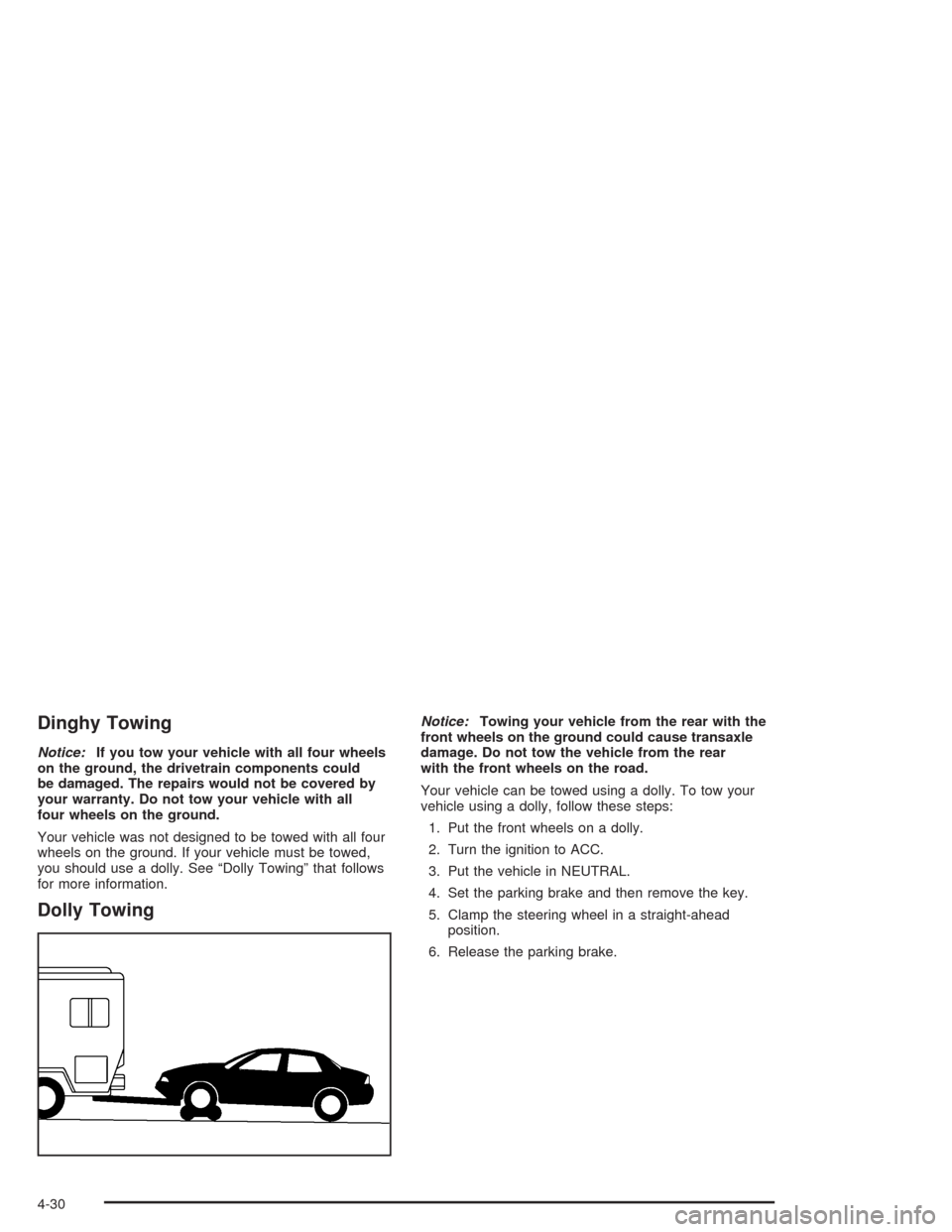
Your vehicle can be towed using a dolly. To tow your
vehicle using a dolly, follow these steps:
1. Put the front wheels on a dolly.
2. Turn the ignition to ACC.
3. Put the vehicle in NEUTRAL.
4. Set the parking brake and then remove the key.
5. Clamp the steering wheel in a straight-ahead
position.
6. Release the parking brake.
4-30
Page 230 of 338
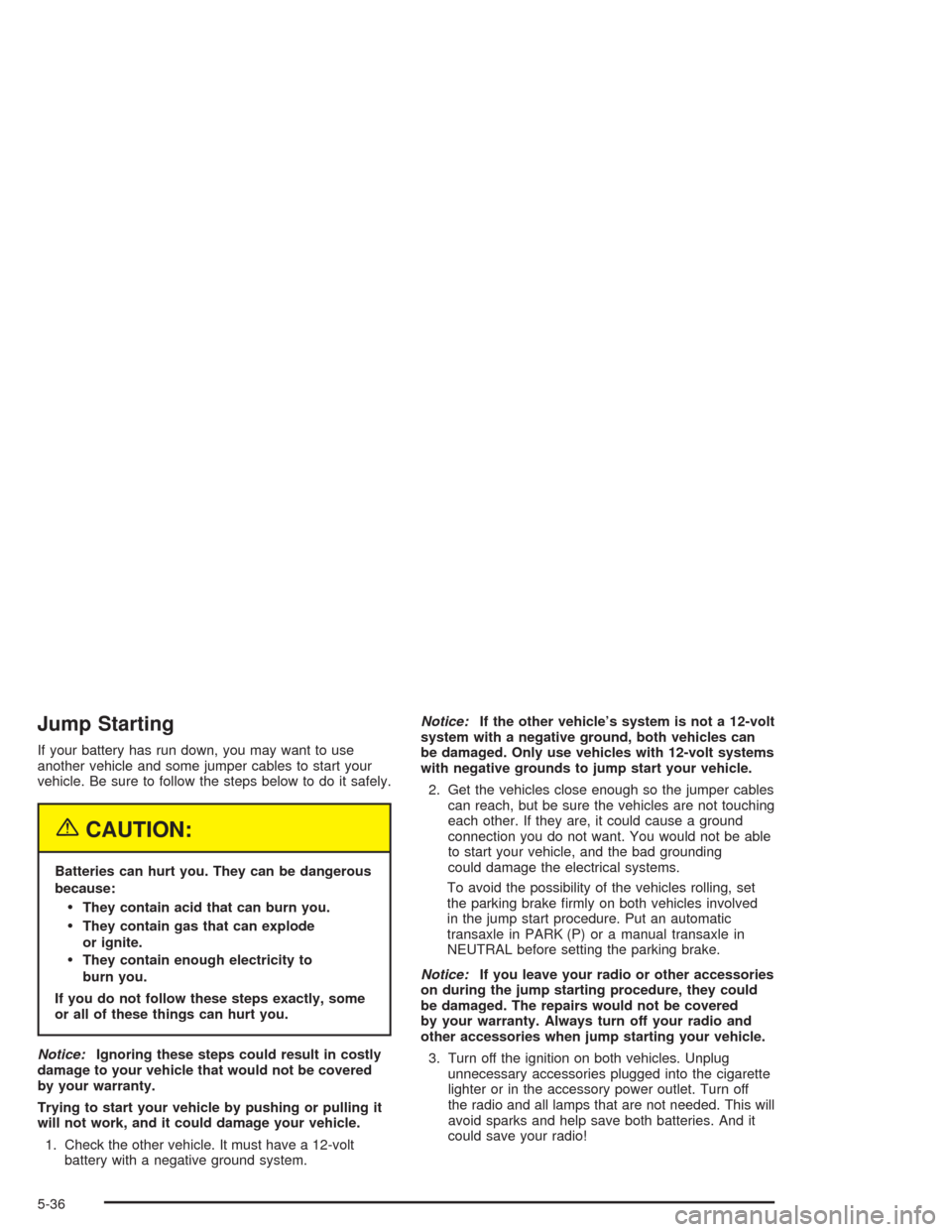
Jump Starting
If your battery has run down, you may want to use
another vehicle and some jumper cables to start your
vehicle. Be sure to follow the steps below to do it safely.
{CAUTION:
Batteries can hurt you. They can be dangerous
because:
They contain acid that can burn you.
They contain gas that can explode
or ignite.
They contain enough electricity to
burn you.
If you do not follow these steps exactly, some
or all of these things can hurt you.
Notice:Ignoring these steps could result in costly
damage to your vehicle that would not be covered
by your warranty.
Trying to start your vehicle by pushing or pulling it
will not work, and it could damage your vehicle.
1. Check the other vehicle. It must have a 12-volt
battery with a negative ground system.Notice:If the other vehicle’s system is not a 12-volt
system with a negative ground, both vehicles can
be damaged. Only use vehicles with 12-volt systems
with negative grounds to jump start your vehicle.
2. Get the vehicles close enough so the jumper cables
can reach, but be sure the vehicles are not touching
each other. If they are, it could cause a ground
connection you do not want. You would not be able
to start your vehicle, and the bad grounding
could damage the electrical systems.
To avoid the possibility of the vehicles rolling, set
the parking brake firmly on both vehicles involved
in the jump start procedure. Put an automatic
transaxle in PARK (P) or a manual transaxle in
NEUTRAL before setting the parking brake.
Notice:If you leave your radio or other accessories
on during the jump starting procedure, they could
be damaged. The repairs would not be covered
by your warranty. Always turn off your radio and
other accessories when jump starting your vehicle.
3. Turn off the ignition on both vehicles. Unplug
unnecessary accessories plugged into the cigarette
lighter or in the accessory power outlet. Turn off
the radio and all lamps that are not needed. This will
avoid sparks and help save both batteries. And it
could save your radio!
5-36
Page 277 of 338
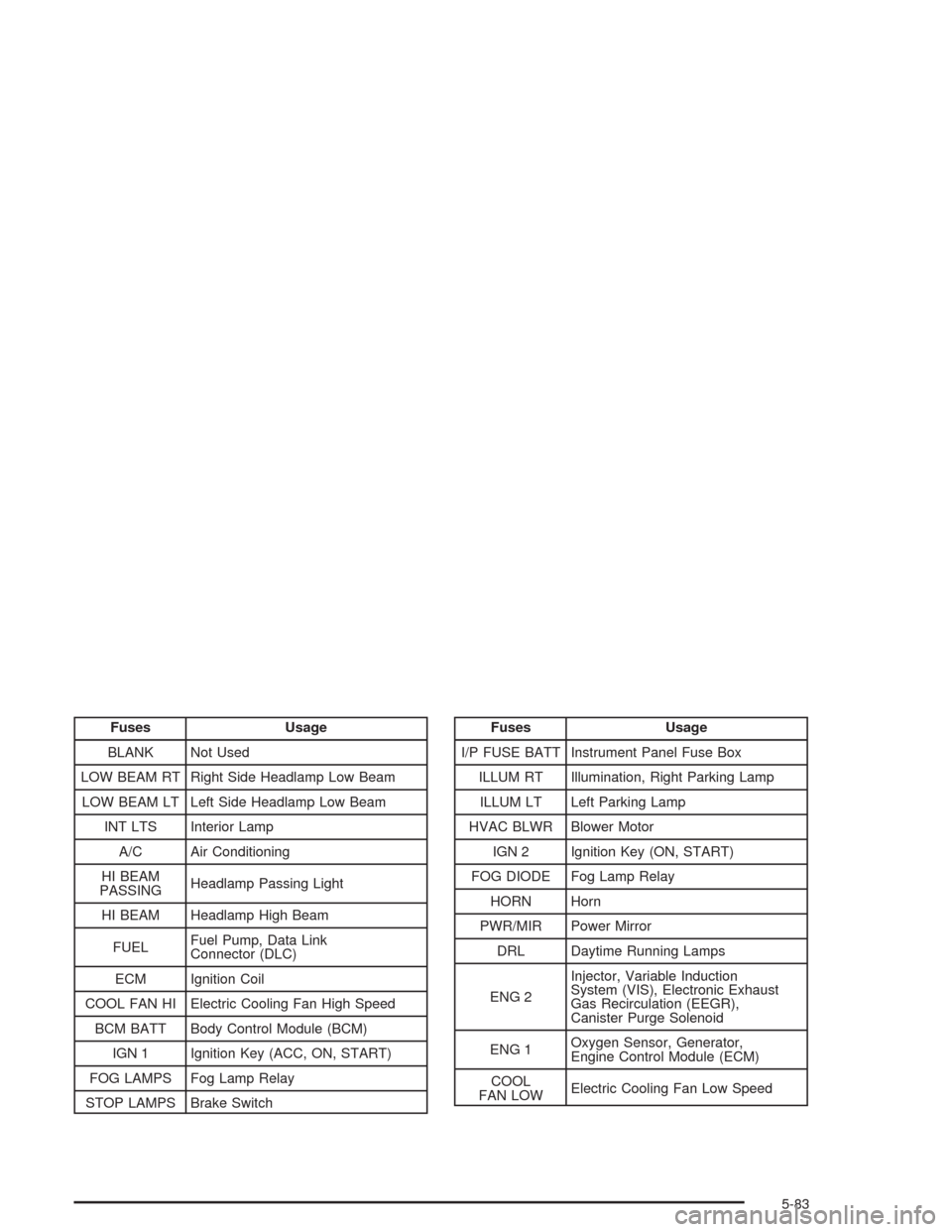
Fuses Usage
BLANK Not Used
LOW BEAM RT Right Side Headlamp Low Beam
LOW BEAM LT Left Side Headlamp Low Beam
INT LTS Interior Lamp
A/C Air Conditioning
HI BEAM
PASSINGHeadlamp Passing Light
HI BEAM Headlamp High Beam
FUELFuel Pump, Data Link
Connector (DLC)
ECM Ignition Coil
COOL FAN HI Electric Cooling Fan High Speed
BCM BATT Body Control Module (BCM)
IGN 1 Ignition Key (ACC, ON, START)
FOG LAMPS Fog Lamp Relay
STOP LAMPS Brake SwitchFuses Usage
I/P FUSE BATT Instrument Panel Fuse Box
ILLUM RT Illumination, Right Parking Lamp
ILLUM LT Left Parking Lamp
HVAC BLWR Blower Motor
IGN 2 Ignition Key (ON, START)
FOG DIODE Fog Lamp Relay
HORN Horn
PWR/MIR Power Mirror
DRL Daytime Running Lamps
ENG 2Injector, Variable Induction
System (VIS), Electronic Exhaust
Gas Recirculation (EEGR),
Canister Purge Solenoid
ENG 1Oxygen Sensor, Generator,
Engine Control Module (ECM)
COOL
FAN LOWElectric Cooling Fan Low Speed
5-83