buttons CHEVROLET EPICA 2006 1.G User Guide
[x] Cancel search | Manufacturer: CHEVROLET, Model Year: 2006, Model line: EPICA, Model: CHEVROLET EPICA 2006 1.GPages: 368, PDF Size: 2.24 MB
Page 182 of 368
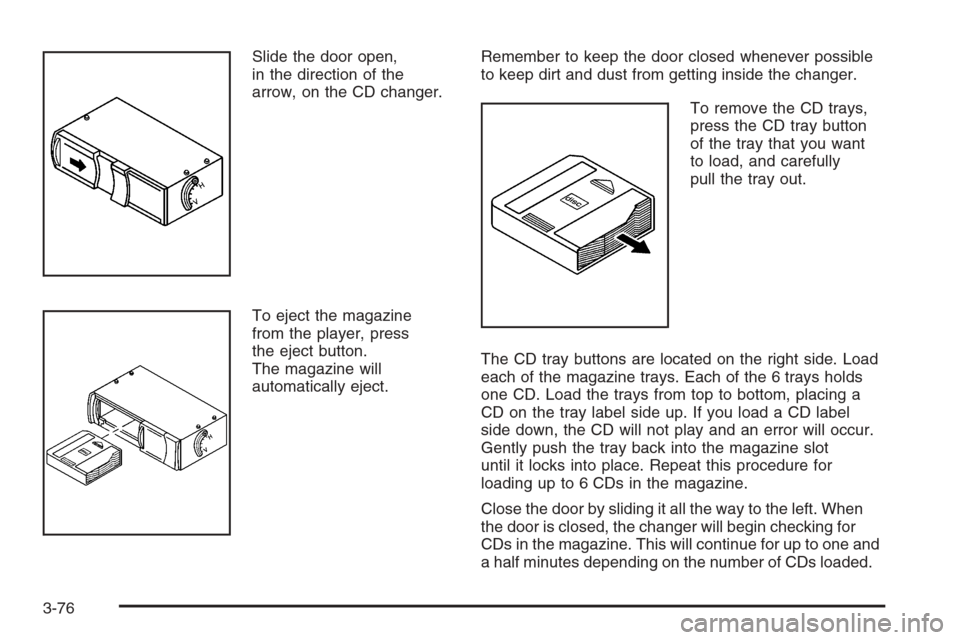
Slide the door open,
in the direction of the
arrow, on the CD changer.
To eject the magazine
from the player, press
the eject button.
The magazine will
automatically eject.Remember to keep the door closed whenever possible
to keep dirt and dust from getting inside the changer.
To remove the CD trays,
press the CD tray button
of the tray that you want
to load, and carefully
pull the tray out.
The CD tray buttons are located on the right side. Load
each of the magazine trays. Each of the 6 trays holds
one CD. Load the trays from top to bottom, placing a
CD on the tray label side up. If you load a CD label
side down, the CD will not play and an error will occur.
Gently push the tray back into the magazine slot
until it locks into place. Repeat this procedure for
loading up to 6 CDs in the magazine.
Close the door by sliding it all the way to the left. When
the door is closed, the changer will begin checking for
CDs in the magazine. This will continue for up to one and
a half minutes depending on the number of CDs loaded.
3-76
Page 183 of 368
Whenever a CD magazine with CDs is loaded in the
changer and the door is closed, the CD symbol
will appear on the radio display. If the CD changer is
checking the magazine for CDs, the CD symbol will flash
on the display until the changer is ready to play. If CD
changer mode is entered during initialization, LOADING
will appear on the display. When a CD begins playing,
a CD and track number will appear on the radio display.
The CD numbers are listed on the front of the
magazine.
All of the CD functions are controlled by the radio
buttons except for ejecting the magazine.
Playing a CD
If an error appears on the display, see “CD Messages”
later in this section.
TRACK (Reverse/Fast Forward):Turn this knob to
select the previous or next track on the current CD.
Push and turn this knob to quickly reverse or advance
within a track. As the CD advances, the elapsed time of
the track will appear on the display.
5 DN (Previous):Press and hold this pushbutton to
select the previous CD in the magazine.
6 UP (Next):Press and hold this pushbutton to select
the next CD in the magazine.2 RPT (Repeat):Press this pushbutton to repeat the
current track. RPT will appear on the display. Press this
pushbutton again to turn off repeat play.
3 INT (Scan):To scan the tracks on the current CD,
press this pushbutton until INTRO appears on the
display. The first ten seconds of each track on the CD
will play. To stop scanning, press this pushbutton again.
4 RDM (Random):Press this pushbutton to listen to
the tracks on the current CD in random, rather than
sequential, order. RDM will appear on the display.
Press this pushbutton again to turn off random play.
While in random, you can turn the tune knob to select
another track.
AM/FM:Press this button to listen to the radio when
playing a CD. The inactive CD(s) will remain safely
inside the player for future listening.
CD:Press this button to play a CD when listening to
the radio. CDC will appear on the display when the
CD changer has been selected.
Press this button while a CD is playing to pause
the CD. Press this button again to resume play.
3-77
Page 292 of 368
Appearance Care
Cleaning the Inside of Your Vehicle
Your vehicle’s interior will continue to look its best if it is
cleaned often. Although not always visible, dust and dirt
can accumulate on your upholstery. Dirt can damage
carpet, fabric, leather, and plastic surfaces. Regular
vacuuming is recommended to remove particles from
your upholstery. It is important to keep your upholstery
from becoming and remaining heavily soiled. Soils
should be removed as quickly as possible. Your vehicle’s
interior may experience extremes of heat that could
cause stains to set rapidly.
Lighter colored interiors may require more frequent
cleaning. Use care because newspapers and garments
that transfer color to your home furnishings may also
transfer color to your vehicle’s interior.
When cleaning your vehicle’s interior, only use cleaners
specifically designed for the surfaces being cleaned.
Permanent damage may result from using cleaners on
surfaces for which they were not intended. Use glass
cleaner only on glass. Remove any accidental over-spray
from other surfaces immediately. To prevent over-spray,
apply cleaner directly to the cleaning cloth.Notice:If you use abrasive cleaners when cleaning
glass surfaces on your vehicle, you could scratch
the glass and/or cause damage to the integrated
radio antenna and the rear window defogger. When
cleaning the glass on your vehicle, use only a
soft cloth and glass cleaner.
Many cleaners contain solvents that may become
concentrated in your vehicle’s breathing space. Before
using cleaners, read and adhere to all safety instructions
on the label. While cleaning your vehicle’s interior,
maintain adequate ventilation by opening your vehicle’s
doors and windows.
Dust may be removed from small buttons and knobs
using a small brush with soft bristles.
Your GM dealer has a product for cleaning your
vehicle’s glass. Should it become necessary, you can
also obtain a product from your GM dealer to remove
odors from your vehicle’s upholstery.
Do not clean your vehicle using the following cleaners
or techniques:
•Never use a knife or any other sharp object to
remove a soil from any interior surface.
•Never use a stiff brush. It can cause damage to
your vehicle’s interior surfaces.
5-68