remote CHEVROLET EQUINOX 2008 1.G User Guide
[x] Cancel search | Manufacturer: CHEVROLET, Model Year: 2008, Model line: EQUINOX, Model: CHEVROLET EQUINOX 2008 1.GPages: 436, PDF Size: 2.42 MB
Page 91 of 436

Liftgate
{CAUTION:
It can be dangerous to drive with the liftgate or
liftglass open because carbon monoxide (CO)
gas can come into your vehicle. You cannot
see or smell CO. It can cause unconsciousness
and even death. If you must drive with the
liftgate open or if electrical wiring or other
cable connections must pass through the seal
between the body and the liftgate or liftglass:
Make sure all other windows are shut.
Turn the fan on your climate control system
to its highest speed and select the control
setting that will force outside air into your
vehicle. See “Climate Control System”
in the Index.
If you have air outlets on or under the
instrument panel, open them all the way.
SeeEngine Exhaust on page 2-35.To unlock the liftgate, press the unlock button on
the Remote Keyless Entry (RKE) transmitter twice or
use the power door lock switch.
To lock the liftgate, press the lock button on the
RKE transmitter or use the power door lock switch.
The liftgate does not have a key lock cylinder.
To open the liftgate, press the touchpad centered
on the underside of the liftgate handle and pull up.
When closing the liftgate, use the molded handles
to pull the liftgate down. Push the liftgate closed
until it latches.
2-13
Page 95 of 436

To stop the window while it is lowering, press and
release the top of the switch.
Window Lockout
o
(Window Lockout):Your vehicle has a lockout
feature to prevent rear seat passengers from operating
the windows. Press the lockout button, located with
the power window switches, to turn the feature on and
off. The window switch has a light that will come on
when the switch is active.
Sun Visors
To block out glare, swing the sun visor down. You
can also detach the driver’s sun visor from the center
mount and slide it along the rod from side-to-side
for greater coverage.
Visor Vanity Mirrors
Your vehicle has covered visor vanity mirrors on
both the driver’s and passenger’s side.
Theft-Deterrent Systems
Vehicle theft is big business, especially in some cities.
Although your vehicle has a number of theft-deterrent
features, we know that nothing we put on it can make
it impossible to steal.
Content Theft-Deterrent
Your vehicle has a content theft-deterrent alarm system.
To activate the theft-deterrent system:
1. Open the door.
2. Lock the door with the power door lock switch
or the Remote Keyless Entry (RKE) transmitter.
If you are using the RKE transmitter, the door
does not need to be open.
3. Close all doors.
The key must be removed from the ignition to
arm the system.
If the theft-deterrent system is activated and a door or
the liftgate is opened without using the RKE transmitter,
a 10 second pre-alarm will occur, and the security light
will ash. The horn will sound rapidly for 10 seconds.
If you do not press unlock on the RKE transmitter or
insert the key in the ignition and turn if from the LOCK/
OFF position, the alarm will go off. The horn will sound
and the headlamps will ash for 30 seconds.
After the alarm has sounded for 30 seconds,
the system will re-arm itself automatically.
To disarm the theft-deterrent system, do one of
the following:
1. Unlock the doors with the RKE transmitter.
2. Insert the key in the ignition and turn it from
the LOCK/OFF position.
2-17
Page 117 of 436

OnStar®System
OnStar uses several innovative technologies and live
advisors to provide you with a wide range of safety,
security, information, and convenience services. If your
airbags deploy, the system is designed to make an
automatic call to OnStar Emergency advisors who can
request emergency services be sent to your location.
If you lock your keys in the vehicle, call OnStar at
1-888-4-ONSTAR and they can send a signal to unlock
your doors. If you need roadside assistance, press
the OnStar button and they can contact Roadside
Service for you.
OnStar service is provided to you subject to the
OnStar Terms and Conditions. You may cancel your
OnStar service at any time by contacting OnStar.A complete OnStar Owner’s Guide and the OnStar
Terms and Conditions are included in the vehicle’s
OnStar Subscriber glove box literature. For more
information, visit onstar.com or onstar.ca, contact
OnStar at 1-888-4-ONSTAR (1-888-466-7827) or
TTY 1-877-248-2080, or press the OnStar button
to speak with an OnStar advisor 24 hours a day,
7 days a week.
Not all OnStar features are available on all vehicles.
To check if your vehicle is equipped to provide the
services described below, or for a full description of
OnStar services and system limitations, see the OnStar
Owner’s Guide in your glove box or visit onstar.com.
OnStar Services
For new vehicles with OnStar, the Safe & Sound Plan,
or the Directions & Connections Plan is included for
one year from the date of purchase. You can extend
this plan beyond the rst year, or upgrade to the
Directions & Connections Plan. For more information,
press the OnStar button to speak with an advisor.
Some OnStar services (such as Remote Door Unlock
or Stolen Vehicle Location Assistance) may not be
available until you register with OnStar.
2-39
Page 118 of 436
Available Services with Safe & Sound Plan
Automatic Notication of Airbag Deployment
Advanced Automatic Crash Notication (AACN)
(If equipped)
Link to Emergency Services
Roadside Assistance
Stolen Vehicle Location Assistance
AccidentAssist
Remote Door Unlock/Vehicle Alert
OnStar Vehicle Diagnostics
GM Goodwrench®On Demand Diagnostics
OnStar Hands-Free Calling with
30 complimentary minutes
OnStar Virtual Advisor (U.S. Only)
Available Services included with
Directions & Connections Plan
All Safe and Sound Plan Services
Driving Directions - Advisor delivered or OnStar
Turn-by-Turn Navigation (If equipped)
RideAssist
Information and Convenience Services
OnStar Hands-Free Calling
OnStar Hands-Free Calling allows eligible OnStar
subscribers to make and receive calls using voice
commands. Hands-Free Calling is fully integrated into
the vehicle, and can be used with OnStar Pre-Paid
Minute Packages. Hands-Free Calling may also
be linked to a Verizon Wireless service plan in the
U.S. or a Bell Mobility service plan in Canada,
depending on eligibility. To nd out more, refer to
the OnStar Owner’s Guide in the vehicle’s glove box,
visit www.onstar.com or www.onstar.ca, or speak
with an OnStar advisor by pressing the OnStar button
or calling 1-888-4-ONSTAR (1-888-466-7827).
OnStar Virtual Advisor
OnStar Virtual Advisor is a feature of OnStar
Hands-Free Calling that uses your minutes to access
location-based weather, local traffic reports, and
stock quotes. By pressing the phone button and giving
a few simple voice commands, you can browse
through the various topics. See the OnStar Owner’s
Guide for more information (Only available in the
continental U.S.).
2-40
Page 119 of 436
OnStar Steering Wheel Controls
Your vehicle may have a Talk/Mute button that can
be used to interact with OnStar Hands-Free Calling.
SeeAudio Steering Wheel Controls on page 3-108for
more information.
On some vehicles, you may have to hold the button
for a few seconds and give the command “ONSTAR” to
activate the OnStar Hands-Free Calling.
On some vehicles, the mute button can be used to
dial numbers into voicemail systems, or to dial phone
extensions. See the OnStar Owner’s Guide for
more information.
How OnStar Service Works
Your vehicle’s OnStar system has the capability of
recording and transmitting vehicle information. This
information is automatically sent to an OnStar Call
Center at the time of an OnStar button press, Emergency
button press or if your airbags or AACN system deploys.The vehicle information usually includes your GPS
location and, in the event of a crash, additional
information regarding the accident that your vehicle has
been involved in (e.g. the direction from which your
vehicle was hit). When you use the Virtual Advisor feature
of OnStar Hands-Free Calling, your vehicle also sends
OnStar your GPS location so that we can provide you
with location-based services.
OnStar service cannot work unless your vehicle is in a
place where OnStar has an agreement with a wireless
service provider for service in that area. OnStar
service also cannot work unless you are in a place
where the wireless service provider OnStar has hired for
that area has coverage, network capacity and reception
when the service is needed, and technology that is
compatible with the OnStar service. Not all services are
available everywhere, particularly in remote or
enclosed areas, or at all times.
Location information about your vehicle is only available
if the GPS satellite signals are unobstructed and
available.
2-41
Page 144 of 436
Dome Lamp
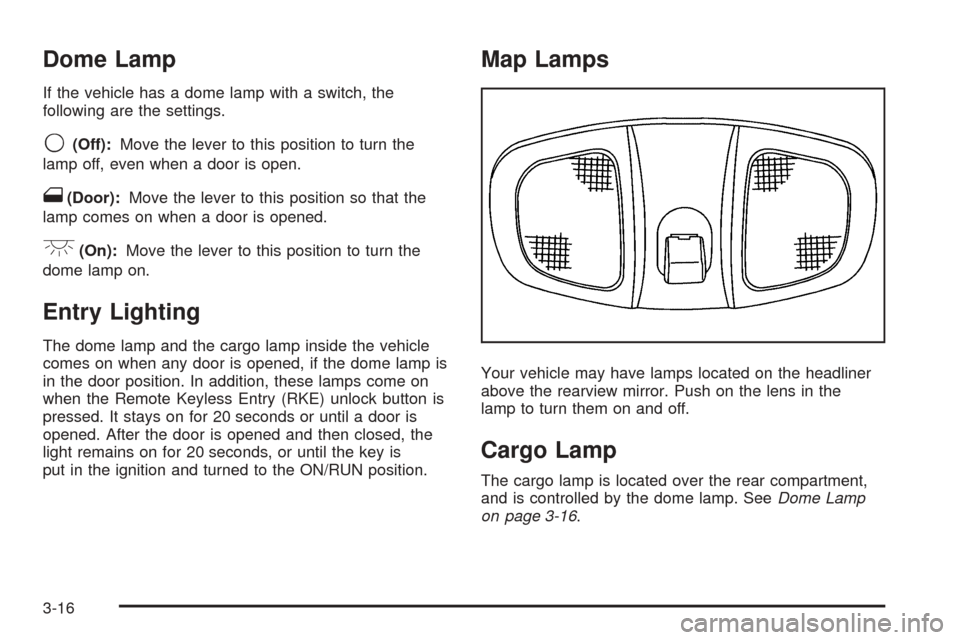
If the vehicle has a dome lamp with a switch, the
following are the settings.
9(Off):Move the lever to this position to turn the
lamp off, even when a door is open.
1(Door):Move the lever to this position so that the
lamp comes on when a door is opened.
+(On):Move the lever to this position to turn the
dome lamp on.
Entry Lighting
The dome lamp and the cargo lamp inside the vehicle
comes on when any door is opened, if the dome lamp is
in the door position. In addition, these lamps come on
when the Remote Keyless Entry (RKE) unlock button is
pressed. It stays on for 20 seconds or until a door is
opened. After the door is opened and then closed, the
light remains on for 20 seconds, or until the key is
put in the ignition and turned to the ON/RUN position.
Map Lamps
Your vehicle may have lamps located on the headliner
above the rearview mirror. Push on the lens in the
lamp to turn them on and off.
Cargo Lamp
The cargo lamp is located over the rear compartment,
and is controlled by the dome lamp. SeeDome Lamp
on page 3-16.
3-16
Page 147 of 436
Climate Controls
Climate Control System
The heating, cooling, and ventilation for the vehicle can
be controlled with this system. If your vehicle has the
remote start feature, the climate control system functions
as part of the remote start feature. SeeRemote
Keyless Entry (RKE) System Operation on page 2-5.
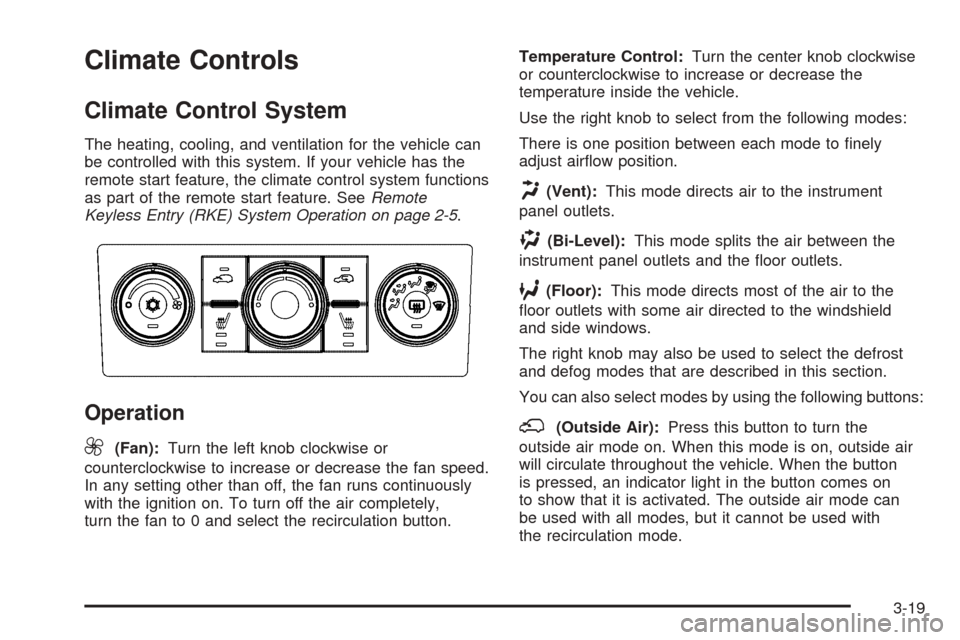
Operation
9
(Fan):Turn the left knob clockwise or
counterclockwise to increase or decrease the fan speed.
In any setting other than off, the fan runs continuously
with the ignition on. To turn off the air completely,
turn the fan to 0 and select the recirculation button.Temperature Control:Turn the center knob clockwise
or counterclockwise to increase or decrease the
temperature inside the vehicle.
Use the right knob to select from the following modes:
There is one position between each mode to nely
adjust airow position.
H(Vent):This mode directs air to the instrument
panel outlets.
)(Bi-Level):This mode splits the air between the
instrument panel outlets and the oor outlets.
6(Floor):This mode directs most of the air to the
oor outlets with some air directed to the windshield
and side windows.
The right knob may also be used to select the defrost
and defog modes that are described in this section.
You can also select modes by using the following buttons:
;(Outside Air):Press this button to turn the
outside air mode on. When this mode is on, outside air
will circulate throughout the vehicle. When the button
is pressed, an indicator light in the button comes on
to show that it is activated. The outside air mode can
be used with all modes, but it cannot be used with
the recirculation mode.
3-19
Page 150 of 436
If your vehicle has the remote start feature, the rear
defogger automatically turns on if it is cold outside.
When the vehicle transitions out of the remote start
mode, the rear defogger will turn off. SeeRemote
Keyless Entry (RKE) System Operation on page 2-5.
Notice:Do not use anything sharp on the inside
of the rear window. If you do, you could cut or
damage the warming grid, and the repairs would
not be covered by your warranty. Do not attach
a temporary vehicle license, tape, a decal or
anything similar to the defogger grid.
Remote Start Climate Control Operation
If your vehicle has the remote start feature and it
is activated, the climate control system heats and cools
the inside of the vehicle using the modes that were
set before the vehicle was turned off and the rear
defogger automatically turns on. If your vehicle has
heated seats, they may turn on if it is cold outside
and will shut off when the key is turned to ON/RUN.
SeeHeated Seats on page 1-4.
Outlet Adjustment
Use the louvers located on the air outlets to change
the direction of the airow.
Operation Tips
Clear away any ice, snow, or leaves from the air
inlets at the base of the vehicle that may block
the ow of air into your vehicle.
Do not use any non-GM approved hood deectors
that could adversely affect the performance of the
system.
Keep the path under the front seats clear of objects
to help circulate the air inside of your vehicle more
effectively.
Passenger Compartment Air Filter
Outside air is routed through a passenger compartment
air lter before entering the vehicle. This lter removes
certain particles from the air, including pollen and
dust particles. Reductions in airow, which may occur
more quickly in dusty areas, indicate that the lter needs
to be replaced early.
The lter should be replaced as part of routine scheduled
maintenance. SeeScheduled Maintenance on page 6-4
for when to replace the lter.
3-22
Page 174 of 436
If there is a problem with the battery charging system,
the DIC will display SERVICE BATTERY CHARGING
SYSTEM. See “SERVICE BATTERY CHARGING
SYSTEM” underDIC Warnings and Messages on
page 3-49. Also, seeElectric Power Management
on page 3-17for more information.
LEARN REMOTE KEY
This display allows you to match Remote Keyless
Entry (RKE) transmitters to your vehicle. To match
an RKE transmitter to your vehicle:
1. Make sure the vehicle is in PARK (P).
2. Press the vehicle information button until LEARN
REMOTE KEY PRESS
VTO BEGIN displays.
3. Press the set/reset button until REMOTE KEY
LEARNING ACTIVE is displayed.
4. Press and hold the lock and unlock buttons on
the rst transmitter at the same time for about
15 seconds.
A chime will sound indicating that the transmitter
is matched.
5. To match additional transmitters at this time,
repeat Step 3.
Each vehicle can have a maximum of
four transmitters matched to it.
6. To exit the programming mode, you must
cycle the key to LOCK/OFF.
CALIBRATE COMPAS (Compass)
Your vehicle may have this feature. The compass can
be manually calibrated. To calibrate the compass
through the DIC, seeDIC Compass on page 3-46.
CHANGE COMPASS ZONE
Your vehicle may have this feature. To change the
compass zone through the DIC, seeDIC Compass
on page 3-46.
Blank Display
This display shows no information.
FEATURE SETTNGS (Settings):
PRESS
VTO SELCT (Select)
This display allows you to personalize the feature
settings on your vehicle. SeeDIC Vehicle
Personalization on page 3-58for more information.
DIC Compass
Your vehicle may have a compass in the
Driver Information Center (DIC).
Compass Zone
The zone is set to zone eight upon leaving the factory.
Your dealer/retailer will set the correct zone for your
location.
3-46
Page 181 of 436
OIL PRSSURE (Pressure) LOW
STOP ENGINE
Notice:If you drive your vehicle while the engine
oil pressure is low, severe engine damage may
occur. If a low oil pressure warning appears on the
Driver Information Center (DIC), stop the vehicle
as soon as possible. Do not drive the vehicle until
the cause of the low oil pressure is corrected.
SeeEngine Oil on page 5-15for more information.
This message displays when the vehicle’s engine
oil pressure is low. The oil pressure light also appears
on the instrument panel cluster. SeeOil Pressure
Light on page 3-37.
Stop the vehicle immediately, as engine damage can
result from driving a vehicle with low oil pressure.
Have the vehicle serviced by your dealer/retailer as
soon as possible when this message is displayed.
PASSENGER DOOR
FRONT/REAR OPEN
This message displays when one or more of
the passenger doors are not closed properly.
Close the doors completely.
REMOTE KEY LEARNING ACTIVE
This message displays while you are matching a
Remote Keyless Entry (RKE) transmitter to your vehicle.
See “LEARN REMOTE KEY” underDIC Operation
and Displays on page 3-43for more information.
SERVICE A/C (Air Conditioning)
SYSTEM
This message displays when there is a problem detected
in the air conditioning system. Have the vehicle serviced
by your dealer/retailer.
SERVICE AIR BAG
This message displays when there is a problem with
the airbag system. Have your vehicle serviced by your
dealer/retailer immediately. SeeAirbag Readiness
Light on page 3-27for more information.
3-53