remote CHEVROLET EQUINOX 2008 1.G Owner's Guide
[x] Cancel search | Manufacturer: CHEVROLET, Model Year: 2008, Model line: EQUINOX, Model: CHEVROLET EQUINOX 2008 1.GPages: 436, PDF Size: 2.42 MB
Page 225 of 436
BAND:Press this button to listen to the radio when a
CD or a DVD is playing. The CD or DVD remains inside
the radio for future listening or viewing entertainment.
DVD/CD AUX (Auxiliary):Press this button to
cycle through DVD, CD, or Auxiliary when listening
to the radio. The DVD/CD text label and a message
showing track or chapter number displays when a
disc is in either slot. Press this button again and
the system automatically searches for an auxiliary input
device, such as a portable audio player. If a portable
audio player is not connected, “No Aux Input Device”
displays. If a disc is in both the DVD slot and the CD
slot the DVD/CD AUX button cycles between the
two sources and does not indicate “No Aux Input
Device”. If a front auxiliary device is connected, the
DVD/CD AUX button cycles through all available
options, such as: DVD slot, CD slot, Front AUX, and
Rear AUX (if available). See “Using the Auxiliary Input
Jack(s)” later in this section, orRear Seat Entertainment
(RSE) System on page 3-99Rear Seat Entertainment
System, “Audio/Video (A/V) Jacks” for more information.
If a MP3/WMA is inserted into top DVD slot, the rear
seat operator can turn on the video screen and use
the remote control to navigate the CD (tracks only)
through the remote control.XM Radio Messages
XL (Explicit Language Channels):These channels,
or any others, can be blocked at a customer’s request,
by calling 1-800-852-XMXM (9696).
XM Updating:The encryption code in the receiver is
being updated, and no action is required. This process
should take no longer than 30 seconds.
No XM Signal:The system is functioning correctly,
but the vehicle is in a location that is blocking the XM™
signal. When you move into an open area, the signal
should return.
Loading XM:The audio system is acquiring and
processing audio and text data. No action is needed.
This message should disappear shortly.
Channel Off Air:This channel is not currently in
service. Tune to another channel.
Channel Unavail:This previously assigned channel
is no longer assigned. Tune to another station. If
this station was one of the presets, choose another
station for that preset button.
3-97
Page 227 of 436
Rear Seat Entertainment (RSE)
System
Your vehicle may have a DVD Rear Seat
Entertainment (RSE) system. The RSE system works
with the vehicle’s audio system. The DVD player is
part of the front radio. The RSE system includes a
radio with a DVD player, a video display screen,
audio/video jacks, two wireless headphones, and a
remote control. SeeRadio(s) on page 3-68for more
information on the vehicle’s audio/DVD system.
Parental Control
The RSE system may have a Parental Control feature,
depending on which radio you have. To enable
Parental Control, press and hold the radio power button
for more than two seconds to stop all system features
such as: radio, video screen, RSA, DVD and/or CD.
While Parental Control is on, a padlock icon displays.
When the radio is turned back on, Parental Control
is unlocked.
Before You Drive
The RSE is designed for rear seat passengers only.
The driver cannot safely view the video screen
while driving and should not try to do so.
In severe or extreme weather conditions the RSE
system might not work until the temperature is within
the operating range. The operating range for the
RSE system is above−4°F (−20°C) or below
140°F (60°C). If the temperature of your vehicle is
outside of this range, heat or cool the vehicle until
the temperature is within the operating range of
the RSE system.
Headphones
The RSE includes two sets of wireless headphones that
are only dedicated to this system. These headphones
are used to listen to the DVD radio or an auxiliary device
connected to the RCA jacks. The wireless headphones
have an ON/OFF switch and a volume control.
To use the headphones, turn the switch to ON. An
indicator light located on the headphones illuminates.
If the light does not illuminate, the batteries might need
to be replaced. See “Battery Replacement” later in
this section for more information. Switch the headphones
to OFF when not in use.
3-99
Page 229 of 436
Audio/Video (A/V) Jacks
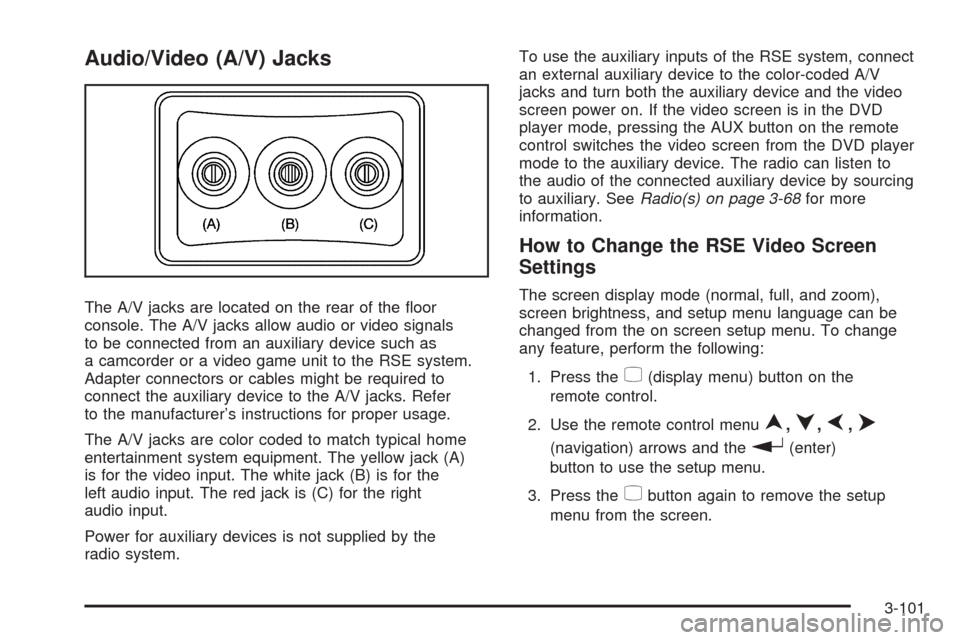
The A/V jacks are located on the rear of the oor
console. The A/V jacks allow audio or video signals
to be connected from an auxiliary device such as
a camcorder or a video game unit to the RSE system.
Adapter connectors or cables might be required to
connect the auxiliary device to the A/V jacks. Refer
to the manufacturer’s instructions for proper usage.
The A/V jacks are color coded to match typical home
entertainment system equipment. The yellow jack (A)
is for the video input. The white jack (B) is for the
left audio input. The red jack is (C) for the right
audio input.
Power for auxiliary devices is not supplied by the
radio system.To use the auxiliary inputs of the RSE system, connect
an external auxiliary device to the color-coded A/V
jacks and turn both the auxiliary device and the video
screen power on. If the video screen is in the DVD
player mode, pressing the AUX button on the remote
control switches the video screen from the DVD player
mode to the auxiliary device. The radio can listen to
the audio of the connected auxiliary device by sourcing
to auxiliary. SeeRadio(s) on page 3-68for more
information.
How to Change the RSE Video Screen
Settings
The screen display mode (normal, full, and zoom),
screen brightness, and setup menu language can be
changed from the on screen setup menu. To change
any feature, perform the following:
1. Press the
z(display menu) button on the
remote control.
2. Use the remote control menu
n,q,p,o
(navigation) arrows and ther(enter)
button to use the setup menu.
3. Press the
zbutton again to remove the setup
menu from the screen.
3-101
Page 230 of 436
Audio Output
Audio from the DVD player or auxiliary inputs may
be heard through the following possible sources:
Wireless Headphones
Vehicle Speakers
Vehicle wired headphone jacks on the rear seat
audio system, if your vehicle has this feature.
The RSE system always transmits the audio signal to
the wireless headphones, if there is audio available.
See “Headphones” earlier in this section for more
information.
When a device is connected to the radio’s auxiliary
input jack, if your vehicle has this feature, or A/V jacks,
the rear seat passengers are able to hear audio
from the auxiliary device through the wireless or wired
headphones. The front seat passengers are able to
listen to playback from this device through the vehicle
speakers by selecting AUX as the source on the radio.
Video Screen
The video screen is located in the overhead console.
To use the video screen, do the following:
1. Push the release button located on the overhead
console.
2. Move the screen to the desired position.
When the video screen is not in use, push it up into its
locked position.
If a DVD is playing and the screen is raised to its
locked position, the screen remains on, this is normal,
and the DVD continues to play through the previous
audio source. Use the remote control
Obutton
or
Zthe disc to turn off the screen.
The overhead console contains the IR transmitters
for the wireless headphones and the IR receivers
for the remote control. They are located at the rear
of the console.
Notice:Avoid directly touching the video screen,
as damage may occur. See “Cleaning the Video
Screen” later in this section for more information.
3-102
Page 231 of 436
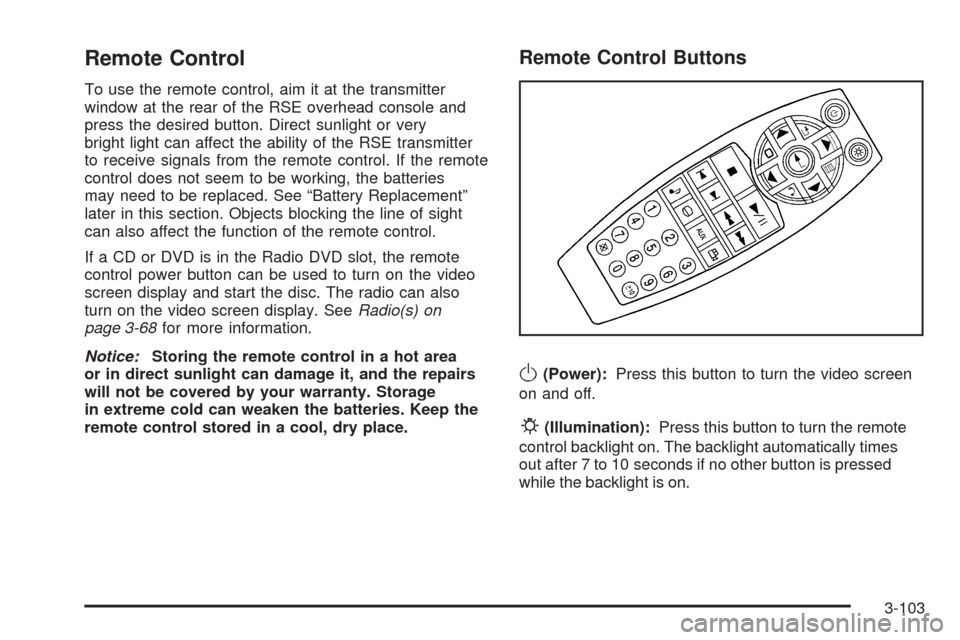
Remote Control
To use the remote control, aim it at the transmitter
window at the rear of the RSE overhead console and
press the desired button. Direct sunlight or very
bright light can affect the ability of the RSE transmitter
to receive signals from the remote control. If the remote
control does not seem to be working, the batteries
may need to be replaced. See “Battery Replacement”
later in this section. Objects blocking the line of sight
can also affect the function of the remote control.
If a CD or DVD is in the Radio DVD slot, the remote
control power button can be used to turn on the video
screen display and start the disc. The radio can also
turn on the video screen display. SeeRadio(s) on
page 3-68for more information.
Notice:Storing the remote control in a hot area
or in direct sunlight can damage it, and the repairs
will not be covered by your warranty. Storage
in extreme cold can weaken the batteries. Keep the
remote control stored in a cool, dry place.
Remote Control Buttons
O(Power):Press this button to turn the video screen
on and off.
P(Illumination):Press this button to turn the remote
control backlight on. The backlight automatically times
out after 7 to 10 seconds if no other button is pressed
while the backlight is on.
3-103
Page 233 of 436
r(Fast Reverse):Press this button to fast reverse
the DVD or CD. To stop fast reversing a DVD video,
press the play/pause button. To stop fast reversing a
DVD audio or CD, release the fast reverse button. This
button might not work when the DVD is playing the
copyright information or the previews.
[(Fast Forward):Press this button to fast forward
the DVD or CD. To stop fast forwarding a DVD
video, press the play/pause button. To stop fast
forwarding a DVD audio or CD, release the fast forward
button. This button might not work when the DVD is
playing the copyright information or the previews.
e(Audio):Press this button to change audio tracks
on DVDs that have this feature when the DVD is
playing. The format and content of this function vary
for each disc.
{(Subtitles):Press this button to turn ON/OFF
subtitles and to move through subtitle options when
a DVD is playing. The format and content of this
function vary for each disc.AUX (Auxiliary):Press this button to switch the system
between the DVD player and an auxiliary source.
d(Camera):Press this button to change camera
angles on DVDs that have this feature when a DVD is
playing. The format and content of this function vary
for each disc.
1 through 0 (Numeric Keypad):The numeric keypad
provides the capability of direct chapter or track
number selection.
\(Clear):Press this button within three seconds
after inputting a numeric selection, to clear all numeric
inputs.
}10 (Double Digit Entries):Press this button to
select chapter or track numbers greater than 9.
Press this button before inputting the number.
If the remote control becomes lost or damaged,
a new universal remote control can be purchased.
If this happens, make sure the universal remote control
uses a code set of Toshiba
®.
3-105
Page 234 of 436
Battery Replacement
To change the remote control batteries, do the following:
1. Slide the rear cover back on the remote control.
2. Replace the two batteries in the compartment.
Make sure that they are installed correctly,
using the diagram on the inside of the battery
compartment.
3. Replace the battery cover.
If the remote control is to be stored for a long period
of time, remove the batteries and keep them in a cool,
dry place.
Problem Recommended Action
No power. The ignition might not
be turned ON/RUN or in
ACC/ACCESSORY.
The picture does not
ll the screen. There are
black borders on the
top and bottom or on
both sides or it looks
stretched out.Check the display mode
settings in the setup
menu by pressing the
display menu button on
the remote control.
Problem Recommended Action
In auxiliary mode, the
picture moves or scrolls.Check the auxiliary
input connections at
both devices.
The remote control
does not work.Check to make sure
there is no obstruction
between the remote
control and the
transmitter window.
Check the batteries to
make sure they are not
dead or installed
incorrectly.
After stopping the
player, I push Play but
sometimes the DVD
starts where I left off
and sometimes at the
beginning.If the stop button was
pressed one time, the
DVD player resumes
playing where the DVD
was stopped. If the stop
button was pressed
two times the DVD player
begins to play from the
beginning of the DVD.
3-106
Page 235 of 436
Problem Recommended Action
The auxiliary source
is running but there
is no picture or sound.Check that the RSE
video screen is in the
auxiliary source mode.
Check the auxiliary
input connections at
both devices.
Sometimes the wireless
headphone audio cuts
out or buzzes.Check for obstructions,
low batteries, reception
range, and interference
from cellular telephone
towers or by using
your cellular telephone
in the vehicle.
Check that the
headphones are on
correctly using the
L (left) and R (right)
on the headphones.
I lost the remote and/or
the headphones.See your dealer/retailer
for assistance.
The DVD is playing,
but there is no picture
or sound.Check that the RSE
video screen is sourced
to the DVD player.DVD Display Error Messages
The DVD display error message depends on which
radio you have. The video screen can display one of
the following:
Disc Load/Eject Error:This message displays when
there are disc load or eject problems.
Disc Format Error:This message displays, if the
disc is inserted with the disc label wrong side up,
or if the disc is damaged.
Disc Region Error:This message displays, if the
disc is not from a correct region.
No Disc Inserted:This message displays, if no disc
is present when the
Zbutton is pressed on the radio.
DVD Distortion
Video distortion may occur when operating cellular
phones, scanners, CB radios, Global Position
Systems (GPS)*, two-way radios, mobile fax,
or walkie talkies.
It may be necessary to turn off the DVD player when
operating one of these devices in or near the vehicle.
*Excludes the OnStar
®System.
3-107
Page 282 of 436
California Perchlorate Materials
Requirements
Certain types of automotive applications, such as airbag
initiators, seat belt pretensioners, and lithium batteries
contained in remote keyless entry transmitters, may
contain perchlorate materials. Special handling may be
necessary. For additional information, see
www.dtsc.ca.gov/hazardouswaste/perchlorate.
Doing Your Own Service Work
{CAUTION:
You can be injured and your vehicle could be
damaged if you try to do service work on a
vehicle without knowing enough about it.
Be sure you have sufficient knowledge,
experience, the proper replacement parts,
and tools before you attempt any vehicle
maintenance task.
CAUTION: (Continued)
CAUTION: (Continued)
Be sure to use the proper nuts, bolts, and
other fasteners. English and metric
fasteners can be easily confused. If you
use the wrong fasteners, parts can later
break or fall off. You could be hurt.
If you want to do some of your own service work, you
should use the proper service manual. It tells you much
more about how to service your vehicle than this
manual can. To order the proper service manual, see
Service Publications Ordering Information on page 7-15.
Your vehicle has an airbag system. Before attempting
to do your own service work, seeServicing Your
Airbag-Equipped Vehicle on page 1-70.
You should keep a record with all parts receipts and list
the mileage and the date of any service work you
perform. SeeMaintenance Record on page 6-16.
5-4
Page 291 of 436
A. Engine Air Cleaner/Filter. SeeEngine Air
Cleaner/Filter on page 5-19.
B. Engine Oil Fill Cap. See “When to Add Engine Oil”
underEngine Oil on page 5-15.
C. Engine Oil Dipstick. See “Checking Engine Oil”
underEngine Oil on page 5-15.
D. Brake Fluid Reservoir. SeeBrakes on page 5-33.
E. Engine Compartment Fuse Block. SeeFuses
and Circuit Breakers on page 5-100.F. Remote Positive (+) Terminal. SeeJump Starting on
page 5-36.
G. Engine Coolant Surge Tank. SeeEngine Coolant on
page 5-22.
H. Windshield Washer Fluid Reservoir. SeeWindshield
Washer Fluid on page 5-32.
5-13