reset CHEVROLET EQUINOX 2010 2.G User Guide
[x] Cancel search | Manufacturer: CHEVROLET, Model Year: 2010, Model line: EQUINOX, Model: CHEVROLET EQUINOX 2010 2.GPages: 394, PDF Size: 5.7 MB
Page 139 of 394
Infotainment System 6-9
Press the0BACK button to delete
the last character in the sequence
or press and hold to delete the
entire character sequence.
Audio Settings
The audio settings can be set for
each radio band and each audio
player source.
To quickly reset an audio setting
value to 0:
1. Press the TONE button.
2. Select the audio setting.
3. Press and hold the MENU/SEL button until the value changes
to 0.
Press the
0BACK button to go
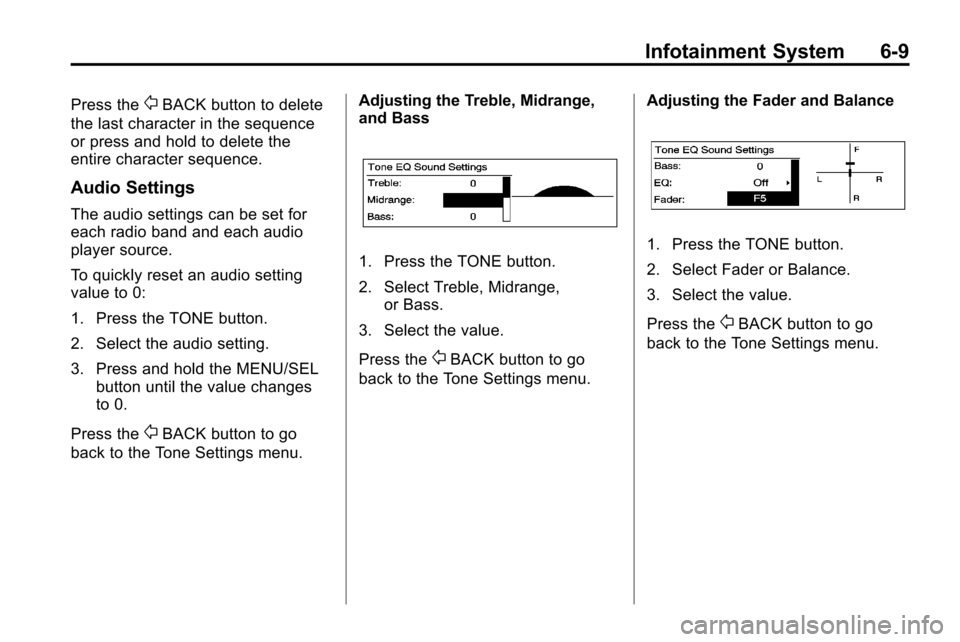
back to the Tone Settings menu. Adjusting the Treble, Midrange,
and Bass
1. Press the TONE button.
2. Select Treble, Midrange,
or Bass.
3. Select the value.
Press the
0BACK button to go
back to the Tone Settings menu. Adjusting the Fader and Balance
1. Press the TONE button.
2. Select Fader or Balance.
3. Select the value.
Press the
0BACK button to go
back to the Tone Settings menu.
Page 141 of 394
Infotainment System 6-11
Maximum Startup Volume
The maximum volume played when
the Radio with CD is first turned on
can be set.
1. Press the CONFIG button.
2. Select Radio Settings.
3. Select Maximum StartupVolume.
4. Select the setting.
5. Press the
0BACK button
to go back to the System
Configuration menu.
Radio
AM-FM Radio
Control Buttons
The buttons used to control the
radio are:
RADIO/BAND: Press to turn the
radio on and choose between AM,
FM, and XM™, if equipped.
MENU/SEL: Turn to manually
search for stations.
FAV: Press to open the
favorites list.
lSEEK orgSEEK: Press to
search for stations. Press and hold
to fast forward and rewind time
shifted data. See “Time Shifting
(Radio with CD/DVD and MEM)”
later in this section.
k: Press to pause and resume
time shifted data. See “Time Shifting
(Radio with CD/DVD and MEM)”
later in this section.
1 to 6: Press to select preset
stations.
RDS (Radio Data System)
The radio may have RDS. The RDS
feature is available for use only on
FM stations that broadcast RDS
information. This feature only works
when the information from the radio
station is available. In rare cases,
a radio station could broadcast
incorrect information that causes the
radio features to work improperly.
If this happens, contact the radio
station.
While the radio is tuned to an
FM-RDS station, the station name
or call letters display.
Page 144 of 394
6-14 Infotainment System
Press and release thegSEEK or
lSEEK buttons to jump forward or
back 30 seconds in the time shift
buffer.
When the radio station is changed,
the buffer is cleared and
automatically restarted for the
current station. Content from a
previously tuned station is no longer
available.
The time shift feature is not
available while recording or with
other sources of playback.
Pausing AM/FM with the Vehicle
Turned Off
If AM/FM is paused when the
vehicle is turned off, the radio
continues to buffer the current radio
station for up to 20 minutes. If the
vehicle is turned back on within
20 minutes, the radio resumes
playback from the paused point.
Satellite Radio
Vehicles with an XM™ Satellite
Radio tuner and a valid XM Satellite
Radio subscription can receive XM
programming.
XM Satellite Radio Service
XM is a satellite radio service that is
based in the 48 contiguous United
States and 10 Canadian provinces.
XM Satellite Radio has a wide
variety of programming and
commercial-free music,
coast-to-coast, and in digital-quality
sound. A service fee is required to
receive the XM service. For more
information, contact XM at
www.xmradio.com or call
1-800-929-2100 in the U.S. and
www.xmradio.ca or call
1-877-438-9677 in Canada.
Control Buttons
The buttons used to control the XM
radio are:
RADIO/BAND: Press to turn the
radio on and choose between AM,
FM, and XM™, if equipped.
gSEEK /lSEEK: Press to go
to the previous or next station.
FAV: Press to open the
favorites list.
k: Press to pause and resume
time shifted data. See “Time Shifting
(Radio with CD/DVD and MEM)”
later in this section.
1 to 6: Press to select preset
stations.
MENU/SEL: Turn to select stations.
Press to open the XM Satellite
Radio menu.
Page 241 of 394
Driving and Operating 8-37
Manual Mode
Electronic Range Select
(ERS) Mode
ERS or manual mode allows for the
selection of the range of gear
positions. Use this mode when
driving down hill or towing a trailer
to limit the top gear and vehicle
speed. The shift position indicator
within the Driver Information Center
(DIC) will display a number next to
the M indicating the highest
available gear under manual mode
and the driving conditions when
manual mode was selected.
To use this feature:
1. Move the shift lever toM (Manual Mode).
2. Press the plus/minus button on the shift lever, to increase or
decrease the gear range
available. When shifting to M (Manual Mode),
the transmission will shift to a preset
lower gear range. For this preset
range, the highest gear available is
displayed next to the M in the DIC.
See
Driver Information Center (DIC)
on page 4‑24for more information.
All gears below that number are
available to use. For example, when
4 (Fourth) is shown next to the M,
1 (First) through 4 (Fourth) gears are
shifted automatically. To shift to
5 (Fifth) gear, press the + (Plus)
button or shift into D (Drive).
M (Manual Mode) will prevent
shifting to a lower gear range if the
engine speed is too high. If vehicle
speed is not reduced within the time
allowed, the lower gear range shift
will not be completed. Slow the
vehicle, then press the −(Minus)
button to the desired lower gear
range.
While using the ERS, cruise control
can be used.
Fuel Economy Mode
The vehicle may have a Fuel
Economy Mode. When engaged,
fuel economy mode can improve the
vehicle's fuel economy.
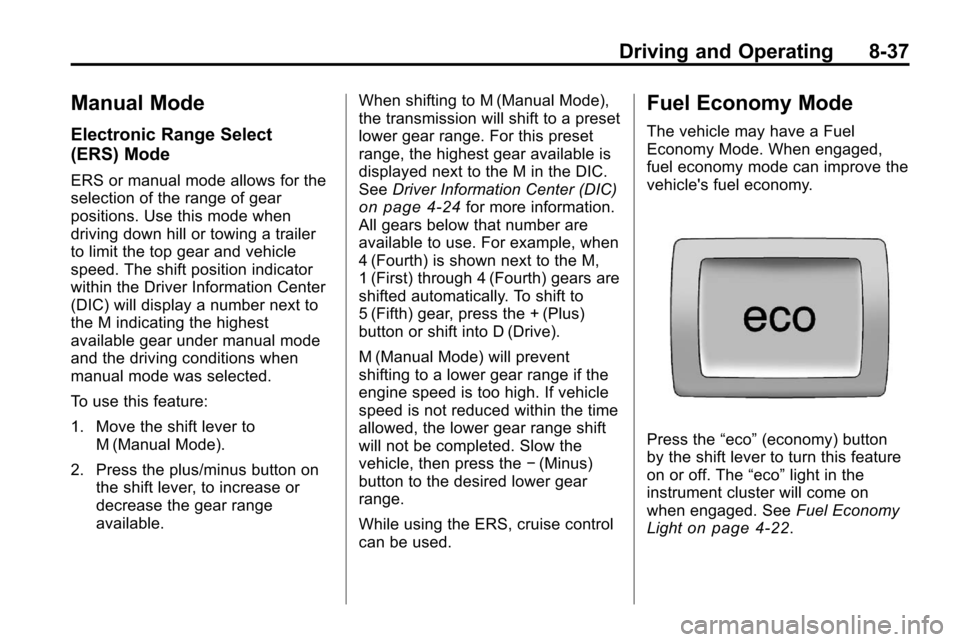
Press the “eco”(economy) button
by the shift lever to turn this feature
on or off. The “eco”light in the
instrument cluster will come on
when engaged. See Fuel Economy
Light
on page 4‑22.
Page 257 of 394
Driving and Operating 8-53
.A fast flash may indicate that the
display has been on for the
maximum allowable time during
a reverse cycle, or the display
has reached an over
temperature limit.
The fast flash conditions are
used to protect the video device
from high temperature
conditions. Once conditions
return to normal the device will
reset and the green indicator will
stop flashing.
During any of these fault conditions,
the display will be blank and the
indicator will continue to flash as
long as the vehicle is in R (Reverse)
or until the conditions return to
normal.
Pressing and holding
zwhen the
left indicator light is flashing will turn
off the video display along with the
left indicator light.
Fuel
Use of the recommended fuel is an
important part of the proper
maintenance of this vehicle. To help
keep the engine clean and maintain
optimum vehicle performance, we
recommend the use of gasoline
advertised as TOP TIER Detergent
Gasoline.
Look for the TOP TIER label on the
fuel pump to ensure gasoline meets
enhanced detergency standards
developed by auto companies. A list
of marketers providing TOP TIER
Detergent Gasoline can be found at
www.toptiergas.com.
Page 279 of 394
Vehicle Care 9-11
.American Petroleum Institute
(API) starburst symbol
Oils meeting these requirements
should have the starburst
symbol on the container. This
symbol indicates that the oil has
been certified by the American
Petroleum Institute (API).
Notice: Use only engine oil
identified as meeting GM
Standard GM6094M and showing
the American Petroleum Institute
Certified For Gasoline Engines
starburst symbol. Failure to use
the recommended oil can result
in engine damage not covered by
the vehicle warranty. Cold Temperature Operation
If in an area of extreme cold, where
the temperature falls below
−29°C
(−20°F), use either an SAE 5W-30
synthetic oil or an SAE 0W-30
engine oil. Both provide easier cold
starting for the engine at extremely
low temperatures. Always use an oil
that meets the required
specification, GM6094M.
Engine Oil Additives / Engine
Oil Flushes
Do not add anything to the oil. The
recommended oils with the starburst
symbol that meet GM standards are
all that is needed for good
performance and engine protection.
Engine oil system flushes are not
recommended and could cause
engine damage not covered by the
vehicle warranty.
Engine Oil Life System
When to Change Engine Oil
This vehicle has a computer system
that indicates when to change the
engine oil and filter. This is based
on engine revolutions and engine
temperature, and not on mileage.
Based on driving conditions, the
mileage at which an oil change is
indicated can vary considerably. For
the oil life system to work properly,
the system must be reset every time
the oil is changed.
When the system has calculated
that oil life has been diminished, it
indicates that an oil change is
necessary. A “Change Engine Oil
Soon” message comes on. See
Engine Oil Messages
on
page 4‑30. Change the oil as soon
as possible within the next 1 000 km
(600 miles). It is possible that,
if driving under the best conditions,
the oil life system might not indicate
that an oil change is necessary for
over a year. However, the engine oil
and filter must be changed at least
Page 280 of 394
9-12 Vehicle Care
once a year and at this time the
system must be reset. Your dealer
has trained service people who will
perform this work using genuine
parts and reset the system. It is also
important to check the oil regularly
and keep it at the proper level.
If the system is ever reset
accidentally, the oil must be
changed at 5 000 km (3,000 miles)
since the last oil change.
Remember to reset the oil life
system whenever the oil is changed.
How to Reset the Engine Oil
Life System
Reset the system whenever the
engine oil is changed so that the
system can calculate the next
engine oil change. To reset the
system:
1. Turn the ignition to ON/RUN withthe engine off.
2. Fully press and release the accelerator pedal three times
within five seconds. If the vehicle has Driver Information
Center (DIC) buttons:
1. Turn the ignition to ON/RUN,
with the engine off.
2. Press the DIC menu button until “Remaining Oil Life” displays.
3. Press and hold the set/clear button until “100%”is displayed.
4. Turn the key to LOCK/OFF.
The system is reset when the
“Change Engine Oil Soon” message
goes off.
What to Do with Used Oil
Used engine oil contains elements
that can be unhealthy for your skin
and could even cause cancer. Do
not let used oil stay on your skin.
Clean your skin and nails with soap
and water, or a good hand cleaner.
Wash or properly dispose of clothing
or rags. See the manufacturer's
warnings about the use and
disposal of oil products. Used oil can be a threat to the
environment. If you change your
own oil, be sure to drain all the oil
from the filter before disposal. Never
dispose of oil by putting it in the
trash, pouring it on the ground, into
sewers, or into streams or bodies of
water. Recycle it by taking it to a
place that collects used oil.
Automatic Transmission
Fluid
How to Check Automatic
Transmission Fluid
It is not necessary to check the
transmission fluid level.
A transmission fluid leak is the only
reason for fluid loss. If a leak
occurs, take the vehicle to your
dealer service department and have
it repaired as soon as possible.
Page 295 of 394
Vehicle Care 9-27
Rear Wiper Blade Replacement
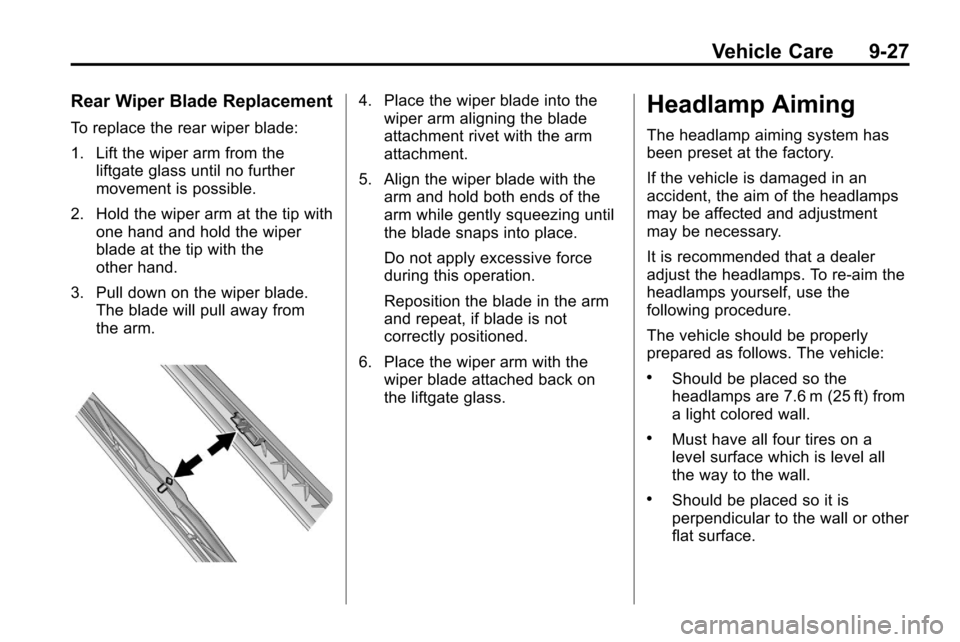
To replace the rear wiper blade:
1. Lift the wiper arm from theliftgate glass until no further
movement is possible.
2. Hold the wiper arm at the tip with one hand and hold the wiper
blade at the tip with the
other hand.
3. Pull down on the wiper blade. The blade will pull away from
the arm.
4. Place the wiper blade into thewiper arm aligning the blade
attachment rivet with the arm
attachment.
5. Align the wiper blade with the arm and hold both ends of the
arm while gently squeezing until
the blade snaps into place.
Do not apply excessive force
during this operation.
Reposition the blade in the arm
and repeat, if blade is not
correctly positioned.
6. Place the wiper arm with the wiper blade attached back on
the liftgate glass.Headlamp Aiming
The headlamp aiming system has
been preset at the factory.
If the vehicle is damaged in an
accident, the aim of the headlamps
may be affected and adjustment
may be necessary.
It is recommended that a dealer
adjust the headlamps. To re-aim the
headlamps yourself, use the
following procedure.
The vehicle should be properly
prepared as follows. The vehicle:
.Should be placed so the
headlamps are 7.6 m (25 ft) from
a light colored wall.
.Must have all four tires on a
level surface which is level all
the way to the wall.
.Should be placed so it is
perpendicular to the wall or other
flat surface.
Page 321 of 394
Vehicle Care 9-53
Reset the Tire Pressure Monitor
System. SeeTire Pressure
Monitor Operation
on page 9‑49.
Make certain that all wheel nuts
are properly tightened. See
“Wheel Nut Torque” under
Capacities and Specifications
on
page 11‑2
.
{WARNING
Rust or dirt on a wheel, or on the
parts to which it is fastened, can
make wheel nuts become loose
after time. The wheel could come
off and cause an accident. When
changing a wheel, remove any
rust or dirt from places where the
wheel attaches to the vehicle. In
an emergency, use a cloth or a
paper towel to do this; but be sure
to use a scraper or wire brush
later, if needed, to get all the rust
or dirt off. See If a Tire Goes Flat
on page 9‑59.
When It Is Time for New
Tires
Various factors, such as
maintenance, temperatures, driving
speeds, vehicle loading, and road
conditions influence when you need
new tires.
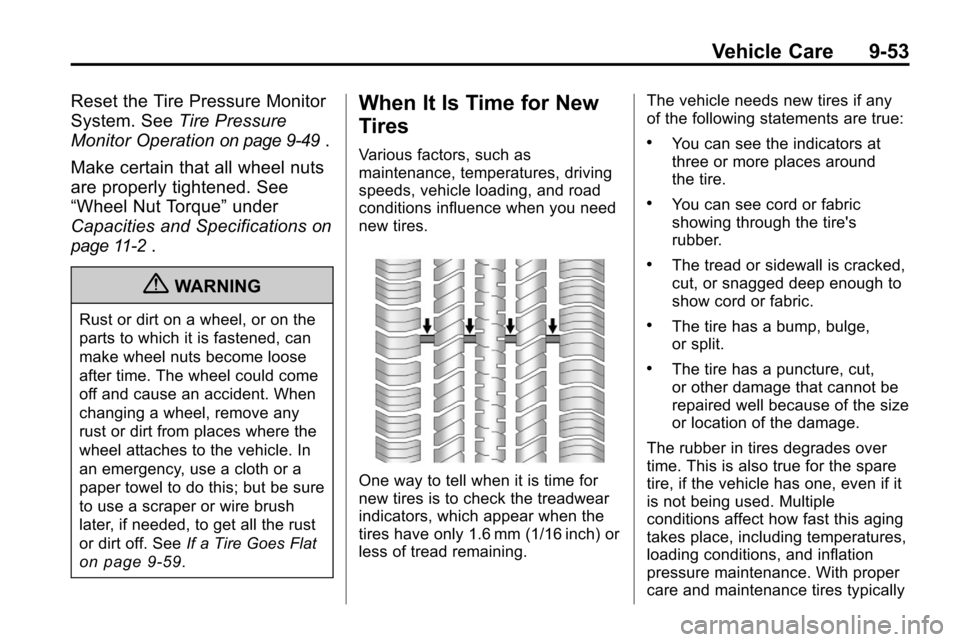
One way to tell when it is time for
new tires is to check the treadwear
indicators, which appear when the
tires have only 1.6 mm (1/16 inch) or
less of tread remaining. The vehicle needs new tires if any
of the following statements are true:
.You can see the indicators at
three or more places around
the tire.
.You can see cord or fabric
showing through the tire's
rubber.
.The tread or sidewall is cracked,
cut, or snagged deep enough to
show cord or fabric.
.The tire has a bump, bulge,
or split.
.The tire has a puncture, cut,
or other damage that cannot be
repaired well because of the size
or location of the damage.
The rubber in tires degrades over
time. This is also true for the spare
tire, if the vehicle has one, even if it
is not being used. Multiple
conditions affect how fast this aging
takes place, including temperatures,
loading conditions, and inflation
pressure maintenance. With proper
care and maintenance tires typically
Page 352 of 394
10-2 Service and Maintenance
.Are driven off-road in the
recommended manner. See
Off-Road Driving on page 8‑8.
.Use the recommended fuel. See
Recommended Fuelon
page 8‑54.
{WARNING
Performing maintenance work can
be dangerous. Some jobs can
cause serious injury. Perform
maintenance work only if you
have the required know-how and
the proper tools and equipment.
If in doubt, see your dealer to
have a qualified technician do the
work. See Doing Your Own
Service Work on page 9‑4.
At your dealer, you can be certain
that you will receive the highest
level of service available. Your dealer has specially trained
service technicians, uses genuine
replacement parts, as well as, up to
date tools and equipment to ensure
fast and accurate diagnostics.
The proper replacement parts,
fluids, and lubricants to use are
listed in
Recommended Fluids and
Lubricantson page 10‑7and
Maintenance Replacement Partson
page 10‑9. We recommend the use
of genuine parts from your dealer.
Rotation of New Tires
To maintain ride, handling, and
performance of the vehicle, it is
important that the first rotation
service for new tires be performed
when they have 8 000 to 13 000 km
(5,000 to 8,000 miles). See Tire
Rotation on page 9‑52.
Scheduled
Maintenance
When the Change Engine Oil
Soon Message Displays
Change engine oil and filter. See
Engine Oilon page 9‑10. An
Emission Control Service.
When the Change Engine Oil
Soon message displays, service
is required for the vehicle as
soon as possible, within the next
1 000 km/600 miles. If driving under
the best conditions, the engine oil
life system might not indicate the
need for vehicle service for more
than a year. The engine oil and filter
must be changed at least once a
year and the oil life system must be
reset. Your dealer has trained
service technicians who will perform
this work and reset the system.
If the engine oil life system is reset
accidentally, service the vehicle
within 5 000 km/3,000 miles since
the last service. Reset the oil life