mirror CHEVROLET EQUINOX 2011 2.G User Guide
[x] Cancel search | Manufacturer: CHEVROLET, Model Year: 2011, Model line: EQUINOX, Model: CHEVROLET EQUINOX 2011 2.GPages: 446, PDF Size: 6.68 MB
Page 52 of 446
Black plate (16,1)Chevrolet Equinox Owner Manual - 2011
2-16 Keys, Doors and Windows
Interior Mirrors
Manual Rearview Mirror
Hold the inside rearview mirror in
the center and move it for a clearer
view behind the vehicle. Adjust the
mirror to avoid glare from the
headlamps behind you. Push the
tab forward for daytime use and pull
it for nighttime use.
Vehicles with OnStar
®have three
additional control buttons located at
the bottom of the mirror. See your
dealer for more information on the
system and how to subscribe to
OnStar. See the OnStar Owner's
Guide for more information about
the services OnStar provides.
Automatic Dimming
Rearview Mirror
The vehicle may have an automatic
dimming inside rearview mirror.
Automatic dimming reduces the
glare from the headlamps of the
vehicle behind you. The dimming feature comes on and
the indicator light comes on each
time the vehicle is started.
O:
Press to turn automatic
dimming on or off.
If the vehicle has a rear vision
camera (RVC) the
Obutton for
turning the automatic dimming
feature on or off will not be
available. See Rear Vision Camera
(RVC) on page 9‑48 for more
information.
Vehicles with OnStar
®have three
additional control buttons located at
the bottom of the mirror. See your
dealer for more information on the
system and how to subscribe to
OnStar. See the OnStar Owner's
Guide for more information about
the services OnStar provides.
Cleaning the Mirror
Do not spray glass cleaner directly
on the mirror. Use a soft towel
dampened with water.
Windows
{WARNING
Leaving children, helpless adults,
or pets in a vehicle with the
windows closed is dangerous.
They can be overcome by the
extreme heat and suffer
permanent injuries or even
death from heat stroke. Never
leave a child, a helpless adult,
or a pet alone in a vehicle,
especially with the windows
closed in warm or hot weather.
Page 55 of 446
Black plate (19,1)Chevrolet Equinox Owner Manual - 2011
Keys, Doors and Windows 2-19
Roof
Sunroof
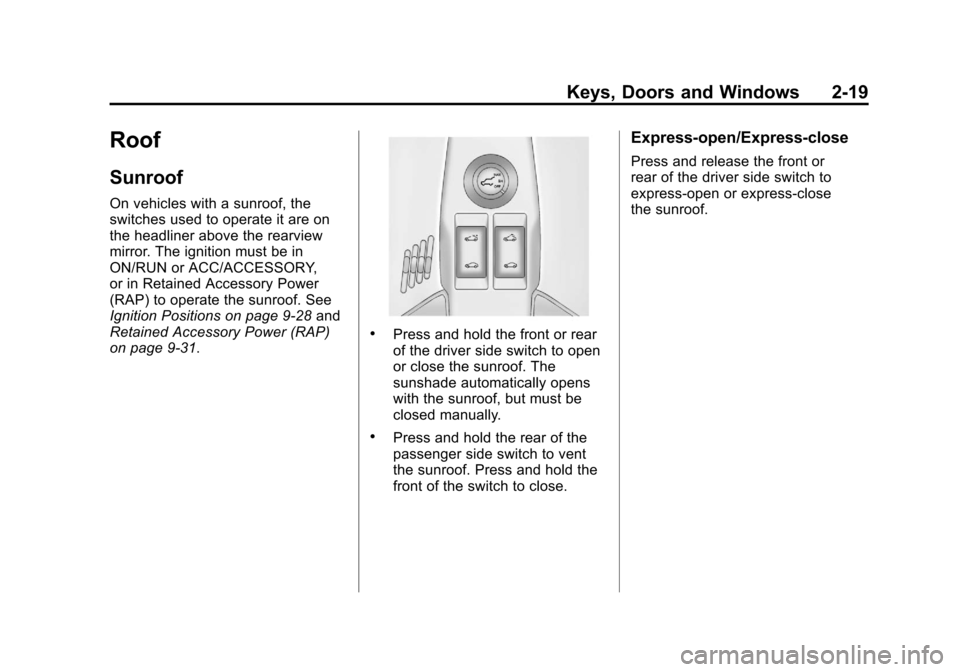
On vehicles with a sunroof, the
switches used to operate it are on
the headliner above the rearview
mirror. The ignition must be in
ON/RUN or ACC/ACCESSORY,
or in Retained Accessory Power
(RAP) to operate the sunroof. See
Ignition Positions on page 9‑28and
Retained Accessory Power (RAP)
on page 9‑31.
.Press and hold the front or rear
of the driver side switch to open
or close the sunroof. The
sunshade automatically opens
with the sunroof, but must be
closed manually.
.Press and hold the rear of the
passenger side switch to vent
the sunroof. Press and hold the
front of the switch to close.
Express-open/Express-close
Press and release the front or
rear of the driver side switch to
express-open or express-close
the sunroof.
Page 60 of 446
Black plate (4,1)Chevrolet Equinox Owner Manual - 2011
3-4 Seats and Restraints
To adjust the lumbar support, see
Lumbar Adjustment on page 3‑6.
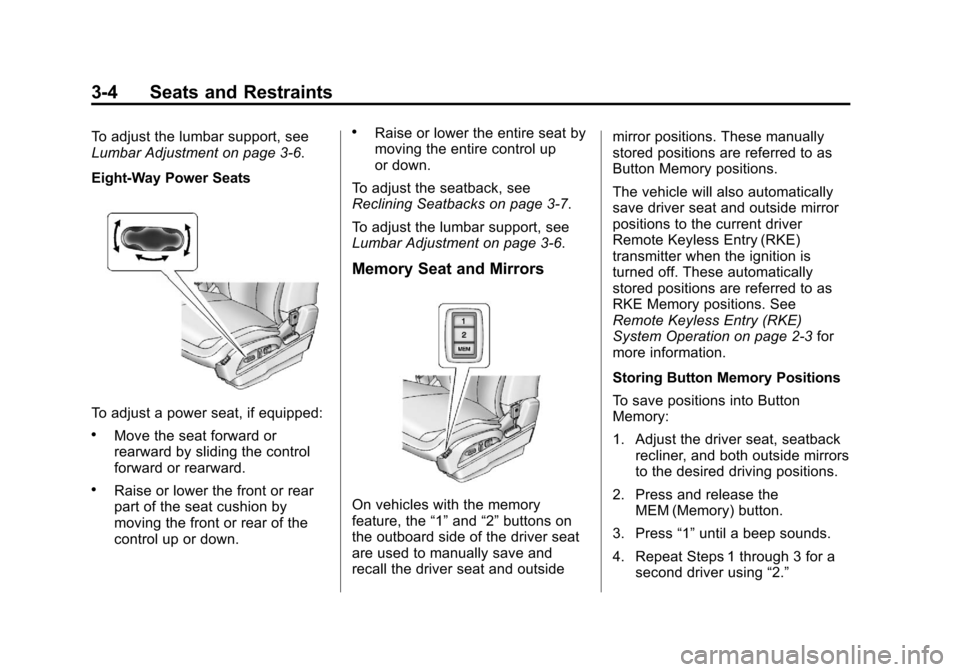
Eight‐Way Power Seats
To adjust a power seat, if equipped:
.Move the seat forward or
rearward by sliding the control
forward or rearward.
.Raise or lower the front or rear
part of the seat cushion by
moving the front or rear of the
control up or down.
.Raise or lower the entire seat by
moving the entire control up
or down.
To adjust the seatback, see
Reclining Seatbacks on page 3‑7.
To adjust the lumbar support, see
Lumbar Adjustment on page 3‑6.
Memory Seat and Mirrors
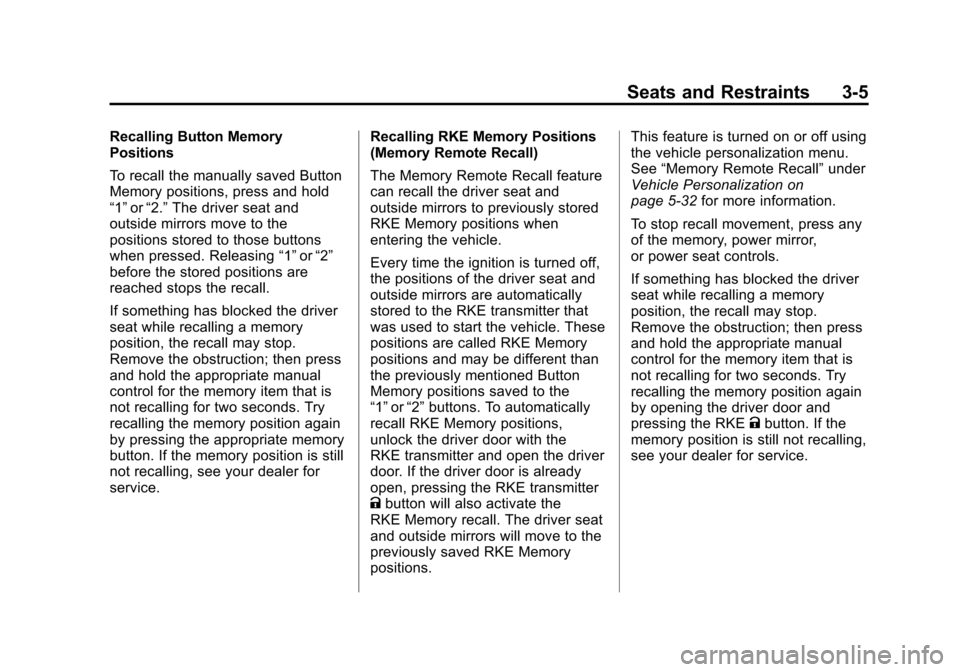
On vehicles with the memory
feature, the “1”and “2”buttons on
the outboard side of the driver seat
are used to manually save and
recall the driver seat and outside mirror positions. These manually
stored positions are referred to as
Button Memory positions.
The vehicle will also automatically
save driver seat and outside mirror
positions to the current driver
Remote Keyless Entry (RKE)
transmitter when the ignition is
turned off. These automatically
stored positions are referred to as
RKE Memory positions. See
Remote Keyless Entry (RKE)
System Operation on page 2‑3
for
more information.
Storing Button Memory Positions
To save positions into Button
Memory:
1. Adjust the driver seat, seatback recliner, and both outside mirrors
to the desired driving positions.
2. Press and release the MEM (Memory) button.
3. Press “1”until a beep sounds.
4. Repeat Steps 1 through 3 for a second driver using “2.”
Page 61 of 446
Black plate (5,1)Chevrolet Equinox Owner Manual - 2011
Seats and Restraints 3-5
Recalling Button Memory
Positions
To recall the manually saved Button
Memory positions, press and hold
“1”or“2.” The driver seat and
outside mirrors move to the
positions stored to those buttons
when pressed. Releasing “1”or“2”
before the stored positions are
reached stops the recall.
If something has blocked the driver
seat while recalling a memory
position, the recall may stop.
Remove the obstruction; then press
and hold the appropriate manual
control for the memory item that is
not recalling for two seconds. Try
recalling the memory position again
by pressing the appropriate memory
button. If the memory position is still
not recalling, see your dealer for
service. Recalling RKE Memory Positions
(Memory Remote Recall)
The Memory Remote Recall feature
can recall the driver seat and
outside mirrors to previously stored
RKE Memory positions when
entering the vehicle.
Every time the ignition is turned off,
the positions of the driver seat and
outside mirrors are automatically
stored to the RKE transmitter that
was used to start the vehicle. These
positions are called RKE Memory
positions and may be different than
the previously mentioned Button
Memory positions saved to the
“1”
or“2” buttons. To automatically
recall RKE Memory positions,
unlock the driver door with the
RKE transmitter and open the driver
door. If the driver door is already
open, pressing the RKE transmitter
K button will also activate the
RKE Memory recall. The driver seat
and outside mirrors will move to the
previously saved RKE Memory
positions. This feature is turned on or off using
the vehicle personalization menu.
See
“Memory Remote Recall” under
Vehicle Personalization on
page 5‑32 for more information.
To stop recall movement, press any
of the memory, power mirror,
or power seat controls.
If something has blocked the driver
seat while recalling a memory
position, the recall may stop.
Remove the obstruction; then press
and hold the appropriate manual
control for the memory item that is
not recalling for two seconds. Try
recalling the memory position again
by opening the driver door and
pressing the RKE Kbutton. If the
memory position is still not recalling,
see your dealer for service.
Page 158 of 446
Black plate (34,1)Chevrolet Equinox Owner Manual - 2011
5-34 Instruments and Controls
Remote Start Auto Heat Seats
When on, this feature will turn the
heated seats on when using remote
start on cold days.
Press the MENU/SELECT knob
when“Remote Start Auto Heat
Seats” is highlighted to toggle
between “On”or“Off.”
Press
}BACK to confirm the
selection and go back to the
last menu.
Comfort and Convenience
Select the Comfort and
Convenience menu and the
following will be displayed:
.Easy Exit Driver Seat
.Chime Volume
.Reverse Tilt Mirror Easy Exit Driver Seat
When on, this feature will move the
driver seat rearward upon turning
the ignition off and the driver door
opening. This may be performed to
make it easier to exit the vehicle.
See the
“Easy Exit Driver Seat”
information under Power Seat
Adjustment on page 3‑3 for more
information.
This allows you to turn the easy exit
seat feature on or off.
Press the MENU/SELECT knob
when “Easy Exit Driver Seat” is
highlighted. Turn the knob to select
“On” or“Off.” Press the knob to
confirm and go back to the
last menu.
Chime Volume
This allows the selection of the
chime volume level.
Press the MENU/SELECT knob
when “Chime Volume” is
highlighted. Turn the knob to select
“Normal”or
“High.” Press the knob to confirm
and go back to the last menu.
Reverse Tilt Mirror
When on, both the driver and
passenger mirrors will tilt downward
when vehicle is shifted to
R (Reverse) to improve visibility of
the ground near the rear wheels.
They will return to their previous
driving position when the vehicle is
shifted out of R (Reverse), the
ignition is turned to OFF, or the
vehicle is left in reverse. See Park
Tilt Mirrors on page 2‑15 for more
information.
This allows you to turn the park tilt
mirrors feature on or off.
Press the MENU/SELECT knob
when “Reverse Tilt Mirror” is
highlighted. Turn the knob to select
“On” or“Off.” Press the knob to
confirm and go back to the
last menu.
Page 161 of 446
Black plate (37,1)Chevrolet Equinox Owner Manual - 2011
Instruments and Controls 5-37
Remote Lock Feedback
This allows selection of what type of
feedback is given when unlocking
the vehicle with the RKE transmitter.
Press the MENU/SELECT knob
when“Remote Lock Feedback” is
highlighted. Turn the knob to select
“Lights and Horn,” “Lights Only,”
“Horn Only,” or“Off. ”Press the knob
to confirm and go back to the
last menu.
Remote Door Unlock
This allows selection of which doors
will unlock when pressing the unlock
button on the RKE transmitter.
Press the MENU/SELECT knob
when “Remote Door Unlock” is
highlighted. Turn the knob to select
“All Doors” or“Driver Door.” Press
the knob to confirm and go back to
the last menu. Memory Remote Recall
This allows the Memory Remote
Recall feature to be turned on or off.
When on, this feature will recall the
current driver's last seat, outside
mirrors upon unlocking the driver
door with the RKE, and opening that
door. The current driver is identified
when the RKE transmitter is used to
unlock the driver door. See
“Memory
Remote Recall” underPower Seat
Adjustment on page 3‑3 for more
information.
Memory Remote Recall is when the
memorized settings will be recalled
as you unlock the vehicle.
Press the MENU/SELECT knob
when “Memory Remote Recall” is
highlighted to toggle between “On”
or “Off.” Press
}BACK to confirm
the selection and go back to the
last menu.
Return to Factory Settings
Select “Return to Factory Settings”
to return all of the vehicle
personalization to the default
settings. Turn the knob to select
“Yes” or“No.” Press the knob to
confirm and go back to the
last menu.
Page 245 of 446
Black plate (7,1)Chevrolet Equinox Owner Manual - 2011
Driving and Operating 9-7
Turn the steering wheel 8 to 13 cm
(3 to 5 in), about one-eighth turn,
until the right front tire contacts the
pavement edge. Then turn the
steering wheel to go straight down
the roadway.
Loss of Control
Let us review what driving experts
say about what happens when the
three control systems—brakes,
steering, and acceleration —do not
have enough friction where the tires
meet the road to do what the driver
has asked.
In any emergency, do not give up.
Keep trying to steer and constantly
seek an escape route or area of
less danger.
Skidding
In a skid, a driver can lose control of
the vehicle. Defensive drivers avoid
most skids by taking reasonable
care suited to existing conditions,
and by not overdriving those
conditions. But skids are always
possible.
The three types of skids correspond
to the vehicle's three control
systems. In the braking skid, the
wheels are not rolling. In the
steering or cornering skid, too much
speed or steering in a curve causes
tires to slip and lose cornering force.
And in the acceleration skid, too
much throttle causes the driving
wheels to spin.
If the vehicle starts to slide, ease
your foot off the accelerator pedal
and quickly steer the way you want
the vehicle to go. If you start
steering quickly enough, the vehicle
may straighten out. Always be ready
for a second skid if it occurs. Of course, traction is reduced when
water, snow, ice, gravel, or other
material is on the road. For safety,
slow down and adjust your driving to
these conditions. It is important to
slow down on slippery surfaces
because stopping distance is longer
and vehicle control more limited.
While driving on a surface with
reduced traction, try to avoid
sudden steering, acceleration,
or braking, including reducing
vehicle speed by shifting to a lower
gear. Any sudden changes could
cause the tires to slide. You might
not realize the surface is slippery
until the vehicle is skidding. Learn to
recognize warning clues
—such as
enough water, ice, or packed snow
on the road to make a mirrored
surface —and slow down when you
have any doubt.
Remember: Antilock brakes help
avoid only the braking skid.
Page 257 of 446
Black plate (19,1)Chevrolet Equinox Owner Manual - 2011
Driving and Operating 9-19
Highway Hypnosis
Always be alert and pay attention to
your surroundings while driving.
If you become tired or sleepy, find a
safe place to park the vehicle
and rest.
Other driving tips include:
.Keep the vehicle well ventilated.
.Keep interior temperature cool.
.Keep your eyes moving—scan
the road ahead and to the sides.
.Check the rearview mirror and
vehicle instruments often.
Hill and Mountain Roads
Driving on steep hills or through
mountains is different than driving
on flat or rolling terrain. Tips for
driving in these conditions include:
.Keep the vehicle serviced and in
good shape.
.Check all fluid levels and brakes,
tires, cooling system, and
transmission.
.Shift to a lower gear when going
down steep or long hills.
{WARNING
If you do not shift down, the
brakes could get so hot that they
would not work well. You would
then have poor braking or even
none going down a hill. You could
crash. Shift down to let the engine
assist the brakes on a steep
downhill slope.
{WARNING
Coasting downhill in N (Neutral)
or with the ignition off is
dangerous. The brakes will have
to do all the work of slowing down
and they could get so hot that
they would not work well. You
would then have poor braking or
even none going down a hill.
(Continued)
WARNING (Continued)
You could crash. Always have the
engine running and the vehicle in
gear when going downhill.
.Stay in your own lane. Do not
swing wide or cut across the
center of the road. Drive at
speeds that let you stay in your
own lane.
.Top of hills: Be alert—
something could be in your
lane (stalled car, accident).
.Pay attention to special road
signs (falling rocks area, winding
roads, long grades, passing or
no-passing zones) and take
appropriate action.
Page 258 of 446
Black plate (20,1)Chevrolet Equinox Owner Manual - 2011
9-20 Driving and Operating
Winter Driving
Driving on Snow or Ice
Drive carefully when there is snow
or ice between the tires and the
road, creating less traction or grip.
Wet ice can occur at about 0°C
(32°F) when freezing rain begins to
fall, resulting in even less traction.
Avoid driving on wet ice or in
freezing rain until roads can be
treated with salt or sand.
Drive with caution, whatever the
condition. Accelerate gently so
traction is not lost. Accelerating too
quickly causes the wheels to spin
and makes the surface under the
tires slick, so there is even
less traction.
Try not to break the fragile traction.
If you accelerate too fast, the drive
wheels will spin and polish the
surface under the tires even more.The
Antilock Brake System (ABS)
on page 9‑39 improves vehicle
stability during hard stops on
slippery roads, but apply the brakes
sooner than when on dry pavement.
Allow greater following distance on
any slippery road and watch for
slippery spots. Icy patches can
occur on otherwise clear roads in
shaded areas. The surface of a
curve or an overpass can remain icy
when the surrounding roads are
clear. Avoid sudden steering
maneuvers and braking while
on ice.
Turn off cruise control on slippery
surfaces.
Blizzard Conditions
Being stuck in snow can be a
serious situation. Stay with the
vehicle unless there is help nearby.
If possible, use the Roadside
Assistance Program on page 13‑6.
To get help and keep everyone in
the vehicle safe:
.Turn on the hazard warning
flashers.
.Tie a red cloth to an outside
mirror.
{WARNING
Snow can trap engine exhaust
under the vehicle. This may
cause exhaust gases to get
inside. Engine exhaust contains
Carbon Monoxide (CO) which
cannot be seen or smelled.
It can cause unconsciousness
and even death.
(Continued)
Page 285 of 446
Black plate (47,1)Chevrolet Equinox Owner Manual - 2011
Driving and Operating 9-47
{WARNING
The Ultrasonic Rear Parking
Assist (URPA) system does not
replace driver vision. It cannot
detect:
.Objects that are below the
bumper, underneath the
vehicle, or too close or far
from the vehicle
.Children, pedestrians,
bicyclists, or pets.
If you do not use proper care
before and while backing, vehicle
damage, injury, or death could
occur. Even with URPA, always
check behind the vehicle before
backing up. While backing, be
sure to look for objects and check
the vehicle's mirrors.
How the System Works
URPA comes on automatically
when the shift lever is moved into
R (Reverse). A single tone sounds
to indicate the system is working.
URPA operates only at speeds less
than 8 km/h (5 mph).
An obstacle is indicated by audible
beeps. The interval between the
beeps becomes shorter as the
vehicle gets closer to the obstacle.
When the distance is less than
30 cm (12 in) the beeping is
continuous for 5 seconds.
To be detected, objects must be at
least 20 cm (8 in) off the ground and
below taillamp level. Objects must
also be within 2.5 m (8 ft) from the
rear bumper. The distance objects
can be detected may be less during
warmer or humid weather. PARK ASSIST OFF displays on the
Driver Information Center (DIC) to
indicate that URPA is off. The
message disappears after a short
period of time.
See
Object Detection System
Messages on page 5‑29 for
URPA messages.
Turning the System On and Off
The URPA system can be turned on
and off using the infotainment
system controls. See Vehicle
Personalization on page 5‑32 for
more information.
URPA defaults to the on setting
each time the vehicle is started.