rear view mirror CHEVROLET EQUINOX 2011 2.G Owners Manual
[x] Cancel search | Manufacturer: CHEVROLET, Model Year: 2011, Model line: EQUINOX, Model: CHEVROLET EQUINOX 2011 2.GPages: 446, PDF Size: 6.68 MB
Page 18 of 446
Black plate (12,1)Chevrolet Equinox Owner Manual - 2011
1-12 In Brief
Sensing System for
Passenger Airbag
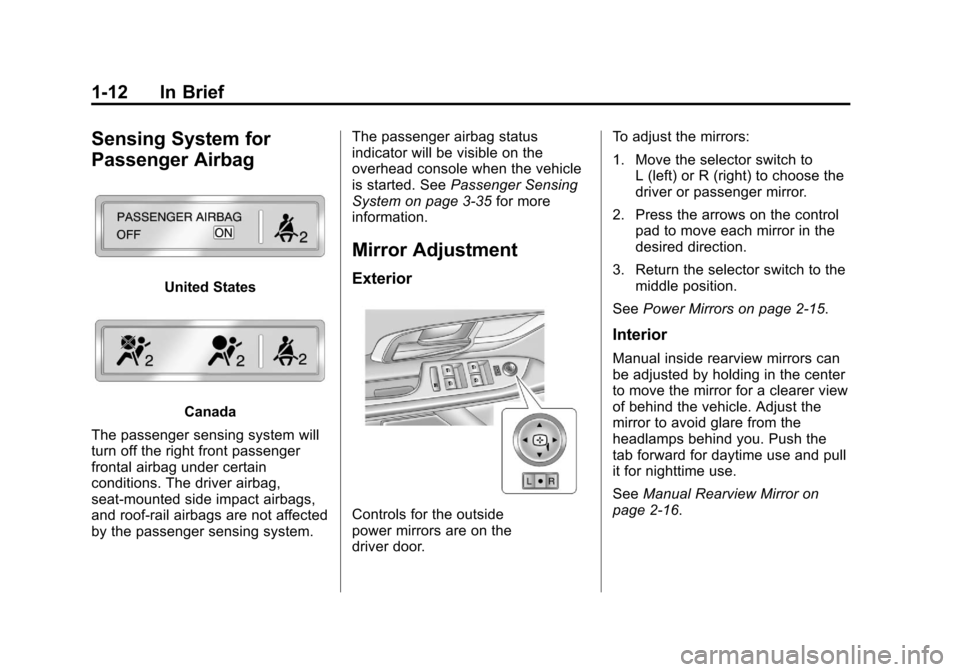
United States
Canada
The passenger sensing system will
turn off the right front passenger
frontal airbag under certain
conditions. The driver airbag,
seat‐mounted side impact airbags,
and roof‐rail airbags are not affected
by the passenger sensing system. The passenger airbag status
indicator will be visible on the
overhead console when the vehicle
is started. See
Passenger Sensing
System on page 3‑35 for more
information.
Mirror Adjustment
Exterior
Controls for the outside
power mirrors are on the
driver door. To adjust the mirrors:
1. Move the selector switch to
L (left) or R (right) to choose the
driver or passenger mirror.
2. Press the arrows on the control pad to move each mirror in the
desired direction.
3. Return the selector switch to the middle position.
See Power Mirrors on page 2‑15.
Interior
Manual inside rearview mirrors can
be adjusted by holding in the center
to move the mirror for a clearer view
of behind the vehicle. Adjust the
mirror to avoid glare from the
headlamps behind you. Push the
tab forward for daytime use and pull
it for nighttime use.
SeeManual Rearview Mirror on
page 2‑16.
Page 19 of 446
Black plate (13,1)Chevrolet Equinox Owner Manual - 2011
In Brief 1-13
Vehicles with an automatic dimming
inside rearview mirror can
automatically reduce the glare from
the headlamps of the vehicle behind
you. The dimming feature comes on
and the indicator light comes on
each time the vehicle is started.
SeeAutomatic Dimming Rearview
Mirror on page 2‑16.Steering Wheel
Adjustment
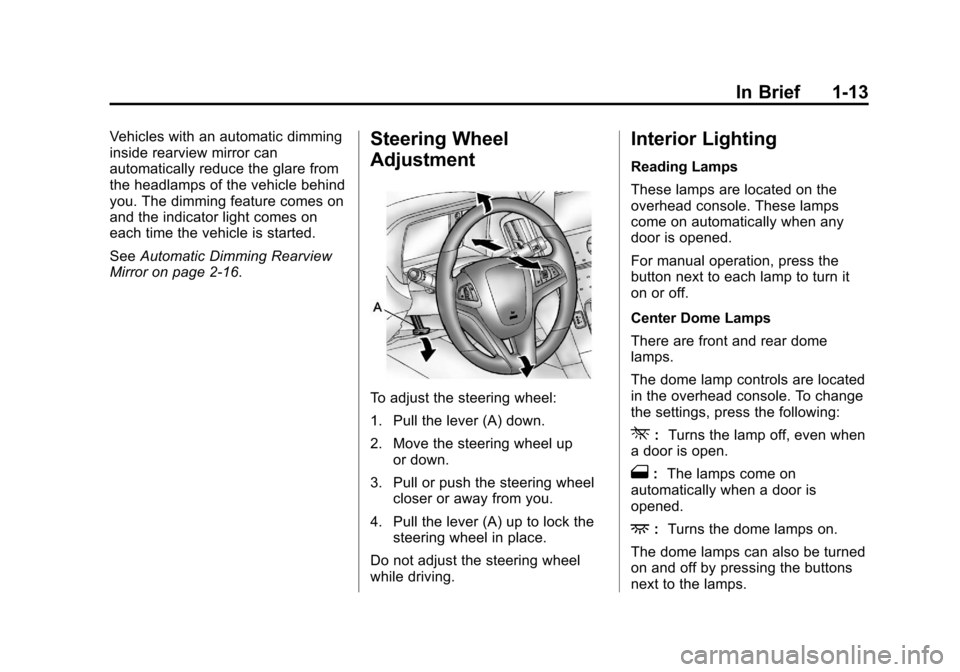
To adjust the steering wheel:
1. Pull the lever (A) down.
2. Move the steering wheel up
or down.
3. Pull or push the steering wheel closer or away from you.
4. Pull the lever (A) up to lock the steering wheel in place.
Do not adjust the steering wheel
while driving.
Interior Lighting
Reading Lamps
These lamps are located on the
overhead console. These lamps
come on automatically when any
door is opened.
For manual operation, press the
button next to each lamp to turn it
on or off.
Center Dome Lamps
There are front and rear dome
lamps.
The dome lamp controls are located
in the overhead console. To change
the settings, press the following:
*: Turns the lamp off, even when
a door is open.
1: The lamps come on
automatically when a door is
opened.
+: Turns the dome lamps on.
The dome lamps can also be turned
on and off by pressing the buttons
next to the lamps.
Page 29 of 446
Black plate (23,1)Chevrolet Equinox Owner Manual - 2011
In Brief 1-23
w x:Use these buttons to scroll
through the items in each menu.
A small marker will move along the
page as you scroll through the
items. This shows where each page
is in the menu.
SET/CLR: Use this button to set or
clear the menu item when it is
displayed.
For more information, see Driver
Information Center (DIC) on
page 5‑22.
Vehicle Personalization
Some vehicle features can be
programmed by using the audio
system controls. These features
include:
.Climate and Air Quality
.Comfort and Convenience
.Collision/Detection Systems
.Language
.Lighting
.Power Door Locks
.Remote Lock/Unlock/Start
.Return to Factory Settings
See Vehicle Personalization on
page 5‑32.
Rear Vision
Camera (RVC)
If available, the rear vision camera
displays a view of the area behind
the vehicle when the vehicle is
shifted into R (Reverse). The
display will appear on either the
inside rearview mirror or navigation
screen, if equipped.
To clean the camera lens, located
above the license plate, rinse it with
water and wipe it with a soft cloth.
See Rear Vision Camera (RVC) on
page 9‑48.
Ultrasonic Parking Assist
If available, Ultrasonic Rear Parking
Assist (URPA) uses sensors on the
rear bumper to detect objects while
parking the vehicle. URPA comes
on automatically when the shift lever
is moved into R (Reverse) and
operates at speeds less than
8 km/h (5 mph). URPA uses audio
beeps to provide distance and
system information.
Keep the sensors on the vehicle's
rear bumper clean to ensure proper
operation.
The URPA system can be turned on
and off using the infotainment
system controls. See Vehicle
Personalization on page 5‑32 for
more information.
See Ultrasonic Parking Assist on
page 9‑46 for more information.
Page 37 of 446
Black plate (1,1)Chevrolet Equinox Owner Manual - 2011
Keys, Doors and Windows 2-1
Keys, Doors and
Windows
Keys and Locks
Keys . . . . . . . . . . . . . . . . . . . . . . . . . . 2-2
Remote Keyless Entry (RKE)System . . . . . . . . . . . . . . . . . . . . . . 2-3
Remote Keyless Entry (RKE) System Operation . . . . . . . . . . . 2-3
Remote Vehicle Start . . . . . . . . . 2-5
Door Locks . . . . . . . . . . . . . . . . . . . 2-6
Power Door Locks . . . . . . . . . . . . 2-7
Safety Locks . . . . . . . . . . . . . . . . . . 2-8
Doors
Liftgate (Manual) . . . . . . . . . . . . . . 2-8
Liftgate (Power) . . . . . . . . . . . . . . . 2-9
Vehicle Security
Vehicle Security . . . . . . . . . . . . . . 2-12
Anti-Theft Alarm System . . . . . 2-12
Immobilizer . . . . . . . . . . . . . . . . . . 2-13
Immobilizer Operation . . . . . . . 2-13
Exterior Mirrors
Convex Mirrors . . . . . . . . . . . . . . 2-14
Power Mirrors . . . . . . . . . . . . . . . . 2-15
Heated Mirrors . . . . . . . . . . . . . . . 2-15
Park Tilt Mirrors . . . . . . . . . . . . . . 2-15
Interior Mirrors
Manual Rearview Mirror . . . . . . 2-16
Automatic Dimming Rearview Mirror . . . . . . . . . . . . . . . . . . . . . . . 2-16
Windows
Windows . . . . . . . . . . . . . . . . . . . . . 2-16
Power Windows . . . . . . . . . . . . . 2-17
Sun Visors . . . . . . . . . . . . . . . . . . . 2-18
Roof
Sunroof . . . . . . . . . . . . . . . . . . . . . . 2-19
Page 51 of 446
Black plate (15,1)Chevrolet Equinox Owner Manual - 2011
Keys, Doors and Windows 2-15
Power Mirrors
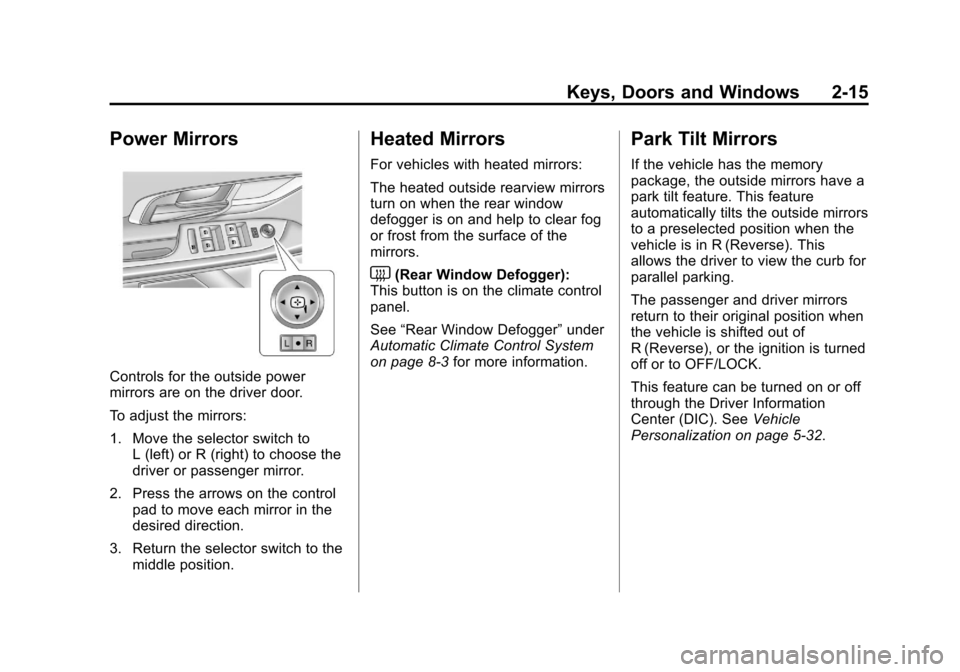
Controls for the outside power
mirrors are on the driver door.
To adjust the mirrors:
1. Move the selector switch toL (left) or R (right) to choose the
driver or passenger mirror.
2. Press the arrows on the control pad to move each mirror in the
desired direction.
3. Return the selector switch to the middle position.
Heated Mirrors
For vehicles with heated mirrors:
The heated outside rearview mirrors
turn on when the rear window
defogger is on and help to clear fog
or frost from the surface of the
mirrors.
<(Rear Window Defogger):
This button is on the climate control
panel.
See “Rear Window Defogger” under
Automatic Climate Control System
on page 8‑3 for more information.
Park Tilt Mirrors
If the vehicle has the memory
package, the outside mirrors have a
park tilt feature. This feature
automatically tilts the outside mirrors
to a preselected position when the
vehicle is in R (Reverse). This
allows the driver to view the curb for
parallel parking.
The passenger and driver mirrors
return to their original position when
the vehicle is shifted out of
R (Reverse), or the ignition is turned
off or to OFF/LOCK.
This feature can be turned on or off
through the Driver Information
Center (DIC). See Vehicle
Personalization on page 5‑32.
Page 52 of 446
Black plate (16,1)Chevrolet Equinox Owner Manual - 2011
2-16 Keys, Doors and Windows
Interior Mirrors
Manual Rearview Mirror
Hold the inside rearview mirror in
the center and move it for a clearer
view behind the vehicle. Adjust the
mirror to avoid glare from the
headlamps behind you. Push the
tab forward for daytime use and pull
it for nighttime use.
Vehicles with OnStar
®have three
additional control buttons located at
the bottom of the mirror. See your
dealer for more information on the
system and how to subscribe to
OnStar. See the OnStar Owner's
Guide for more information about
the services OnStar provides.
Automatic Dimming
Rearview Mirror
The vehicle may have an automatic
dimming inside rearview mirror.
Automatic dimming reduces the
glare from the headlamps of the
vehicle behind you. The dimming feature comes on and
the indicator light comes on each
time the vehicle is started.
O:
Press to turn automatic
dimming on or off.
If the vehicle has a rear vision
camera (RVC) the
Obutton for
turning the automatic dimming
feature on or off will not be
available. See Rear Vision Camera
(RVC) on page 9‑48 for more
information.
Vehicles with OnStar
®have three
additional control buttons located at
the bottom of the mirror. See your
dealer for more information on the
system and how to subscribe to
OnStar. See the OnStar Owner's
Guide for more information about
the services OnStar provides.
Cleaning the Mirror
Do not spray glass cleaner directly
on the mirror. Use a soft towel
dampened with water.
Windows
{WARNING
Leaving children, helpless adults,
or pets in a vehicle with the
windows closed is dangerous.
They can be overcome by the
extreme heat and suffer
permanent injuries or even
death from heat stroke. Never
leave a child, a helpless adult,
or a pet alone in a vehicle,
especially with the windows
closed in warm or hot weather.
Page 55 of 446
Black plate (19,1)Chevrolet Equinox Owner Manual - 2011
Keys, Doors and Windows 2-19
Roof
Sunroof
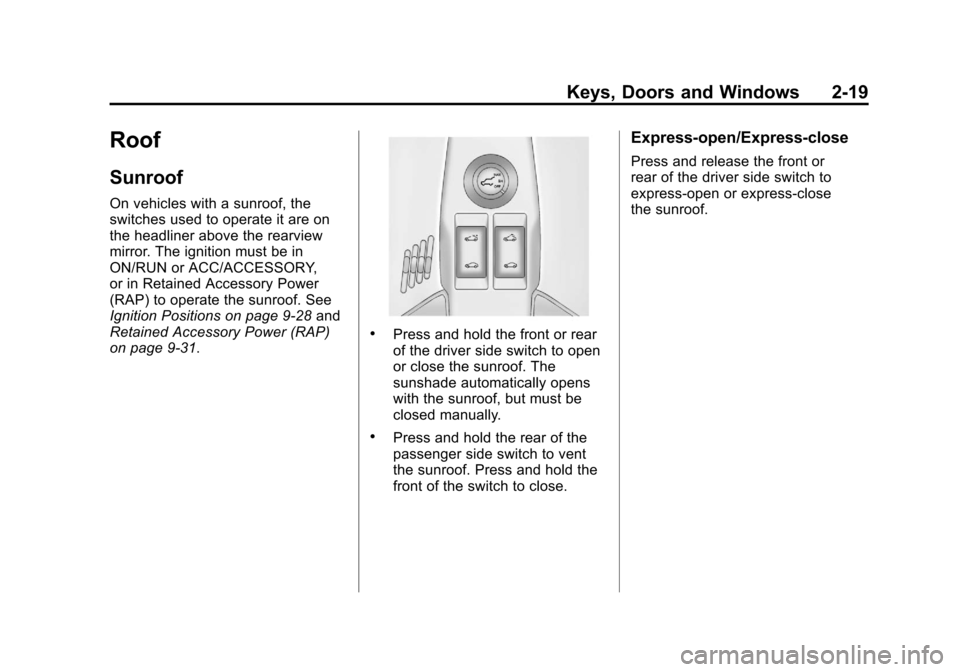
On vehicles with a sunroof, the
switches used to operate it are on
the headliner above the rearview
mirror. The ignition must be in
ON/RUN or ACC/ACCESSORY,
or in Retained Accessory Power
(RAP) to operate the sunroof. See
Ignition Positions on page 9‑28and
Retained Accessory Power (RAP)
on page 9‑31.
.Press and hold the front or rear
of the driver side switch to open
or close the sunroof. The
sunshade automatically opens
with the sunroof, but must be
closed manually.
.Press and hold the rear of the
passenger side switch to vent
the sunroof. Press and hold the
front of the switch to close.
Express-open/Express-close
Press and release the front or
rear of the driver side switch to
express-open or express-close
the sunroof.
Page 257 of 446
Black plate (19,1)Chevrolet Equinox Owner Manual - 2011
Driving and Operating 9-19
Highway Hypnosis
Always be alert and pay attention to
your surroundings while driving.
If you become tired or sleepy, find a
safe place to park the vehicle
and rest.
Other driving tips include:
.Keep the vehicle well ventilated.
.Keep interior temperature cool.
.Keep your eyes moving—scan
the road ahead and to the sides.
.Check the rearview mirror and
vehicle instruments often.
Hill and Mountain Roads
Driving on steep hills or through
mountains is different than driving
on flat or rolling terrain. Tips for
driving in these conditions include:
.Keep the vehicle serviced and in
good shape.
.Check all fluid levels and brakes,
tires, cooling system, and
transmission.
.Shift to a lower gear when going
down steep or long hills.
{WARNING
If you do not shift down, the
brakes could get so hot that they
would not work well. You would
then have poor braking or even
none going down a hill. You could
crash. Shift down to let the engine
assist the brakes on a steep
downhill slope.
{WARNING
Coasting downhill in N (Neutral)
or with the ignition off is
dangerous. The brakes will have
to do all the work of slowing down
and they could get so hot that
they would not work well. You
would then have poor braking or
even none going down a hill.
(Continued)
WARNING (Continued)
You could crash. Always have the
engine running and the vehicle in
gear when going downhill.
.Stay in your own lane. Do not
swing wide or cut across the
center of the road. Drive at
speeds that let you stay in your
own lane.
.Top of hills: Be alert—
something could be in your
lane (stalled car, accident).
.Pay attention to special road
signs (falling rocks area, winding
roads, long grades, passing or
no-passing zones) and take
appropriate action.
Page 287 of 446
Black plate (49,1)Chevrolet Equinox Owner Manual - 2011
Driving and Operating 9-49
WARNING (Continued)
Do not back the vehicle by only
looking at the RVC screen, or use
the screen during longer, higher
speed backing maneuvers or
where there could be cross-traffic.
Your judged distances using the
screen will differ from actual
distances.
If you do not use proper care
before backing up, you could hit a
vehicle, child, pedestrian,
bicyclist, or pet, resulting in
vehicle damage, injury, or death.
Even though the vehicle has the
RVC system, always check
carefully before backing up by
checking behind and around
the vehicle.
Vehicles Without a Navigation
System
When the key is in the ON/RUN
position and the driver shifts the
vehicle into R (Reverse), the video
image automatically appears in the
inside rearview mirror. Once the
driver shifts out of R (Reverse), the
video image automatically
disappears from the inside
rearview mirror.
Turning the Rear Vision Camera
System Off or On
To turn off the RVC system, press
and hold
z, located on the inside
rearview mirror, until the left
indicator light turns off. The RVC
display is now disabled.
To turn the RVC system on again,
press and hold
zuntil the left
indicator light illuminates. The RVC
system display is now enabled and
the display will appear in the mirror
normally.
Vehicles With a Navigation
System
An image appears on the navigation
screen with the message Check
Surroundings for Safety when the
vehicle is shifted into R (Reverse).
The navigation screen goes to the
previous screen after approximately
10 seconds once the vehicle is
shifted out of R (Reverse).
To cancel the delay, do one of the
following:
.Press a hard key on the
navigation system.
.Shift into P (Park).
.Reach a vehicle speed of
8 km/h (5 mph).
Page 290 of 446
Black plate (52,1)Chevrolet Equinox Owner Manual - 2011
9-52 Driving and Operating
When the System Does Not
Seem To Work Properly
The RVC system may not work
properly or display a clear image if:
.The RVC is turned off. See
“Turning the Rear Vision Camera
System On or Off”earlier in this
section.
.It is dark.
.The sun or the beam of
headlights is shining directly into
the camera lens.
.Ice, snow, mud, or anything else
builds up on the camera lens.
Clean the lens, rinse it with
water, and wipe it with a
soft cloth.
.The back of the vehicle is in an
accident, the position and
mounting angle of the camera
can change or the camera can
be affected. Be sure to have the
camera and its position and
mounting angle checked at
your dealer. The RVC system display in the
rearview mirror may turn off or not
appear as expected due to one of
the following conditions. If this
occurs the left indicator light on the
mirror will flash.
.A slow flash may indicate a loss
of video signal, or no video
signal present during the reverse
cycle.
.A fast flash may indicate that the
display has been on for the
maximum allowable time during
a reverse cycle, or the display
has reached an over
temperature limit.
The fast flash conditions are
used to protect the video device
from high temperature
conditions. Once conditions
return to normal the device will
reset and the green indicator will
stop flashing.
During any of these fault conditions,
the display will be blank and the
indicator will continue to flash as
long as the vehicle is in R (Reverse)
or until the conditions return to
normal.
Pressing and holding
zwhen the
left indicator light is flashing will turn
off the video display along with the
left indicator light.