warning CHEVROLET EQUINOX 2013 2.G Repair Manual
[x] Cancel search | Manufacturer: CHEVROLET, Model Year: 2013, Model line: EQUINOX, Model: CHEVROLET EQUINOX 2013 2.GPages: 388, PDF Size: 6.53 MB
Page 126 of 388
Black plate (20,1)Chevrolet Equinox Owner Manual - 2013 - CRC - 5/21/12
5-20 Instruments and Controls
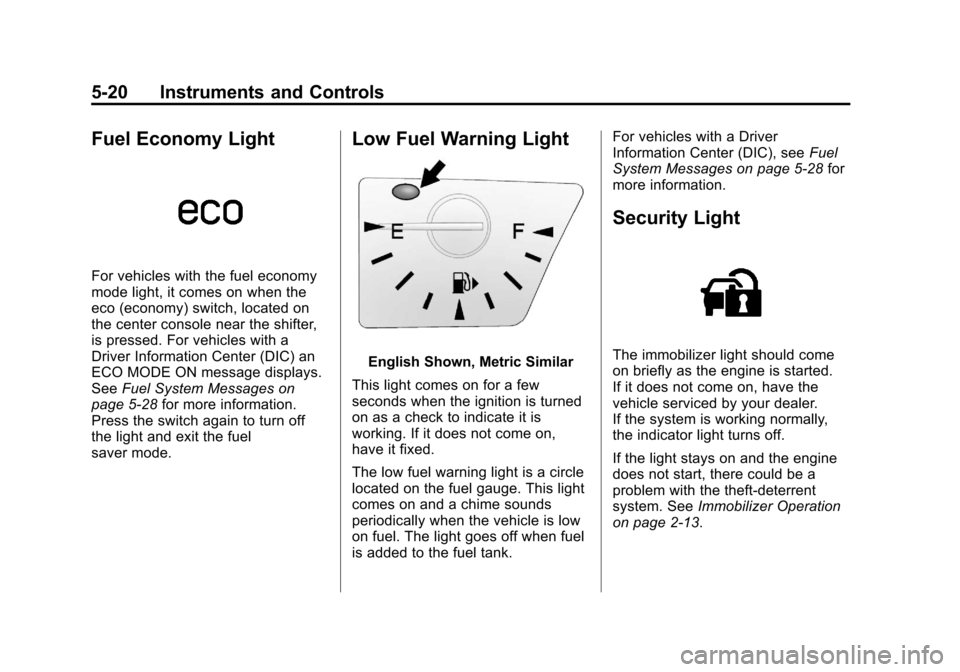
Fuel Economy Light
For vehicles with the fuel economy
mode light, it comes on when the
eco (economy) switch, located on
the center console near the shifter,
is pressed. For vehicles with a
Driver Information Center (DIC) an
ECO MODE ON message displays.
SeeFuel System Messages on
page 5‑28 for more information.
Press the switch again to turn off
the light and exit the fuel
saver mode.
Low Fuel Warning Light
English Shown, Metric Similar
This light comes on for a few
seconds when the ignition is turned
on as a check to indicate it is
working. If it does not come on,
have it fixed.
The low fuel warning light is a circle
located on the fuel gauge. This light
comes on and a chime sounds
periodically when the vehicle is low
on fuel. The light goes off when fuel
is added to the fuel tank. For vehicles with a Driver
Information Center (DIC), see
Fuel
System Messages on page 5‑28 for
more information.
Security Light
The immobilizer light should come
on briefly as the engine is started.
If it does not come on, have the
vehicle serviced by your dealer.
If the system is working normally,
the indicator light turns off.
If the light stays on and the engine
does not start, there could be a
problem with the theft-deterrent
system. See Immobilizer Operation
on page 2‑13.
Page 128 of 388
Black plate (22,1)Chevrolet Equinox Owner Manual - 2013 - CRC - 5/21/12
5-22 Instruments and Controls
Information Displays
Driver Information
Center (DIC)
The vehicle may have a Driver
Information Center (DIC). It displays
information about the vehicle and
warning messages if there is a
system problem detected. DIC
messages display in the center of
the instrument panel cluster. See
Vehicle Messages on page 5‑25for
more information.
The vehicle may also have features
that can be customized through the
controls on the radio. See Vehicle
Personalization on page 5‑32 for
more information.
DIC Operation and Displays
Use the DIC buttons located in the
center of the instrument panel to
access different displays. The DIC
displays trip, fuel, vehicle system
information, and warning messages. It also shows the shift lever position,
the odometer, and the direction the
vehicle is driving.
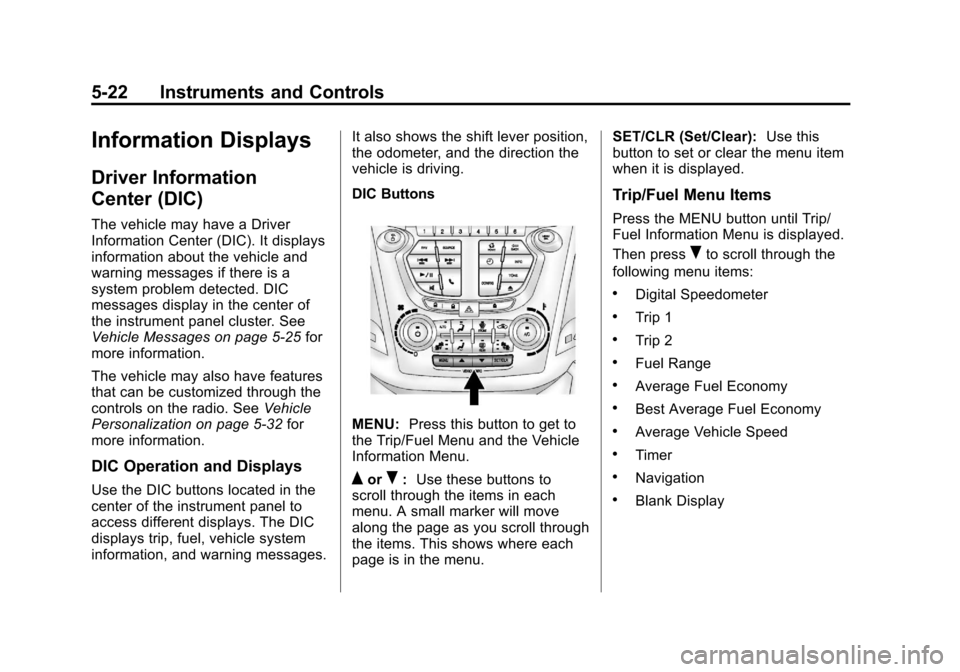
DIC Buttons
MENU:
Press this button to get to
the Trip/Fuel Menu and the Vehicle
Information Menu.
QorR: Use these buttons to
scroll through the items in each
menu. A small marker will move
along the page as you scroll through
the items. This shows where each
page is in the menu. SET/CLR (Set/Clear):
Use this
button to set or clear the menu item
when it is displayed.
Trip/Fuel Menu Items
Press the MENU button until Trip/
Fuel Information Menu is displayed.
Then press
Rto scroll through the
following menu items:
.Digital Speedometer
.Trip 1
.Trip 2
.Fuel Range
.Average Fuel Economy
.Best Average Fuel Economy
.Average Vehicle Speed
.Timer
.Navigation
.Blank Display
Page 134 of 388
Black plate (28,1)Chevrolet Equinox Owner Manual - 2013 - CRC - 5/21/12
5-28 Instruments and Controls
Engine Power Messages
ENGINE POWER IS REDUCED
This message displays when the
vehicle's engine power is reduced.
Reduced engine power can affect
the vehicle's ability to accelerate.
If this message is on, but there is no
reduction in performance, proceed
to your destination. The
performance may be reduced the
next time the vehicle is driven. The
vehicle may be driven at a reduced
speed while this message is on, but
maximum acceleration and speed
may be reduced. Anytime this
message stays on, the vehicle
should be taken to your dealer for
service as soon as possible.
Fuel System Messages
ECO MODE ON
On some models, this message
displays when the fuel economy
mode has been turned on bypressing the eco button near the
shift lever. See
Fuel Economy Mode
on page 9‑29 for more information.
FUEL LEVEL LOW
This message displays when the
vehicle is low on fuel. Refuel as
soon as possible.
TIGHTEN GAS CAP
This message displays when the
fuel cap is not on tight. Tighten the
fuel cap.
Key and Lock Messages
REPLACE BATTERY IN
REMOTE KEY
This message displays when the
battery in the Remote Keyless Entry
(RKE) transmitter needs to be
replaced.
Object Detection System
Messages
FORWARD COLLISION
ALERT OFF
If your vehicle has the Forward
Collision Alert (FCA) system, this
message may display if the FCA
system cannot activate due to a
temporary condition. See Forward
Collision Alert (FCA) System on
page 9‑37.
FRONT CAMERA BLOCKED,
CLEAN WINDSHIELD
This message displays when the
Lane Departure Warning (LDW) and
Forward Collision Alert (FCA)
systems are disabled because the
camera view is blocked and cannot
operate properly. It may also
activate during heavy rain or due to
road spray. To clean the system,
clean the outside of the windshield
area in front of the LDW/FCA
camera sensor.
Page 135 of 388
Black plate (29,1)Chevrolet Equinox Owner Manual - 2013 - CRC - 5/21/12
Instruments and Controls 5-29
LANE DEPARTURE SYSTEM
UNAVAILABLE
If your vehicle has the Lane
Departure Warning (LDW) system,
this message may display if the
LDW system cannot activate due to
a temporary condition. SeeLane
Departure Warning (LDW) on
page 9‑44 for more information.
PARK ASSIST OFF
This message displays when the
park assist system has been turned
off or when there is a temporary
condition causing the system to be
disabled. See Ultrasonic Parking
Assist on page 9‑40.
SERVICE FRONT CAMERA
This message displays when the
Lane Departure Warning (LDW) and
Forward Collision Alert (FCA)
systems are disabled and need
service. See your dealer.
SERVICE PARK ASSIST
This message displays if there is a
problem with the Ultrasonic Rear
Parking Assist (URPA) system. Do
not use this system to help you
park. See Ultrasonic Parking Assist
on page 9‑40 for more information.
Ride Control System
Messages
ALL WHEEL DRIVE OFF
If your vehicle has the All-Wheel
Drive (AWD) system, this message
displays when the rear drive system
is overheating. This message turns
off when the rear drive system cools
down. If the warning message stays
on for a while, you need to reset the
warning message. To reset the
warning message, turn the ignition
off and then back on again. If the
message stays on, see your dealer
right away. See All-Wheel Drive on
page 9‑29 for more information.
SERVICE ALL WHEEL DRIVE
If your vehicle has the All-Wheel
Drive (AWD) system, this message
displays if a problem occurs with
this system. If this message
appears, stop as soon as possible
and turn off the vehicle. Restart the
vehicle and check for the message
on the DIC display. If the message
is still displayed or appears again
when you begin driving, the AWD
system needs service. See your
dealer.
SERVICE TRACTION
CONTROL
This message displays when there
is a problem with the Traction
Control System (TCS). See Traction
Control System (TCS) on
page 9‑32.
SERVICE STABILITRAK
This message displays if there is a
problem with the StabiliTrak system.
StabiliTrak
®System on page 9‑33.
Page 137 of 388
Black plate (31,1)Chevrolet Equinox Owner Manual - 2013 - CRC - 5/21/12
Instruments and Controls 5-31
The low tire pressure warning light
will also come on. SeeTire
Pressure Light on page 5‑19.
If a tire pressure message appears
on the DIC, stop as soon as you
can. Inflate the tires by adding air
until the tire pressure is equal to the
values shown on the Tire and
Loading Information label. See Tires
on page 10‑36, Vehicle Load Limits
on page 9‑14, and Tire Pressure on
page 10‑43.
You can receive more than one tire
pressure message at a time. The
DIC also shows the tire pressure
values. See Driver Information
Center (DIC) on page 5‑22.
Transmission Messages
SERVICE TRANSMISSION
This message displays if there is a
problem with the transmission. See
your dealer.
SHIFT TO PARK
This message displays when the
transmission needs to be shifted to
P (Park). This may appear when
attempting to remove the key from
the ignition or from the vehicle if the
vehicle is not in P (Park).
TRANSMISSION HOT —IDLE
ENGINE
This message displays and a chime
sounds if the transmission fluid in
the vehicle gets hot. Driving with the
transmission fluid temperature high
can cause damage to the vehicle.
Stop the vehicle and let it idle to
allow the transmission to cool. This
message clears when the fluid
temperature reaches a safe level.
Vehicle Reminder
Messages
ICE POSSIBLE DRIVE
WITH CARE
This message is displayed when ice
conditions are possible.
TURN WIPER CONTROL TO
INTERMITTENT FIRST
This message is displayed when
attempting to adjust the intermittent
wiper speed without intermittent
selected on the wiper control. See
Windshield Wiper/Washer on
page 5‑3.
Page 147 of 388
Black plate (1,1)Chevrolet Equinox Owner Manual - 2013 - CRC - 5/21/12
Lighting 6-1
Lighting
Exterior Lighting
Exterior Lamp Controls . . . . . . . . 6-1
Headlamp High/Low-BeamChanger . . . . . . . . . . . . . . . . . . . . . 6-1
Flash-to-Pass . . . . . . . . . . . . . . . . . 6-2
Daytime Running Lamps (DRL) . . . . . . . . . . . . . . . . 6-2
Automatic Headlamp System . . . . . . . . . . . . . . . . . . . . . . 6-2
Hazard Warning Flashers . . . . . 6-3
Turn and Lane-Change Signals . . . . . . . . . . . . . . . . . . . . . . 6-3
Fog Lamps . . . . . . . . . . . . . . . . . . . . 6-4
Interior Lighting
Instrument Panel Illumination Control . . . . . . . . . . . . . . . . . . . . . . 6-4
Dome Lamps . . . . . . . . . . . . . . . . . 6-4
Reading Lamps . . . . . . . . . . . . . . . 6-5
Lighting Features
Entry Lighting . . . . . . . . . . . . . . . . . 6-5
Battery Load Management . . . . 6-5
Exterior Lighting
Exterior Lamp Controls
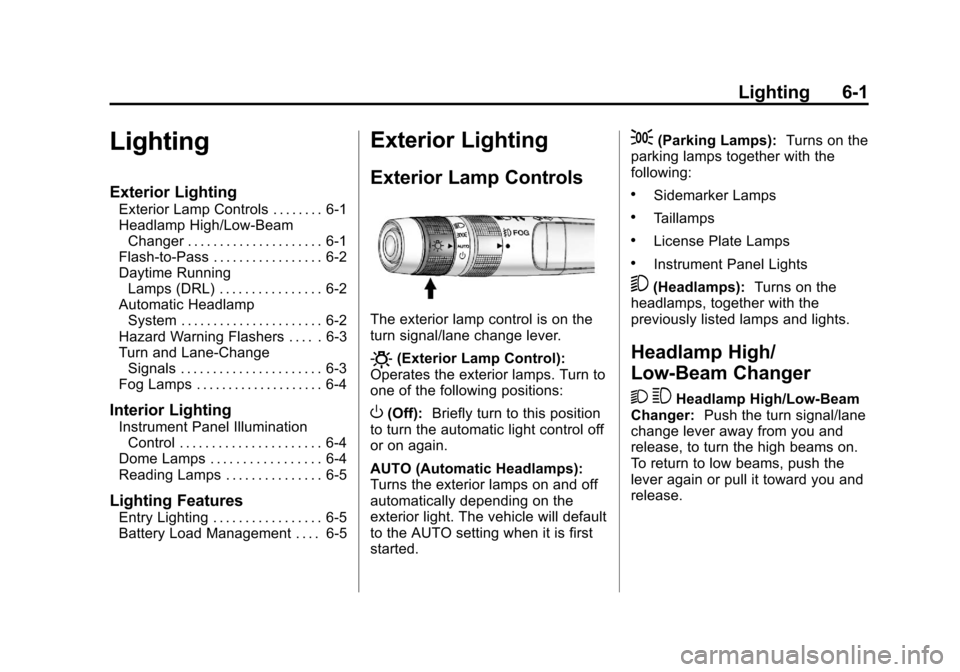
The exterior lamp control is on the
turn signal/lane change lever.
O(Exterior Lamp Control):
Operates the exterior lamps. Turn to
one of the following positions:
O(Off): Briefly turn to this position
to turn the automatic light control off
or on again.
AUTO (Automatic Headlamps):
Turns the exterior lamps on and off
automatically depending on the
exterior light. The vehicle will default
to the AUTO setting when it is first
started.
;(Parking Lamps): Turns on the
parking lamps together with the
following:
.Sidemarker Lamps
.Taillamps
.License Plate Lamps
.Instrument Panel Lights
5(Headlamps): Turns on the
headlamps, together with the
previously listed lamps and lights.
Headlamp High/
Low-Beam Changer
2 3
Headlamp High/Low‐Beam
Changer: Push the turn signal/lane
change lever away from you and
release, to turn the high beams on.
To return to low beams, push the
lever again or pull it toward you and
release.
Page 149 of 388
Black plate (3,1)Chevrolet Equinox Owner Manual - 2013 - CRC - 5/21/12
Lighting 6-3
The system may also turn on the
headlamps when driving through a
parking garage or tunnel.
Lights On with Wipers
If the windshield wipers are
activated in daylight with the engine
on, and the exterior lamp control is
in AUTO, the headlamps, parking
lamps, and other exterior lamps
come on. The transition time for the
lamps coming on varies based on
wiper speed. When the wipers are
not operating, these lamps turn off.
Move the exterior lamp control to
OFF or to the Parking Lamp position
to disable this feature.
Hazard Warning Flashers
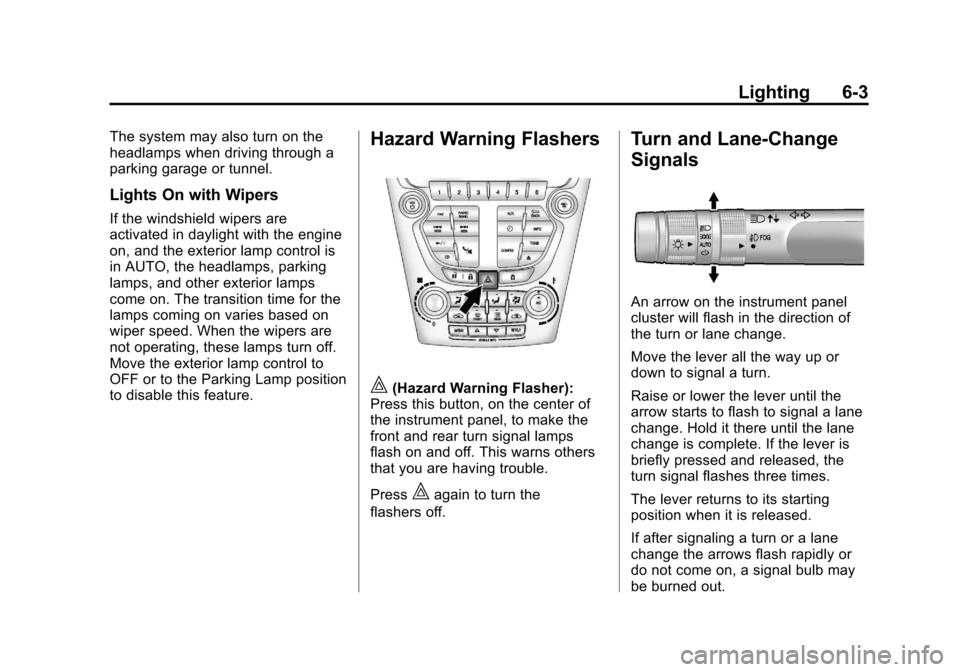
|(Hazard Warning Flasher):
Press this button, on the center of
the instrument panel, to make the
front and rear turn signal lamps
flash on and off. This warns others
that you are having trouble.
Press
|again to turn the
flashers off.
Turn and Lane-Change
Signals
An arrow on the instrument panel
cluster will flash in the direction of
the turn or lane change.
Move the lever all the way up or
down to signal a turn.
Raise or lower the lever until the
arrow starts to flash to signal a lane
change. Hold it there until the lane
change is complete. If the lever is
briefly pressed and released, the
turn signal flashes three times.
The lever returns to its starting
position when it is released.
If after signaling a turn or a lane
change the arrows flash rapidly or
do not come on, a signal bulb may
be burned out.
Page 153 of 388
Black plate (1,1)Chevrolet Equinox Owner Manual - 2013 - CRC - 5/21/12
Infotainment System 7-1
Infotainment
System
Introduction
Infotainment . . . . . . . . . . . . . . . . . . . 7-1
Theft-Deterrent Feature . . . . . . . 7-2
Overview . . . . . . . . . . . . . . . . . . . . . . 7-3
Operation . . . . . . . . . . . . . . . . . . . . . 7-4
Radio
AM-FM Radio . . . . . . . . . . . . . . . . . 7-7
Satellite Radio . . . . . . . . . . . . . . . . 7-9
Radio Reception . . . . . . . . . . . . . 7-12
Multi-Band Antenna . . . . . . . . . . 7-13
Audio Players
CD Player . . . . . . . . . . . . . . . . . . . 7-13
MP3 . . . . . . . . . . . . . . . . . . . . . . . . . 7-15
Auxiliary Devices . . . . . . . . . . . . 7-17
Phone
Bluetooth (Overview) . . . . . . . . 7-21
Bluetooth (InfotainmentControls) . . . . . . . . . . . . . . . . . . . 7-23
Bluetooth (Voice Recognition) . . . . . . . . . . . . . . . 7-27
Trademarks and License
Agreements
Trademarks and LicenseAgreements . . . . . . . . . . . . . . . . 7-33
Introduction
Infotainment
Read the following pages to
become familiar with the audio
system's features.
{WARNING
Taking your eyes off the road for
extended periods could cause a
crash resulting in injury or death
to you or others. Do not give
extended attention to infotainment
tasks while driving.
This system provides access to
many audio and non-audio listings.
Page 174 of 388
Black plate (22,1)Chevrolet Equinox Owner Manual - 2013 - CRC - 5/21/12
7-22 Infotainment System
.Review the controls and
operation of the infotainment
system.
.Pair cell phone(s) to the vehicle.
The system may not work with
all cell phones. See“Pairing”in
this section for more information.
.If the cell phone has voice
dialing capability, learn to use
that feature to access the
address book or contact list. See
“Voice Pass-Thru” in this section
for more information.
.See “Storing and Deleting Phone
Numbers” in this section for
more information.
{WARNING
When using a cell phone, it can
be distracting to look too long or
too often at the screen of the
phone or the infotainment
(navigation) system. Taking your
eyes off the road too long or too
(Continued)
WARNING (CONTINUED)
often could cause a crash
resulting in injury or death. Focus
your attention on driving.
Vehicles with a Bluetooth system
can use a Bluetooth-capable cell
phone with a Hands-Free Profile to
make and receive phone calls. The
infotainment system and voice
recognition are used to control the
system. The system can be used
while in ON/RUN or ACC/
ACCESSORY. The range of the
Bluetooth system can be up to 9.1 m
(30 ft). Not all phones support all
functions and not all phones work
with the Bluetooth system. See
www.gm.com/bluetooth for more
information about compatible
phones.
Bluetooth Controls
Use the buttons located on the
infotainment system and the
steering wheel to operate the
Bluetooth system.
Steering Wheel Controls
b/g(Push To Talk): Press to
answer incoming calls, confirm
system information, and start voice
recognition.
>/i(End Call/Mute): Press to
end a call, reject a call, or cancel an
operation.
Infotainment System Controls
If equipped, the infotainment system
allows certain controls to be
selected on the infotainment display.
For information about how to
navigate the menu system using the
infotainment controls, see Operation
on page 7‑4.
Page 195 of 388
Black plate (1,1)Chevrolet Equinox Owner Manual - 2013 - CRC - 5/21/12
Driving and Operating 9-1
Driving and
Operating
Driving Information
Distracted Driving . . . . . . . . . . . . . 9-2
Defensive Driving . . . . . . . . . . . . . 9-3
Drunk Driving . . . . . . . . . . . . . . . . . 9-3
Control of a Vehicle . . . . . . . . . . . 9-3
Braking . . . . . . . . . . . . . . . . . . . . . . . 9-3
Steering . . . . . . . . . . . . . . . . . . . . . . . 9-4
Off-Road Recovery . . . . . . . . . . . . 9-5
Loss of Control . . . . . . . . . . . . . . . . 9-5
Off-Road Driving . . . . . . . . . . . . . . 9-6
Driving on Wet Roads . . . . . . . 9-10
Highway Hypnosis . . . . . . . . . . . 9-11
Hill and Mountain Roads . . . . . 9-11
Winter Driving . . . . . . . . . . . . . . . 9-12
If the Vehicle Is Stuck . . . . . . . . 9-14
Vehicle Load Limits . . . . . . . . . . 9-14
Starting and Operating
New Vehicle Break-In . . . . . . . . 9-19
Ignition Positions . . . . . . . . . . . . 9-19
Starting the Engine . . . . . . . . . . 9-21
Retained AccessoryPower (RAP) . . . . . . . . . . . . . . . 9-22
Engine Coolant Heater . . . . . . . 9-23 Shifting Into Park . . . . . . . . . . . . 9-23
Shifting out of Park . . . . . . . . . . 9-25
Parking over Things
That Burn . . . . . . . . . . . . . . . . . . 9-25
Engine Exhaust
Engine Exhaust . . . . . . . . . . . . . . 9-25
Running the Vehicle WhileParked . . . . . . . . . . . . . . . . . . . . . 9-26
Automatic Transmission
Automatic Transmission . . . . . 9-26
Manual Mode . . . . . . . . . . . . . . . . 9-28
Fuel Economy Mode . . . . . . . . . 9-29
Drive Systems
All-Wheel Drive . . . . . . . . . . . . . . 9-29
Brakes
Antilock BrakeSystem (ABS) . . . . . . . . . . . . . . 9-30
Parking Brake . . . . . . . . . . . . . . . 9-31
Brake Assist . . . . . . . . . . . . . . . . . 9-31
Hill Start Assist (HSA) . . . . . . . 9-31
Ride Control Systems
Traction Control System (TCS) . . . . . . . . . . . . . . 9-32
StabiliTrak
®System . . . . . . . . . 9-33
Cruise Control
Cruise Control . . . . . . . . . . . . . . . 9-35
Object Detection Systems
Forward Collision Alert (FCA) System . . . . . . . . . . . . . . . . . . . . . 9-37
Ultrasonic Parking Assist . . . . 9-40
Rear Vision Camera (RVC) . . . . . . . . . . . . . 9-41
Lane Departure Warning (LDW) . . . . . . . . . . . . . 9-44
Fuel
Fuel . . . . . . . . . . . . . . . . . . . . . . . . . 9-46
Recommended Fuel . . . . . . . . . 9-47
Gasoline Specifications . . . . . . 9-47
California FuelRequirements . . . . . . . . . . . . . . 9-47
Fuels in Foreign Countries . . . 9-47
Fuel Additives . . . . . . . . . . . . . . . 9-47
Fuel E85 (85% Ethanol) . . . . . 9-48
Filling the Tank . . . . . . . . . . . . . . 9-49
Filling a Portable Fuel Container . . . . . . . . . . . . . . . . . . . 9-51
Towing
General TowingInformation . . . . . . . . . . . . . . . . . 9-51
Driving Characteristics and Towing Tips . . . . . . . . . . . . . . . . 9-51