ac system CHEVROLET EQUINOX 2018 Owner's Manual
[x] Cancel search | Manufacturer: CHEVROLET, Model Year: 2018, Model line: EQUINOX, Model: CHEVROLET EQUINOX 2018Pages: 428, PDF Size: 6.05 MB
Page 2 of 428

Chevrolet Equinox Owner Manual (GMNA-Localizing-U.S./Canada/Mexico-
10446639) - 2018 - CRC - 8/18/17
ContentsIntroduction . . . . . . . . . . . . . . . . . . . . . . 2
In Brief . . . . . . . . . . . . . . . . . . . . . . . . . . . 5
Keys, Doors, and Windows . . . . . 31
Seats and Restraints . . . . . . . . . . . 58
Storage . . . . . . . . . . . . . . . . . . . . . . . 108
Instruments and Controls . . . . . . 112
Lighting . . . . . . . . . . . . . . . . . . . . . . . 157
Infotainment System . . . . . . . . . . 165
Climate Controls . . . . . . . . . . . . . . 190
Driving and Operating . . . . . . . . . 198
Vehicle Care . . . . . . . . . . . . . . . . . . 278
Service and Maintenance . . . . . 371
Technical Data . . . . . . . . . . . . . . . . 385
Customer Information . . . . . . . . . 389
Reporting Safety Defects . . . . . . 400
OnStar . . . . . . . . . . . . . . . . . . . . . . . . 403
Index . . . . . . . . . . . . . . . . . . . . 415
Page 5 of 428
Chevrolet Equinox Owner Manual (GMNA-Localizing-U.S./Canada/Mexico-
10446639) - 2018 - CRC - 8/18/17
4 Introduction
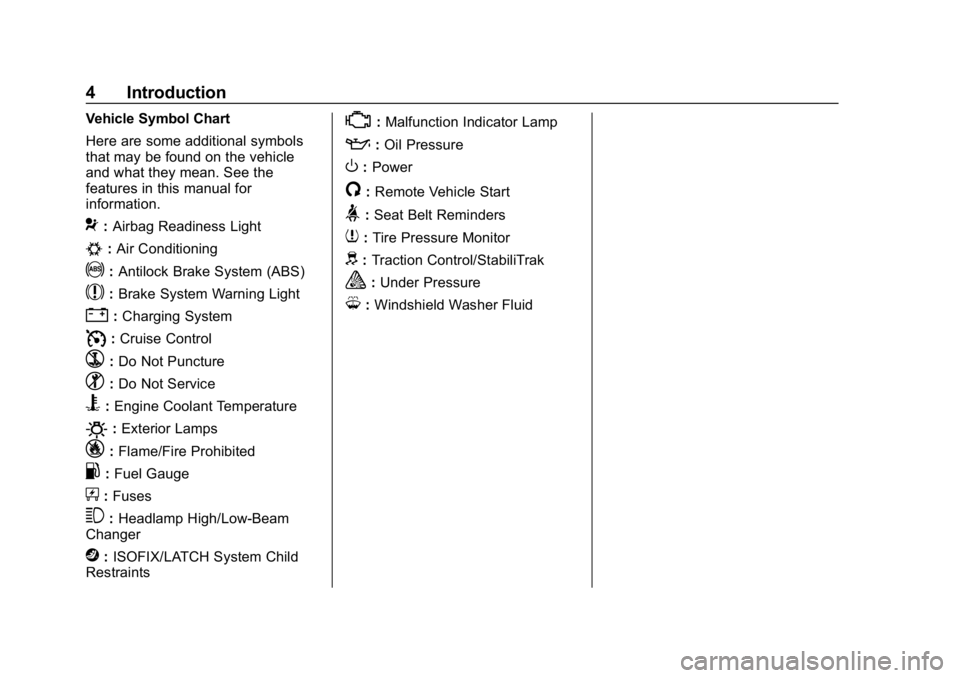
Vehicle Symbol Chart
Here are some additional symbols
that may be found on the vehicle
and what they mean. See the
features in this manual for
information.
9:Airbag Readiness Light
#:Air Conditioning
!:Antilock Brake System (ABS)
$:Brake System Warning Light
":Charging System
I: Cruise Control
`:Do Not Puncture
^:Do Not Service
B:Engine Coolant Temperature
O:Exterior Lamps
_: Flame/Fire Prohibited
.:Fuel Gauge
+: Fuses
3:Headlamp High/Low-Beam
Changer
j: ISOFIX/LATCH System Child
Restraints
*: Malfunction Indicator Lamp
::Oil Pressure
O:Power
/:Remote Vehicle Start
>:Seat Belt Reminders
7: Tire Pressure Monitor
d:Traction Control/StabiliTrak
a:Under Pressure
M: Windshield Washer Fluid
Page 6 of 428
Chevrolet Equinox Owner Manual (GMNA-Localizing-U.S./Canada/Mexico-
10446639) - 2018 - CRC - 8/18/17
In Brief 5
In Brief
Instrument Panel
Instrument Panel . . . . . . . . . . . . . . . . 6
Initial Drive Information
Initial Drive Information . . . . . . . . . . 8
Stop/Start System . . . . . . . . . . . . . . . 8
Remote Keyless Entry (RKE)System . . . . . . . . . . . . . . . . . . . . . . . . 8
Remote Vehicle Start . . . . . . . . . . . 8
Door Locks . . . . . . . . . . . . . . . . . . . . . 9
Liftgate . . . . . . . . . . . . . . . . . . . . . . . . 10
Windows . . . . . . . . . . . . . . . . . . . . . . . 10
Seat Adjustment . . . . . . . . . . . . . . . 11
Memory Features . . . . . . . . . . . . . . 13
Heated and Ventilated Seats . . . 13
Head Restraint Adjustment . . . . 14
Seat Belts . . . . . . . . . . . . . . . . . . . . . 14
Passenger Sensing System . . . 14
Mirror Adjustment . . . . . . . . . . . . . . 15
Steering Wheel Adjustment . . . . 15
Interior Lighting . . . . . . . . . . . . . . . . 16
Exterior Lighting . . . . . . . . . . . . . . . 17
Windshield Wiper/Washer . . . . . . 17
Climate Controls . . . . . . . . . . . . . . . 18
Transmission . . . . . . . . . . . . . . . . . . 19
Vehicle Features
Infotainment System . . . . . . . . . . . 20
Radio(s) . . . . . . . . . . . . . . . . . . . . . . . 20
Satellite Radio . . . . . . . . . . . . . . . . . 21
Portable Audio Devices . . . . . . . . 21
Bluetooth
®. . . . . . . . . . . . . . . . . . . . . 21
Steering Wheel Controls . . . . . . . 21
Cruise Control . . . . . . . . . . . . . . . . . 22
Driver Information Center (DIC) . . . . . . . . . . . . . . . . . 23
Forward Collision Alert (FCA) System . . . . . . . . . . . . . . . . . . . . . . . 23
Forward Automatic Braking (FAB) . . . . . . . . . . . . . . . . 23
Lane Keep Assist (LKA) . . . . . . . 23
Lane Change Alert (LCA) . . . . . . 24
Surround Vision . . . . . . . . . . . . . . . 24
Rear Vision Camera (RVC) . . . . 24
Rear Cross Traffic Alert (RCTA) System . . . . . . . . . . . . . . . . . . . . . . . 24
Parking Assist . . . . . . . . . . . . . . . . . 24
Power Outlets . . . . . . . . . . . . . . . . . 25
Universal Remote System . . . . . 25
Sunroof . . . . . . . . . . . . . . . . . . . . . . . . 25
Performance and Maintenance
Traction Control/Electronic Stability Control . . . . . . . . . . . . . . 26
Tire Pressure Monitor . . . . . . . . . . 27 Fuel (LYX - 1.5L L4 Turbo
Engine) . . . . . . . . . . . . . . . . . . . . . . . 27
Fuel (LTG - 2.0L L4 Turbo Engine) . . . . . . . . . . . . . . . . . . . . . . . 28
Fuel (Diesel) . . . . . . . . . . . . . . . . . . . 28
E85 or FlexFuel . . . . . . . . . . . . . . . . 28
Engine Oil Life System . . . . . . . . 28
Driving for Better Fuel
Economy . . . . . . . . . . . . . . . . . . . . . 29
Diesel Particulate Filter . . . . . . . . 29
Diesel Exhaust Fluid . . . . . . . . . . . 30
Roadside Assistance Program . . . . . . . . . . . . . . . . . . . . . . 30
Page 8 of 428

Chevrolet Equinox Owner Manual (GMNA-Localizing-U.S./Canada/Mexico-
10446639) - 2018 - CRC - 8/18/17
In Brief 7
1.Air Vents 0195.
2. Turn Signal Lever. See Turn
and Lane-Change Signals
0 161.
IntelliBeam
®System Button (If
Equipped). See Exterior Lamp
Controls 0157.
3. Instrument Cluster 0122.
Driver Information Center (DIC)
Display. See Driver Information
Center (DIC) 0139.
4. Windshield Wiper/Washer
0114.
5. Infotainment 0165.
6. Light Sensor. See Automatic
Headlamp System 0160.
7. Hazard Warning Flashers
0160.
8. Climate Control Systems 0190
(If Equipped).
Dual Automatic Climate Control
System 0192 (If Equipped).
9. Heated and Ventilated Front
Seats 066 (If Equipped). 10.
Power Outlets 0118.
11. Wireless Charging 0120 (If
Equipped).
12. USB Port 0173.
Auxiliary Input Jack. See
Auxiliary Devices 0179.
13. All-Wheel Drive 0234 (If
Equipped).
Tow/Haul Mode 0234.
14. Electric Parking Brake 0236.
15. Shift Lever. See Automatic
Transmission 0231.
Manual Mode 0233.
16. ENGINE START/STOP Button. SeeIgnition Positions 0215.
17. Steering Wheel Controls 0113.
Traction Control/Electronic
Stability Control 0238.
18. Horn 0114.
19. Steering Wheel Adjustment
0113 (Out of View). 20.
Cruise Control 0241.
Heated Steering Wheel 0114
(If Equipped).
Forward Collision Alert (FCA)
System 0248 (If Equipped).
Lane Keep Assist (LKA) 0254
(If Equipped).
21. Hood Release. See Hood
0 281.
22. Fog Lamps 0161 (If
Equipped).
23. Exterior Lamp Controls 0157.
24. Data Link Connector (DLC) (Out of View). See Malfunction
Indicator Lamp (Check Engine
Light) 0130.
25. Instrument Panel Illumination
Control 0162.
Page 9 of 428
Chevrolet Equinox Owner Manual (GMNA-Localizing-U.S./Canada/Mexico-
10446639) - 2018 - CRC - 8/18/17
8 In Brief
Initial Drive
Information
This section provides a brief
overview about some of the
important features that may or may
not be on your specific vehicle.
For more detailed information, refer
to each of the features which can be
found later in this owner’s manual.
Stop/Start System
The vehicle may have a fuel saving
Stop/Start system to shut off the
engine and help conserve fuel.
When the brakes are applied and
the vehicle is at a complete stop,
the engine may turn off. When the
brake pedal is released or the
accelerator pedal is pushed, the
engine will restart. The engine may
restart even while the brake is
applied. SeeStarting the Engine
0 217.
Remote Keyless Entry
(RKE) System
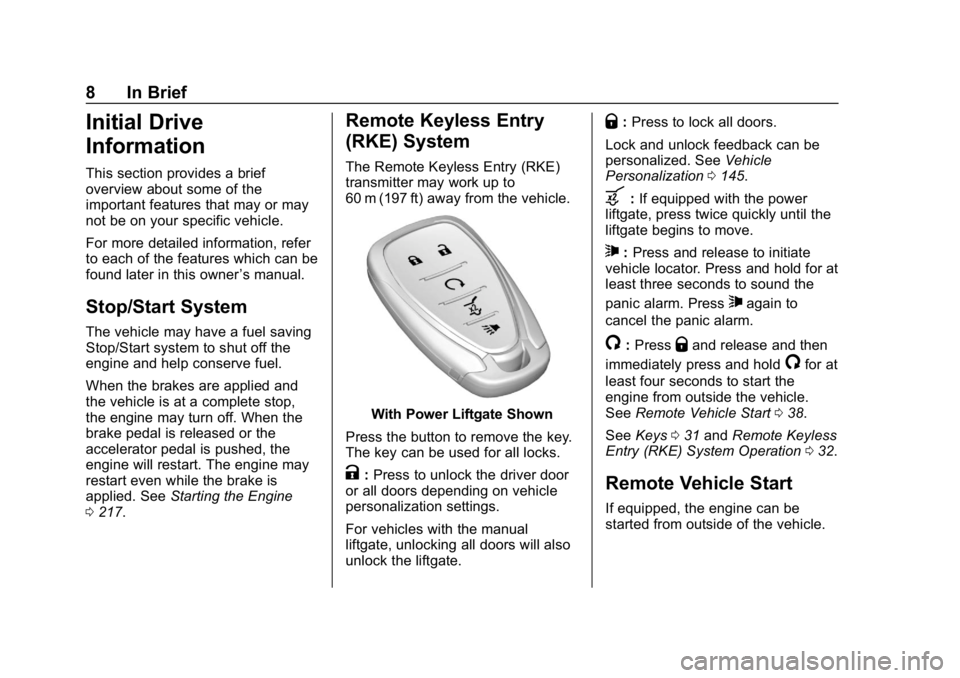
The Remote Keyless Entry (RKE)
transmitter may work up to
60 m (197 ft) away from the vehicle.
With Power Liftgate Shown
Press the button to remove the key.
The key can be used for all locks.
K: Press to unlock the driver door
or all doors depending on vehicle
personalization settings.
For vehicles with the manual
liftgate, unlocking all doors will also
unlock the liftgate.
Q: Press to lock all doors.
Lock and unlock feedback can be
personalized. See Vehicle
Personalization 0145.
b:If equipped with the power
liftgate, press twice quickly until the
liftgate begins to move.
7: Press and release to initiate
vehicle locator. Press and hold for at
least three seconds to sound the
panic alarm. Press
7again to
cancel the panic alarm.
/: PressQand release and then
immediately press and hold
/for at
least four seconds to start the
engine from outside the vehicle.
See Remote Vehicle Start 038.
See Keys 031 and Remote Keyless
Entry (RKE) System Operation 032.
Remote Vehicle Start
If equipped, the engine can be
started from outside of the vehicle.
Page 10 of 428
Chevrolet Equinox Owner Manual (GMNA-Localizing-U.S./Canada/Mexico-
10446639) - 2018 - CRC - 8/18/17
In Brief 9
Starting the Vehicle
1. Press and releaseQon the
RKE transmitter.
2. Immediately press and hold
/
for at least four seconds or until
the turn signal lamps flash.
Start the vehicle normally after
entering.
When the vehicle starts, the parking
lamps will turn on.
Remote start can be extended.
Canceling a Remote Start
To cancel a remote start, do one of
the following:
. Press and hold
/until the
parking lamps turn off.
. Turn on the hazard warning
flashers.
. Turn the vehicle on and then off.
See Remote Vehicle Start 038.
Door Locks
To lock or unlock the vehicle from
the outside, press
QorKon the
Remote Keyless Entry (RKE)
transmitter.
Q: Press to lock the doors. The
indicator light in the switch will come
on when the door is locked.
K: Press to unlock the doors.
See Door Locks 040. To manually unlock a door from
inside the vehicle, pull once on the
door handle to unlock it, and a
second time to open it.
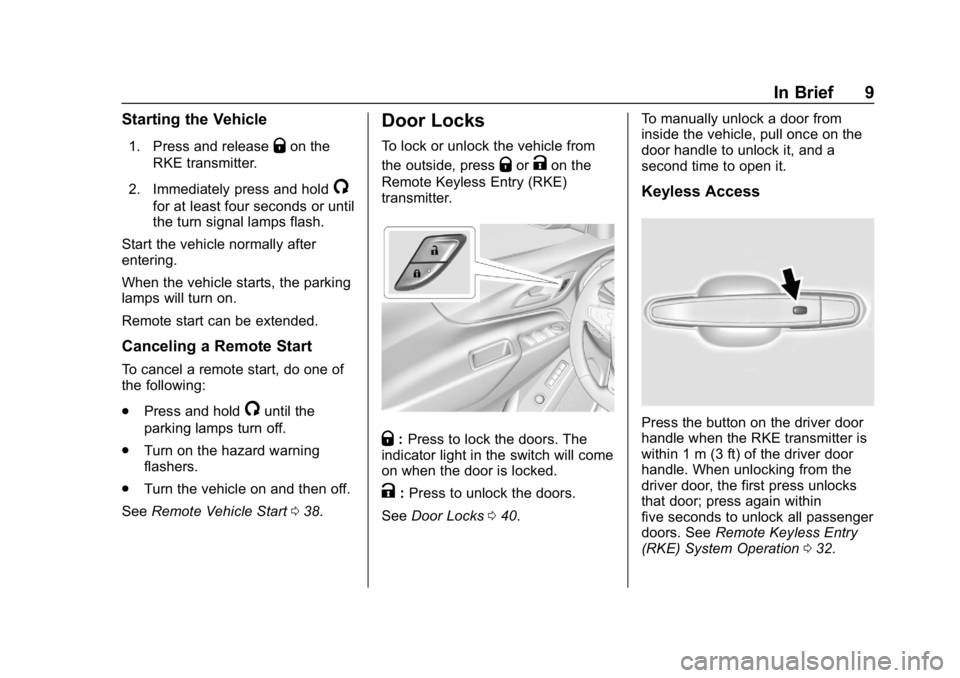
Keyless Access
Press the button on the driver door
handle when the RKE transmitter is
within 1 m (3 ft) of the driver door
handle. When unlocking from the
driver door, the first press unlocks
that door; press again within
five seconds to unlock all passenger
doors. See
Remote Keyless Entry
(RKE) System Operation 032.
Page 15 of 428
Chevrolet Equinox Owner Manual (GMNA-Localizing-U.S./Canada/Mexico-
10446639) - 2018 - CRC - 8/18/17
14 In Brief
Press the heated or ventilated
button once for the highest setting.
With each press of the button, the
heated or ventilated seat will
change to the next lower setting,
and then to the off setting. The
lights indicate three for the highest
setting and one for the lowest.
SeeHeated and Ventilated Front
Seats 066.
Head Restraint
Adjustment
Do not drive until the head restraints
for all occupants are installed and
adjusted properly.
To achieve a comfortable seating
position, change the seatback
recline angle as little as necessary
while keeping the seat and the head
restraint height in the proper
position.
See Head Restraints 059 and Seat
Adjustment 061.
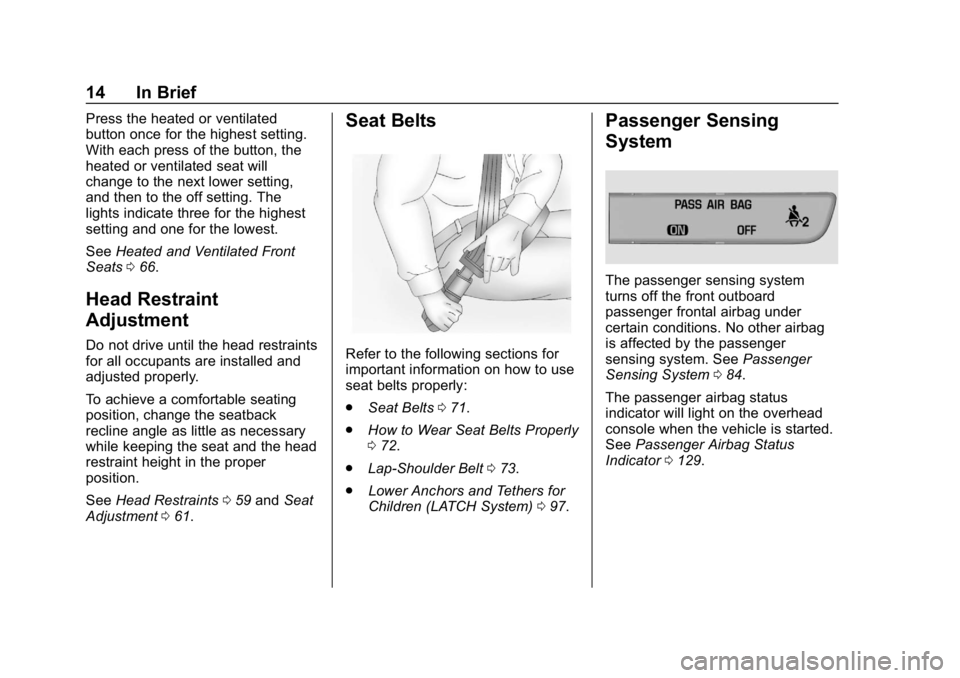
Seat Belts
Refer to the following sections for
important information on how to use
seat belts properly:
.
Seat Belts 071.
. How to Wear Seat Belts Properly
072.
. Lap-Shoulder Belt 073.
. Lower Anchors and Tethers for
Children (LATCH System) 097.
Passenger Sensing
System
The passenger sensing system
turns off the front outboard
passenger frontal airbag under
certain conditions. No other airbag
is affected by the passenger
sensing system. See Passenger
Sensing System 084.
The passenger airbag status
indicator will light on the overhead
console when the vehicle is started.
See Passenger Airbag Status
Indicator 0129.
Page 19 of 428
Chevrolet Equinox Owner Manual (GMNA-Localizing-U.S./Canada/Mexico-
10446639) - 2018 - CRC - 8/18/17
18 In Brief
Rear Window Wiper/Washer
Turn the end of the windshield wiper
lever to operate the rear window
wiper/washer.
OFF :Turns the system off.
INT : Intermittent wipes.
ON : Slow wipes.
1:Push the windshield wiper
lever forward to spray washer fluid
on the rear window. The lever
automatically returns to its original
position when released.
See Windshield Wiper/Washer
0 114 and Rear Window Wiper/
Washer 0115.
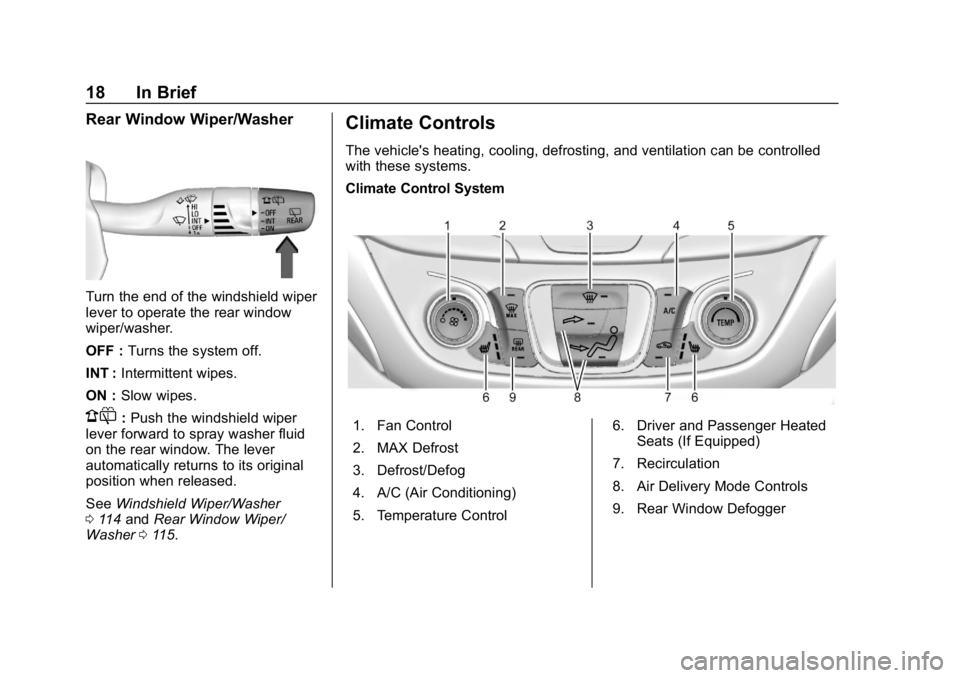
Climate Controls
The vehicle's heating, cooling, defrosting, and ventilation can be controlled
with these systems.
Climate Control System
1. Fan Control
2. MAX Defrost
3. Defrost/Defog
4. A/C (Air Conditioning)
5. Temperature Control 6. Driver and Passenger Heated
Seats (If Equipped)
7. Recirculation
8. Air Delivery Mode Controls
9. Rear Window Defogger
Page 20 of 428
Chevrolet Equinox Owner Manual (GMNA-Localizing-U.S./Canada/Mexico-
10446639) - 2018 - CRC - 8/18/17
In Brief 19
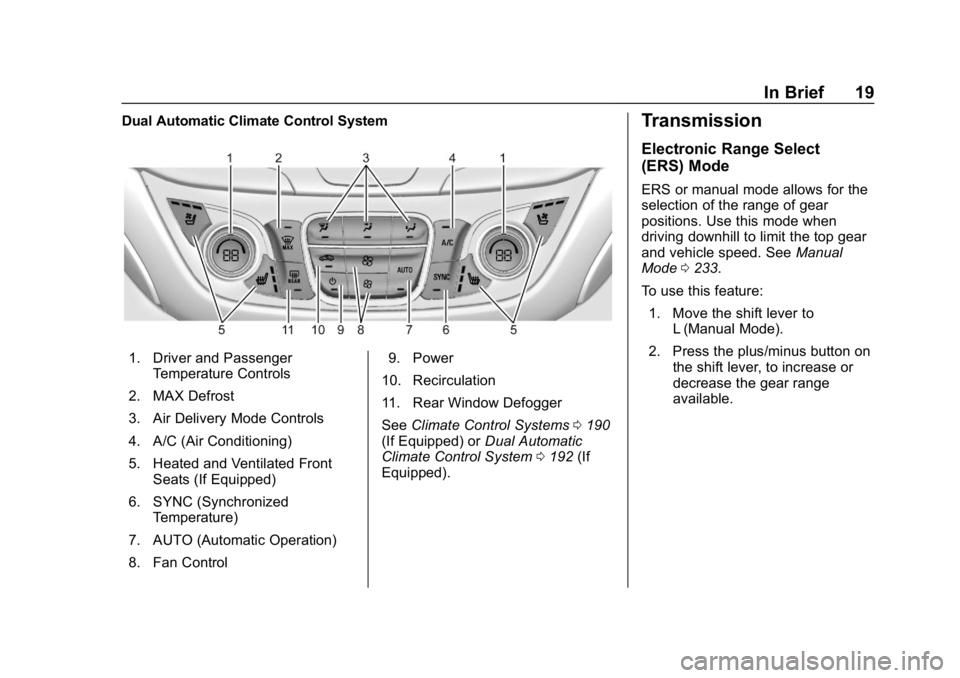
Dual Automatic Climate Control System
1. Driver and PassengerTemperature Controls
2. MAX Defrost
3. Air Delivery Mode Controls
4. A/C (Air Conditioning)
5. Heated and Ventilated Front Seats (If Equipped)
6. SYNC (Synchronized Temperature)
7. AUTO (Automatic Operation)
8. Fan Control 9. Power
10. Recirculation
11. Rear Window Defogger
See Climate Control Systems 0190
(If Equipped) or Dual Automatic
Climate Control System 0192 (If
Equipped).
Transmission
Electronic Range Select
(ERS) Mode
ERS or manual mode allows for the
selection of the range of gear
positions. Use this mode when
driving downhill to limit the top gear
and vehicle speed. See Manual
Mode 0233.
To use this feature: 1. Move the shift lever to L (Manual Mode).
2. Press the plus/minus button on the shift lever, to increase or
decrease the gear range
available.
Page 21 of 428
Chevrolet Equinox Owner Manual (GMNA-Localizing-U.S./Canada/Mexico-
10446639) - 2018 - CRC - 8/18/17
20 In Brief
Vehicle Features
Infotainment System
Base radio information is included in
this manual. See the infotainment
manual for information on other
available infotainment systems.
Read the following pages to
become familiar with the features.
{Warning
Taking your eyes off the road for
too long or too often while using
any infotainment feature can
cause a crash. You or others
could be injured or killed. Do not
give extended attention to
infotainment tasks while driving.
Limit your glances at the vehicle
displays and focus your attention
on driving. Use voice commands
whenever possible.
The infotainment system has built-in
features intended to help avoid
distraction by disabling some functions when driving. These
functions may gray out when they
are unavailable. Many infotainment
features are also available through
the instrument cluster and steering
wheel controls.
Before driving:
.
Become familiar with the
operation, center stack controls,
and infotainment display
controls.
. Set up the audio by presetting
favorite stations, setting the
tone, and adjusting the
speakers.
. Set up phone numbers in
advance so they can be called
easily by pressing a single
control or by using a single voice
command if equipped with
Bluetooth phone capability.
See Defensive Driving 0200.
To play the infotainment system with
the ignition off, see Retained
Accessory Power (RAP) 0221.
Radio(s)
O
:
. Press to turn the power on.
. Press and hold to turn the
power off.
. Press to mute/unmute the
system when on.
. Turn to decrease or increase the
volume.
g:
. Radio: Press and release to fast
seek the strongest previous
station or channel.
. USB/Music/Pictures: Press to go
to the previous content. Press
and hold to fast rewind.
d:
. Radio: Press and release to fast
seek the next strongest station
or channel.
. USB/Music/Pictures: Press to go
to the next content. Press and
hold to fast forward.