power CHEVROLET EQUINOX 2018 Owner's Manual
[x] Cancel search | Manufacturer: CHEVROLET, Model Year: 2018, Model line: EQUINOX, Model: CHEVROLET EQUINOX 2018Pages: 428, PDF Size: 6.05 MB
Page 5 of 428
Chevrolet Equinox Owner Manual (GMNA-Localizing-U.S./Canada/Mexico-
10446639) - 2018 - CRC - 8/18/17
4 Introduction
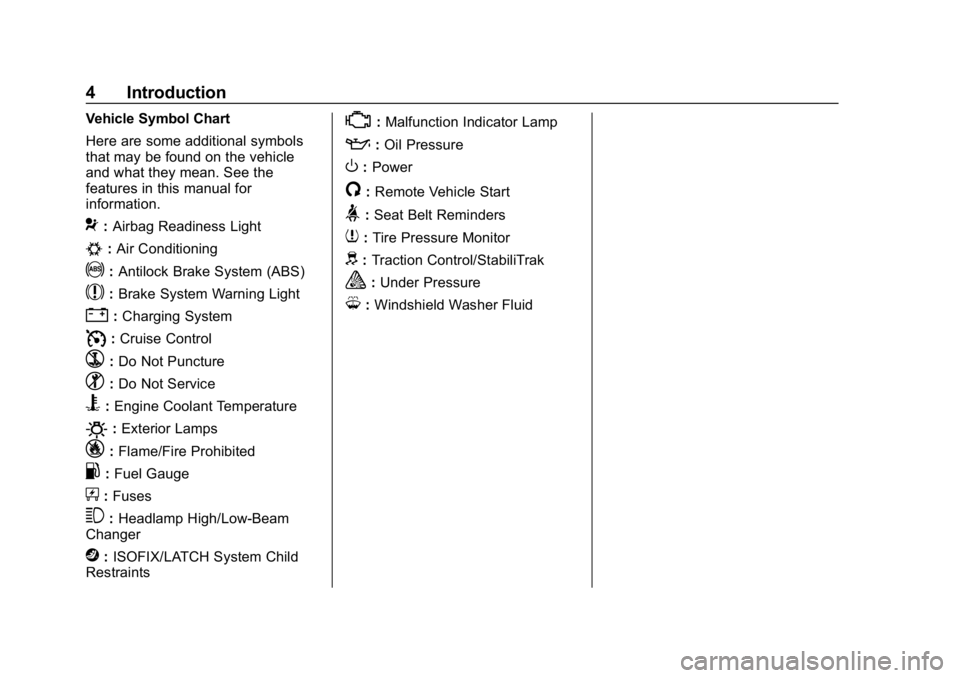
Vehicle Symbol Chart
Here are some additional symbols
that may be found on the vehicle
and what they mean. See the
features in this manual for
information.
9:Airbag Readiness Light
#:Air Conditioning
!:Antilock Brake System (ABS)
$:Brake System Warning Light
":Charging System
I: Cruise Control
`:Do Not Puncture
^:Do Not Service
B:Engine Coolant Temperature
O:Exterior Lamps
_: Flame/Fire Prohibited
.:Fuel Gauge
+: Fuses
3:Headlamp High/Low-Beam
Changer
j: ISOFIX/LATCH System Child
Restraints
*: Malfunction Indicator Lamp
::Oil Pressure
O:Power
/:Remote Vehicle Start
>:Seat Belt Reminders
7: Tire Pressure Monitor
d:Traction Control/StabiliTrak
a:Under Pressure
M: Windshield Washer Fluid
Page 6 of 428
Chevrolet Equinox Owner Manual (GMNA-Localizing-U.S./Canada/Mexico-
10446639) - 2018 - CRC - 8/18/17
In Brief 5
In Brief
Instrument Panel
Instrument Panel . . . . . . . . . . . . . . . . 6
Initial Drive Information
Initial Drive Information . . . . . . . . . . 8
Stop/Start System . . . . . . . . . . . . . . . 8
Remote Keyless Entry (RKE)System . . . . . . . . . . . . . . . . . . . . . . . . 8
Remote Vehicle Start . . . . . . . . . . . 8
Door Locks . . . . . . . . . . . . . . . . . . . . . 9
Liftgate . . . . . . . . . . . . . . . . . . . . . . . . 10
Windows . . . . . . . . . . . . . . . . . . . . . . . 10
Seat Adjustment . . . . . . . . . . . . . . . 11
Memory Features . . . . . . . . . . . . . . 13
Heated and Ventilated Seats . . . 13
Head Restraint Adjustment . . . . 14
Seat Belts . . . . . . . . . . . . . . . . . . . . . 14
Passenger Sensing System . . . 14
Mirror Adjustment . . . . . . . . . . . . . . 15
Steering Wheel Adjustment . . . . 15
Interior Lighting . . . . . . . . . . . . . . . . 16
Exterior Lighting . . . . . . . . . . . . . . . 17
Windshield Wiper/Washer . . . . . . 17
Climate Controls . . . . . . . . . . . . . . . 18
Transmission . . . . . . . . . . . . . . . . . . 19
Vehicle Features
Infotainment System . . . . . . . . . . . 20
Radio(s) . . . . . . . . . . . . . . . . . . . . . . . 20
Satellite Radio . . . . . . . . . . . . . . . . . 21
Portable Audio Devices . . . . . . . . 21
Bluetooth
®. . . . . . . . . . . . . . . . . . . . . 21
Steering Wheel Controls . . . . . . . 21
Cruise Control . . . . . . . . . . . . . . . . . 22
Driver Information Center (DIC) . . . . . . . . . . . . . . . . . 23
Forward Collision Alert (FCA) System . . . . . . . . . . . . . . . . . . . . . . . 23
Forward Automatic Braking (FAB) . . . . . . . . . . . . . . . . 23
Lane Keep Assist (LKA) . . . . . . . 23
Lane Change Alert (LCA) . . . . . . 24
Surround Vision . . . . . . . . . . . . . . . 24
Rear Vision Camera (RVC) . . . . 24
Rear Cross Traffic Alert (RCTA) System . . . . . . . . . . . . . . . . . . . . . . . 24
Parking Assist . . . . . . . . . . . . . . . . . 24
Power Outlets . . . . . . . . . . . . . . . . . 25
Universal Remote System . . . . . 25
Sunroof . . . . . . . . . . . . . . . . . . . . . . . . 25
Performance and Maintenance
Traction Control/Electronic Stability Control . . . . . . . . . . . . . . 26
Tire Pressure Monitor . . . . . . . . . . 27 Fuel (LYX - 1.5L L4 Turbo
Engine) . . . . . . . . . . . . . . . . . . . . . . . 27
Fuel (LTG - 2.0L L4 Turbo Engine) . . . . . . . . . . . . . . . . . . . . . . . 28
Fuel (Diesel) . . . . . . . . . . . . . . . . . . . 28
E85 or FlexFuel . . . . . . . . . . . . . . . . 28
Engine Oil Life System . . . . . . . . 28
Driving for Better Fuel
Economy . . . . . . . . . . . . . . . . . . . . . 29
Diesel Particulate Filter . . . . . . . . 29
Diesel Exhaust Fluid . . . . . . . . . . . 30
Roadside Assistance Program . . . . . . . . . . . . . . . . . . . . . . 30
Page 8 of 428

Chevrolet Equinox Owner Manual (GMNA-Localizing-U.S./Canada/Mexico-
10446639) - 2018 - CRC - 8/18/17
In Brief 7
1.Air Vents 0195.
2. Turn Signal Lever. See Turn
and Lane-Change Signals
0 161.
IntelliBeam
®System Button (If
Equipped). See Exterior Lamp
Controls 0157.
3. Instrument Cluster 0122.
Driver Information Center (DIC)
Display. See Driver Information
Center (DIC) 0139.
4. Windshield Wiper/Washer
0114.
5. Infotainment 0165.
6. Light Sensor. See Automatic
Headlamp System 0160.
7. Hazard Warning Flashers
0160.
8. Climate Control Systems 0190
(If Equipped).
Dual Automatic Climate Control
System 0192 (If Equipped).
9. Heated and Ventilated Front
Seats 066 (If Equipped). 10.
Power Outlets 0118.
11. Wireless Charging 0120 (If
Equipped).
12. USB Port 0173.
Auxiliary Input Jack. See
Auxiliary Devices 0179.
13. All-Wheel Drive 0234 (If
Equipped).
Tow/Haul Mode 0234.
14. Electric Parking Brake 0236.
15. Shift Lever. See Automatic
Transmission 0231.
Manual Mode 0233.
16. ENGINE START/STOP Button. SeeIgnition Positions 0215.
17. Steering Wheel Controls 0113.
Traction Control/Electronic
Stability Control 0238.
18. Horn 0114.
19. Steering Wheel Adjustment
0113 (Out of View). 20.
Cruise Control 0241.
Heated Steering Wheel 0114
(If Equipped).
Forward Collision Alert (FCA)
System 0248 (If Equipped).
Lane Keep Assist (LKA) 0254
(If Equipped).
21. Hood Release. See Hood
0 281.
22. Fog Lamps 0161 (If
Equipped).
23. Exterior Lamp Controls 0157.
24. Data Link Connector (DLC) (Out of View). See Malfunction
Indicator Lamp (Check Engine
Light) 0130.
25. Instrument Panel Illumination
Control 0162.
Page 9 of 428
Chevrolet Equinox Owner Manual (GMNA-Localizing-U.S./Canada/Mexico-
10446639) - 2018 - CRC - 8/18/17
8 In Brief
Initial Drive
Information
This section provides a brief
overview about some of the
important features that may or may
not be on your specific vehicle.
For more detailed information, refer
to each of the features which can be
found later in this owner’s manual.
Stop/Start System
The vehicle may have a fuel saving
Stop/Start system to shut off the
engine and help conserve fuel.
When the brakes are applied and
the vehicle is at a complete stop,
the engine may turn off. When the
brake pedal is released or the
accelerator pedal is pushed, the
engine will restart. The engine may
restart even while the brake is
applied. SeeStarting the Engine
0 217.
Remote Keyless Entry
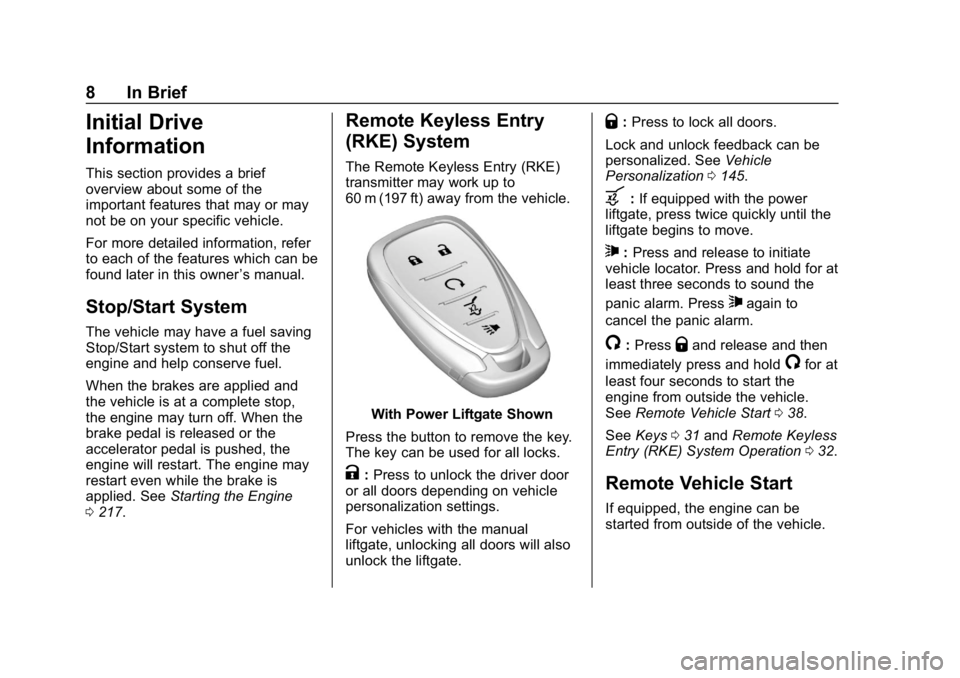
(RKE) System
The Remote Keyless Entry (RKE)
transmitter may work up to
60 m (197 ft) away from the vehicle.
With Power Liftgate Shown
Press the button to remove the key.
The key can be used for all locks.
K: Press to unlock the driver door
or all doors depending on vehicle
personalization settings.
For vehicles with the manual
liftgate, unlocking all doors will also
unlock the liftgate.
Q: Press to lock all doors.
Lock and unlock feedback can be
personalized. See Vehicle
Personalization 0145.
b:If equipped with the power
liftgate, press twice quickly until the
liftgate begins to move.
7: Press and release to initiate
vehicle locator. Press and hold for at
least three seconds to sound the
panic alarm. Press
7again to
cancel the panic alarm.
/: PressQand release and then
immediately press and hold
/for at
least four seconds to start the
engine from outside the vehicle.
See Remote Vehicle Start 038.
See Keys 031 and Remote Keyless
Entry (RKE) System Operation 032.
Remote Vehicle Start
If equipped, the engine can be
started from outside of the vehicle.
Page 11 of 428
Chevrolet Equinox Owner Manual (GMNA-Localizing-U.S./Canada/Mexico-
10446639) - 2018 - CRC - 8/18/17
10 In Brief
Liftgate
Manual Liftgate Operation
Unlock the vehicle before opening
the liftgate.
To open the liftgate, press the touch
pad under the liftgate handle and
lift up.
Do not press the touch pad while
closing the liftgate. This may cause
the liftgate to be unlatched.
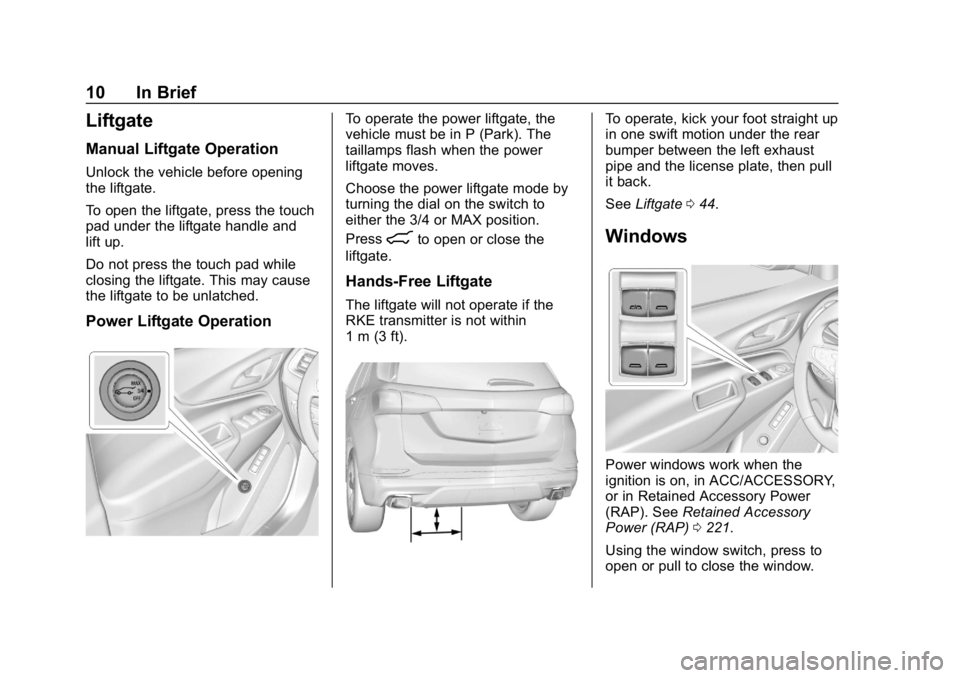
Power Liftgate Operation
To operate the power liftgate, the
vehicle must be in P (Park). The
taillamps flash when the power
liftgate moves.
Choose the power liftgate mode by
turning the dial on the switch to
either the 3/4 or MAX position.
Press
8to open or close the
liftgate.
Hands-Free Liftgate
The liftgate will not operate if the
RKE transmitter is not within
1 m (3 ft).
To operate, kick your foot straight up
in one swift motion under the rear
bumper between the left exhaust
pipe and the license plate, then pull
it back.
See Liftgate 044.
Windows
Power windows work when the
ignition is on, in ACC/ACCESSORY,
or in Retained Accessory Power
(RAP). See Retained Accessory
Power (RAP) 0221.
Using the window switch, press to
open or pull to close the window.
Page 12 of 428
Chevrolet Equinox Owner Manual (GMNA-Localizing-U.S./Canada/Mexico-
10446639) - 2018 - CRC - 8/18/17
In Brief 11
The windows may be temporarily
disabled if they are used repeatedly
within a short time.
SeePower Windows 053.
Seat Adjustment
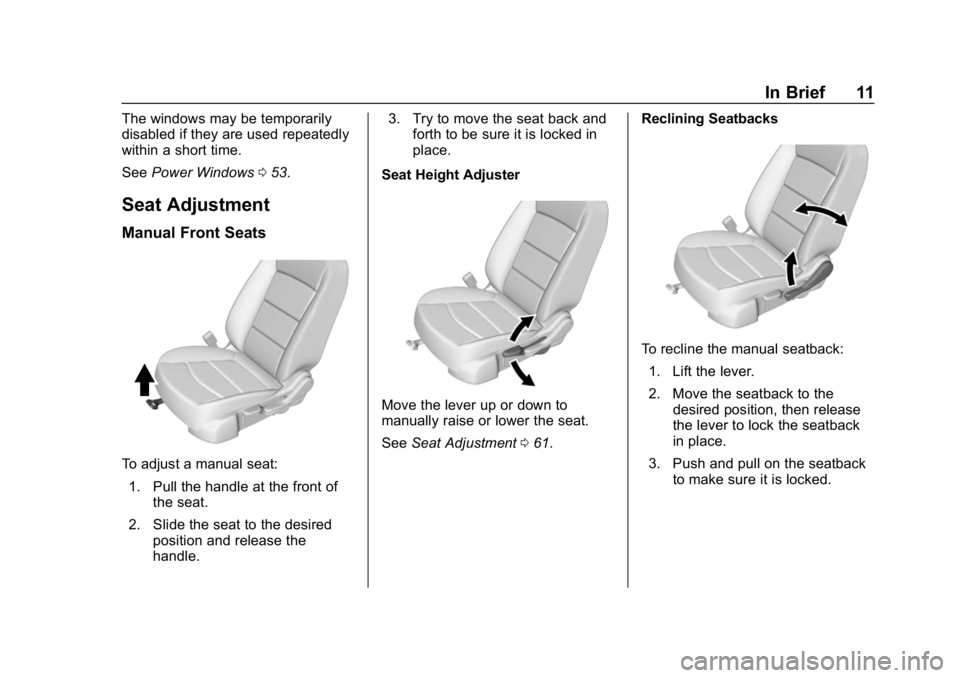
Manual Front Seats
To adjust a manual seat:
1. Pull the handle at the front of the seat.
2. Slide the seat to the desired position and release the
handle. 3. Try to move the seat back and
forth to be sure it is locked in
place.
Seat Height Adjuster
Move the lever up or down to
manually raise or lower the seat.
See Seat Adjustment 061. Reclining Seatbacks
To recline the manual seatback:
1. Lift the lever.
2. Move the seatback to the desired position, then release
the lever to lock the seatback
in place.
3. Push and pull on the seatback to make sure it is locked.
Page 13 of 428
Chevrolet Equinox Owner Manual (GMNA-Localizing-U.S./Canada/Mexico-
10446639) - 2018 - CRC - 8/18/17
12 In Brief
To return the seatback to an upright
position:1. Lift the lever fully without applying pressure to the
seatback, and the seatback
returns to the upright position.
2. Push and pull on the seatback to make sure it is locked.
See Reclining Seatbacks 062.
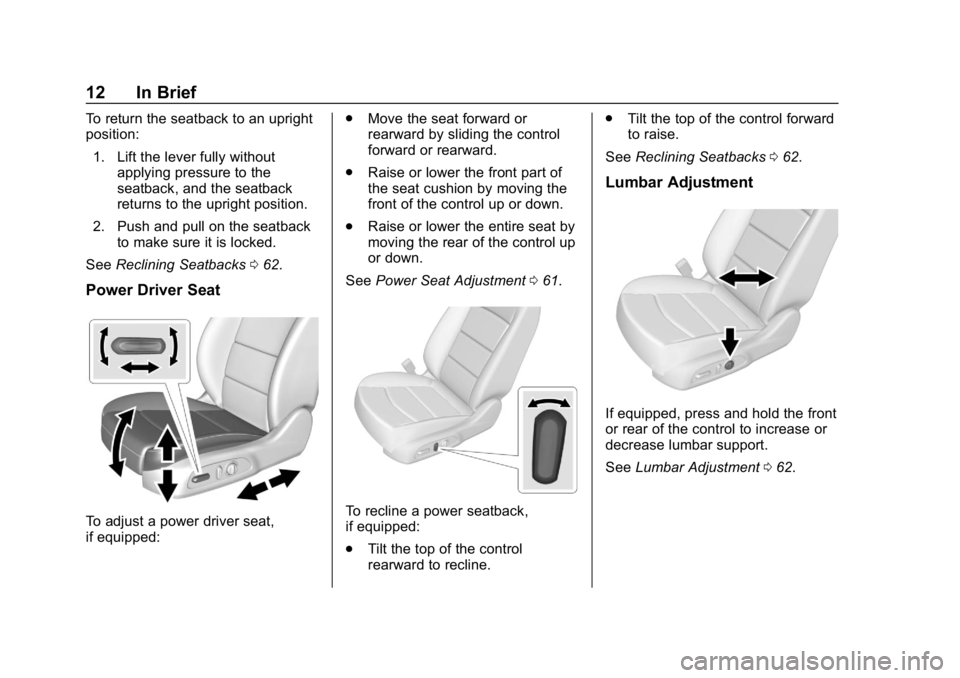
Power Driver Seat
To adjust a power driver seat,
if equipped: .
Move the seat forward or
rearward by sliding the control
forward or rearward.
. Raise or lower the front part of
the seat cushion by moving the
front of the control up or down.
. Raise or lower the entire seat by
moving the rear of the control up
or down.
See Power Seat Adjustment 061.To recline a power seatback,
if equipped:
.
Tilt the top of the control
rearward to recline. .
Tilt the top of the control forward
to raise.
See Reclining Seatbacks 062.
Lumbar Adjustment
If equipped, press and hold the front
or rear of the control to increase or
decrease lumbar support.
See Lumbar Adjustment 062.
Page 14 of 428
Chevrolet Equinox Owner Manual (GMNA-Localizing-U.S./Canada/Mexico-
10446639) - 2018 - CRC - 8/18/17
In Brief 13
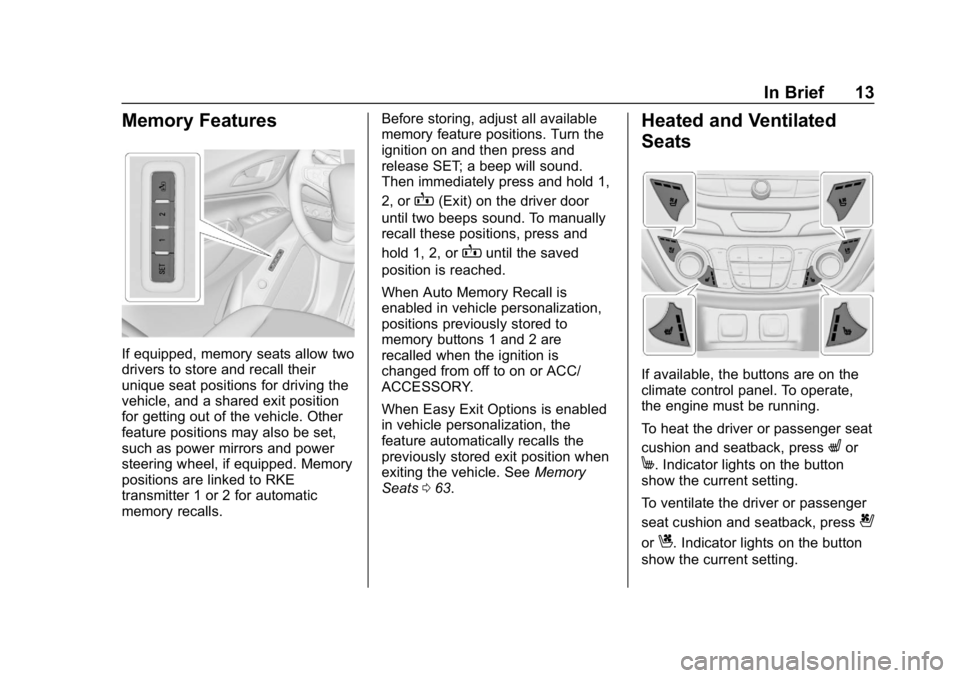
Memory Features
If equipped, memory seats allow two
drivers to store and recall their
unique seat positions for driving the
vehicle, and a shared exit position
for getting out of the vehicle. Other
feature positions may also be set,
such as power mirrors and power
steering wheel, if equipped. Memory
positions are linked to RKE
transmitter 1 or 2 for automatic
memory recalls.Before storing, adjust all available
memory feature positions. Turn the
ignition on and then press and
release SET; a beep will sound.
Then immediately press and hold 1,
2, or
B(Exit) on the driver door
until two beeps sound. To manually
recall these positions, press and
hold 1, 2, or
Buntil the saved
position is reached.
When Auto Memory Recall is
enabled in vehicle personalization,
positions previously stored to
memory buttons 1 and 2 are
recalled when the ignition is
changed from off to on or ACC/
ACCESSORY.
When Easy Exit Options is enabled
in vehicle personalization, the
feature automatically recalls the
previously stored exit position when
exiting the vehicle. See Memory
Seats 063.
Heated and Ventilated
Seats
If available, the buttons are on the
climate control panel. To operate,
the engine must be running.
To heat the driver or passenger seat
cushion and seatback, press
Lor
M. Indicator lights on the button
show the current setting.
To ventilate the driver or passenger
seat cushion and seatback, press
{
orC. Indicator lights on the button
show the current setting.
Page 16 of 428
Chevrolet Equinox Owner Manual (GMNA-Localizing-U.S./Canada/Mexico-
10446639) - 2018 - CRC - 8/18/17
In Brief 15
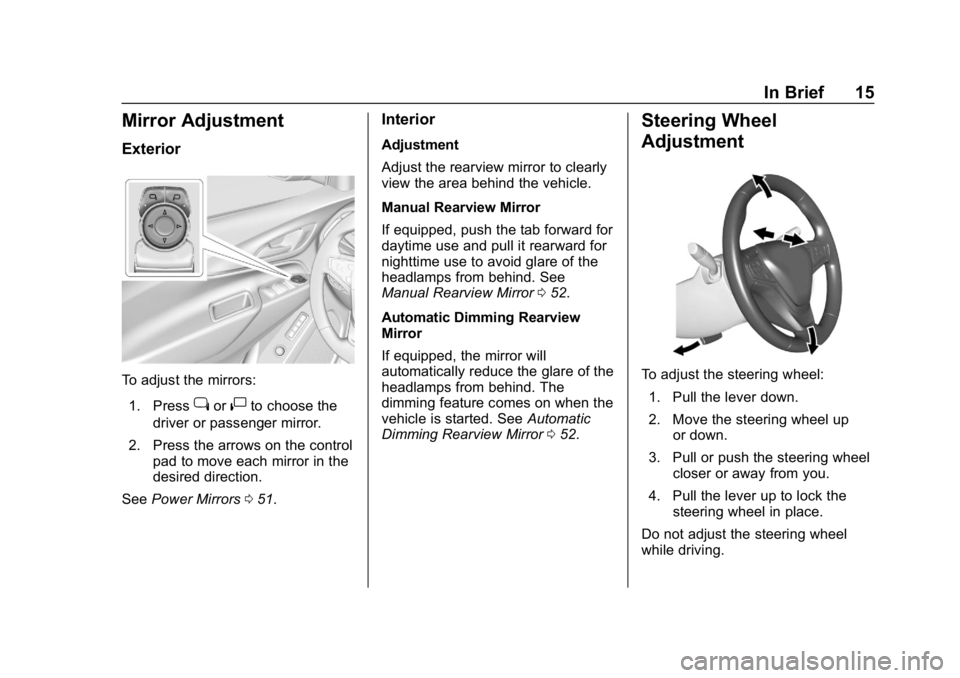
Mirror Adjustment
Exterior
To adjust the mirrors:1. Press
jor|to choose the
driver or passenger mirror.
2. Press the arrows on the control pad to move each mirror in the
desired direction.
See Power Mirrors 051.
Interior
Adjustment
Adjust the rearview mirror to clearly
view the area behind the vehicle.
Manual Rearview Mirror
If equipped, push the tab forward for
daytime use and pull it rearward for
nighttime use to avoid glare of the
headlamps from behind. See
Manual Rearview Mirror 052.
Automatic Dimming Rearview
Mirror
If equipped, the mirror will
automatically reduce the glare of the
headlamps from behind. The
dimming feature comes on when the
vehicle is started. See Automatic
Dimming Rearview Mirror 052.
Steering Wheel
Adjustment
To adjust the steering wheel:
1. Pull the lever down.
2. Move the steering wheel up or down.
3. Pull or push the steering wheel closer or away from you.
4. Pull the lever up to lock the steering wheel in place.
Do not adjust the steering wheel
while driving.
Page 20 of 428
Chevrolet Equinox Owner Manual (GMNA-Localizing-U.S./Canada/Mexico-
10446639) - 2018 - CRC - 8/18/17
In Brief 19
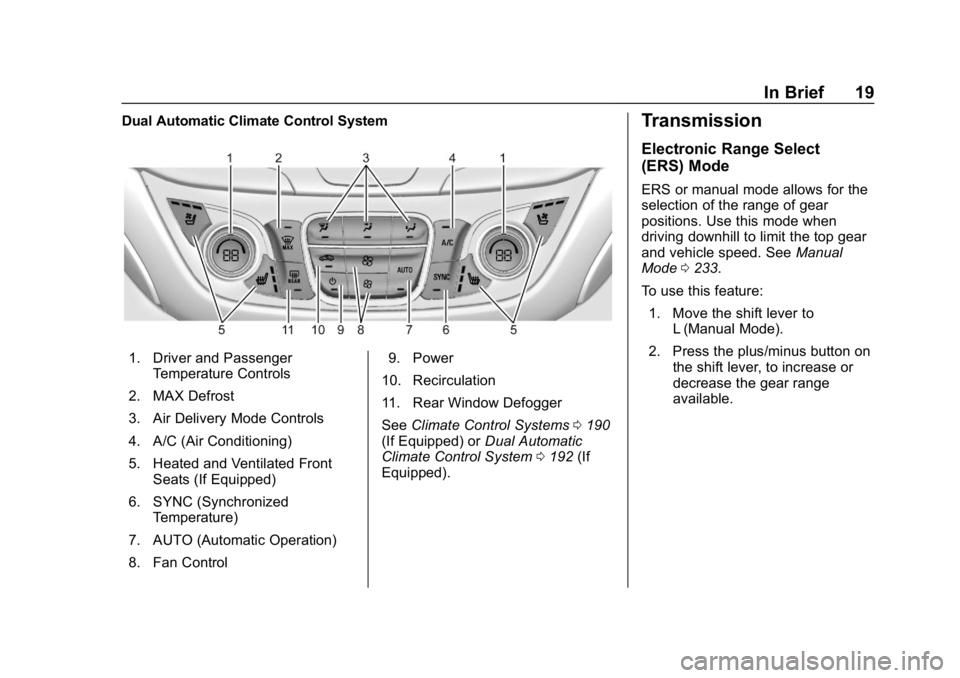
Dual Automatic Climate Control System
1. Driver and PassengerTemperature Controls
2. MAX Defrost
3. Air Delivery Mode Controls
4. A/C (Air Conditioning)
5. Heated and Ventilated Front Seats (If Equipped)
6. SYNC (Synchronized Temperature)
7. AUTO (Automatic Operation)
8. Fan Control 9. Power
10. Recirculation
11. Rear Window Defogger
See Climate Control Systems 0190
(If Equipped) or Dual Automatic
Climate Control System 0192 (If
Equipped).
Transmission
Electronic Range Select
(ERS) Mode
ERS or manual mode allows for the
selection of the range of gear
positions. Use this mode when
driving downhill to limit the top gear
and vehicle speed. See Manual
Mode 0233.
To use this feature: 1. Move the shift lever to L (Manual Mode).
2. Press the plus/minus button on the shift lever, to increase or
decrease the gear range
available.